JETPLAN
Who Is the Company Behind JETPLAN?
- Seller: JETPLAN
- Year Founded: 2021
- HQ Location: Stuttgart, DE
-
LinkedIn® Page: www.linkedin.com
3 employees on LinkedIn®
Last updated: October 3, 2024
Total Products under this Category: 217
Last updated: November 24, 2026
Why You Can Trust G2's Software Rankings:
G2's software rankings are built on verified user reviews, rigorous moderation, and a consistent research methodology maintained by a team of analysts and data experts. Each product is measured using the same transparent criteria, with no paid placement or vendor influence. While reviews reflect real user experiences, which can be subjective, they offer valuable insight into how software performs in the hands of professionals. Together, these inputs power the G2 Score, a standardized way to compare tools within every category.
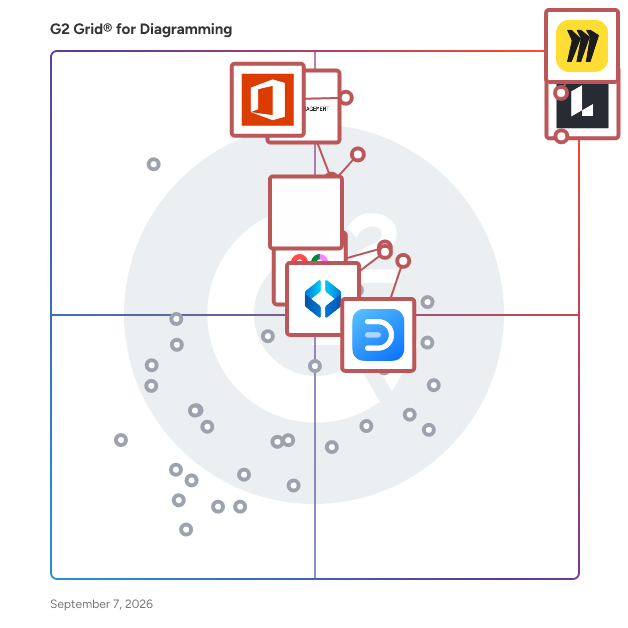
Highlighted products: Miro, Lucid Visual Collaboration Suite, Visio, FigJam, Cvent Event Marketing & Management, Mural, Wondershare EdrawMax, and SmartDraw.
Underlying data: [Grid® JSON](https://www.g2.com/categories/diagramming/grids.json?focus%5B%5D=miro&focus%5B%5D=lucid-software-inc-lucid-visual-collaboration-suite&focus%5B%5D=visio&focus%5B%5D=fig-jam&focus%5B%5D=cvent-event-marketing-management&focus%5B%5D=mural&focus%5B%5D=wondershare-edrawmax&focus%5B%5D=smartdraw)
elvo is a whiteboard that looks hand-drawn and helps you finish the diagram. Draw a box, pause, and Kelvo drafts the next step. Press Tab to keep it, or keep drawing to ignore it.
Connect G2 to Claude or ChatGPT for answers grounded in G2's trusted reviews, comparisons, and pricing from real user insights.
Design crash diagrams more easily, accurately and efficiently
Machinations is the ultimate game design tool that empowers game designers with out-of-the-box predictions to anticipate and fix balancing issues. Taking a proactive approach to game design and using player progression predictions, Machinations allows studios to deliver better games faster, manage risks, and lift game KPIs. Trusted by world-class studios such as Ubisoft, Gameloft, Wargaming, and King, see what Machinations can do in action: -34% Production Time: Instrumental throughout game's lifecycle, Machinations brings clarity to teams while allowing for game design innovation through rapid, no-code iterations. -88% Guesswork: Using Machinations, studios get actionable insights to manage risks and avoid damage to their player base. +27% Player Retention: With Machinations, studios can easily identify & eliminate causes of player churn without introducing short- & long-term side effects. +3,25% Revenue/month: By introducing compounding incremental improvements with each update. Machinations fosters a community of 50k+ game developers across 300+ studios worldwide and is taught in 700+ academic institutions around the world.
Average Rating: 4.5/5.0
Total Reviews: 1
AI-generated summary from verified user reviews
"A Good Tool to Try Out Gameplay Loops!"
Rating: 4.5/5.0 stars
— Srivishnu S.
All-in-one Confluence macros for diagrams, code, data, and documentation. - Macro Pack for Confluence is an all-in-one macro toolkit that helps teams create, embed, and visualize rich technical documentation directly in Atlassian Confluence. With 30+ macros for diagrams, code, structured data, documents, media, and interactive content, teams can go beyond standard Confluence pages without installing separate apps for every format. Whether you're documenting software architecture, publishing API specifications, sharing development resources, or building an internal knowledge base, Macro Pack makes complex information easier to present, maintain, and understand. Create richer documentation with 30+ macros: - Diagrams and visualizations: Display Mermaid, PlantUML, BPMN, draw.io, Excalidraw, and other diagram formats directly in Confluence pages. - API and developer documentation: Present OpenAPI/Swagger, AsyncAPI, Markdown, AsciiDoc, HTML, LaTeX, and code in readable formats. - Structured data and files: Visualize JSON, CSV, Excel, and other supported content instead of relying on raw files or external viewers. - Interactive and multimedia content: Enrich documentation with surveys, embedded media, 3D models, and specialized content formats. Connect documentation to existing content sources Use inline text, Confluence attachments, URLs, GitHub, GitLab, Bitbucket, and other supported external sources to bring information into your pages. Preview and configure how content is rendered before publishing it. Built for teams that document more than text Macro Pack helps developers, technical writers, IT teams, and knowledge managers consolidate technical information in Confluence. Replace scattered screenshots and static attachments with richer visual content, make complex information more accessible, and reduce the need to manage multiple single-purpose Confluence apps. From software documentation and architecture diagrams to internal knowledge bases and project documentation, Macro Pack brings the formats your team already uses into one collaborative workspace.
Macro Pack for Jira brings technical documentation and visual context directly into Jira work items. With 30+ macros for diagrams, API specifications, documents, code, structured data, and multimedia, teams can display the information behind their work without switching tools, downloading attachments, or installing separate apps for every format. Jira work items often contain more than a description and comments. Developers need architecture diagrams and API specifications. Project managers need spreadsheets and reports. Designers need prototypes and visual references. Macro Pack makes this supporting content accessible directly in Jira, where teams discuss, review, and manage their work. Display 30+ content formats inside Jira: - Diagrams and visualizations: Render Mermaid, PlantUML, BPMN, draw.io, Excalidraw, WaveDrom, and other technical diagrams. - API and developer documentation: Display Swagger/OpenAPI, AsyncAPI, GraphQL, Markdown, AsciiDoc, HTML, and source code with syntax highlighting. - Documents and structured data: Preview PDF, Word, CSV, Excel, and JSON files, including readable tables and expandable data trees. - Media and interactive content: Embed images, video, audio, 3D models, and HTML content directly in Jira work items. Bring content from the tools you already use Connect to GitHub, GitLab, and Bitbucket repositories, or use Jira attachments, URLs, and raw text as content sources. Render files and technical resources without manually copying their contents into Jira descriptions. Keep technical context connected to your work Macro Pack adds a dedicated tab to Jira work items, making diagrams, documentation, and files available alongside the discussion. Open content in fullscreen, edit supported resources, and reuse shared materials across multiple work items. Built for development, IT, and cross-functional teams Whether you're reviewing API changes, documenting software architecture, handling service requests, analyzing project data, or collaborating on designs, Macro Pack helps turn Jira work items into a more complete source of information. Instead of managing multiple single-purpose apps for diagrams, code, documents, and data, teams can bring their technical context together with one flexible Jira macro toolkit.
The All-New All-In-One Workspace for Modern Teams Embracing the concept of a unified workspace, Matilda brings a powerful suite of best-in-class apps together in one place, allowing teams across the globe to connect, create, coordinate, and delight their customers effortlessly. With its mission to simplify technology, Matilda empowers organisations to do more with less, making it an essential tool for startups to Fortune 500 companies alike. Key Features: -Powerful Apps Included: Matilda comes packed with a suite of powerful applications including Docs, Projects, Tables, Chat, Customers, and Copilot, ensuring that teams have all the tools they need to succeed. - Create with Ease: With Docs, teams can co-edit in real time, making document creation and coordination seamless. This feature aims to replace Google Docs, Notion, and Coda, by providing a more integrated and efficient experience. - Streamlined Project Management: Matilda's Projects feature allows for effortless management and tracking of every aspect of your projects. With capabilities like auto-scheduling, it's designed to replace tools like Jira, Trello, and Asana. - Advanced Data Management: Although Tables are coming soon, they promise to redefine data handling by syncing data from hundreds of sources or creating new collections, aiming to replace tools like Airtable, Notion, and Segment. - Seamless Communication: Chat brings all team communication into one place, integrated across projects, tasks, and docs, providing an alternative to Slack and MS Teams. - Customer Relationship Management: The soon-to-be-released Customers feature will allow teams to effortlessly track leads and manage customer interactions in one streamlined interface, aiming to replace Salesforce and Hubspot. - AI-Powered Assistance: Copilot offers custom AI assistants to help automate and streamline workflows, aiming to replace AI tools like ChatGPT and Google Bard. Conclusion: Matilda Workspace stands out as an all-encompassing solution that not only promises to streamline and simplify the way teams work but also embraces the future with its AI-powered capabilities and commitment to sustainability. Whether you’re managing projects, coordinating with your team, handling customer relationships, or leveraging AI for automation, Matilda Workspace provides an intuitive, powerful, and adaptable platform for every kind of team to thrive. Try Matilda today and experience the future of work, designed to help you deliver projects on time, every time.
Average Rating: 4.7/5.0
Total Reviews: 14
AI-generated summary from verified user reviews
"Invaluable support for my projects"
Rating: 5.0/5.0 stars
— Anna K.
Rating: 5.0/5.0 stars
— Annabel K.
Modeldraw is a comprehensive diagramming solution that's completely free for teams, offering a full suite of tools for professional communication. Create specialized diagrams for software development, business planning, and Agile workflows, including UML diagrams, system architecture maps, flowcharts, mind maps, and user story maps. With powerful real-time collaboration and an intuitive interface, Modeldraw allows unlimited team members to work together with no credit card required.
Powerful ASCII art editor designed for the Mac
netTerrain Logical combines the flexibility of a powerful drawing tool with the automation of discovery software. Eliminate headaches from outdated spreadsheets and scattered Visio diagrams. Troubleshoot faster. Prevent your assets and infrastructure from growing out-of-control. Make smart network decisions informed by real-time and historical insights. Integrate with anything and everything (netTerrain includes a robust suite of pre-built third party connectors to tools such as ServiceNow and an extensible and well-documented API). Flexible licensing options (from on premise to cloud) designed to suit all budgets are offered.
Average Rating: 5.0/5.0
Total Reviews: 1
Rating: 5.0/5.0 stars
— Peter K.
NetworkSketch is network diagram and documentation software for network engineers, IT teams and MSPs. It runs in the browser with nothing to install. Devices carry real fields: hostname, management IP, model, serial number, MAC address and location. Cables are links with ports at each end, a media type (copper, single-mode or multi-mode fiber, DAC, wireless, WAN), speed and VLANs. Cables are color-coded by media type, and the Media Type Key fills itself in. Buildings, rooms, racks, zones and VLANs are areas that hold their devices and carry subnets. A network check flags duplicate IP addresses (IPv4 and IPv6, across pages), addresses outside their subnet, interfaces used by two cables and bad MAC addresses. One click auto-arranges the page. The PDF export includes an engineering title block, device inventory, cabling schedule, VLAN/subnet table, change log and a “verified against the network” stamp, which makes it suitable for as-built handovers and PCI DSS or SOC 2 evidence. Devices can be imported from a spreadsheet or SolarWinds Orion. Diagrams are never uploaded: they are saved as plain, documented files on your own computer. Templates cover campus and branch offices, SD-WAN, voice, MSP client sites, PCI cardholder data segments, data center rack rows and a CCNA lab. A subscription also includes CallSketch for call flow and IVR diagrams.
