Best Data Loss Prevention (DLP) Software - Page 17

Last updated: November 18, 2026

How Many Data Loss Prevention (DLP) Software Products Does G2 Track?

Total Products under this Category: 261

Category Stats (Nov 2026)

  • Average Rating: 4.5/5 (↑0.01 vs Oct 2026) The average rating of products in this category, based on all submitted ratings
  • Top Trending Product: Mimecast Data Governance (+5.37%) - Among all products in this category, Mimecast Data Governance recorded the largest rating increase compared to last month

Last updated: November 24, 2026

How Does G2 Rank Data Loss Prevention (DLP) Software Products?

Why You Can Trust G2's Software Rankings:

  • 30 Analysts and Data Experts
  • 16,100+ Authentic Reviews
  • 261+ Products
  • Unbiased Rankings

G2's software rankings are built on verified user reviews, rigorous moderation, and a consistent research methodology maintained by a team of analysts and data experts. Each product is measured using the same transparent criteria, with no paid placement or vendor influence. While reviews reflect real user experiences, which can be subjective, they offer valuable insight into how software performs in the hands of professionals. Together, these inputs power the G2 Score, a standardized way to compare tools within every category.

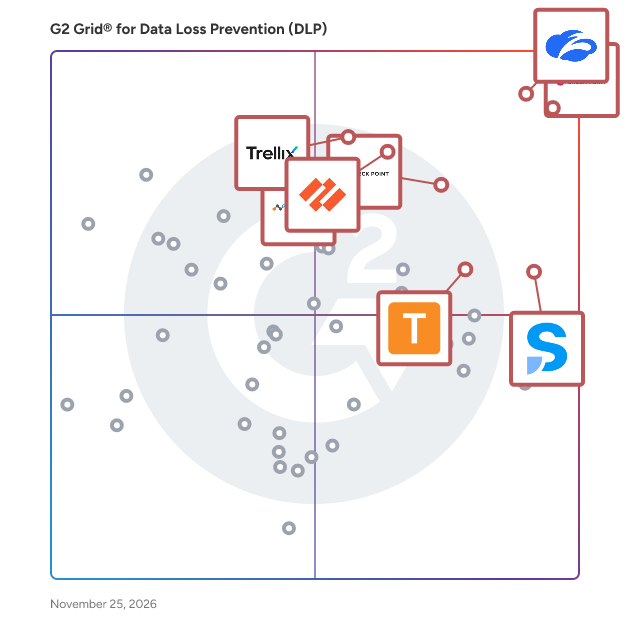
G2 Grid® for Data Loss Prevention (DLP) Software

G2 Grid® for Data Loss Prevention (DLP) Software plotting products by satisfaction and market presence

Highlighted products: Check Point Next Generation Firewalls (NGFWs), Zscaler Internet Access, Check Point Email Security, Safetica, Prisma AIRS, Trellix Data Loss Prevention, Netskope One Platform, and Teramind.

Underlying data: [Grid® JSON](https://www.g2.com/categories/data-loss-prevention-dlp/grids.json?focus%5B%5D=check-point-next-generation-firewalls-ngfws&focus%5B%5D=zscaler-internet-access&focus%5B%5D=check-point-email-security&focus%5B%5D=safetica&focus%5B%5D=prisma-airs&focus%5B%5D=trellix-data-loss-prevention&focus%5B%5D=netskope-one-platform&focus%5B%5D=teramind)

SolarWinds Access Rights Manager

SolarWinds® Access Rights Manager (ARM) seamlessly integrates with your existing security tools and infrastructure, providing centralized visibility into Active Directory, Azure AD, Exchange, SharePoint, and file servers. Built for ease of use, ARM helps organizations easily manage and audit user access rights across their IT environment, ensuring compatibility and smooth deployment. It enables IT and security teams to quickly answer the critical question: "Who has access to what, and when did they access it?" By automating user provisioning, offering a self-service permissions portal for data owners, and delivering out-of-the-box compliance reports, SolarWinds ARM reduces the administrative burden on IT teams while helping organizations adhere to strict regulatory mandates like GDPR, PCI DSS, and HIPAA. Eliminate IT Bottlenecks: Managing permissions manually or via complex PowerShell scripts is time-consuming. ARM automates routine tasks like account provisioning and delegates access approvals to business data owners, freeing up IT staff to focus on strategic initiatives. Simplify Audit & Compliance Readiness: Preparing for audits can be a massive headache. ARM provides pre-built, customizable reporting templates that make it easy to prove compliance to auditors, showing a clear trail of who accessed sensitive data and when. Mitigate Insider Threats and Data Breaches: Overprivileged accounts are a massive security risk. ARM highlights overprovisioned users, tracks unauthorized access attempts, and helps enforce the Principle of Least Privilege (PoLP) across your hybrid IT environment. Key Features: • Active Directory & Azure AD Auditing: Monitor and manage user permissions, detect suspicious account activity, and track changes in real time. • Automated User Provisioning & Deprovisioning: Standardize onboarding and offboarding with role-specific templates, ensuring users only get the access they need. • Self-Service Permissions Portal: Delegate access rights management directly to data owners, reducing IT support tickets and bottlenecks. • Comprehensive Compliance Reporting: Generate and schedule detailed audit reports to help CISOs feel assured and prepared for audits, demonstrating compliance with internal policies and external regulations (HIPAA, PCI, GDPR). • File Server & SharePoint Auditing: Gain deep visibility into NTFS permissions and SharePoint access to protect sensitive enterprise data. • Cybersecurity Risk Management: Identify insecure account configurations and monitor for compromised credentials to prevent data breaches and insider threats.

Average Rating: 3.5/5.0

Total Reviews: 1

How Do G2 Users Rate SolarWinds Access Rights Manager?

  • Ease of Use: 8.3/10 (Category avg: 8.9/10)

Who Is the Company Behind SolarWinds Access Rights Manager?

Who Uses This Product?

  • Company Size: 100% Medium

Somansa Mail-i

Somansa Mail-i is a Network DLP solution to monitor, discover, and protect data in motion.

Who Is the Company Behind Somansa Mail-i?

  • Seller: Somansa
  • Year Founded: 1997
  • HQ Location: San Jose, US
  • LinkedIn® Page: www.linkedin.com
    40 employees on LinkedIn®

Sookasa for Dropbox

Sookasa provides encryption and compliance for sensitive files across cloud storage services and mobile devices.

Who Is the Company Behind Sookasa for Dropbox?

AI can help you find the answers. G2 helps you trust them.

Connect G2 to Claude or ChatGPT for answers grounded in G2's trusted reviews, comparisons, and pricing from real user insights.

How it works

SOS Click for Microsoft Office

SOS Click is an add-on for Microsoft Office which allows the user to save documents, spreadsheets and presentations across multiple places in one shot. The add-on works with Word, Excel and PowerPoint and supports local and remote locations like local folders, flash drives, network drives, one or more e-mail address as well as cloud services such as Dropbox and Google Drive. Once the desired locations are configured, one click saves the work to all of them instead of saving to each separately. The add-on also features two auto-save options: the standard way and with the option to keep past versions with a timestamp attached to each. In addition, settings can be shared among Word, Excel and PowerPoint instead of configuring each separately.

Who Is the Company Behind SOS Click for Microsoft Office?

SpectralOps

Discover, classify, and protect your codebases, logs, and other assets. Monitor and detect API keys, tokens, credentials, high-risk security misconfiguration and more.

Who Is the Company Behind SpectralOps?

Suadeo Self Data Services® platform

The Self Data Services® platform from Suadeo empowers business users with complete autonomy in managing and manipulating their data, without the need for technical expertise. This freedom in data usage promotes collaboration and enhances collective intelligence. Designed from its inception as a single processing engine and with a unified user interface, the platform aims to liberate data usage throughout its entire life cycle. The platform offers a comprehensive range of services, including: - Low-code applications: Non-technical users can quickly develop applications without the need for any coding. - Data visualization: The platform's data visualization features empower business users and, in combination with its data management capabilities, liberate the user. - Agile reporting: Suadeo's reporting is dynamic, responsive, and agile, offering the performance and agility expected by top management. - Open data: The Self Data Services® platform from Suadeo is inherently open data, allowing data, analyses, and components to be shared with a single click, both internally and publicly. - Data Governance: The Self Data Services® platform from Suadeo also guarantees end-to-end control and management of data, from extraction to distribution. - Sovereign cloud: Suadeo offers a sovereign cloud with data centers hosted in the Île-de-France region. All hardware and software that make up our cloud is the exclusive property of Suadeo. Suadeo is used by both private and public sector organizations worldwide.

Average Rating: 5.0/5.0

Total Reviews: 1

How Do G2 Users Rate Suadeo Self Data Services® platform?

  • Ease of Use: 10.0/10 (Category avg: 8.9/10)

Who Is the Company Behind Suadeo Self Data Services® platform?

  • Seller: Suadeo
  • Year Founded: 2004
  • HQ Location: Ivry sur seine , FR
  • LinkedIn® Page: www.linkedin.com
    52 employees on LinkedIn®

Who Uses This Product?

  • Company Size: 100% Small

What Are Recent G2 Reviews of Suadeo Self Data Services® platform?

tamper

Who Is the Company Behind tamper?

  • Seller: tamper
  • Year Founded: 2024
  • HQ Location: Lille, FR
  • LinkedIn® Page: www.linkedin.com
    1 employees on LinkedIn®

TETRA Security

TETRA Security helps organizations protect corporate and personal data when employees use generative AI tools such as ChatGPT, Claude, and Gemini. The platform checks prompts in real time within the customer’s infrastructure. Security teams can monitor prompts, mask sensitive information, or block a prompt before it reaches the AI service.

Who Is the Company Behind TETRA Security?

TotalHeal DataShield

TotalHeal DataShield is the Data Loss Prevention (DLP) and data discovery product of TotalHeal, the security platform made in India by Freaquer Corporation Private Limited. Finds Aadhaar numbers, PAN, bank accounts, card numbers, keys and your own confidential records on servers, in OneDrive, SharePoint and Google Drive, and in mail that leaves — and takes access away with a second person’s approval. It is managed from the TotalHeal console together with the other TotalHeal products, under one account and one bill. TotalHeal is available as a cloud service and for on-premises deployment. Every organisation can start a 30-day free trial from the console.

Who Is the Company Behind TotalHeal DataShield?

TotalHeal PromptShield

TotalHeal PromptShield is the AI Security (GenAI firewall) product of TotalHeal, the security platform made in India by Freaquer Corporation Private Limited. See which AI assistants your people use and block the ones you have not approved; put your own AI applications behind a gateway that stops sensitive data and injection attempts. It is managed from the TotalHeal console together with the other TotalHeal products, under one account and one bill. TotalHeal is available as a cloud service and for on-premises deployment. Every organisation can start a 30-day free trial from the console.

Who Is the Company Behind TotalHeal PromptShield?

TRIAS

TRIAS DLP is an enterprise Data Loss Prevention (DLP) platform that integrates Data Security Posture Management (DSPM), automated data discovery, content-aware detection (CAD), and data classification to help organizations discover, classify, monitor, and protect sensitive data across endpoints, networks, cloud, and hybrid environments. The platform delivers continuous visibility into sensitive data, identifies security risks and data exposure, enforces policy-based protection, and prevents unauthorized data movement while supporting compliance with regulations such as GDPR, KVKK, and ISO 27001. Available for both on-premises and cloud deployments, TRIAS DLP enables organizations to strengthen their overall data security posture through a unified approach to data discovery, classification, and protection.

Who Is the Company Behind TRIAS?

USB Disk Security Pro

Designed for modern enterprises. From deep USB device control to application network restrictions, to AI-powered productivity insights — privacy-first, only monitors violations you define. One-click policy deployment from the web, comprehensive office environment protection.

Who Is the Company Behind USB Disk Security Pro?

Veeam Data Cloud for Microsoft 365

Veeam Data Cloud for Microsoft 365 is an industry-leading SaaS backup solution that protects your critical Microsoft 365 workloads (Exchange, SharePoint, OneDrive, and Teams) and Microsoft Entra ID from accidental deletions, ransomware, misconfigurations, and compliance gaps. There's no infrastructure to manage or storage to size. Just reliable, scalable protection at a predictable per-user price with unlimited storage included. Why IT teams choose Veeam Data Cloud for Microsoft 365: • Single platform simplicity: Protect Microsoft 365 and Entra ID with one modern web-based console, with all maintenance, patching, and updates handled by Veeam. • Granular, fast recovery: Recover exactly what you need, whether it’s a single deleted email, a OneDrive file, or thousands of objects at scale, with Premium plan restore speeds up to 3–5 TB per hour. • Advanced threat detection: Patent-pending ransomware and malware detection monitors your environment in real time, giving you instant visibility into threats before they spread. • Zero-trust security foundation: Service-level immutability, MFA, 256-bit encryption, customer-managed encryption keys (BYOK), IP-range restrictions, and role-based access controls keep your backups secure and tamper-proof. • Data sovereignty: Choose your backup storage region to meet local compliance requirements, including GDPR, HIPAA, SOX, and DORA. • Unlimited storage: No surprises. Storage costs stay flat as your data grows, with no hidden fees for major capabilities. • Self-service restore: End users recover their own Microsoft 365 data without opening a support ticket (and you get your day back). • Lower your TCO: Customers switching from self-managed backup consistently report significant total cost of ownership savings by eliminating storage, infrastructure, and IT management overhead. Plus, you can save additional cost by bundling with Entra ID protection. Trusted by more than 25 million protected Microsoft 365 users worldwide, Veeam Data Cloud for Microsoft 365 delivers the industry's most comprehensive SaaS backup, covering everything from daily operational recovery to large-scale ransomware recovery.

Average Rating: 4.5/5.0

Total Reviews: 246

How Do G2 Users Rate Veeam Data Cloud for Microsoft 365?

  • Ease of Use: 9.1/10 (Category avg: 8.9/10)

Who Is the Company Behind Veeam Data Cloud for Microsoft 365?

  • Seller: Veeam
  • Company Website:
  • Year Founded: 2006
  • HQ Location: Kirkland, WA
  • LinkedIn® Page: www.linkedin.com
    7,515 employees on LinkedIn®

Who Uses This Product?

  • Who Uses This: IT Manager, System Engineer
  • Top Industries: Information Technology and Services, Computer Software
  • Company Size: 56% Medium, 25% Small

What Do G2 Reviewers Say About Veeam Data Cloud for Microsoft 365?

AI-generated summary from verified user reviews

Pros
  • Users appreciate the effortless backup management with Veeam Data Cloud, noting improved stability and modern security features.
  • Users appreciate the easy, cloud-based management system of Veeam Data Cloud for Microsoft 365, enhancing their overall experience.
  • Users find the easy file restoration feature of Veeam Data Cloud invaluable for recovering lost documents effortlessly.
  • Users value the effortless restore process that simplifies data recovery and enhances overall user experience.
  • Users value the easy setup of Veeam Data Cloud for Microsoft 365, enjoying seamless management and fast recovery processes.
Cons
  • Users note the lack of backup options for certain applications, hindering comprehensive data protection with Veeam.
  • Users find the difficult setup of Veeam Data Cloud for Microsoft 365 time-consuming and cumbersome, especially with NAS integration.
  • Users face backup issues, particularly with SharePoint functionality, leading to errors and complications during the process.
  • Users find the licensing issues frustrating due to costs and limited purchasing options for smaller organizations.
  • Users feel that the licensing costs are quite expensive, particularly for smaller organizations with limited budgets.

What Are Recent G2 Reviews of Veeam Data Cloud for Microsoft 365?

What Are G2 Users Discussing About Veeam Data Cloud for Microsoft 365?

Lauren Worth
LW
Researched and written by Lauren Worth