# Best Curriculum Management Software - Page 4

*By [Emma Stein](https://research.g2.com/insights/author/emma-stein)*


Curriculum management software handles the development and implementation of curriculum for educational institutions. Both K–12 and higher education institutions use curriculum management solutions to deal with all tasks related to brainstorming, developing, integrating, and launching curriculum.

These solutions alleviate issues that accompany disparate curriculum development, and ensure there is a centralized repository of institution-approved documents to guide the process and help build comprehensive curricula. Curriculum management software includes task management, role assigning, approval, course catalog creation, mapping, version control, reporting, and analysis features to give educators a full complement of tools with which to develop, execute, and analyze curricula.

Curriculum management software often integrates with [student management systems](https://www.g2.com/categories/student-information-systems-sis) and [learning management systems (LMS)](https://www.g2.com/categories/learning-management-system-lms).

To qualify for inclusion in the Curriculum Management category, a product must:

- Contain curriculum mapping tools
- Provide a content resource library
- Offer built-in assessment capabilities
- Be designed for use in the education space


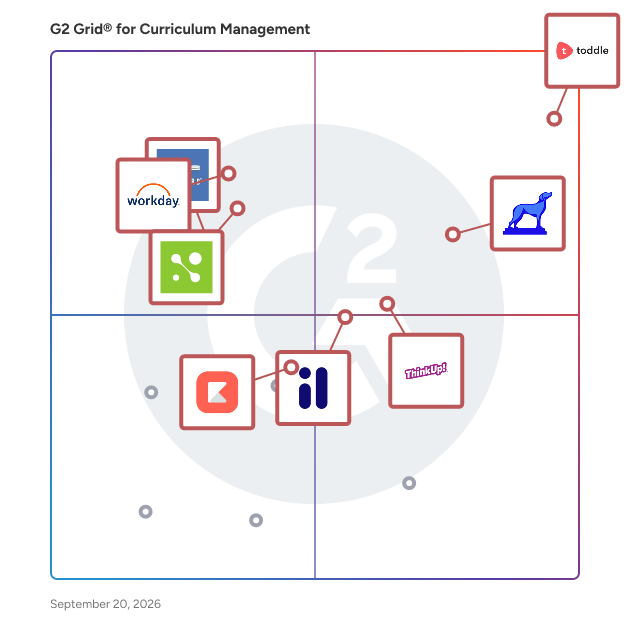
## G2 Grid® for Curriculum Management Software
![G2 Grid® for Curriculum Management Software plotting products by satisfaction and market presence](https://www.g2.com/categories/curriculum-management/grids.png?focus%5B%5D=1171672&focus%5B%5D=94576&focus%5B%5D=67468&focus%5B%5D=24992&focus%5B%5D=22280&focus%5B%5D=10552&focus%5B%5D=43053&focus%5B%5D=66252)
Highlighted products: Toddle, ThinkUp!, MasteryConnect, Workday Student, Imagine Learning Classroom (formerly LearnZillion), Skyward Student Information System, Classter, and Kiddom.
Underlying data: [Grid® JSON](https://www.g2.com/categories/curriculum-management/grids.json?focus%5B%5D=toddle&amp;focus%5B%5D=curriculum-associates-thinkup&amp;focus%5B%5D=masteryconnect&amp;focus%5B%5D=workday-student&amp;focus%5B%5D=imagine-learning-classroom-formerly-learnzillion&amp;focus%5B%5D=skyward-student-information-system&amp;focus%5B%5D=classter&amp;focus%5B%5D=kiddom)


## How Many Curriculum Management Software Products Does G2 Track?
**Total Products under this Category:** 87

### Category Stats (Jul 2026)
- **Average Rating**: 4.08/5 The average rating of products in this category, based on all submitted ratings
- **Top Trending Product**: Toddle (+1.06%) - Among all products in this category, Toddle recorded the largest rating increase compared to last month
*Last updated: July 14, 2026*


## How Does G2 Rank Curriculum Management Software Products?

**Why You Can Trust G2's Software Rankings:**

- 30 Analysts and Data Experts
- 700+ Authentic Reviews
- 87+ Products
- Unbiased Rankings

G2's software rankings are built on verified user reviews, rigorous moderation, and a consistent research methodology maintained by a team of analysts and data experts. Each product is measured using the same transparent criteria, with no paid placement or vendor influence. While reviews reflect real user experiences, which can be subjective, they offer valuable insight into how software performs in the hands of professionals. Together, these inputs power the G2 Score, a standardized way to compare tools within every category.


## Which Curriculum Management Software Is Best for Your Use Case?

- **Leader:** [Toddle](https://www.g2.com/products/toddle/reviews)
- **Highest Performer:** [Imagine Learning Classroom (formerly LearnZillion)](https://www.g2.com/products/imagine-learning-classroom-formerly-learnzillion/reviews)
- **Easiest to Use:** [Classter](https://www.g2.com/products/classter/reviews)
- **Top Trending:** [Kiddom](https://www.g2.com/products/kiddom/reviews)
- **Best Free Software:** [ThinkUp!](https://www.g2.com/products/curriculum-associates-thinkup/reviews)


---

**Sponsored**

### brightwheel

Accelerate your child care business with brightwheel - the #1 platform for early education. Brightwheel is a management software solution for childcares, daycares, and preschools specifically designed to streamline tasks tackled by directors/administrators and teachers at mid- to high-capacity centers. In addition to saving hours per week of effort for each staff member, 100% of parents are more satisfied with their school experience once brightwheel is implemented.


[Visit website](https://www.g2.com/external_clickthroughs/record?secure%5Bad_program%5D=ppc&amp;secure%5Bad_slot%5D=category_product_list&amp;secure%5Bcategory_id%5D=1917&amp;secure%5Bchosen_at%5D=2026-07-14T11%3A45%3A53Z&amp;secure%5Bdisplayable_resource_id%5D=325&amp;secure%5Bdisplayable_resource_type%5D=Category&amp;secure%5Bmedium%5D=sponsored&amp;secure%5Bplacement_reason%5D=neighbor_category&amp;secure%5Bplacement_resource_ids%5D%5B%5D=325&amp;secure%5Bprioritized%5D=false&amp;secure%5Bproduct_id%5D=11833&amp;secure%5Bresource_id%5D=1917&amp;secure%5Bresource_type%5D=Category&amp;secure%5Bsource_type%5D=category_page&amp;secure%5Bsource_url%5D=https%3A%2F%2Fwww.g2.com%2Fcategories%2Fcurriculum-management%3Fpage%3D6&amp;secure%5Btoken%5D=89e48af048cef55bb67f337d512a80f699c4eaf5e00e5cc8d077e9d1b399c6a7&amp;secure%5Burl%5D=https%3A%2F%2Fmybrightwheel.com%2F%3Futm_source%3Dg2%26utm_medium%3Dppc%26utm_campaign%3Dg2-ad-clicks%26utm_content%3Dhomepage&amp;secure%5Burl_type%5D=custom_url)

---

## What Are the Top-Rated Curriculum Management Software Products in 2026?
### 1. [PowerSchool ContentNav](https://www.g2.com/products/powerschool-contentnav/reviews)
PowerSchool ContentNav is a comprehensive content and learning object repository designed to streamline educators&#39; access to high-quality, standards-aligned instructional materials. By integrating district-created content, curated publisher resources, open educational resources (OER), and AI-generated materials, ContentNav empowers teachers to deliver personalized and effective instruction tailored to each student&#39;s needs. Key Features and Functionality: - Diverse Content Repository: Offers a vast collection of instructional materials, including district-specific content, publisher resources, OER, and AI-generated content, ensuring educators have a wide range of high-quality resources at their fingertips. - AI-Powered Search and Filtering: Utilizes artificial intelligence to enhance search capabilities, allowing teachers to quickly find the most relevant content with filters based on educational standards. - Seamless Integration: Integrates with PowerSchool&#39;s Learning Management System, Schoology Learning, enabling educators to easily add resources to their courses and create personalized learning experiences. - Content Usage Reporting: Provides administrators with access to usage reports, tracking engagement metrics such as views, likes, and the addition of materials to courses or playlists, facilitating data-driven decision-making. - Support for Various Material Types: Supports multiple content formats, including webpages, videos, text, images, interactive materials, audio, file downloads, and HTML, catering to diverse teaching and learning preferences. Primary Value and Solutions Provided: ContentNav addresses the challenge of sourcing and managing diverse instructional materials by offering a centralized, AI-enhanced platform that simplifies content discovery and integration. This efficiency allows educators to focus more on instruction and student engagement, ultimately enhancing learning outcomes. By providing access to a wide array of vetted, standards-aligned resources, ContentNav supports personalized learning pathways, ensuring that each student receives instruction tailored to their unique needs and learning styles.


**Who Is the Company Behind PowerSchool ContentNav?**

- **Seller:** [PowerSchool](https://www.g2.com/sellers/powerschool)
- **HQ Location:** Folsom, CA
- **Twitter:** @MyPowerSchool (12,129 Twitter followers)
- **LinkedIn® Page:** https://www.linkedin.com/company/10114126/ (3,365 employees on LinkedIn®)
- **Ownership:** NYSE: PWSC


### 2. [PowerSchool Curriculum &amp; Instruction](https://www.g2.com/products/powerschool-curriculum-instruction/reviews)
PowerSchool Curriculum &amp; Instruction is a comprehensive digital solution designed to enhance curriculum mapping and lesson planning for educators. By integrating curriculum development with instructional delivery, it streamlines the teaching process, allowing educators to focus more on student engagement and learning outcomes. Key Features and Functionality: - Integrated Curriculum Mapping and Lesson Planning: Facilitates the creation and alignment of curriculum maps and lesson plans within a unified platform, ensuring consistency and coherence across educational programs. - Comprehensive Analytics: Provides educators with detailed insights into curriculum effectiveness and student performance, enabling data-driven decisions to improve instructional strategies. - Collaborative Tools: Supports collaboration among educators by allowing the sharing and refinement of curriculum materials and lesson plans, fostering a cohesive teaching community. - Standards Alignment: Ensures that curriculum and instruction are aligned with educational standards, promoting uniformity and compliance across educational institutions. Primary Value and Solutions Provided: PowerSchool Curriculum &amp; Instruction addresses the challenges educators face in managing and delivering effective curriculum and lesson plans. By offering an integrated platform, it reduces administrative burdens, enhances instructional alignment, and provides actionable insights through analytics. This leads to improved teaching efficiency and better student outcomes, as educators can tailor their instruction to meet diverse learning needs effectively.


**Who Is the Company Behind PowerSchool Curriculum &amp; Instruction?**

- **Seller:** [PowerSchool](https://www.g2.com/sellers/powerschool)
- **HQ Location:** Folsom, CA
- **Twitter:** @MyPowerSchool (12,129 Twitter followers)
- **LinkedIn® Page:** https://www.linkedin.com/company/10114126/ (3,365 employees on LinkedIn®)
- **Ownership:** NYSE: PWSC


### 3. [ProjectConcert](https://www.g2.com/products/projectconcert/reviews)
ProjectConcert is an educational organization solution.


**Who Is the Company Behind ProjectConcert?**

- **Seller:** [Akcia](https://www.g2.com/sellers/akcia)
- **HQ Location:** N/A
- **LinkedIn® Page:** https://www.linkedin.com/company/No-Linkedin-Presence-Added-Intentionally-By-DataOps (1 employees on LinkedIn®)


### 4. [QuadHQ](https://www.g2.com/products/quadhq/reviews)
Quad provides AI staff members called Experts for EdTech operators — universities, ed-tech companies, OPMs, and learning platforms. Each Expert has deep domain knowledge about a specific operational role: curriculum design, enrollment analytics, student success, compliance, marketing, and more. The core workflow: hire an Expert, connect it to your institutional systems (Canvas, Banner, Salesforce, Moodle, Google Workspace, Microsoft 365), and the Expert does real work — builds courses, generates enrollment reports with anomaly detection, runs accessibility audits with auto-remediation, drafts RFP responses, creates outreach campaigns, and delivers executive-ready artifacts in DOCX, XLSX, and PDF. Unlike generic AI assistants, Quad Experts are pre-trained on EdTech domain knowledge — Bloom&#39;s taxonomy, WCAG accessibility standards, QM rubrics, accreditation frameworks, and institutional brand voice. They don&#39;t need prompt engineering. They already know the job. Quad includes a 4-level trust system (Suggest, Review, Execute, Autonomous) that lets operators start with full oversight and progressively grant autonomy as Experts prove reliability. Every execution has a full audit trail — cost, duration, model used, and complete trace. The platform supports 100+ ready-to-run automations, scheduled workflows with approval gates, multi-expert orchestration (Swarms), a self-learning memory system that compounds institutional knowledge over time, and a Skill Marketplace for sharing reusable task templates. Built for multi-tenant operations — each client workspace has isolated memory, connections, trust configurations, and data. Enterprise features include SSO/SAML, RBAC, portfolio reporting, and SLA compliance.


**Who Is the Company Behind QuadHQ?**

- **Seller:** [Edvanta](https://www.g2.com/sellers/edvanta)
- **Year Founded:** 2007
- **HQ Location:** Noida, IN
- **LinkedIn® Page:** https://www.linkedin.com/company/edvanta (35 employees on LinkedIn®)


### 5. [ReadCloud](https://www.g2.com/products/readcloud-readcloud/reviews)
The superior platform for your eBooks and Digital Resources


**Who Is the Company Behind ReadCloud?**

- **Seller:** [ReadCloud](https://www.g2.com/sellers/readcloud)
- **Year Founded:** 2009
- **HQ Location:** Brighton, AU
- **LinkedIn® Page:** https://www.linkedin.com/company/readcloud/ (25 employees on LinkedIn®)
- **Ownership:** ASX: RCL


### 6. [RevolutionEd](https://www.g2.com/products/revolutioned/reviews)
RevolutionEd delivers innovative, collaborative tools that save teachers time, strengthen schools, and prepare students for success in school and beyond.


**Who Is the Company Behind RevolutionEd?**

- **Seller:** [RevolutionEd](https://www.g2.com/sellers/revolutioned)
- **Year Founded:** 2024
- **HQ Location:** Frisco, US
- **LinkedIn® Page:** https://www.linkedin.com/company/revolutioned/ (3 employees on LinkedIn®)


### 7. [RightPath](https://www.g2.com/products/right-reason-technologies-rightpath/reviews)
Since 2001, our mission at Right Reason Technologies is to provide tools for districts and schools that improve the success of teachers and students. Our team of education, technology and support professionals is dedicated to this mission and the collaboration necessary to make it a reality for every district. Our student success platform, RightPath™, offers four seamlessly integrated modules. Either together or as stand-alone products, they offer numerous paths to support teachers and students as they navigate success. The four modules that comprise the RighPath™ platform are – Data Informed Instruction, Instructional Planning, Learning Resources &amp; Programs and Professional Performance.


**Who Is the Company Behind RightPath?**

- **Seller:** [Right Reason Technologies](https://www.g2.com/sellers/right-reason-technologies)
- **Year Founded:** 2001
- **HQ Location:** Bethlehem, US
- **Twitter:** @rightreason (138 Twitter followers)
- **LinkedIn® Page:** https://linkedin.com/company/right-reason-technologies (17 employees on LinkedIn®)


### 8. [Sage](https://www.g2.com/products/sage-2026-03-09/reviews)
Sage partners with school districts and state agencies to develop high-quality, standards-aligned Career and Technical Education (CTE) curriculum. The platform uses AI to accelerate what traditionally takes years of manual work into days, covering curriculum development, teacher training, and platform access for customization and delivery. Sagesupports engagements ranging from single-pathway pilots to state-wide rollouts across all 16 CTE career clusters.


**Who Is the Company Behind Sage?**

- **Seller:** [Sage](https://www.g2.com/sellers/sage-a1711a75-001a-4b43-9fc9-c78352ca745b)
- **HQ Location:** N/A
- **LinkedIn® Page:** https://www.linkedin.com/company/106042498/ (3 employees on LinkedIn®)


### 9. [School Management System Software](https://www.g2.com/products/veuz-concepts-school-management-system-software/reviews)
Running a school is complex, but managing it doesn’t have to be. Our school management system brings everything together in one easy-to-use platform, making tasks like tracking student progress and scheduling as easy as possible.


**Who Is the Company Behind School Management System Software?**

- **Seller:** [Veuz Concepts](https://www.g2.com/sellers/veuz-concepts)
- **Year Founded:** 2008
- **HQ Location:** Kozhikode, IN
- **LinkedIn® Page:** https://www.linkedin.com/company/veuzconcepts/ (77 employees on LinkedIn®)


### 10. [Show My Homework](https://www.g2.com/products/show-my-homework/reviews)
Creators of market-leading software, Show My Homework, Satchel has developed a powerful range of school software focusing on homework, behaviour, classroom management and teaching resources.


**Who Is the Company Behind Show My Homework?**

- **Seller:** [Team Satchel](https://www.g2.com/sellers/team-satchel)
- **HQ Location:** London, GB
- **Twitter:** @Team_Satchel (3,887 Twitter followers)
- **LinkedIn® Page:** https://www.linkedin.com/company/11005580 (62 employees on LinkedIn®)


### 11. [SmartTeach](https://www.g2.com/products/smartteach/reviews)
SmartTeach brings curriculum, assessment, family engagement, and professional learning together in one place. It connects the work educators do every day so they can save time, personalize learning, and support every child.


**Who Is the Company Behind SmartTeach?**

- **Seller:** [Teaching Strategies](https://www.g2.com/sellers/teaching-strategies)
- **Year Founded:** 1988
- **HQ Location:** Washington, DC
- **LinkedIn® Page:** https://www.linkedin.com/company/teaching-strategies-llc (1,156 employees on LinkedIn®)


### 12. [Worktribe](https://www.g2.com/products/worktribe/reviews)
Worktribe is an intuitive cloud-based platform for collaborative curriculum development and management.


**Who Is the Company Behind Worktribe?**

- **Seller:** [Worktribe](https://www.g2.com/sellers/worktribe)
- **Year Founded:** 2002
- **HQ Location:** Bristol, GB
- **Twitter:** @worktribe (202 Twitter followers)
- **LinkedIn® Page:** https://www.linkedin.com/company/worktribe/ (27 employees on LinkedIn®)


## What Is Curriculum Management Software?

[Education Software](https://www.g2.com/categories/education)

## What Software Categories Are Similar to Curriculum Management Software?

- [Classroom Management Software](https://www.g2.com/categories/classroom-management)
- [Digital Learning Platforms](https://www.g2.com/categories/digital-learning-platforms)


---

## How Do You Choose the Right Curriculum Management Software?

### What You Should Know About Curriculum Management Software

### What is Curriculum Management Software?

Curriculum management software handles the development and implementation of curriculum mapping for educational institutions. K–12 and higher education institutions use curriculum management systems to fulfill all student learning and engagement tasks.

These solutions alleviate issues accompanying disparate curriculum development, ensure a centralized repository of institution-approved documents to guide the process, and help build comprehensive curriculum plans and modules. Curriculum management software includes task management, role assigning, and course catalog creation. Many of these solutions also have mapping, version control, reporting, and analysis features, complementing educators with tools to develop, execute, and analyze curricula.

#### What Types of Curriculum Management Software Exist?

**Closed-source curriculum management system**

A closed-source curriculum management system is maintained by the vendor. Some of these solutions feature student licensing, which can be expensive due to the user fee per student. Vendors host closed-source versions of these systems on their servers and are responsible for managing and maintaining the platform. They also offer the benefit of strong external support in terms of tech support, should any technical challenges arise. The downside to a closed-source curriculum management solution is the limited integrations and customization.

**Open-source curriculum management system**

An open-source curriculum management system is freely distributed and can be maintained and customized by the user. Compared to closed-source solutions, these open-source solutions allow for greater accessibility and control. Educators can personalize the platform to suit their specific needs, with plugins and new functionalities able to be added immediately. Schools must have the proper infrastructure to run and support their open-source curriculum solution, particularly having an IT team familiar with the platform. Some open-source curriculum management systems offer specialized pricing for particular school types.

### What are the Common Features of Curriculum Management Software?

The most common features of curriculum management software products include the following:

**Curriculum mapping** : Curriculum management systems typically allow users to plan an entire course. This will enable teachers to see the curriculum at different levels, from an individual lesson to the unit sequence for a whole year. Curriculums can be organized by class or subject.

**Lesson plan templates:** For creating individual lessons, many tools offer templates that guide an educator through important data points to include in each lesson plan. These fields could include the lesson&#39;s subject, relevant standards, the unit it belongs to, the date it will take place, and assessments. Depending on the author&#39;s needs, these templates may be customized with different fields.

**File attachments:** Users can add attachments to lessons or units so that those essential files are accessible in future years and for other viewers. A teacher might attach a PDF reading passage, a presentation file with lecture slides, or an image of a painting for students to analyze.

**Curriculum sharing:** To facilitate cross-teacher collaboration, curriculum management software tools allow users to share their plans with others, including teachers and administrators. This sharing is often accomplished through a web portal, meaning people can access the plans from anywhere.

**Integrations:** For products that serve higher education institutions, integrations with other products are key to providing access to the digital curriculums that professors create using curriculum management software. Curriculum platforms commonly integrate with learning management systems (LMS), which instructors use to distribute content to students. They may also integrate with student information systems and grade books to ensure a single source of truth when it comes to curriculum data.

### What are the Benefits of Curriculum Management Software?

**Curriculum organization** : Teachers may use different content collaboration platforms for storing their lessons and materials, making it harder for instructors to share plans with each other. The naming and organization of those files may not be standardized or may have changed over time, which could make it challenging to find the right document. Curriculum management tools allow educators to organize their materials by topic or calendar date so teachers can quickly find the unit or lesson plan they need. Many tools also come with lesson plan drafting functions, so educators can fill out standardized fields and attach materials to the appropriate lessons, which helps keep the plans organized.

**Realign plans to learning standards** : K-12 teachers often incorporate learning standards into their curriculums when planning courses. State and national education officials create benchmarks to standardize the content and skills students learn at different schools. Many curriculum management tools come pre-loaded with standards from a variety of jurisdictions, giving teachers an accessible menu of standards to attach to various lessons. These standard libraries can save teachers significant time by having the information they need in one place, meaning they don’t need to locate and copy standards from a website.

### Who Uses Curriculum Management Software?

**Teachers and professors:** The most likely users of curriculum management software are those writing the curriculum. These are typically teachers at the K-12 level and professors at the college level. Instructors use these tools to design their curriculum, plan individual lessons, add materials, and share their work with other educators.

**Curriculum coordinators** : School administrators responsible for overseeing curriculum development across an institution use curriculum software to get a higher-level view of educators’ course plans. A curriculum coordinator can use these tools to monitor the curriculums created or modified by individual teachers or teams. Having plans from multiple teachers available allows curriculum coordinators to spot redundancies or opportunities for collaboration.

**Department chairs** : Faculty who lead an academic department use curriculum management software similar to curriculum coordinators: to guide the development of the various curriculums that faculty in their department are creating. Access to up-to-date plans from multiple teachers streamlines the process of ensuring the curriculums meet the department’s standards.

**Administrative evaluators** : Supervisors often evaluate teachers and professors on their ability to plan effective instruction. An administrator responsible for evaluating educator performance might use curriculum management software to view an instructor’s plans as part of their professional review.

#### Software Related to Curriculum Management Software

Related software solutions that can be used together with curriculum management software include:

[Student information systems (SIS)](https://www.g2.com/categories/student-information-systems-sis) **:** Student information systems (SIS) &amp;nbsp;or student management systems track all student data. Teachers, students, parents, and educational institutes use these solutions. Through SIS integration of curriculum management systems, students, parents, and educators can access all relevant information to the school.

[Learning management systems (LMS)](https://www.g2.com/categories/learning-management-system-lms) **:** Learning management systems (LMS) allow schools to access course material from anywhere. Educators rely on LMS for curriculum and content management and for allowing students to take control of the learning process.

[Education ERP systems](https://www.g2.com/categories/education-erp):&amp;nbsp; Education ERP systems are used by employees in the school district office to manage the resources of the school district as a whole, as well as by office staff at individual schools. Colleges and universities often have employees in multiple offices who use one or more aspects of an ERP system, including enrollment, accreditation, and academic advising. Adding an integrated ERP system to a curriculum management software solution provides a seamless way to manage both course catalog management and school resources in a single system.

### Challenges with Curriculum Management Software

As an education software tool, curriculum management software faces two key challenges to potential buyers: curriculum learning standards and a lack of educational software integrations.

**Incomplete learning standards:** In the United States, educators are responsible for curriculum mapping that aligns with the learning outcomes created by school district authorities. Each state’s government determines its standard learning requirements, there are dozens of different sets of standards, and a given curriculum product may not come pre-loaded with all of them. Suppose standards alignment is a focus for a school considering purchasing curriculum management software. In that case, administrators should investigate whether the potential curriculum management system has the standards that their teachers need to avoid the inefficient practice of copying and pasting standards from government websites.

**Lack of integrations** : Some curriculum management products integrate with a range of learning management systems, student information systems, and other edtech products, giving administrators the flexibility to use the tools with systems they already have. These integrations streamline sharing lessons, assignments, and assessments directly with students, so teachers don’t have to enter student information or find another avenue for sharing manually. However, some curriculum platforms may have few integrations or may lack integrations with the software a school uses, making it important for buyers to research a curriculum product’s integrations before purchasing.

### How to Buy Curriculum Management Software

Identifying the teacher&#39;s exact needs may prove difficult, and that&#39;s the starting point of determining which curriculum management software to purchase. Suppose the school requires a software solution that measures student success based on curriculum plans. In that case, they can visit G2 to see a comparative analysis of what other institutes in the school district have purchased.

Once it is determined which specific features and curriculum tools would best serve the buyer, a criteria checklist should be developed, preferably by the institution&#39;s learning objectives. The list serves as a guide to remind the buyer of non-negotiable items such as built-in assessment capabilities or program accreditation requirements. In addition, supplying the teacher or professor with a syllabi resource library would also serve as a bonus feature.

#### Compare Curriculum Management Software Products

Buyers have multiple options to compare curriculum management systems; the first thing to identify is essential &quot;must-haves.&quot;

**Create a long list**

Long lists are created by eliminating the options that do not provide critical functionality. For instance, buyers looking for curriculum management software should consider something other than software exclusively for course data entry. A typical long list should include at most ten products unless many options are similar. In this case, additional details like curriculum design or professor approval workflows can be used to eliminate vendors.

**Create a short list**

From the long list of curriculum management vendors, it is helpful to narrow the list of vendors and come up with a shorter list of contenders, preferably no more than five. With this list, schools can produce a matrix to compare the features and pricing of the various solutions. For buyers in the United States, this may be an excellent time to look at their prospective state&#39;s curriculum requirements.

**Conduct demos**

Demos are an excellent opportunity for buyers to see how curriculum management systems work. Buyers should determine whether the platform is open-sourced or closed-source during the demo. Only the shortlisted vendors are invited to demonstrate their software solutions. Demos should be performed live, using the system, not through slide decks and screenshots. All vendors should follow a predetermined scenario that illustrates the teacher and student experience. A typical procedure for curriculum management is to display real-time curriculum approval, then go through the integration steps with learning management systems.

#### Selection of Curriculum Management Software

**Choose a selection team**

Before purchasing a curriculum management software solution, the buyer must draft a successful software selection team to work together throughout the buying process. For institutes with multiple instructors teaching courses, curriculum development is typically a collaborative process in which teachers contribute their ideas to the curriculum plans.&amp;nbsp;

Including numerous instructors in the selection team will be beneficial as they&#39;ll identify product efficiencies best suited for the institute. A good starting point at more prominent universities or school districts serving urban areas is to aim for three to five people in senior roles such as provost, academic advisors, or board of education members. The software selection team may be smaller at private institutes, with few participants multitasking and taking on more responsibilities.

With the continued growth of digital educational tools, finding a well-organized, easy-to-access, and up-to-date digital course curriculum software can be challenging for instructors at schools, colleges, and universities. The selection team should compare the software demos&#39; notes, facts, and figures.

**Negotiation**

As some curriculum management tools offer customized pricing based on the school district or school type, opening up a pricing conversation is imperative. For example, the software provider may be willing to give a discount to private or charter schools.

**Final decision**

The final decision should be based on the information gathered and the institution&#39;s needs. During the final decision-making process, it is imperative to do a test run of the program to test software competencies for the instructors. Conducting a test run with a small sample size of users will ensure all needs are met. If the tool is well received, the buyer can be assured that the selection was correct. If not, repeat the process until a confident decision can be made.


