# Best CAD Viewers

*By [Daniel Rivera](https://research.g2.com/insights/author/daniel-rivera)*


CAD viewers offer users the ability to view, annotate, and sometimes edit various CAD file types such as DWG, STL, DXF, and IGES. Within CAD viewer software, designers can access all geometrical and metadata for a particular design file, which then enables them to make annotations, navigate layers and components, and measure distances, surfaces, and angles. CAD viewers are leveraged by any design department that needs access to files that perform 3D or 2D modeling. CAD viewers are often used in conjunction with other design software systems such as [general-purpose CAD software](https://www.g2.com/categories/general-purpose-cad).

To qualify for inclusion in the CAD Viewers category, a product must:

- Access and view various CAD file types
- Provide access to view geometrical and metadata within the design file
- Export and batch convert CAD files


## How Many CAD Viewers Products Does G2 Track?
**Total Products under this Category:** 78

### Category Stats (Jul 2026)
- **Average Rating**: 4.24/5 The average rating of products in this category, based on all submitted ratings
- **Top Trending Product**: 3D Viewer MAX (+5.0%) - Among all products in this category, 3D Viewer MAX recorded the largest rating increase compared to last month
*Last updated: July 05, 2026*


## How Does G2 Rank CAD Viewers Products?

**Why You Can Trust G2's Software Rankings:**

- 30 Analysts and Data Experts
- 2,700+ Authentic Reviews
- 78+ Products
- Unbiased Rankings

G2's software rankings are built on verified user reviews, rigorous moderation, and a consistent research methodology maintained by a team of analysts and data experts. Each product is measured using the same transparent criteria, with no paid placement or vendor influence. While reviews reflect real user experiences, which can be subjective, they offer valuable insight into how software performs in the hands of professionals. Together, these inputs power the G2 Score, a standardized way to compare tools within every category.


## Which CAD Viewers Is Best for Your Use Case?

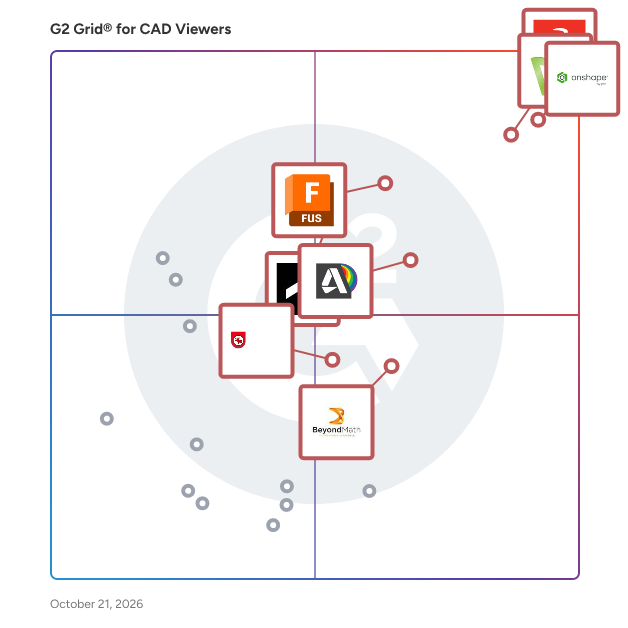
- **Leader:** [Onshape](https://www.g2.com/products/onshape/reviews)
- **Highest Performer:** [IrfanView](https://www.g2.com/products/irfanview/reviews)
- **Easiest to Use:** [Onshape](https://www.g2.com/products/onshape/reviews)
- **Top Trending:** [CADMATIC eBrowser](https://www.g2.com/products/cadmatic-cadmatic-ebrowser/reviews)
- **Best Free Software:** [Onshape](https://www.g2.com/products/onshape/reviews)


---

**Sponsored**

### CMS IntelliCAD

CMS IntelliCAD® is a sophisticated CAD software solution designed to meet the diverse needs of professionals in engineering, architecture, and consulting. This full-featured software provides users with an extensive array of 2D and 3D drawing tools that are compatible with Autodesk® AutoCAD®, making it an ideal choice for anyone who relies on CAD drawings for their work. With its intelligent design and powerful capabilities, CMS IntelliCAD serves as a reliable alternative for those seeking advanced CAD functionalities without the associated high costs. Targeted primarily at engineers, architects, and consultants, CMS IntelliCAD caters to a wide range of users who require precision and efficiency in their design processes. The software is particularly beneficial for professionals who need to create detailed drawings, models, and documentation. Its compatibility with .DWG file extensions ensures seamless integration with existing projects, allowing users to work with files from various sources without losing data integrity. Additionally, the software supports Building Information Modeling (BIM), enhancing its utility for modern architectural and engineering practices, which increasingly rely on collaborative and data-rich environments. One of the standout features of CMS IntelliCAD is its extensive customization options. Users can take advantage of a comprehensive programming toolkit that includes support for LISP, VBA, .Net, and IRX development. This flexibility allows users to tailor the software to their specific workflows, enhancing productivity and streamlining repetitive tasks. The ability to create custom commands and automate processes can significantly reduce the time spent on drafting and design, making it a valuable asset for busy professionals who need to maximize their efficiency. Moreover, CMS IntelliCAD offers extended interoperability with various file formats, including DGN, .STEP, .IGES, and .PDF. This broad compatibility ensures that users can collaborate effectively with colleagues and clients who may be using different software solutions. The software&#39;s robust features, combined with its affordability, make it an attractive option for businesses and individuals looking to enhance their CAD capabilities without compromising on quality or performance. CMS IntelliCAD stands out in the CAD software landscape by providing a powerful, customizable, and cost-effective solution for professionals in various fields. Its intelligent design, extensive compatibility, and support for advanced programming make it a practical choice for those who require a reliable tool for their design and drafting needs. The combination of these features positions CMS IntelliCAD as a strong contender in the competitive CAD market, appealing to both seasoned professionals and newcomers alike.


[Visit website](https://www.g2.com/external_clickthroughs/record?secure%5Bad_program%5D=ppc&amp;secure%5Bad_slot%5D=category_product_list&amp;secure%5Bcategory_id%5D=1957&amp;secure%5Bchosen_at%5D=2026-07-05T23%3A49%3A20Z&amp;secure%5Bdisplayable_resource_id%5D=291&amp;secure%5Bdisplayable_resource_type%5D=Category&amp;secure%5Bmedium%5D=sponsored&amp;secure%5Bplacement_reason%5D=neighbor_category&amp;secure%5Bplacement_resource_ids%5D%5B%5D=291&amp;secure%5Bprioritized%5D=false&amp;secure%5Bproduct_id%5D=5497&amp;secure%5Bresource_id%5D=1957&amp;secure%5Bresource_type%5D=Category&amp;secure%5Bsource_type%5D=category_page&amp;secure%5Bsource_url%5D=https%3A%2F%2Fwww.g2.com%2Fcategories%2Fcad-viewers%3Fpage%3D4&amp;secure%5Btoken%5D=686431d881a0b73f756eed5443b3a8cce6b250fbf6f96a2f7d552a66b552c7e4&amp;secure%5Burl%5D=https%3A%2F%2Fintellicadms.com%2Fsite%2F&amp;secure%5Burl_type%5D=custom_url)

---

## What Are the Top-Rated CAD Viewers Products in 2026?
### 1. [Onshape](https://www.g2.com/products/onshape/reviews)
Onshape by PTC is the leading cloud-native CAD &amp; PDM platform that runs on any device, anywhere-requiring zero IT. Onshape is for product design companies who are fed up with the errors, time waste, and hidden costs of outdated file-based CAD &amp; PDM. Only Onshape: - Eliminates CAD crashes and never loses data - Enables secure, real-time collaboration - Tracks all activity and provides infinite restore - Has built-in PDM with branching and merging


**Average Rating:** 4.7/5.0
**Total Reviews:** 683
**How Do G2 Users Rate Onshape?**

- **Has the product been a good partner in doing business?:** 9.3/10 (Category avg: 8.4/10)
- **Ease of Admin:** 9.1/10 (Category avg: 8.5/10)
- **File size:** 8.5/10 (Category avg: 8.1/10)
- **Dimensioning tools:** 8.8/10 (Category avg: 8.2/10)

**Who Is the Company Behind Onshape?**

- **Seller:** [PTC](https://www.g2.com/sellers/ptc)
- **Company Website:** https://www.ptc.com
- **Year Founded:** 1985
- **HQ Location:** Boston, Massachusetts
- **Twitter:** @PTC (37,560 Twitter followers)
- **LinkedIn® Page:** https://www.linkedin.com/company/1935/ (8,145 employees on LinkedIn®)

**Who Uses This Product?**
- **Who Uses This:** Mechanical Engineer, Owner
- **Top Industries:** Mechanical or Industrial Engineering, Design
- **Company Size:** 79% Small-Business, 17% Mid-Market


#### What Are Onshape's Pros and Cons?

**Pros:**

- Ease of Use (28 reviews)
- Collaboration (22 reviews)
- Online Accessibility (21 reviews)
- Features (15 reviews)
- Sharing (15 reviews)

**Cons:**

- Missing Features (18 reviews)
- Lack of Features (10 reviews)
- Drawing Issues (7 reviews)
- Internet Dependency (7 reviews)
- Limited CAD Features (7 reviews)


### What Do G2 Reviewers Say About Onshape?
*AI-generated summary from verified user reviews*

**Pros:**

- Users enjoy the **ease of use** of Onshape, appreciating its intuitive interface and seamless accessibility from any device.
- Users value the **collaboration features** of Onshape, facilitating seamless team communication and document sharing.
- Users value the **online accessibility** of Onshape, allowing seamless work from any device without installation issues.
- Users love the **cloud-based convenience** of Onshape, enabling seamless access and efficient project management from any device.
- Users value the **ease of sharing** documents with non-CAD users, enhancing collaboration across teams.

**Cons:**

- Users note the **missing features** in Onshape, particularly in mature CAM options and sheet metal functionality.
- Users feel the **lack of advanced features** in Onshape hinders productivity compared to other CAD software like Solidworks.
- Users find the **drawing issues** in Onshape cumbersome, limiting functionality and complicating their design process.
- Users note the **internet dependency** of Onshape can lead to performance issues and file accessibility problems.
- Users find Onshape has **limited CAD features** , particularly in sheet metal, drawing environment, and CAM options.

#### What Are Recent G2 Reviews of Onshape?

**"[Cloud-Based Flexibility with Robust Performance](https://www.g2.com/survey_responses/onshape-review-12462851)"**

**Rating:** 5.0/5.0 stars
*— Prashant D.*

[Read full review](https://www.g2.com/survey_responses/onshape-review-12462851)

---

**"[Browser-Based Design: Seamless Collaboration and Useful Version History](https://www.g2.com/survey_responses/onshape-review-13053142)"**

**Rating:** 4.5/5.0 stars
*— Muzammil M.*

[Read full review](https://www.g2.com/survey_responses/onshape-review-13053142)

---


#### What Are G2 Users Discussing About Onshape?

- [What is Onshape used for?](https://www.g2.com/discussions/what-is-onshape-used-for) - 1 comment

### 2. [DraftSight](https://www.g2.com/products/draftsight/reviews)
A feature-rich DraftSight is a versatile 2D CAD solution tailored for professionals such as architects, engineers, construction service providers, professional CAD users, designers, educators, and hobbyists. Serving industries such as architecture, engineering, construction, facilities management, manufacturing, landscape architecture, and industrial design, the software boasts an extensive range of features that enable users to efficiently create, edit, view, and markup 2D and 3D DWG files. With its user-friendly interface, DraftSight ensures a smooth transition from any existing CAD application. Whether you&#39;re involved in detailed architectural drawings or complex engineering designs, DraftSight&#39;s comprehensive 2D CAD capabilities make it an ideal choice for all your design needs.


**Average Rating:** 4.2/5.0
**Total Reviews:** 208
**How Do G2 Users Rate DraftSight?**

- **Has the product been a good partner in doing business?:** 8.3/10 (Category avg: 8.4/10)
- **Ease of Admin:** 8.2/10 (Category avg: 8.5/10)
- **File size:** 8.2/10 (Category avg: 8.1/10)
- **Dimensioning tools:** 8.7/10 (Category avg: 8.2/10)

**Who Is the Company Behind DraftSight?**

- **Seller:** [Dassault Systemes](https://www.g2.com/sellers/dassault-systemes)
- **Year Founded:** 1981
- **HQ Location:** Velizy-Villacoublay
- **Twitter:** @Dassault3DS (74,082 Twitter followers)
- **LinkedIn® Page:** https://www.linkedin.com/company/3896/ (27,414 employees on LinkedIn®)
- **Ownership:** EPA: DSY.PA

**Who Uses This Product?**
- **Who Uses This:** Mechanical Engineer, Design Engineer
- **Top Industries:** Mechanical or Industrial Engineering, Manufacturing
- **Company Size:** 62% Small-Business, 32% Mid-Market


#### What Are DraftSight's Pros and Cons?

**Pros:**

- Ease of Use (13 reviews)
- Features Functionality (9 reviews)
- Easy Learning (6 reviews)
- Design Efficiency (4 reviews)
- Drawing Tools (4 reviews)

**Cons:**

- Drawing Issues (2 reviews)
- Expensive (2 reviews)
- Poor Customer Support (2 reviews)
- Software Instability (2 reviews)
- Training Deficiency (2 reviews)


### What Do G2 Reviewers Say About DraftSight?
*AI-generated summary from verified user reviews*

**Pros:**

- Users find DraftSight&#39;s **ease of use** reminiscent of AutoCAD, facilitating quick and efficient drafting experiences.
- Users appreciate the **ease of use and comprehensive functionalities** of DraftSight, making drafting quick and efficient.
- Users find DraftSight **easy to learn** , enabling novice and experienced users to create complex drawings effortlessly.
- Users value the **design efficiency** of DraftSight, enabling fast and easy creation of essential drawings.
- Users value the **easy-to-use drawing tools** in DraftSight, enabling quick and efficient drafting and collaboration.

**Cons:**

- Users struggle with **drawing issues** , including difficulties in copy/pasting and persistent paper space and printing problems.
- Users express concern about DraftSight&#39;s **high cost** , especially after it transitioned from freeware to a paid model.
- Users express frustration over the **poor customer support** , making troubleshooting and assistance challenging during use.
- Users report frequent **software instability** with DraftSight, often experiencing crashes, particularly on lower-end hardware.
- Users feel there is a **training deficiency** , wishing for more tutorials to enhance their learning experience with DraftSight.

#### What Are Recent G2 Reviews of DraftSight?

**"[Professional-Grade 2D CAD with a Fast, Intuitive Interface](https://www.g2.com/survey_responses/draftsight-review-12639225)"**

**Rating:** 5.0/5.0 stars
*— Jose P.*

[Read full review](https://www.g2.com/survey_responses/draftsight-review-12639225)

---

**"[DraftSight: Low-Cost, Comfortable UI, and Strong DWG Performance](https://www.g2.com/survey_responses/draftsight-review-12958423)"**

**Rating:** 5.0/5.0 stars
*— Deepak K.*

[Read full review](https://www.g2.com/survey_responses/draftsight-review-12958423)

---


#### What Are G2 Users Discussing About DraftSight?

- [What is DraftSight used for?](https://www.g2.com/discussions/draftsight-what-is-draftsight-used-for)
- [Is DraftSight 2018 still free?](https://www.g2.com/discussions/is-draftsight-2018-still-free)
- [How much is DraftSight 2020?](https://www.g2.com/discussions/how-much-is-draftsight-2020)
- [What is DraftSight used for?](https://www.g2.com/discussions/what-is-draftsight-used-for)
- [Is DraftSight 2020 free?](https://www.g2.com/discussions/is-draftsight-2020-free)

### 3. [Autodesk Fusion](https://www.g2.com/products/autodesk-fusion/reviews)
Autodesk Fusion connects capabilities, data, and people across the entire product development lifecycle. Fusion provides you with CAD, CAM, CAE and PCB tools along with PLM/PDM and MES (manufacturing execution system) capabilities to facilitate seamless workflows across your entire organization. Key features: - 3D Design and Modeling: Autodesk Fusion offers a robust set of tools for creating 3D models and designs, making it ideal for product development and industrial design. - Manufacturing Integration: With Autodesk Fusion, you can design and manufacture products using the same platform, streamlining the process from concept to production. - Electronics Design: PCB design capabilities are integrated into the Autodesk Fusion platform, allowing for the creation of electronic components as part of the overall product design process. - Simulation and Analysis: Autodesk Fusion includes simulation tools to test and optimize designs before manufacturing, reducing the need for physical prototypes. - Cloud Collaboration: As a cloud-based platform, Autodesk Fusion enables seamless collaboration among design and engineering teams, regardless of location. - Generative Design: This feature allows you to input design goals and constraints, and Autodesk Fusion will generate multiple design options that meet these criteria. By integrating the entire product development process into one platform, Autodesk Fusion allows users to bring products to market faster and more efficiently.


**Average Rating:** 4.5/5.0
**Total Reviews:** 510
**How Do G2 Users Rate Autodesk Fusion?**

- **Has the product been a good partner in doing business?:** 8.8/10 (Category avg: 8.4/10)
- **Ease of Admin:** 8.5/10 (Category avg: 8.5/10)
- **File size:** 8.4/10 (Category avg: 8.1/10)
- **Dimensioning tools:** 8.3/10 (Category avg: 8.2/10)

**Who Is the Company Behind Autodesk Fusion?**

- **Seller:** [Autodesk](https://www.g2.com/sellers/autodesk)
- **Company Website:** https://www.autodesk.com
- **Year Founded:** 1982
- **HQ Location:** San Francisco
- **Twitter:** @autodesk (273,215 Twitter followers)
- **LinkedIn® Page:** https://www.linkedin.com/company/autodesk/ (15,352 employees on LinkedIn®)

**Who Uses This Product?**
- **Who Uses This:** Owner, Design Engineer
- **Top Industries:** Mechanical or Industrial Engineering, Design
- **Company Size:** 68% Small-Business, 22% Mid-Market


#### What Are Autodesk Fusion's Pros and Cons?

**Pros:**

- Ease of Use (33 reviews)
- Features (23 reviews)
- Design Efficiency (17 reviews)
- Easy Learning (17 reviews)
- Features Functionality (16 reviews)

**Cons:**

- Difficult Learning (12 reviews)
- Learning Curve (12 reviews)
- Assembly Difficulties (9 reviews)
- Missing Features (9 reviews)
- Performance Issues (9 reviews)


### What Do G2 Reviewers Say About Autodesk Fusion?
*AI-generated summary from verified user reviews*

**Pros:**

- Users find Autodesk Fusion to be **very easy to use** , especially for 3D printing and personal projects.
- Users appreciate the **wide range of features** in Autodesk Fusion, enjoying its seamless integration and user-friendly interface.
- Users highlight the **design efficiency** of Autodesk Fusion, benefiting from customizable tools and abundant instructional resources.
- Users find Autodesk Fusion&#39;s **easy learning curve** ideal for beginners and enhances team collaboration.
- Users value the **abundant instructional resources** and extensive features of Autodesk Fusion, enhancing their modeling efficiency.

**Cons:**

- Users find Autodesk Fusion **difficult to learn** , highlighting challenges in mastering the software independently.
- Users find the **learning curve steep** initially, impacting their ability to efficiently use Autodesk Fusion.
- Users face significant **assembly difficulties** , struggling with limited customization and complex timelines in Autodesk Fusion.
- Users are frustrated by **missing features** in Autodesk Fusion, limiting usability and hampering real-time editing capabilities.
- Users report **performance issues** with Autodesk Fusion, including bugs, glitches, and slowdowns affecting usability.

#### What Are Recent G2 Reviews of Autodesk Fusion?

**"[Autodesk Fusion Streamlines Parametric 3D Design from Idea to Prototype](https://www.g2.com/survey_responses/autodesk-fusion-review-13041979)"**

**Rating:** 5.0/5.0 stars
*— Muzammil M.*

[Read full review](https://www.g2.com/survey_responses/autodesk-fusion-review-13041979)

---

**"[Autodesk Fusion 360 is a great parametric 3D modeling software](https://www.g2.com/survey_responses/autodesk-fusion-review-5236244)"**

**Rating:** 5.0/5.0 stars
*— Damaris C.*

[Read full review](https://www.g2.com/survey_responses/autodesk-fusion-review-5236244)

---


#### What Are G2 Users Discussing About Autodesk Fusion?

- [What is Fusion 360 used for?](https://www.g2.com/discussions/what-is-fusion-360-used-for) - 1 comment
- [Is Fusion 360 still free for hobbyists?](https://www.g2.com/discussions/fusion-360-is-fusion-360-still-free-for-hobbyists) - 1 comment
- [Is Fusion 360 a CAD software?](https://www.g2.com/discussions/is-fusion-360-a-cad-software) - 1 comment
- [What is Fusion 360 software used for?](https://www.g2.com/discussions/what-is-fusion-360-software-used-for)
- [What functionality does Fusion 360 offer its users?](https://www.g2.com/discussions/fusion-360-what-functionality-does-fusion-360-offer-its-users)

### 4. [SOLIDWORKS](https://www.g2.com/products/solidworks/reviews)
SOLIDWORKS delivers connected, easy-to-use tools that help you innovate and accelerate every aspect of your product development process.


**Average Rating:** 4.5/5.0
**Total Reviews:** 628
**How Do G2 Users Rate SOLIDWORKS?**

- **Has the product been a good partner in doing business?:** 8.3/10 (Category avg: 8.4/10)
- **Ease of Admin:** 7.9/10 (Category avg: 8.5/10)
- **File size:** 8.3/10 (Category avg: 8.1/10)
- **Dimensioning tools:** 9.5/10 (Category avg: 8.2/10)

**Who Is the Company Behind SOLIDWORKS?**

- **Seller:** [Solidworks](https://www.g2.com/sellers/solidworks)
- **Year Founded:** 1993
- **HQ Location:** Waltham, MA
- **Twitter:** @SOLIDWORKS (178,616 Twitter followers)
- **LinkedIn® Page:** https://www.linkedin.com/showcase/solidworks/
- **Ownership:** EPA: DSY

**Who Uses This Product?**
- **Who Uses This:** Design Engineer, Mechanical Design Engineer
- **Top Industries:** Mechanical or Industrial Engineering, Design
- **Company Size:** 51% Small-Business, 39% Mid-Market


#### What Are SOLIDWORKS's Pros and Cons?

**Pros:**

- Ease of Use (34 reviews)
- Features (28 reviews)
- 3D Modeling (25 reviews)
- User Interface (20 reviews)
- CAD Integration (15 reviews)

**Cons:**

- Performance Issues (16 reviews)
- Slow Performance (15 reviews)
- High System Requirements (14 reviews)
- Expensive (11 reviews)
- Slow Simulation (11 reviews)


### What Do G2 Reviewers Say About SOLIDWORKS?
*AI-generated summary from verified user reviews*

**Pros:**

- Users appreciate the **user-friendly interface** of SOLIDWORKS, making parametric 3D modeling intuitive and efficient.
- Users appreciate the **user-friendly interface** of SOLIDWORKS, enhancing their efficiency in complex mechanical designs.
- Users love the **ease of 3D modeling** in SOLIDWORKS, finding it beginner-friendly and cost-effective for all designs.
- Users appreciate SOLIDWORKS for its **user-friendly interface** , making parametric 3D modeling accessible and efficient.
- Users value the **seamless CAD integration** of SOLIDWORKS, enhancing design efficiency and collaboration across projects.

**Cons:**

- Users experience **performance issues** with SOLIDWORKS, especially with large assemblies and complex models causing slowdowns and crashes.
- Users experience **slow performance** with large assemblies in SOLIDWORKS, leading to frustrating delays and crashes during complex tasks.
- Users face challenges due to SOLIDWORKS&#39; **high system requirements** , necessitating powerful hardware for optimal performance.
- Users find SOLIDWORKS to be **expensive** , which poses a significant barrier for small companies seeking CAD solutions.
- Users report that **slow simulation** occurs with large assemblies, impacting performance and productivity during complex modeling tasks.

#### What Are Recent G2 Reviews of SOLIDWORKS?

**"[A USER FRIENDLY AND IMPORTANT SOFTWARE FOR THE ENGINEERS](https://www.g2.com/survey_responses/solidworks-review-12735771)"**

**Rating:** 5.0/5.0 stars
*— Vivek  B.*

[Read full review](https://www.g2.com/survey_responses/solidworks-review-12735771)

---

**"[Intuitive UI and Reliable Performance with Strong Integrations](https://www.g2.com/survey_responses/solidworks-review-12674092)"**

**Rating:** 5.0/5.0 stars
*— shrinivasa k.*

[Read full review](https://www.g2.com/survey_responses/solidworks-review-12674092)

---


#### What Are G2 Users Discussing About SOLIDWORKS?

- [What is SOLIDWORKS used for?](https://www.g2.com/discussions/what-is-solidworks-used-for) - 3 comments, 1 upvote
- [Where is the Features toolbar in Solidworks?](https://www.g2.com/discussions/where-is-the-features-toolbar-in-solidworks) - 1 comment
- [What is included in solidworks standard?](https://www.g2.com/discussions/what-is-included-in-solidworks-standard)
- [What is solidworks software used for?](https://www.g2.com/discussions/what-is-solidworks-software-used-for)
- [What are features in Solidworks?](https://www.g2.com/discussions/what-are-features-in-solidworks) - 1 comment

### 5. [Autodesk Viewer](https://www.g2.com/products/autodesk-viewer/reviews)
Autodesk Viewer is a free, web-based application that enables users to view, measure, mark up, and share 2D and 3D design files directly from their browser, without the need for any software installation. Supporting over 80 file formats, including DWG, STEP, DWF, RVT, and Solidworks, it facilitates seamless collaboration among project stakeholders by providing easy access to design data from any device with an internet connection. Key Features and Functionality: - Multi-Format Support: Handles a wide range of file types, ensuring compatibility across various CAD environments. - Zero-Installation Access: Operates entirely within a web browser, eliminating the need for software downloads or installations. - Integrated Tools: Offers intuitive tools for measuring, marking up, and reviewing designs, enhancing communication and collaboration. - Autodesk Ecosystem Integration: Connects seamlessly with Autodesk Construction Cloud, BIM 360, and Fusion 360, enabling automatic file synchronization and version control. Primary Value and User Solutions: Autodesk Viewer addresses the need for efficient and accessible design collaboration by allowing users to interact with complex 2D and 3D models without specialized software. Its browser-based platform reduces IT overhead and deployment complexity, making it particularly valuable for external stakeholders, clients, and occasional users who require quick access to design files. By supporting a broad range of file formats and integrating with Autodesk&#39;s suite of tools, it streamlines review workflows and enhances project communication, ultimately leading to more efficient project execution and decision-making.


**Average Rating:** 4.3/5.0
**Total Reviews:** 61
**How Do G2 Users Rate Autodesk Viewer?**

- **Has the product been a good partner in doing business?:** 9.4/10 (Category avg: 8.4/10)
- **Ease of Admin:** 9.3/10 (Category avg: 8.5/10)
- **File size:** 8.1/10 (Category avg: 8.1/10)
- **Dimensioning tools:** 8.5/10 (Category avg: 8.2/10)

**Who Is the Company Behind Autodesk Viewer?**

- **Seller:** [Autodesk](https://www.g2.com/sellers/autodesk)
- **Year Founded:** 1982
- **HQ Location:** San Francisco
- **Twitter:** @autodesk (273,215 Twitter followers)
- **LinkedIn® Page:** https://www.linkedin.com/company/autodesk/ (15,352 employees on LinkedIn®)
- **Ownership:** NASDAQ:ADSK

**Who Uses This Product?**
- **Top Industries:** Construction, Architecture &amp; Planning
- **Company Size:** 55% Small-Business, 32% Mid-Market


#### What Are Autodesk Viewer's Pros and Cons?

**Pros:**

- Compatibility (1 reviews)
- Ease of Use (1 reviews)
- File Compatibility (1 reviews)
- Online Access (1 reviews)

**Cons:**

- Lack of Features (1 reviews)


### What Do G2 Reviewers Say About Autodesk Viewer?
*AI-generated summary from verified user reviews*

**Pros:**

- Users value the **compatibility with multiple file formats** , allowing easy access directly in their browser.
- Users commend the **ease of use** of Autodesk Viewer, benefiting from browser-based access and multiple file format support.
- Users value the **file compatibility** of Autodesk Viewer, enabling easy access to multiple formats directly in the browser.
- Users value the **online access** of Autodesk Viewer, enabling seamless viewing of multiple file formats without installation.

**Cons:**

- Users find Autodesk Viewer valuable for navigation, but experience **limitations in functionality** that hinder the review process.

#### What Are Recent G2 Reviews of Autodesk Viewer?

**"[Reliable, Fast Autodesk File Viewing and Sharing—Free](https://www.g2.com/survey_responses/autodesk-viewer-review-12930264)"**

**Rating:** 5.0/5.0 stars
*— Deepak K.*

[Read full review](https://www.g2.com/survey_responses/autodesk-viewer-review-12930264)

---

**"[Awesome, User-Friendly Platform for Sharing 3D Models and Documents](https://www.g2.com/survey_responses/autodesk-viewer-review-12856603)"**

**Rating:** 5.0/5.0 stars
*— hossein M.*

[Read full review](https://www.g2.com/survey_responses/autodesk-viewer-review-12856603)

---


#### What Are G2 Users Discussing About Autodesk Viewer?

- [What is the use of Autodesk DWG TrueView?](https://www.g2.com/discussions/autodesk-viewer-what-is-the-use-of-autodesk-dwg-trueview)
- [Is Autodesk Viewer free?](https://www.g2.com/discussions/is-autodesk-viewer-free) - 1 comment
- [How do I use Autodesk viewer?](https://www.g2.com/discussions/how-do-i-use-autodesk-viewer) - 1 comment
- [What does Autodesk viewer do?](https://www.g2.com/discussions/what-does-autodesk-viewer-do)

### 6. [Autodesk DWG TrueView](https://www.g2.com/products/autodesk-dwg-trueview/reviews)
AutoCAD DWG Format Viewer


**Average Rating:** 4.4/5.0
**Total Reviews:** 73
**How Do G2 Users Rate Autodesk DWG TrueView?**

- **Has the product been a good partner in doing business?:** 8.3/10 (Category avg: 8.4/10)
- **Ease of Admin:** 8.8/10 (Category avg: 8.5/10)
- **File size:** 8.4/10 (Category avg: 8.1/10)
- **Dimensioning tools:** 7.9/10 (Category avg: 8.2/10)

**Who Is the Company Behind Autodesk DWG TrueView?**

- **Seller:** [Autodesk](https://www.g2.com/sellers/autodesk)
- **Year Founded:** 1982
- **HQ Location:** San Francisco
- **Twitter:** @autodesk (273,215 Twitter followers)
- **LinkedIn® Page:** https://www.linkedin.com/company/autodesk/ (15,352 employees on LinkedIn®)
- **Ownership:** NASDAQ:ADSK

**Who Uses This Product?**
- **Top Industries:** Construction, Mechanical or Industrial Engineering
- **Company Size:** 45% Small-Business, 36% Mid-Market


#### What Are Recent G2 Reviews of Autodesk DWG TrueView?

**"[Autodesk DWG TrueView: Most Robust and Versatile DWG Viewer](https://www.g2.com/survey_responses/autodesk-dwg-trueview-review-8037161)"**

**Rating:** 5.0/5.0 stars
*— Aldrin B.*

[Read full review](https://www.g2.com/survey_responses/autodesk-dwg-trueview-review-8037161)

---

**"[Free of cost software and very easy to use](https://www.g2.com/survey_responses/autodesk-dwg-trueview-review-9467562)"**

**Rating:** 4.5/5.0 stars
*— Vishal G.*

[Read full review](https://www.g2.com/survey_responses/autodesk-dwg-trueview-review-9467562)

---


#### What Are G2 Users Discussing About Autodesk DWG TrueView?

- [What is Autodesk DWG TrueView used for?](https://www.g2.com/discussions/what-is-autodesk-dwg-trueview-used-for)
- [How do I use TrueView in AutoCAD?](https://www.g2.com/discussions/how-do-i-use-trueview-in-autocad) - 1 comment
- [Can you draw with Autodesk TrueView?](https://www.g2.com/discussions/can-you-draw-with-autodesk-trueview) - 1 comment
- [Is DWG True View free?](https://www.g2.com/discussions/is-dwg-true-view-free) - 2 comments
- [What is the use of Autodesk DWG TrueView?](https://www.g2.com/discussions/what-is-the-use-of-autodesk-dwg-trueview)

### 7. [IrfanView](https://www.g2.com/products/irfanview/reviews)
IrfanView seeks to create unique, new and interesting features, unlike some other graphic viewers, whose whole &quot;creativity&quot; is based on feature cloning, stealing of ideas and whole dialogs from ACDSee and/or IrfanView! (for example: XnView has been stealing/cloning features and whole dialogs from IrfanView, for 10+ years).


**Average Rating:** 4.6/5.0
**Total Reviews:** 50
**How Do G2 Users Rate IrfanView?**

- **Has the product been a good partner in doing business?:** 10.0/10 (Category avg: 8.4/10)
- **Ease of Admin:** 10.0/10 (Category avg: 8.5/10)
- **File size:** 9.2/10 (Category avg: 8.1/10)
- **Dimensioning tools:** 8.7/10 (Category avg: 8.2/10)

**Who Is the Company Behind IrfanView?**

- **Seller:** [IrfanView](https://www.g2.com/sellers/irfanview)
- **Year Founded:** 2005
- **HQ Location:** Poland
- **Twitter:** @irfanview (182 Twitter followers)
- **LinkedIn® Page:** https://www.linkedin.com/company/anysoft (4 employees on LinkedIn®)

**Who Uses This Product?**
- **Top Industries:** Computer Software, Information Technology and Services
- **Company Size:** 65% Small-Business, 22% Mid-Market


#### What Are IrfanView's Pros and Cons?

**Pros:**

- Image Editing (1 reviews)

**Cons:**

- Outdated Interface (1 reviews)


### What Do G2 Reviewers Say About IrfanView?
*AI-generated summary from verified user reviews*

**Pros:**

- Users value the **image resizing quality** of IrfanView, ensuring high resolution is maintained effectively.

**Cons:**

- Users find the interface **outdated** , detracting from the overall experience despite its simplicity for beginners.

#### What Are Recent G2 Reviews of IrfanView?

**"[I have been a user since the 90s.](https://www.g2.com/survey_responses/irfanview-review-9367095)"**

**Rating:** 4.0/5.0 stars
*— Albert C.*

[Read full review](https://www.g2.com/survey_responses/irfanview-review-9367095)

---

**"[High-Quality Image Resizing Made Easy](https://www.g2.com/survey_responses/irfanview-review-12376350)"**

**Rating:** 4.0/5.0 stars
*— Jaclyn K.*

[Read full review](https://www.g2.com/survey_responses/irfanview-review-12376350)

---


#### What Are G2 Users Discussing About IrfanView?

- [Should I use IrfanView?](https://www.g2.com/discussions/should-i-use-irfanview) - 1 comment
- [Is IrfanView a photo editor?](https://www.g2.com/discussions/is-irfanview-a-photo-editor) - 2 comments
- [Is IrfanView still the best?](https://www.g2.com/discussions/is-irfanview-still-the-best) - 2 comments
- [What can IrfanView do?](https://www.g2.com/discussions/what-can-irfanview-do) - 2 comments

### 8. [CADMATIC eBrowser](https://www.g2.com/products/cadmatic-cadmatic-ebrowser/reviews)
CADMATIC eBrowser is a powerful 3D CAD viewer. A user-friendly 3D viewer that streamlines project review processes. Seamlessly explore, merge, and compare multiple 3D models effortlessly. Detect collisions, measure objects, and annotate directly on the model to enhance collaboration. With its compact file sizes, sharing becomes a breeze. Enjoy an array of key features, including support for various file formats, collision detection, panoramic views, intuitive navigation, and compatibility with VR interfaces. Experience optimized project review and communication by downloading CADMATIC eBrowser now. What our customers say: ⭐“There is no other 3D communication tool more capable than CADMATIC eBrowser.” – Cor Lettenga, DEKC Managing Director ⭐“We use CADMATIC eBrowser with a VR headset in design reviews. It helps to see with your own eyes what the solution will look like in the real world. The review process is smoother and faster this way.” – CMBernardini Engineering Manager Gianluca Coccato ⭐“By using CADMATIC eBrowser we improve communication between the office and the site, not only during the construction phase but also during the commissioning and startup.” – Paolo Fantini, Technical Manager at STC Power ⭐“CADMATIC eBrowser is powerful and the interface is easy to use. It is used throughout the whole concept, basic and detail engineering phase, but also in purchasing, sales, and production.” – Børulf Lefdal, Head of Hull Structure CADMATIC eBrowser – key features: 🛠 Stand-alone browser with support for multiple file formats: EBM, EBMX (native Cadmatic formats), DWG, DXF, IFC, DGN, NWD, E57, PTX, DWF, and DWFx 🛠 Possibility to merge and compare 3D models, including metadata and clash check, from different formats and sources and subset parts of models 🛠 The collision detector inside eBrowser enables users to gain more in-depth insight into the 3D model, combine 3D models from different sources, and check consistency 🛠 Option to upload point clouds with photorealistic panoramic views to compare design models with existing structures 🛠 Efficient and straightforward navigation using 3D or model hierarchy, check all meta-data about any object with one click 🛠 Control visibility, transparency, and color of objects 🛠 Use markups for change management and discussions with other project partners 🛠 Support for VR interface


**Average Rating:** 4.4/5.0
**Total Reviews:** 50
**How Do G2 Users Rate CADMATIC eBrowser?**

- **Has the product been a good partner in doing business?:** 8.6/10 (Category avg: 8.4/10)
- **Ease of Admin:** 8.6/10 (Category avg: 8.5/10)
- **File size:** 8.3/10 (Category avg: 8.1/10)
- **Dimensioning tools:** 7.9/10 (Category avg: 8.2/10)

**Who Is the Company Behind CADMATIC eBrowser?**

- **Seller:** [Cadmatic](https://www.g2.com/sellers/cadmatic)
- **Year Founded:** 1982
- **HQ Location:** Turku, FI
- **Twitter:** @CADMATICGroup (188 Twitter followers)
- **LinkedIn® Page:** https://www.linkedin.com/company/cadmatic/ (309 employees on LinkedIn®)

**Who Uses This Product?**
- **Top Industries:** Shipbuilding, Maritime
- **Company Size:** 56% Small-Business, 32% Mid-Market


#### What Are CADMATIC eBrowser's Pros and Cons?

**Pros:**

- 3D Modeling (2 reviews)
- Lightweight (2 reviews)
- Ease of Use (1 reviews)
- Easy Learning (1 reviews)
- Free Access (1 reviews)

**Cons:**

- Inadequate CAD Features (1 reviews)
- Lack of Features (1 reviews)
- Limited Customization (1 reviews)
- Limited Editing (1 reviews)
- Performance Issues (1 reviews)


### What Do G2 Reviewers Say About CADMATIC eBrowser?
*AI-generated summary from verified user reviews*

**Pros:**

- Users love the **ease of sharing and reviewing 3D models** with CADMATIC eBrowser, enhancing collaboration and efficiency.
- Users appreciate the **lightweight software** that allows easy sharing and quick access to complex 3D models.
- Users find the **ease of navigation** in CADMATIC eBrowser highly beneficial for a user-friendly experience.
- Users find the **easy navigation** of CADMATIC eBrowser makes it very user-friendly and accessible for everyone.
- Users appreciate the **free access** to CADMATIC eBrowser, enabling easy sharing and reviewing of complex 3D models.

**Cons:**

- Users are frustrated by the **inadequate CAD features** , as it only allows model viewing without editing capabilities.
- Users find the **lack of editing features** in CADMATIC eBrowser limits its functionality significantly for design work.
- Users find the **limited customization** options hinder their ability to tailor layer visibility and UI effectively.
- Users find the **limited editing capabilities** of CADMATIC eBrowser restricts their ability to create or modify designs.
- Users experience noticeable **performance issues** , particularly slowdowns when opening the import menu, impacting their overall usage.

#### What Are Recent G2 Reviews of CADMATIC eBrowser?

**"[My experience with CADMATIC eBrowser](https://www.g2.com/survey_responses/cadmatic-ebrowser-review-11348539)"**

**Rating:** 4.0/5.0 stars
*— Harrison P.*

[Read full review](https://www.g2.com/survey_responses/cadmatic-ebrowser-review-11348539)

---

**"[Fast and practical viewing tool for BIM models](https://www.g2.com/survey_responses/cadmatic-ebrowser-review-11302138)"**

**Rating:** 4.0/5.0 stars
*— Verified User in Architecture &amp; Planning*

[Read full review](https://www.g2.com/survey_responses/cadmatic-ebrowser-review-11302138)

---


### 9. [Bentley View](https://www.g2.com/products/bentley-view/reviews)
Bentley View is the industry’s most powerful free viewer. In addition to being the most popular AutoCAD reader, you can view over 50 file formats, including CAD and raster images as well as Bentley’s uniquely powerful iModels. Newly Added Format Support: SRealDWG 2018 Point-cloud streaming Bentley civil terrain models JT format Rhino V5 IFC viewer 3SM scalable meshes created with ContextCapture Advanced Viewing Features: Navigate drawings and models using a new streamlined CONNECT Edition user interface Dynamically explore models with Clip Volume to slice through models Leverage display rules in DGNs to view geometry based on embedded properties Easily navigate using touch screen support in Windows 10 Analyze models by changing their visual display based on object attributes (height, slope, aspect angle) View and navigate Bentley’s groundbreaking hypermodels and their embedded plans, sections, and elevations You can also use Bentley View as a MicroStation viewer, a free DXF viewer, and to open CAD files directly


**Average Rating:** 4.1/5.0
**Total Reviews:** 17
**How Do G2 Users Rate Bentley View?**

- **Has the product been a good partner in doing business?:** 7.8/10 (Category avg: 8.4/10)
- **Ease of Admin:** 7.8/10 (Category avg: 8.5/10)
- **File size:** 7.6/10 (Category avg: 8.1/10)
- **Dimensioning tools:** 9.0/10 (Category avg: 8.2/10)

**Who Is the Company Behind Bentley View?**

- **Seller:** [Bentley Systems](https://www.g2.com/sellers/bentley-systems)
- **Year Founded:** 1984
- **HQ Location:** Exton, PA
- **Twitter:** @BentleySystems (17,564 Twitter followers)
- **LinkedIn® Page:** https://www.linkedin.com/company/4929/ (5,621 employees on LinkedIn®)
- **Ownership:** NASDAQ: BSY

**Who Uses This Product?**
- **Company Size:** 44% Mid-Market, 39% Small-Business


#### What Are Recent G2 Reviews of Bentley View?

**"[Extremely Satisfied with the User Experience](https://www.g2.com/survey_responses/bentley-view-review-8412308)"**

**Rating:** 5.0/5.0 stars
*— Ahmet Savaş G.*

[Read full review](https://www.g2.com/survey_responses/bentley-view-review-8412308)

---

**"[Free and Easy CAD File Compatibility](https://www.g2.com/survey_responses/bentley-view-review-12519986)"**

**Rating:** 5.0/5.0 stars
*— Ratiu V.*

[Read full review](https://www.g2.com/survey_responses/bentley-view-review-12519986)

---


#### What Are G2 Users Discussing About Bentley View?

- [What is Bentley View Connect edition?](https://www.g2.com/discussions/bentley-view-what-is-bentley-view-connect-edition) - 1 comment
- [What is Bentley View Connect edition?](https://www.g2.com/discussions/what-is-bentley-view-connect-edition) - 1 comment
- [How do you use a Bentley View?](https://www.g2.com/discussions/bentley-view-how-do-you-use-a-bentley-view) - 1 comment
- [How do you use a Bentley View?](https://www.g2.com/discussions/how-do-you-use-a-bentley-view) - 1 comment
- [What is MicroStation software used for?](https://www.g2.com/discussions/bentley-view-what-is-microstation-software-used-for) - 1 comment

### 10. [Design Review](https://www.g2.com/products/design-review/reviews)
Design Review CAD viewer software lets you view, mark up, print, and track changes to 2D and 3D files for freewithout the original design software. Work with a variety of file formats, including: DWF, DWFx, DWG, and DXF (requires installation of free DWG TrueView software); Adobe PDF; as well as image file types such as.bmp, .jpg, .gif, .pcx, .pct, .png, .rlc, .tga, .tif, .mil, .cal, and more.


**Average Rating:** 4.2/5.0
**Total Reviews:** 15
**How Do G2 Users Rate Design Review?**

- **Has the product been a good partner in doing business?:** 7.2/10 (Category avg: 8.4/10)
- **Ease of Admin:** 8.9/10 (Category avg: 8.5/10)
- **File size:** 7.9/10 (Category avg: 8.1/10)
- **Dimensioning tools:** 7.5/10 (Category avg: 8.2/10)

**Who Is the Company Behind Design Review?**

- **Seller:** [Autodesk](https://www.g2.com/sellers/autodesk)
- **Year Founded:** 1982
- **HQ Location:** San Francisco
- **Twitter:** @autodesk (273,215 Twitter followers)
- **LinkedIn® Page:** https://www.linkedin.com/company/autodesk/ (15,352 employees on LinkedIn®)
- **Ownership:** NASDAQ:ADSK

**Who Uses This Product?**
- **Company Size:** 47% Mid-Market, 47% Small-Business


#### What Are Recent G2 Reviews of Design Review?

**"[It helps you tracking changes in your CAD files](https://www.g2.com/survey_responses/design-review-review-7856811)"**

**Rating:** 4.5/5.0 stars
*— Luis Enrique T.*

[Read full review](https://www.g2.com/survey_responses/design-review-review-7856811)

---

**"[AutoDesk Design Review delivers a fantastic CAD-viewing experience without skimping on features.](https://www.g2.com/survey_responses/design-review-review-7604526)"**

**Rating:** 5.0/5.0 stars
*— Mohammad M.*

[Read full review](https://www.g2.com/survey_responses/design-review-review-7604526)

---


#### What Are G2 Users Discussing About Design Review?

- [What files can design review open?](https://www.g2.com/discussions/what-files-can-design-review-open)
- [How do you write a software design review?](https://www.g2.com/discussions/how-do-you-write-a-software-design-review)
- [What is a design review in software engineering?](https://www.g2.com/discussions/what-is-a-design-review-in-software-engineering)
- [What is design review used for?](https://www.g2.com/discussions/what-is-design-review-used-for)

### 11. [Creo View Express](https://www.g2.com/products/creo-view-express/reviews)
Creo Elements/View Express is the world&#39;s highest performance 3D CAD visual collaboration solutions.


**Average Rating:** 4.4/5.0
**Total Reviews:** 14
**How Do G2 Users Rate Creo View Express?**

- **Has the product been a good partner in doing business?:** 10.0/10 (Category avg: 8.4/10)
- **Ease of Admin:** 10.0/10 (Category avg: 8.5/10)
- **File size:** 7.4/10 (Category avg: 8.1/10)
- **Dimensioning tools:** 8.3/10 (Category avg: 8.2/10)

**Who Is the Company Behind Creo View Express?**

- **Seller:** [PTC](https://www.g2.com/sellers/ptc)
- **Year Founded:** 1985
- **HQ Location:** Boston, Massachusetts
- **Twitter:** @PTC (37,560 Twitter followers)
- **LinkedIn® Page:** https://www.linkedin.com/company/1935/ (8,145 employees on LinkedIn®)
- **Ownership:** NASDAQ: PTC

**Who Uses This Product?**
- **Top Industries:** Automotive
- **Company Size:** 43% Enterprise, 29% Mid-Market


#### What Are Recent G2 Reviews of Creo View Express?

**"[Becoming more competent with Creo View Express](https://www.g2.com/survey_responses/creo-view-express-review-9114420)"**

**Rating:** 5.0/5.0 stars
*— Harshal B.*

[Read full review](https://www.g2.com/survey_responses/creo-view-express-review-9114420)

---

**"[Great user experience of models in Creo View](https://www.g2.com/survey_responses/creo-view-express-review-9108952)"**

**Rating:** 5.0/5.0 stars
*— rajender s.*

[Read full review](https://www.g2.com/survey_responses/creo-view-express-review-9108952)

---


#### What Are G2 Users Discussing About Creo View Express?

- [Can you design in Creo View?](https://www.g2.com/discussions/can-you-design-in-creo-view)
- [What is Creo View used for?](https://www.g2.com/discussions/what-is-creo-view-used-for) - 1 comment
- [What are the special features in Creo?](https://www.g2.com/discussions/creo-view-express-what-are-the-special-features-in-creo)
- [What is Creo View Express?](https://www.g2.com/discussions/what-is-creo-view-express)

### 12. [ActCAD BIM](https://www.g2.com/products/actcad-actcad-bim/reviews)
ActCAD is a native dwg/dxf cad software suitable for professional 2D drafting and 3D modeling projects. ActCAD is trusted by over 30000 users in over 103 countries for more than 10 years. The interface, commands, icons, dialogs, shortcuts etc. are very much similar to other popular cad software tools available in market. Flexible license types available even for single license. There is no learning for existing cad users while saving 80% of the costs. ActCAD offers free email technical support without any limitations. ActCAD can be fully customized and programs can be developed using our free API toolkit. It supports popular programming languages like , lisp dcl, .net, C++ etc. Apart from all regular commands, ActCAD offers many productive tools like pdf to cad converter, Block libraries, Image to Cad converter, handling point sets between Cad and Excel and many more. ActCAD is suitable for any high end professional projects in the domains of Architecture, Civil, Mechanical, Automotive.


**Average Rating:** 4.5/5.0
**Total Reviews:** 47
**How Do G2 Users Rate ActCAD BIM?**

- **Has the product been a good partner in doing business?:** 9.0/10 (Category avg: 8.4/10)
- **Ease of Admin:** 9.3/10 (Category avg: 8.5/10)
- **File size:** 9.3/10 (Category avg: 8.1/10)
- **Dimensioning tools:** 9.1/10 (Category avg: 8.2/10)

**Who Is the Company Behind ActCAD BIM?**

- **Seller:** [ACTCAD](https://www.g2.com/sellers/actcad)
- **Year Founded:** 2010
- **HQ Location:** Hyderabad, Andhra Pradesh
- **Twitter:** @actcadsoftware (383 Twitter followers)
- **LinkedIn® Page:** https://www.linkedin.com/company/13207154/ (14 employees on LinkedIn®)

**Who Uses This Product?**
- **Top Industries:** Architecture &amp; Planning, Civil Engineering
- **Company Size:** 80% Small-Business, 18% Mid-Market


#### What Are ActCAD BIM's Pros and Cons?

**Pros:**

- Affordable (1 reviews)
- Efficiency (1 reviews)
- Helpful (1 reviews)
- Powerful Performance (1 reviews)
- Pricing (1 reviews)

**Cons:**

- Difficult Learning (1 reviews)
- Expensive (1 reviews)
- Insufficient Training (1 reviews)
- Learning Curve (1 reviews)
- Limited Features (1 reviews)


### What Do G2 Reviewers Say About ActCAD BIM?
*AI-generated summary from verified user reviews*

**Pros:**

- Users appreciate the **affordability** of ActCAD BIM, finding it offers great value for professionals and beginners alike.
- Users praise ActCAD for its **efficiency** , providing a powerful CAD solution that enhances productivity at a great price.
- Users commend the **excellent functionality** of ActCAD BIM, praising its value and usability for all levels of expertise.
- Users appreciate the **powerful performance** of ActCAD BIM, benefiting from its robust functionality and value.
- Users find ActCAD BIM offers **excellent functionality at an attractive price point** , making it suitable for all skill levels.

**Cons:**

- Users find the **difficult learning** process for ActCAD BIM frustrating, impacting the overall usability and experience.
- Users find ActCAD to be **expensive** with a steep learning curve and potential performance issues on older systems.
- Users find the **insufficient training** available for ActCAD BIM challenging, making it hard to utilize advanced features effectively.
- Users find the **steep learning curve** of ActCAD BIM challenging, especially for advanced features and limited documentation.
- Users find the **limited features** of ActCAD BIM restrict their experience and hinder effective utilization of the software.

#### What Are Recent G2 Reviews of ActCAD BIM?

**"[Replacing Autocad with Actcad](https://www.g2.com/survey_responses/actcad-bim-review-7457102)"**

**Rating:** 5.0/5.0 stars
*— Costas S.*

[Read full review](https://www.g2.com/survey_responses/actcad-bim-review-7457102)

---

**"[Good software](https://www.g2.com/survey_responses/actcad-bim-review-10302221)"**

**Rating:** 5.0/5.0 stars
*— Murali K.*

[Read full review](https://www.g2.com/survey_responses/actcad-bim-review-10302221)

---


#### What Are G2 Users Discussing About ActCAD BIM?

- [Who owns ActCAD?](https://www.g2.com/discussions/who-owns-actcad)
- [How much does ActCAD cost?](https://www.g2.com/discussions/how-much-does-actcad-cost)
- [Is ActCAD legit?](https://www.g2.com/discussions/is-actcad-legit) - 1 comment
- [What is ActCAD used for?](https://www.g2.com/discussions/what-is-actcad-used-for) - 1 comment

### 13. [Envision](https://www.g2.com/products/canvas-gfx-envision/reviews)
Canvas Envision: the award-winning connected knowledge platform for manufacturing ecosystems Create and consume interactive digital work instructions for training, assembly, and maintenance. Drive faster, more effective content creation. Accelerate knowledge transfer and training. Crush those KPIs for quality improvement, cost reduction, and faster time-to-market. Digital work instructions, evolved Manufacturers are investing in Digital Transformation initiatives to strengthen their competitive position, improve shareholder value, and reduce production costs. At the same time, they’re experiencing significant challenges with employee retention and productivity. Envision helps companies grow by empowering front-line workers with the right information at the right time in the right format. More effective communication Interactivity and visual content are proven to be more effective for process learning and execution in manufacturing environments. Envision is an enterprise-wide platform that makes it easy to both create and consume everything from embeddable 2D drawings and static 3D model visualizations to digital work instruction documents using interactive models, animations, and narration. Better still: workers can share comments with the engineering team, weaving the digital thread concept into a digital loop reality.


**Average Rating:** 4.6/5.0
**Total Reviews:** 12
**How Do G2 Users Rate Envision?**

- **Has the product been a good partner in doing business?:** 10.0/10 (Category avg: 8.4/10)
- **Ease of Admin:** 8.9/10 (Category avg: 8.5/10)
- **File size:** 7.8/10 (Category avg: 8.1/10)
- **Dimensioning tools:** 7.8/10 (Category avg: 8.2/10)

**Who Is the Company Behind Envision?**

- **Seller:** [Canvas GFX](https://www.g2.com/sellers/canvas-gfx)
- **Year Founded:** 1987
- **HQ Location:** Boston, Massachusetts
- **Twitter:** @Canvas_GFX (159 Twitter followers)
- **LinkedIn® Page:** https://www.linkedin.com/company/canvas-gfx (28 employees on LinkedIn®)

**Who Uses This Product?**
- **Company Size:** 67% Small-Business, 33% Mid-Market


#### What Are Recent G2 Reviews of Envision?

**"[Visual alignment across the enterprise.](https://www.g2.com/survey_responses/envision-review-8669469)"**

**Rating:** 5.0/5.0 stars
*— Tim  S.*

[Read full review](https://www.g2.com/survey_responses/envision-review-8669469)

---

**"[Best suitable designing software](https://www.g2.com/survey_responses/envision-review-8364266)"**

**Rating:** 4.5/5.0 stars
*— Ajeet R.*

[Read full review](https://www.g2.com/survey_responses/envision-review-8364266)

---


#### What Are G2 Users Discussing About Envision?

- [What is Canvas X Pro used for?](https://www.g2.com/discussions/what-is-canvas-x-pro-used-for)

### 14. [IronCAD](https://www.g2.com/products/ironcad/reviews)
Design better, faster IronCAD is an intuitive 3D and 2D design solution that empowers engineers, increases productivity, and facilitates collaboration throughout the enterprise. IRONCAD 3D modeling software empowers designers to focus on design by giving them an intuitive platform that mirrors how we interact with the physical world. Easily reposition components with the patented TriBall™ visualization tool, resize objects by stretching them with handles, and drag and drop predefined shapes into the design scene for a better, faster design process. 3D models made in IRONCAD only require one file, no matter how complex. Assembly part data is integrated into a file’s unified design environment, rather than linking to external files. Feature, part, and assembly data can be stored in catalogs which can be pre-built to include frequently used parts and assemblies, freeing designers to be more productive and allowing them to extend the use of 3D data throughout the enterprise.


**Average Rating:** 4.4/5.0
**Total Reviews:** 39
**How Do G2 Users Rate IronCAD?**

- **Has the product been a good partner in doing business?:** 8.7/10 (Category avg: 8.4/10)
- **Ease of Admin:** 8.9/10 (Category avg: 8.5/10)
- **File size:** 7.8/10 (Category avg: 8.1/10)
- **Dimensioning tools:** 7.8/10 (Category avg: 8.2/10)

**Who Is the Company Behind IronCAD?**

- **Seller:** [IronCAD](https://www.g2.com/sellers/ironcad)
- **Year Founded:** 2001
- **HQ Location:** Atlanta, GA
- **LinkedIn® Page:** https://www.linkedin.com/company/92206/ (31 employees on LinkedIn®)

**Who Uses This Product?**
- **Top Industries:** Furniture
- **Company Size:** 74% Small-Business, 14% Enterprise


#### What Are Recent G2 Reviews of IronCAD?

**"[Easier and faster than other CAD programs for general design but still powerful for complex models](https://www.g2.com/survey_responses/ironcad-review-7053978)"**

**Rating:** 4.5/5.0 stars
*— Verified User in Packaging and Containers*

[Read full review](https://www.g2.com/survey_responses/ironcad-review-7053978)

---

**"[Agile in a time where change is key](https://www.g2.com/survey_responses/ironcad-review-8466758)"**

**Rating:** 5.0/5.0 stars
*— Jan G.*

[Read full review](https://www.g2.com/survey_responses/ironcad-review-8466758)

---


#### What Are G2 Users Discussing About IronCAD?

- [Is IronCAD better than Solidworks?](https://www.g2.com/discussions/is-ironcad-better-than-solidworks)
- [How do you use IronCAD?](https://www.g2.com/discussions/how-do-you-use-ironcad)
- [Is IronCAD any good?](https://www.g2.com/discussions/is-ironcad-any-good)
- [What is IronCAD mechanical?](https://www.g2.com/discussions/what-is-ironcad-mechanical) - 2 comments

### 15. [SolidView](https://www.g2.com/products/solidview/reviews)
SolidView/Pro is the centerpiece product and is offered at $495. The greatest benefit of SolidView/Pro is the ability to open native CAD files without having to own expensive CAD software. Simply purchase the specific interface(s) you need for popular CAD programs. In addition, SolidView/Pro can translate, scale, rotate, mirror, copy and combine 3D data, as well as perform complex measurements. It can publish SVD files to be opened with SolidView and SolidView/Lite. It also includes a mold analysis feature. Network licenses are available.


**Average Rating:** 4.0/5.0
**Total Reviews:** 14
**How Do G2 Users Rate SolidView?**

- **Has the product been a good partner in doing business?:** 10.0/10 (Category avg: 8.4/10)
- **Ease of Admin:** 10.0/10 (Category avg: 8.5/10)
- **File size:** 8.7/10 (Category avg: 8.1/10)
- **Dimensioning tools:** 8.6/10 (Category avg: 8.2/10)

**Who Is the Company Behind SolidView?**

- **Seller:** [SolidView](https://www.g2.com/sellers/solidview)
- **HQ Location:** Valencia, CA
- **LinkedIn® Page:** https://linkedin.com/company/solidview (1 employees on LinkedIn®)

**Who Uses This Product?**
- **Company Size:** 71% Small-Business, 36% Mid-Market


#### What Are Recent G2 Reviews of SolidView?

**"[SolidView:-Enhancing 3D Collaboration &amp; Visualisation.](https://www.g2.com/survey_responses/solidview-review-8854516)"**

**Rating:** 4.0/5.0 stars
*— Saajan C.*

[Read full review](https://www.g2.com/survey_responses/solidview-review-8854516)

---

**"[Using solid view for analysing 3D designs and reverse engineering.](https://www.g2.com/survey_responses/solidview-review-8970984)"**

**Rating:** 4.5/5.0 stars
*— Aniket N.*

[Read full review](https://www.g2.com/survey_responses/solidview-review-8970984)

---


### 16. [FreeCAD](https://www.g2.com/products/freecad/reviews)
FreeCAD is a parametric 3D modeler made primarily to design real-life objects of any size.


**Average Rating:** 4.1/5.0
**Total Reviews:** 57
**How Do G2 Users Rate FreeCAD?**

- **Has the product been a good partner in doing business?:** 7.8/10 (Category avg: 8.4/10)
- **Ease of Admin:** 8.3/10 (Category avg: 8.5/10)
- **File size:** 7.9/10 (Category avg: 8.1/10)
- **Dimensioning tools:** 7.3/10 (Category avg: 8.2/10)

**Who Is the Company Behind FreeCAD?**

- **Seller:** [FreeCAD](https://www.g2.com/sellers/freecad)
- **Year Founded:** 2021
- **HQ Location:** Brussels
- **LinkedIn® Page:** https://www.linkedin.com/company/freecad-project-association/ (10 employees on LinkedIn®)

**Who Uses This Product?**
- **Top Industries:** Design, Mechanical or Industrial Engineering
- **Company Size:** 71% Small-Business, 15% Mid-Market


#### What Are Recent G2 Reviews of FreeCAD?

**"[FreeCAD Flexible CAD System and easy to use.](https://www.g2.com/survey_responses/freecad-review-7087937)"**

**Rating:** 4.5/5.0 stars
*— Kelvin C.*

[Read full review](https://www.g2.com/survey_responses/freecad-review-7087937)

---

**"[FreeCAD: Feature-Rich, Customizable CAD at No Cost](https://www.g2.com/survey_responses/freecad-review-12666613)"**

**Rating:** 5.0/5.0 stars
*— Verified User in Design*

[Read full review](https://www.g2.com/survey_responses/freecad-review-12666613)

---


#### What Are G2 Users Discussing About FreeCAD?

- [What is FreeCAD used for?](https://www.g2.com/discussions/what-is-freecad-used-for)
- [Is FreeCAD easy to learn?](https://www.g2.com/discussions/is-freecad-easy-to-learn) - 1 comment
- [Does Google have a free CAD program?](https://www.g2.com/discussions/does-google-have-a-free-cad-program)
- [Is FreeCAD reliable?](https://www.g2.com/discussions/is-freecad-reliable) - 1 comment
- [What can FreeCAD do?](https://www.g2.com/discussions/what-can-freecad-do)

### 17. [DWG Viewer 2.0](https://www.g2.com/products/dwg-viewer-2-0/reviews)
DWG Viewer 2.0 is an easy to use app for viewing AutoCAD DWG and DXF files from a PC on the Mac.


**Average Rating:** 4.1/5.0
**Total Reviews:** 22
**How Do G2 Users Rate DWG Viewer 2.0?**

- **Has the product been a good partner in doing business?:** 8.9/10 (Category avg: 8.4/10)
- **Ease of Admin:** 7.5/10 (Category avg: 8.5/10)
- **File size:** 6.9/10 (Category avg: 8.1/10)
- **Dimensioning tools:** 7.9/10 (Category avg: 8.2/10)

**Who Is the Company Behind DWG Viewer 2.0?**

- **Seller:** [Microspot](https://www.g2.com/sellers/microspot)
- **Year Founded:** 1964
- **HQ Location:** ASHFORD, GB
- **Twitter:** @microspot_ltd (119 Twitter followers)
- **LinkedIn® Page:** https://www.linkedin.com/company/microspot-limited/ (3 employees on LinkedIn®)

**Who Uses This Product?**
- **Top Industries:** Construction
- **Company Size:** 55% Mid-Market, 41% Small-Business


#### What Are Recent G2 Reviews of DWG Viewer 2.0?

**"[Online Viewer for DWG Files for those who don&#39;t have AutoCAD](https://www.g2.com/survey_responses/dwg-viewer-2-0-review-7603606)"**

**Rating:** 4.5/5.0 stars
*— Jessi N.*

[Read full review](https://www.g2.com/survey_responses/dwg-viewer-2-0-review-7603606)

---

**"[The Insight View to DWG Files](https://www.g2.com/survey_responses/dwg-viewer-2-0-review-7611950)"**

**Rating:** 4.0/5.0 stars
*— Smriti A.*

[Read full review](https://www.g2.com/survey_responses/dwg-viewer-2-0-review-7611950)

---


### 18. [AGi32](https://www.g2.com/products/agi32/reviews)
Lighting Analysts&#39; AGi32, from Revalize assists the architectural lighting industry with predicted lighting performance using powerful calculation software. It provides numeric and rendered solutions for almost any lighting application, interior or exterior, including roadway, sports, and daylighting. Throughout its 36 years in business, Lighting Analysts has been recognized as the author of “Industry Standard” calculation tools for architectural lighting applications. Its products are used worldwide by lighting professionals of all types; from manufacturers to specifiers (engineers, lighting designers), sales representatives, and many government agencies (military, state, and provincial DOT’s). Lighting Analysts is proud to be part of Revalize, an industry-leading CPQ, product and design platform that helps organizations accelerate their time-to-cash. Unlike other revenue management platforms, Revalize is built for the unique needs of specialty industries and offers comprehensive design-to-cash solutions that help 15,000+ customers globally to design, customize, quote, and sell more than $8B in products each month.


**Average Rating:** 4.3/5.0
**Total Reviews:** 17
**How Do G2 Users Rate AGi32?**

- **Has the product been a good partner in doing business?:** 8.3/10 (Category avg: 8.4/10)
- **Ease of Admin:** 8.3/10 (Category avg: 8.5/10)
- **File size:** 5.0/10 (Category avg: 8.1/10)
- **Dimensioning tools:** 4.2/10 (Category avg: 8.2/10)

**Who Is the Company Behind AGi32?**

- **Seller:** [Revalize](https://www.g2.com/sellers/revalize)
- **Year Founded:** 2021
- **HQ Location:** Jacksonville, US
- **Twitter:** @revalize (103 Twitter followers)
- **LinkedIn® Page:** https://www.linkedin.com/company/revalize/ (531 employees on LinkedIn®)

**Who Uses This Product?**
- **Top Industries:** Architecture &amp; Planning
- **Company Size:** 59% Small-Business, 24% Enterprise


#### What Are Recent G2 Reviews of AGi32?

**"[AGi32 is so far the most comprehensive and reliable lighting calculating tool I know.](https://www.g2.com/survey_responses/agi32-review-5362562)"**

**Rating:** 5.0/5.0 stars
*— Verified User in Architecture &amp; Planning*

[Read full review](https://www.g2.com/survey_responses/agi32-review-5362562)

---

**"[I use AGI32 everyday and I Love it!](https://www.g2.com/survey_responses/agi32-review-5358401)"**

**Rating:** 5.0/5.0 stars
*— Heather K.*

[Read full review](https://www.g2.com/survey_responses/agi32-review-5358401)

---


#### What Are G2 Users Discussing About AGi32?

- [What is AGi32 used for?](https://www.g2.com/discussions/what-is-agi32-used-for)

### 19. [LibreCAD](https://www.g2.com/products/librecad/reviews)
LibreCAD is a free Open Source CAD application for Windows, Apple and Linux.


**Average Rating:** 3.8/5.0
**Total Reviews:** 25
**How Do G2 Users Rate LibreCAD?**

- **Has the product been a good partner in doing business?:** 5.0/10 (Category avg: 8.4/10)
- **Ease of Admin:** 6.7/10 (Category avg: 8.5/10)
- **File size:** 6.7/10 (Category avg: 8.1/10)
- **Dimensioning tools:** 8.3/10 (Category avg: 8.2/10)

**Who Is the Company Behind LibreCAD?**

- **Seller:** [FreeCAD](https://www.g2.com/sellers/freecad)
- **Year Founded:** 2021
- **HQ Location:** Brussels
- **LinkedIn® Page:** https://www.linkedin.com/company/freecad-project-association/ (10 employees on LinkedIn®)

**Who Uses This Product?**
- **Top Industries:** Architecture &amp; Planning
- **Company Size:** 60% Small-Business, 40% Mid-Market


#### What Are Recent G2 Reviews of LibreCAD?

**"[When you need to create 2D technical drawing I always use LibreCAD.](https://www.g2.com/survey_responses/librecad-review-4284484)"**

**Rating:** 5.0/5.0 stars
*— Kiril C.*

[Read full review](https://www.g2.com/survey_responses/librecad-review-4284484)

---

**"[Designing of Floor Plans &amp; Architect Blocks Made Easy with LibreCAD](https://www.g2.com/survey_responses/librecad-review-5098244)"**

**Rating:** 4.5/5.0 stars
*— Preet C.*

[Read full review](https://www.g2.com/survey_responses/librecad-review-5098244)

---


#### What Are G2 Users Discussing About LibreCAD?

- [What is LibreCAD used for?](https://www.g2.com/discussions/what-is-librecad-used-for)

### 20. [Easy CAD Viewer](https://www.g2.com/products/easy-cad-viewer/reviews)
View, plot, convert and manage drawings without AutoCAD. Easy CAD Viewer allows you to view and print various AutoCAD drawings on your PC easily and quickly. It also enables you to manage 2D and 3D CAD drawings, such as to rotate, edit. Easy CAD Viewer works with AutoCAD DWG, DXF, DWF files of all versions as early as AutoCAD Release 9 and as recent as AutoCAD 2013. The software is more than a viewer; it converts DWG, DXF, DWF drawings to image formats such as BMP, JPG, GIF, PNG, TIFF, and TGA.


**Average Rating:** 3.8/5.0
**Total Reviews:** 9
**How Do G2 Users Rate Easy CAD Viewer?**

- **Has the product been a good partner in doing business?:** 10.0/10 (Category avg: 8.4/10)
- **Ease of Admin:** 9.2/10 (Category avg: 8.5/10)
- **File size:** 7.0/10 (Category avg: 8.1/10)
- **Dimensioning tools:** 7.8/10 (Category avg: 8.2/10)

**Who Is the Company Behind Easy CAD Viewer?**

- **Seller:** [Softtonic](https://www.g2.com/sellers/softtonic)
- **Year Founded:** 1997
- **HQ Location:** Barcelona, ES
- **LinkedIn® Page:** https://www.linkedin.com/company/softonic (302 employees on LinkedIn®)

**Who Uses This Product?**
- **Company Size:** 45% Mid-Market, 27% Enterprise


#### What Are Recent G2 Reviews of Easy CAD Viewer?

**"[Easy to use with nice ui ux experience](https://www.g2.com/survey_responses/easy-cad-viewer-review-10019396)"**

**Rating:** 5.0/5.0 stars
*— Ram P.*

[Read full review](https://www.g2.com/survey_responses/easy-cad-viewer-review-10019396)

---

**"[Good software to analyze and view CAD drawings](https://www.g2.com/survey_responses/easy-cad-viewer-review-6856864)"**

**Rating:** 4.0/5.0 stars
*— Suraj R.*

[Read full review](https://www.g2.com/survey_responses/easy-cad-viewer-review-6856864)

---


#### What Are G2 Users Discussing About Easy CAD Viewer?

- [What is Easy CAD Viewer used for?](https://www.g2.com/discussions/what-is-easy-cad-viewer-used-for)

### 21. [3D-Tool File Viewer](https://www.g2.com/products/3d-tool-file-viewer/reviews)
For more than 20 years, the German company 3D-Tool GmbH &amp; Co. KG has been continuously developing its CAD viewer and converter of the same name to meet the needs and requirements of customers from a wide range of industries. The 3D-Tool CAD Viewer is a universal and user-friendly tool for the evaluation and coordination of 3D designs throughout the company. In addition to the 3D-Tool Viewer, the Premium version includes the 3D-NativeCAD Converter, a professional interface for converting and exchanging 3D data with customers and suppliers.


**Average Rating:** 4.7/5.0
**Total Reviews:** 8
**How Do G2 Users Rate 3D-Tool File Viewer?**

- **Has the product been a good partner in doing business?:** 6.7/10 (Category avg: 8.4/10)
- **Ease of Admin:** 8.3/10 (Category avg: 8.5/10)
- **File size:** 7.5/10 (Category avg: 8.1/10)
- **Dimensioning tools:** 8.3/10 (Category avg: 8.2/10)

**Who Is the Company Behind 3D-Tool File Viewer?**

- **Seller:** [3D-Tool](https://www.g2.com/sellers/3d-tool)
- **Year Founded:** 2016
- **HQ Location:** Poznań, PL
- **LinkedIn® Page:** https://www.linkedin.com/company/18310806 (2 employees on LinkedIn®)

**Who Uses This Product?**
- **Company Size:** 40% Small-Business, 30% Enterprise


#### What Are 3D-Tool File Viewer's Pros and Cons?

**Pros:**

- 3D Modeling (1 reviews)
- CAD Compatibility (1 reviews)
- CAD Designing (1 reviews)
- Design Visualization (1 reviews)
- File Conversion (1 reviews)

**Cons:**

- CAD Limitations (1 reviews)
- Complex Modeling (1 reviews)
- Limited 3D Capabilities (1 reviews)
- Limited Editing (1 reviews)
- Limited Features (1 reviews)


### What Do G2 Reviewers Say About 3D-Tool File Viewer?
*AI-generated summary from verified user reviews*

**Pros:**

- Users appreciate the **lightweight design** of 3D-Tool File Viewer, enabling quick and efficient viewing of 3D models.
- Users value the **CAD compatibility** of 3D-Tool File Viewer, enhancing their ability to work with various CAD formats.
- Users appreciate the **lightweight functionality** of 3D-Tool File Viewer for efficiently viewing and converting CAD models.
- Users appreciate the **design visualization capabilities** of 3D-Tool File Viewer for easily viewing and converting 3D models.
- Users appreciate the **file conversion tool** in 3D-Tool File Viewer, enabling seamless format transitions for CAD models.

**Cons:**

- Users note the limitation of **no model modifications** in 3D-Tool File Viewer, focusing only on analysis and animations.
- Users find **complex modeling limitations** frustrating, as modifications to the model are not supported in 3D-Tool File Viewer.
- Users find the **limited 3D capabilities** restrict their ability to modify models, focusing only on analysis and animations.
- Users find the **limited editing capabilities** of 3D-Tool File Viewer restrict their ability to modify models freely.
- Users find the **limited features** of 3D-Tool File Viewer restrictive, lacking model modification capabilities.

#### What Are Recent G2 Reviews of 3D-Tool File Viewer?

**"[3d tool viewer](https://www.g2.com/survey_responses/3d-tool-file-viewer-review-5353573)"**

**Rating:** 5.0/5.0 stars
*— Mounika S.*

[Read full review](https://www.g2.com/survey_responses/3d-tool-file-viewer-review-5353573)

---

**"[3D-Tool File Viewer : Review](https://www.g2.com/survey_responses/3d-tool-file-viewer-review-5369339)"**

**Rating:** 4.5/5.0 stars
*— Sonika T.*

[Read full review](https://www.g2.com/survey_responses/3d-tool-file-viewer-review-5369339)

---


#### What Are G2 Users Discussing About 3D-Tool File Viewer?

- [What is 3D-Tool File Viewer used for?](https://www.g2.com/discussions/what-is-3d-tool-file-viewer-used-for)

### 22. [BobCAD-CAM](https://www.g2.com/products/bobcad-cam/reviews)
BobCAD CAM is for product designers, mechanical engineers, machinists, and makers. Powerful and affordable CNC programming solutions for mill, mill-turn, lathe, router, laser, plasma, waterjet, and wire EDM machines. 2.5, 3, 4 &amp; 5 axis machining, advanced simulation, reporting, and post-processing. Easy to use, learn, and own. Free weekly ongoing live training designed to crush the learning curve and speed up your success! BobCAD-CAM customers are some of the most productive and profitable manufacturers in the world! One can find BobCAD-CAM being used to program CNC parts in many different industries. Aerospace, automotive, consumer, custom fabrication, defense/military, education, mold/pattern, music, production shop, sporting goods, tool &amp; die, woodworking.


**Average Rating:** 3.6/5.0
**Total Reviews:** 13
**How Do G2 Users Rate BobCAD-CAM?**

- **Has the product been a good partner in doing business?:** 3.9/10 (Category avg: 8.4/10)
- **Ease of Admin:** 5.0/10 (Category avg: 8.5/10)
- **File size:** 10.0/10 (Category avg: 8.1/10)
- **Dimensioning tools:** 10.0/10 (Category avg: 8.2/10)

**Who Is the Company Behind BobCAD-CAM?**

- **Seller:** [BobCAD-CAM](https://www.g2.com/sellers/bobcad-cam)
- **Year Founded:** 1985
- **HQ Location:** Tampa, US
- **Twitter:** @bobcad_cam (2,462 Twitter followers)
- **LinkedIn® Page:** https://www.linkedin.com/company/978111/ (117 employees on LinkedIn®)

**Who Uses This Product?**
- **Company Size:** 92% Small-Business, 8% Mid-Market


#### What Are Recent G2 Reviews of BobCAD-CAM?

**"[Great Software](https://www.g2.com/survey_responses/bobcad-cam-review-8016737)"**

**Rating:** 5.0/5.0 stars
*— Steven C.*

[Read full review](https://www.g2.com/survey_responses/bobcad-cam-review-8016737)

---

**"[Effortless STP &amp; DXF to G-code Conversion](https://www.g2.com/survey_responses/bobcad-cam-review-12543836)"**

**Rating:** 5.0/5.0 stars
*— Christian H.*

[Read full review](https://www.g2.com/survey_responses/bobcad-cam-review-12543836)

---


#### What Are G2 Users Discussing About BobCAD-CAM?

- [Is BobCAD Parametric?](https://www.g2.com/discussions/is-bobcad-parametric)
- [What are the features of CAM?](https://www.g2.com/discussions/bobcad-cam-what-are-the-features-of-cam)
- [What is the function of CAM software?](https://www.g2.com/discussions/bobcad-cam-what-is-the-function-of-cam-software)
- [How do you use the BobCAD software?](https://www.g2.com/discussions/how-do-you-use-the-bobcad-software)

### 23. [DWG FastView Plus](https://www.g2.com/products/dwg-fastview-plus/reviews)
A lightest, easy-to-use viewer with most compact interface plus tools for fast and simply view, measure, plot and share DWG/DXF files.


**Average Rating:** 4.3/5.0
**Total Reviews:** 9
**How Do G2 Users Rate DWG FastView Plus?**

- **Has the product been a good partner in doing business?:** 8.3/10 (Category avg: 8.4/10)
- **Ease of Admin:** 8.3/10 (Category avg: 8.5/10)
- **File size:** 8.0/10 (Category avg: 8.1/10)
- **Dimensioning tools:** 8.0/10 (Category avg: 8.2/10)

**Who Is the Company Behind DWG FastView Plus?**

- **Seller:** [Gstarsoft](https://www.g2.com/sellers/gstarsoft-7f64628b-68f9-44a2-8822-34c6217c7ed3)
- **Year Founded:** 2001
- **HQ Location:** Suzhou, CN
- **Twitter:** @Gstarsoft_CAD (1,616 Twitter followers)
- **LinkedIn® Page:** https://www.linkedin.com/company/2444016/ (80 employees on LinkedIn®)

**Who Uses This Product?**
- **Company Size:** 50% Mid-Market, 50% Small-Business


#### What Are DWG FastView Plus's Pros and Cons?

**Pros:**

- Cloud Computing (1 reviews)
- Cloud Integration (1 reviews)
- Collaboration (1 reviews)
- Compatibility (1 reviews)
- Cross-Platform Portability (1 reviews)

**Cons:**

- Design Difficulties (1 reviews)
- Limited Editing (1 reviews)
- Limited Tools (1 reviews)


### What Do G2 Reviewers Say About DWG FastView Plus?
*AI-generated summary from verified user reviews*

**Pros:**

- Users appreciate the **real-time cloud collaboration** feature of DWG FastView Plus, enhancing interactive workflows across devices.
- Users value the **real-time cloud collaboration** feature, enhancing interactive workflows and simultaneous editing across devices.
- Users value the **real-time cloud collaboration** feature of DWG FastView Plus, enhancing interactive mobile CAD workflows.
- Users value the **real-time cloud collaboration** feature, enabling simultaneous edits from any device for enhanced interaction.
- Users appreciate the **cross-platform portability** of DWG FastView Plus, enabling seamless collaboration from any device.

**Cons:**

- Users find **design difficulties** in DWG FastView Plus due to limited advanced editing capabilities for complex geometries.
- Users find the **limited editing capabilities** of DWG FastView Plus frustrating, especially for complex geometric modifications.
- Users find the **editing tools too limited** in DWG FastView Plus, hindering their ability to modify complex designs effectively.

#### What Are Recent G2 Reviews of DWG FastView Plus?

**"[The struggle to open your CAD file on your handy device is now over!](https://www.g2.com/survey_responses/dwg-fastview-plus-review-7111272)"**

**Rating:** 4.5/5.0 stars
*— Utsav J.*

[Read full review](https://www.g2.com/survey_responses/dwg-fastview-plus-review-7111272)

---

**"[It replaced the necessity of  a PC to look any AutoCAD  drawing in construction site works.](https://www.g2.com/survey_responses/dwg-fastview-plus-review-3343944)"**

**Rating:** 5.0/5.0 stars
*— Verified User in Civil Engineering*

[Read full review](https://www.g2.com/survey_responses/dwg-fastview-plus-review-3343944)

---


#### What Are G2 Users Discussing About DWG FastView Plus?

- [What is DWG FastView Plus used for?](https://www.g2.com/discussions/what-is-dwg-fastview-plus-used-for)

### 24. [CAD Reader](https://www.g2.com/products/cad-reader/reviews)
CAD Reader is a fast cad drawing viewer, View, Markup, Measure, and Edit DWG &amp; DXF drawings KEY FUNCTIONS: 01.Drawing Management ①Export PDF&amp;nbsp; Export high-resolution PDFs with annotations ②Drawing Splitting Export&amp;nbsp; One-click to split drawing, solve the issues of oversized drawings ③External Reference Management&amp;nbsp; Automatically load external reference files and bind them to one CAD file ④Drawing Version Conversion&amp;nbsp; Convert between different versions of CAD files ⑤Table and Text Extraction&amp;nbsp; One-click extraction of text and tables in CAD to Excel 02.Measurement and Tabulation ①Tabulate&amp;nbsp; Automatically tabulate all measured lengths and areas, and export to Excel ②Shape Identification&amp;nbsp; One-click automatically counting of shapes and legends ③Polygon Area(with arc-edges)&amp;nbsp; Measure the irregular areas composed of arcs and straight lines ④Continuous Measurement&amp;nbsp; Quickly measure the length of polylines (with arcs) ⑤Measure Circle (Radius, Angle)&amp;nbsp; One-click measurement of arcs, radius, angles, and circles 03.Drawing Annotations ①Comment Category&amp;nbsp; Categorize annotations for clearer display and management ②Multiline Text&amp;nbsp; Easily annotate on multiline text ③Cloud Line&amp;nbsp; Using cloud lines to make your content more noticeable and prominent ④Leader Line&amp;nbsp; Draw arrows with text comments to clarify the annotation location ⑤Photo and Audio&amp;nbsp; Insert site photos and voice recording on your drawings(via mobile device) 04.Built-In Editor Tools ①Attribute Modification&amp;nbsp; Modify layers or CAD entities in properties ②Various Drawing Features&amp;nbsp; Drawing tools such as Line, Polyline, Circle, Arc ③Practical Features&amp;nbsp; Copy, Mirror, Move, Explode, Delete CAD entities ④Edit Text&amp;nbsp; Add or modify texts ⑤Scaling&amp;nbsp; Easily set the scale for the drawing 05.Shape Identification Quickly identify the total numbers of similar legends or symbols in the drawing: 06.Drawing Comparison Quickly find the differences between old and new revision drawings Differences between both drawings are highlighted using different colors 07.Mobile Accessibility Even without a computer, worry- free measurement and annotation can be carried out outdoors.On- site pictures are mapped to drawing locations one - by- one, facilitating inspections.


**Average Rating:** 4.6/5.0
**Total Reviews:** 7
**How Do G2 Users Rate CAD Reader?**

- **File size:** 9.7/10 (Category avg: 8.1/10)
- **Dimensioning tools:** 9.3/10 (Category avg: 8.2/10)

**Who Is the Company Behind CAD Reader?**

- **Seller:** [Glodon](https://www.g2.com/sellers/glodon)
- **Year Founded:** 1998
- **HQ Location:** Beijing, CN
- **LinkedIn® Page:** https://www.linkedin.com/company/3629441 (103 employees on LinkedIn®)
- **Ownership:** SHE: 002410

**Who Uses This Product?**
- **Company Size:** 57% Small-Business, 43% Mid-Market


#### What Are CAD Reader's Pros and Cons?

**Pros:**

- Features Functionality (3 reviews)
- Ease of Use (2 reviews)
- Measurement Accuracy (2 reviews)
- CAD Compatibility (1 reviews)
- Easy Learning (1 reviews)


### What Do G2 Reviewers Say About CAD Reader?
*AI-generated summary from verified user reviews*

**Pros:**

- Users value the **shape identification feature** of CAD Reader, simplifying vegetation analysis and enhancing workflow efficiency.
- Users appreciate the **ease of use** in CAD Reader, citing its small memory footprint and user-friendly installation.
- Users value the **measurement accuracy** of CAD Reader, enabling precise analysis and effective management of garden engineering designs.
- Users appreciate the **CAD compatibility** of CAD Reader, enabling efficient identification and management of vegetation in designs.
- Users find CAD Reader to be **extremely easy to learn** , making it ideal for beginners and quick to set up.


#### What Are Recent G2 Reviews of CAD Reader?

**"[convenient for my daily work](https://www.g2.com/survey_responses/cad-reader-review-11102601)"**

**Rating:** 5.0/5.0 stars
*— JONG E.*

[Read full review](https://www.g2.com/survey_responses/cad-reader-review-11102601)

---

**"[The best CAD tool! measure, annotate, and edit dwg files](https://www.g2.com/survey_responses/cad-reader-review-11089395)"**

**Rating:** 5.0/5.0 stars
*— Amanda Y.*

[Read full review](https://www.g2.com/survey_responses/cad-reader-review-11089395)

---


#### What Are G2 Users Discussing About CAD Reader?

- [What is CAD Reader used for?](https://www.g2.com/discussions/what-is-cad-reader-used-for)

### 25. [Sketchfab](https://www.g2.com/products/sketchfab/reviews)
3D and AR visualization solutions for business. Sketchfab is the leading platform to publish, share, and integrate interactive 3D and AR experiences anywhere online: websites, eCommerce platforms, blogs, articles, and advertising campaigns. Visit us: sketchfab.com/enterprise


**Average Rating:** 4.4/5.0
**Total Reviews:** 24
**How Do G2 Users Rate Sketchfab?**

- **File size:** 8.9/10 (Category avg: 8.1/10)
- **Dimensioning tools:** 8.9/10 (Category avg: 8.2/10)

**Who Is the Company Behind Sketchfab?**

- **Seller:** [Sketchfab](https://www.g2.com/sellers/sketchfab)
- **Year Founded:** 2012
- **HQ Location:** New York, US
- **Twitter:** @Sketchfab (65,573 Twitter followers)
- **LinkedIn® Page:** https://www.linkedin.com/company/sketchfab/ (73 employees on LinkedIn®)

**Who Uses This Product?**
- **Company Size:** 68% Small-Business, 16% Mid-Market


#### What Are Sketchfab's Pros and Cons?

**Pros:**

- Collaboration (1 reviews)
- Design Visualization (1 reviews)
- Ease of Use (1 reviews)
- Features Functionality (1 reviews)
- Software Power (1 reviews)

**Cons:**

- Expensive (1 reviews)
- File Compatibility (1 reviews)
- Lack of Features (1 reviews)


### What Do G2 Reviewers Say About Sketchfab?
*AI-generated summary from verified user reviews*

**Pros:**

- Users value the **powerful real-time 3D viewing experience** of Sketchfab, enhancing their workflow and design choices.
- Users appreciate the **powerful real-time 3D viewing experience** of Sketchfab, enhancing their design workflow and inspiration.
- Users praise the **ease of use** in Sketchfab, appreciating its smooth interface and efficient navigation for quick model selection.
- Users love the **powerful real-time 3D viewing experience** of Sketchfab, enhancing their design workflow and inspiration.
- Users love the **powerful real-time 3D viewing experience** of Sketchfab, enhancing efficiency in design workflows.

**Cons:**

- Users find Sketchfab **expensive** due to limited access to high-quality models and costly plans that impact budgets.
- Users regret the **inconsistent file compatibility** on Sketchfab, necessitating extra adjustments for optimal use in projects.
- Users find a **lack of features** in Sketchfab, including inconsistent model quality and limited free high-quality options.

#### What Are Recent G2 Reviews of Sketchfab?

**"[Perfect platform for ready made 3D models](https://www.g2.com/survey_responses/sketchfab-review-9215430)"**

**Rating:** 5.0/5.0 stars
*— Atharva V.*

[Read full review](https://www.g2.com/survey_responses/sketchfab-review-9215430)

---

**"[Sketchfab Makes 3D Model Previewing and Sharing Effortless](https://www.g2.com/survey_responses/sketchfab-review-12401641)"**

**Rating:** 5.0/5.0 stars
*— Muzammil M.*

[Read full review](https://www.g2.com/survey_responses/sketchfab-review-12401641)

---


#### What Are G2 Users Discussing About Sketchfab?

- [What formats does Sketchfab support?](https://www.g2.com/discussions/what-formats-does-sketchfab-support)
- [Is Sketchfab a software?](https://www.g2.com/discussions/is-sketchfab-a-software)
- [What is the software Sketchfab used for?](https://www.g2.com/discussions/what-is-the-software-sketchfab-used-for)


## What Is CAD Viewers?

[CAD Software](https://www.g2.com/categories/cad)

## What Software Categories Are Similar to CAD Viewers?

- [General-Purpose CAD Software](https://www.g2.com/categories/general-purpose-cad)
- [Mechanical Computer-aided Design (MCAD) Software](https://www.g2.com/categories/mechanical-computer-aided-design-mcad)


---

## How Do You Choose the Right CAD Viewers?

### What You Should Know About CAD Viewers Software

### What is CAD Viewers Software?

CAD software is a huge cost for any design team. Since so many teams work on a particular design, it can often be difficult for all teams to have the same CAD software to share and access design files. Instead of purchasing a compatible CAD software product, or being left out of the design phase of a project, design teams can use CAD viewers software to view, annotate, and edit designs. This saves money, time, and keeps all necessary parties involved during the design phase of a project.

Key Benefits of CAD Viewers Software

- Improve collaboration by supporting a wide variety of file types for users to access 
- Save money by having one neutral CAD software for all users to access other CAD designs
- Allow users to save time by batch exporting CAD files

### Why Use CAD Viewers Software?

There are over 50 different file formats in computer-aided design. Product designers, architects, manufacturers, and engineers all work with computer-aided design software and most of them work with various products that can support any of the 50 or more computer-aided design file types. With all of these different file types, it can hinder cross team collaboration if two different teams don’t use the same product that supports the same design file. CAD viewers software mitigate this issue by providing a neutral ground that allows users to view all different CAD design files. This way users can annotate, edit, and collaborate without working on the same design software.

### Who Uses CAD Viewers Software?

**Architects —** Although most CAD software is geared toward product designers and civil engineers, architects still use many of the same file types. This includes DWG and DXF files. Architects may be working with other various teams that use different proprietary file formats. Because of this, it’s important to have access to CAD viewers software that enables these teams to view those files.

**Product designers —** Product designers that use various CAD software can use CAD viewers that translate design files. This way if a product designer working in a certain file format needs another designer to look at it, they can both look at it without needing the same software.

**Civil engineers —** Civil engineers work with CAD software on a daily basis, often working with various file types. As such it’s important that they have access to software that allows each engineer to view, annotate, and make edits to each design.

### Kinds of CAD Viewers Software

An important aspect to note about CAD files is that some are neutral file types while others are proprietary files. Neutral or open-source formats were invented as intermediate formats for converting between two proprietary formats. These are very popular for their ability to handle all different types of CAD files. On the other hand, users can run into problems when they encounter proprietary file formats. For example, popular CAD products such as SolidWorks, and Solid Edge can only use CAD files in their own format. So if users want to work with those files, they have to work with those products.

Below are the most common CAD files, and ones that should be supported by most CAD viewers.There are over 50 types of CAD files that are used in computer-aided design. While some CAD viewers have great accessibility and allow users to view most types, others only allow users to view and annotate the most common files.

**DWG —** A DWG file viewer allows users to view the native format of products such as Draftsight, AutoCAD, BricsCAD and more. It is perhaps the most common CAD file type for 2D drawings since it is used by some of the largest vendors in the CAD market. DWG files are supported non-natively by many other CAD products because of its widespread use in computer-aided design.

**DWF —** DWF stands for design web format. This file type is a highly compressed version of a CAD file that&#39;s useful for viewing, printing, and transmitting designs. DWF files are saved in a compressed format to reduce the size of the file. These files are native to AutoCAD and other Autodesk products. Because these files are so common it’s important to choose a CAD viewer that supports DWF files. Similar to DWG files, DWG files are usually used for 2D drawings.

**IGES —** IGES file types are used for 3D CAD files. Although it is no longer developed, the IGES file is still widely used to transfer data between CAD, CAM, and CAE software programs. It is a neutral file type and can be used by most CAD products.

**STEP —** STEP is one of the most widely used CAD file formats for 3D files. It is also a neutral file type which allows it to support many different file types.

### CAD Viewers Software Features

**View 2D files —** The main function of most CAD viewers is that it allows users to view different 2D file formats.This feature allows users to access all geometrical and metadata for a particular design file.

**View 3D files —** CAD viewers also allow users to view 3D files of designs. This feature allows users to access all geometrical and metadata for a particular design file, but in a 3D format.

**Annotate —** This feature enables users to make annotations, navigate layers and components, and measure distances, surfaces, and angles.

**Editing —** Some CAD viewers not only allow users to measure and annotate, but also edit the design itself.

**Collaboration —** Collaboration features allow multiple users to annotate and edit CAD files at the same time. Some collaboration tools allow users to share designs through a URL so those viewing CAD files do not need to install their own CAD viewer to view the CAD file.

**Batch conversion —** Batch conversion features allow users to save selected files and convert them to a different file all at once. This can be very helpful for users who need to convert many files all at once.

**Track changes —** Most CAD viewers allow users to manage, track, and import changes back to the original design software. Users can also undo recent changes or see which users made which changes. This further enhances design intent and allows users to not lose previous work that contributed to overall design.

### Trends Related to CAD Viewers Software

**Mobile CAD viewers —** As software becomes increasingly mobile, it makes sense for users to have accessibility to all the CAD files they need anytime from anywhere. Because of this, more major CAD vendors are introducing CAD viewers software that are available on a mobile device. While it may not have all of the functionality of a desktop product, it still can give users the basic functionality they need.

### Potential Issues with CAD Viewers Software

**Unsupported file types —** As noted above, not all CAD viewers have access to all different file types. It’s important to choose a CAD viewer that will be compatible with the file types that users work with the most.

### Software and Services Related to CAD Viewers Software

[**General-purpose CAD software**](https://www.g2.com/categories/general-purpose-cad) **—** Product designers use general-purpose CAD software as the basis for most of their designs. The CAD software that a designer chooses will determine the file type that they ultimately design in. If you are working across various teams and don’t want to use a CAD viewer tool, then it’s important to choose a CAD software that either allows various file formats, or one used across all teams.


