  # Best Automation Testing Tools - Page 3

  *By [Adam Crivello](https://research.g2.com/insights/author/adam-crivello)*

   Automation testing tools control the execution of software tests. It simplifies the testing process for software engineers by using the minimum set of scripts, saving their teams time and money. These tools, typically utilized by large enterprises, allow teams to run pre-scripted tests on their applications before they are pushed into production. After running trials, these tools can report the outcomes and compare results to previous tests. The [best automation testing tools](https://learn.g2.com/best-automation-testing-software) can run tests repeatedly and at any point throughout the day. This function is critical to continuous delivery and continuous testing.

To qualify for inclusion in the Automation Testing category, a product must:

- Execute software tests
- Run outcome reports
- Compare outcomes to previous tests
- Carry out tests multiple times a day
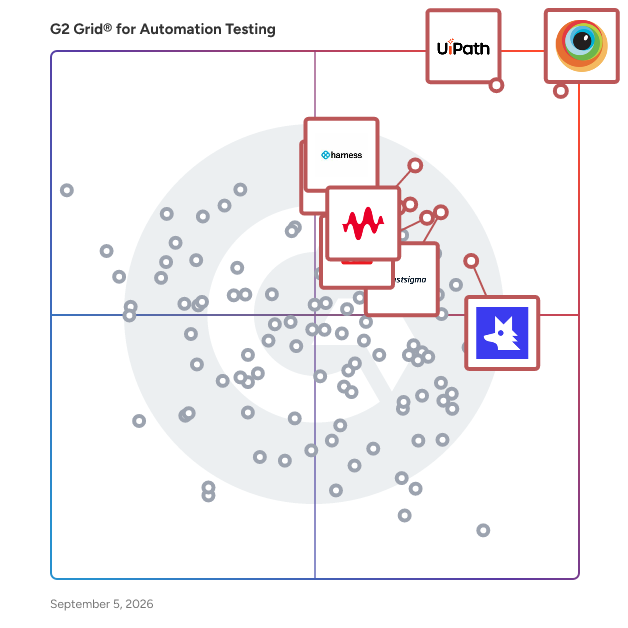


  ## How Many Automation Testing Tools Products Does G2 Track?
**Total Products under this Category:** 294

  
## How Does G2 Rank Automation Testing Tools Products?

**Why You Can Trust G2's Software Rankings:**

- 30 Analysts and Data Experts
- 18,100+ Authentic Reviews
- 294+ Products
- Unbiased Rankings

G2's software rankings are built on verified user reviews, rigorous moderation, and a consistent research methodology maintained by a team of analysts and data experts. Each product is measured using the same transparent criteria, with no paid placement or vendor influence. While reviews reflect real user experiences, which can be subjective, they offer valuable insight into how software performs in the hands of professionals. Together, these inputs power the G2 Score, a standardized way to compare tools within every category.

  
## Which Automation Testing Tools Is Best for Your Use Case?

- **Leader:** [BrowserStack](https://www.g2.com/products/browserstack/reviews)
- **Highest Performer:** [ContextQA](https://www.g2.com/products/contextqa/reviews)
- **Easiest to Use:** [TestFirst](https://www.g2.com/products/testfirst/reviews)
- **Top Trending:** [Qodex.ai](https://www.g2.com/products/qodex-ai/reviews)
- **Best Free Software:** [BrowserStack](https://www.g2.com/products/browserstack/reviews)

  
---

**Sponsored**

### Tricentis qTest

Tricentis qTest is a scalable test management solution that integrates with planning, testing, and DevOps tools, like Jira, Selenium, and Jenkins, giving teams a complete, unified view of testing throughout the software development cycle. ItL supports Agile, waterfall, or any hybrid methodology, allowing QA and development teams to approach testing strategically and collaboratively, and to release higher-quality software faster.


[Visit website](https://www.g2.com/external_clickthroughs/record?secure%5Bad_program%5D=ppc&amp;secure%5Bad_slot%5D=category_product_list&amp;secure%5Bcategory_id%5D=108&amp;secure%5Bdisplayable_resource_id%5D=108&amp;secure%5Bdisplayable_resource_type%5D=Category&amp;secure%5Bmedium%5D=sponsored&amp;secure%5Bplacement_reason%5D=page_category&amp;secure%5Bplacement_resource_ids%5D%5B%5D=108&amp;secure%5Bprioritized%5D=false&amp;secure%5Bproduct_id%5D=5769&amp;secure%5Bresource_id%5D=108&amp;secure%5Bresource_type%5D=Category&amp;secure%5Bsource_type%5D=category_page&amp;secure%5Bsource_url%5D=https%3A%2F%2Fwww.g2.com%2Fcategories%2Fautomation-testing-tools%3Fpage%3D19&amp;secure%5Btoken%5D=c2d69c5e127591b61507bc450984aaa7cfe70911ae4f92b2dab42d046fbae0f9&amp;secure%5Burl%5D=https%3A%2F%2Fwww.tricentis.com%2F%3Futm_medium%3Dcpc%26utm_source%3Dg2clicks%26utm_campaign%3Dna_na_na_ams_en_2026-05%26utmc_placement%3Dautomation-testing%26utmc_product%3Dna%26utmc_lptype%3Ddefault&amp;secure%5Burl_type%5D=custom_url)

---

  ## What Are the Top-Rated Automation Testing Tools Products in 2026?
### 1. [Qualitia](https://www.g2.com/products/qualitia-software-qualitia/reviews)
  Qualitia is a no-code test automation platform specially designed for global enterprises to test any type of application with Fast, Reliable, and Easy automation. With Qualitia you can test any type of application including Web, Mobile, Desktop, API, and even packaged applications like Salesforce without the need for writing a single line of code. Over 150+ customers including Fortune 500 companies trust Qualitia for all their software testing needs.


  **Average Rating:** 4.5/5.0
  **Total Reviews:** 22
**How Do G2 Users Rate Qualitia?**

- **Reliability:** 9.2/10 (Category avg: 8.7/10)
- **Thoroughness:** 9.1/10 (Category avg: 8.7/10)
- **Test Feedback:** 9.0/10 (Category avg: 8.8/10)
- **Has the product been a good partner in doing business?:** 9.2/10 (Category avg: 9.2/10)

**Who Is the Company Behind Qualitia?**

- **Seller:** [Qualitia Software](https://www.g2.com/sellers/qualitia-software)
- **Year Founded:** 2011
- **HQ Location:** Pune, Maharashtra
- **Twitter:** @Qualitia (1,191 Twitter followers)
- **LinkedIn® Page:** https://www.linkedin.com/company/qualitia/ (113 employees on LinkedIn®)

**Who Uses This Product?**
  - **Company Size:** 35% Enterprise, 35% Small-Business


#### What Are Qualitia's Pros and Cons?

**Pros:**

- Automation (7 reviews)
- Ease of Use (6 reviews)
- Automation Ease (4 reviews)
- Customer Support (4 reviews)
- Ease of Learning (3 reviews)

**Cons:**

- Missing Features (3 reviews)
- Expensive (2 reviews)
- Bug Issues (1 reviews)
- Configuration Issues (1 reviews)
- Editing Difficulties (1 reviews)

### 2. [testRigor](https://www.g2.com/products/testrigor/reviews)
  Software QA testers use testRigor codeless testing tool to create robust end-to-end functional tests. Software testing made easy: create cross-platform tests using no code for web, native and hybrid mobile applications, desktop, and API. Utilize email testing, visual testing and audio testing built-in features. Create your automated tests 15x faster and with 95% less test maintenance than traditional automation testing tools. Execute tests in parallel and receive results in minutes, not hours. Easily integrate with your favorite issue management tools, CI/CD tools, and so on. It’s easy to scale your software testing with testRigor. Best for: Software teams who want to rapidly increase their test automation coverage while also spending much less time on maintenance. testRigor aims to be the only automation tool needed - with broad support, cross-platform and cross-browser testing, reporting and screenshots for every step


  **Average Rating:** 4.7/5.0
  **Total Reviews:** 19
**How Do G2 Users Rate testRigor?**

- **Reliability:** 9.7/10 (Category avg: 8.7/10)
- **Thoroughness:** 9.7/10 (Category avg: 8.7/10)
- **Test Feedback:** 9.7/10 (Category avg: 8.8/10)
- **Has the product been a good partner in doing business?:** 10.0/10 (Category avg: 9.2/10)

**Who Is the Company Behind testRigor?**

- **Seller:** [TestRigor](https://www.g2.com/sellers/testrigor)
- **Year Founded:** 2022
- **HQ Location:** Brooklyn, US
- **Twitter:** @testrigor (907 Twitter followers)
- **LinkedIn® Page:** https://www.linkedin.com/company/testrigor/ (285 employees on LinkedIn®)

**Who Uses This Product?**
  - **Top Industries:** Computer Software
  - **Company Size:** 70% Small-Business, 30% Mid-Market


#### What Are testRigor's Pros and Cons?

**Pros:**

- Ease of Use (7 reviews)
- Automation (5 reviews)
- Time-saving (5 reviews)
- Customer Support (4 reviews)
- Automation Ease (2 reviews)

**Cons:**

- Testing Difficulties (3 reviews)
- Testing Issues (3 reviews)
- Bug Issues (2 reviews)
- Technical Issues (2 reviews)
- Expensive (1 reviews)

### 3. [TestProject](https://www.g2.com/products/testproject/reviews)
  TestProject is the world&#39;s first 100% free test automation platform for Web, Android, iOS and API testing, trusted by over 150,000 users in the testing community. TestProject helps testers and developers ensure quality with speed, by eliminating maintenance &amp; setup hassles and empowering Selenium &amp; Appium with AI self-healing technology. No matter your skillset, TestProject has all the tools you need to ensure a top-notch automation experience, using advanced codeless features or open source SDK compatible with native Selenium APIs. To top it off, you also get to leverage their useful Addons library, out-of-the-box beautiful test reports, seamless integrations into your CI/CD pipelines, worldwide team collaboration options to boost efficiency, and all of this at no cost. By fostering a collaborative community that can come together, as individuals and in teams, TestProject is shaping the future of software testing and helping teams overcome testing challenges with ease and deliver flawless products. Founded in 2015 and acquired by Tricentis in 2019. To learn more, visit https://testproject.io/


  **Average Rating:** 4.7/5.0
  **Total Reviews:** 14
**How Do G2 Users Rate TestProject?**

- **Reliability:** 10.0/10 (Category avg: 8.7/10)
- **Thoroughness:** 10.0/10 (Category avg: 8.7/10)
- **Test Feedback:** 10.0/10 (Category avg: 8.8/10)
- **Has the product been a good partner in doing business?:** 9.6/10 (Category avg: 9.2/10)

**Who Is the Company Behind TestProject?**

- **Seller:** [TestProject](https://www.g2.com/sellers/testproject)
- **Year Founded:** 2007
- **HQ Location:** Petah-Tikva, IL
- **LinkedIn® Page:** https://www.linkedin.com/company/testproject-io/ (1 employees on LinkedIn®)

**Who Uses This Product?**
  - **Company Size:** 43% Mid-Market, 36% Small-Business


### 4. [Perfecto](https://www.g2.com/products/perfecto/reviews)
  Perfecto by Perforce is the web and mobile app testing platform most trusted in the industry. Patchwork testing strategies are a thing of the past because with Perfecto, users enjoy a seamless, end-to-end testing experience from anywhere in the world. Leverage the enterprise-grade cloud to test on real devices, virtual devices, or a combination of both — whichever suits your needs best. Bug detection is faster than ever and allows users to detect and fix much earlier in the cycle. Perfecto’s robust smart reporting features help identify issues quickly through test failure analysis and false-negative filtering. Automate testing from your CI and synch all your reporting in one place. Fix defects quickly with the industry’s most comprehensive rich test artifacts. Network virtualization and user simulation let you test like your users and reduce the chance of escaped defects. Extend test coverage and fully integrate with your entire toolchain. Continuous testing has never been more achievable thanks to Perfecto’s unmatched advanced capabilities, including BDD &amp; codeless automation, parallel test executions &amp; bursting capabilities, open integrations with leading DevOps tools and automation frameworks, CI dashboards, heatmaps, rich artifacts collection, and ML-driven test analytics. Revolutionize your testing strategy and find out why more than half of Fortune 500 companies trust Perfecto as their testing partner. 99.9% uptime means better testing, time and money saved, and a superior app as the end result. For more information or to start a 14-day free trial, visit www.perfecto.io.


  **Average Rating:** 4.4/5.0
  **Total Reviews:** 92
**How Do G2 Users Rate Perfecto?**

- **Reliability:** 8.3/10 (Category avg: 8.7/10)
- **Thoroughness:** 8.1/10 (Category avg: 8.7/10)
- **Test Feedback:** 8.1/10 (Category avg: 8.8/10)
- **Has the product been a good partner in doing business?:** 8.8/10 (Category avg: 9.2/10)

**Who Is the Company Behind Perfecto?**

- **Seller:** [Perforce](https://www.g2.com/sellers/perforce)
- **Year Founded:** 1995
- **HQ Location:** Minneapolis, MN
- **Twitter:** @perforce (5,094 Twitter followers)
- **LinkedIn® Page:** https://www.linkedin.com/company/perforce/ (2,032 employees on LinkedIn®)

**Who Uses This Product?**
  - **Top Industries:** Banking, Financial Services
  - **Company Size:** 53% Enterprise, 31% Mid-Market


#### What Are Perfecto's Pros and Cons?

**Pros:**

- Automation (1 reviews)
- Automation Support (1 reviews)
- Bug Detection (1 reviews)
- Connectivity (1 reviews)
- Device Variety (1 reviews)

**Cons:**

- Expensive (1 reviews)
- Learning Curve (1 reviews)

### 5. [Sauce Labs](https://www.g2.com/products/sauce-labs/reviews)
  In a world that relies on code, Sauce Labs strives to make it work for everyone, everywhere and every time. This is digital confidence. Sauce Labs is the leading provider of continuous test and error reporting solutions that gives companies confidence to deliver a trusted digital brand experience to their customers. The Sauce Labs Continuous Testing Cloud identifies quality signals in development and production, accelerating the ability to release and update web and mobile applications that look, function and perform exactly as they should on every browser, operating system and device, every single time. For more information, please visit https://saucelabs.com.


  **Average Rating:** 4.3/5.0
  **Total Reviews:** 166
**How Do G2 Users Rate Sauce Labs?**

- **Reliability:** 7.7/10 (Category avg: 8.7/10)
- **Thoroughness:** 8.0/10 (Category avg: 8.7/10)
- **Test Feedback:** 8.0/10 (Category avg: 8.8/10)
- **Has the product been a good partner in doing business?:** 8.4/10 (Category avg: 9.2/10)

**Who Is the Company Behind Sauce Labs?**

- **Seller:** [Sauce Labs](https://www.g2.com/sellers/sauce-labs)
- **Year Founded:** 2008
- **HQ Location:** San Francisco, CA
- **Twitter:** @saucelabs (12,607 Twitter followers)
- **LinkedIn® Page:** https://www.linkedin.com/company/891955/ (332 employees on LinkedIn®)

**Who Uses This Product?**
  - **Who Uses This:** Software Engineer, Senior Software Engineer
  - **Top Industries:** Information Technology and Services, Computer Software
  - **Company Size:** 49% Enterprise, 39% Mid-Market


#### What Are Sauce Labs's Pros and Cons?

**Pros:**

- Ease of Use (8 reviews)
- Automation (7 reviews)
- Cross-Browser Testing (7 reviews)
- Real-time Testing (6 reviews)
- Real Devices (5 reviews)

**Cons:**

- Learning Curve (4 reviews)
- Complexity (2 reviews)
- Difficult Setup (2 reviews)
- Expensive (2 reviews)
- Learning Difficulty (2 reviews)

### 6. [Oracle Application Testing Suite](https://www.g2.com/products/oracle-application-testing-suite/reviews)
  Application Testing Suite is a comprehensive, integrated testing solution that ensures the quality, scalability, and availability of your Web applications, Web Services, packaged Oracle Applications and Oracle databases.


  **Average Rating:** 3.8/5.0
  **Total Reviews:** 29
**How Do G2 Users Rate Oracle Application Testing Suite?**

- **Reliability:** 6.7/10 (Category avg: 8.7/10)
- **Thoroughness:** 6.7/10 (Category avg: 8.7/10)
- **Has the product been a good partner in doing business?:** 7.6/10 (Category avg: 9.2/10)

**Who Is the Company Behind Oracle Application Testing Suite?**

- **Seller:** [Oracle](https://www.g2.com/sellers/oracle)
- **Year Founded:** 1977
- **HQ Location:** Austin, TX
- **Twitter:** @Oracle (827,981 Twitter followers)
- **LinkedIn® Page:** https://www.linkedin.com/company/1028/ (199,301 employees on LinkedIn®)
- **Ownership:** NYSE:ORCL

**Who Uses This Product?**
  - **Top Industries:** Information Technology and Services
  - **Company Size:** 52% Enterprise, 33% Small-Business


### 7. [Playwright](https://www.g2.com/products/playwright/reviews)
  Playwright is an open-source automation framework developed by Microsoft, designed for end-to-end testing of web applications across multiple browsers and platforms. It enables developers and testers to write reliable and efficient tests using a single API, ensuring consistent behavior across Chromium, Firefox, and WebKit browsers. With support for various programming languages, including JavaScript, TypeScript, Python, and C#, Playwright offers flexibility and ease of integration into diverse development environments. Its modern architecture and rich feature set make it a powerful tool for automating complex web interactions and ensuring application quality. Key Features and Functionality: - Cross-Browser Support: Automate tests across Chromium, Firefox, and WebKit using a unified API, facilitating comprehensive cross-browser testing. - Cross-Platform Compatibility: Run tests on Windows, macOS, and Linux, ensuring consistent application behavior across different operating systems. - Headless and Headful Modes: Execute tests in headless mode for faster, resource-efficient testing, or in headful mode for debugging and visualization purposes. - Parallel Test Execution: Support for parallel test execution reduces overall test suite runtime, enhancing testing efficiency. - Auto-Waiting Mechanism: Automatically waits for elements to be ready before interacting with them, reducing flaky tests and improving reliability. - Network Interception and Mocking: Intercept and modify network requests and responses, enabling testing without relying on backend services. - Advanced Debugging Tools: Utilize tools like Playwright Inspector and Trace Viewer for step-by-step debugging and post-mortem analysis. - Multiple Language Support: Write tests in JavaScript, TypeScript, Python, Java, or C#, accommodating diverse development preferences. Primary Value and Problem Solved: Playwright addresses the challenges of modern web application testing by providing a robust, efficient, and versatile automation framework. Its cross-browser and cross-platform capabilities ensure that applications perform consistently across different environments, reducing the risk of browser-specific issues. The framework&#39;s support for multiple programming languages allows teams to integrate it seamlessly into their existing workflows. Features like auto-waiting, parallel execution, and advanced debugging tools enhance test reliability and speed, leading to faster development cycles and higher-quality applications. By simplifying complex testing scenarios and offering a comprehensive set of tools, Playwright empowers teams to deliver reliable and performant web applications.


  **Average Rating:** 4.8/5.0
  **Total Reviews:** 12
**How Do G2 Users Rate Playwright?**

- **Reliability:** 9.4/10 (Category avg: 8.7/10)
- **Thoroughness:** 9.2/10 (Category avg: 8.7/10)
- **Test Feedback:** 8.9/10 (Category avg: 8.8/10)
- **Has the product been a good partner in doing business?:** 10.0/10 (Category avg: 9.2/10)

**Who Is the Company Behind Playwright?**

- **Seller:** [Playwright](https://www.g2.com/sellers/playwright)
- **Year Founded:** 2020
- **HQ Location:** Sunnyvale, US
- **LinkedIn® Page:** https://www.linkedin.com/company/playwrightweb (51 employees on LinkedIn®)

**Who Uses This Product?**
  - **Top Industries:** Computer Software
  - **Company Size:** 50% Enterprise, 33% Small-Business


#### What Are Playwright's Pros and Cons?

**Pros:**

- Easy Setup (2 reviews)
- Speed (2 reviews)
- Automation (1 reviews)
- Automation Support (1 reviews)
- Cross-Browser Testing (1 reviews)

**Cons:**

- Difficult Navigation (1 reviews)
- Learning Curve (1 reviews)
- Slow Performance (1 reviews)

### 8. [OpenText Professional Performance Engineering](https://www.g2.com/products/opentext-professional-performance-engineering/reviews)
  LoadRunner is the industry-standard software solution for application performance and load testing. LoadRunner emulates hundreds or thousands of concurrent virtual users, with minimal hardware, to apply accurate workloads to any application. As it drives load against the system, LoadRunner captures end-user response times for business processes and transactions to determine whether the application can meet the required service-level agreements. Nonintrusive, real-time performance monitors captures real-time performance data from every component of application infrastructure. After the test completes, the LoadRunner analysis engine provides a single view of end-user response time and infrastructure-level performance to identify the most likely causes of performance issues. Learn more at microfocus.com/loadrunner


  **Average Rating:** 4.4/5.0
  **Total Reviews:** 34
**How Do G2 Users Rate OpenText Professional Performance Engineering?**

- **Has the product been a good partner in doing business?:** 7.8/10 (Category avg: 9.2/10)

**Who Is the Company Behind OpenText Professional Performance Engineering?**

- **Seller:** [OpenText](https://www.g2.com/sellers/opentext)
- **Year Founded:** 1991
- **HQ Location:** Waterloo, ON
- **Twitter:** @OpenText (21,580 Twitter followers)
- **LinkedIn® Page:** https://www.linkedin.com/company/2709/ (23,339 employees on LinkedIn®)
- **Ownership:** NASDAQ:OTEX

**Who Uses This Product?**
  - **Top Industries:** Information Technology and Services
  - **Company Size:** 80% Enterprise, 15% Mid-Market


### 9. [Meticulous](https://www.g2.com/products/meticulous/reviews)
  Meticulous AI creates and maintains a suite of end-to-end tests from recorded user sessions. Meticulous continually adds new tests as new features or edge cases are introduced, and removes old tests as they become out of date - ensuring your test suite is always up to date and complete, without any intervention required by developers. Add a script tag to your local development, staging, and preview URL environments to record sessions (optional: record production sessions too for additional coverage). Built from the Chromium level up with a deterministic scheduling engine -- making it the only testing tool that eliminates flakes. Tests are heavily parallelized across a compute cluster, allowing you to test 1000s of screens and get results in under 120 seconds.


  **Average Rating:** 5.0/5.0
  **Total Reviews:** 11
**How Do G2 Users Rate Meticulous?**

- **Reliability:** 9.2/10 (Category avg: 8.7/10)
- **Thoroughness:** 9.7/10 (Category avg: 8.7/10)
- **Test Feedback:** 10.0/10 (Category avg: 8.8/10)
- **Has the product been a good partner in doing business?:** 10.0/10 (Category avg: 9.2/10)

**Who Is the Company Behind Meticulous?**

- **Seller:** [Meticulous](https://www.g2.com/sellers/meticulous)
- **HQ Location:** San Francisco, California
- **Twitter:** @meticulousgabe (285 Twitter followers)
- **LinkedIn® Page:** https://www.linkedin.com/company/alwaysmeticulous/ (19 employees on LinkedIn®)

**Who Uses This Product?**
  - **Top Industries:** Computer Software
  - **Company Size:** 82% Small-Business, 18% Mid-Market


#### What Are Meticulous's Pros and Cons?

**Pros:**

- Automation (1 reviews)
- Bug Detection (1 reviews)
- Cost-Effective (1 reviews)
- Customer Support (1 reviews)
- Ease of Use (1 reviews)

**Cons:**

- Learning Curve (1 reviews)
- Overwhelming (1 reviews)

### 10. [TestStand](https://www.g2.com/products/teststand/reviews)
  TestStand is test management software that helps you develop, debug, and deploy test systems and provides full visibility into testing process and results. TestStand is application software that helps engineers quickly develop robust automated test and validation systems. You can extend the functionality of your system by developing test sequences in TestStand that integrate code modules written in any programming language. You can use built-in functionality to profile and optimize speed and parallelism before deploying test systems to production. TestStand provides extensible plug-ins for reporting, database logging, and connectivity to other systems, meeting the needs of any environment. With TestStand, you can confidently deploy test systems with increased throughput that run at the speed of production.


  **Average Rating:** 4.0/5.0
  **Total Reviews:** 12
**How Do G2 Users Rate TestStand?**

- **Reliability:** 8.1/10 (Category avg: 8.7/10)
- **Thoroughness:** 7.8/10 (Category avg: 8.7/10)
- **Test Feedback:** 8.3/10 (Category avg: 8.8/10)
- **Has the product been a good partner in doing business?:** 8.3/10 (Category avg: 9.2/10)

**Who Is the Company Behind TestStand?**

- **Seller:** [NI](https://www.g2.com/sellers/ni)
- **Year Founded:** 1976
- **HQ Location:** Austin, TX
- **Twitter:** @NIglobal (26,258 Twitter followers)
- **LinkedIn® Page:** https://www.linkedin.com/company/3433 (7,996 employees on LinkedIn®)
- **Ownership:** NASDAQ: NATI

**Who Uses This Product?**
  - **Company Size:** 50% Mid-Market, 25% Enterprise


### 11. [TestFirst](https://www.g2.com/products/testfirst/reviews)
  At TestFirst, we champion 1QA: the one-man QA team for the AI era. Powered by TestFirst AI, 1QA gives companies a complete QA function through a single QA engineer. It is built on top of TestFirst, our full-stack QA platform for generating, automating, and managing test coverage in one place. Automation, manual testing, issue tracking, and more — without the overhead of building and managing a traditional QA team. Just faster, leaner, AI-powered QA.


  **Average Rating:** 5.0/5.0
  **Total Reviews:** 31
**How Do G2 Users Rate TestFirst?**

- **Has the product been a good partner in doing business?:** 10.0/10 (Category avg: 9.2/10)

**Who Is the Company Behind TestFirst?**

- **Seller:** [FirstCall QA](https://www.g2.com/sellers/firstcall-qa)
- **Year Founded:** 2021
- **HQ Location:** Singapore
- **Twitter:** @FirstCallQA (2 Twitter followers)
- **LinkedIn® Page:** https://www.linkedin.com/company/firstcall-qa/ (11 employees on LinkedIn®)

**Who Uses This Product?**
  - **Top Industries:** Computer Software
  - **Company Size:** 65% Mid-Market, 35% Small-Business


#### What Are TestFirst's Pros and Cons?

**Pros:**

- Ease of Use (23 reviews)
- Test Cases (21 reviews)
- Efficiency Improvement (10 reviews)
- Jira Integration (8 reviews)
- User Interface (8 reviews)

**Cons:**

- Limited Device Options (5 reviews)
- Difficult Learning Curve (4 reviews)
- Poor Reporting (4 reviews)
- Poor UI (2 reviews)
- Integration Issues (1 reviews)

### 12. [Provar](https://www.g2.com/products/provar/reviews)
  Provar provides a Salesforce-centric, low-maintenance testing solution that delivers speed, reliability, and scalability. With comprehensive coverage, integration support, and AI at every stage of the testing lifecycle, Provar helps QA teams to confidently release high-quality software faster.


  **Average Rating:** 4.3/5.0
  **Total Reviews:** 171
**How Do G2 Users Rate Provar?**

- **Reliability:** 8.1/10 (Category avg: 8.7/10)
- **Thoroughness:** 8.2/10 (Category avg: 8.7/10)
- **Test Feedback:** 8.3/10 (Category avg: 8.8/10)
- **Has the product been a good partner in doing business?:** 9.0/10 (Category avg: 9.2/10)

**Who Is the Company Behind Provar?**

- **Seller:** [Provar](https://www.g2.com/sellers/provar)
- **Year Founded:** 2000
- **HQ Location:** London, GB
- **Twitter:** @ProvarTesting (1,318 Twitter followers)
- **LinkedIn® Page:** https://www.linkedin.com/company/10639460/ (136 employees on LinkedIn®)

**Who Uses This Product?**
  - **Who Uses This:** Software Engineer, Test Analyst
  - **Top Industries:** Information Technology and Services, Computer Software
  - **Company Size:** 40% Enterprise, 36% Small-Business


#### What Are Provar's Pros and Cons?

**Pros:**

- Ease of Use (3 reviews)
- Salesforce Integration (3 reviews)
- Customer Support (2 reviews)
- Ease of Learning (2 reviews)
- Easy Integrations (2 reviews)

**Cons:**

- Complexity (1 reviews)
- Expensive (1 reviews)
- Learning Curve (1 reviews)
- Slow Performance (1 reviews)

### 13. [Loadmill](https://www.g2.com/products/loadmill/reviews)
  AI-Native Test Automation: Creation, Maintenance &amp; Analysis AN END-TO-END SOLUTION Harnessing AI Across Test Automation Lifecycle Loadmill is an innovative AI-driven test automation platform designed to streamline the entire test automation lifecycle. Our platform harnesses artificial intelligence to simplify the creation, maintenance, and analysis of test scripts, allowing QA engineers to generate robust, automated test scripts from manual test cases with minimal effort. By focusing on testing through the API layer, Loadmill provides a solution that is fast, cost-effective, and platform-agnostic, enabling comprehensive cross-platform end-to-end testing. Integrating seamlessly with existing SDLC tools and workflows, Loadmill ensures compatibility and enhances productivity in diverse development environments. The platform&#39;s AI capabilities extend beyond test creation. Loadmill assists with test maintenance by intelligently refactoring test scripts in response to application changes, significantly reducing the manual effort required. Additionally, Loadmill&#39;s AI-driven analysis tools help QA engineers quickly identify and resolve test failures, providing detailed root cause analyses and suggesting potential fixes. This comprehensive approach not only boosts QA and development productivity but also increases test coverage and reduces test cycle duration. Designed for enterprise customers and complex multi-system applications, Loadmill is a versatile and powerful solution for modern software testing needs, offering robust integrations with various CI/CD tools, source control systems, and ticketing platforms. Learn more: https://www.loadmill.com/mobile-testing Book a demo: https://www.loadmill.com/schedule-demo/ Website https://www.loadmill.com


  **Average Rating:** 4.6/5.0
  **Total Reviews:** 33
**How Do G2 Users Rate Loadmill?**

- **Reliability:** 9.4/10 (Category avg: 8.7/10)
- **Thoroughness:** 8.9/10 (Category avg: 8.7/10)
- **Test Feedback:** 9.3/10 (Category avg: 8.8/10)
- **Has the product been a good partner in doing business?:** 9.5/10 (Category avg: 9.2/10)

**Who Is the Company Behind Loadmill?**

- **Seller:** [Loadmill Ltd.](https://www.g2.com/sellers/loadmill-ltd)
- **Year Founded:** 2018
- **HQ Location:** Palo Alto, US
- **Twitter:** @LoadmillTeam (137 Twitter followers)
- **LinkedIn® Page:** https://www.linkedin.com/company/loadmill (20 employees on LinkedIn®)

**Who Uses This Product?**
  - **Top Industries:** Computer Software, Computer Games
  - **Company Size:** 48% Mid-Market, 33% Small-Business


### 14. [DevAssure](https://www.g2.com/products/devassure/reviews)
  DevAssure is a SaaS-based End-to-End Test Automation Platform. Users can seamlessly perform Web and API test automation. Moreover, DevAssure has the provision to perform accessibility tests, visual tests, etc. With DevAssure&#39;s test automation tool, QA Professionals can generate test cases using AI, simultaneously perform web and API tests together, record test steps, and generate test cases from Figma UI mock-ups. Test case creation, Execution, and Monitoring can be performed using &quot;DevAssure test automation platform&quot;. Users can eliminate the pain of using several testing tools. Empower your SDETs and QA Professionals with the best test automation tool. To learn more about DevAssure test automation platform visit our website.


  **Average Rating:** 4.6/5.0
  **Total Reviews:** 41
**How Do G2 Users Rate DevAssure?**

- **Reliability:** 8.8/10 (Category avg: 8.7/10)
- **Thoroughness:** 8.8/10 (Category avg: 8.7/10)
- **Test Feedback:** 8.6/10 (Category avg: 8.8/10)
- **Has the product been a good partner in doing business?:** 10.0/10 (Category avg: 9.2/10)

**Who Is the Company Behind DevAssure?**

- **Seller:** [DevAssure](https://www.g2.com/sellers/devassure)
- **Year Founded:** 2024
- **HQ Location:** Chennai, IN
- **LinkedIn® Page:** https://www.linkedin.com/company/devassure (8 employees on LinkedIn®)
- **Ownership:** DevAssure

**Who Uses This Product?**
  - **Who Uses This:** SDET
  - **Top Industries:** Computer Software, Financial Services
  - **Company Size:** 51% Mid-Market, 44% Small-Business


#### What Are DevAssure's Pros and Cons?

**Pros:**

- Ease of Use (17 reviews)
- Automation Focus (16 reviews)
- Automation (15 reviews)
- Time-Saving (11 reviews)
- Speed (10 reviews)

**Cons:**

- Slow Loading (8 reviews)
- Slow Performance (5 reviews)
- Learning Curve (4 reviews)
- Software Bugs (4 reviews)
- Bug Issues (2 reviews)

### 15. [QA Touch](https://www.g2.com/products/qa-touch/reviews)
  QA Touch is a sophisticated test management tool for QA teams all around the world. We believe in making your work easy and providing everything you need on one platform. With our all-inclusive Test Case Management tool, expediting testing and projects will be a piece of cake. QA Touch offers a natural and intuitive method of execution. We know it’s annoying to adjust to new processes and have crafted a tool that adapts to your systems and way of work. Allocating and tracking issues is a built-in function that allows you to post an issue while running a test case, eliminating the need to transfer between software. It’s never been easier to copy and move the test cases from one project to another, or between the modules within a project. The tool has been crafted to help level the playing field and offer companies a means to truly compete with the giants in their industry, without burning a hole in their pockets. With QA Touch, enjoy: 1. A single, common repository for all your test assets. 2. Enterprise features include project productivity and Audit logs to track your working progress and project. 3. Managing Issues made easy with Seamless two-way integration with JIRA 4. Microsoft Azure boards to make your project management easier than ever. 5. Made Test management a cakewalk with our intuitive features like the option to pin the project, Status updates, help, logs, and reports right from the dashboard. 6. One point is Integration with Jenkin to do all the CI/CD activities 7. Handy QA Touch-Cypress reporter integration to sync your cypress.io automation test results to QA Touch. 8. Easy-to-use Reporter for end-to-end free and open source automation tool Test Cafe. 9. Leverage QA Touch Boards to make agile project management more effortless. Boards Organize, Customize, Visualize, and Track the trails of your work. QA Touch offers an affordable test solution with straightforward capabilities for creating test cases, bundling test suites, performing test runs, third-party tool integrations, and generating flawless test Reports, Requirements, In-built Bug-Tracking, Mind Maps, Boards, Performance and people can manage their testing operations from a single interface (Dashboard). Users will like the vast array of user-friendly features available, which range from mapping and developing test cases to tracking the team&#39;s actions. QA Touch promotes excellence in the delivery of high-quality projects.


  **Average Rating:** 4.2/5.0
  **Total Reviews:** 78
**How Do G2 Users Rate QA Touch?**

- **Reliability:** 8.3/10 (Category avg: 8.7/10)
- **Thoroughness:** 7.9/10 (Category avg: 8.7/10)
- **Test Feedback:** 7.5/10 (Category avg: 8.8/10)
- **Has the product been a good partner in doing business?:** 8.5/10 (Category avg: 9.2/10)

**Who Is the Company Behind QA Touch?**

- **Seller:** [DCKAP](https://www.g2.com/sellers/dckap)
- **Year Founded:** 2005
- **HQ Location:** Austin, TX
- **Twitter:** @DCKAP (1,221 Twitter followers)
- **LinkedIn® Page:** https://www.linkedin.com/company/754694/ (201 employees on LinkedIn®)

**Who Uses This Product?**
  - **Top Industries:** Computer Software, Information Technology and Services
  - **Company Size:** 66% Small-Business, 29% Mid-Market


#### What Are QA Touch's Pros and Cons?

**Pros:**

- Ease of Use (10 reviews)
- Test Cases (8 reviews)
- User Interface (8 reviews)
- Organization (6 reviews)
- Integrations (5 reviews)

**Cons:**

- Poor UI Design (5 reviews)
- Limited Customization (4 reviews)
- Limited Free Access (4 reviews)
- Poor UI (4 reviews)
- Poor Reporting (3 reviews)

### 16. [Subject7](https://www.g2.com/products/subject7/reviews)
  Subject7 enables “true” codeless automation, empowering anyone to become an automation expert.&amp;nbsp; Our platform accelerates test authoring, reduces test maintenance, and scales in the cloud or on-prem with enterprise-grade security.&amp;nbsp; Subject7 unifies testing delivering functional, regression, end to end, API, database, load, security, and accessibility testing in a single solution.&amp;nbsp; We integrate easily into your DevOps and Agile tooling ecosystem with native plugins and open APIs.&amp;nbsp; Subject7 has attained SOC2 Type II certification; our customers include highly secure enterprises and major government agencies.


  **Average Rating:** 4.9/5.0
  **Total Reviews:** 13
**How Do G2 Users Rate Subject7?**

- **Reliability:** 10.0/10 (Category avg: 8.7/10)
- **Thoroughness:** 10.0/10 (Category avg: 8.7/10)
- **Test Feedback:** 10.0/10 (Category avg: 8.8/10)
- **Has the product been a good partner in doing business?:** 9.8/10 (Category avg: 9.2/10)

**Who Is the Company Behind Subject7?**

- **Seller:** [Subject7](https://www.g2.com/sellers/subject7)
- **Year Founded:** 2011
- **HQ Location:** McLean, VA
- **Twitter:** @Subject_7 (67 Twitter followers)
- **LinkedIn® Page:** https://www.linkedin.com/company/subject7/ (34 employees on LinkedIn®)

**Who Uses This Product?**
  - **Company Size:** 46% Enterprise, 31% Mid-Market


### 17. [Endtest](https://www.g2.com/products/endtest/reviews)
  Endtest is an agentic AI platform for end-to-end test automation, built to help teams create, run, maintain, and scale automated tests faster, without writing code. It combines a low-code testing interface with powerful AI agents that can generate editable tests, assist with test maintenance, import tests from external files, and help teams automate complex real-world workflows across web, mobile, API, database, email, SMS, file, visual, and accessibility testing. With Endtest, users can create automated tests manually, record them, import them, or generate them with the AI Test Creation Agent. Unlike generic AI tools that produce fragile code or black-box results, Endtest generates standard editable test steps that can be reviewed, modified, reused, and executed like any other Endtest test. This gives teams the speed of AI while preserving control, transparency, and long-term maintainability. Endtest is designed for software developers, QA teams, product managers, startup founders, and organizations that want reliable automated testing without the overhead of building and maintaining a custom framework. Its intuitive interface makes test automation accessible to non-technical users, while still offering the depth needed by technical teams for advanced workflows, CI/CD integration, cross-browser testing, real device and browser coverage, geolocation testing, API checks, database validation, file handling, email and SMS verification, and detailed reporting. The platform includes advanced agentic AI capabilities for test creation, test maintenance, and migration from other tools. Users can describe what they want to test, attach files, or import test definitions from formats such as CSV, JSON, or TXT, and Endtest can convert those inputs into standard automated test steps. Endtest also supports self-healing tests, helping reduce maintenance by automatically finding alternative locators when application elements change. Endtest stands out through its focus on speed, reliability, and unlimited usage. Teams get unlimited AI usage and unlimited test executions, without worrying about tokens, credits, or usage-based AI limits. This makes it especially useful for teams that want to adopt AI-powered testing at scale without unpredictable costs or interruptions. The platform runs tests in the cloud across browsers, operating systems, screen resolutions, and geolocations, allowing teams to validate critical user journeys in realistic environments. It also integrates with modern development workflows and CI/CD pipelines, making it easy to run regression suites automatically and catch issues before they reach production. By combining agentic AI, low-code test automation, unlimited AI usage, unlimited test executions, self-healing capabilities, and broad end-to-end testing coverage, Endtest helps teams ship more reliable software faster. It is built for organizations that want the fastest, most reliable way to create and maintain automated tests while keeping full control over the testing process.


  **Average Rating:** 4.7/5.0
  **Total Reviews:** 53
**How Do G2 Users Rate Endtest?**

- **Reliability:** 8.8/10 (Category avg: 8.7/10)
- **Thoroughness:** 9.0/10 (Category avg: 8.7/10)
- **Test Feedback:** 9.2/10 (Category avg: 8.8/10)
- **Has the product been a good partner in doing business?:** 9.3/10 (Category avg: 9.2/10)

**Who Is the Company Behind Endtest?**

- **Seller:** [Endtest](https://www.g2.com/sellers/endtest)
- **Year Founded:** 2016
- **HQ Location:** Dover, Delaware
- **Twitter:** @endtest_io (2,456 Twitter followers)
- **LinkedIn® Page:** https://www.linkedin.com/company/10903516/ (4 employees on LinkedIn®)

**Who Uses This Product?**
  - **Who Uses This:** QA Engineer, Software Engineer
  - **Top Industries:** Computer Software, Information Technology and Services
  - **Company Size:** 54% Small-Business, 33% Mid-Market


#### What Are Endtest's Pros and Cons?

**Pros:**

- Intuitive UI (2 reviews)
- User Interface (2 reviews)
- Ease of Use (1 reviews)

**Cons:**

- Slow Performance (1 reviews)
- Testing Difficulties (1 reviews)

### 18. [Zebrunner](https://www.g2.com/products/zebrunner/reviews)
  Zebrunner is an AI-powered, unified platform that bridges the gap between manual and automated testing, enabling QA teams to work together seamlessly. Zebrunner Testing Platform leverages advanced AI to optimize and accelerate the testing process, from generating and autocompleting test cases to prioritizing failures and providing real-time insights. This unified approach ensures that all aspects of testing are integrated, streamlined, and aligned with your development cycle, ultimately leading to higher quality software and faster delivery times. Zebrunner Test Case Management is an integral component of the platform, offering a comprehensive solution for managing manual test cases. The tool simplifies test organization with features like split-screen navigation, customizable layouts, and drag-and-drop editing. Testers can gain real-time insights into their testing progress, quickly identifying and addressing blockers or failures. The integration of AI further accelerates the process by automating the creation and completion of test cases, allowing teams to focus on more critical tasks. Additionally, Zebrunner&#39;s customizable fields and filters enable tailored test management, ensuring that testing aligns with specific project requirements and goals. Zebrunner Automation Reporting is designed to empower teams with advanced reporting and analysis capabilities for their automated testing efforts. This module seamlessly integrates with existing test automation frameworks like TestNG, JUnit, PyTest, Cypress, and Playwright, or custom setups via REST API. It provides real-time insights into test execution, allowing teams to monitor progress, analyze failures, and access runtime artifacts such as logs and video recordings. By visualizing trends and metrics, Zebrunner helps teams identify areas for improvement and optimize their testing processes. The platform&#39;s robust reporting capabilities ensure that stakeholders have access to accurate and actionable data, facilitating smarter decision-making and continuous improvement in testing practices. In addition to its core features, Zebrunner offers rich integrations with tools like Jira, enabling bidirectional traceability and a unified workflow across testing and development teams. With its modular design, teams can choose to use the entire platform or select specific modules that best meet their needs. Zebrunner is also enterprise-ready, supporting large teams with features like role-based access control, Single Sign-On, and ISO 27001 certification for data security. This makes Zebrunner a scalable, secure, and efficient solution for organizations of all sizes looking to enhance their testing capabilities.


  **Average Rating:** 5.0/5.0
  **Total Reviews:** 23
**How Do G2 Users Rate Zebrunner?**

- **Reliability:** 9.6/10 (Category avg: 8.7/10)
- **Thoroughness:** 9.7/10 (Category avg: 8.7/10)
- **Test Feedback:** 9.9/10 (Category avg: 8.8/10)
- **Has the product been a good partner in doing business?:** 10.0/10 (Category avg: 9.2/10)

**Who Is the Company Behind Zebrunner?**

- **Seller:** [Zebrunner Inc.](https://www.g2.com/sellers/zebrunner-inc)
- **HQ Location:** Roseville, US
- **LinkedIn® Page:** https://www.linkedin.com/company/zebrunner (9 employees on LinkedIn®)

**Who Uses This Product?**
  - **Top Industries:** Computer Software, Health, Wellness and Fitness
  - **Company Size:** 71% Mid-Market, 25% Small-Business


#### What Are Zebrunner's Pros and Cons?

**Pros:**

- Ease of Use (19 reviews)
- User Interface (13 reviews)
- Intuitive UI (12 reviews)
- Automation (8 reviews)
- Time-saving (7 reviews)

**Cons:**

- Difficult Navigation (2 reviews)
- Missing Features (2 reviews)
- Bug Issues (1 reviews)
- Complexity (1 reviews)
- Difficult Learning Curve (1 reviews)

### 19. [SoftSpell](https://www.g2.com/products/softspell/reviews)
  SoftSpell is an AI-powered platform that accelerates software delivery and simplifies legacy modernization. It transforms unstructured requirements and existing codebases into structured outputs, enabling faster development with clarity and control. By combining intelligent requirement analysis, context-aware code generation, and automated testing, it ensures end-to-end traceability while reducing manual effort and rework. SoftSpell integrates seamlessly into existing workflows, helping teams deliver high-quality software faster.


  **Average Rating:** 4.5/5.0
  **Total Reviews:** 34
**How Do G2 Users Rate SoftSpell?**

- **Reliability:** 9.0/10 (Category avg: 8.7/10)
- **Thoroughness:** 9.0/10 (Category avg: 8.7/10)
- **Test Feedback:** 9.0/10 (Category avg: 8.8/10)
- **Has the product been a good partner in doing business?:** 8.9/10 (Category avg: 9.2/10)

**Who Is the Company Behind SoftSpell?**

- **Seller:** [SoftSpell](https://www.g2.com/sellers/softspell)
- **HQ Location:** Oak Brook, Illinois
- **LinkedIn® Page:** https://www.linkedin.com/company/softspell-ai/ (9 employees on LinkedIn®)

**Who Uses This Product?**
  - **Who Uses This:** Senior Software Engineer
  - **Top Industries:** Computer Software, Program Development
  - **Company Size:** 54% Enterprise, 37% Small-Business


#### What Are SoftSpell's Pros and Cons?

**Pros:**

- Time-saving (18 reviews)
- Coding Assistance (17 reviews)
- Automation (15 reviews)
- Quality Improvement (14 reviews)
- Ease of Use (11 reviews)

**Cons:**

- Slow Performance (9 reviews)
- Prompt Issues (7 reviews)
- Limited Multimedia Support (2 reviews)
- UX Improvement (2 reviews)
- Browser Compatibility (1 reviews)

### 20. [OpenText Application Quality Management](https://www.g2.com/products/opentext-application-quality-management/reviews)
  Micro Focus is now part of OpenText! OpenText™ Application Lifecycle Management (ALM)/Quality Center empowers you to achieve high efficiency in testing and manage quality with a requirements-driven, risk-based approach, align people with processes, mitigate application complexities, automate manual tasks, and establish end-to-end traceability. Gaining a complete view across all releases and projects grants you insights that help informed decisions. Multiple deployment options, open integrations with common tools, and strong data control make ALM/Quality Center ideal for ensuring compliance and adapting to changes. OpenText™ ALM/Quality Center serves as the single pane of glass to govern software quality and implement rigorous, auditable lifecycle processes. Designed for complex multi-application environments, organizations can achieve high efficiency in their testing and measure quality with a requirements-driven and risk-based testing approach. Advanced reporting provides a complete view across all releases to gain new insights and make informed decisions. With numerous deployment options, open integrations with common tools and strong data controls, ALM/Quality Center is a perfect choice for enterprises that need to enforce standards, ensure compliance and adapt to changing tools.


  **Average Rating:** 4.0/5.0
  **Total Reviews:** 125
**How Do G2 Users Rate OpenText Application Quality Management?**

- **Reliability:** 8.7/10 (Category avg: 8.7/10)
- **Thoroughness:** 9.0/10 (Category avg: 8.7/10)
- **Test Feedback:** 8.3/10 (Category avg: 8.8/10)
- **Has the product been a good partner in doing business?:** 7.7/10 (Category avg: 9.2/10)

**Who Is the Company Behind OpenText Application Quality Management?**

- **Seller:** [OpenText](https://www.g2.com/sellers/opentext)
- **Year Founded:** 1991
- **HQ Location:** Waterloo, ON
- **Twitter:** @OpenText (21,580 Twitter followers)
- **LinkedIn® Page:** https://www.linkedin.com/company/2709/ (23,339 employees on LinkedIn®)
- **Ownership:** NASDAQ:OTEX

**Who Uses This Product?**
  - **Top Industries:** Information Technology and Services, Computer Software
  - **Company Size:** 71% Enterprise, 21% Mid-Market


#### What Are OpenText Application Quality Management's Pros and Cons?

**Pros:**

- Customer Support (3 reviews)
- Ease of Use (3 reviews)
- Features (3 reviews)
- Implementation Ease (3 reviews)
- Easy Implementation (2 reviews)

**Cons:**

- Difficult Setup (1 reviews)
- Expensive (1 reviews)
- Expensive Subscriptions (1 reviews)
- Integration Issues (1 reviews)
- Lack of Clarity (1 reviews)

### 21. [HeadSpin](https://www.g2.com/products/headspin/reviews)
  HeadSpin is the world’s first Digital Experience AI Platform that combines cloud-hosted and on-prem global device infrastructure, test automation, and ML-driven performance &amp; quality of experience analytics for mobile, web, audio, and video. HeadSpin empowers engineering, QA, operations, and product teams to assure optimal digital experiences across delivery channels throughout the development lifecycle. Learn more at www.HeadSpin.io . Global Device Infrastructure Allows end-to-end testing &amp; monitoring with thousands of devices in hundreds of locations on real carrier and WiFi networks around the globe. No SDK required. Test Automation &amp; APIs Integrates seamlessly into CI/CD workflows enabling functional and performance testing pre and post release. Support for all testing frameworks. Performance, QoE &amp; Machine Learning Automatically surfaces issues and points to underlying root causes across all layers of the stack—from quantifying audio/video QoE to code and packet visibility. Insights-to-Actions Delivers regression and aggregation insights throughout the digital experience lifecycle, from planning and development to troubleticketing and operations. Trending, alerts, and analytics.


  **Average Rating:** 4.7/5.0
  **Total Reviews:** 28
**How Do G2 Users Rate HeadSpin?**

- **Reliability:** 7.5/10 (Category avg: 8.7/10)
- **Thoroughness:** 6.7/10 (Category avg: 8.7/10)
- **Test Feedback:** 7.8/10 (Category avg: 8.8/10)
- **Has the product been a good partner in doing business?:** 9.4/10 (Category avg: 9.2/10)

**Who Is the Company Behind HeadSpin?**

- **Seller:** [HeadSpin](https://www.g2.com/sellers/headspin)
- **Year Founded:** 2015
- **HQ Location:** Sunnyvale, California
- **Twitter:** @headspin_io (1,509 Twitter followers)
- **LinkedIn® Page:** https://www.linkedin.com/company/6629540/ (228 employees on LinkedIn®)

**Who Uses This Product?**
  - **Top Industries:** Computer Software, Information Technology and Services
  - **Company Size:** 46% Small-Business, 36% Enterprise


### 22. [TestingWhiz](https://www.g2.com/products/testingwhiz/reviews)
  TestingWhiz is a Code-less Test Automation Tool for Functional, Regression and Database Testing of your Web, Mobile and Cloud-based Applications. It is a Test Automation Tool, which can perform end-to-end testing like Functional, Regression, Database, Big Data, Web UI, Cross Browser testing &amp; Distributed Execution for Web, Mobile and Cloud Apps.


  **Average Rating:** 4.0/5.0
  **Total Reviews:** 25
**How Do G2 Users Rate TestingWhiz?**

- **Has the product been a good partner in doing business?:** 9.2/10 (Category avg: 9.2/10)

**Who Is the Company Behind TestingWhiz?**

- **Seller:** [Cygnet.One](https://www.g2.com/sellers/cygnet-one)
- **Year Founded:** 2000
- **HQ Location:** Ahmedabad, IN
- **LinkedIn® Page:** https://www.linkedin.com/company/cygnet-one/ (797 employees on LinkedIn®)

**Who Uses This Product?**
  - **Top Industries:** Information Technology and Services, Computer Software
  - **Company Size:** 54% Mid-Market, 29% Enterprise


### 23. [TestResults](https://www.g2.com/products/testresults/reviews)
  TestResults is an enterprise software test automation platform that uses computer vision and deep learning to interact with applications like a human user - by looking at the screen, not by reading code or hidden element IDs. Unlike traditional test automation tools relying on object identifiers, XPath selectors, or API hooks, TestResults uses a locally deployed AI model to visually recognize UI elements and understand their context. This means tests remain stable even when the underlying code, element IDs, or UI layout change between releases. Who is it for? TestResults is built for organizations needing to test multiple technologies within a single workflow: A test case can move from a web browser to a desktop application, a mainframe terminal, SAP, and end by validating a PDF - all in one sequence, using the same automation approach. Users: The platform is designed for both technical and non-technical users. Test cases are created using natural language instructions instead of code. This allows business analysts, domain experts, and QA professionals to build and maintain automation without developer support. Key capabilities include: - Visual, AI-driven element recognition across web, desktop, mobile, mainframe, SAP, Citrix/VDI, and embedded systems - without needing access to the application&#39;s source code or server settings. - A centralized screen model where UI changes are updated once and automatically reflected across all test cases referencing the affected element reduces maintenance overhead. - Built-in compliance reporting with audit-proof, revision-safe documentation of every test step, designed to meet regulatory standards (eg. FINMA, BAIT, SOX, FDA 21 CFR Part 820, IEC 62304, ISO 13485). Flexible deployment options: fully on-premise, European cloud, or hybrid setups, with RBAC, SSO, and full data residency control. CI/CD Integration: TestResults integrates with all common CI/CD pipelines and test management tools like Azure DevOps, Jira, XRay, and Jenkins via REST API. Who is using TestResults? TestResults is used by enterprise teams in financial services, healthcare, and other regulated industries where test stability, cross-platform coverage, and audit readiness are critical. 86% of teams who evaluate TestResults end up buying it, and 97% recommend it.


  **Average Rating:** 4.9/5.0
  **Total Reviews:** 11
**How Do G2 Users Rate TestResults?**

- **Reliability:** 9.0/10 (Category avg: 8.7/10)
- **Thoroughness:** 8.8/10 (Category avg: 8.7/10)
- **Test Feedback:** 9.2/10 (Category avg: 8.8/10)
- **Has the product been a good partner in doing business?:** 10.0/10 (Category avg: 9.2/10)

**Who Is the Company Behind TestResults?**

- **Seller:** [progile AG](https://www.g2.com/sellers/progile-ag)
- **Year Founded:** 2022
- **HQ Location:** Zürichstrasse 98, 8600 Dübendorf, Switzerland
- **LinkedIn® Page:** https://www.linkedin.com/company/testresultsio (9 employees on LinkedIn®)

**Who Uses This Product?**
  - **Top Industries:** Financial Services
  - **Company Size:** 55% Mid-Market, 27% Small-Business


#### What Are TestResults's Pros and Cons?

**Pros:**

- Customer Support (5 reviews)
- Ease of Use (5 reviews)
- Automation (3 reviews)
- Automation Support (3 reviews)
- Ease of Learning (2 reviews)

**Cons:**

- Device Management (1 reviews)
- Expensive (1 reviews)
- Inconsistent Functionality (1 reviews)
- Learning Curve (1 reviews)
- Licensing Issues (1 reviews)

### 24. [TestComplete](https://www.g2.com/products/testcomplete/reviews)
  TestComplete is a powerful automated GUI testing tool for mobile, web, and desktop applications. Create accurate and repeatable automated tests across multiple devices, platforms, and environments quickly and easily – whether you are a complete beginner or an experienced automation engineer. When testing today’s modern applications, it’s important that your tools are as agile and flexible as possible. TestComplete enables teams to script in multiple languages including JavaScript, VBScript, and Python, or build complex tests via record and replay capabilities. The tool comes with out-of-the-box integrations with CI/CD tools like Jenkins and Jira, popular open source frameworks and tools like Selenium and SoapUI, as well as native support for BDD. By giving you the ability to run tests in parallel across 1500+ remote test environments, including browsers, operating systems, and devices,TestComplete can significantly increase your test coverage and delivery speed - ultimately helping save costs. The tool&#39;s object recognition engine is now also supported by artificial intelligence, which enables you to detect and test the elements of any GUI, including PDFs and charts, as well as mainframe and SAP applications. Under pressure to increase quality in faster release cycles? With TestComplete, no problem.


  **Average Rating:** 4.2/5.0
  **Total Reviews:** 93
**How Do G2 Users Rate TestComplete?**

- **Reliability:** 6.3/10 (Category avg: 8.7/10)
- **Thoroughness:** 8.8/10 (Category avg: 8.7/10)
- **Test Feedback:** 7.1/10 (Category avg: 8.8/10)
- **Has the product been a good partner in doing business?:** 7.9/10 (Category avg: 9.2/10)

**Who Is the Company Behind TestComplete?**

- **Seller:** [SmartBear](https://www.g2.com/sellers/smartbear)
- **HQ Location:** Somerville, MA
- **Twitter:** @smartbear (16,487 Twitter followers)
- **LinkedIn® Page:** https://www.linkedin.com/company/108422/ (994 employees on LinkedIn®)

**Who Uses This Product?**
  - **Top Industries:** Computer Software, Information Technology and Services
  - **Company Size:** 49% Mid-Market, 29% Enterprise


### 25. [IBM Engineering Test Management](https://www.g2.com/products/ibm-engineering-test-management/reviews)
  Increase efficiency and quality of software delivery with test planning, workflow control, tracking, and metrics reporting. Available on prem and as SaaS. Use comprehensive test plans Use test plans that are customizable live artifacts which capture a variety of testing activity dimensions. Meet regulatory requirements Provides help to meet regulatory requirements and get ready for compliance audits. Get reporting with a purpose Always have an accurate real-time status without having to ping each and every team member. Run test scripts quickly Accelerate manual testing using rich text, in-line images and assisted data entry and validation for precise test definition and execution. Accelerate time to value Use the cloud to get up and running faster and focus on technological innovation. Better manage your machines Whether it is a test lab or virtual machines, track all your lab resources in one place. Make sure that the required resources to execute your test plan are available.


  **Average Rating:** 4.1/5.0
  **Total Reviews:** 18
**How Do G2 Users Rate IBM Engineering Test Management?**

- **Reliability:** 10.0/10 (Category avg: 8.7/10)
- **Thoroughness:** 10.0/10 (Category avg: 8.7/10)
- **Test Feedback:** 10.0/10 (Category avg: 8.8/10)
- **Has the product been a good partner in doing business?:** 9.3/10 (Category avg: 9.2/10)

**Who Is the Company Behind IBM Engineering Test Management?**

- **Seller:** [IBM](https://www.g2.com/sellers/ibm)
- **Year Founded:** 1911
- **HQ Location:** Armonk, NY
- **Twitter:** @IBM (709,298 Twitter followers)
- **LinkedIn® Page:** https://www.linkedin.com/company/1009/ (324,553 employees on LinkedIn®)
- **Ownership:** SWX:IBM

**Who Uses This Product?**
  - **Top Industries:** Information Technology and Services
  - **Company Size:** 60% Enterprise, 36% Mid-Market


    ## What Is Automation Testing Tools?
  [DevOps Software](https://www.g2.com/categories/devops)
  ## What Software Categories Are Similar to Automation Testing Tools?
    - [Software Testing Tools](https://www.g2.com/categories/software-testing)
    - [Bug Tracking Software](https://www.g2.com/categories/bug-tracking)
    - [Mobile App Testing Software](https://www.g2.com/categories/mobile-app-testing)
    - [Load Testing Tools](https://www.g2.com/categories/load-testing-tools)
    - [Test Management Tools](https://www.g2.com/categories/test-management)
    - [SAP Store Software](https://www.g2.com/categories/sap-store)
    - [AI Software Testing Tools](https://www.g2.com/categories/ai-software-testing-tools)

  
---

## How Do You Choose the Right Automation Testing Tools?

### What You Should Know About Automation Testing Tools

### What are Automation Testing Tools?

Automation testing tools, also known as test automation software,&amp;nbsp;allow development teams to run prescripted tests on their applications before they are pushed into production. These tools give developers the means to set standard test parameters and automate their execution. While the setup for these standard testing frameworks requires initial effort, they are then run quickly, repeatedly, and automatically to the benefit of developer workloads over time, reducing the need for manual testing.&amp;nbsp;

While the core concept that defines automation testing software is relatively straightforward, there exists a wide variety of tools based on the types of tests they handle. This includes, but is not limited to, user interface (UI) testing, desktop testing, and different types of performance testing. These tools can be run across programming languages and operating systems, including Python, Java, JavaScript, Windows, and more.&amp;nbsp;

#### What Types of Automation Testing Tools Exist?

There is a wide variety of automation testing tools on the market. These tools help test for a range of issues across several different use cases. These tests include:&amp;nbsp;

**Desktop testing**

Desktop testing tests the functionality, security, usability, and stability of an application after it is deployed. This includes desktop application testing tools such as Katalon Studios.&amp;nbsp;

**User interface (UI) testing**

UI testing tests the aspects that a user will come into contact with. This type of testing often focuses on visuals, as that is what the user most often sees and comes into contact with. UI testing alusuallyten tests for potential bugs.&amp;nbsp;

**No-code testing**

No-code testing is an automated form of testing that does not require the intervention of developers. Codeless testing frees up time for developers, as they do not need to get involved with potentially long, time-intensive testing.&amp;nbsp;

**Mobile testing**

Mobile device testing, or mobile applications testing, is the process by which mobile devices and applications are tested for areas such as functionality, usability, and consistency. As mobile apps and devices continue to become more common, this type of app testing will become increasingly important. An example of this is Appium. Appium is an open-source test automation framework for native, hybrid, and mobile web apps and web applications.&amp;nbsp;

**Cross-browser testing**

Cross-browser testing compares and analyzes the behavior of a website in various browser environments. This web testing ensures that the website has an optimal user experience across different web apps and services. An example of this is Selenium, an integrated development environment (IDE). Selenium WebDriver conducts automated regression testing across web browsers.&amp;nbsp;

**API testing**

API testing allows users to test APIs directly. This includes functional testing, as well as testing for reliability, performance, and security.&amp;nbsp;

**Load testing**

Load testing tools simulate real-world load environments for apps or websites in a safe, controlled environment. These testing tools will monitor and report on the performance of applications or websites to catch slowdowns or other issues.

### What are the Common Features of Automation Testing Tools?

The following are some core features of test automation software:&amp;nbsp;

**Test feedback:** Testers rely on test automation tools to automatically produce reports upon testing. These reports provide actionable insights when issues arise, giving development teams a jumping-off point to react accordingly. This feedback helps testers save time and effort hunting down bugs and solutions.

**Test history:** ​​Test automation platforms maintain a thorough history of logs for future reference and analysis. Users rely on these test logs when tracking an issue across multiple cycles to determine possible causes. Test history serves as a roadmap that aids development teams working to resolve issues.

**Custom parameters:** Most test automation tools allow users to define custom tests and test parameters to best suit their needs. This allows development teams to test the exact qualities of their software that warrant analysis without wasting time with irrelevant data.

**Organization:** Test automation platfroms automatically notifies relevant team members with updates upon testing. Development teams also rely on test automation to accurately assign follow-up tasks when action is needed after testing. This takes effort within the software testing process off developers’ hands, freeing their time to focus on other aspects of development.

### What are the Benefits of Automation Testing Tools?

While there are many facets to consider, some key benefits apply to the successful adoption of any automation testing platform.

**Automate repetitive tasks:** As the name implies, test automation systems automate repetitive software testing tasks. These tasks are crucial to the software development process and time consuming when handled exclusively by developers. Implementing test automation software shifts the workload off of developers’ shoulders, allowing them to spend more time on their in-production applications.

**Gain immediate insights on test outcomes:** Since automation testing solutions run outcome reports after each test and automatically compare test outcomes against previous tests and benchmarks, developers can easily diagnose software flaws. Without these tools, developers must compare test results manually or use less comprehensive software to handle analysis. Test automation software reports give teams a starting point by which they more effectively solve issues with their software.

### Who Uses Automation Testing Tools?

As automation testing software is costly, enterprise companies are more likely to implement them. However, depending on the situation, these solutions may also represent worthwhile value for mid-market companies.

**Enterprise development teams:** Enterprise development teams tend to have many software applications and updates in production simultaneously. Companies employing these teams often have the resources to justify the investment required to get test automation software set up, which then generates long-term value by saving time and effort indefinitely.

**Mid-market development teams:** Depending on the situation and the tool selected, mid-market development teams find enough value in implementing test automation software to make the upfront investment worth it, despite their relatively smaller resource pool.

### What are the Alternatives to Automation Testing Tools?

Alternatives that can replace test automation software, either partially or completely:

[**Continuous integration (CI) tools**](https://www.g2.com/categories/continuous-integration): CI, or continuous testing, is the practice of frequently building and testing each change made to a codebase. Continuous testing involves developers uploading new code, or code changes, to a common code repository, which is then tested automatically at the time of upload to ensure changes do not cause issues or breaks. By automating tests, users ensure immediately their code is sound and that important software features are operating as expected.

[**Software testing tools**](https://www.g2.com/categories/software-testing): Software testing tools give development teams the methods and tools to determine the quality of their software creation and improvement projects. Development teams use software testing tools to assess whether the software is usable, performs properly, meets development team goals, and satisfies overall requirements. Test automation software automates many of the more tedious tasks associated with software testing tools, meaning the two often go together.

#### Software Related to Automation Testing Tools

Related solutions that can be used together with test automation tools include:

[**Bug tracking software**](https://www.g2.com/categories/bug-tracking): Bug tracking software, or issue tracking software, refers to software used by quality assurance (QA) and software development teams to report software bugs and problems. Thorough bug tracking is essential for good software development. Bug tracking software provides a repository that explains how to reproduce a bug and how widespread an issue is and allows a business to separate, prioritize, sequence, and provide communications about different bugs across many projects or applications. These tools can pair with test automation tools to automatically find new bugs and begin debugging. QA testing tools, including QA automation tools, help QA testers measure the quality of the software.&amp;nbsp;

[**Test management software**](https://www.g2.com/categories/test-management): Test management tools help development teams manage, track, and maintain their software tests. Unlike software testing tools or test automation software, test management software is not designed to run software tests themselves. Instead, developers use test management solutions to maintain test cases and test results in a repository-like structure, which are then turned into actionable reports.

### Challenges with Automation Testing Tools

Software solutions can come with their own set of challenges.&amp;nbsp;

**Cost:** Test automation tools may be an expensive investment. Picking the right tool for the right job is crucial to ensure the investment is worthwhile.&amp;nbsp;

**Thoroughness:** For test automation software to be effective, it needs to take testing tasks thoroughly and reliably off development teams’ workload. If a test automation tool requires too much human intervention to function reliably, the time and effort saved come into question.&amp;nbsp;

**Test variety:** Some development teams have niche testing needs. When selecting the right test automation tool, one must ensure that their chosen software covers the right variety of testing types according to development need. A test automation software tool that is unable to automate development teams’ desired test types delivers a less valuable result.

### Which Companies Should Buy Automation Testing Tools?

Automation testing tools and software can be used by almost any organization across industries and company sizes. In particular, any company that only has a limited number of developers can benefit from automation testing tools. These tools will help manage the workflow of the small team of developers and coders.&amp;nbsp;

### How to Buy Automation Testing Tools

#### Requirements Gathering (RFI/RFP) for Automation Testing Tools

The requirements for automation testing software will be dependent on which type the company is purchasing. A [load testing tool](https://www.g2.com/categories/load-testing-tools), for example, may have different requirements than an API testing tool. As mentioned earlier, one of the challenges of test automation software is just how niche it can get. It can be highly dependent on the individual organization’s needs and desires. A company also must consider what related technology it plans to purchase alongside the automation testing software.&amp;nbsp;

#### Compare Automation Testing Products

**Create a long list**

Buyers should start by identifying which specific type of test automation software tool it is looking to purchase. Once the type of tool is identified, buyers can then use G2.com and other online resources to research the top products on the market.&amp;nbsp;

**Create a short list**

After identifying the exact type of automation testing tools needed, buyers can then dig deeper into which product fits their specific needs. Companies should consider the bandwidth of developers on their team, which could help determine whether they need a codeless tool. Companies should also consider what pre-existing software they already have on site, as well as what additional software they may need to purchase.&amp;nbsp;

**Conduct demos**

Companies should walk through a demo of each product they are considering purchasing. This allows them to get an up close and personal view of the testing platform, its functionality, and how it fits into the current test automation framework at the company. This allows organizations to initiate test creation to see how the test execution is performed in a test environment.&amp;nbsp;

#### Selection of Automation Testing Tools

**Choose a selection team**

The selection team should include a mix of roles and titles that would interact with test automation software. First and foremost, at least one member of the development team should be involved, as the development team would be most likely to interact with the tool regularly. Other roles may be dependent on the automation testing use cases. If the tool purchased is for UI testing, roles such as site administrators and product managers may also need to be involved.&amp;nbsp;

**Negotiation**

While some test automation vendors will have a set cost for their product, others may be open to negotiation. Organizations should do their research prior to the negotiation phase to ensure that what they are asking for is a reasonable price.&amp;nbsp;

**Final decision**

Ultimately, organizations will need to decide which product they want to go forward with. Companies should consider what specific features, use cases, and capabilities they are looking for depending on their organizational needs.&amp;nbsp;

### How much do Automation Testing Tools cost?

Automation testing software tends to be relatively expensive, meaning that a company must carefully weigh the benefits of using such software against the costs. These products span a wide variety of use cases and functionality. Development teams searching for a test automation solution should consider each product’s feature set to weigh the potential benefits against current operational costs.&amp;nbsp;

#### Return on Investment (ROI)

With the right tool applied in the right way, test automation software ultimately saves companies time, money, and effort indefinitely after the initial investment. Companies should compare the upfront costs of implementation to potential gains that can be had later down the line after implementation.&amp;nbsp;

### Implementation of Automation Testing Tools

**How is Automation Testing Software Implemented?**

As stated above, there is a wide variety of use cases and functionalities of test automation software. This means that implementation can often depend on the tool or the specific kind of testing being conducted.&amp;nbsp;

Test automation software is often implemented through the cloud. There are tools for both desktop and mobile devices, including IoS and Android devices. Automation testing tools can also be open source, which will be important as open-source software continues to rise in popularity.&amp;nbsp;

**Who is Responsible for Automation Testing Tool Implementation?**

Developers are often key members of the implementation process, as they are the ones who will be using them regularly. QA team may be involved along with agile project managers in a DevOps environment. In reality, anyone involved in test coverage across the test suite could ultimately become involved.&amp;nbsp;

**What Does the Implementation Process Look Like for Automation Testing Tools?**

Companies should plan to run tests multiple times prior to going live in order to collect test data. This test data helps ensure that testing solutions work properly, and it identifies different potential problems before they occur.

**When Should You Implement Automation Testing Tools?**

Organizations should implement test automation systems once they have conducted initial testing on the tool. Once up and running, developers will be eager to utilize test automation software, as it saves them time and allows them to focus on other, more engaging activities.&amp;nbsp;

### Automation Testing Tools Trends

**Smart automation software tools**

As AI continues to develop as a technology, it is increasingly becoming integrated into different software testing tools. These “smart” tools are on the rise, particularly with staff that are missing developers and other resources due to labor shortages amid the Covid-19 pandemic. Automated tools are also beneficial because they are cost efficient and free up time for developers to work on other major projects and initiatives.&amp;nbsp;

**IoT and API testing**

IoT is another technology on the rise that will impact test automation software. The majority of data shared over IoT is connected through APIs. This means it will be increasingly critical to conduct API testing to ensure IoT-enabled devices are running smoothly.&amp;nbsp;


