Best AI Video Generators for Small Business - Page 4

How Many AI Video Generators Products Does G2 Track?

Total Products under this Category: 999

Category Stats (Sep 2026)

  • Average Rating: 4.6/5 (↑0.01 vs Aug 2026) The average rating of products in this category, based on all submitted ratings
  • Top Trending Product: Facy (+900.0%) - Among all products in this category, Facy recorded the largest rating increase compared to last month

Last updated: September 29, 2026

How Does G2 Rank AI Video Generators Products?

Why You Can Trust G2's Software Rankings:

  • 30 Analysts and Data Experts
  • 36,900+ Authentic Reviews
  • 999+ Products
  • Unbiased Rankings

G2's software rankings are built on verified user reviews, rigorous moderation, and a consistent research methodology maintained by a team of analysts and data experts. Each product is measured using the same transparent criteria, with no paid placement or vendor influence. While reviews reflect real user experiences, which can be subjective, they offer valuable insight into how software performs in the hands of professionals. Together, these inputs power the G2 Score, a standardized way to compare tools within every category.

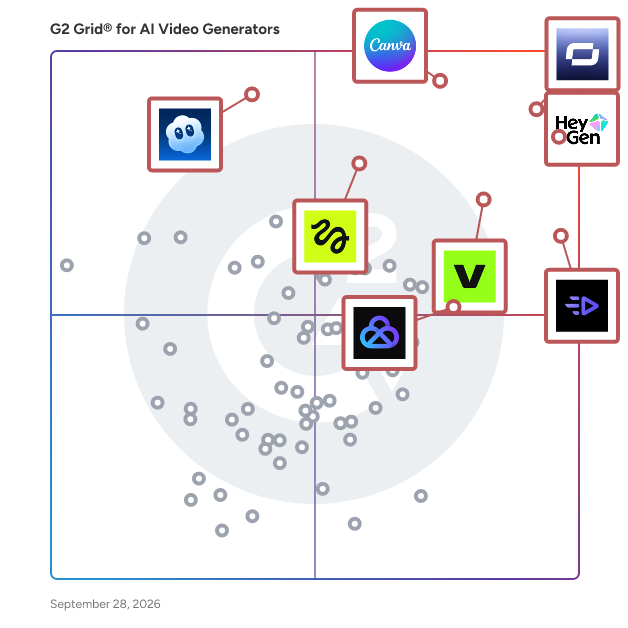
G2 Grid® for AI Video Generators

G2 Grid® for AI Video Generators plotting products by satisfaction and market presence

Highlighted products: HeyGen, Canva, Synthesia, Creatify AI, VEED, Higgsfield, Sora, and AKOOL.

Underlying data: [Grid® JSON](https://www.g2.com/categories/ai-video-generators/grids.json?focus%5B%5D=heygen&focus%5B%5D=canva&focus%5B%5D=synthesia&focus%5B%5D=creatify-labs-inc-creatify-ai&focus%5B%5D=veed&focus%5B%5D=higgsfield&focus%5B%5D=openai-sora&focus%5B%5D=akool&segment=small-business)

invideo

invideo is an agentic AI video creation platform. Tell it what you want to make, a film, a brand campaign, a microdrama series, a performance ad, and its agents take it from script to final cut, routing across 200+ AI models to write, storyboard, generate, and edit every shot. From solo creatives to creative enterprises. Every video starts the same way: an idea in your head and a hundred tedious steps between you and the finished cut. Invideo removes the hundred steps. invideo is an agentic AI video creation platform. Tell it what you want to make, a film, a brand campaign, a microdrama series, a performance ad, and its agents take it from script to final cut: writing, storyboarding, generating shots, laying voiceover and music, editing the whole thing together. Under the hood, invideo's agents route your work across 200+ AI image, video, audio and music models, like Seedance, Kling, Nano Banana, GPT Image, ElevenLabs and more, choosing the right model and writing the right prompt for every single shot. And the agents remember. They hold your characters, follow your brand guidelines, your story in context, so you never repeat yourself. Want to try a new costume, location, or lead actor? Change it across every shot in one instruction instead of regenerating dozens of clips. When you want your hands on the work, it's all there: previz, VFX, hybrid filmmaking, a full timeline editor, multiplayer collaboration, and custom agents you can cast into roles like cinematographer or sound designer. Create films where you direct and the agents sweat the details. Ads that stay on brand in every format from one brief. Microdrama series that scale without losing the plot. One idea, spun into dozens of cuts for every channel.

Average Rating: 4.2/5.0

Total Reviews: 177

How Do G2 Users Rate invideo?

  • Ease of Use: 8.4/10 (Category avg: 9.1/10)
  • Content Creation: 6.7/10 (Category avg: 9.0/10)
  • Content Editing: 7.5/10 (Category avg: 8.5/10)
  • File Storage: 7.5/10 (Category avg: 8.5/10)

Who Is the Company Behind invideo?

  • Seller: invideo
  • Year Founded: 2017
  • HQ Location: San Francisco, California
  • Twitter: @InVideoOfficial
    31,518 Twitter followers
  • LinkedIn® Page: www.linkedin.com
    248 employees on LinkedIn®

Who Uses This Product?

  • Who Uses This: Owner, Founder
  • Top Industries: Marketing and Advertising, Information Technology and Services
  • Company Size: 81% Small, 11% Medium

What Do G2 Reviewers Say About invideo?

AI-generated summary from verified user reviews

Pros
  • Users rave about the seamless video creation process in InVideo, making it easy to produce professional content effortlessly.
  • Users praise Invideo for its ease of use, allowing effortless video creation with minimal effort and exceptional support.
  • Users rave about the high quality of Invideo's videos, perfect for marketing and engaging presentations.
  • Users rave about the effortless video creation with InVideo, generating stunning content quickly and efficiently.
  • Users value the efficient content creation process in InVideo, leveraging its intuitive interface and diverse resources.
Cons
  • Users express frustration with plan limitations, feeling trapped by fast credit consumption and lack of essential features.
  • Users experience rapid credit depletion with AI features, feeling misled and frustrated by the service's limitations.
  • Users criticize the expensive credit system, feeling it consumes credits rapidly and leads to a lack of value.
  • Users feel the expensive cost of InVideo leads to quick credit depletion, resulting in poor value for money.
  • Users report poor support from InVideo, facing unresolved issues and frustrating experiences with refunds and credit consumption.

What Are Recent G2 Reviews of invideo?

What Are G2 Users Discussing About invideo?

Trupeer

In every company, someone knows exactly how the work gets done, how the migration runs, which step fixes the error, where the real process lives. When they switch teams or leave, that knowledge usually goes with them. Trupeer captures it first. Someone records their screen and talks through the task once. Trupeer's AI turns that single take into a polished video, a step-by-step guide, and an SOP, in 120+ languages, with smart zooms, clean narration, and avatars. No editing or retakes. It all lands in a branded knowledge base on your own domain, live in a day with no setup. Search it and you don't just get a link, you get an answer, plus a clip cued to the exact moment it happens. Your AI agents get the same: ITSM bots, automation platforms, and ops copilots query the same verified knowledge over MCP before they act. Trusted by 10,000+ teams across 200+ countries, including Glean, SAP, Welltower, KPMG, Autodesk, Lufthansa, MSCI, Carrier,Skillsoft ✅ Genpact: 300 SOPs and videos in 15 days, down from 8–10 weeks, at 85% lower cost ✅ Zuora: certification videos from 5 hours to 4 minutes; 1,500 built for Zuora University ✅ Diageo: 87% less IT video production time; 27 localized outputs from a single recording ISO 27001, SOC 2, and GDPR compliant, with SSO & SCIM. Recorded once. Understood forever. Learn more at trupeer.ai

Average Rating: 4.8/5.0

Total Reviews: 68

How Do G2 Users Rate Trupeer?

  • Ease of Use: 9.4/10 (Category avg: 9.1/10)
  • Content Creation: 8.3/10 (Category avg: 9.0/10)
  • Content Editing: 6.7/10 (Category avg: 8.5/10)
  • File Storage: 6.7/10 (Category avg: 8.5/10)

Who Is the Company Behind Trupeer?

  • Seller: Trupeer
  • Company Website:
  • Year Founded: 2023
  • HQ Location: Bengaluru, IN
  • Twitter: @TrupeerAI
    916 Twitter followers
  • LinkedIn® Page: www.linkedin.com
    48 employees on LinkedIn®

Who Uses This Product?

  • Who Uses This: Founder
  • Top Industries: Computer Software, Information Technology and Services
  • Company Size: 63% Small, 31% Medium

What Do G2 Reviewers Say About Trupeer?

AI-generated summary from verified user reviews

Pros
  • Users value the time-saving features of Trupeer, allowing quick and efficient creation of professional product videos.
  • Users find Trupeer's interface incredibly easy to use, simplifying the creation of 'How to Videos' and product guides.
  • Users find it extremely easy to create 'How to Videos' and 'Product Guides' with Trupeer's intuitive AI workflow.
  • Users value the AI-driven tools of Trupeer, simplifying walkthrough creation and enhancing productivity with time-saving features.
  • Users love the ease of use with Trupeer, allowing for quick, professional quality video production without hassle.
Cons
  • Users find the limited features of Trupeer, such as voice options and background music, restrictive and lacking variety.
  • Users feel the meeting limitations of Trupeer are too restrictive, affecting flexibility and overall experience.
  • Users face limited language support with few voice options, affecting customization and convenience in their projects.
  • Users feel the plan limitations restrict customization options and voice variety, impacting their overall experience.
  • Users face challenges with recording issues, needing to re-record entire videos for minor changes in their content.

What Are Recent G2 Reviews of Trupeer?

Pictory AI

Turn Long-Form Content Into High-Impact Videos With Pictory AI Keeping up with content demands today is harder than ever. Social media needs constant posting. Webinars and demos take hours to produce but often go unwatched. Blogs, podcasts, and white papers require significant effort, yet struggle to get visibility. Even SEO-driven content is frequently published and forgotten. Pictory AI was built to solve these exact challenges. Pictory is an AI-powered video creation platform that helps marketers, content teams, educators, and businesses transform long-form content into engaging, professional videos in minutes, without video editing skills or complex software. What Is Pictory AI? Pictory AI is the best editing tool, It turns existing content such as blog posts, URLs, webinars, podcasts, recordings, presentations, scripts, and ideas into short, shareable videos optimized for social media, marketing, training, and internal communications. Instead of starting from scratch, Pictory helps you repurpose content you already have and scale video creation efficiently. What You Can Do With Pictory AI Pictory simplifies and automates video creation by allowing you to: -Extract multiple short video highlights from webinars, video podcasts, interviews, demos, and recordings. -Convert blog posts, URLs, and white papers into concise summary videos- -Edit videos by editing the text transcript using AI-powered video editing. -Automatically generate captions and subtitles for better accessibility and engagement -Turn audio files and podcasts into videos with visuals. -Convert PowerPoint presentations into polished videos with narration. -Record your screen, webcam, or both and instantly edit the recording with AI. -Create videos from text, images, ideas, or existing media using multiple AI workflows AI Video Editing Made Simple Pictory’s AI Video Editor automatically transcribes uploaded videos and recordings, allowing you to remove filler words, silences, and unwanted sections with a few clicks. Videos are generated scene by scene, making it easy to adjust visuals, text, layouts, music, animations, and voiceovers without traditional timelines. Branding and Team Collaboration All videos created in Pictory can be customized with your brand identity. Using Brand Kits, you can apply logos, fonts, brand colors, and styles across all videos for consistent branding. Pictory also supports collaboration, enabling teams to share projects, media, and brand assets. Who Is Pictory For? Pictory is used by marketing and social media teams, content marketers, SaaS companies, agencies, educators, coaches, and businesses that want to scale video content quickly and efficiently. Why Choose Pictory AI? -No video editing experience required. -Fast conversion from content to video. -Multiple workflows for different content types. AI-powered automation with creative control Pictory AI helps you get more value from your content, increase visibility across channels, and stay competitive in a video-first world.

Average Rating: 4.6/5.0

Total Reviews: 81

How Do G2 Users Rate Pictory AI?

  • Ease of Use: 8.9/10 (Category avg: 9.1/10)
  • Content Creation: 10.0/10 (Category avg: 9.0/10)

Who Is the Company Behind Pictory AI?

  • Seller: Pictory
  • Year Founded: 2019
  • HQ Location: Bothell, US
  • Twitter: @pictoryai
    4,598 Twitter followers
  • LinkedIn® Page: www.linkedin.com
    71 employees on LinkedIn®

Who Uses This Product?

  • Who Uses This: Owner
  • Top Industries: Marketing and Advertising, E-Learning
  • Company Size: 89% Small, 10% Medium

What Do G2 Reviewers Say About Pictory AI?

AI-generated summary from verified user reviews

Pros
  • Users love the ease of use of Pictory AI, allowing quick content creation without extensive training.
  • Users appreciate the ease of video creation with Pictory AI, making it a game-changer for content production.
  • Users appreciate the high quality output of Pictory AI, creating professional videos efficiently with minimal effort.
  • Users value the high-quality outcomes from Pictory AI, enhancing their video creation experience with professional results.
  • Users are pleased with the satisfying final outcomes of videos created with Pictory AI, enhancing their content creation experience.
Cons
  • Users note the limited flexibility in voice quality, wishing for more emotion and emphasis options in AI voices.
  • Users report video editing issues, citing limited template selection and overall video quality that needs improvement.
  • Users find the voice selection limited and desire more advanced features like captioning for enhanced functionality.
  • Users find the limited selection of avatars and voices in Pictory AI disappointing, lacking advanced features like captioning.
  • Users express concern over limited content credits and the average quality of generated reels.

What Are Recent G2 Reviews of Pictory AI?

What Are G2 Users Discussing About Pictory AI?

Revid AI

Revid AI is an AI-powered video creation platform that enables creators, marketers, agencies, and businesses to produce high-quality short-form videos in minutes. By combining AI writing, video editing, voice generation, subtitles, and visual content creation into a single workflow, Revid AI eliminates the complexity and cost traditionally associated with video production. Users can generate engaging videos from simple prompts, blog posts, articles, scripts, social media content, or existing long-form content. The platform automatically creates scenes, selects relevant visuals, generates captions and voiceovers, and assembles everything into polished videos optimized for platforms such as TikTok, Instagram Reels, YouTube Shorts, LinkedIn, and Facebook. Whether you're growing a personal brand, managing content for clients, or scaling a company's marketing efforts, Revid AI helps you create more content faster, maintain a consistent publishing schedule, and increase audience engagement without requiring advanced editing skills or a dedicated production team. Thousands of creators and businesses use Revid AI to streamline content creation and turn ideas into videos that drive views, followers, and business growth.

Average Rating: 4.6/5.0

Total Reviews: 33

How Do G2 Users Rate Revid AI?

  • Ease of Use: 8.9/10 (Category avg: 9.1/10)
  • Content Creation: 9.2/10 (Category avg: 9.0/10)
  • Content Editing: 8.9/10 (Category avg: 8.5/10)
  • File Storage: 8.3/10 (Category avg: 8.5/10)

Who Is the Company Behind Revid AI?

Who Uses This Product?

  • Company Size: 91% Small, 3% Large

What Are Recent G2 Reviews of Revid AI?

Simplified

Simplified is the one app to create, collaborate, and scale your marketing. Design, write marketing copy, create videos, collaborate, and publish to socials—all in the same place. Built for speed and simplicity, Simplified helps over 2,000,000 creators, marketers and businesses to scale their marketing, streamline their workflows, and get work done in a few clicks. With a no-code design editor, AI writer, stunning templates, multiple brand kits, unlimited workspaces, and in-app publishing, you can start and finish your marketing without switching tabs. Ever.

Average Rating: 4.6/5.0

Total Reviews: 4,447

How Do G2 Users Rate Simplified?

  • Ease of Use: 8.9/10 (Category avg: 9.1/10)
  • Content Creation: 8.2/10 (Category avg: 9.0/10)
  • Content Editing: 7.9/10 (Category avg: 8.5/10)
  • File Storage: 7.1/10 (Category avg: 8.5/10)

Who Is the Company Behind Simplified?

  • Seller: Simplified
  • Year Founded: 2020
  • HQ Location: San Francisco, US
  • Twitter: @sosimplified
    7,924 Twitter followers
  • LinkedIn® Page: www.linkedin.com
    51 employees on LinkedIn®

Who Uses This Product?

  • Who Uses This: Founder, CEO
  • Top Industries: Writing and Editing, Marketing and Advertising
  • Company Size: 94% Small, 4% Medium

What Do G2 Reviewers Say About Simplified?

AI-generated summary from verified user reviews

Pros
  • Users find Simplified's interface exceptionally easy to use, with intuitive tools that deliver results quickly and effectively.
  • Users find the ease of use of Simplified exceptional, allowing for efficient writing of various documents effortlessly.
  • Users love the unique content creation capabilities of Simplified, streamlining their workflow across various business needs.
  • Users love the time-saving features of Simplified, enhancing collaboration and producing high-quality marketing materials effortlessly.
  • Users love the ease of use of Simplified, making complex tasks simple and accessible for everyone.
Cons
  • Users express frustration over limited credits, wishing for more affordable subscription options to enhance app usage.
  • Users feel the credit system limits accessibility for students, suggesting a subscription model for better affordability.
  • Users find that the AI's limitations in generating responses can hinder its overall effectiveness, despite its appealing style.
  • Users report insufficient credits leading to frustrating experiences, with requests timing out and support responsiveness lacking.
  • Users find the app expensive due to high subscription costs and limited trial options, impacting accessibility for students.

What Are Recent G2 Reviews of Simplified?

What Are G2 Users Discussing About Simplified?

Knowlify

Knowlify is an AI video studio that turns docs into premium explainer videos. Built for teams that need consistent, high-impact explainers - faster than traditional production, more engaging than standard AI video tools.

Average Rating: 4.3/5.0

Total Reviews: 19

How Do G2 Users Rate Knowlify?

  • Ease of Use: 8.7/10 (Category avg: 9.1/10)
  • Content Creation: 9.4/10 (Category avg: 9.0/10)
  • Content Editing: 10.0/10 (Category avg: 8.5/10)

Who Is the Company Behind Knowlify?

  • Seller: KnowlifyAI
  • Year Founded: 2025
  • HQ Location: San Francisco, US
  • LinkedIn® Page: www.linkedin.com
    13 employees on LinkedIn®

Who Uses This Product?

  • Company Size: 79% Small, 11% Medium

What Are Recent G2 Reviews of Knowlify?

Pipio

Pipio enables everyone to create professional videos without mics, cameras, actors, or studios.

Average Rating: 4.7/5.0

Total Reviews: 20

How Do G2 Users Rate Pipio?

  • Ease of Use: 9.6/10 (Category avg: 9.1/10)
  • Content Creation: 7.3/10 (Category avg: 9.0/10)
  • Content Editing: 7.1/10 (Category avg: 8.5/10)
  • File Storage: 7.5/10 (Category avg: 8.5/10)

Who Is the Company Behind Pipio?

Who Uses This Product?

  • Company Size: 95% Small, 5% Medium

What Do G2 Reviewers Say About Pipio?

AI-generated summary from verified user reviews

Pros
  • Users admire the customization options in Pipio, enabling tailored backgrounds and realistic AI presenter videos.
  • Users find Pipio's platform simple to use, enabling easy video generation with customizable backgrounds and decent results.
  • Users find Pipio's platform to deliver impressive results, enabling engaging videos with customizable backgrounds and AI presenters.
  • Users find Pipio's platform simple to use, enabling easy creation of customizable videos with AI presenters.
  • Users find Pipio's platform to be simple and versatile, allowing easy customization of AI presenter videos and backgrounds.

What Are Recent G2 Reviews of Pipio?

PhotoAIVideo.com

PhotoAIVideo.com is an AI-powered platform designed to revolutionize real estate marketing by transforming static property photos into dynamic, professional-quality videos. This innovative solution enables real estate professionals to create engaging listing videos without the need for expensive equipment or technical expertise, enhancing property presentations and capturing buyer attention more effectively. Key Features and Functionality: - AI Video Creator: Automatically converts static property photos into cinematic videos with intelligent scene detection, smart transitions, and professional templates. - Automatic Voiceovers: Generates natural-sounding AI voiceovers in multiple languages, allowing for custom scripts and emotion control to enhance viewer engagement. - Smart Captions Editor: Adds engaging captions and text overlays automatically, with customizable fonts and animation effects to maintain brand consistency. - Cinematic Effects: Applies Hollywood-style effects and transitions, including various movement effects, color grading, and lighting enhancements, to make property videos stand out. - White-Label Delivery: Offers custom branding options, enabling users to deliver videos with their own logos and maintain a professional identity. - Rapid Processing: Delivers professional videos in just minutes through an optimized AI pipeline, supporting bulk processing and priority handling. Primary Value and Solutions Provided: PhotoAIVideo.com addresses the challenges real estate professionals face in creating high-quality marketing content by offering a fast, cost-effective, and user-friendly solution. By automating the video creation process, the platform saves time and resources, allowing agents and photographers to produce engaging videos that enhance property listings, increase buyer engagement, and ultimately drive sales. The AI-driven approach ensures consistent, professional results, helping users stand out in a competitive market without the need for specialized skills or equipment.

Average Rating: 4.6/5.0

Total Reviews: 27

How Do G2 Users Rate PhotoAIVideo.com?

  • Ease of Use: 8.8/10 (Category avg: 9.1/10)
  • Content Creation: 8.6/10 (Category avg: 9.0/10)
  • Content Editing: 7.6/10 (Category avg: 8.5/10)
  • File Storage: 8.5/10 (Category avg: 8.5/10)

Who Is the Company Behind PhotoAIVideo.com?

Who Uses This Product?

  • Top Industries: Real Estate
  • Company Size: 96% Small, 7% Medium

What Do G2 Reviewers Say About PhotoAIVideo.com?

AI-generated summary from verified user reviews

Pros
  • Users find PhotoAIvideo.com to be incredibly user-friendly, enabling quick creation of high-quality videos effortlessly.
  • Users highlight the high-quality video output from PhotoAIVideo.com, finding it impressive and user-friendly.
  • Users appreciate the ease of use and professional results, making it ideal for quick, high-quality video creation.
  • Users appreciate the user-friendly creation process of PhotoAIVideo.com, enabling quick production of high-quality videos effortlessly.
  • Users commend the user-friendly platform of PhotoAIvideo.com, enabling quick and easy video creation from images.
Cons
  • Users find the cost issue significant, wishing for more value at the current subscription prices.
  • Users find the learning curve steep for beginners due to limited tutorials and a need for more guidance.
  • Users experience finicky AI video generation, leading to queued videos and limited customer support for issues encountered.
  • Users report frequent credit system issues, including failed video generations and lack of customer support, causing frustration.
  • Users feel the product is expensive, making it less accessible for those on a tighter budget.

What Are Recent G2 Reviews of PhotoAIVideo.com?

Waymark

Waymark AI gives you the power to scale custom video production without sacrificing quality. Win new customers and thrill existing ones with our high-performance AI video generation and effortless editing. With video for broadcast TV, streaming, social media, and web, Waymark is the only AI platform with video certified for every channel. Try our interactive demo today at https://waymark.com/marketing/interactive-demo.

Average Rating: 4.6/5.0

Total Reviews: 166

How Do G2 Users Rate Waymark?

  • Ease of Use: 8.7/10 (Category avg: 9.1/10)
  • Content Creation: 8.1/10 (Category avg: 9.0/10)
  • Content Editing: 7.4/10 (Category avg: 8.5/10)
  • File Storage: 8.2/10 (Category avg: 8.5/10)

Who Is the Company Behind Waymark?

  • Seller: Waymark
  • Year Founded: 2012
  • HQ Location: Detroit, US
  • Twitter: @waymark
    2,527 Twitter followers
  • LinkedIn® Page: www.linkedin.com
    55 employees on LinkedIn®

Who Uses This Product?

  • Who Uses This: Account Executive
  • Top Industries: Marketing and Advertising, Broadcast Media
  • Company Size: 39% Medium, 38% Large

What Do G2 Reviewers Say About Waymark?

AI-generated summary from verified user reviews

Pros
  • Users praise the game-changing AI capabilities of Waymark, enabling quick and beautiful commercial creation with ease.
  • Users value the AI integration of Waymark, simplifying content creation and enhancing creativity for efficient commercials.
  • Users love the variety of branding features in Waymark, making it easy to create quality content quickly.
  • Users enjoy the ease of use with Waymark, enabling quick creation and seamless customization of commercial specs.
  • Users find the AI voiceover feature and ease of use highly beneficial for streamlining their creative workflows.
Cons
  • Users desire greater editing freedom, seeking more control over templates and elements in Waymark's video creation process.
  • Users lament the limited creativity in Waymark, citing poor customization and lack of diverse templates for projects.
  • Users find the limited templates restrict their creativity, desiring more flexibility and customization options for videos.
  • Users face upload issues, including slow speeds and limitations on video customization, affecting their overall experience.
  • Users find the limited variety of themes in Waymark's AI feature leads to repetitive designs and frustration.

What Are Recent G2 Reviews of Waymark?

What Are G2 Users Discussing About Waymark?

Yepic Studio

Yepic AI – Real-Time Video Avatars That See, Hear, and Adapt Like a Human. Yepic is the operating system for human capital. We transform training, onboarding, and customer service with real-time AI avatars that respond in under a second—with emotional intelligence, visual awareness, and multilingual fluency.

Average Rating: 4.5/5.0

Total Reviews: 72

How Do G2 Users Rate Yepic Studio?

  • Ease of Use: 9.2/10 (Category avg: 9.1/10)
  • Content Creation: 7.7/10 (Category avg: 9.0/10)
  • Content Editing: 8.0/10 (Category avg: 8.5/10)
  • File Storage: 8.0/10 (Category avg: 8.5/10)

Who Is the Company Behind Yepic Studio?

  • Seller: Yepic AI Limited
  • Year Founded: 2019
  • HQ Location: Grays Inn, GB
  • Twitter: @YepicAIOfficial
    62 Twitter followers
  • LinkedIn® Page: www.linkedin.com
    7 employees on LinkedIn®

Who Uses This Product?

  • Top Industries: Marketing and Advertising, Information Technology and Services
  • Company Size: 79% Small, 12% Medium

What Do G2 Reviewers Say About Yepic Studio?

AI-generated summary from verified user reviews

Pros
  • Users praise the ease of use of Yepic Studio, making video creation accessible for beginners and saving time.
  • Users appreciate the convenience of digital presenters in Yepic Studio, creating friendly and personal videos effortlessly.
  • Users highlight the time-saving capabilities of Yepic Studio, making video creation quick and effortless.
  • Users appreciate the natural editing experience of Yepic Studio, allowing for quick adjustments and professional results.
Cons
  • Users experience slow performance during exporting, particularly with longer videos, impacting efficiency and reliability.
  • Users find the limited avatar options in Yepic Studio restrict their creativity and video personalization.
  • Users experience lagging performance when exporting longer videos, resulting in delays and frame drops during rendering.

What Are Recent G2 Reviews of Yepic Studio?

What Are G2 Users Discussing About Yepic Studio?

Predis.ai

Predis.ai is an AI ad platform that helps businesses create ads that look like their brand - shaped by what works in their category. From product URL to launch-ready ad in under 3 minutes, Predis.ai generates on-brand video ads, UGC ads with lifelike AI actors, static creatives, and product ads across Meta, TikTok, Instagram, YouTube, LinkedIn, and Pinterest. The platform analyzes ads to surface which hooks, formats, and CTAs are working in each category. Predis.ai has powered over 200M ads to date, delivering 1.5× average ROAS improvement and 75% less production time.

Average Rating: 4.7/5.0

Total Reviews: 109

How Do G2 Users Rate Predis.ai?

  • Ease of Use: 9.4/10 (Category avg: 9.1/10)
  • Content Creation: 10.0/10 (Category avg: 9.0/10)

Who Is the Company Behind Predis.ai?

  • Seller: EZML Technologies
  • Year Founded: 2020
  • HQ Location: Pune, IN
  • Twitter: @PredisAI
    773 Twitter followers
  • LinkedIn® Page: www.linkedin.com
    92 employees on LinkedIn®

Who Uses This Product?

  • Who Uses This: Owner
  • Top Industries: Marketing and Advertising, Information Technology and Services
  • Company Size: 93% Small, 5% Medium

What Do G2 Reviewers Say About Predis.ai?

AI-generated summary from verified user reviews

Pros
  • Users love the ease of use of Predis.ai, finding it seamless and efficient for social media management.
  • Users love the effortless content creation with Predis.ai, seamlessly generating perfect posts for social media and ads.
  • Users love the ad management capabilities of Predis.ai, facilitating seamless content generation and posting on social networks.
  • Users love the automation benefits of Predis.ai, effortlessly creating and posting content aligned with their brand.
  • Users appreciate the excellent customer service of Predis.ai, enhancing their overall experience and comfort.
Cons
  • Users find the missing features like varied posting styles and better avatar speech disappointing in Predis.ai.
  • Users find the AI limitations evident in the speech of avatars, noting poor timing and a mechanical sound.
  • Users find the permanent watermark on videos in the free plan annoying and disruptive to their content.
  • Users are frustrated with the permanent watermark on videos in the free plan, affecting overall presentation.
  • Users dislike the permanent watermark on videos from the free plan, impacting the overall presentation of their posts.

What Are Recent G2 Reviews of Predis.ai?

Vivideo

Vivideo Tools Resources Examples 🇺🇸 English Generate Video Now 100% Free Forever • No Credit Card Required AI Video Generator - Text to Video & Image to VideoText to Video Image to Video Transform your script into stunning videos instantly. The only AI video maker that is truly free, unlimited, and professional. AI Video Generator No Credit Card Required Generate Video for Free See Examples 2M+ Videos Created 500K+ Happy Creators 60 sec Avg. Generation Time 50+ Languages Supported Text to Video In Action Watch how Vivideo transforms simple text into professional videos in seconds 2:30 ⚡ AI-Generated in 60 seconds 🎙️ Professional Voiceover ✨ No Editing Required Why We Are The Best AI Video Generator ⏱️ Lightning Fast Create professional videos in under 60 seconds. Our AI works at the speed of thought. 💰 Studio Quality Professional-grade videos without the professional price tag. Always free, always amazing. 🚀 Very Simple Just describe what you want. Our AI handles all the complex video editing for you. 📈 Proven Results Join 500K+ creators who've generated millions of views with AI-powered videos. Complete AI Video Creation Suite ✨ Advanced Text to Video Paste your script and watch our AI video generator bring it to life with relevant stock footage and AI avatars. 🎙️ AI Voiceovers Choose from 50+ natural-sounding AI voices in multiple languages. Perfect pronunciation every time. 🎬 High-Quality Output Export in Full HD or 4K resolution. Optimized for all social media platforms. ⚡ Smart Editor Fine-tune your videos with our intuitive editor. Adjust timing, effects, and more with simple controls. 📝 Automated Subtitles Automatic captions in 50+ languages. Perfectly timed and fully customizable. 🎨 AI Avatars Add realistic AI presenters to your videos. Choose from diverse avatars or create custom ones. How It Works From text to viral video in 4 simple steps 01 Enter Your Script Type or paste your content. Describe what you want to see in your video. 02 Choose Your Style Select video format, voice, and visual style. Or let AI decide for you. 03 AI Generates Video Our AI creates your video in under 60 seconds, complete with visuals and audio. 04 Export & Share Download your video or share directly to TikTok, Instagram, YouTube, and more. Perfect For Every Creator 📱 Social Media Content Create eye-catching content for TikTok, Instagram Reels, and YouTube Shorts that drives engagement and grows your following. ✓ Daily content creation ✓ Trending topic videos ✓ Behind-the-scenes clips 💼 Marketing Videos Produce professional marketing content that converts. Perfect for ads, promos, and brand storytelling. ✓ Product announcements ✓ Brand story videos ✓ Customer testimonials 🛒 Product Demos Showcase your products with engaging demo videos. Increase conversions with clear, compelling presentations. ✓ Feature highlights ✓ Tutorial videos ✓ Comparison videos 📚 Explainer Videos Simplify complex topics with clear, engaging explainer videos. Perfect for education and onboarding. ✓ How-to guides ✓ Educational content ✓ Process explanations All Video Formats 🎵 TikTok Videos Optimized for TikTok's algorithm 9:16 up to 60s • Trending formats • Auto hashtags • Viral templates 📸 Instagram Reels Perfect for Instagram engagement 9:16 up to 90s • Reels-optimized • Story integration • Music sync ▶️ YouTube Shorts Designed for YouTube's short format 9:16 up to 60s • Shorts optimized • SEO friendly • High retention ⭐ Stories Quick, engaging story content 9:16 up to 15s • 24h format • Swipe-up ready • Poll integration 🎬 Landscape Videos Full YouTube & website videos 16:9 up to 5m • HD/4K export • Long-form ready • Professional finish Loved by Creators Join thousands of creators who trust Vivideo ★ ★ ★ ★ ★ “Vivideo transformed my content game. I went from struggling to post once a week to creating daily viral content. Absolute game-changer!” 👩‍💼 Sarah Chen Content Creator, 2M followers ★ ★ ★ ★ ★ “As a marketing director, I needed fast, quality video content. Vivideo delivers both. It's like having a video team in my pocket.” 👨‍💼 Marcus Rodriguez Marketing Director ★ ★ ★ ★ ★ “The ROI is incredible. We've cut video production costs by 90% while actually improving our engagement rates. Highly recommend!” 👩 Emily Watson E-commerce Owner Common Questions About AI Video Is this AI video generator really free? Yes! Vivideo is a completely free AI video generator. Unlike competitors, we allow you to create unlimited videos without credit cards or hidden fees. What is the best free AI video generator? How does the AI video generation work? Do I need video editing experience? What types of videos can I create? Can I add voiceovers and avatars? How fast is video generation? Can I use Vivideo for e-commerce? Can I edit the AI-generated videos? Ready to Create Viral Videos? Join 500K+ creators using AI to dominate social media. Start for free, no credit card required. Start Creating Free ✓ Free Forever ✓ No Credit Card Required ✓ Unlimited Videos Vivideo Transform your ideas into stunning videos with AI. Create professional content in minutes, no editing skills required. Download on the App Store Get it on Google Play Available in the ChatGPT Available in the Chrome Extension Free Tools Video Compressor Video Converter Background Remover GIF Maker Video Resizer Video Trimmer AI Tools AI Video Generator Text to Video Image to Video Video Merger Remove Audio Company Examples About Privacy Policy Terms of Service Contact Best AI Video Tools Best AI Video Generators 2025 Best Free AI Video Makers Best Text-to-Video Tools Best for YouTube Best for TikTok Best for Marketing Best AI Avatar Generators Best No Watermark Tools Blog Viral TikTok Videos with AI AI Video for E-commerce Text to Video Guide Free AI Tools No Watermark AI Video for YouTube Shorts Make Money with AI Videos AI Video for Real Estate Faceless YouTube Channel AI Video Marketing ROI Image to Video Guide Comparisons Vivideo vs InVideo Vivideo vs Synthesia Vivideo vs Pictory Vivideo vs Lumen5 Vivideo vs Runway Vivideo vs HeyGen InVideo vs Pictory Synthesia vs HeyGen Runway vs Pika CapCut vs Canva © 2026 Vivideo. All rights reserved.

Average Rating: 4.2/5.0

Total Reviews: 16

How Do G2 Users Rate Vivideo?

  • Ease of Use: 9.4/10 (Category avg: 9.1/10)
  • Content Creation: 10.0/10 (Category avg: 9.0/10)

Who Is the Company Behind Vivideo?

  • Seller: ViVideo
  • Year Founded: 2025
  • HQ Location: Middletown, US
  • LinkedIn® Page: www.linkedin.com
    1 employees on LinkedIn®

Who Uses This Product?

  • Company Size: 88% Small, 6% Large

What Do G2 Reviewers Say About Vivideo?

AI-generated summary from verified user reviews

Pros
  • Users find Vivideo's ease of use remarkable, making AI video creation fast and accessible for everyone.
  • Users praise Vivideo for its efficiency, enabling quick and easy AI video creation without prior editing experience.
  • Users enjoy the intuitive interface of Vivideo, enabling simple and fast AI video creation for everyone.
  • Users appreciate the navigation ease of Vivideo, finding the interface user-friendly and intuitive for all experience levels.
  • Users commend the impressive output quality of Vivideo, enabling quick and efficient video creation.
Cons
  • Users desire more creative controls in Vivideo, feeling that it limits their ability to customize content effectively.
  • Users experience occasional speed issues during peak times, impacting the efficiency of their content generation.

What Are Recent G2 Reviews of Vivideo?

Bijou Barry
BB
Researched and written by Bijou Barry
Updated