AI-Generated Results
Finding matches…
SafeSide Prevention provides flexible, and sustainable suicide prevention education for the health and behavioral health workforce. SafeSide's InPlace Learning programs offer online learning you do as a group. Subscriptions include on-demand video-based training, monthly live office hours, and regular updates and refreshers to keep a growing and changing staff trained, current, and supported long-term.
Not seeing what you're looking for?
Dive deeper into "VideoAsk" on G2 AI

MEDIASHAREiQ is the most flexible video platform for recording, managing, sharing, and tracking video-based training programs.
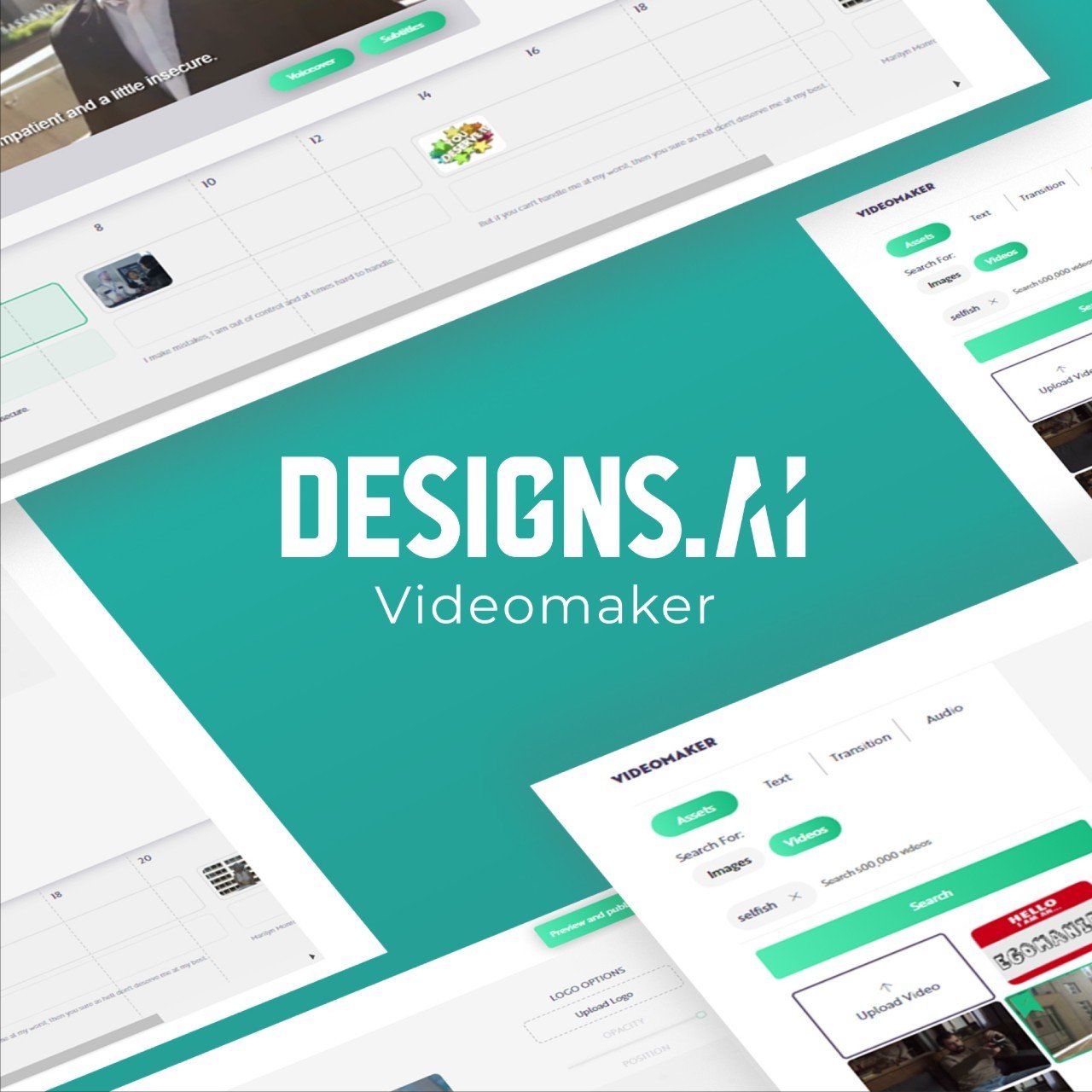
Videomaker is an easy-to-use online video creation tool that leverages artificial intelligence and millions of premium content to transform your script into a finished, professional video.
Experience AI-powered text-to-video tool.
Features:
📹 Millions of videos, images, and audio clips
🎙️ Voiceovers in more than 10 different languages
✏️Easy-to-use editor
📱 Export in different dimensions
Create a video in 4 easy steps:
✨Input script and select video preferences.
✨Designs.ai creates a seamlessly edited video.
✨Customize using the simplified editor.
✨Export high-resolution videos in multiple formats.

Discover Remote Recruit, the leading global recruitment platform that transforms hiring with video-based recruitment. Connect with top employers and talent for remote jobs, making job search and hiring more engaging and efficient.

Apeaksoft Screen Recorder is a professional tool to record any video/audio and capture screen on your Windows PC or Mac. This screen recorder enables you to record any on-screen activities you want with original image/sound quality. For instance, you can use it to record online videos, Skype calls, GoToMeeting, games, podcast, webinars, lectures, online conference, webcam videos, etc. in full screen or customized screen size.


VideoMark is a Chrome extension, can help you take notes on YouTube. It can save subtitles and screenshots easily and is great for learning the important part of the videos for everyone.

Big Think+ is a corporate learning solution designed to help organizations upskill their people in the areas that matter most: leadership, communication, resilience, and emotional intelligence. Our video-based lessons feature world-class experts, entrepreneurs, and executives distilling their knowledge into actionable insights. The result is scalable learning that fits seamlessly into the flow of work and drives measurable impact.


AnyMP4 iPhone Transfer Pro for Mac enables you to transfer photos, videos, music and many other multimedia files from iPhone/iPad/iPod such as iPhone 11 Pro Max/11 Pro/11/XS/XS Max, iPad Air, iPad pro, iPad mini 4 and iPod, etc. to Mac for backup. It also allows you to import Mac/iTunes files to iPhone/iPad/iPod. It can also convert the incompatible video/audio to iPhone/iPad/iPod supported format.
Key Features:
1. Transfer files from iPhone/iPad/iPod to Mac or from Mac to iOS device
This iPhone to Mac Transfer can help you transfer photo, video, music and other media files from iPhone 11 Pro Max/11 Pro/11/XS/XS Max, iPad pro, iPad mini 4/3/2, iPod and more digital devices to Mac/iTunes for backup. With this Mac to iPhone Transfer, you can transfer photo, video, music and others to iPhone/iPad/iPod.
2. Import files between iOS devices
AnyMP4 iPhone Transfer Pro for Mac can sync videos, music, pictures, etc. between any two iOS devices. For instance, if you connect your iPhone and iPad to Macbook, you can easily transfer your photos from iPhone to iPad.
3. Back up SMS/Contacts on your iPhone to Mac
With this program, you can copy your SMS to Mac for backup and they can be saved in excel, text or html format. You can also back up the important contacts to Mac in case of the damaging of iPhone, iPad or iPod. The de-duplication function can automatically delete repeated contacts or merge overlapping contact information for you.
4. Support the latest device
This iPhone Transfer for Mac is compatible with the latest iTunes and support all devices such as iPad pro, iPhone 11 Pro Max/11 Pro/11/XS/XS Max, iPad Air 2, iPad mini 4/3/2, iPad pro and iPod 5, etc.

1. Complete UI/UX Composition and UI/UX/ “User-Friendly Interface”
- Simple, Easy to use, and Human-centered UI/UX, Stylish New Design
- For ease of use, it is possible to change the location of the preview and menu area / Set
the hotkeys / Effect search /add effect overlays to Favorites.
- New home screen: You can easily check the updated features
- Added in-product Tutorial Guide: for User Convenience
2. Customizable/ Adjustable Editing Features
- User can adjust and apply the template in detail (finely adjust the time to apply the effect,
etc.)
- Additional Timeline functions: In addition to the basic menu function cut/paste, editing
features such as inserting into the middle or back of the video are added.
- Unlimited multi-track: Various clip layouts / Multi-track for simultaneous editing of multiple
sources / Unlimited number of tracks can be added
- Video/Audio Separation: Video track can contain text, image, and video sources on the same
track
3. NEW Features
- Chroma Key: By inserting an image in the background, it is possible to create a more
complete video
- PIP (Picture in Picture): Displays the screen inside the screen and is usually supported by
display devices. Since it is a frequently used feature, it is added to the GOM Mix Max. PIP
displays a small screen inside the screen. You can position the screen in any corner position
you want, also it is possible to adjust its size.
4. Encoding
- Reduced Encoding Time: SW is 3 times lighter than the existing GOM Mix Pro, and
encoding is 3 times faster now (697MB → 127MB)
- Video editing program works faster in an environment upgraded to inter-core i5 or higher
- Encoding size divided by sizes optimized for YouTube
5. “Colorful video editing” with rich basic sources
- More than 130 effects including filters, templates, sound sources, etc., and more than 130
kinds of overlay & transition effects that are installed as standard in the program
We provide digital communication solutions, with creativity and data at the core.

VideoAI is an advanced AI-powered video generation platform that enables users to create professional-quality videos featuring realistic human-like avatars and lifelike voiceovers. Designed for entrepreneurs and content creators, VideoAI simplifies the video production process by eliminating the need for complex software, extensive technical skills, or physical studio setups. Users can transform their ideas into engaging videos by generating custom AI avatars from a single photo or text input, producing instant avatar videos and B-roll footage in various styles and settings, and editing content with features like voiceovers, captions, transitions, and B-rolls. The platform supports over 70 languages, allowing for broad audience reach. By streamlining the video creation process, VideoAI empowers users to produce high-quality, engaging content efficiently and cost-effectively, addressing common challenges such as lengthy production times, high costs, and inconsistent quality associated with traditional video production methods.

VideoShorts is an AI-powered platform designed to transform lengthy YouTube videos into concise, engaging clips optimized for social media sharing. By leveraging advanced algorithms, it identifies the most captivating moments within your content, enabling effortless creation of shareable snippets that resonate with your audience. This tool is particularly beneficial for content creators, marketers, and social media managers aiming to enhance their digital presence without investing extensive time in manual editing.
Key Features and Functionality:
- AI-Powered Editing: Automatically detects and extracts engaging moments from YouTube videos, significantly reducing manual editing time.
- Customization Options: Allows adjustment of clip length, captions, and formatting to match your brand’s style.
- Social Media Optimization: Generates clips tailored for platforms like Instagram, TikTok, and Facebook, ensuring optimal engagement.
- User-Friendly Interface: Simplifies the clip creation process, making it accessible to users with varying levels of technical expertise.
Primary Value and User Solutions:
VideoShorts addresses the challenge of repurposing long-form content into bite-sized videos suitable for today's fast-paced digital landscape. By automating the identification and extraction of key moments, it enables users to produce high-quality, shareable content efficiently. This not only saves time but also enhances audience engagement and expands reach across multiple social media platforms. Whether you're a content creator looking to maximize your video assets or a marketer aiming to boost brand visibility, VideoShorts offers a streamlined solution to meet your needs.

VideoSnack is an AI-powered tool designed to transform video content from platforms like YouTube and Loom into high-quality, SEO-friendly written content. This enables users to reach a broader audience, including those who prefer reading over watching videos, and improves search engine visibility since search algorithms primarily index text. The conversion process is quick and efficient, taking approximately 60 seconds. VideoSnack offers various output formats, including blog posts, summaries, interviews, tutorials, reviews, newsletters, and show notes.
Key Features and Functionality:
- AI-Powered Conversion: Utilizes advanced AI to convert videos into various text formats, such as blog posts, summaries, and tutorials.
- Platform Integration: Supports video links from platforms like YouTube and Loom, facilitating seamless content transformation.
- Customization Options: Allows users to customize content length, tone of voice, and target language, with support for over 30 languages.
- SEO Optimization: Enhances search engine visibility by converting video content into text, which is more easily indexed by search algorithms.
- Export Capabilities: Enables direct export of content to platforms like WordPress as posts, pages, or custom posts.
Primary Value and User Solutions:
VideoSnack addresses the challenge of repurposing video content into written formats, thereby expanding audience reach and improving SEO performance. By automating the conversion process, it saves time and effort for content creators, marketers, and businesses, allowing them to maximize the value of their existing video content. This tool is particularly beneficial for agencies, publishers, bloggers, technical writers, in-house teams, and content managers seeking to enhance their content strategy and online presence.

VideoStance is a video content analysis platform that cross-examines claims about AI coding tools and large language models from multiple creators. The software extracts stances, data points, and timestamps from expert videos to build a database of verified opinions. It identifies where creators agree, where they disagree, and what unique insights individual experts contribute. The platform provides tool comparisons such as Claude Code versus GitHub Copilot and Cursor versus Windsurf, supported by aggregated claims. VideoStance examines broader categories including AI coding agents and alternatives to established platforms. It features reviews and rankings of AI tools across different use cases. The software addresses limitations inherent in single-source reviews by aggregating perspectives from multiple creators, offering cross-verified insights rather than isolated opinions.


The powerful IOS/Android screen to PC mirroring tool with high quality and no lag.
*Compatible with all types of iOS & Android devices.
*Mirror iOS/Android screen to your computer without quality loss or lags.
*Allow both wired & wireless connection.
*Support 4K screencast with sound.
*Record iOS/Android screen, system audio & microphone sound simultaneously.
Record Your Screen with Multiple Smart Features!
#Capture any region of your PC screen with audio or webcam.
#20+ recording modes specialized in capturing gameplay, video, audio, etc.
#Mirror and record your iOS/Android screen on PC with HD quality.
#Trim, compress, merge, or convert videos with easy-to-use editing tools.
#Record videos of all scenarios: tutorials, webinars, online lessons, and more.

VideoSolo BD-DVD Ripper is a software solution designed to convert both homemade and commercial Blu-ray and DVD discs into digital formats. This enables users to back up their physical media collections and enjoy their favorite movies on various devices without the need for the original discs. With support for over 300 video and audio formats, including MP4, MKV, MOV, and MP3, the software ensures compatibility across a wide range of platforms. Its user-friendly interface and advanced features make the conversion process straightforward and efficient.
Key Features and Functionality:
- Wide Format Support: Convert Blu-ray and DVD content to numerous formats such as MP4, MKV, MOV, FLV, M4V, and extract audio to formats like MP3, AAC, M4A, and WAV.
- Device Presets: Predefined output profiles for popular devices, including smartphones, tablets, gaming consoles, and smart TVs, ensuring optimal playback quality.
- Customizable Parameters: Adjust video and audio settings such as resolution, aspect ratio, bitrate, frame rate, and encoder to tailor the output to specific needs.
- High-Quality Output: Maintain original video quality with support for up to 4K resolution, ensuring a superior viewing experience.
- 3D Conversion: Convert 2D Blu-ray/DVD movies to 3D modes like Anaglyph , Side-by-Side, and Top/Bottom for an enhanced visual experience.
- Audio and Subtitle Preservation: Retain original audio tracks and subtitles during conversion, with the option to add external tracks and subtitles as needed.
- Editing Tools: Built-in video editor allows users to cut, crop, rotate, merge, adjust effects, add filters, and apply watermarks to customize their videos.
- Accelerated Conversion Speed: Utilizes multi-threading, multi-core, and GPU acceleration technologies to achieve up to 6x faster conversion speeds.
Primary Value and User Benefits:
VideoSolo BD-DVD Ripper addresses the need for digitizing physical media collections, allowing users to preserve their Blu-ray and DVD content in digital formats. This not only safeguards against potential damage or loss of physical discs but also provides the convenience of accessing and enjoying movies on various devices without the constraints of physical media. The software's extensive format support, customizable settings, and high-quality output ensure that users can tailor their viewing experience to their preferences. Additionally, the inclusion of editing tools and 3D conversion capabilities offers further flexibility, making it a comprehensive solution for managing and enjoying Blu-ray and DVD content.