AI-Generated Results
Finding matches…
HCL DFMPro is a powerful Design for Manufacturability (DFM) & Assembly Validation software fully integrated within Creo Parametric, SOLIDWORKS, NX, CATIA V5, and 3DEXPERIENCE to help validate your designs for manufacturability, assembly, serviceability in the early design cycle. Trusted by leading manufacturers across aerospace and defense, medical, high-tech and automotive industries.
Not seeing what you're looking for?
Dive deeper into "Parakeet ASR" on G2 AI

impressBox is a cloud digital signage content management system (CMS) for organisations that run screen networks across many sites: retail chains, retail-media and DOOH networks, shopping centres, transport hubs, gyms or corporate spaces. It is developed and operated by Dėžutė, UAB in Vilnius, Lithuania, and hosted in the European Union.
Content and scheduling. Upload images, video, audio, PDFs and web pages, or add YouTube and Vimeo videos, live HLS streams, web URLs and Canva designs. Build parameterized HTML templates that anyone can fill in through a form. Put content into playlists and control exactly when it plays: date windows, hour-of-day rules, on/off cycles over weeks or months, scheduled and recurring publishing, temporary playlists and display on/off hours. Tag rules let one shared playlist play differently on each screen, and impressBox shows where each clip will actually play and confirms that every screen received the update.
An AI agent that runs the platform. A built-in assistant can carry out most tasks in plain language: uploading and scheduling content, building templates, publishing playlists, checking device status, pulling playback statistics and troubleshooting screens. The same agent is available over WhatsApp and through an OAuth-secured MCP endpoint, so teams can also manage their signage from AI tools such as Claude. AI image tools generate and edit images, extend them to any screen shape, read text and dates from artwork, and score content before it goes live.
Remote device operations. See every screen's status, a live screenshot, logs and uptime history. Turn displays on and off, change volume, reboot, update players and configure Wi-Fi or Ethernet remotely. Network diagnostics run from the player itself (reachability, ping, traceroute), and automated diagnosis matches device errors to fixes. Self-healing watchdogs recover from playback problems, and content keeps playing offline from local storage.
Retail media and audio. Ad insertion rules, ad impression counters and peer-to-peer content delivery inside a store support retail-media networks; these are configured together with the impressBox team. The same platform also drives audio-only players for in-store radio and audio ads.
Players and partners. impressBox runs on LG webOS displays, Samsung Tizen smart signage, Android and Android TV devices, BrightSign Series 4 and 5, Raspberry Pi and x86 players, and in any modern browser. Multi-account access and sub-accounts let resellers and integrators manage many customers from one login.

E-mail signatures and Out of Office auto reply messages are an integral part of corporate identity and corporate design, but also of successful media and internet presence concepts and marketing campaigns.
Besides the design and texting, one must also think about their central administration and distribution. This ensures compliance with CI/CD guidelines, guarantees the use of correct and up-to-date data, helps with legal compliance, relieves staff and opens up an additional marketing channel.
With Set-OutlookSignatures, signatures and Out of Office auto reply messages can be:
Generated from templates in DOCX or HTML file format
Customized with a broad range of variables, including photos, from Active Directory and other sources
Variables are available for the currently logged-on user, this user’s manager, each mailbox and each mailbox’s manager
Images in signatures can be bound to the existence of certain variables (useful for optional social network icons, for example)
Applied to all mailboxes (including shared mailboxes), specific mailbox groups, specific e-mail addresses or specific user or mailbox properties, for every mailbox across all Outlook profiles (Outlook, New Outlook, Outlook Web) (automapped and additional mailboxes are optional)
Created with different names from the same template (e.g., one template can be used for multiple shared mailboxes)
Assigned time ranges within which they are valid
Set as default signature for new e-mails, or for replies and forwards (signatures only)
Set as default OOF message for internal or external recipients (OOF messages only)
Set in Outlook Web for the currently logged-in user, including mirroring signatures the the cloud as roaming signatures
Centrally managed only or exist along user created signatures (signatures only)
Copied to an alternate path for easy access on mobile devices not directly supported by this script (signatures only)
Write protected (Outlook signatures only)
Set-OutlookSignatures can be executed by users on clients and terminal servers, or on a central server without end user interaction.
On clients, it can run as part of the logon script, as scheduled task, or on user demand via a desktop icon, start menu entry, link or any other way of starting a program.
Signatures and OOF messages can also be created and deployed centrally, without end user or client involvement.
Sample templates for signatures and OOF messages demonstrate all available features and are provided as .docx and .htm files.
Simulation mode allows content creators and admins to simulate the behavior of the script and to inspect the resulting signature files before going live.
The script is designed to work in big and complex environments (Exchange resource forest scenarios, across AD trusts, multi-level AD subdomains, many objects). It works on premises, in hybrid and cloud-only environments.
It is multi-client capable by using different template paths, configuration files and script parameters.
Set-OutlookSignatures requires no installation on servers or clients. You only need a standard SMB file share on a central system, and Office on your clients.
A documented implementation approach, based on real life experiences implementing the script in multi-client environments with a five-digit number of mailboxes, contains proven procedures and recommendations for product managers, architects, operations managers, account managers and e-mail and client administrators.
The implementation approach is suited for service providers as well as for clients, and covers several general overview topics, administration, support, training across the whole lifecycle from counselling to tests, pilot operation and rollout up to daily business.

ArakYet is a ABM tool designed for GTM teams to tackle a problem most teams quietly suffer through: AI inconsistencies that poison lead data and derail outbound. RevOps, GTM and many other outbound teams we spoke to kept asking for cleaner, more “ready-to-convert” accounts. So in ArakYet, we help you find who’s actively hiring, tech stack they use, qualify linkedin profiles, active fundings, etc.. so you can plug straight into client workflows.

TravelX transforms the way businesses manage travel and expenses by offering a fully automated, mobile-first platform. Designed to simplify the entire travel lifecycle, from request initiation to reimbursement, TravelX ensures smooth, compliant, and efficient processes. The platform provides businesses with complete financial control, robust policy enforcement, and a user-friendly interface that employees likes the most.
The platform is built with compliance at its core, ensuring real-time policy checks during every step—from travel request submission to expense approval—ensuring that violations are detected and resolved proactively. TravelX also offers advanced features like automated receipt scanning, real-time mileage tracking, and multi-currency support, making it ideal for global businesses. Customizable approval workflows and deep integration capabilities allow TravelX to adapt to any organisation's unique needs, providing enhanced control and transparency over all travel and expense activities.
Features
• End-to-End Automation: Automates every stage of travel and expense management—from request submission and approvals to travel booking, expense capture, and reimbursement—reducing the need for manual intervention and minimizing errors.
• Real-Time Policy Compliance: Built-in policy checks ensure that all travel and expense requests meet organizational guidelines before submission. Policy violations are automatically flagged, allowing teams to take corrective actions in real-time.
• Mobile-First Interface: TravelX's intuitive mobile app enables employees to manage travel requests, capture receipts, and track expenses seamlessly while on-the-go. With real-time updates, employees can stay informed about the status of their submissions and approvals.
• OCR-Enabled Receipt Capture & Expense Categorization: Using Optical Character Recognition (OCR), TravelX automatically scans and extracts data from receipts, categorizing expenses into predefined categories, saving employees time and ensuring accurate reporting.
• Customizable Approval Workflows: Tailor approval workflows based on multiple parameters like department, cost center, and amount thresholds.
TravelX supports multi-level approvals, ensuring compliance while allowing flexibility for various business needs.
• Global Scalability with Multi-Currency Support: With TravelX, businesses operating internationally can streamline travel and expense management across regions. The platform supports multiple currencies and country-specific policies, making it easy to manage global teams and ensure consistent compliance.
Integrations
• ERP Systems: SAP (S/4HANA), Oracle ERP Cloud, Microsoft Dynamics 365, NetSuite, Workday Financial Management
• HR Systems: Workday, SuccessFactors, Oracle HCM Cloud, ADP, BambooHR
• Travel Booking Platforms: Concur Travel, Egencia, BCD Travel, American Express GBT, CWT
• Custom Integrations: RESTful APIs for tailored connections with other business applications and platforms.

Mixbus32C is a digital audio workstation (DAW developed by Harrison Consoles, designed to emulate the sound and workflow of their renowned 32-series analog mixing consoles. It offers a comprehensive mixing environment with a "knob per function" layout, providing users with an intuitive and efficient interface for music production. By integrating precise emulations of Harrison's analog circuitry, Mixbus32C delivers a true analog mixing experience within a digital platform.
Key Features and Functionality:
- Analog Console Emulation: Accurate modeling of Harrison's 32C analog console circuit designs, including a sweepable 4-band parametric EQ with high-pass and low-pass filters on each channel.
- Comprehensive Mixing Tools: Each channel strip features input trim, polarity control, compression, and 12 mix bus sends, facilitating detailed sound shaping and routing.
- Extensive Bus System: Provides 12 stereo mix buses, each equipped with tone controls, compression, sidechaining, and analog tape saturation simulation, allowing for complex mix configurations.
- Unlimited Tracks and Plugins: Supports unlimited stereo or mono input channels and MIDI tracks, each capable of hosting unlimited plugins, sends, and hardware inserts, limited only by system resources.
- Advanced Metering and Monitoring: Offers comprehensive metering with peak, peak hold, and compressor gain reduction indicators on every track and bus, ensuring precise monitoring of audio levels.
- Industry Standard Compatibility: Supports VST plugins on Windows, AudioUnit (AU plugins on macOS, and LV2 plugins across all platforms, along with standard audio I/O support, ensuring seamless integration into various production environments.
Primary Value and User Solutions:
Mixbus32C addresses the need for a DAW that combines the sonic qualities and tactile workflow of analog consoles with the flexibility and convenience of digital recording. By providing an authentic analog mixing experience, it enables users to achieve warm, rich, and dynamic mixes without the need for external hardware. The intuitive interface and comprehensive feature set streamline the production process, making it an ideal solution for audio engineers and producers seeking high-quality sound and efficient workflow in a digital environment.

DEP AIWorks is the advanced AI platform by DEP, designed to transform the way engineering is conceived, developed, & optimized. Built at the intersection of engineering expertise and cutting-edge AI/ML technologies, AIWorks empowers organizations to accelerate product development, enhance decision-making, and drive innovation at scale.
By seamlessly integrating with existing engineering workflows, DEP AIWorks enables intelligent automation across design, simulation, and analysis processes. From smart pre-processing and parametric modeling to predictive insights and optimization, the platform brings a new level of efficiency, accuracy, and agility to CAE-driven engineering.
With a strong focus on scalability and real-world application, DEP AIWorks supports industries ranging from automotive and aerospace to industrial equipment and beyond. It helps engineering teams reduce development time, improve performance, and make data-driven decisions with confidence.
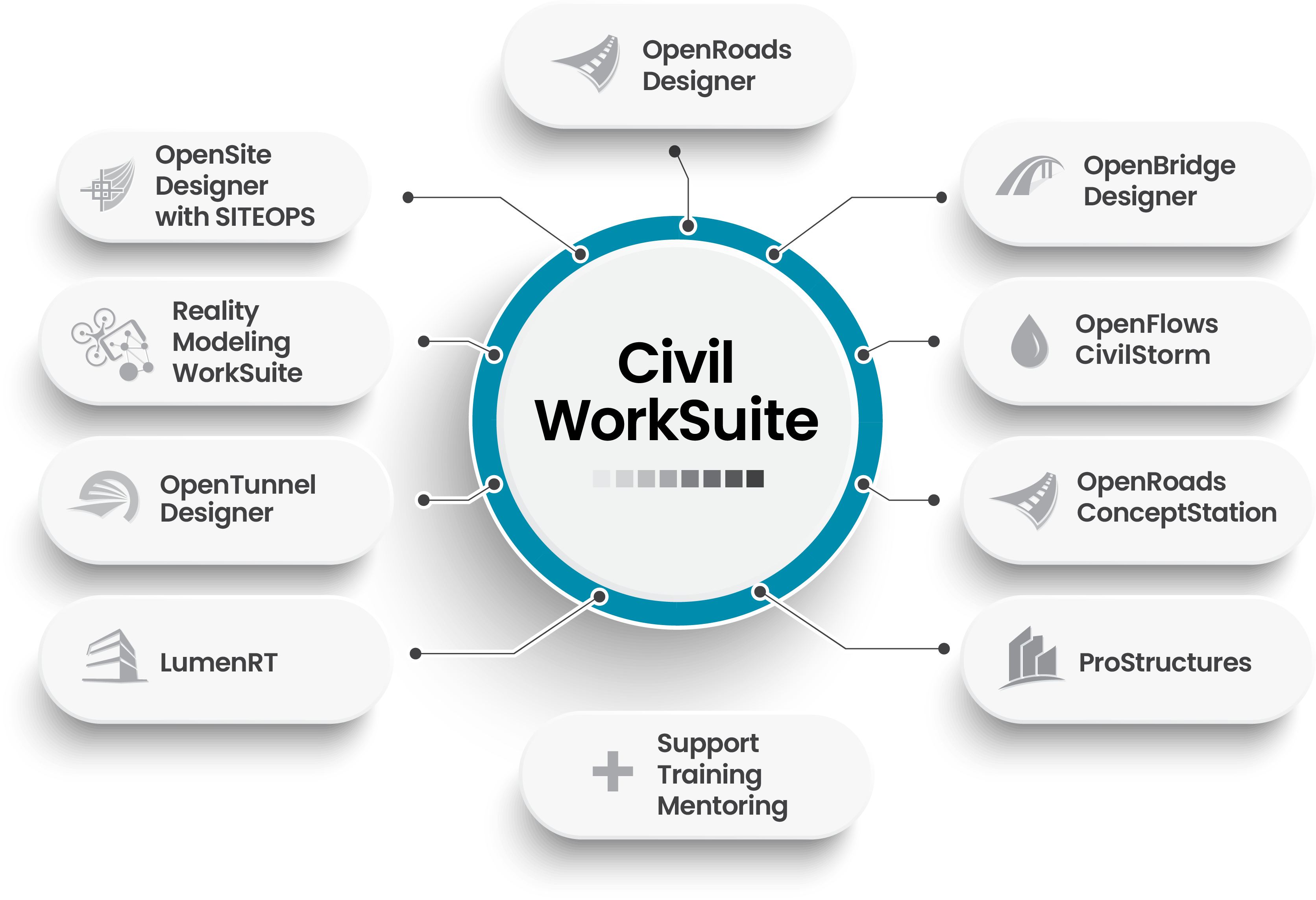
Civil WorkSuite is a comprehensive suite of civil engineering software applications designed to streamline infrastructure project workflows from data acquisition through construction documentation. It integrates nine essential tools, including OpenRoads Designer, OpenBridge Designer, OpenSite Designer, OpenTunnel Designer, OpenRoads ConceptStation, OpenFlows CivilStorm, Bentley LumenRT, ProStructures, and Reality Modeling WorkSuite. This all-in-one solution enables engineers to efficiently design, analyze, and deliver projects across various domains such as roads, bridges, sites, tunnels, water systems, and structures.
Key Features and Functionality:
- OpenRoads Designer: Versatile civil design application for tasks like interchange and roundabout design, earthworks, surveying, and utility design.
- OpenBridge Designer: Bridge information modeling tool supporting detailed bridge design, including terrain, roadways, and access ramps.
- OpenSite Designer: Comprehensive solution for site design, engineering, and land development, featuring automated site layout and grading optimization.
- OpenTunnel Designer: Specialized tool for tunnel modeling and simulation, enhancing productivity and reducing rework.
- OpenRoads ConceptStation: Software for rapid conceptual design during preliminary project stages, integrating roadway and bridge design capabilities.
- OpenFlows CivilStorm: Hydraulic modeling solution for analyzing complex stormwater systems and improving pond design.
- Bentley LumenRT: Real-time visualization software for creating cinematic-quality images and presentations of infrastructure designs.
- ProStructures: Steel and concrete design software delivering parametric structural components for increased productivity.
- Reality Modeling WorkSuite: Tools for reality capture through 3D photogrammetry or laser scanning, producing high-fidelity 3D reality models.
Primary Value and User Solutions:
Civil WorkSuite offers an end-to-end solution for civil engineering projects, enabling professionals to deliver complete projects with greater efficiency, accuracy, and innovation. By integrating essential tools into a single package, it reduces design time by up to 20% with existing staff, facilitates seamless cross-discipline collaboration, and ensures up-to-date data through dynamic change management. This comprehensive approach helps firms meet project requirements on time, every time, regardless of changes, ultimately enhancing productivity and profitability.

Cobalt is a parametric 3D modeling software for product design and development that's easy to use. It offers wireframe, solid and surface modeling with precision drawings, renderings and animation. Supports a variety of file formats for import and export, including STEP, IGES, SAT, DWG, DXF, STL etc.
Cobalt’s flexible 3D modeling matches professional power with speed and ease of use in our unique Organic Workflow design process. Available for both Macintosh and Windows, Cobalt lets creative people work without worrying about their software. Designers save time and money by moving quickly from conception through completion in the real world of last minute changes. Primarily for designers, engineers and inventors, Cobalt leads the Ashlar-Vellum™ product line with on-demand, dimensionally constrained and equation-driven parametrics that make creating variations on a design faster and easier than ever before in 3D design software.

Parametrix Cloud Outage insurance protects companies from financial losses that result from a cloud outage of one of the top three public cloud service providers: Amazon Web Services (AWS), Microsoft Azure, and Google Cloud Platform (GCP).
Parametrix cloud outage insurance is especially suited for companies that:
1. Have mission critical activities that depend on the cloud
2. Have service-level agreements (SLAs) in place that rely on the cloud
3. Would experience direct revenue losses, operational losses, or other financial or intangible losses as a result of a cloud outage event

Chat Recap AI - Advanced Chat Analytics Across All Platforms 💬📊
ChatRecap is the ultimate AI-powered chat analyzer that transforms your conversations into actionable insights. Our comprehensive platform examines message patterns, sentiment trends, engagement metrics, and relationship dynamics across WhatsApp, Instagram, Snapchat, Discord, Telegram, and more, helping you understand your digital interactions like never before.
Chat Recap AI: The Complete Chat Analysis Solution
In today's interconnected world, our digital conversations shape our relationships, professional lives, and social connections. ChatRecap provides sophisticated yet accessible chat analysis tools that decode communication patterns across all major messaging platforms. By combining advanced AI algorithms with intuitive visualization, ChatRecap delivers powerful insights that help users improve their communication effectiveness and relationship quality.
Why ChatRecap Stands Above the Rest
ChatRecap delivers a level of analysis depth unmatched in the chat analysis industry. Our platform's cross-platform compatibility allows users to analyze conversations from WhatsApp, Instagram, Snapchat, Discord, Telegram, and more in one unified interface. Whether you're examining romantic relationships, monitoring team communication, analyzing friend group dynamics, or studying your own communication patterns for self-improvement, ChatRecap provides the tools and insights you need.
Our proprietary AI algorithms examine not just what is said, but how and when messages are exchanged, creating a multi-dimensional analysis that reveals hidden patterns and relationship dynamics that would otherwise remain invisible.
Comprehensive Features That Make ChatRecap Essential
1. Universal Platform Support
Unlike limited chat analyzers, ChatRecap offers seamless analysis across platforms:
WhatsApp analyzer with advanced message timing patterns
Instagram message and engagement analysis
Snapchat interaction frequency and response metrics
Discord conversation and server dynamic analysis
Telegram individual and group chat analytics
Support for CSV, TXT, and JSON chat exports
2. Advanced AI-Powered Analysis
ChatRecap leverages cutting-edge AI technology to deliver:
Emotion tracking across conversation history
Response time patterns and anomaly detection
Topic modeling to identify conversation themes
Proactive relationship health indicators
Communication style matching analysis
Custom natural language processing for slang and emojis
3. Interactive Data Visualization Suite
Transform complex data into intuitive visual insights:
Real-time conversation flow mapping
Interactive sentiment timeline charts
Communication balance heat maps
Engagement pattern comparison tools
Customizable dashboard with key metrics
Exportable reports for offline review
4. Relationship Intelligence Tools
Go beyond basic metrics with specialized analysis:
Compatibility assessments based on communication patterns
Conflict detection and resolution recommendations
Interest alignment tracking over time
Conversation quality scoring and improvement tips
Relationship milestone identification
Communication style adaptation suggestions
How ChatRecap Works
Getting started with ChatRecap is simple and secure:
Export Your Conversations: Follow our step-by-step guides to export chats from WhatsApp, Instagram, Snapchat, Discord, Telegram, or other supported platforms.
Upload and Configure: Import your conversation data to our secure platform and select the analysis parameters that matter most to you.
Explore Your Insights: Access your personalized dashboard featuring visual representations of your communication patterns and relationship dynamics.
Receive Actionable Recommendations: Get customized suggestions to improve your communication effectiveness and relationship quality.
Uncompromising Privacy and Security
We understand that your conversations are personal. ChatRecap implements military-grade security measures:
Zero-knowledge encryption technology
Automatic data purging after analysis completion
Locally-processed analysis options for sensitive content
GDPR and CCPA compliant data handling
Optional anonymization of personal identifiers
Transparent privacy controls with user ownership of all data
Who Benefits from ChatRecap?
ChatRecap serves diverse user needs:
Relationship-focused users: Gain insights into romantic communication patterns to strengthen connections and identify improvement areas.
Friend groups: Understand group dynamics and ensure balanced participation across your social circles.
Business teams: Analyze communication efficiency and improve collaboration through better message patterns.
Mental health professionals: Provide data-backed insights for clients working on communication issues (with proper consent).
Personal development enthusiasts: Track your own communication evolution and set improvement goals.
ChatRecap Pricing and Access
ChatRecap offers flexible pricing options to meet various needs:
Free Tier: Basic analysis for up to 1,000 messages per month
Premium Plan: Comprehensive analysis with unlimited messages and advanced features
Professional Package: Enterprise-grade tools with API access and custom integrations
Join the Communication Revolution
Transform your understanding of digital interactions with ChatRecap. Sign up today and discover the hidden patterns in your conversations that shape your relationships and social connections.
For questions about platform compatibility, export procedures, or analysis capabilities, contact our support team at support@chatrecap.io.

OwlCAD is parametric CAD for 3D printing that runs in a web browser, with nothing to install and no client software to deploy.
For organisations it provides team workspaces, classroom management and school licensing with a centrally administered pooled credit budget. Student accounts are managed and pseudonymous, AI is teacher-only, and a signable district data agreement is available. Projects are private by default and every plan, free included, carries full commercial rights.
The editor covers parametric solid modelling with booleans on the Manifold kernel, sketches with constraints, extrude, revolve, sweep, loft, fillets, chamfers, patterns and assemblies with mates. Thirty-two generators produce gears, threads, fasteners and enclosures. Clearance presets and checks for overhangs, thin walls and watertightness prepare parts for printing.
Imports STL, 3MF, OBJ, STEP and OpenSCAD. Exports STL, 3MF, OBJ, GLB, STEP, DXF and SVG. A hosted MCP server lets agents drive part creation

DSI Technologies, based in Trivandrum, India, is a comprehensive engineering service provider specializing in Computer-Aided Design , Computer-Aided Engineering , and Computational Fluid Dynamics services. Catering to industries such as automotive, heavy engineering, transportation, and aerospace, DSI offers end-to-end solutions from initial concept development to final product validation. Their expertise encompasses product design, engineering analysis, and support services, ensuring high-quality, reliable, and cost-effective outcomes for Original Equipment Manufacturers and suppliers.
Key Features and Functionality:
- Engineering Design Services: Comprehensive support from concept to product validation for automotive, off-highway, industrial equipment, and aircraft components.
- Product Design & CAD: Development of fully parametric solid CAD models, facilitating rapid prototyping and seamless integration with CAE analysis.
- CAE & CFD Analysis: Utilization of advanced tools like NEi Nastran, LS-DYNA, and HyperWorks for finite element modeling and simulation, enhancing product performance and reliability.
- Engineering Support Services: Provision of skilled workforce to scale up product development teams, ensuring timely delivery and data confidentiality.
Primary Value and Solutions Provided:
DSI Technologies addresses the critical needs of reducing design and development costs while maintaining high-quality standards. By offering both on-site and offshore business models, they leverage time zone differences to provide 24/7 operations, accelerating product development cycles. Their strong domain expertise and technical know-how enable clients to achieve faster time-to-market with fewer prototypes, ensuring efficient and reliable product development processes.

EHAB is a weather risk management platform which helps construction companies to manage weather & climate risk across their projects using advanced impact modelling, smart contracts and parametric insurance.
The platform uses 70+ years of historical data, climate trend analysis, and detailed schedule analysis to assess weather risk and offers numerous dashboards to users to improve decision making.

TextoCAD is an advanced computer-aided design (CAD) software tailored for professionals in architecture, engineering, and construction. It offers a comprehensive suite of tools that facilitate the creation, modification, and optimization of detailed 2D and 3D designs. With its intuitive interface and robust functionality, TextoCAD streamlines the design process, enhancing productivity and precision.
Key Features and Functionality:
- Comprehensive Design Tools: Provides a wide array of drawing and editing tools for both 2D and 3D modeling, enabling intricate design work.
- Layer Management: Allows users to organize and control different elements of a design efficiently through a robust layer management system.
- Parametric Constraints: Enables the application of geometric and dimensional constraints to maintain design integrity and consistency.
- Collaboration Capabilities: Supports multi-user environments with features that facilitate real-time collaboration and version control.
- File Compatibility: Ensures seamless integration with other CAD software by supporting various file formats, including DWG and DXF.
- Customization and Automation: Offers scripting and API support for users to customize workflows and automate repetitive tasks.
Primary Value and User Solutions:
TextoCAD addresses the need for a reliable and efficient CAD solution that enhances design accuracy and workflow efficiency. By providing a user-friendly platform equipped with powerful tools, it reduces the learning curve for new users while offering advanced capabilities for seasoned professionals. The software's compatibility with industry-standard file formats ensures smooth collaboration across different teams and projects. Additionally, its customization options allow users to tailor the software to their specific needs, further optimizing productivity. Overall, TextoCAD empowers users to bring their design visions to life with precision and ease.

NestMaxx is free, online true-shape nesting software for laser, plasma and CNC router cutting. It packs parts by their real outlines using the No Fit Polygon method, so curved and irregular parts interlock instead of sitting in bounding boxes. Import DXF or SVG files, pick from over 40 parametric shapes, or draw a part in the built-in CAD editor. Nest across multiple sheets, drop small parts into holes, then export the layout as DXF or SVG. It runs entirely on your device, with no sign-up.

ToolsUnited is a cloud‑based platform that provides standardized, high‑quality tooling data from leading cutting‑tool manufacturers, including geometric data, technical drawings, and 3D models. It enables parametric and application‑based search across all brands, direct export into CAM and tool‑management systems, and supports industry formats such as ISO, DIN, STEP, and DIN SPEC 698. The service also offers interfaces to over 20 CAM/TMS systems and a “where‑to‑buy” feature that connects users to local distributors. Searching is free, and users can register to access data downloads and integrations.

gNucleus AI is an innovative platform that leverages Generative AI to transform text descriptions and images into fully editable 3D CAD models. Designed for engineers and designers, it streamlines the CAD creation process, enabling rapid prototyping and efficient design iterations. By converting textual inputs and visual data into precise 3D models, gNucleus AI significantly reduces the time and effort traditionally required in CAD modeling.
Key Features and Functionality:
- GenAI Aided 3D Design: Utilizes advanced Generative AI algorithms to assist in creating detailed 3D CAD designs efficiently.
- Text to CAD: Enables conversational CAD model creation, allowing users to generate models up to 10 times faster than manual methods.
- Image to CAD: Transforms images and PDFs into fully editable parametric CAD models, not just meshes or dumb solids.
- Text to Assembly: Generates assemblies from text, spreadsheets, PDFs, and BOMs, facilitating complex design processes.
- Multi-Format Support: Produces models in various CAD formats, including FreeCAD, Catia, SolidWorks, STEP, IGES, STL, and GLTF, ensuring compatibility across different platforms.
Primary Value and User Solutions:
gNucleus AI addresses the challenges of time-consuming and labor-intensive CAD modeling by automating the creation process through AI-driven text and image inputs. This automation leads to a tenfold increase in design speed, allowing for rapid prototyping and faster product development cycles. The platform's support for multiple CAD formats and its ability to produce fully editable parametric models ensure seamless integration into existing workflows, enhancing productivity and reducing the learning curve for new users. By simplifying complex design tasks, gNucleus AI empowers engineers and designers to focus more on innovation and less on manual modeling efforts.

The Cadence LDE Electrical Analyzer empowers designers to tackle layout-dependent effects (LDEs) with unmatched precision, ensuring enhanced design performance and accuracy. This silicon-correlated electrical DFM tool identifies, analyzes, and minimizes parametric issues like stress and well proximity effects across custom analog, digital, and standard cell designs. By integrating LDE variability into design flows and leveraging features like LDE-aware simulation, electrical constraints, and actionable layout modifications, it accelerates convergence and reduces iterations. With seamless integration into tools like Virtuoso and Innovus, the LDE Electrical Analyzer delivers improved timing closure, optimized device matching, and reliable signoff for modern, complex designs.

The SAFI™ Steel Calculator is an essential tool for structural engineers and construction professionals, designed to streamline the verification, design, and optimization of steel beams and columns. By eliminating the need for complex 3D analysis models, it allows users to quickly validate design results for specific elements within intricate structures. The software supports multiple design standards, including American LRFD/ASD, Canadian S16, European Eurocode 3, and Indian IS 800, ensuring compliance across various international codes.
Key Features and Functionality:
- Comprehensive Design Standards: Supports American LRFD/ASD, Canadian S16, European Eurocode 3, and Indian IS 800 standards, facilitating versatile application in diverse engineering contexts.
- Efficient Validation and Optimization: Enables rapid verification and optimization of steel beams and columns without the necessity for detailed 3D modeling, enhancing productivity and accuracy.
- User-Friendly Interface: Features an intuitive graphical interface that allows real-time visualization of models, support conditions, and loads, simplifying the design process.
- Extensive Section Libraries: Includes standard sections from CISC, AISC, and European databases, as well as parametric sections created using the GSE™ software, offering flexibility in design choices.
- Automated Load Combinations: Generates load combinations automatically according to various codes, including NBCC, BOCA, UBC, ASCE 7, and Eurocode, reducing manual input and potential errors.
- Detailed Reporting: Provides comprehensive reports with summaries and detailed analyses, including graphical or numerical visualization of results, aiding in thorough documentation and review.
Primary Value and Problem Solving:
The SAFI™ Steel Calculator addresses the need for a swift and reliable method to verify and optimize steel structural elements without the complexity of full-scale 3D modeling. By supporting multiple international design standards and offering an intuitive interface, it enhances productivity and ensures compliance with relevant codes. This tool is particularly valuable for professionals seeking to validate design results efficiently, optimize structural components, and maintain high standards of safety and performance in their projects.