# Best Enterprise Server Monitoring Software

  *By [Tian Lin](https://research.g2.com/insights/author/tian-lin)*

   Products classified in the overall Server Monitoring category are similar in many regards and help companies of all sizes solve their business problems. However, enterprise business features, pricing, setup, and installation differ from businesses of other sizes, which is why we match buyers to the right Enterprise Business Server Monitoring to fit their needs. Compare product ratings based on reviews from enterprise users or connect with one of G2&#39;s buying advisors to find the right solutions within the Enterprise Business Server Monitoring category.

In addition to qualifying for inclusion in the Server Monitoring Software category, to qualify for inclusion in the Enterprise Business Server Monitoring Software category, a product must have at least 10 reviews left by a reviewer from an enterprise business.


## Category Overview

**Total Products under this Category:** 106


## Trust & Credibility Stats

**Why You Can Trust G2's Software Rankings:**

- 30 Analysts and Data Experts
- 5,700+ Authentic Reviews
- 106+ Products
- Unbiased Rankings

G2's software rankings are built on verified user reviews, rigorous moderation, and a consistent research methodology maintained by a team of analysts and data experts. Each product is measured using the same transparent criteria, with no paid placement or vendor influence. While reviews reflect real user experiences, which can be subjective, they offer valuable insight into how software performs in the hands of professionals. Together, these inputs power the G2 Score, a standardized way to compare tools within every category.


---

**Sponsored**

### ManageEngine OpManager

ManageEngine OpManager offers unified network performance monitoring and fault management for your entire IT infrastructure. It provides real-time insights into the health and availability of all devices, servers, and applications, enabling quick troubleshooting and ensuring continuous network uptime.


[Visit website](https://www.g2.com/external_clickthroughs/record?secure%5Bad_program%5D=ppc&amp;secure%5Bad_slot%5D=category_product_list&amp;secure%5Bcategory_id%5D=2112&amp;secure%5Bdisplayable_resource_id%5D=2112&amp;secure%5Bdisplayable_resource_type%5D=Category&amp;secure%5Bmedium%5D=sponsored&amp;secure%5Bplacement_reason%5D=page_category&amp;secure%5Bplacement_resource_ids%5D%5B%5D=2112&amp;secure%5Bprioritized%5D=false&amp;secure%5Bproduct_id%5D=17351&amp;secure%5Bresource_id%5D=2112&amp;secure%5Bresource_type%5D=Category&amp;secure%5Bsource_type%5D=category_page&amp;secure%5Bsource_url%5D=https%3A%2F%2Fwww.g2.com%2Fcategories%2Fserver-monitoring&amp;secure%5Btoken%5D=326a35dde47bcc8a55d537cf94644a872b59e22a83417d118d78c13aa0658d22&amp;secure%5Burl%5D=https%3A%2F%2Fwww.manageengine.com%2Fnetwork-monitoring%2Fopm-server-monitoring.html%3Futm_source%3Dg2%26utm_medium%3Dcpc&amp;secure%5Burl_type%5D=custom_url)

---

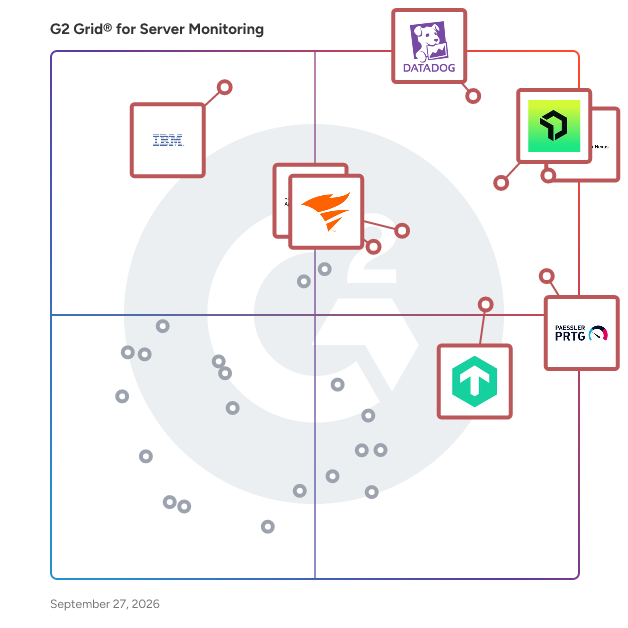
## Top-Rated Products (Ranked by G2 Score)
### 1. [Datadog](https://www.g2.com/products/datadog/reviews)
  Datadog is the monitoring, security and analytics platform for developers, IT operations teams, security engineers and business users in the cloud age. The SaaS platform integrates and automates infrastructure monitoring, application performance monitoring and log management to provide unified, real-time observability of our customers&#39; entire technology stack. Datadog is used by organizations of all sizes and across a wide range of industries to enable digital transformation and cloud migration, drive collaboration among development, operations, security and business teams, accelerate time to market for applications, reduce time to problem resolution, secure applications and infrastructure, understand user behavior and track key business metrics.


  **Average Rating:** 4.4/5.0
  **Total Reviews:** 688

**User Satisfaction Scores:**

- **Performance Baseline:** 8.4/10 (Category avg: 8.6/10)
- **Proactive Server Monitoring Software:** 8.3/10 (Category avg: 8.7/10)
- **Has the product been a good partner in doing business?:** 8.5/10 (Category avg: 9.0/10)
- **Software Scaling:** 8.0/10 (Category avg: 8.7/10)


**Seller Details:**

- **Seller:** [Datadog](https://www.g2.com/sellers/datadog)
- **Company Website:** https://www.datadoghq.com/
- **Year Founded:** 2010
- **HQ Location:** New York
- **Twitter:** @datadoghq (50,931 Twitter followers)
- **LinkedIn® Page:** https://www.linkedin.com/company/1066442/ (10,625 employees on LinkedIn®)

**Reviewer Demographics:**
  - **Who Uses This:** Software Engineer, DevOps Engineer
  - **Top Industries:** Information Technology and Services, Computer Software
  - **Company Size:** 47% Mid-Market, 33% Enterprise


#### Pros & Cons

**Pros:**

- Ease of Use (145 reviews)
- Monitoring (144 reviews)
- Real-time Monitoring (122 reviews)
- Features (93 reviews)
- Analytics (88 reviews)

**Cons:**

- Expensive (92 reviews)
- Learning Curve (73 reviews)
- Pricing Issues (71 reviews)
- Cost (65 reviews)
- Learning Difficulty (56 reviews)

### 2. [Paessler PRTG](https://www.g2.com/products/paessler-prtg/reviews)
  Paessler PRTG is a real-time unified infrastructure monitoring solution that enables IT Pros to locate problems throughout their entire network and resolve them before they escalate and become business critical. PRTG monitors all systems, devices, traffic and applications of your IT infrastructure using these technologies: SNMP: ready to use and custom options WMI and Windows Performance Counters SSH: for Linux/Unix and MacOS systems Flows and Packet Sniffing HTTP requests REST APIs returning XML or JSON Ping, SQL and many more Over 500,000 sysadmins from SMB&#39;s to large enterprises use Paessler PRTG to make their networks faster, more responsive, and more reliable.


  **Average Rating:** 4.7/5.0
  **Total Reviews:** 202

**User Satisfaction Scores:**

- **Performance Baseline:** 8.5/10 (Category avg: 8.6/10)
- **Proactive Server Monitoring Software:** 8.6/10 (Category avg: 8.7/10)
- **Has the product been a good partner in doing business?:** 8.9/10 (Category avg: 9.0/10)
- **Software Scaling:** 8.3/10 (Category avg: 8.7/10)


**Seller Details:**

- **Seller:** [Paessler GmbH](https://www.g2.com/sellers/paessler-gmbh)
- **Company Website:** https://www.paessler.com/
- **Year Founded:** 1997
- **HQ Location:** Nuremberg, Germany
- **LinkedIn® Page:** https://www.linkedin.com/company/409588/ (390 employees on LinkedIn®)

**Reviewer Demographics:**
  - **Who Uses This:** Software Engineer, Network Administrator
  - **Top Industries:** Information Technology and Services, Telecommunications
  - **Company Size:** 52% Mid-Market, 37% Enterprise


#### Pros & Cons

**Pros:**

- Ease of Use (78 reviews)
- Monitoring (64 reviews)
- Monitoring Capabilities (57 reviews)
- Alerting Systems (53 reviews)
- Easy Setup (51 reviews)

**Cons:**

- Expensive (30 reviews)
- Slow Performance (29 reviews)
- User Interface Issues (28 reviews)
- Learning Curve (23 reviews)
- Licensing Issues (23 reviews)

### 3. [New Relic](https://www.g2.com/products/new-relic/reviews)
  New Relic invented cloud APM for application engineers. Today it is a leader in observability and source of truth for all engineers to make decisions with data across their entire software stack and the software life cycle. There are an estimated 25 million engineers in the world across more than 25 distinct functions. As every company becomes a software company, engineers are using New Relic to gather real-time insights and trending data about the performance of their software so they can be more resilient and deliver exceptional customer experiences. Only New Relic provides an all-in-one platform that is built and sold as a unified experience. With New Relic, customers get access to a secure telemetry cloud for all metrics, events, logs, and traces; powerful full-stack analysis tools; and predictable user-based pricing. New Relic has also curated one of the industry’s largest ecosystems of open source integrations, making it easy for every engineer to get started with observability and use New Relic alongside their other favorite applications.


  **Average Rating:** 4.4/5.0
  **Total Reviews:** 568

**User Satisfaction Scores:**

- **Performance Baseline:** 8.7/10 (Category avg: 8.6/10)
- **Proactive Server Monitoring Software:** 8.9/10 (Category avg: 8.7/10)
- **Has the product been a good partner in doing business?:** 8.5/10 (Category avg: 9.0/10)
- **Software Scaling:** 8.4/10 (Category avg: 8.7/10)


**Seller Details:**

- **Seller:** [New Relic](https://www.g2.com/sellers/new-relic)
- **Company Website:** https://newrelic.com
- **Year Founded:** 2008
- **HQ Location:** San Francisco, CA
- **Twitter:** @newrelic (65,851 Twitter followers)
- **LinkedIn® Page:** https://www.linkedin.com/company/426253/ (3,029 employees on LinkedIn®)

**Reviewer Demographics:**
  - **Who Uses This:** Software Engineer, Senior Software Engineer
  - **Top Industries:** Information Technology and Services, Computer Software
  - **Company Size:** 43% Mid-Market, 30% Enterprise


#### Pros & Cons

**Pros:**

- Ease of Use (97 reviews)
- Real-time Monitoring (95 reviews)
- Monitoring (75 reviews)
- Insights (69 reviews)
- Analytics (62 reviews)

**Cons:**

- Expensive (63 reviews)
- Pricing Issues (53 reviews)
- Complexity (50 reviews)
- Learning Curve (50 reviews)
- Complex Setup (38 reviews)

### 4. [ManageEngine OpManager](https://www.g2.com/products/manageengine-opmanager/reviews)
  ManageEngine OpManager offers unified network performance monitoring and fault management for your entire IT infrastructure. It provides real-time insights into the health and availability of all devices, servers, and applications, enabling quick troubleshooting and ensuring continuous network uptime.


  **Average Rating:** 4.6/5.0
  **Total Reviews:** 178

**User Satisfaction Scores:**

- **Performance Baseline:** 8.6/10 (Category avg: 8.6/10)
- **Proactive Server Monitoring Software:** 8.8/10 (Category avg: 8.7/10)
- **Has the product been a good partner in doing business?:** 9.0/10 (Category avg: 9.0/10)
- **Software Scaling:** 8.2/10 (Category avg: 8.7/10)


**Seller Details:**

- **Seller:** [Zoho](https://www.g2.com/sellers/zoho-b00ca9d5-bca8-41b5-a8ad-275480841704)
- **Year Founded:** 1996
- **HQ Location:** Austin, TX
- **Twitter:** @Zoho (137,251 Twitter followers)
- **LinkedIn® Page:** https://www.linkedin.com/company/38373/ (30,531 employees on LinkedIn®)
- **Phone:** +1 (888) 900-9646 

**Reviewer Demographics:**
  - **Who Uses This:** IT Manager, Network Administrator
  - **Top Industries:** Information Technology and Services, Financial Services
  - **Company Size:** 57% Mid-Market, 32% Enterprise


#### Pros & Cons

**Pros:**

- Monitoring (44 reviews)
- Real-time Monitoring (34 reviews)
- Ease of Use (33 reviews)
- User Interface (27 reviews)
- Comprehensive Monitoring (25 reviews)

**Cons:**

- Complexity (14 reviews)
- Complex Configuration (13 reviews)
- Complex Setup (11 reviews)
- Missing Features (11 reviews)
- Difficult Configuration (9 reviews)

### 5. [Checkmk](https://www.g2.com/products/checkmk/reviews)
  Checkmk is a full-stack monitoring and observability platform designed to provide unified visibility into hybrid IT infrastructures. With more than 2,000 built-in integrations, it offers broad coverage across networks, servers, cloud workloads, Kubernetes and applications. The platform is highly automated, featuring auto-discovery of hosts and services and rule-based configuration to reduce manual setup. It is highly scalable, capable of efficiently monitoring thousands of hosts and millions of services. A central web-based interface allows users to manage configuration, visualize data with customizable dashboards, and track system performance over time. Checkmk is available as packages for all common Linux distributions, as a virtual or physical appliance, through AWS and Azure Marketplace images, or as SaaS. Checkmk is available in four editions: Checkmk Community offers free and open source monitoring for small infrastructures. Checkmk Pro allows for monitoring at speed and scale for data center infrastructures. Checkmk Ultimate offers full-stack observability for hybrid and cloud-native infrastructures which is also available with multi-tenancy and data segregation to support security and compliance. And Checkmk Cloud for full-stack observability for hybrid and cloud-native infrastructures in a SaaS platform. Available extensions include synthetic monitoring and OpenTelemetry for application monitoring. The Checkmk Relay enables secure data collection for segmented networks using outbound-only communication, supporting fully air-gapped and zero-inbound monitoring deployments. Checkmk supports integration with ITSM tools and third-party platforms, enabling automatic ticket creation and consistent alerting. Features such as forecasting, capacity planning, and asset inventory as well as lifecycle management and auto-registration help teams manage dynamic IT environments. Monitoring capabilities: - Monitoring of hybrid infrastructures: cloud, on-premises, virtual, and container environments. - 2000+ built-in integrations networks, servers, cloud workloads, Kubernetes and applications out-of-the-box dashboards provide key metrics for AWS and Azure environments, Linux and Windows servers, and Kubernetes clusters. - Automated discovery and configuration. - Alerting with native ITSM integrations. Operational benefits: - Provides insights into system health, capacity trends, and future resource needs through built-in assessments and forecasting tools. - Reduces manual effort with auto-discovery, rule-based configuration, and centralized agent management as well as auto-registration and host lifecycle management. - Accelerates incident response time by using custom self-healing workflows via the ‘Alert Handler’. - Allows creation of tailored dashboards and views to focus on the most relevant metrics for each team. - Maintains an up-to-date inventory of hardware and software assets, enriched with live monitoring data. - Supports distributed monitoring and can handle massive amounts of data. Why choose Checkmk? - Cost Efficiency: Transparent pricing model with a strong price-performance ratio - Security: Meets stringent security requirements, including fully air-gapped deployments and zero-inbound monitoring. - Visibility: Delivers broad and deep visibility with flexible deployment options. - Scalability: Scales efficiently to support large, distributed environments with high host and service counts. - Extensibility: Supports custom plug-ins, integrations, synthetic monitoring to monitor you applications from the user’s perspective and OpenTelemetry for application monitoring. Customers include: Adobe, Cloudera, Fujitsu, Siemens, Orange, VW, HP, Zalando, Fitbit, NEC, Continental, NHL, Capgemini, Sixt, Intesa SanPaolo


  **Average Rating:** 4.7/5.0
  **Total Reviews:** 282

**User Satisfaction Scores:**

- **Performance Baseline:** 8.3/10 (Category avg: 8.6/10)
- **Proactive Server Monitoring Software:** 8.2/10 (Category avg: 8.7/10)
- **Has the product been a good partner in doing business?:** 9.0/10 (Category avg: 9.0/10)
- **Software Scaling:** 7.7/10 (Category avg: 8.7/10)


**Seller Details:**

- **Seller:** [Checkmk](https://www.g2.com/sellers/checkmk)
- **Company Website:** https://checkmk.com/
- **Year Founded:** 2007
- **HQ Location:** Munich, DE
- **Twitter:** @checkmk (1,757 Twitter followers)
- **LinkedIn® Page:** https://www.linkedin.com/company/11824415/ (223 employees on LinkedIn®)

**Reviewer Demographics:**
  - **Who Uses This:** IT Engineer, Systemadministrator
  - **Top Industries:** Information Technology and Services, Computer &amp; Network Security
  - **Company Size:** 42% Mid-Market, 41% Enterprise


#### Pros & Cons

**Pros:**

- Ease of Use (27 reviews)
- Monitoring (24 reviews)
- Monitoring Services (23 reviews)
- Flexibility (21 reviews)
- Real-time Monitoring (19 reviews)

**Cons:**

- Learning Curve (18 reviews)
- Difficult Learning (15 reviews)
- Learning Difficulty (12 reviews)
- Complex Configuration (11 reviews)
- Complex Setup (10 reviews)

### 6. [SolarWinds Observability](https://www.g2.com/products/solarwinds-worldwide-llc-solarwinds-observability/reviews)
  SolarWinds® Observability is a comprehensive full-stack observability solution designed to meet the diverse needs of modern organizations, regardless of their size. This solution provides deep visibility into hybrid ecosystems, enabling users to monitor and manage both on-premises and cloud environments effectively. By optimizing performance and ensuring availability across distributed hybrid IT infrastructures, SolarWinds Observability supports organizations in navigating the complexities of their IT environments. Targeted at IT professionals and organizations that require robust monitoring capabilities, SolarWinds Observability caters to a wide range of use cases. It is particularly beneficial for businesses operating in hybrid environments, where the integration of on-premises and cloud resources is essential. The solution allows users to gain a holistic view of their networks, applications, databases, and user experiences, thereby facilitating better decision-making and operational efficiency. This is especially crucial in today’s fast-paced digital landscape, where downtime can significantly impact service reliability and customer satisfaction. One of the standout features of SolarWinds Observability is its built-in intelligence powered by AIOps capabilities. This functionality accelerates issue remediation by enabling users to detect, troubleshoot, and resolve problems more efficiently. The advanced predictive analysis and anomaly-based alerts help organizations proactively address potential issues before they escalate, ultimately reducing downtime and enhancing service reliability. Additionally, the solution&#39;s log pattern analysis further streamlines the troubleshooting process, allowing IT teams to focus on strategic initiatives rather than being bogged down by operational challenges. SolarWinds Observability offers flexibility in deployment, providing users with the option to choose between self-hosted and SaaS models. The self-hosted option integrates seamlessly with other SolarWinds services, such as security and storage monitoring, while the SaaS option is tailored for deeper monitoring of custom and cloud-based applications. This adaptability ensures that organizations can select the deployment method that best aligns with their operational needs and infrastructure. Moreover, SolarWinds Observability stands out by consolidating multiple monitoring tools into a single, integrated solution. This not only simplifies the monitoring process but also helps organizations reduce costs associated with managing disparate systems. By offering comprehensive visibility across hybrid IT environments, SolarWinds Observability empowers organizations to optimize their operations and enhance overall performance.


  **Average Rating:** 4.3/5.0
  **Total Reviews:** 787

**User Satisfaction Scores:**

- **Performance Baseline:** 8.4/10 (Category avg: 8.6/10)
- **Proactive Server Monitoring Software:** 8.4/10 (Category avg: 8.7/10)
- **Has the product been a good partner in doing business?:** 8.3/10 (Category avg: 9.0/10)
- **Software Scaling:** 7.5/10 (Category avg: 8.7/10)


**Seller Details:**

- **Seller:** [SolarWinds Worldwide LLC](https://www.g2.com/sellers/solarwinds-worldwide-llc)
- **Company Website:** https://www.solarwinds.com
- **Year Founded:** 1999
- **HQ Location:** Austin, TX
- **Twitter:** @solarwinds (19,618 Twitter followers)
- **LinkedIn® Page:** https://www.linkedin.com/company/166039/ (2,818 employees on LinkedIn®)

**Reviewer Demographics:**
  - **Who Uses This:** Network Engineer, Network Administrator
  - **Top Industries:** Information Technology and Services, Hospital &amp; Health Care
  - **Company Size:** 45% Enterprise, 36% Mid-Market


#### Pros & Cons

**Pros:**

- Ease of Use (64 reviews)
- Monitoring (63 reviews)
- Monitoring Performance (55 reviews)
- Monitoring Capabilities (51 reviews)
- User Interface (41 reviews)

**Cons:**

- Expensive (35 reviews)
- Learning Curve (21 reviews)
- Integration Issues (20 reviews)
- Complex Setup (19 reviews)
- Configuration Difficulty (18 reviews)

### 7. [Progress WhatsUp Gold](https://www.g2.com/products/progress-whatsup-gold/reviews)
  WhatsUp Gold is an IT infrastructure monitoring software designed to help users identify and resolve network issues swiftly, often before they impact end users. This solution provides comprehensive visibility into network performance and availability, enabling IT professionals to maintain optimal operations across their infrastructure. With its interactive mapping interface, WhatsUp Gold allows users to visualize the status of all devices connected to their network, making it easier to monitor both on-premise and cloud-based resources. Targeted primarily at IT administrators and network engineers, WhatsUp Gold is particularly beneficial for organizations that rely heavily on network performance for their daily operations. Its user-friendly design caters to both seasoned professionals and those new to network management, offering a range of features that streamline the monitoring process. The software is designed to support various use cases, from small businesses needing basic monitoring capabilities to large enterprises requiring advanced network management solutions. One of the standout features of WhatsUp Gold is its customizable drag-and-drop dashboards, which provide users with the flexibility to tailor their monitoring experience according to specific needs. These dashboards present real-time data on device status and performance, allowing users to quickly assess the health of their network. Additionally, the software’s automatic discovery and mapping capabilities enable users to visualize their entire network topology, ensuring that no device goes unnoticed during monitoring. WhatsUp Gold also emphasizes optimization, helping users manage network traffic and bandwidth utilization effectively. By providing actionable insights and unified views of network performance, the software empowers IT teams to troubleshoot issues efficiently. The ability to identify and resolve network and server problems proactively not only enhances operational efficiency but also improves overall user satisfaction by minimizing downtime. In summary, WhatsUp Gold offers a robust and interactive solution for IT infrastructure monitoring, combining ease of use with powerful features. Its focus on real-time visibility, customization, and proactive troubleshooting makes it a valuable tool for organizations looking to enhance their network management capabilities.


  **Average Rating:** 4.4/5.0
  **Total Reviews:** 381

**User Satisfaction Scores:**

- **Performance Baseline:** 8.3/10 (Category avg: 8.6/10)
- **Proactive Server Monitoring Software:** 8.4/10 (Category avg: 8.7/10)
- **Has the product been a good partner in doing business?:** 8.8/10 (Category avg: 9.0/10)
- **Software Scaling:** 8.1/10 (Category avg: 8.7/10)


**Seller Details:**

- **Seller:** [Progress Software](https://www.g2.com/sellers/progress-software)
- **Company Website:** https://www.progress.com/
- **Year Founded:** 1981
- **HQ Location:** Burlington, MA.
- **Twitter:** @ProgressSW (48,853 Twitter followers)
- **LinkedIn® Page:** https://www.linkedin.com/company/progress-software/ (4,205 employees on LinkedIn®)

**Reviewer Demographics:**
  - **Who Uses This:** Network Engineer, Network Administrator
  - **Top Industries:** Information Technology and Services, Education Management
  - **Company Size:** 57% Mid-Market, 26% Enterprise


#### Pros & Cons

**Pros:**

- Ease of Use (47 reviews)
- Monitoring (44 reviews)
- Monitoring Performance (35 reviews)
- Alert Notifications (31 reviews)
- User Interface (30 reviews)

**Cons:**

- Expensive (16 reviews)
- Poor Interface Design (15 reviews)
- Complex Setup (14 reviews)
- Learning Curve (14 reviews)
- Outdated Interface (14 reviews)

### 8. [ManageEngine Applications Manager](https://www.g2.com/products/manageengine-applications-manager/reviews)
  ManageEngine Applications Manager is an application performance &amp; IT infrastructure monitoring solution that is designed to combat modern infrastructure problems and ensure that your business and end users are unaffected by substandard performance and downtime. By leveraging deep application performance monitoring with byte-code instrumentation, infrastructure monitoring, hybrid cloud monitoring, and digital experience monitoring from a single console, IT and DevOps teams will be able to gain code-level insights, automate their processes, pinpoint &amp; resolve performance issues, and deliver better business outcomes. Overall, our product will help businesses optimize application usage &amp; revenue, reduce MTTR, improve DevOps processes, migrate to the cloud with confidence, respond to incidents faster, and ensure seamless user experiences.


  **Average Rating:** 4.6/5.0
  **Total Reviews:** 101

**User Satisfaction Scores:**

- **Performance Baseline:** 8.8/10 (Category avg: 8.6/10)
- **Proactive Server Monitoring Software:** 9.4/10 (Category avg: 8.7/10)
- **Has the product been a good partner in doing business?:** 9.3/10 (Category avg: 9.0/10)
- **Software Scaling:** 9.0/10 (Category avg: 8.7/10)


**Seller Details:**

- **Seller:** [Zoho](https://www.g2.com/sellers/zoho-b00ca9d5-bca8-41b5-a8ad-275480841704)
- **Year Founded:** 1996
- **HQ Location:** Austin, TX
- **Twitter:** @Zoho (137,251 Twitter followers)
- **LinkedIn® Page:** https://www.linkedin.com/company/38373/ (30,531 employees on LinkedIn®)
- **Phone:** +1 (888) 900-9646 

**Reviewer Demographics:**
  - **Top Industries:** Information Technology and Services, Computer Software
  - **Company Size:** 48% Mid-Market, 41% Enterprise


#### Pros & Cons

**Pros:**

- Monitoring (21 reviews)
- Monitoring Capabilities (18 reviews)
- Monitoring Features (14 reviews)
- Real-time Monitoring (14 reviews)
- Ease of Use (12 reviews)

**Cons:**

- Limited Features (9 reviews)
- Feature Limitations (6 reviews)
- Integration Issues (6 reviews)
- Learning Curve (6 reviews)
- Limited Customization (6 reviews)

### 9. [Pandora FMS](https://www.g2.com/products/pandora-fms/reviews)
  Pandora FMS is a unified monitoring and observability platform designed to consolidate visibility, alerting, reporting, and automation across heterogeneous IT environments. Instead of combining multiple point tools for networks, servers, applications, and cloud services, Pandora FMS centralizes data collection and operational workflows in a single console, reducing integration effort and operational complexity in on-premise, hybrid, and multi-cloud architectures. The platform collects telemetry using multiple methods, including agents, remote checks, standard protocols (e.g., SNMP/WMI), APIs, and log/event ingestion. This enables teams to monitor infrastructure and services end-to-end, correlate signals, and maintain consistent alerting policies and dashboards across distributed estates. Pandora FMS also supports capacity and trend analysis to anticipate resource constraints and identify recurring patterns, and includes AI-assisted capabilities for anomaly detection and automated thresholds to surface hard-to-spot operational signals. Pandora FMS is extensible through a large plugin ecosystem (500+ plugins and integrations), covering a wide range of enterprise and infrastructure technologies such as SAP, Oracle, Citrix, JBoss, VMware, AWS, SQL Server, Red Hat, and WebSphere. This extensibility helps organizations standardize monitoring across legacy and modern stacks without redesigning their monitoring approach per technology. Core capabilities: -Unified monitoring for networks, servers, applications, cloud services, endpoints, and logs -Centralized alerting, event correlation, dashboards, and scheduled reporting -Flexible data collection via agents, remote checks, APIs, and plugins -Scalability for distributed environments and large numbers of monitored elements -Analytics for trend/capacity planning plus AI-assisted anomaly detection and dynamic thresholds -A key differentiator is direct vendor support, which simplifies escalation and ensures continuity of expertise for deployment, tuning, and ongoing operations.


  **Average Rating:** 4.6/5.0
  **Total Reviews:** 216

**User Satisfaction Scores:**

- **Performance Baseline:** 9.2/10 (Category avg: 8.6/10)
- **Proactive Server Monitoring Software:** 9.3/10 (Category avg: 8.7/10)
- **Has the product been a good partner in doing business?:** 9.0/10 (Category avg: 9.0/10)
- **Software Scaling:** 9.3/10 (Category avg: 8.7/10)


**Seller Details:**

- **Seller:** [Pandora FMS](https://www.g2.com/sellers/pandora-fms)
- **Company Website:** https://pandorafms.com/
- **Year Founded:** 2004
- **HQ Location:** Madrid, Spain
- **Twitter:** @pandorafms (5,470 Twitter followers)
- **LinkedIn® Page:** https://www.linkedin.com/company/pandora-pfms/ (57 employees on LinkedIn®)

**Reviewer Demographics:**
  - **Who Uses This:** Data Analyst
  - **Top Industries:** Information Technology and Services, Telecommunications
  - **Company Size:** 51% Mid-Market, 38% Small-Business


#### Pros & Cons

**Pros:**

- Monitoring (139 reviews)
- Ease of Use (114 reviews)
- Real-time Monitoring (96 reviews)
- Flexibility (64 reviews)
- Network Monitoring (61 reviews)

**Cons:**

- Learning Curve (45 reviews)
- Complex Setup (32 reviews)
- Learning Difficulty (30 reviews)
- Difficult Learning (28 reviews)
- Complex Configuration (27 reviews)

### 10. [Zabbix](https://www.g2.com/products/zabbix/reviews)
  Zabbix is an all-in-one, open source monitoring and observability solution that makes any hardware, software, service, or web application more efficient and reliable. Available on-premise and in the cloud, Zabbix can deploy anywhere and monitor any device, system, or app in any environment – while providing comprehensive data protection, easy integration, and limitless data visualization options. Zabbix uses a wide range of data collection methods to collect metrics, defining smart problem thresholds and harnessing the power of machine learning to suppress unwanted alert storms and notify users regarding the root cause of issues. Metrics are displayed on intuitive, easy-to-understand dashboards that allow users to access issues, reports, and maps with a single click. Users can monitor anything from physical and virtual servers or containers to network infrastructure and applications. Zabbix allows users to: • Control their infrastructure by collecting any metric from any source • Detect problems instantly • Get alerted on critical issues • Gain additional insights and extend observability via powerful data visualization • Leverage a single pane of glass for an entire infrastructure • Keep track of KPI&#39;s with business service monitoring • Seamlessly deploy Zabbix within any infrastructure • Deploy with just a few clicks, either on-premise or in the cloud • Scale quickly and without limits • Do business with the peace of mind that enterprise-grade security provides Zabbix also offers a full range of professional services, including: • Technical support subscriptions • Zabbix professional training • Migration • Upgrades • Template building • Development • Integration • Consulting • Turnkey solution


  **Average Rating:** 4.4/5.0
  **Total Reviews:** 204

**User Satisfaction Scores:**

- **Performance Baseline:** 8.4/10 (Category avg: 8.6/10)
- **Proactive Server Monitoring Software:** 8.3/10 (Category avg: 8.7/10)
- **Has the product been a good partner in doing business?:** 8.1/10 (Category avg: 9.0/10)
- **Software Scaling:** 8.5/10 (Category avg: 8.7/10)


**Seller Details:**

- **Seller:** [Zabbix](https://www.g2.com/sellers/zabbix)
- **Company Website:** https://www.zabbix.com
- **Year Founded:** 2005
- **HQ Location:** Riga, Latvia
- **Twitter:** @zabbix (9,924 Twitter followers)
- **LinkedIn® Page:** https://www.linkedin.com/company/2476879/ (164 employees on LinkedIn®)

**Reviewer Demographics:**
  - **Who Uses This:** System Administrator
  - **Top Industries:** Information Technology and Services, Telecommunications
  - **Company Size:** 61% Mid-Market, 27% Enterprise


#### Pros & Cons

**Pros:**

- Monitoring (11 reviews)
- Ease of Use (9 reviews)
- Monitoring Capabilities (8 reviews)
- Monitoring Ease (6 reviews)
- Real-time Monitoring (6 reviews)

**Cons:**

- Learning Curve (4 reviews)
- Dashboard Issues (3 reviews)
- Data Limitations (3 reviews)
- Difficult Configuration (3 reviews)
- Difficult Learning (3 reviews)

### 11. [Centreon Infra Monitoring](https://www.g2.com/products/centreon-infra-monitoring/reviews)
  Centreon is a comprehensive IT monitoring solution designed to help organizations gain full visibility and control over their IT operations. By providing real-time insights into system performance, network health, and application availability, Centreon enables businesses to proactively manage their IT environments, ensuring uninterrupted operations and optimal resource utilization. Targeted primarily at IT departments and operations teams, Centreon serves a diverse range of industries, from small businesses to large enterprises. Its user-friendly interface and customizable dashboards make it accessible for both technical and non-technical users. This versatility allows organizations to tailor the monitoring experience to their specific needs, making it an invaluable tool for maintaining operational efficiency and enhancing service delivery. One of the key use cases for Centreon is its ability to prevent downtime through proactive issue detection. By continuously monitoring critical systems and applications, Centreon alerts IT teams to potential problems before they escalate into significant outages. This proactive approach minimizes disruptions and helps organizations maintain a reliable IT infrastructure, which is essential for meeting business demands and ensuring customer satisfaction. Centreon also emphasizes resource optimization, allowing businesses to maximize efficiency and reduce IT costs. By providing detailed insights into resource utilization, organizations can identify underperforming assets and make informed decisions about capacity planning and resource allocation. This capability enables businesses to streamline their IT operations, ultimately leading to cost savings and improved performance. In addition, Centreon enhances the user experience by delivering consistent, high-quality IT services. With its comprehensive monitoring capabilities, IT teams can ensure that applications and services are running smoothly, providing end-users with the reliable performance they expect. This focus on user experience fosters customer loyalty and supports overall business success by aligning IT services with organizational goals. Centreon distinguishes itself in the IT monitoring category by combining powerful monitoring features with a user-centric approach. Its ability to deliver actionable insights, prevent downtime, optimize resources, and enhance user experience makes it a vital tool for organizations looking to improve their IT operations and achieve business success.


  **Average Rating:** 4.6/5.0
  **Total Reviews:** 89

**User Satisfaction Scores:**

- **Performance Baseline:** 7.8/10 (Category avg: 8.6/10)
- **Proactive Server Monitoring Software:** 8.2/10 (Category avg: 8.7/10)
- **Has the product been a good partner in doing business?:** 8.1/10 (Category avg: 9.0/10)
- **Software Scaling:** 7.4/10 (Category avg: 8.7/10)


**Seller Details:**

- **Seller:** [Centreon](https://www.g2.com/sellers/centreon)
- **Company Website:** https://www.centreon.com/
- **Year Founded:** 2005
- **HQ Location:** Paris, France
- **Twitter:** @Centreon (699 Twitter followers)
- **LinkedIn® Page:** https://www.linkedin.com/company/830051/ (162 employees on LinkedIn®)

**Reviewer Demographics:**
  - **Who Uses This:** Network Engineer
  - **Top Industries:** Information Technology and Services, Internet
  - **Company Size:** 63% Mid-Market, 25% Enterprise


#### Pros & Cons

**Pros:**

- Ease of Use (9 reviews)
- Monitoring (8 reviews)
- Monitoring Capabilities (7 reviews)
- Real-time Monitoring (7 reviews)
- Integrations (6 reviews)

**Cons:**

- Complex Configuration (5 reviews)
- Not User-Friendly (5 reviews)
- Complex Setup (4 reviews)
- Difficult Learning (4 reviews)
- Learning Curve (4 reviews)

### 12. [OpsPilot](https://www.g2.com/products/opspilot/reviews)
  OpsPilot is an AI-powered observability and operational intelligence platform that helps engineering and operations teams move from reactive monitoring to proactive, autonomous operations. Modern production systems — microservices, distributed architectures, cloud and hybrid environments — generate enormous volumes of telemetry. Traditional monitoring tools surface that data, but still leave engineers responsible for interpreting signals, identifying root causes, and deciding what to do. OpsPilot closes that gap. It continuously analyzes telemetry across your applications, infrastructure, and services, then tells your team what is happening, why it is happening, and what to do about it. From monitoring to operational intelligence OpsPilot goes beyond dashboards and alerts. It correlates signals across metrics, logs, traces, and deployment events to identify abnormal behaviour, explain root causes, and guide teams toward faster resolution — dramatically reducing the time spent on incident investigation and operational troubleshooting. AI SRE teammate OpsPilot is designed to act as an AI SRE teammate — augmenting your operations team by answering the questions engineers face during incidents: What changed? Where is the failure occurring? Which service is responsible? What should we investigate next? Three core capabilities - Observability — collects and correlates telemetry across metrics, logs, traces, JVM data, and application-level diagnostics for a complete picture of system behaviour. - Operational Intelligence — applies AI-driven analysis to surface what changed, what is causing the issue, which components are involved, and what actions may resolve it. - Action and Automation — supports guided incident response, runbook generation, automated remediation, and continuous operational learning. OpenTelemetry-native OpsPilot ingests telemetry via OTLP over gRPC or HTTP — no proprietary agent required. It works with your existing OpenTelemetry instrumentation across Kubernetes, microservices, cloud services, and serverless platforms. Prometheus-compatible metrics, Loki log ingestion, and Jaeger/Zipkin trace formats are also supported. For teams needing deep JVM or ColdFusion diagnostics, the optional FusionReactor APM agent provides additional application-level telemetry. Built for DevOps, SRE, and platform engineering teams OpsPilot is designed for organizations running modern production systems that require high reliability and operational efficiency — particularly teams moving toward SRE or platform engineering models who need deeper operational insight without increasing headcount. Deployed as SaaS, hybrid, or agentless via OpenTelemetry.


  **Average Rating:** 4.8/5.0
  **Total Reviews:** 174

**User Satisfaction Scores:**

- **Performance Baseline:** 8.6/10 (Category avg: 8.6/10)
- **Proactive Server Monitoring Software:** 8.9/10 (Category avg: 8.7/10)
- **Has the product been a good partner in doing business?:** 9.5/10 (Category avg: 9.0/10)
- **Software Scaling:** 9.1/10 (Category avg: 8.7/10)


**Seller Details:**

- **Seller:** [Intergral](https://www.g2.com/sellers/intergral)
- **Company Website:** https://www.fusion-reactor.com/
- **Year Founded:** 1998
- **HQ Location:** Boeblingen, DE
- **Twitter:** @Fusion_Reactor (9,373 Twitter followers)
- **LinkedIn® Page:** https://www.linkedin.com/showcase/fusionreactor/ (1 employees on LinkedIn®)

**Reviewer Demographics:**
  - **Who Uses This:** CTO, Developer
  - **Top Industries:** Information Technology and Services, Computer Software
  - **Company Size:** 61% Small-Business, 29% Mid-Market


#### Pros & Cons

**Pros:**

- Monitoring (25 reviews)
- Real-time Monitoring (23 reviews)
- Ease of Use (17 reviews)
- Performance (15 reviews)
- Troubleshooting (15 reviews)

**Cons:**

- Learning Curve (8 reviews)
- Expensive (6 reviews)
- Learning Difficulty (5 reviews)
- UX Improvement (5 reviews)
- Data Limitations (4 reviews)

### 13. [Foglight for Databases](https://www.g2.com/products/foglight-for-databases/reviews)
  Offering a holistic approach to database monitoring, Quest&#39;s Foglight for Databases effectively merges and standardizes database performance monitoring across platforms regardless of their location—cloud or on-premise—including relational, non-relational, open-source, and cloud-only databases. Featuring deep diagnostic capabilities, organizations can proactively manage and tune both real-time and historical performance, while troubleshooting and enhancing the overall health of their database environment.


  **Average Rating:** 4.0/5.0
  **Total Reviews:** 43

**User Satisfaction Scores:**

- **Performance Baseline:** 8.9/10 (Category avg: 8.6/10)
- **Has the product been a good partner in doing business?:** 8.5/10 (Category avg: 9.0/10)


**Seller Details:**

- **Seller:** [Quest Software](https://www.g2.com/sellers/quest-software)
- **Year Founded:** 1987
- **HQ Location:** Austin, TX
- **Twitter:** @Quest (17,156 Twitter followers)
- **LinkedIn® Page:** https://www.linkedin.com/company/2880/ (3,594 employees on LinkedIn®)
- **Ownership:** NYSE: DGX

**Reviewer Demographics:**
  - **Top Industries:** Information Technology and Services
  - **Company Size:** 57% Enterprise, 35% Mid-Market


### 14. [Netreo](https://www.g2.com/products/netreo/reviews)
  Netreo is the most comprehensive IT Operations full stack monitoring and AIOps company. We provide a single source of truth for proactive performance and availability monitoring for large enterprise networks, infrastructure, applications and business services. Our solution is used by: - IT Executives to have full visibility from the business service right down into the infrastructure and network that supports it. - IT Engineering departments as a decision support system for capacity planning, and architecting modern solutions. - IT Operations teams for real time visibility into what is failing in their environment, what bottlenecks exist and who it is affecting. We provide all of these insights for systems and vendor mixes in large heterogeneous and constantly evolving environments. We have an extensive and growing list of supported vendors (over 350 integrations) including network vendors, servers, storage, virtualization, cloud platforms and others. Our platform is also an extensible environment with the ability for our user community to build and share their integrations with others in our customer community.


  **Average Rating:** 4.5/5.0
  **Total Reviews:** 54

**User Satisfaction Scores:**

- **Performance Baseline:** 8.7/10 (Category avg: 8.6/10)
- **Proactive Server Monitoring Software:** 8.5/10 (Category avg: 8.7/10)
- **Has the product been a good partner in doing business?:** 9.2/10 (Category avg: 9.0/10)
- **Software Scaling:** 8.7/10 (Category avg: 8.7/10)


**Seller Details:**

- **Seller:** [BMC Helix](https://www.g2.com/sellers/bmc-helix)
- **Year Founded:** 2025
- **HQ Location:** N/A
- **LinkedIn® Page:** https://www.linkedin.com/company/bmchelix/ (1,083 employees on LinkedIn®)

**Reviewer Demographics:**
  - **Top Industries:** Information Technology and Services, Primary/Secondary Education
  - **Company Size:** 37% Mid-Market, 34% Enterprise


## Parent Category

[IT Infrastructure Software](https://www.g2.com/categories/it-infrastructure)


## Related Categories

- [Application Performance Monitoring (APM) Tools](https://www.g2.com/categories/application-performance-monitoring-apm)
- [Cloud Infrastructure Monitoring  Software](https://www.g2.com/categories/cloud-infrastructure-monitoring)
- [Observability Software](https://www.g2.com/categories/observability-software)


---

## Buyer Guide

### What You Should Know About Server Monitoring Software

### **What is Server Monitoring Software?**

Server monitoring is the process of monitoring and tracking a physical or virtual server performance. Server monitoring software allows a user to continually assess server utilization rates (uptime and downtime) and help identify performance issues. A vital feature is its ability to monitor several server metrics in real time, which include CPU utilization, memory allocation, hardware health, and response time. Tracking server metrics lets the user analyze usage patterns and identify errors, thereby allowing more time for troubleshooting solutions instead of searching for causes. The software allows the user to collect extensive details on hardware health which is not easily available from server operating systems, and view data from a single interface. Server monitoring software has become a staple for many companies as they continue to grow and expand their data center and computing powers across the globe.

Server monitoring software is based on the server operating system that is being used, which includes Windows, Linux, Unix, and other OS deployments. The server monitoring tool is used to analyze the performance of Linux processes or Windows services which permits systems administrators to understand the load on system resources. For Windows monitoring, users will be able to gain several insights on critical Windows performance metrics such as memory, disk usage, and CPU utilization. Under Linux monitoring, users will be able to monitor server metrics such as thread count and load average.

Server monitoring software should be able to alert a user immediately when a fault occurs in order to prevent downtime. In case a fault occurs when the server passes a certain threshold limit, it immediately alerts the user by sending instant notifications via on-screen displays, email, SMS, and Slack alerts. Some server monitoring software also allows users to set up remedial actions (such as shutting down a server or offloading tasks to another server)&amp;nbsp; to be taken in case of any fault.

### What are the Common Features of Server Monitoring Software?

Server monitoring software is a great way to ensure that all servers are running smoothly and that there are no issues that could cause a possible downtime. The following are some core metrics within server monitoring that can help users keep track of their servers’ health:

**CPU utilization:** This is the key feature that the software must be able to efficiently perform. A server monitoring solution should be able to monitor the load on the CPU.&amp;nbsp;

Since the CPU is the processing center of the server, any fault or issues in the CPU performance could lead to a slowdown of the server which could eventually crash. In addition, heavy CPU usage will lead to poor memory utilization further decreasing the health of the server.

**Disk usage:** This feature allows a user to analyze how much disk space is left for usage. It helps to identify what are the applications or processes that are taking up the highest space and provides solutions to prevent complete usage of disk space. It allows the user to make simple and efficient capacity planning decisions.

In addition to disk space, server monitoring software should also be able to track RAM usage. Since the data in RAM is stored only for a short while, it only tracks the data that is being actively used. This inherently allows the software to keep track of system upgrades and cached memory (so the user knows when it’s time to clear cache if there is a system slow down).&amp;nbsp;

**Network monitoring and analysis:** Servers are the backbone of the IT environment, which is connected to a large computer network across the globe. To do a manual network check across every single connection point is an impossible task for humans, and that is where the software plays a key role. This feature tests, collects, processes, and builds a database of network statistics that can be used to derive insights and analysis. This would also include monitoring firewalls.

**Error rate detection and analysis** : Error rate is the number of issues that occur relative to the total error requests. By analyzing the error rate of a server, it provides the user an opportunity to identify possible errors before they occur and prevent any downtime. Although the acceptable standard error rate is less than 1%, it would be ideal to ensure that there are little to no errors.

**Bandwidth analysis:** Bandwidth is the amount of information that is sent over a certain period of time. For a server that keeps processing data both inwards and outwards, it is a key feature to see which of the applications are taking up the most bandwidth. Taking up more bandwidth would lead to the server slowing down, causing reduced application performance. By being able to track the bandwidth consumed by an application, a user will be able to reduce congestion and bottlenecks and ensure the smooth running of the server.

Bandwidth monitoring can be done via three options—packet sniffing, Simple Network Management Protocol (SNMP), and netflow. SNMP is the ideal solution for simple bandwidth monitoring requirements. SNMP-based server monitoring solution would collect information or transmit and receive values within the network device interfaces. SNMP is a great tool for making capacity planning decisions. For Windows servers, users can also opt for Windows Management Interface (WMI) which is a Microsoft protocol, specifically designed for Microsoft-based network management, servers (such as SQL servers), Azure stacks, virtualized environments, and workstations.

Another additional and interesting feature that bandwidth analysis allows is to ensure that there are no data breaches in the IT system, in which hackers would abuse the network by taking up the bandwidth. A sudden spike or increase in bandwidth usage could help identify perpetrators, and system admins can immediately take the necessary course of action.

**Dashboards:** Having a customizable dashboard or template as part of a server monitoring solution has become a necessity. There are several templates for server application monitoring platforms for Unix, Linux, and Windows servers. The dashboard provides powerful visualization of data in different, personalized ways. It empowers the user to analyze the data and provide data-driven recommendations and suggestions. Other inclusions consist of a suite of analysis tools and APIs that enable secure integration with other third-party applications. This software also comes with an easy web interface that allows the admin to configure and control the dashboard as per preferences.

**Remote access:** With working from home becoming the new norm, it has become a key feature for server monitoring software to act as a medium between the user and the server, when the user cannot go physically to the server room. Providing remote access would allow users to fix several problems by taking control of the devices attached to the network, without leaving the comfort of their homes. In addition, several enterprises have thousands of servers installed in data centers at far-off locations, which makes it physically impossible to check each and every server manually. Server monitoring systems allow the concerned team to keep track of all the servers from a single point.

**Server availability:** Server monitoring software also allows the user to identify which are the servers being severely over or underutilized. This will allow admins to set up a contingency plan in place in case there is a possibility of server failure. For instance, a server monitoring software would be able to track the servers that have low free disk space, if it&#39;s in a critical or warning state, if device temperature is too high or too low, fan working is in a critical state, etc., and would ideally offload few workloads to additional servers that are being underutilized.&amp;nbsp;

**Track configuration changes:** Some server monitoring systems have additional benefits such as keeping track of any configuration changes such as new plugins, add-ons, removed or replaced components, track upgrades, etc.

### What are the Benefits of Server Monitoring Software?

**Measures server health:** The server monitoring software tracks each metric, from CPU optimization to memory usage, disk allocation, response time, and several others. It ensures that the server is healthy and there are no issues causing a slowdown of the system. Users can keep track of all components from a vantage point.

**Promptly identifying server issues:** Real-time server monitoring software sends our prompts, alerting the user that there is an issue. This helps the user to be proactive. For numerous businesses that cannot afford downtime which could lead to huge monetary losses, this software helps to keep servers functional at 100% efficiency without any lapses. In addition, this leads to quicker, more effective troubleshooting.

**Continuous business operations:** By using server monitoring systems, companies are able to run daily functions without any issues by monitoring uptime and downtime. For example, in a situation where a company website does not work properly and faces an outage, the server monitoring software would immediately alert the user and necessary action will be taken. This allows the website to be up and running within no time, thereby preventing the company from losing website traffic.

**Providing performance monitoring:** Performance statistics allow a user to analyze real-time data along with historical data and pinpoint causes and reasons that could cause a failure of the system.

**Seamless integration with other IT software:** Server monitoring services are easily integrated with various software such as log analysis software, IT alert system software, IT issue resolution software, and others. Its data is used in collaboration with other tools for developing a solid IT infrastructure ecosystem.&amp;nbsp;&amp;nbsp;

**Recognize security breaches:** A sudden spike in data processing or bandwidth consumption could help the user to spot suspicious activity take preemptive actions.

**Open-source tools:** Open-source tools are software programs or tools that are free for several users to use without requiring a commercial license. Several server monitoring software are open-source tools and therefore, users do not have to face significant costs to procure. Open-source tools are also a good option to look out for since it allows the software to be highly scalable making it future ready. They also come with a series of plugins and add-ons for additional functionality.

### Who Uses Server Monitoring Software?

**IT teams (administration, development, and support):** By using server monitoring tools, the IT team can easily be alerted in case of any errors that arise and can make quick decisions to reduce downtime. The alerts are sent to the system administrator, who then raises them with the concerned system engineers to look into. The system engineers will be able to troubleshoot and solve the application performance and hosting issues, as well as changes in the server’s function. The team can also set performance monitoring benchmarks in order to maintain server efficiency.

**Executive team:** Data-driven decisions allow business professionals to use verified data towards achieving business goals. By using the data that the server monitoring systems provide (via dashboards or templates, or integrating the software with various other systems), the executive team can proactively derive insights from data visualization. Executive teams can use this information to evaluate risks, analyze efficiencies, and track return on investment (ROI).&amp;nbsp;

**Security management specialists:** The team can use the data tracked by the server monitoring services to ensure that all servers are secure and are not compromised. The team would also be able to eliminate any risks even before they occur. In addition, this is extremely helpful when there are multiple servers to be monitored at various locations.

### What are the Alternatives to Server Monitoring Software?

Alternatives to server monitoring software can replace this type of software, either partially or completely:

[Enterprise monitoring software](https://www.g2.com/categories/enterprise-monitoring): Enterprise monitoring software offers a single view approach to keep track of all IT environments within an enterprise, which includes servers, storage, networks, database management, and several others. The data can be accessed via a single dashboard. Since this approach allows complete infrastructure monitoring, various users can benefit from viewing data in a single frame rather than depending on separate server monitoring solutions.

[Hardware monitoring software](https://www.g2.com/categories/hardware-monitoring): Hardware monitoring software is used to track the performance of hardware components which include CPU performance, fan speeds that are core components for servers. The software sends alerts to the user in case of any potential problems. The usage of hardware monitoring software allows the user to immediately pinpoint the error source and take necessary actions such as replacement of a faulty part.

[Log monitoring software](https://www.g2.com/categories/log-monitoring): Log monitoring software scans and monitors log files generated by servers and networks. The software is used to detect unusual patterns in the log files and generate alerts to inform the user.

### Challenges with Server Monitoring Software

Server monitoring software solutions can come with their own set of challenges:

**Managing an increasing number of servers:** Paramount importance is being given to IT infrastructure, driven by the sudden need to work from home and ensure business continuity. Companies are heavily investing in expanding their server infrastructure in order to support high-speed data processing, file transfers, and smooth operations. As the number of servers increases, it becomes difficult for server monitoring software to scale to keep up with the rate of servers being added, and therefore also need to be updated continuously.&amp;nbsp;

**Hardware health and environment issues:** There are some issues that can happen beyond the control of the admins such as power outages, UPS failure, temperature and humidity levels in a data center, failure of the cooling system, fan breakdown which are hard to control.

**Alert blindness:** Alert blindness is a situation that occurs when the users receive several alerts from server monitoring tools that with time, could potentially be ignored due to its repetitiveness. In such a scenario, there is a huge challenge for users to actually identify severe issues that need immediate attention.

To solve this challenge, the ideal solution would be to set threshold notifications for different components. Recheck intervals can also be set in place to ensure that the errors are recurring or a one-time situation. In addition, situations wherein automated responses can be set in place will also help to save a lot of time. For example, if a web server fails and the website freezes, server monitoring tools could be set up automatically to do a force restart, and then check whether the issue is solved. If not, it can then alert the required system administrators to check on what is causing the errors.

**Limitation with seeing the bigger picture:** System administrators would use the software to answer the question “Is my server working correctly, and if not, what can I do to fix it?”. Although this is the core capability of the software, there is a challenge of not looking at the bigger picture where the data and insight pulled from the monitoring software can factor well into strategic business decisions.

### How to Buy Server Monitoring Software

Server monitoring software needs to have one common goal, which is to monitor the server&#39;s health and alert the user in case of any errors. There are numerous factors that need to be considered before making the purchase of the software:

**Align with business desires and budgets:** The primary goal when making a purchase decision to opt for a server monitoring solution is to ensure to pick a software that is well aligned with the buyer’s business desire and budget. For instance, if a buyer has a smaller budget and only requires software to maintain server health they can opt for a free version or a basic offering with minimum features. Conversely, if a buyer requires software that can handle a gamut of operations as well as run large advanced tasks, they can opt for a more sophisticated and feature-rich server monitoring software.

**Environment surveys:** The buyer needs to scrutinize their company IT systems environment and applications in order to choose the right server monitoring software. This would include whether these servers are on premises or virtual servers&amp;nbsp; (on the cloud), location of the servers, etc. Buyers that have several servers located physically or virtually would require server monitoring software since it would be extremely difficult to manage each one separately.

**Future planning:** As companies continue to grow and expand operations, it is necessary that buyers choose software that can support current server requirements and also any future upgrades. It is a good practice to check with the software vendor if the monitoring software can support the buyer in the long term as well. This is extremely important in order to ensure hardware compatibility in the future as well.

**Compare the list of server monitoring software:** Once the customer has decided that they require server monitoring tools to help keep track of server health and budgets have been set, the next step would be to make a long list of the best server monitoring software that are presently available in the market. Long lists help to eliminate software that does not provide critical functionality, thereby reducing the list to be more compact and precise. Once the list has been narrowed down, the customer can begin to compare different features and offerings of the server monitoring software as per the company needs. Pricing decisions are also taken to ensure that the software selected fits in the IT budget. A highly efficient method of comparing various server monitoring software would be to opt for technology review platforms such as g2.com, that provide unbiased reviews and also provide different perspectives on the benefits or issues with various server monitoring software.

**Live demos or trial versions:** Once the list has been further narrowed down, customers can then opt to check if the server monitoring software vendors are providing a live demo, or a free trial version (with limited functionality). This is a great way for buyers to ensure that the server monitoring software is the right choice for the customer, and can use the trial versions before finally committing to the purchase decision.

**Invest in training:** When opting for a new software, it is a good idea to check with the software vendor if they can provide training for the employees that would be using the software on a regular basis. Employees would face a learning curve when handling complex new server monitoring tools, and by providing training it would help the users to get acclimated to the monitoring software quicker.