TaskTrack
Who Is the Company Behind TaskTrack?
- Seller: Avitus
- Year Founded: 2015
- HQ Location: Randburg, ZA
-
LinkedIn® Page: www.linkedin.com
2 employees on LinkedIn®
Total Products under this Category: 759
Last updated: November 01, 2026
Why You Can Trust G2's Software Rankings:
G2's software rankings are built on verified user reviews, rigorous moderation, and a consistent research methodology maintained by a team of analysts and data experts. Each product is measured using the same transparent criteria, with no paid placement or vendor influence. While reviews reflect real user experiences, which can be subjective, they offer valuable insight into how software performs in the hands of professionals. Together, these inputs power the G2 Score, a standardized way to compare tools within every category.
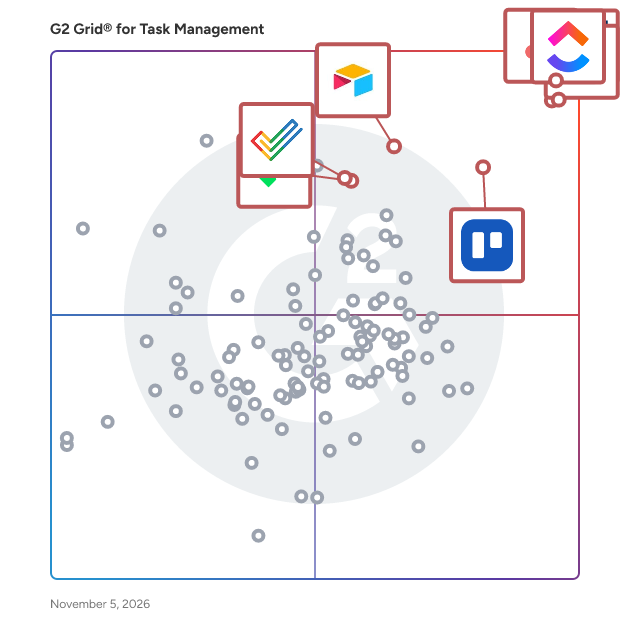
Highlighted products: Asana, ClickUp, monday AI Work Platform, Smartsheet, Trello, Airtable, Zoho Projects, and Wrike.
Underlying data: [Grid® JSON](https://www.g2.com/categories/task-management-software/grids.json?focus%5B%5D=asana&focus%5B%5D=clickup&focus%5B%5D=monday-com&focus%5B%5D=smartsheet&focus%5B%5D=trello&focus%5B%5D=airtable&focus%5B%5D=zoho-projects&focus%5B%5D=wrike)
Collaborative, simple task management that will improve your teams productivity.
Taskwall is a productivity software to execute your strategy and accelerate growth by making OKRs simple and effective. It provides tons of features for successfully implementing OKRs into personal or business goal setting. Taskwall supports hundreds of integration with Zapier, Slack, Trello, Jira and more which helps you take your team’s productivity to the new heights.
Average Rating: 5.0/5.0
Total Reviews: 1
"Easy to use app for setting and tracking OKRs"
Rating: 5.0/5.0 stars
— Sakshi G.
Connect G2 to Claude or ChatGPT for answers grounded in G2's trusted reviews, comparisons, and pricing from real user insights.
Tasqs is a task manager based on the idea that not everything on your list deserves to survive. Most to-do apps help you capture more tasks, so your list and feeling of being behind keep growing. Tasqs is built to help you really complete tasks instead. Friday Amnesty is a weekly ritual that surfaces tasks you keep rescheduling and offers three choices: commit to a date, shrink it to a first step, or let it go. The Shortlist limits your day to five tasks, so you always know what matters. It also includes recurring tasks, tags, an AI assistant, and a connector to manage tasks from Claude or ChatGPT. It's free to start.
Say goodbye to chaos and hello to clarity with Tatask's folder-based task organization. Tatask helps you compartmentalise and prioritize your tasks so you can focus on what really matters and make rapid progress by focusing on 1 small task at a time. Tatask lets you nest tasks inside each other so you can break down the most complex projects into bite-sized chunks. It is the perfect tool for anyone who wants to take control of their life and get things done.
Taktia is a shared day board for small service businesses. See who is on which job today, and for which customer, without running the day from memory, spreadsheets and WhatsApp. Built for owner-operators with teams of about 2 to 15. $2.50 per person a month, or $25 a year. 14-day free trial, no card needed.
Transaction management software for real estate industry that allows management of all contract-related processes from single platform.
TeamAssurance is a cloud platform to connect your Top line with your Front line in real-time, embedding a virtuous cycle of improvement & learning. Our integrated platform directly links your 3 most critical processes: Strategy Management | Project Management | Daily Management
Average Rating: 5.0/5.0
Total Reviews: 1
Rating: 5.0/5.0 stars
— era b.
GET YOUR COMPANY TASKS DONE
TeamGantt is online Gantt chart software for teams who need a schedule everyone can see, trust, and actually use. Plan in minutes with drag-and-drop simplicity, link dependent tasks once, and let the whole schedule move with you when plans change. No bloated setup, no certification required, and no per-seat bill that punishes you for inviting the people who need to be in the loop. More than 2 million people in over 120 countries have used TeamGantt to plan their work, and 20,000+ teams rely on it today, from marketing departments and creative agencies to custom home builders, trade contractors, and product teams at companies like NASA, Netflix, Google, and Whole Foods Market. WHY TEAMGANTT IS DIFFERENT Most project tools force a trade-off. Enterprise scheduling software is powerful but slow to learn and expensive to roll out. All-in-one work platforms try to do everything, burying the timeline under layers of docs, dashboards, and settings. Spreadsheets are familiar but fall apart the moment one date changes. TeamGantt was built to end that trade-off. It gives you real scheduling power (dependencies, critical path, baselines, workload, and cost tracking) in an interface that anyone on your team, or your client's team, can pick up in an afternoon. We believe a schedule only works if people actually open it, so we obsess over making it fast, visual, and friendly. BUILT ON A JOBSITE, NOT IN A BOARDROOM TeamGantt started in 2009 as scheduling software for a Baltimore roofing contractor. Our cofounders built it on nights and weekends because nothing on the market handled both job scheduling and team coordination well. A customer signed up within hours of the first launch, and we have been building alongside our customers ever since. We are proudly bootstrapped. We have never taken outside equity funding, which means there is no investor pressure pushing us toward complexity, upsells, or growth-at-all-costs decisions. Our customers fund our business, so our customers decide where it goes. That independence shows up everywhere: in the roadmap, in the pricing, and in the support you get. FAST, VISUAL SCHEDULING - Drag-and-drop Gantt charts: Create tasks, set dates, and adjust timelines by simply dragging bars. Changes happen instantly. - Dependencies with lead and lag: Link tasks once. Move one date, and every downstream task follows automatically, with custom lead and lag times when you need them. - Critical path: See exactly which tasks determine your finish date so you know where a delay will hurt and where you have room to breathe. - Milestones, lookahead schedules, and templates: Mark key moments, plan the next few weeks in detail, and reuse what works so every new project starts ahead. - Easy imports: Bring in existing plans from Microsoft Project (.mpp), CSV or Excel, and Primavera P6. No rebuilding from scratch. - AI-assisted planning: Describe your project and TeamGantt's AI Assistant drafts a starting plan with phases, tasks, milestones, and durations, so you never start from a blank page. Most teams build their first project in minutes, not weeks. SINGLE SOURCE OF TRUTH - VISUALLY Not everyone thinks in Gantt charts, and they don't have to. TeamGantt keeps a single source of truth and lets each person work in the view that suits them: Gantt, calendar, list, or kanban board, plus a personal My Tasks view and custom cross-project workflow boards. Subtasks, task groups, checklists, custom labels, custom fields, and a built-in RACI chart give structure without clutter. KNOW WHERE EVERYTHING & EVERYONE STANDS - Baselines: Compare the plan you promised with the one you're actually running, then fix course quickly. - Real-time progress and project health: See what's on track and what's slipping at a glance, across a single project or your whole portfolio. - Time tracking and estimates: Log hours, run timesheet reports, and compare estimated vs. actual hours to sharpen future planning. - Activity log with undo: See who changed what, and reverse mistakes in a click. - Notifications and alerts: Keep the right people informed without endless status meetings. SEE WHO'S BOOKED, WHO'S FREE, AND WHO'S STRETCHED TOO THIN TeamGantt's workload view shows demand across every project by task count or estimated hours, and it updates live as you drag tasks around. Assign work to people, teams, or even assets like equipment and spaces. Spot double-booking before it happens, balance the load, and protect your team from burnout. COLLABORATION IN REAL TIME A schedule is only useful if the people doing the work can see it. TeamGantt makes collaboration simple: - Comments, @-mentions, sticky notes, and file sharing right on the tasks they relate to. - Live share links that give anyone view-only access to an always-current schedule. Send one link and it updates automatically, every time. - Exports, printable PDF timelines, and embeddable timelines for websites and client updates. - Unlimited collaborators on Business and Builder plans, so you never have to decide who gets left out. TEAMGANTT 3.0: FASTER, CLEANER, SMARTER Our latest release, TeamGantt 3.0, rebuilds the core experience for performance and focus: - A renewed Gantt chart engineered to be dramatically faster, even on very large schedules. - A refreshed interface with more room to work, a customizable sidebar, and reworked filters and navigation. - A Command Palette (Cmd/Ctrl + K) to jump instantly to any project, board, or task. - An AI Assistant (Beta) that helps you manage projects, not just build them. Ask what's overdue, adjust the schedule for a change order, or push remaining tasks after a weather delay, all in plain language. PURPOSE-BUILT FOR CONSTRUCTION: BUILDER EDITION Because TeamGantt was born on a jobsite, we take construction seriously. Builder Edition gives custom home builders, remodelers, trade contractors, and small commercial GCs tools designed for how crews actually work: - Subcontractor portal: Send schedule requests by text message or email. Subs confirm or decline with just a phone number. No app, no account, no password. - Client portal: Share a curated, live view of progress with homeowners and clients, with built-in chat to keep communication in one place. - Procurement tracking and material lead times: Link material orders to install tasks so dates update automatically when deliveries slip, with a procurement board across all your jobs. - Cost-loaded scheduling and cash flow forecasting: Track budgeted vs. actual costs per task and forecast expected billing as the schedule changes. - Procore integration: Push your TeamGantt schedule to Procore so the field and the office work from the same plan. - Personalized onboarding to get your team up and running fast. WORKS WITH THE TOOLS YOU ALREADY USE TeamGantt fits into your existing stack instead of asking you to replace it. Integrations include Slack, Trello, Basecamp, Dropbox, Procore, and calendar feeds for Google, iCal, and Outlook. Zapier connects TeamGantt to more than 8,000 other apps, and an open API supports custom connections. Microsoft Project import and export means you can collaborate with stakeholders who still live in MPP files. SECURE AND READY TO SCALE Manager and collaborator permissions keep control where it belongs, while single sign-on (SSO), advanced reporting, and forecasting are available for organizations that need them. TeamGantt runs in your browser on Mac or PC with nothing to install, and mobile access keeps teams connected from the office, the field, or on the go. SIMPLE, PREDICTABLE PRICING We think pricing should be as straightforward as the product. TeamGantt uses flat monthly plans rather than a per-seat bill, and our Business and Builder plans include unlimited managers and collaborators. Every paid plan comes with a 14-day free trial with full access to that plan's features, and there are no long-term contracts. Annual billing saves 20%, and a free Personal plan is available for individuals getting started. SUPPORT FROM REAL PEOPLE WHO KNOW THE PRODUCT This is where TeamGantt really stands apart. When you reach out, you talk to a real person on our team, not a chatbot or a ticket queue. Our average response time is under five minutes on weekdays, and support is available seven days a week, including evenings and weekends. Over 100 tutorials and help docs are available on demand, and our team will happily help you set up your first project. Our customers notice. As one leader put it: "TeamGantt's customer service is second to none. Amber has personally helped me out of jams and even rebuilt my schedule when I needed it. There's just really good people behind the scenes." And from a project manager at Rakuten: "We compared multiple project management solutions and found many good 'integrated' enterprise solutions but couldn't find a good solution which just focuses on our problem: project management. TeamGantt is designed to solve the problem." WHO TEAMGANTT IS FOR - Project managers who want real scheduling power without enterprise complexity. - Marketing teams and creative agencies juggling campaigns, launches, and client deliverables. - Construction teams, including custom home builders, remodelers, trade contractors, and small commercial GCs. - Operations, product, and IT teams coordinating cross-functional work with clear deadlines. - Any team tired of spreadsheets that break and tools nobody wants to open. OUR PROMISE Our values are simple: always do the right thing, put people over profits, and treat others with dignity and respect. That's why we build software that respects your time, price it fairly, and stand behind it with people who care. Have a real schedule by the end of the day. Start a free 14-day trial, take a guided tour, or book a demo and we'll walk through it together.
Average Rating: 4.8/5.0
Total Reviews: 875
AI-generated summary from verified user reviews
"Super Project Management Software"
Rating: 4.5/5.0 stars
— Dave A.
"Intuitive Gantt Chart Tool with Room for Analytics Growth"
Rating: 4.5/5.0 stars
— Shubhang P.
TeamGlot.com is a unified workspace for global and national teams, enabling collaboration in native languages. Ideal for international and also national companies, it combines all team tools in one place with automatic translations. Team Collaboration: - Work together in one space, regardless of location. - Share and discuss documents in real-time with live translation (33 languages). - Chat conferences with up to 10 nationalities, each in their own language. - Invite team members, view availability, and schedule meetings. - Shared task management with deadlines and progress tracking. - Internal messages with one-click translation. - Invite guests without accounts via temporary codes. Internal messages: Send messages directly to team members. The message appears for the recipient and can be translated with one click, you can then reply in your own language. Document Editing: - Upload and auto-translate documents (including scanned pages and graphs via OCR). - AI-generated summaries for quick content overview. - Edit texts in your language, adjusting font, size, and alignment. - Supports PDF, DOC, DOCX, TXT, RTF, and ODT formats. Shared task management: Create shared tasks that the entire team can follow and update. Assign a task to a specific team colleague, the recipient accepts or declines the task, and you track its progress in real time. If a deadline is missed, the task flashes red so it isn’t forgotten. It’s also possible to manage tasks centrally, where an administrator can decide who participates in the task. Chat & Calendar: - Separate chats for up to 5 people with real-time translation. - Color-coded calendar with AI-assisted scheduling and reminders. - Professional email writing in 33 languages, adapting to cultural norms. Security: - Data stored in Europe under GDPR. - AES-256-GCM encryption for general data, files and chats; TLS 1.3 for secure connections. - Data auto-deleted after 24 hours (documents, chats) or short periods. - Secure payments via European independent partner; no card details stored in Teamglot.com. TeamGlot.com simplifies secure, cross-border teamwork, making language barriers invisible.
TeamGrid is a streamlined task and project management platform with integrated telephony and smart-office functions.
Teamogy is all-in-one cloud system for those who want to have their company in order. It allows you to have fully overview about capacity planning and time tracking. Teamogy connects internal teams and supports collaboration and communications inside the company. It lets your team work anytime and from anywhere.
Average Rating: 5.0/5.0
Total Reviews: 1
Rating: 5.0/5.0 stars
— Vít K.
