Best Secure Enterprise Browser Software - Page 3

How Many Secure Enterprise Browser Software Products Does G2 Track?

Total Products under this Category: 55

Category Stats (Sep 2026)

  • Average Rating: 4.66/5 (↓0.01 vs Aug 2026) The average rating of products in this category, based on all submitted ratings
  • Top Trending Product: MoreLogin (+0.75%) - Among all products in this category, MoreLogin recorded the largest rating increase compared to last month

Last updated: September 05, 2026

How Does G2 Rank Secure Enterprise Browser Software Products?

Why You Can Trust G2's Software Rankings:

  • 30 Analysts and Data Experts
  • 2,200+ Authentic Reviews
  • 55+ Products
  • Unbiased Rankings

G2's software rankings are built on verified user reviews, rigorous moderation, and a consistent research methodology maintained by a team of analysts and data experts. Each product is measured using the same transparent criteria, with no paid placement or vendor influence. While reviews reflect real user experiences, which can be subjective, they offer valuable insight into how software performs in the hands of professionals. Together, these inputs power the G2 Score, a standardized way to compare tools within every category.

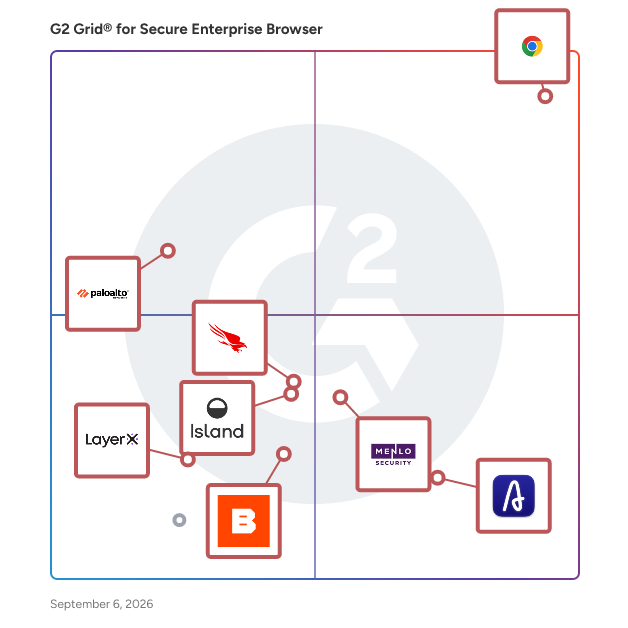
G2 Grid® for Secure Enterprise Browser Software

G2 Grid® for Secure Enterprise Browser Software plotting products by satisfaction and market presence

Highlighted products: Chrome Enterprise, Afina Browser, Menlo Security, Prisma Browser, CrowdStrike Falcon Seraphic Enterprise Browser, Island, Browserbase, and LayerX Browser Security Platform.

Underlying data: [Grid® JSON](https://www.g2.com/categories/secure-enterprise-browser/grids.json?focus%5B%5D=chrome-enterprise&focus%5B%5D=afina-browser&focus%5B%5D=menlo-security&focus%5B%5D=prisma-browser&focus%5B%5D=crowdstrike-falcon-seraphic-enterprise-browser&focus%5B%5D=island&focus%5B%5D=browserbase&focus%5B%5D=layerx-browser-security-platform)

HERE

OpenFin is the OS for Enterprise Productivity. We bring organizations together in a single, secure, and unified workspace. From the world’s largest banks to emerging startups around the world, OpenFin is being used by firms of all sizes to build beautiful desktop applications and custom end-user workspaces that drive productivity.

Who Is the Company Behind HERE?

  • Seller: HERE
  • Year Founded: 2010
  • HQ Location: New York, New York, United States
  • LinkedIn® Page: www.linkedin.com
    126 employees on LinkedIn®

HERE Enterprise Browser

Built through collaboration with global banks, HERE Enterprise Browser provides enterprise security, workforce productivity and seamless integration of enterprise AI. HERE’s Chromium-based, zero-trust security model includes integration with Microsoft Entra and other IDPs, app access controls, data loss prevention controls, executable protection and auditability for compliance. HERE supercharges productivity through app interoperability and Supertabs that combine multiple tabs into persona or task-based dashboards. It provides federated enterprise search to Microsoft 365, Google Workspace, Salesforce and other platforms. HERE also has its own Notification Center and an AI Center that enables integration of enterprise AI models into end user workflows.

Who Is the Company Behind HERE Enterprise Browser?

  • Seller: HERE
  • Year Founded: 2010
  • HQ Location: New York, US
  • LinkedIn® Page: www.linkedin.com
    168 employees on LinkedIn®

HP Wolf Pro Security

HP Wolf Pro Security is an endpoint security solution designed for small and medium sized businesses providing protection without complex IT management. It combines multiple layers of defense—including hardware enforced threat containment, next generation antivirus, and credential protection—to stop common attacks like phishing, malware, and ransomware. By isolating risky activities such as email attachments, downloads, and web browsing, threats are contained before they can spread or infect the PC. Built specifically for SMBs, it is easy to deploy and manage through a cloud based console with preconfigured policies, minimizing the need for dedicated security expertise. This helps reduce IT workload, lower security alerts, and improve end user productivity."

Average Rating: 4.5/5.0

Total Reviews: 2

Who Is the Company Behind HP Wolf Pro Security?

  • Seller: HP
  • Year Founded: 1939
  • HQ Location: Palo Alto, CA
  • Twitter: @HP
    1,091,979 Twitter followers
  • LinkedIn® Page: www.linkedin.com
    144,241 employees on LinkedIn®
  • Ownership: HPQ

Who Uses This Product?

  • Company Size: 67% Large, 33% Small

What Are Recent G2 Reviews of HP Wolf Pro Security?

Mammoth Enterprise Browser

The Mammoth Enterprise Browser combines a policy engine and a hardened Chromium-based web browser as the basis of a new security solution. This solution enforces conditional access and prevents data leakage as users connect to the public cloud, internal applications, and SaaS applications. Integrations with identity providers automate the secure onboarding of remote users, contractors, and partners without the need for VDI or VPN connections. By securing the browser, Mammoth Cyber revolutionizes web security, providing organizations with unparalleled protection and control over their digital assets in an increasingly complex threat landscape.

Who Is the Company Behind Mammoth Enterprise Browser?

Neon Cyber Platform

Neon Cyber is an AI-native, browser security solution that gives security teams real-time visibility into, and control over, how employees interact with AI tools, SaaS applications, and web-based resources — including activity that occurs outside of single sign-on (SSO) and identity provider (IDP) controls. The platform deploys as a lightweight browser extension across all major Chromium-based browsers (Chrome, Edge, Brave, Opera, and others) and requires no changes to existing network infrastructure. It can be pushed to end users in minutes via MDM, GPO or, Google Workspace. As employees adopt AI tools faster than security controls can keep pace, traditional solutions like DLP, EDR, and email security see only fragments of what's happening. Neon closes that gap. Deployed as a lightweight browser extension across all major Chromium-based browsers (Chrome, Edge, Brave, Opera, and others), it requires no infrastructure changes and can be rolled out in minutes via group policy, Google Workspace, or browser store enrollment. Core capabilities include: * AI & SaaS Visibility — Discovers every AI tool and SaaS application accessed by employees, including accounts created outside SSO and IDP controls, with vendor compliance metadata (SOC 2, HIPAA, etc.), data-sharing practices, and authentication methods. * AI Data Leakage Prevention — Monitors every prompt, input, upload, and download into generative AI tools in real time, enforcing context-aware guardrails to stop sensitive data from leaving the browser. * In-Browser Phishing Detection — A locally-run Small Language Model (SLM) analyzes form behavior and DOM interactions at the point of click to detect and block phishing attempts before credentials are entered — no external URL feeds required. * Identity & Credential Governance — Detects credential reuse, weak authentication, and identity anomalies across sanctioned and unsanctioned applications. * Forensic Timelines & SIEM Integration — Captures full session-level evidence per user and exports structured telemetry to SIEM/SOAR platforms via API. Neon Cyber complements existing EDR and IAM investments without replacing them — and without forcing employees into restrictive isolated browsers. Security teams get full visibility and control at the point of intent.

Who Is the Company Behind Neon Cyber Platform?

Noid

Who Is the Company Behind Noid?

NullPrint

NullPrint is an Anti-detect Browser helps teams launch isolated browser profiles with unique fingerprints, proxy and geo controls, and built-in automation. Sync profiles across your organization and run manual or automated sessions from one desktop app.

Who Is the Company Behind NullPrint?

Who Uses This Product?

  • Company Size: 100% Small

What Are Recent G2 Reviews of NullPrint?

P1 Browser指纹浏览器

P1Browser Fingerprint Browser is one of the most popular and secure anti-detection browsers, specially designed for multi-account management, trusted by over 9 million users. It is built to solve the problem of account bans and is widely used in affiliate marketing, social media marketing, crypto airdrops, web scraping and other fields. Users can generate real browser fingerprints with various customizable parameters and easily manage all accounts in an unprecedented way. It ensures full account security by minimizing the risk of account suspension, ban, disablement and restriction. Multi-Account Management: P1Browser Fingerprint Browser allows you to easily create independent profiles for accounts on Facebook, Amazon, Google, TikTok, LinkedIn and any other websites. Multi-Window Synchronizer: Run and manage multiple identical tasks simultaneously on Windows and Mac systems. Customizable RPA: Build automated tasks tailored to your needs. Local API: Flexible integration with automated workflows. Team Collaboration Management: Assign roles and permissions flexibly according to each team member’s responsibilities. Unmatched Security Settings: End-to-end encrypted transmission and storage, secure account & browser configurations, and bug bounty programs protect all your accounts in a fully secure way。

Who Is the Company Behind P1 Browser指纹浏览器?

P1Power Browser指纹浏览器

P1 Fingerprint Browser is one of the most popular and secure anti-detection browsers, professionally built for multi-account management and trusted by massive global users. It is designed to solve the pain point of frequent account bans, widely applied in affiliate marketing, social media operations, crypto airdrops, web scraping and more industries. Users can generate real browser fingerprints with fully customizable parameters and manage all bulk accounts effortlessly in one platform. It effectively minimizes the risk of account suspension, restriction, disablement and blocking, keeping all your accounts in a fully secure environment. Multi-account management: P1 Fingerprint Browser

Who Is the Company Behind P1Power Browser指纹浏览器?

Perception Point

Our Advanced Email Security combines cutting edge threat prevention with the speed, scale and flexibility of the cloud. We’ve built in multiple scanning engines and threat intelligence for enhanced protection against known attacks like phishing, spam and commodity malware. For advanced threats, we’ve invented the first technology to combine hardware visibility with software agility to see what leading solutions miss. Propriety software algorithms x-ray code at the CPU-level to intercept attacks at the earliest stage possible - the exploit - before malware is even delivered. Our cyber security as a service deploys in a single click, analyzes up to 60x faster* and has limitless scale to always scan 100% of your traffic

Average Rating: 4.8/5.0

Total Reviews: 5

Who Is the Company Behind Perception Point?

  • Seller: Perception Point
  • Year Founded: 2015
  • HQ Location: Tel Aviv, Central
  • Twitter: @perceptionpo1nt
    2,961 Twitter followers
  • LinkedIn® Page: www.linkedin.com
    132 employees on LinkedIn®

Who Uses This Product?

  • Company Size: 83% Small, 17% Medium

What Are Recent G2 Reviews of Perception Point?

What Are G2 Users Discussing About Perception Point?

Prisma Browser for Business

Prisma Browser for Business is a secure web browser tailored for small businesses, integrating advanced security features directly into the browsing experience. Built on the Chromium platform, it offers a familiar interface while providing enterprise-grade protection against online threats such as phishing, ransomware, and data breaches. This solution enables teams to work seamlessly across various applications and AI tools, ensuring data security without the need for a dedicated IT team. Key Features and Functionality: - Proactive Threat Protection: Utilizes AI-powered threat scanning to detect and block phishing attempts, malware, and other cyber threats in real-time. - Data Loss Prevention: Implements controls to prevent accidental sharing of sensitive information, such as disabling copy/paste and file uploads to unauthorized platforms. - AI Interaction Management: Monitors and regulates AI tool usage to prevent unintended actions and data leaks, ensuring that business information remains secure. - User-Friendly Deployment: Offers a straightforward setup process with pre-configured security settings, allowing businesses to protect their teams without technical expertise. Primary Value and Problem Solved: Prisma Browser for Business addresses the critical need for robust cybersecurity in small businesses, which are increasingly targeted by sophisticated cyberattacks. By embedding security directly into the browser, it safeguards the primary workspace where employees spend the majority of their time. This solution not only protects against external threats but also mitigates risks associated with accidental data exposure through AI tools and other online platforms. By providing an easy-to-use, comprehensive security solution, Prisma Browser for Business empowers small businesses to focus on growth and productivity without compromising on security.

Who Is the Company Behind Prisma Browser for Business?

  • Seller: Palo Alto Networks
  • Year Founded: 2005
  • HQ Location: Santa Clara, CA
  • Twitter: @PaloAltoNtwks
    128,951 Twitter followers
  • LinkedIn® Page: www.linkedin.com
    23,492 employees on LinkedIn®
  • Ownership: NYSE: PANW
Lauren Worth
LW
Researched and written by Lauren Worth
Updated January 9, 2025