Best Project Management Software - Page 66

How Many Project Management Software Products Does G2 Track?

Total Products under this Category: 1,301

Category Stats (Sep 2026)

  • Average Rating: 4.39/5 The average rating of products in this category, based on all submitted ratings
  • Top Trending Product: Workzone (+1.76%) - Among all products in this category, Workzone recorded the largest rating increase compared to last month

Last updated: September 01, 2026

How Does G2 Rank Project Management Software Products?

Why You Can Trust G2's Software Rankings:

  • 30 Analysts and Data Experts
  • 142,700+ Authentic Reviews
  • 1,301+ Products
  • Unbiased Rankings

G2's software rankings are built on verified user reviews, rigorous moderation, and a consistent research methodology maintained by a team of analysts and data experts. Each product is measured using the same transparent criteria, with no paid placement or vendor influence. While reviews reflect real user experiences, which can be subjective, they offer valuable insight into how software performs in the hands of professionals. Together, these inputs power the G2 Score, a standardized way to compare tools within every category.
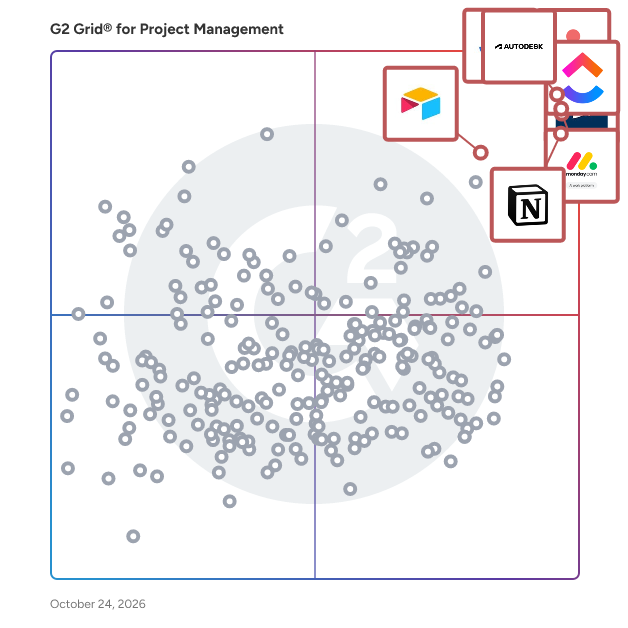
G2 Grid® for Project Management Software

G2 Grid® for Project Management Software plotting products by satisfaction and market presence

Highlighted products: Jira, Asana, Smartsheet, monday AI Work Platform, ClickUp, Notion, Airtable, and Quickbase.

Underlying data: [Grid® JSON](https://www.g2.com/categories/project-management/grids.json?focus%5B%5D=jira&focus%5B%5D=asana&focus%5B%5D=smartsheet&focus%5B%5D=monday-com&focus%5B%5D=clickup&focus%5B%5D=notion&focus%5B%5D=airtable&focus%5B%5D=quickbase)

PM Nexus

PM Nexus is an interactive learning and practice platform designed for project managers who want to develop better judgment - not just memorize frameworks or pass exams. Built around an Explore → Practice → Grow workflow, PM Nexus connects project management knowledge to real project decisions through interactive learning, scenario-based practice, decision support tools, and professional development tracking. With PM Nexus, you can: • Explore project management processes through interactive maps, process journeys, and ITTO relationships • Translate project context into practical decisions using Tailoring, Risk Radar, and decision support tools • Practice real-world project scenarios through simulations and Decision Replay • Track learning progress, professional development activities, and earned PDUs in one place PM Nexus is designed for project managers, PMP® and CAPM® candidates, PMO professionals, and teams that want to apply project management principles - not just study them. Built by PM Access, a PMI Authorized Training Partner, PM Nexus supports up to 59 trackable PDUs and offers a free tier with access to selected learning experiences.

Who Is the Company Behind PM Nexus?

Who Uses This Product?

  • Company Size: 100% Small

What Are Recent G2 Reviews of PM Nexus?

PMS-99

Who Is the Company Behind PMS-99?

PMS-99.com

PMS-99 (Project Management System 99) is an enterprise-grade, cloud-hosted project management platform engineered to replace fragmented tools and information silos with a singular, high-performance workspace. Built to support organizations of all sizes—from agile startups to complex public and private enterprises—PMS-99 ensures absolute structural integrity throughout a project’s lifecycle.

Who Is the Company Behind PMS-99.com?

Ponuz

Ponuz is a B2B desktop app that reinvents employee monitoring — the kind your team won't hate. Traditional tools watch: screen time, screenshots, keyloggers, mouse tracking. Ponuz does none of that; it measures the complexity of the work and the real results delivered. It's two experiences in one app. For owners and managers: a visibility layer where, instead of decoding metric-heavy dashboards, you simply talk to your data — ask Sentinel "How has Camilo been performing?" and get a plain-language answer about results, blockers and progress. For employees: a copilot that supports instead of watching — task management with proof of delivery (each task linked back to the meeting where it was agreed, moving Not started → In progress → In review → Done), their own productivity metrics, a company knowledge base ("second brain"), and video calls that turn into a summary, full transcript and action items automatically. Sentinel, the AI copilot, is one shortcut away (⌘⇧P) from any app, grounded in your company's own knowledge and aware of what's on screen. Ponuz keeps your data private — it never shares it or trains AI models on it. Available for macOS 11+ and Windows 10/11+. No screenshots. No keyloggers — just clarity on what your team actually got done.

Who Is the Company Behind Ponuz?

  • Seller: Ponuz
  • Year Founded: 2025
  • HQ Location: San Antonio, US
  • LinkedIn® Page: www.linkedin.com
    1 employees on LinkedIn®

Who Uses This Product?

  • Company Size: 100% Small

What Are Recent G2 Reviews of Ponuz?

Portal Worx

Portal Worx is a project workspace for construction and trades: main contractors, specialist contractors, fit-out firms, and the architects working alongside them. Everything a job produces, in one place. Drawings, site photos, documents, reports, updates and message threads, organised by project rather than scattered across email, shared drives and WhatsApp groups. Every upload, edit and deletion is logged automatically and kept for a year, so when a question lands months later the answer is already recorded. Your client sees the job without ringing you. Access is set per item, not per person. Every document category, photo folder, report and message thread carries its own audience, so a client sees exactly the parts of their own job you shared and nothing else. Clients and subcontractors cannot see each other. You can also send a document, photo or report by secure link to someone with no account at all. Reports worth handing to a client. Build the form once as a template, then fill it in on site. Thirteen block types including checklists, tables, annotations drawn on a photo and signatures signed on screen, with sections that show or hide based on the answers given. Export as a PDF stamped with your logo. AI that reads the job and stops there. Ask any project for a plain-language catch-up: progress against the dates, what has moved recently, what is flagged. It is built from a view filtered to the person asking, so it can never surface something they could not already open, and it reports rather than advises. Unlimited users on every plan. Your team, your clients and your subcontractors. There are no seats and no per-user fees, so bringing another person onto a job never costs more. It sits alongside what you already use. Portal Worx covers documents, photos, reports, communication and the audit trail. It does not do estimating, job costing, scheduling or invoicing, so there is nothing to migrate and no need to replace the tools handling your money. 14-day free trial on the Professional plan. No card required.

Who Is the Company Behind Portal Worx?

Portwood

Document Generation and Automation in Salesforce using Salesforce Data

Who Is the Company Behind Portwood?

Power Retro

Who Is the Company Behind Power Retro?

  • Seller: Tappointment
  • Year Founded: 2014
  • HQ Location: Budapest, HU
  • Twitter: @tappointment
    533 Twitter followers
  • LinkedIn® Page: www.linkedin.com
    20 employees on LinkedIn®

PQFORCE

PQFORCE is the flagship product of INTRASOFT, a Swiss SaaS solution provider that has developed customised software solutions for multinational corporations for over 20 years. PQFORCE enables organisations to handle all aspects of project, portfolio, resource and cost management. It helps users to get more done with less, whether they are using a waterfall, Agile, or hybrid project management methodology.

Average Rating: 4.4/5.0

Total Reviews: 4

How Do G2 Users Rate PQFORCE?

  • Has the product been a good partner in doing business?: 10.0/10 (Category avg: 8.9/10)

Who Is the Company Behind PQFORCE?

  • Seller: INTRASOFT
  • Year Founded: 1992
  • HQ Location: Hünenberg, CH
  • Twitter: @pqforce
    13 Twitter followers
  • LinkedIn® Page: www.linkedin.com
    10 employees on LinkedIn®

Who Uses This Product?

  • Company Size: 75% Small, 25% Large

What Do G2 Reviewers Say About PQFORCE?

AI-generated summary from verified user reviews

Pros
  • Users value the effective organization capabilities of PQFORCE, making task management simple and accessible for all.
  • Users value the user-friendly dashboard of PQFORCE, making project management accessible for all team members.
  • Users value the customizability of PQFORCE, enabling tailored organization and enhanced focus on essential tasks.
  • Users value the customization options of PQFORCE, enabling tailored task organization and efficient project management.
  • Users value the user-friendly dashboard of PQFORCE, enabling easy project management without needing a dedicated manager.
Cons
  • Users find the learning curve challenging, needing significant time to familiarize themselves with PQFORCE's features.
  • Users experience a steep learning curve with PQFORCE, needing time to fully acclimate to its advanced features.
  • Users note that setting up workflows on PQFORCE is time-consuming, especially without enough pre-built templates for smaller teams.
  • Users find the time-consumption in setting up workflows for PQFORCE to be frustrating and inefficient.

What Are Recent G2 Reviews of PQFORCE?

Praxis Navigator

Praxis Navigator is a security behavior monitoring platform that connects to Microsoft 365 via the Graph API to measure how employees actually handle security in their daily work. Instead of tracking training completions or simulated phishing clicks, it monitors real behaviors across Exchange Online, SharePoint, OneDrive, Teams, and Entra ID — giving IT and security leaders visibility into what their workforce actually does. The platform deploys in under 15 minutes with no agents or endpoint software. Once connected, it surfaces historic behavioral data from day one, establishing a behavioral baseline without waiting months to collect data. Security teams can tag interventions — such as awareness campaigns, policy changes, or training rollouts — and track before-and-after behavioral change over time. Praxis Navigator is built by Praxis Security Labs, founded by Kai Roer, author of "Build a Security Culture" and co-author of "The Security Culture Playbook" (Wiley). Roer created the Security Culture Framework adopted by ENISA and used by organizations worldwide. The platform is designed for organizations running Microsoft 365 that need to prove whether their security awareness and culture investments are actually changing employee behavior.

Who Is the Company Behind Praxis Navigator?

premaze

Who Is the Company Behind premaze?

Subhransu Sahu
SS
Researched and written by Subhransu Sahu
Updated April 9, 2026