Best OS Imaging & Deployment Software - Page 2

How Many OS Imaging & Deployment Software Products Does G2 Track?

Total Products under this Category: 30

Category Stats (Sep 2026)

  • Average Rating: 4.16/5 The average rating of products in this category, based on all submitted ratings
  • Top Trending Product: SmartDeploy (+0.02%) - Among all products in this category, SmartDeploy recorded the largest rating increase compared to last month

Last updated: September 05, 2026

How Does G2 Rank OS Imaging & Deployment Software Products?

Why You Can Trust G2's Software Rankings:

  • 30 Analysts and Data Experts
  • 800+ Authentic Reviews
  • 30+ Products
  • Unbiased Rankings

G2's software rankings are built on verified user reviews, rigorous moderation, and a consistent research methodology maintained by a team of analysts and data experts. Each product is measured using the same transparent criteria, with no paid placement or vendor influence. While reviews reflect real user experiences, which can be subjective, they offer valuable insight into how software performs in the hands of professionals. Together, these inputs power the G2 Score, a standardized way to compare tools within every category.

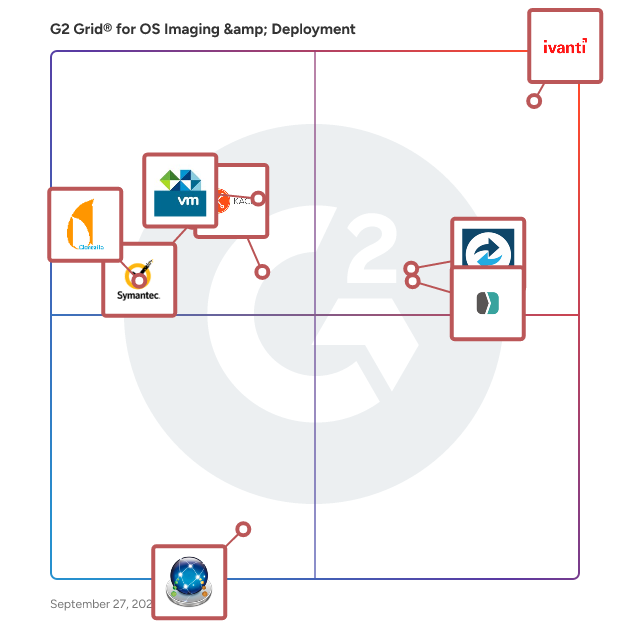
G2 Grid® for OS Imaging & Deployment Software

G2 Grid® for OS Imaging & Deployment Software plotting products by satisfaction and market presence

Highlighted products: Ivanti Neurons for Unified Endpoint Management, Macrium Backup & Restore, SmartDeploy, ThinApp, KACE Unified Endpoint Manager, Symantec Ghost Solution Suite, Clonezilla, and DeployStudio.

Underlying data: [Grid® JSON](https://www.g2.com/categories/os-imaging-deployment/grids.json?focus%5B%5D=ivanti-neurons-for-unified-endpoint-management&focus%5B%5D=macrium-backup-restore&focus%5B%5D=smartdeploy&focus%5B%5D=thinapp&focus%5B%5D=kace-unified-endpoint-manager&focus%5B%5D=symantec-ghost-solution-suite&focus%5B%5D=clonezilla&focus%5B%5D=deploystudio)

MacOnboardingMate

MacOnboardingMate (MOM) is a wizard designed to streamline Mac onboarding into a Mobile Device Management (MDM) solution or to orchestrate its migration between MDMs, all under the remote supervision of IT support. MOM provisioning over the Setup Assistant or Login Window allows a Mac to be onboarded even before the user’s first session is opened. Key integrations with Installomator and Homebrew ensure that the latest software versions are installed during onboarding, while mSCP helps IT support improve security posture and assess a Mac’s compliance score before it is assigned to a user. Slack and Teams integrations provide real-time visibility during workflows. A MOM Setup license allows a Mac to be onboarded either from an existing user session or the Setup Assistant. In the first scenario, the Mac is already in production and enrolled in the MDM using Device Enrollment or Automated Device Enrollment. In the second, the Mac is new or reset and enrolled using Automated Device Enrollment. A MOM Switch license enables a Mac to be migrated from an active user session and enrolled in a new MDM using Device Enrollment or Automated Device Enrollment. This critical process is central to any MDM migration project, requiring migrated devices to retain their Automated Device Enrollment configuration when applicable. The MOM Switch license also includes all the features of the MOM Setup license. MOM operates in two execution modes to run these workflows. The Launcher mode is used when MOM is run manually outside of an MDM. In contrast, AutoLauncher is used when MOM runs from an MDM, either automatically or manually via Self Service. For example, when a Mac is migrated between MDMs, MOM is executed from the original MDM using the AutoLauncher mode. MOM is multilingual, currently localized in English and French, with translations easily built from a template to support users’ preferred languages. MOM is a turnkey solution requiring no scripting knowledge for implementation or upgrades. If needed, MOM can be extended with custom scripts executed at key workflow stages.

Who Is the Company Behind MacOnboardingMate?

  • Seller: Agnosys
  • Year Founded: 1999
  • HQ Location: Saint-Maurice-Montcouronne, FR
  • LinkedIn® Page: www.linkedin.com
    7 employees on LinkedIn®

Macrium Deployment

Macrium SiteDeploy allows computers to be set up with a clean golden image from a bare metal state. SiteDeploy has been carefully designed to solve the everyday image deployment challenges your IT team faces. It addresses the problems experienced in a wide range of roles and organizations - from businesses where compliance is key, to government, healthcare and other security conscious environments.

Who Is the Company Behind Macrium Deployment?

MSIX Installer

MSIX Installer is a lightweight Windows utility for signing and installing MSIX, MSIXBundle, APPX, and APPXBundle packages. Simply drag a package into the application or select it using the Choose File button. The app prepares a local signing certificate, signs the selected package, verifies the signature, and installs it for the current Windows user. The entire process runs locally on your computer. Selected packages are not uploaded to external servers. Key features Drag-and-drop package selection Support for MSIX, MSIXBundle, APPX, and APPXBundle Local package signing Automatic signature verification Installation and reinstallation of packages Automatic handling of existing package versions Compact dark interface Standalone one-file application No user account required No cloud processing MSIX Installer is designed for developers, testers, and users who need a simple way to prepare and install Windows application packages locally.

Who Is the Company Behind MSIX Installer?

  • Seller: Microsoft
  • Year Founded: 1975
  • HQ Location: Redmond, Washington
  • Twitter: @microsoft
    13,091,739 Twitter followers
  • LinkedIn® Page: www.linkedin.com
    232,750 employees on LinkedIn®
  • Ownership: MSFT

OfflineInstallerSetup

OfflineInstallerSetup curates verified direct download URLs for offline / standalone software installers on Windows, macOS, and Linux. Each entry links to the publisher's own installer file — no third-party mirrors, no installer bundlers, no signup. Useful for IT admins deploying to air-gapped machines, users on slow connections, and anyone who prefers the publisher's real .exe over a 5 MB web bootstrapper.

Who Is the Company Behind OfflineInstallerSetup?

PARAGON Deployment Manager

Deployment Manager is a professional tool for original equipment manufacturers and IT departments, helping to perform effective centralized deployment for a computer park of any size.

Who Is the Company Behind PARAGON Deployment Manager?

  • Seller: Paragon Software Group
  • Year Founded: 1994
  • HQ Location: Freiburg im Breisgau, Germany
  • Twitter: @ParagonSoftware
    2,711 Twitter followers
  • LinkedIn® Page: www.linkedin.com
    87 employees on LinkedIn®

RECON ITR

RECON ITR is a comprehensive macOS forensic solution that integrates bootable and live imaging capabilities into a single tool, enabling efficient acquisition and analysis of data from Intel-based and Apple Silicon Macs. Designed for both novice and advanced investigators, RECON ITR provides rapid access to critical information with extensive reporting options. Built natively on the macOS platform, it supports imaging and triaging without the need for additional tools, ensuring immediate results in the field. The solution focuses on capturing essential files and artifacts from macOS, iOS backups, and Boot Camp partitions, maximizing data retrieval in minimal time. Key Features and Functionality: - Dual Imaging Solutions: Offers both bootable and live imaging options to accommodate various scenarios, including support for Apple Silicon Macs and T2 Security Chips. - Automated Artifact Collection: Utilizes hundreds of plugins to parse thousands of artifacts from macOS, iOS backups, and Boot Camp, facilitating swift analysis and triage. - Volatile Data Collection: Automatically gathers volatile data pertinent to malware, hacking activities, and user logins, enhancing investigative capabilities. - Logical Imaging with Timestamp Preservation: Enables selective logical imaging while preserving original timestamps, ensuring data integrity during acquisition. - Integrated Software Write-Blocking: Incorporates built-in write-blocking features, eliminating the need for additional hardware to maintain forensic soundness. - iOS Backup Processing: Detects, parses, and triages iOS backups, allowing for the recovery of messages, web browsing history, and more within seconds. - Comprehensive Reporting Options: Provides multiple reporting formats, including PDF, HTML, CSV, and XML, to cater to diverse documentation requirements. Primary Value and User Solutions: RECON ITR streamlines the forensic process by combining imaging and analysis into a single, user-friendly tool, reducing the need for multiple software solutions. Its native macOS design ensures compatibility and efficiency, offering immediate access to critical data without extensive processing delays. By focusing on essential artifacts and providing rapid results, RECON ITR addresses the challenges of time-sensitive investigations, making it an invaluable asset for forensic examiners handling macOS environments.

Who Is the Company Behind RECON ITR?

Setup Studio

Setup Studio is a native Windows application for creating setup packages with a clear, script-based workflow. It helps you define your installer project, configure application details, choose installation settings, and build setup packages for your applications — all in one lightweight desktop tool. With Setup Studio, you can manage important installer options such as app information, output paths, installation folders, shortcuts, and package behavior in an easy-to-edit project script. This makes it simple to create reproducible installer builds and maintain your setup configuration over time. Features Create installer projects with a script-based workflow Configure application information and publisher details Define installation paths and output locations Set up shortcuts and installer behavior Manage project settings in a clear text-based format Build native Windows setup packages for your applications Lightweight native desktop experience Why Setup Studio? Setup Studio is designed for developers and software creators who want a straightforward way to prepare Windows setup packages without unnecessary complexity. Its project-based approach makes installer creation easier to organize, edit, and reuse.

Who Is the Company Behind Setup Studio?

  • Seller: Microsoft
  • Year Founded: 1975
  • HQ Location: Redmond, Washington
  • Twitter: @microsoft
    13,091,739 Twitter followers
  • LinkedIn® Page: www.linkedin.com
    232,750 employees on LinkedIn®
  • Ownership: MSFT

Silent Install Builder 6

Silent Install Builder 6 is a Windows software tool that enables users to create silent and unattended installation packages for one or multiple applications. It is designed for IT administrators, system engineers, and managed service providers who need to distribute and install software on multiple systems with minimal manual intervention. The application allows users to record installation steps or capture configuration parameters, which can then be automatically reproduced during deployment. Silent Install Builder 6 can automate installation processes even for applications that do not support built-in silent or command-line options. Key features include: Silent installation creation: Generate unattended setup packages for applications without native automation options. Multi-package setup builder: Combine multiple installers into a single executable file for streamlined deployment. Installer type detection: Identify installer frameworks such as InstallShield, NSIS, Inno Setup, and MSI and apply corresponding silent parameters. Custom scripting support: Incorporate JavaScript or .NET API scripts to define installation logic, modify files, or update registry entries. Command-line integration: Use CMD, PowerShell, or VBScript commands to run and manage automated installations. Common use cases include: Automating software installation across enterprise or educational environments. Creating deployment packages for Group Policy, Microsoft Intune, or SCCM. Managing consistent installations across testing, staging, and production systems. Preparing unattended installers for internal or large-scale software rollouts. Aprel Technologies LLC has been developing automation and installer management solutions since 2009, with the Silent Install Builder product line reflecting its experience in simplifying software deployment.

Who Is the Company Behind Silent Install Builder 6?

Telepod

Telepod is an innovative automaton designed to streamline the lifecycle of iOS devices. Telepod helps IT teams meet all their device configuration and sorting needs, and can be implemented to facilitate MDM switching projects. Telepod operates through highly customizable workflows which are remotely built and monitored. If necessary, users’ data transfers take place over a wired connection, without recourse to iCloud. Telepod provides 8 workflows designed to address common use cases : • Backup — A device is backed up, and the resulting backup is used as a template for other devices. • Migration — A device is migrated directly from one MDM to another. The migrated device is re-enrolled using Device Enrollment and retains its Supervised status. • Migration Back to My Device — A device is migrated from one MDM to another via a pivot device. The migrated device is re-enrolled using Automated Device Enrollment and is Supervised. • Replacement — A current device is replaced by a new one, enrolled in the same or a different MDM. The new device is enrolled using either Automated Device Enrollment or Device Enrollment, and is Supervised. • Replacement en masse — Current devices are replaced in batches by new ones enrolled in the same or a different MDM. The new devices are enrolled using either Automated Device Enrollment or Device Enrollment, and are Supervised. • Setup — A device is configured, optionally using the backup of another device. It is enrolled in an MDM using either Automated Device Enrollment or Device Enrollment, and is Supervised. • Setup en masse — Devices are configured in batches, optionally using a backup from another device. They are enrolled in an MDM using either Automated Device Enrollment or Device Enrollment, and are Supervised. • Sorting — Devices are inspected in batches, primarily for inventory and battery diagnostics. To facilitate the transition between two MDMs, three methods are proposed, each with its own characteristics detailed in this comparative table. All three methods ensure that the device returned to the user is Supervised, but only the one involving the use of a pivot device allows the user to regain their device, enrolled in the new MDM using Automated Device Enrolment, in order to prevent the removal of the remote management profile. Backups can be stored centrally in a distribution point so that they are available worldwide. When preparing a device, battery cycle count and health are collected, and alerts are triggered when chosen levels are reached. As part of the Replacement en masse, Setup en masse and Sorting workflows, device details stored in Telepod’s cumulative database can be exported as CSV files. During workflows, the user may be prompted to define inventory values. In the context of MDM Switching, these values are copied from the inventory of the device in the current MDM to the inventory of the same device in the new MDM. In the context of a Replacement, the values are copied from the inventory of the current device in its MDM to the inventory of the new device in the same MDM. Telepod is multilingual and currently localized in English and French, but translations can be built from a template to match the preferred languages of the users. Telepod is a turnkey software that requires no scripting knowledge for implementation.

Who Is the Company Behind Telepod?

  • Seller: Agnosys
  • Year Founded: 1999
  • HQ Location: Saint-Maurice-Montcouronne, FR
  • LinkedIn® Page: www.linkedin.com
    7 employees on LinkedIn®

VIO ISO Editor

VIO ISO Editor represents a modern approach to ISO image management, designed for users who need reliable, efficient tools for creating and editing disc images across multiple platforms. KEY FEATURES: Cross-Platform Compatibility VIO ISO Editor works seamlessly on both Windows and macOS, providing a consistent user experience across platforms. Multiple ISO Standards Support - ISO9660: Universal compatibility standard - Joliet: Extended filename support with Unicode characters - UDF: Support for files larger than 4GB - Rock Ridge: Unix-style permissions and attributes Intuitive User Interface The clean, dual-pane interface resembles modern file managers, making it immediately familiar to users. The left panel shows the ISO structure as a tree, while the right panel displays folder contents in detail. High-Performance File Handling Efficiently handles files of all sizes, from small documents to massive media collections. Tested and verified with ISO images exceeding 30GB while maintaining stable performance and responsive user interaction. Drag-and-Drop Functionality Simply drag files and folders from your system directly into the ISO structure. The interface supports multiple file selection and provides immediate feedback during operations. Real-Time Validation Built-in validation ensures file names comply with selected ISO standards before final creation, preventing common errors and compatibility issues. Professional File Management - Extract files and folders from existing ISOs - Add new content to ISO structures - Create custom folder hierarchies - Remove unwanted files and directories - Real-time file system validation IDEAL FOR: System Administrators: Create deployment images and system backups Software Developers: Package applications for distribution Digital Archivists: Long-term file storage and organization IT Professionals: Custom installation media creation Regular Users: Personal file archiving and organization TECHNICAL SPECIFICATIONS: - Supports ISO images up to 30GB+ in size - Multi-threaded processing for optimal performance - Native file system integration - Automatic format detection for existing ISOs - Comprehensive error handling and recovery VIO ISO Editor fills the gap between overly complex professional tools and basic utilities that lack essential features. It provides the perfect balance of functionality and usability for modern ISO management needs.

Who Is the Company Behind VIO ISO Editor?

Shalaka Joshi
SJ
Researched and written by Shalaka Joshi
Updated October 3, 2024