Best HVAC Software - Page 4

How Many HVAC Software Products Does G2 Track?

Total Products under this Category: 216

Category Stats (Nov 2026)

  • Average Rating: 4.26/5 The average rating of products in this category, based on all submitted ratings
  • Top Trending Product: Housecall Pro (+0.07%) - Among all products in this category, Housecall Pro recorded the largest rating increase compared to last month

Last updated: November 02, 2026

How Does G2 Rank HVAC Software Products?

Why You Can Trust G2's Software Rankings:

  • 30 Analysts and Data Experts
  • 7,400+ Authentic Reviews
  • 216+ Products
  • Unbiased Rankings

G2's software rankings are built on verified user reviews, rigorous moderation, and a consistent research methodology maintained by a team of analysts and data experts. Each product is measured using the same transparent criteria, with no paid placement or vendor influence. While reviews reflect real user experiences, which can be subjective, they offer valuable insight into how software performs in the hands of professionals. Together, these inputs power the G2 Score, a standardized way to compare tools within every category.

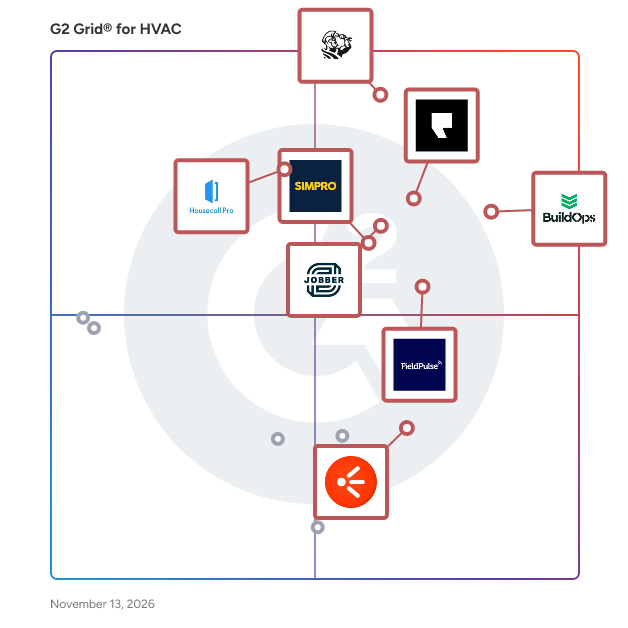
G2 Grid® for HVAC Software

G2 Grid® for HVAC Software plotting products by satisfaction and market presence

Highlighted products: ServiceTitan, BuildOps, Podium, Jobber, FieldPulse, Simpro, Housecall Pro, and HVAKR.

Underlying data: [Grid® JSON](https://www.g2.com/categories/hvac/grids.json?focus%5B%5D=servicetitan&focus%5B%5D=buildops&focus%5B%5D=podium&focus%5B%5D=jobber&focus%5B%5D=fieldpulse-fieldpulse&focus%5B%5D=simpro&focus%5B%5D=housecall-pro&focus%5B%5D=hvakr)

UniweldSmarTech Manifold

The Uniweld SmarTechDigital Manifold App communicates with SmarTech Digital Manifold to clearly display professionally accurate pressure and temperature readings in the palm of hand. Monitor target and actual Superheat and Subcooling calculations in real-time, as pressure and temperature readings fluctuate.

Average Rating: 2.5/5.0

Total Reviews: 1

Who Is the Company Behind UniweldSmarTech Manifold?

Who Uses This Product?

  • Company Size: 100% Medium

What Are G2 Users Discussing About UniweldSmarTech Manifold?

ACLogics

ACLogics is an AI-powered diagnostic assistant built for professional HVAC technicians. Enter an error code, nameplate data, or plain-language notes from the field, and ACLogics returns structured, step-by-step troubleshooting instructions. It also tracks job and diagnostic history, and auto-generates service reports, helping techs fix problems faster and with less guesswork.

Who Is the Company Behind ACLogics?

AI can help you find the answers. G2 helps you trust them.

Connect G2 to Claude or ChatGPT for answers grounded in G2's trusted reviews, comparisons, and pricing from real user insights.

How it works

AroFlo

AroFlo is cloud-based job management software for Australian and New Zealand tradies. It gives office teams, field staff and managers one system for handling work from the first customer enquiry through quoting, scheduling, completion, invoicing and reporting. Built as job management software for tradies, AroFlo supports businesses that need to coordinate people, jobs, materials, assets and customer records across multiple locations. The platform brings CRM, quotes, work orders, trade scheduling software, mobile job management, digital forms, timesheets and job costing into a shared workflow. Office staff can schedule and dispatch work while field teams access job details, record labour, complete forms, capture signatures, update assets and add materials from the mobile app. Everyone works from the same job record, which reduces double handling and gives managers clearer visibility into job status, labour and costs. AroFlo also includes project management, recurring maintenance, compliance workflows, inventory, purchasing, supplier catalogues, trade invoicing software, payments and configurable reporting. Quote, cost and time data can flow into invoicing, helping teams prepare invoices sooner and maintain stronger cost control. GPS and location tools support workforce coordination, while dashboards and reports help managers review operational and financial performance. This connected approach suits buyers comparing trade job management software or field service management software in Australia. AroFlo Lightning adds AI-assisted tools within the platform. Depending on the workflow, these tools can help users prepare job information, summarise field notes, search business data using natural language and support day-to-day administration. Lightning works with the operational data held in AroFlo, so office and field teams do not need a separate system for these tasks. Key capabilities include: - Quote-to-invoice workflows with estimating, approvals, job costing, invoicing and payments. - Scheduling and dispatch tools that connect planned work with field updates. - Mobile access for job details, timesheets, forms, assets, materials and signatures. - Inventory, purchasing, compliance, project, maintenance, reporting and integration tools. AroFlo connects with accounting, payment, messaging, estimating and automation tools including Xero, MYOB, QuickBooks, Reckon, Stripe, Square, ClickSend, MessageMedia, Groundplan and Zapier. These integrations let businesses keep specialist systems while reducing manual re-entry between them.

Average Rating: 4.3/5.0

Total Reviews: 2

How Do G2 Users Rate AroFlo?

  • Has the product been a good partner in doing business?: 6.7/10 (Category avg: 8.5/10)
  • Ease of Use: 8.3/10 (Category avg: 8.6/10)
  • Ease of Admin: 7.5/10 (Category avg: 8.0/10)
  • Quality of Support: 5.8/10 (Category avg: 8.9/10)

Who Is the Company Behind AroFlo?

  • Seller: Simpro
  • Company Website:
  • Year Founded: 2002
  • HQ Location: Miami, FL
  • LinkedIn® Page: www.linkedin.com
    719 employees on LinkedIn®

Who Uses This Product?

  • Company Size: 100% Small

What Are Recent G2 Reviews of AroFlo?

autarc

Autarc is an all-in-one software platform designed for professionals in the renewable energy sector, including installers of heat pumps, solar systems, storage units, and wall boxes. By integrating customer relationship management (CRM), planning, and design tools into a unified system, Autarc streamlines the entire project lifecycle—from initial customer inquiry to installation and maintenance. This comprehensive approach enables energy installers to significantly reduce the pre-installation phase of home energy projects, cutting down the process from several weeks to just minutes. Key Features and Functionality: - Comprehensive Project Management: Autarc offers tools for managing customer leads, team members, and funding applications, ensuring all project information is centralized and easily accessible. - Advanced Planning Tools: The platform includes features such as heat loss calculation, heat pump design, hydraulic balancing, and quotation preparation, all designed to enhance precision and efficiency in project planning. - Digital Documentation: Autarc facilitates digital documentation and mobile recording on construction sites, allowing for immediate data availability and centralized storage, which promotes smooth processes and transparent communication. - AI and LiDAR Integration: By leveraging artificial intelligence and LiDAR technology, Autarc automates data collection and system recommendations, significantly reducing manual input and potential errors. - Energy Certificates: The software enables the digital creation of energy certificates, with certified experts handling the entire process to ensure compliance and accuracy. Primary Value and User Solutions: Autarc addresses the inefficiencies in the sales, planning, and installation processes faced by energy installers. By providing a unified platform that integrates various tools and automates key tasks, it allows installers to handle more projects in less time, thereby accelerating the transition to sustainable energy solutions. The platform's AI-driven features and digital documentation capabilities reduce manual labor and errors, leading to increased productivity and customer satisfaction. Ultimately, Autarc empowers energy professionals to scale their operations effectively and contribute to the decarbonization of energy systems.

Who Is the Company Behind autarc?

  • Seller: autarc
  • Year Founded: 2023
  • HQ Location: Berlin, DE
  • LinkedIn® Page: www.linkedin.com
    3,866 employees on LinkedIn®

Autonomous HVAC CFD

Autonomous HVAC CFD involves using advanced simulation techniques to optimize heating, ventilation, and air conditioning systems with minimal human intervention. By integrating real-time data and AI, autonomous systems can automatically adjust airflow, temperature, and humidity to improve energy efficiency and comfort. CFD helps visualize airflow patterns, temperature distribution, and heat transfer, enabling better system design and performance. This approach enhances comfort, reduces operational costs, and supports predictive maintenance. Autonomous HVAC CFD is widely used in smart buildings, industrial facilities, and residential settings, ensuring efficient climate control and environmental sustainability.

Who Is the Company Behind Autonomous HVAC CFD?

Boris

Your business in the palm of your hand

Who Is the Company Behind Boris?

BuildM8

Who Is the Company Behind BuildM8?

  • Seller: BuildM8
  • Year Founded: 2024
  • HQ Location: Market Harborough, GB
  • LinkedIn® Page: www.linkedin.com
    2 employees on LinkedIn®

CallBack HVAC

CallBack HVAC helps HVAC contractors recover missed, after-hours, and overflow calls with instant text-back follow-up, caller detail capture, urgency flags, and a simple callback queue for owner-operators and dispatch teams.

Who Is the Company Behind CallBack HVAC?

Celsius

Who Is the Company Behind Celsius?

  • Seller: VERSA
  • Year Founded: 2017
  • HQ Location: Cremorne, AU
  • LinkedIn® Page: www.linkedin.com
    17 employees on LinkedIn®

Cinderblock

Cinderblock is job management software for solo contractors and small teams that need one place to run work from first customer contact to final payment. It brings jobs, customer details, appointments, tasks, estimates, invoices, files, and payments into a connected workflow. A job can span a single service call or multiple visits and phases without splitting its history across separate tools. Owners, office staff, and field crews can see what has happened, what is scheduled, and what still needs attention. CONNECTED JOB AND CUSTOMER RECORDS Keep each job’s customer information, service details, status, appointments, tasks, notes, photos, videos, files, estimates, and invoices together. Customer profiles show previous jobs and interactions, helping the team prepare for a return visit or answer a question without searching through texts and email threads. Statuses, tags, and labels help organize active work. A contractor handling a multi-visit installation, for example, can return to the same record for the original estimate, scheduled visits, site documentation, and billing history instead of rebuilding context at each stage. TASKS, NOTES, AND FIELD DOCUMENTATION Break a larger job into clear action items. Assign tasks to teammates, set due dates and priorities, add subtasks, and track what has been completed. Tasks can be connected to jobs or specific appointments so crews know what needs to happen on a particular visit. Job notes help the office and field share updates; teammates can use mentions and replies, pin important instructions, and control the visibility of private notes. Photos, videos, PDFs, and other documents are organized under the job. Files linked to an appointment, estimate, or invoice can also be found in the job’s file area. Teams can label and filter files, then share relevant documents with customers without requiring them to create an account. Reusable forms can help collect job reports, checklists, and site information in a consistent format. SCHEDULING AND FIELD COORDINATION Plan appointments in day, week, or month calendar views. Assign one or more crew members, link an appointment to a job, and drag it to a new time when plans change. Multiple visits stay connected to the same job, giving the next crew member access to prior details and the work ahead. The shared calendar helps the office see who is booked and where there is room for another appointment. Customer email notifications and appointment reminders help communicate schedule changes and upcoming visits. Teams can also set task reminders for internal follow-up. ESTIMATES AND CUSTOMER APPROVAL Build estimates from saved services and materials or start from a template. Add quantities, costs, markups, taxes, discounts, descriptions, and terms to explain the proposed work. An estimate can include relevant notes and images, then be shared by email or web link for online review and electronic signature. Once the customer accepts, convert it to an invoice with the existing line items and pricing carried over. Keeping the estimate connected to the job lets the team refer back to the agreed scope as work progresses. INVOICES, PROGRESS BILLING, AND PAYMENTS Create invoices with custom line items, payment terms, taxes, and payment options. For longer projects, use partial or progress invoices to bill for a deposit, a project phase, or completed work instead of waiting until the end. Billing records remain linked to the job, so the team can see what has been invoiced, paid, or left outstanding. Customers can pay eligible invoices online by credit card or ACH bank transfer, and a business can choose which payment methods to offer on an invoice. Payment processing is optional; teams can still use Cinderblock to manage estimates and invoices without enabling online payments. MOBILE WORK AND OFFLINE ACCESS The iOS and Android apps let teams view jobs and schedules, update tasks and notes, capture site photos, and work with estimates and invoices away from the office. Key mobile features continue to work when service is unavailable. Supported changes are saved on the device and sync when a connection returns. A crew member can review recent job information and document work at a site with poor reception, while the office can access those updates after they sync. QUICKBOOKS ONLINE INTEGRATION Cinderblock integrates with QuickBooks Online to help keep job operations and accounting records aligned. Two-way sync covers customers, estimates, invoices, payments, services and materials, and sales tax. A payment collected through Cinderblock can be reflected against the corresponding QuickBooks invoice, while a payment recorded in QuickBooks can update the status seen in Cinderblock. Teams can work with job details and customer-facing documents in Cinderblock while continuing to use QuickBooks Online for bookkeeping. ADDITIONAL TOOLS FOR GROWING TEAMS Foundation covers core job management, scheduling, estimating, invoicing, online payments, reminders, and QuickBooks Online integration. Build adds time tracking and timesheets, purchase orders, and job costing and profitability tools. Field staff can clock time against appointments and jobs, connecting labor hours to the work performed. Teams can export timesheets and use labor rates to understand job labor costs. Purchase orders can be built from saved items, linked to jobs, sent to vendors for online review, and tracked by status. Build’s job cost views bring together labor, materials, purchasing, and other expenses with invoiced amounts, profit, and margin. Costs can also be entered manually when they do not come from another Cinderblock record. Role-based access helps owners, managers, and field staff see the information relevant to their work; Build supports further customization of Manager and User permissions. WHO CINDERBLOCK IS FOR Cinderblock is designed for contractors who want to coordinate the office and field without losing track of a job between visits. It supports construction and specialty trades including electrical, plumbing, HVAC, roofing, painting, remodeling, and landscaping. Solo operators can use it to organize jobs, customer communication, and billing. Growing teams can add shared schedules, assignments, documentation, and financial visibility as their work becomes more complex. The connected job record is especially useful when a project involves an estimate, several appointments, field updates, purchases, and invoices over time. Cinderblock offers a 14-day free trial with no credit card required. Both available plans include two users, with additional users available.

Who Is the Company Behind Cinderblock?
Neya Kumaresan
NK
Researched and written by Neya Kumaresan
Updated October 3, 2024