# Best File Transfer Protocol (FTP) Software - Page 8

*By [Shalaka Joshi](https://research.g2.com/insights/author/shalaka-joshi)*


FTP (File Transfer Protocol) software transfers files between a computer and a server over the internet. It is built on a client-server model architecture, in which one computer acts as the server to store information and the other acts as the client to send or request files from the server. Companies leverage these tools to transfer large files or large amounts of data between multiple stakeholders. In particular, webmaster teams use FTP to transfer web pages, web application files, and images to their web server; additionally, IT teams utilize FTP solutions to transfer data back to disaster recovery, or DR, sites.

FTP solutions are similar to [managed file transfer (MFT) software](https://www.g2.com/categories/managed-file-transfer-mft) in that both types of tools facilitate the transfer of files and data. However, they do not utilize the same server. Furthermore, while FTP is a traditional File Transfer Protocol, SFTP (SSH File Transfer Protocol) is an alternative which adds a security layer in the file transfer process through encryption and authentication features.

To qualify for inclusion in the FTP category, a product must:

- Allow file sharing between remote machines over a network
- Use the TCP/IP protocol to transfer files
- Allow the transfer of files over an established data connection between client and server
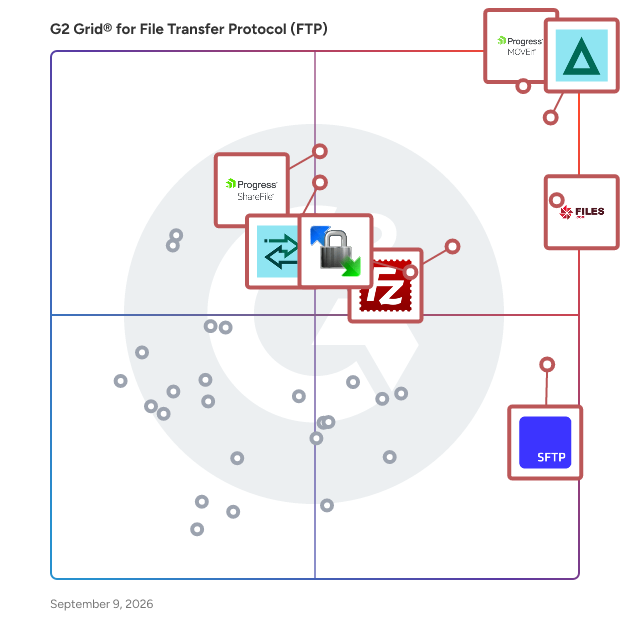


## Top File Transfer Protocol (FTP) Software at a Glance
| # | Product | Rating | Best For | What Users Say |
|---|---------|--------|----------|----------------|
| 1 | [Progress MOVEit](https://www.g2.com/products/progress-moveit/reviews) | 4.4/5.0 (519 reviews) | Automated secure MFT with compliance-grade audit trails | "[Excellent UI, Fast Large-File Performance, and Smooth Entra Integration](https://www.g2.com/survey_responses/progress-moveit-review-12702417)" |
| 2 | [GoAnywhere MFT](https://www.g2.com/products/goanywhere-mft/reviews) | 4.6/5.0 (429 reviews) | Automated secure FTP workflow orchestration | "[Secure, Scalable File Transfers with Powerful Azure ADLS Integration](https://www.g2.com/survey_responses/goanywhere-mft-review-12850404)" |
| 3 | [Files.com](https://www.g2.com/products/files-com/reviews) | 4.6/5.0 (293 reviews) | Managed SFTP with automated partner file routing | "[The All-in-One File Orchestration Layer That Replaced Our Entire Custom Middleware Stack](https://www.g2.com/survey_responses/files-com-review-12579544)" |
| 4 | [SFTP To Go](https://www.g2.com/products/sftp-to-go/reviews) | 4.7/5.0 (171 reviews) | Managed SFTP hosting with webhook-driven automation | "[Effortless and Reliable Data Transfers with SFTP To Go](https://www.g2.com/survey_responses/sftp-to-go-review-12939569)" |
| 5 | [FileZilla](https://www.g2.com/products/filezilla/reviews) | 4.5/5.0 (755 reviews) | Cross-platform FTP/SFTP server file transfers | "[FileZilla, the FREE Monster FTP Client!](https://www.g2.com/survey_responses/filezilla-review-12691782)" |
| 6 | [Progress ShareFile](https://www.g2.com/products/progress-sharefile/reviews) | 4.2/5.0 (1,474 reviews) | Encrypted large-file transfer with audit trails | "[Citrix](https://www.g2.com/survey_responses/progress-sharefile-review-6788477)" |
| 7 | [WinSCP](https://www.g2.com/products/winscp/reviews) | 4.6/5.0 (224 reviews) | Secure cross-OS file transfer with protocol flexibility | "[Reliable and Secure File Transfer Tool for Daily Administration.](https://www.g2.com/survey_responses/winscp-review-12964351)" |
| 8 | [Globalscape](https://www.g2.com/products/globalscape/reviews) | 4.6/5.0 (70 reviews) | Automated secure MFT with compliance-grade controls | "[Globalscape Makes Secure File Transfers Fast with Powerful Automation](https://www.g2.com/survey_responses/globalscape-review-12653210)" |
| 9 | [JSCAPE MFT Server](https://www.g2.com/products/jscape-mft-server/reviews) | 4.5/5.0 (96 reviews) | Automated secure MFT with multi-protocol orchestration | "[JSCAPE: Solid, Secure, Feature-Rich File Transfers in One Platform](https://www.g2.com/survey_responses/jscape-mft-server-review-12225595)" |
| 10 | [Thru](https://www.g2.com/products/thru/reviews) | 4.6/5.0 (96 reviews) | Encrypted MFT with audit-trail compliance | "[Comprehensive and Intuitive](https://www.g2.com/survey_responses/thru-review-10735449)" |


## How Many File Transfer Protocol (FTP) Software Products Does G2 Track?
**Total Products under this Category:** 124

### Category Stats (Jun 2026)
- **Average Rating**: 4.33/5 The average rating of products in this category, based on all submitted ratings
- **Top Trending Product**: Thorn Technologies SFTP Gateway (+0.003) - Among all products in this category, Thorn Technologies SFTP Gateway recorded the largest rating increase compared to last month
*Last updated: June 01, 2026*


## How Does G2 Rank File Transfer Protocol (FTP) Software Products?

**Why You Can Trust G2's Software Rankings:**

- 30 Analysts and Data Experts
- 5,300+ Authentic Reviews
- 124+ Products
- Unbiased Rankings

G2's software rankings are built on verified user reviews, rigorous moderation, and a consistent research methodology maintained by a team of analysts and data experts. Each product is measured using the same transparent criteria, with no paid placement or vendor influence. While reviews reflect real user experiences, which can be subjective, they offer valuable insight into how software performs in the hands of professionals. Together, these inputs power the G2 Score, a standardized way to compare tools within every category.


## Which File Transfer Protocol (FTP) Software Is Best for Your Use Case?

- **Leader:** [Progress MOVEit](https://www.g2.com/products/progress-moveit/reviews)
- **Highest Performer:** [SFTP To Go](https://www.g2.com/products/sftp-to-go/reviews)
- **Easiest to Use:** [Files.com](https://www.g2.com/products/files-com/reviews)
- **Top Trending:** [GoAnywhere MFT](https://www.g2.com/products/goanywhere-mft/reviews)
- **Best Free Software:** [Progress MOVEit](https://www.g2.com/products/progress-moveit/reviews)


---

**Sponsored**

### Couchdrop

Couchdrop enables businesses to send, receive, and automate secure file transfers in one simple platform. As a modern, cloud-native platform, Couchdrop automatically scales to meet the needs of businesses from startups to enterprises. Organizations can securely transfer millions of files and terabytes of data with automatic scaling that can meet the most intense file transfer requirements, all without having any infrastructure management. Supporting, simple, direct connections to storage like SharePoint, Dropbox, Azure, and more, Couchdrop integrates with over 20 platforms and growing. Couchdrop does not store data at any stage of the process and acts as a secure pipe between systems, leaving you in full control at all times. Couchdrop aims to be simple and easy enough for anyone to use. An SFTP server is created immediately at sign-up, and all admin and management tasks are done through a modern, uncomplicated web interface where users can connect platforms, add external users, and build workflows using the no-code automation builder. Both transfer automation and file actions are created with this visual builder. Transfer automations push or pull files from external sources, while file actions can move, copy, rename, encrypt/decrypt, compress/decompress, and more, including firing external webhooks. Automations can be scheduled to happen at set times or based on events like uploads, downloads, or a trigger from one of Couchdrop&#39;s file intake methods. These ingestion options include mailboxes for email attachments, upload links as a secure client-facing brandable web portal, and secure shared links with optional password protection and expiration. Couchdrop is suitable for organizations of all sizes, with simple, transparent monthly pricing and plans set for businesses at different stages and transfer requirements. All plans are backed by award-winning support from product experts with typical responses within half a day. While simple to use, Couchdrop has enterprise-grade security controls available to everyone. Features and protocols can be restricted at the user or organization level, and users can be isolated to a specific directory as their root with granular access controls. Couchdrop&#39;s already comprehensive auditing can also be enhanced by integrating with SIEM providers to send logs and events. Join the thousands of private and public sector organizations that use Couchdrop for all their secure file transfer needs. All new accounts include a 14-day free trial with no credit card or demo required.


[Visit website](https://www.g2.com/external_clickthroughs/record?secure%5Bad_program%5D=ppc&amp;secure%5Bad_slot%5D=category_product_list&amp;secure%5Bcategory_id%5D=2364&amp;secure%5Bdisplayable_resource_id%5D=2364&amp;secure%5Bdisplayable_resource_type%5D=Category&amp;secure%5Bmedium%5D=sponsored&amp;secure%5Bplacement_reason%5D=page_category&amp;secure%5Bplacement_resource_ids%5D%5B%5D=2364&amp;secure%5Bprioritized%5D=false&amp;secure%5Bproduct_id%5D=135973&amp;secure%5Bresource_id%5D=2364&amp;secure%5Bresource_type%5D=Category&amp;secure%5Bsource_type%5D=category_page&amp;secure%5Bsource_url%5D=https%3A%2F%2Fwww.g2.com%2Fcategories%2Ffile-transfer-protocol-ftp%3Fpage%3D8&amp;secure%5Btoken%5D=9067629ce7fbbd83b853c8e48d3e1b37ee3b63d21cd11bac3a1f16741e672c61&amp;secure%5Burl%5D=https%3A%2F%2Fwww.couchdrop.io%2Fcloud-sftp&amp;secure%5Burl_type%5D=custom_url)

---


## What Is File Transfer Protocol (FTP) Software?

[Data Integration Tools](https://www.g2.com/categories/data-integration-tools)

## What Software Categories Are Similar to File Transfer Protocol (FTP) Software?

- [Managed File Transfer (MFT) Software](https://www.g2.com/categories/managed-file-transfer-mft)


---

## How Do You Choose the Right File Transfer Protocol (FTP) Software?

### What You Should Know About File Transfer Protocol (FTP) Software

### What is File Transfer Protocol (FTP) Software?

Organizations have a perennial need to constantly share files or data among employees as well as with external partners, customers, or suppliers. File transfer protocol (FTP) was the standard internet protocol to share files for many years. Secure file transfer protocol (SFTP) and file transfer protocol with support (FTPS) or transport layer security (SSL/TLS) were introduced later as an alternative to FTP software to combat security issues. SFTP, also known as secure shell (SSH) file transfer protocol and FTPS are both secure protocols that provide encrypted file transfers. SFTP is an extension of the SSH protocol, while FTPS simply adds a security layer to the existing FTP protocol.

Companies use FTP software primarily to transfer multiple files or data between a client and server over an established internet connection or transmission control protocol (TCP) network. FTP software is built on a client-server architecture model consisting of an FTP client and an FTP server.

Key Benefits of File Transfer Protocol (FTP) Software

- Enables the transfer of multiple directories at one time with no size limitations
- Offers automatic data backup and disaster recovery features
- Allows file transfers to be scheduled and resumed
- Availability of multiple free open-source FTP software

### Why Use File Transfer Protocol (FTP) Software?

**Large file transfers —** FTP software is one of the easiest and quickest ways to transfer large and multiple files at one go as it is able to handle simultaneous transmissions (multi-threaded transfers) with ease.

**Ease of use —** The software has a user-friendly interface design which it easy and intuitive to use, making file transfer operations efficient.

**Operating system (OS) support —** FTP software is available on multiple OS. This allows organizations to standardize on a single file transfer client.

### Who Uses File Transfer Protocol (FTP) Software?

Companies that require to perform multiple or large file sharing on a daily basis use FTP software. In particular, industries like architecture, engineering, and construction (AEC), transcription services and printing, manufacturing, retail and wholesale distribution, IT consulting, media and marketing, and many more use FTP software. FTP software is typically used by:

**AEC industry —** The AEC industry uses FTP to share large files in the form of computer-aided design (CAD) and architecture components.

**Graphic designers and transcription services —** The graphic design industry leverages the offerings of FTP software to facilitate the sharing of large print jobs as there are no file restrictions.

**Website designers —** Webmasters employ FTP to facilitate the uploading and downloading of files between their computer and their web-hosting servers.

**Educational institutions —** FTP software helps in the file or data sharing processes for educational institutions who offer various data-oriented internal services for their students and employees.

**Medical industry —** The automatic backup feature of an FTP software is widely used in the medical industry where patients&#39; information is considered very crucial.

### File Transfer Protocol (FTP) Software Features

Listed below are the main features of File Transfer Protocol (FTP) software:

**Synchronize utility —** With real-time sync feature, FTP software monitors files and synchronizes them as soon as they are created, updated, or deleted. It works in the background with no user interaction.

**Queuing utility —** FTP software offers the ability to add items to a queue to be either uploaded or downloaded.

**Drag and drop —** Drag and drop method within FTP enables users to copy or move files and folders to a new location or even copy a file or an entire folder within the directory in which it resides.

**Scheduling —** FTP schedulers help in automating file transfers, taking the manual file exchange burden off of individual team members. It helps businesses streamline their file transfer workflows by scheduling a file or directory transfer and allowing file sharing without having to alter work patterns.

**File backup and disaster recovery —** Disaster recovery ensures files are regularly and automatically backed up to combat the threat of losing data or files due to a natural calamity or power outage.

**Data representation —** FTP handles three sorts of data representations: ASCII (7 bit), EBCDIC (8-bit), and 8-binary data. The ASCII record is the default position for moving content documents. Each character is encoded using 7-piece ASCII. The sender changes the record from its own representation into ASCII characters and the collector changes the ASCII character to its own representation.

Additionally, SFTP offers some of the following features along with FTP:

**File management —** SFTP provides a remote file management functionality, allowing applications to resume interrupted file transfers, list the contents of remote directories, and delete remote files.

**Encryption —** Encryption protects data from eavesdroppers while in transit over the network, while data integrity checks ensure that the transferred data has not been tampered with.

**Authentication —** An SFTP server requires trading partners to authenticate in two different ways. They may either prove their identity with a user ID and password (this information is encrypted over the SFTP connection and not in plain text) or validate with an SSH key or SSH key and password combination.

**Access control —** SFTP allows limited user access. It gives select users control over transfer, access, or uploads of new files or dictionaries.

### Trends Related to File Transfer Protocol (FTP) Software

FTP is a very old-school set of rules for transferring files between computers. While basic FTP has been enhanced with SSH and SSL along the way, for organizations that routinely transfer sensitive documents containing proprietary or regulated data, FTP servers have become a compliance liability. Auditors are highly skeptical of companies that still use FTP to move sensitive data, especially after the FBI has warned of the inherent security flaws with anonymous FTP servers.

Managed file transfer (MFT) solutions came into the market recently to overcome many of the shortfalls of FTP. As the name implies, MFT adds management features required as the need for file transfers grows from occasional and non critical to high volume and mission critical. Additionally, MFT solutions also provide a large number of security and compliance features that are either unavailable or just too hard to add on to off-the-shelf FTP products. Setting up something similar on FTP servers leads to maintenance issues for IT teams and they also result in FTP sprawl.

### Potential Issues with File Transfer Protocol (FTP) Software

**Security —** FTP was not built to be secure. It is commonly viewed as an insecure protocol because it relies on clear-text usernames and passwords for authentication and does not use encryption. Files sent via FTP are vulnerable to sniffing, spoofing, and brute force attacks, among other basic attack methods.

**Compliance —** FTP on its own or using an FTP vendor with inadequate security could leave businesses at risk of noncompliance fines. If compliance regulations like Health Insurance Portability and Accountability Act (HIPAA ), California Consumer Privacy Act (CCPA), and others apply to a company, it is difficult to find an FTP solution that helps to stay compliant.

**Lack of logging and limited reporting —** A lot of FTP solutions have an inability to track or are inconsistent in tracking what has been uploaded on the remote system. So, if files are mishandled or a data breach occurs, the sender may struggle to track the source of the problem.

**Restricted access —** Closely connected to file security is file access. Using old FTP methods make it impossible to know who was accessing files and for what purpose.

**Loss of data control —** Sharing files via FTP allows little control over the data, files, or both. Once the file is sent, the sender has no control over the file, both in terms of how it is used and who is using it. The sender also loses control over how long the downloaded copy will be kept by the recipient.

### Software and Services Related to File Transfer Protocol (FTP) Software

The primary function of FTP is to upload or download files for archival or for sharing files that are too large for email. Some of the other tools which provide the same are:

[**Managed file transfer (MFT) software**](https://www.g2.com/categories/managed-file-transfer-mft) **—** MFT tools are software-based services that manage the secure exchange and delivery of data across a network. MFT technology is built on FTP technology. MFT solutions are designed to add management and security features to protect data and scale the delivery of data and files.

[**Cloud content collaboration software**](https://www.g2.com/categories/cloud-content-collaboration) **—** Cloud content collaboration software serve as dedicated cloud storage and offer file sharing solutions for documents, images, videos, spreadsheets, and other files created and used by a business.


