Top Free Enterprise Information Archiving Software - Page 2

How Many Enterprise Information Archiving Software Products Does G2 Track?

Total Products under this Category: 136

Category Stats (Nov 2026)

  • Average Rating: 4.34/5 (↓0.01 vs Oct 2026) The average rating of products in this category, based on all submitted ratings

Last updated: November 01, 2026

How Does G2 Rank Enterprise Information Archiving Software Products?

Why You Can Trust G2's Software Rankings:

  • 30 Analysts and Data Experts
  • 1,600+ Authentic Reviews
  • 136+ Products
  • Unbiased Rankings

G2's software rankings are built on verified user reviews, rigorous moderation, and a consistent research methodology maintained by a team of analysts and data experts. Each product is measured using the same transparent criteria, with no paid placement or vendor influence. While reviews reflect real user experiences, which can be subjective, they offer valuable insight into how software performs in the hands of professionals. Together, these inputs power the G2 Score, a standardized way to compare tools within every category.

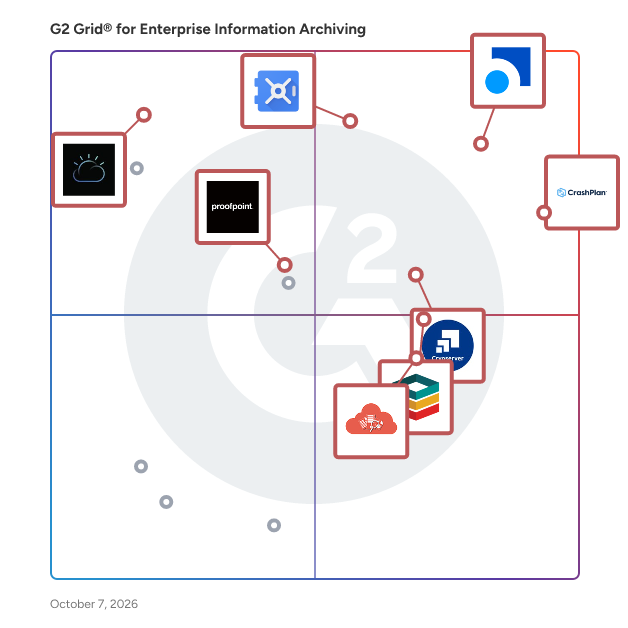
G2 Grid® for Enterprise Information Archiving Software

G2 Grid® for Enterprise Information Archiving Software plotting products by satisfaction and market presence

Highlighted products: Smarsh Professional Archive, CrashPlan Platform, Google Vault, Cryoserver, Pagefreezer, Microsoft Teams Analytics Tool, IBM Information Lifecycle Governance, and Proofpoint Enterprise Archive.

Underlying data: [Grid® JSON](https://www.g2.com/categories/enterprise-information-archiving/grids.json?focus%5B%5D=smarsh-smarsh-professional-archive&focus%5B%5D=crashplan-platform&focus%5B%5D=google-vault&focus%5B%5D=cryoserver&focus%5B%5D=pagefreezer&focus%5B%5D=microsoft-teams-analytics-tool&focus%5B%5D=ibm-information-lifecycle-governance&focus%5B%5D=proofpoint-proofpoint-enterprise-archive)

DocuXplorer

DocuXplorer is a document management platform built to maximize efficiency and drive down costs for organizations handling large volumes of files and information. With DocuXplorer, you eliminate slow, manual processes and empower your team to find, manage, and act on documents with unprecedented speed and precision.​ Boost Productivity and Cut Manual Work DocuXplorer automates document routing, approvals, and archiving—transforming repetitive tasks into seamless digital workflows that can cut manual processing time by up to 70%. Employees spend less time searching for files and more time on high-value work thanks to full-text search, custom workflows, intelligent document processing, and audit trails. Real-Time Insights and Compliance With AI-powered analytics, you'll uncover insights and track trends within your document repository, making business intelligence accessible to all users. You'll also simplify audit readiness and stay compliant with a system that enforces strict security protocols. Intuitive and Flexible Integration DocuXplorer offers a user-friendly interface, with drag-and-drop functionality and customizable workflows that adapt to how you already work. Setup and integration with your current tools and systems is straightforward and doesn't require technical expertise, so you'll see immediate ROI in productivity gains. Trust and Support For over 25 years, DocuXplorer has been trusted by businesses and government agencies to securely manage documents and drive digital transformation while reducing risk and saving money. You can expect to: - Find information instantly. Search for any document or keyword using built-in OCR and metadata indexing tools that turn scanned and digital files into searchable text. With DocuXplorer's AI features, capture and understand information more efficiently, visualize document trends, and make data-informed decisions about where to improve your processes. - Stay organized and compliant. Structure files according to business rules using customizable taxonomies and version control, ensuring every document is tracked, up to date, and audit-ready. - Protect sensitive data. Control who can view, edit, or share documents through role or group-based access permissions that align with internal policies and compliance requirements. - Eliminate redundant manual work. Streamline approvals and task routing using workflow automation, keeping processes consistent and projects on schedule. - Work seamlessly across systems. Connect document management with accounting, ERP, or CRM tools through integrations that support continuous information flow. With DocuXplorer, you'll move beyond siloed storage and workflow systems to create a single structured, searchable, and intelligent information hub. Your teams will work confidently with their data—securely, efficiently, and with full visibility across operations.

Average Rating: 4.5/5.0

Total Reviews: 2

Who Is the Company Behind DocuXplorer?

Who Uses This Product?

  • Company Size: 100% Small, 50% Medium

What Are Recent G2 Reviews of DocuXplorer?

What Are G2 Users Discussing About DocuXplorer?

filerskeepers

The filerskeepers dashboard is built for enterprises that want to get, and stay, in control of their data and records retention. It turns one of compliance's most fragmented, high-risk obligations into a single, manageable system — so your organization becomes and remains truly data retention compliant. Records retention is deceptively hard at scale. Every jurisdiction sets its own rules, those rules change constantly, and mapping them to the data you actually hold is a manual, error-prone exercise that never quite stays current. Miss a requirement and you're exposed to regulatory penalties. Over-retain and you carry needless cost and privacy risk. The filerskeepers dashboard closes that gap. At its core is the world's most comprehensive record retention database: every retention obligation from 324+ jurisdictions across 221 countries, kept current and in one place. Instead of chasing local counsel or stitching together spreadsheets, you pull the exact obligations that apply to your business and your locations — and build a bespoke retention schedule in just a few clicks. From there, the dashboard becomes the backbone of your enterprise records management program: Find every law in one place. Stop hunting across jurisdictions and access the full global picture of retention obligations from a single source of truth. Build bespoke retention schedules in minutes. Generate schedules tailored to your business, entities, and geographies — no legal-research bottleneck, no manual assembly. Get real-time notifications when the law changes. When an obligation is updated anywhere in your footprint, you're alerted immediately, so your schedules never drift out of compliance. Automatically map legal rules to your data. The dashboard connects retention requirements directly to your data categories, removing the guesswork of which rule applies to what. Apply golden standards. Simplify global, regional, or national retention with pre-built standards that harmonize your approach and reduce complexity across the organization. Integrate via API. Connect the dashboard to your existing systems so retention logic flows into the tools your teams already use. Plug into Microsoft Purview. A dedicated connector makes integration straightforward, extending compliant retention into your Microsoft environment with minimal setup. The result is a records management program that's defensible, auditable, and genuinely maintainable. Legal, privacy, and IT teams work from the same authoritative rules rather than competing interpretations. Schedules stay accurate as regulations evolve, without constant rework. And because the obligations are mapped to your data and delivered into your existing stack, compliance becomes an operational reality — not a binder that ages the moment it's printed. Whether you're managing retention for a single country or standardizing it across dozens, the filerskeepers dashboard gives you the coverage, automation, and confidence to develop and mature your enterprise records management program — and to prove you're in control at any moment.

Who Is the Company Behind filerskeepers?

NetApp Cloud Volumes ONTAP

NetApp® Cloud Volumes ONTAP® offers a self-managed, unified storage management solution built on NetApp’s industry-leading ONTAP® software—empowering organizations with unmatched control and flexibility across block and file workloads in hybrid and multicloud environments. Seamlessly integrated with all major cloud providers, it runs natively on each cloud platform (Microsoft Azure, Google Cloud, AWS), allowing you to deploy and manage storage for mission-critical applications, databases, containers, and user files without requiring extra tooling or complex configuration. With support for iSCSI, NVMe/TCP, NFS, SMB/CIFS, and S3, Cloud Volumes ONTAP brings enterprise-class data services to your cloud environment.  

Average Rating: 4.5/5.0

Total Reviews: 26

How Do G2 Users Rate NetApp Cloud Volumes ONTAP?

  • Has the product been a good partner in doing business?: 8.3/10 (Category avg: 8.7/10)
  • Quality of Support: 8.5/10 (Category avg: 8.7/10)
  • Ease of Admin: 8.5/10 (Category avg: 8.7/10)

Who Is the Company Behind NetApp Cloud Volumes ONTAP?

  • Seller: NetApp
  • Year Founded: 1989
  • HQ Location: Los Angeles, California
  • LinkedIn® Page: www.linkedin.com
    12,706 employees on LinkedIn®
  • Ownership: NASDAQ
  • Total Revenue (USD mm): $5,412

Who Uses This Product?

  • Top Industries: Information Technology and Services, Computer & Network Security
  • Company Size: 41% Large, 32% Small

What Do G2 Reviewers Say About NetApp Cloud Volumes ONTAP?

AI-generated summary from verified user reviews

Pros
  • Users highlight the comprehensive solutions of NetApp Cloud Volumes ONTAP, emphasizing its user-friendly interface and powerful performance.
  • Users value the powerful performance and availability of NetApp Cloud Volumes ONTAP for reliable data storage solutions.
  • Users appreciate the user-friendly interface of NetApp Cloud Volumes ONTAP, which simplifies storage management effectively.
  • Users appreciate the user-friendly interface and powerful CLI, ensuring high performance and availability in NAS storage.
  • Users value the high availability of NetApp Cloud Volumes ONTAP, ensuring reliable access to their storage solutions.
Cons
  • Users find the command line difficulty challenging, especially with frequent GUI changes complicating the experience.
  • Users find the frequent GUI changes of NetApp Cloud Volumes ONTAP cumbersome, preferring to rely on CLI instead.
  • Users find the poor interface design frustrating, leading to a reliance on CLI for efficiency.
  • Users feel the poor UI of NetApp Cloud Volumes ONTAP leads to reliance on CLI instead of the interface.
  • Users find the poor usability due to frequent GUI changes, leading them to rely on the CLI instead.

What Are Recent G2 Reviews of NetApp Cloud Volumes ONTAP?

What Are G2 Users Discussing About NetApp Cloud Volumes ONTAP?

AI can help you find the answers. G2 helps you trust them.

Connect G2 to Claude or ChatGPT for answers grounded in G2's trusted reviews, comparisons, and pricing from real user insights.

How it works

Proventeq365

Proventeq365 - The Control Plane for Microsoft 365 Content Lifecycle Proventeq365 is a unified content management platform designed to help organisations migrate, govern, optimise and secure their content across Microsoft 365. Bringing together content migration, governance, storage optimisation and Copilot readiness, Proventeq365 helps organisations reduce costs, minimise security risks, eliminate content sprawl and establish a secure, well-governed foundation for AI adoption. With powerful content analytics, automation and intelligent governance capabilities, Proventeq365 gives organisations greater visibility and control over their content throughout its lifecycle. Migration & Restructuring Modernise your content landscape by migrating from legacy ECM/DMS platforms and file systems to Microsoft 365. - Consolidate legacy content silos into SharePoint, Teams and OneDrive. - Preserve metadata, permissions and document history during migration. - Reduce legacy licensing costs, complexity and migration risks. - Restructure and organise content to improve collaboration and accessibility. Governance & Compliance Establish control over your Microsoft 365 content with consistent governance, security policies and permissions. - Identify and prevent oversharing of sensitive information. - Enforce permissions, governance policies and content management standards. - Identify security risks, compliance gaps and unmanaged content. - Improve visibility and control across your Microsoft 365 environment. Storage Optimisation Reduce Microsoft 365 storage costs by identifying redundant content, optimising storage and improving information quality. - Identify redundant, obsolete and trivial (ROT) content. - Reduce SharePoint storage consumption and associated costs. - Archive inactive content to cost-effective alternative storage. - Improve content organisation, quality and findability. Copilot Readiness Prepare your Microsoft 365 environment for secure, effective AI adoption and maximise the value of Microsoft Copilot. - Identify and remediate oversharing and sensitive content exposure. - Improve content quality, structure and accessibility for AI. - Establish secure governance foundations for Copilot adoption. - Improve AI response quality and maximise Copilot ROI.

Average Rating: 3.5/5.0

Total Reviews: 1

Who Is the Company Behind Proventeq365?

  • Seller: Proventeq
  • Company Website:
  • Year Founded: 2007
  • HQ Location: Reading, England, United Kingdom
  • LinkedIn® Page: www.linkedin.com
    109 employees on LinkedIn®

Who Uses This Product?

  • Company Size: 100% Large

Stillio

With Stillio you can capture and archive website screenshots automatically. Stillio helps you to archive important web pages, keep records for regulatory compliance, track competitors, improve SEO ranking insights, verify ads, monitor copyright infringements, track trends and capture your online digital heritage.

Average Rating: 4.9/5.0

Total Reviews: 38

How Do G2 Users Rate Stillio?

  • Has the product been a good partner in doing business?: 9.8/10 (Category avg: 8.7/10)
  • Quality of Support: 9.9/10 (Category avg: 8.7/10)
  • Ease of Admin: 9.8/10 (Category avg: 8.7/10)

Who Is the Company Behind Stillio?

  • Seller: Stillio
  • Year Founded: 2011
  • HQ Location: Amersfoort, UT
  • LinkedIn® Page: www.linkedin.com
    5 employees on LinkedIn®

Who Uses This Product?

  • Top Industries: Financial Services
  • Company Size: 63% Small, 29% Medium

What Are Recent G2 Reviews of Stillio?

What Are G2 Users Discussing About Stillio?

Vaultastic

Vaultastic can ingest your business data stored from a wide range of active and legacy data sources into a central, unified cloud repository. Vaultastic’s cross-platform architecture integrates easily with various data sources such as M365, Google Workspace, Google Drive, MS Exchange, Zimbra, SalesForce, SendGrid, and many more. On-demand SaaS tools for fast ediscovery, governance, and flexible data extraction increase the visibility and availability of business-critical data.

Average Rating: 4.0/5.0

Total Reviews: 4

How Do G2 Users Rate Vaultastic?

  • Quality of Support: 7.8/10 (Category avg: 8.7/10)

Who Is the Company Behind Vaultastic?

Who Uses This Product?

  • Company Size: 50% Medium, 50% Small

What Are Recent G2 Reviews of Vaultastic?

What Are G2 Users Discussing About Vaultastic?

Shalaka Joshi
SJ
Researched and written by Shalaka Joshi
Updated October 3, 2024