Cleanor: Smart Phone Cleaner
Who Is the Company Behind Cleanor: Smart Phone Cleaner?
- Seller: Cleanor Research Labs L.L.C-FZ
- Year Founded: 2025
- HQ Location: Dubai, AE
-
LinkedIn® Page: www.linkedin.com
1 employees on LinkedIn®
Total Products under this Category: 73
Last updated: September 01, 2026
Why You Can Trust G2's Software Rankings:
G2's software rankings are built on verified user reviews, rigorous moderation, and a consistent research methodology maintained by a team of analysts and data experts. Each product is measured using the same transparent criteria, with no paid placement or vendor influence. While reviews reflect real user experiences, which can be subjective, they offer valuable insight into how software performs in the hands of professionals. Together, these inputs power the G2 Score, a standardized way to compare tools within every category.
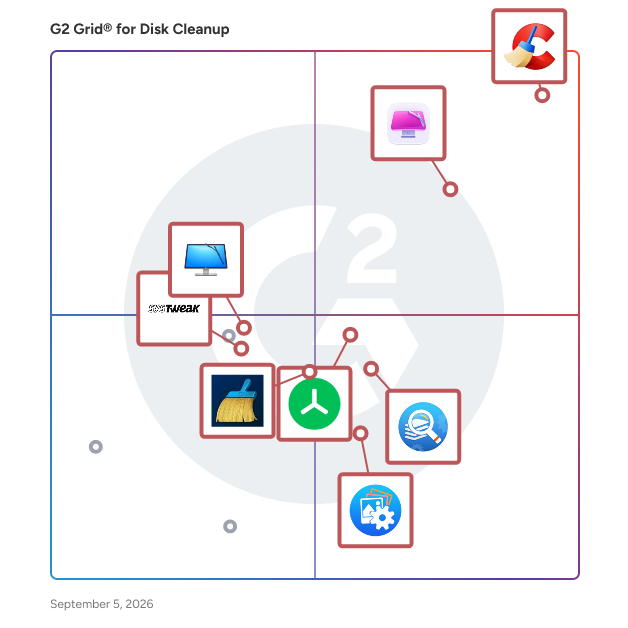
Highlighted products: CCleaner, CleanMyMac, Treesize, Duplicate Files Fixer, cleanmasterofficial, Duplicate Photos Fixer Pro, CleanMyPC, and Advanced System Optimizer.
Underlying data: [Grid® JSON](https://www.g2.com/categories/disk-cleanup/grids.json?focus%5B%5D=ccleaner&focus%5B%5D=cleanmymac&focus%5B%5D=treesize&focus%5B%5D=duplicate-files-fixer&focus%5B%5D=cleanmasterofficial&focus%5B%5D=duplicate-photos-fixer-pro&focus%5B%5D=cleanmypc&focus%5B%5D=advanced-system-optimizer)
CloudXena Duplicate File Finder & Remover is a powerful and reliable solution designed to identify and eliminate duplicate files, helping users free up valuable storage space effortlessly. Whether your system is cluttered with repeated documents, photos, videos, or audio files, this tool scans thoroughly to detect duplicates with high accuracy. It allows users to perform full system scans or target specific folders, giving complete control over the cleanup process. The software supports all file types and groups duplicates in an organized manner, making it easy to review and decide which files to keep or remove. With advanced filtering options like file size, type, and date, users can refine their search for faster and more precise results. Additionally, it provides detailed scan summaries, enabling informed decisions by displaying file properties such as location and size. Users can choose flexible actions like permanently deleting duplicates, moving them to the Recycle Bin, or relocating them to another folder. The tool also detects visually similar photos, making it ideal for managing large image libraries. With its intuitive interface and free trial option, it ensures a smooth, risk-free experience for efficient storage management.
Duplicate File Finder tool streamlines your file management by swiftly locating and removing duplicate files. It helps you reclaim your valuable storage space, boost system performance, and keep your local workspace organized. With a user-friendly interface, the tool makes it easy to identify redundant files and boost your system, improving overall efficiency. Ideal for users seeking a straightforward solution to keep efficient file management.
DT Duplicate Finder and Remover scans your Windows PC across 550+ file formats and finds duplicates by actual content.
east-tec DisposeSecure is a professional data sanitization software designed to permanently and securely erase all information from hard drives and other storage media. It is the essential tool for preparing computer hardware for disposal, donation, reuse, or resale, ensuring that confidential business and personal data is destroyed and forensically unrecoverable. The software offers significant operational flexibility to fit various IT workflows. It can be run from a bootable device, such as a USB drive, to wipe any computer's internal drives regardless of the installed operating system. For larger-scale operations, east-tec DisposeSecure can be deployed over a network (PXE boot) to sanitize multiple computers simultaneously while centralizing logs and reports. Additionally, it can wipe non-system external drives directly from within Windows for added convenience. To guarantee security and support compliance with data protection regulations like GDPR, east-tec DisposeSecure uses erasure methods that meet and exceed leading government and industry standards. After each wipe, it generates a comprehensive, tamper-proof certificate of erasure, providing a verifiable audit trail that confirms the complete destruction of data. This makes it an indispensable solution for any organization that handles sensitive information.
Find and delete duplicate files on your computer and free up gigabytes of hard drive spaces that was being taken up by duplicate files that you don't need.
Increase PC Speed. Optimize or Maximize its Performance. Fix Stubborn DLL, EXE and Other Computer Errors. Detect and Remove Malicious Virus, Spyware or Adware. Fix Freezing and Crashing Issues.
iBoysoft DiskGeeker is a user-friendly disk management tool tailor-made for Mac users who want to implement cross-platform disk usage, enhance data security, optimize system performance, and improve work efficiency. With iBoysoft DiskGeeker installed, Mac users can access BitLocker encrypted and NTFS drives on Mac for seamless data handling, use FileVault or BitLocker to encrypt and unlock disks for enhanced data security, shield against virus attacks and block unauthenticated access with USB Defender, perform disk checks and repair to maintain disk health, efficiently clean junk and unwanted files from hard drives for optimized performance, swiftly clone all content from one disk to another for seamless data backup, easily map network drives with various protocols for streamlined access, back up files on APFS volumes (Macintosh HD) for data loss prevention, test the sequential or random read and write speed of disks to ensure optimal performance, and more.
Mac Optimizer Pro is the only product you’ll ever need to keep your device in top shape, running smooth, fast, and efficient.
Secure you Mac from all kinds of unsafe Internet data by enabling Firewall settings. Keep your Mac healthy and all the app on it up-to-date!
