Best Disk Cleanup Software - Page 3

How Many Disk Cleanup Software Products Does G2 Track?

Total Products under this Category: 73

Category Stats (Sep 2026)

  • Average Rating: 4.18/5 The average rating of products in this category, based on all submitted ratings
  • Top Trending Product: Cisdem Duplicate Finder (+5.56%) - Among all products in this category, Cisdem Duplicate Finder recorded the largest rating increase compared to last month

Last updated: September 01, 2026

How Does G2 Rank Disk Cleanup Software Products?

Why You Can Trust G2's Software Rankings:

  • 30 Analysts and Data Experts
  • 900+ Authentic Reviews
  • 73+ Products
  • Unbiased Rankings

G2's software rankings are built on verified user reviews, rigorous moderation, and a consistent research methodology maintained by a team of analysts and data experts. Each product is measured using the same transparent criteria, with no paid placement or vendor influence. While reviews reflect real user experiences, which can be subjective, they offer valuable insight into how software performs in the hands of professionals. Together, these inputs power the G2 Score, a standardized way to compare tools within every category.

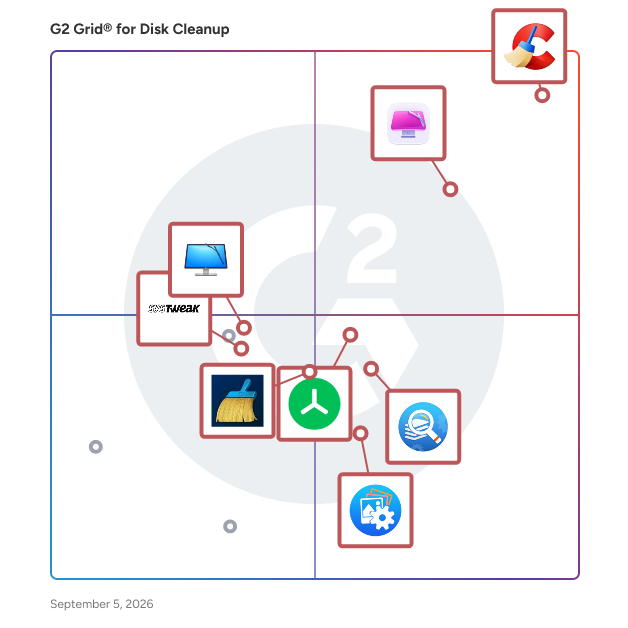
G2 Grid® for Disk Cleanup Software

G2 Grid® for Disk Cleanup Software plotting products by satisfaction and market presence

Highlighted products: CCleaner, CleanMyMac, Treesize, Duplicate Files Fixer, cleanmasterofficial, Duplicate Photos Fixer Pro, CleanMyPC, and Advanced System Optimizer.

Underlying data: [Grid® JSON](https://www.g2.com/categories/disk-cleanup/grids.json?focus%5B%5D=ccleaner&focus%5B%5D=cleanmymac&focus%5B%5D=treesize&focus%5B%5D=duplicate-files-fixer&focus%5B%5D=cleanmasterofficial&focus%5B%5D=duplicate-photos-fixer-pro&focus%5B%5D=cleanmypc&focus%5B%5D=advanced-system-optimizer)

PrivaZer

PrivaZer is a professional-grade PC cleaner and privacy protection tool, widely recognized as a leading CCleaner alternative for users who value transparency, control, and security. Developed in France, PrivaZer delivers deep system cleaning while ensuring your personal data remains fully private. Unlike traditional cleanup utilities, PrivaZer doesn’t just delete temporary files — it analyzes and securely removes hidden traces left by Windows, web browsers, software installations, and daily computer use. Every cleaning action is documented, allowing users to understand what’s being removed and why. This transparency makes PrivaZer a trusted choice among individuals and IT professionals who want reliable, verifiable cleaning without hidden telemetry or data collection. As a CCleaner alternative, PrivaZer stands out for its privacy-first approach. It uses advanced, military-grade overwriting methods to ensure deleted files and residual traces cannot be recovered, providing complete peace of mind. The software’s intuitive interface offers both automatic and manual control modes — ideal for beginners who want simplicity and experts who demand precision. Key benefits of PrivaZer include: 🔒 Privacy-focused design: No telemetry, no tracking, and no background data harvesting. ⚙️ Deep cleaning capabilities: Removes hidden files, hidden entries, registry traces, and browser remnants that other tools often miss. 🧠 Transparency and control: Detailed reports show every change made, so users always know what’s happening. 🚀 Performance optimization: Frees up valuable disk space and helps systems run faster and smoother. 🧩 Customizable cleaning: Adjust settings for specific folders, drives, or devices — including external drives and USBs. 🇫🇷 Ethically developed in France: Built with a commitment to data protection and digital ethics. PrivaZer has earned global recognition as the CCleaner alternative for users who demand more than basic cleaning. It offers a unique balance of powerful optimization, advanced security, and complete transparency — all without compromising your privacy. Discover why more than 500,000 users trust PrivaZer to clean their systems safely and effectively every month. PrivaZer — Clean deeper. Protect your privacy.

Average Rating: 4.9/5.0

Total Reviews: 4

How Do G2 Users Rate PrivaZer?

  • Quality of Support: 9.6/10 (Category avg: 7.7/10)
  • Purge Temp Files: 10.0/10 (Category avg: 8.9/10)
  • Clutter Reduction: 10.0/10 (Category avg: 9.0/10)
  • Purge Browser Temp: 10.0/10 (Category avg: 8.8/10)

Who Is the Company Behind PrivaZer?

Who Uses This Product?

  • Company Size: 75% Small, 25% Medium

What Are Recent G2 Reviews of PrivaZer?

Soft Cleaner

Automatically, at all times, the virtual acceleration of your computer like smartphone is assured with very reduced CPU power consumption and very high performance. Increase cyber security. Soft Cleaner is (License: Free) very highly powerful computer optimization software. Gain some more free disk space and stability in system resource utilization without adding extra hardware components and without tweaking your computer. Typically, to protect your computer, you need to install many different programs and change many settings. However, with Soft Cleaner you don't have to go through all these problems. It has the features that protect the system and accelerate the computer performance automatically with 'Automatic Memory Optimizer'. It is secure, easy to use and free! Download: https://softcleaner.in/live-analysis Advanced integrated features: These unified features start default when optimize from 'Virus Cleaner - Game Booster' also some with 'Automatic Memory Optimizer'. • Secure internet privacy. • Instant speed boost gaming/GPU/CPU, better results in FPS. • Smooth SSD/HDD long life. • Validate slow responding peripherals. • Increase boot speed. • Accelerate FTP, TFTP, SCP, FTP, SFTP, standard upload/download packet transmit. • Patch cleaner. • Fewer errors and crashes. • More physical disk space. • Very less total utilization of physical disk usage. • Energize entire system resources. • High powerful system cleaner. • Optimize client and server systems. • Clogged files deletion. • Uninterrupted internet access. • Fastest permanent file contents eraser. • Optimize I/O speed, RAM, working processes, virtual memory. • Ensure safely eject USB/external hard drives/camcorders/firewire devices. • Fix unnecessary high CPU overloads usage. Faster access, increases work rate. • Accelerate cloud-based cross-platform performance. • Comfortably work your computer even running games/Internet/high memory and CPU usage programs/editors/software development/Visual Studio/.NET/Android Studio/Emulator/IDEs/copy-paste huge files or directories, compatible home/client/server machines. Clean internet traces, history, cookies, typed history: Chrome, Microsoft Edge, Firefox, Brave Browser, Internet Explorer, Vivaldi, Opera, UC Browser, Safari, Chromium. TOOLS TURBO – Increase cyber security. Top level system optimization. About TURBO: Best for 1/2 times in a week or immediate in any security compromise reached. Specification: This is not fully focused Antivirus software, Yet automatically removes almost hidden spy entrances inside your computer system and tighten robustness. It already successfully removed some 'Kernel Mode Rootkits' and 'Keygen' malware. Cleanup of lots of free space. You need to optimize, if an unexpected system restart occurs or program exit without system restart during 'default system optimization' or 'TURBO'. Multi - FilesSearch - Search multiple and disordered/inaccurately named files. Limitation in system drive. Sensitive - Case sensitive search for any particular file by the combination of different keywords/parameters. Suppose if you knows one or two alphabets too it can find the file accurately. (eg: filenamehdd.html you may search some knowing sequential alphabets like "eh, htm/any" then it will find accurately.

Average Rating: 4.5/5.0

Total Reviews: 1

How Do G2 Users Rate Soft Cleaner?

  • Quality of Support: 5.0/10 (Category avg: 7.7/10)
  • Purge Temp Files: 8.3/10 (Category avg: 8.9/10)
  • Clutter Reduction: 10.0/10 (Category avg: 9.0/10)
  • Purge Browser Temp: 10.0/10 (Category avg: 8.8/10)

Who Is the Company Behind Soft Cleaner?

Who Uses This Product?

  • Company Size: 100% Large

What Are Recent G2 Reviews of Soft Cleaner?

What Are G2 Users Discussing About Soft Cleaner?

Zetcure Pro

ZetCurePro Cleaner Disk Cleanup tool helps you to free up space on your hard disk to improve the performance of your computer. The tool identifies files that you can safely delete and then enables you to choose whether you want to delete some or all of the identified files. Remove temporary Internet files. Delete downloaded program files, such as Microsoft ActiveX controls and Java applets.

Average Rating: 4.5/5.0

Total Reviews: 1

How Do G2 Users Rate Zetcure Pro?

  • Quality of Support: 8.3/10 (Category avg: 7.7/10)

Who Is the Company Behind Zetcure Pro?

Who Uses This Product?

  • Company Size: 100% Small

What Are Recent G2 Reviews of Zetcure Pro?

What Are G2 Users Discussing About Zetcure Pro?

AnyMP4 iOS Cleaner

AnyMP4 iOS Cleaner enables iOS users to clean up iPhone/iPad/iPod Touch to speed up devices and free up more space. It can erase junk/ temporary files, caches, unwanted data and large files, uninstall applications easily. And you can clear all data permanently with iOS Cleaner by choosing different erasing levels. Key Functions: 1. Free up more space for your iPhone/iPad/iPod Touch. This iOS Cleaner can help you easily clear images/junk/temporary files, hidden caches, unwanted data/large files, uninstall useless application to save your phone storage. By cleaning up system junks, you can keep your iOS device with excellent performance and enjoy ultimate speed-up responsiveness of the iOS devices. 2. Erase data with 3 erasing levels according to your demand. With AnyMP4 iOS Cleaner, you can protect your valuable data and privacy by choosing erasing levels, namely low erasing level (erase all iOS data quickly), middle erasing level (erase deleted data without recovery), and high erasing level (erase any private data unrecoverably and safely). Through the three erasing levels, you can keep innumerous personal information from disclosure. Then, you can feel free to sell or donate the iOS devices. 3. Other useful functions. If you don't want to delete your valuable photos to free up space, AnyMP4 iOS Cleaner also does a favor for you. You can backup original photos to PC before erasing data on iOS devices. Thus you will not lose your important memory photos. At the same time, you can compress HEIC/JPG/PNG photos and save the compressed photos on your computer.

Who Is the Company Behind AnyMP4 iOS Cleaner?

Aryson Duplicate File Finder & Remover

Aryson Duplicate File Finder & Remover is a powerful and easy-to-use software designed to help users identify and remove duplicate files from their system. It efficiently scans storage and eliminates unnecessary file copies, helping to free up disk space and improve overall system performance. The tool uses advanced scanning algorithms to detect duplicate files across various formats, including documents, images, videos, audio files, and archives. It offers multiple scan modes, allowing users to find duplicates based on file name, size, or content for accurate results. With its intuitive interface, the software is suitable for both technical and non-technical users. It includes a preview feature that allows users to review duplicate files before deletion, ensuring that only unwanted files are removed while important data remains safe. Aryson Duplicate File Finder & Remover supports scanning across internal drives, external storage devices, and other locations, making it a flexible solution for managing data. It also provides smart auto-selection and customizable filters to help users quickly select and remove duplicates based on their preferences. Overall, it is a reliable solution for organizing storage, removing duplicate files, and enhancing system efficiency without risking data loss.

Who Is the Company Behind Aryson Duplicate File Finder & Remover?

  • Seller: Aryson Technologies
  • Year Founded: 2014
  • HQ Location: Noida, Uttar Pradesh
  • Twitter: @Arysontec
    46 Twitter followers
  • LinkedIn® Page: www.linkedin.com
    101 employees on LinkedIn®

Aryson OneDrive Duplicate Remover

Aryson OneDrive Duplicate Remover helps you keep your OneDrive storage clean and organized by finding and removing duplicate files quickly and safely. It scans your cloud data efficiently and identifies unnecessary copies, allowing you to recover storage space without affecting important files. The software supports a wide range of file types, including documents, images, videos, and more. With flexible scanning options, you can perform quick or deep scans depending on how thoroughly you want to search for duplicates. Its simple and user-friendly interface makes it easy for anyone to use. You can preview duplicate files before deletion, ensuring that only unwanted copies are removed while the original data remains intact. The tool also allows batch removal, so you can delete multiple duplicate files at once and save time. Overall, Aryson OneDrive Duplicate Remover is a practical solution for managing cloud storage, reducing clutter, and improving efficiency.

Who Is the Company Behind Aryson OneDrive Duplicate Remover?

  • Seller: Aryson Technologies
  • Year Founded: 2014
  • HQ Location: Noida, Uttar Pradesh
  • Twitter: @Arysontec
    46 Twitter followers
  • LinkedIn® Page: www.linkedin.com
    101 employees on LinkedIn®

Auslogics Disk Defrag

Disk fragmentation is one of the most common factors behind slower PC performance and reduced efficiency of computer systems in the workplace. A disk defragmenter puts together fragmented file pieces to ensure faster access to data on your drives. For over 15 years, Auslogics Disk Defrag has been one of the most recommended defraggers that can easily optimize your hard drive and speed up your system with just a few intuitive clicks. One of the fastest defraggers in the world, Disk Defrag often takes less than 10 minutes to defragment an average-size hard drive. Simply download and install the program, select the drive and click "Defrag." Disk Defrag will rearrange fragmented files and optimize your drive for maximum performance. In addition, it offers advanced features to help you get the most out of your drives: schedule automatic defrags; exclude certain files or folders from defrags; clean up before defragging, and more. With Auslogics’ proprietary defragmentation technology, improving your PC's performance has never been easier.

Who Is the Company Behind Auslogics Disk Defrag?

Auslogics SSD Optimizer

Auslogics SSD Optimizer is a dedicated tool designed to maximize SSD efficiency and boost your drive’s performance. - Real-time monitoring lets you check your SSD health and track read/write operations, estimated service life, and overall drive status. - Disk Explorer reveals large files and hidden space hogs so you can free up disk space. - The scheduler allows you to customize the frequency and timing of SSD optimization to suit your needs. - Quick disk cleanup removes junk from your drive before running optimization, reducing unnecessary write cycles. Advanced algorithms facilitate drive maintenance by optimizing file placement, system services, and core operations to accelerate read/write speeds and extend SSD lifespan. Backed by exclusive Auslogics technology proven safe and effective through extensive testing, SSD Optimizer speeds up data access and improves overall system performance.

Who Is the Company Behind Auslogics SSD Optimizer?

BreviSoft Fast Duplicate File Finder & Remover Tool

BreviSoft Fast Duplicate File Finder & Remover Tool is a powerful optimization utility that aims to free up disk space by finding and removing duplicate files. It utilizes advanced algorithms to compare binary files, searching your system for perfect matches, even when they have different filenames—allowing you to declutter your digital library and improve overall performance. Key Features Smart Scanning Engine – Performed byte-by-byte comparison to identify duplicate data with 100% accuracy Supports Multiple Formats: Easily detects duplicate photos, videos, audio files, archives and documents (PDF, Word) Auto-Marking Logic: Automatically mark duplicates for removal based on smart rules e.g. oldest/newest date or file size or folder path. Visual Preview: Integrated File Viewer lets you preview images and documents before permanent deletion. External Drive Support — Scan and clean your USB drive, external HDD and even network storage along with internal drives. Safety Nets: Moving duplicates to Recycle Bin or backup folder rather than deleting them instantly to prevent accidental data loss. Why Choose BreviSoft? Efficiency Meets Precision: No more hidden copies wasting you gigabytes of storage. BreviSoft offers a straightforward scanning process where various scans are performed multithreaded for fast analyses, making it easier for both professionals and casual users to keep clutter in check.

Who Is the Company Behind BreviSoft Fast Duplicate File Finder & Remover Tool?

CA Cleanup

CA Cleanup is designed to help you comply with many regulations and laws requiring due diligence for information security, protection and privacy

Who Is the Company Behind CA Cleanup?

  • Seller: Broadcom
  • Year Founded: 1991
  • HQ Location: San Jose, CA
  • Twitter: @broadcom
    63,909 Twitter followers
  • LinkedIn® Page: www.linkedin.com
    44,602 employees on LinkedIn®
  • Ownership: NASDAQ: CA

Cigati OneDrive Duplicate Finder & Remover

Cigati OneDrive Duplicate Finder and Remover is a reliable utility designed to detect and remove duplicate files from your OneDrive cloud storage quickly and safely. Over time, duplicate photos, documents, videos, and other files can accumulate due to repeated uploads or syncing, consuming valuable storage space and making file management difficult. This software scans your entire OneDrive account and accurately identifies identical files so users can easily clean up unnecessary duplicates. The tool uses advanced algorithms to detect duplicate files based on attributes such as file name, size, and other parameters, ensuring precise results without affecting original data. It provides a preview option that allows users to review duplicate items before deletion, giving full control over which files should be removed. With its intuitive interface, even non-technical users can scan and remove duplicate files in just a few clicks. The software helps reclaim storage space, keep OneDrive organised, and improve overall file management. It supports various file types and works smoothly on major Windows versions, making it suitable for both individual users and organisations that rely on cloud storage for collaboration.

Who Is the Company Behind Cigati OneDrive Duplicate Finder & Remover?

  • Seller: Cigati Solutions
  • Year Founded: 2018
  • HQ Location: Noida, Uttar Pradesh
  • Twitter: @Cigatisolution
    11 Twitter followers
  • LinkedIn® Page: www.linkedin.com
    4 employees on LinkedIn®

Cigati PST Compress Tool

Cigati PST Compress Tool is a powerful Windows utility designed to reduce the size of Microsoft Outlook PST files quickly and efficiently. It enables users to compress single or multiple PST files in bulk, freeing up valuable disk space and improving Outlook performance without any data loss. The tool features an intuitive mailbox preview panel that displays emails and attachments in a tree structure, allowing users to selectively compress specific folders. It supports attachment handling — users can compress, extract, or remove attachments as needed. A custom destination path option ensures compressed files are saved to a preferred location. Compatible with all Windows versions, including Windows 11, the software requires no technical expertise. A free trial version is available, allowing users to compress up to 50 PST files before upgrading. Folder hierarchy, email metadata, and formatting remain fully intact throughout the process.

Who Is the Company Behind Cigati PST Compress Tool?

  • Seller: Cigati Solutions
  • Year Founded: 2018
  • HQ Location: Noida, Uttar Pradesh
  • Twitter: @Cigatisolution
    11 Twitter followers
  • LinkedIn® Page: www.linkedin.com
    4 employees on LinkedIn®

CleanMyMac for Business

CleanMyMac Business is an all-in-one Mac optimization and maintenance solution built specifically for modern IT teams managing Apple devices across growing organizations. Designed for remote and hybrid environments, CleanMyMac Business empowers IT administrators with centralized control over their Mac fleets—streamlining maintenance, reducing support tickets, and cutting down on manual tasks. By proactively cleaning, updating, and monitoring system health, the product helps extend device lifespan, improve performance, and ensure uninterrupted productivity for employees. Security is at the core: CleanMyMac Business supports compliance with industry standards like SOC 2 and ISO 27001, giving your company and your clients peace of mind. Whether you’re managing a handful of machines or scaling across departments, CleanMyMac Business helps your team stay fast, secure, and focused—without adding to IT overhead.

Who Is the Company Behind CleanMyMac for Business?

  • Seller: MacPaw
  • Year Founded: 2009
  • HQ Location: Cambridge, US
  • Twitter: @MacPaw
    23,411 Twitter followers
  • LinkedIn® Page: www.linkedin.com
    525 employees on LinkedIn®
Tian Lin
TL
Researched and written by Tian Lin
Updated October 3, 2024