Best Diagramming Software - Page 15

Last updated: October 3, 2024

How Many Diagramming Software Products Does G2 Track?

Total Products under this Category: 217

Category Stats (Nov 2026)

  • Average Rating: 4.42/5 The average rating of products in this category, based on all submitted ratings
  • Top Trending Product: Cvent Event Diagramming (+0.29%) - Among all products in this category, Cvent Event Diagramming recorded the largest rating increase compared to last month

Last updated: November 24, 2026

How Does G2 Rank Diagramming Software Products?

Why You Can Trust G2's Software Rankings:

  • 30 Analysts and Data Experts
  • 37,000+ Authentic Reviews
  • 217+ Products
  • Unbiased Rankings

G2's software rankings are built on verified user reviews, rigorous moderation, and a consistent research methodology maintained by a team of analysts and data experts. Each product is measured using the same transparent criteria, with no paid placement or vendor influence. While reviews reflect real user experiences, which can be subjective, they offer valuable insight into how software performs in the hands of professionals. Together, these inputs power the G2 Score, a standardized way to compare tools within every category.

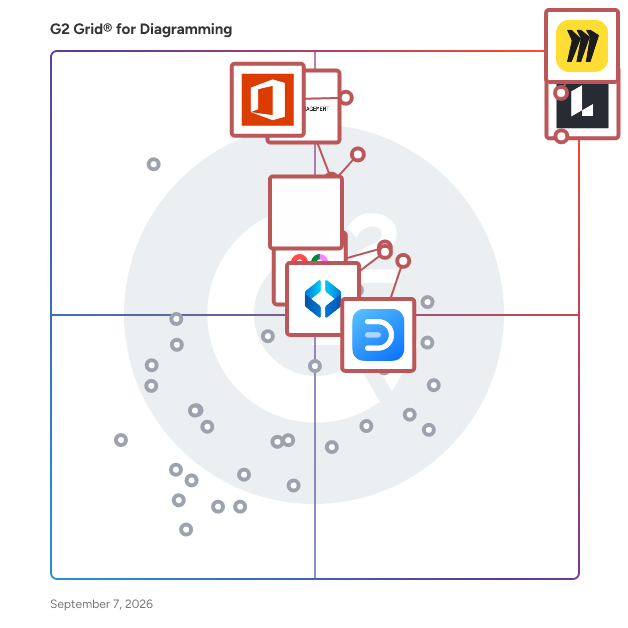
G2 Grid® for Diagramming Software

G2 Grid® for Diagramming Software plotting products by satisfaction and market presence

Highlighted products: Miro, Lucid Visual Collaboration Suite, Visio, FigJam, Cvent Event Marketing & Management, Mural, Wondershare EdrawMax, and SmartDraw.

Underlying data: [Grid® JSON](https://www.g2.com/categories/diagramming/grids.json?focus%5B%5D=miro&focus%5B%5D=lucid-software-inc-lucid-visual-collaboration-suite&focus%5B%5D=visio&focus%5B%5D=fig-jam&focus%5B%5D=cvent-event-marketing-management&focus%5B%5D=mural&focus%5B%5D=wondershare-edrawmax&focus%5B%5D=smartdraw)

UXbeam

UXbeam is a product research platform built to make advanced information architecture work remarkably fast. Go from card sorting and Mental Model Detection to participant-informed sitemaps, iterative tree testing, path analysis, and participant recruitment in one streamlined workflow. It brings speed and rigor to UX and product teams in the pursuit of robust information architecture.

Who Is the Company Behind UXbeam?

  • Seller: UXbeam
  • Year Founded: 2021
  • HQ Location: San Francisco
  • LinkedIn® Page: www.linkedin.com
    1 employees on LinkedIn®

Vecta

Vecta is a web-based collaborative diagramming tool.

Who Is the Company Behind Vecta?

  • Seller: Vecta
  • HQ Location: Sheffield, England
  • LinkedIn® Page: www.linkedin.com
    1 employees on LinkedIn®

Who Uses This Product?

  • Company Size: 100% Small

What Are G2 Users Discussing About Vecta?

Visible Analyst

Whether you are designing e-business applications, developing a data warehouse, or integrating your legacy systems with new enterprise applications; Visible Analyst has all the power you need. Visible Analyst enables true enterprise application engineering by storing and documenting data, processes, business requirements, and objects that can be shared by application developers throughout an organization. The result: you can more easily design and control enterprise software for quality, consistency, and reusability in business applications through the managed sharing of meta-data. All editions support concurrent multi-user access. Learn more about Visible Analyst at: https://visiblesystemscorp.com/Products/Analyst/index.htm

Who Is the Company Behind Visible Analyst?

AI can help you find the answers. G2 helps you trust them.

Connect G2 to Claude or ChatGPT for answers grounded in G2's trusted reviews, comparisons, and pricing from real user insights.

How it works

Wavelength

Wavelength is an AI process mapping tool that builds the process map from a conversation. You talk through a process on a call, record a voice note, or paste a meeting transcript, and Wavelength draws an editable flow diagram while you speak. Actors, systems, decisions, and data stores each get their own shape. Sales engineers, solution architects, business analysts, consultants, and operations teams use Wavelength on discovery calls, requirements sessions, and process workshops. The map is ready to share before the call ends. After the call, you can edit each step by hand or by prompt, add swim lanes, and share a review link so the customer can confirm or correct each step. Export to PNG, PDF, PowerPoint, draw.io, Visio, BPMN, Mermaid, or an SOP document. Wavelength works with Zoom, Microsoft Teams, Google Meet, Slack, Notion, Jira, Confluence, HubSpot, Salesforce, ServiceNow, Zapier, n8n, Make, Claude, and ChatGPT. The Free plan includes 10 saved flows and needs no card. Pro is $9.99 per user per month.

Who Is the Company Behind Wavelength?

WireFlow

WireFlow is cloud-based diagram software for audio-visual and live event preproduction planning. It enables the creation of signal flow diagrams, rack elevations, LED wall layouts, and cable schedules in one workspace. Connection-aware validation prevents setup errors by ensuring compatible cable types and accurate port matching for HDMI, SDI, XLR, RJ45, USB, DMX, DisplayPort, Dante, NDI, and fiber connections. Devices can be positioned and connected port-to-port with automatic validation. WireFlow generates exportable cable schedules, bills of materials, and PDF documentation. Features include an LED wall builder for cabinet grids, pixel mapping, and power planning, plus a rack elevation tool with labeled front and rear views. Zone mapping designates stage and control areas. Cloud autosave syncs work across devices, while share links allow read-only project viewing. Team workspaces enable shared editing, project chat, and inventory tracking.

Who Is the Company Behind WireFlow?

XTEN-AV

XTEN-AV is all-in-one AV design, proposal, project and service management software for audio-visual (AV) integrators, designers, consultants and manufacturers. It replaces the 4–5 tools AV teams juggle (CAD, BOM spreadsheets, proposal and project tools) with one connected workflow. Built for commercial AV, residential AV, pro AV, higher education and government AV projects. X-DRAW (AV design software): Create AV system designs, floor plans, line schematics, signal flow diagrams, rack layouts, front elevations, ceiling speaker layouts and cable schedules automatically, with BOM-to-drawing sync, automatic cable labeling, AVIXA symbols, scope of work and submittals. Built-in AV product library with dealer pricing. No additional software licenses required. X-DOC (AV proposal software): Turn designs and BOMs into professional AV proposals and quotes in minutes, using 100+ templates. Add labor, markup, taxes and optional room packages; track client views and comments in real time; and close deals with approval workflows, payment schedules and legally binding e-signatures. X-PRO (AV project and service management software): Run AV installations with tasks, Gantt charts, events, inventory, purchase orders, invoices and change orders, with clock-in/clock-out for field technicians. Manage service calls, service agreements and technician schedules after handover. XAVIA (AI agent for AV): Use chat or voice commands to generate drawings, build and check BOMs, analyze bid documents, recommend products, draft proposals, create projects and pull reports. Cloud-based with iOS and Android apps. Integrates with QuickBooks, Xero, NetSuite, HubSpot, Salesforce, ConnectWise PSA, Microsoft Dynamics 365, Q360, monday.com and Zoho, plus ADI, Snap One and TD SYNNEX distributor pricing and Okta SSO. Trusted by 30,000+ AV professionals in 130+ countries, with $3B+ worth of AV proposals and designs created. The AV industry's first software with a US utility patent. Free trial, no credit card required.

Who Is the Company Behind XTEN-AV?

  • Seller: XTEN-AV
  • Year Founded: 2019
  • HQ Location: Union City, US
  • LinkedIn® Page: www.linkedin.com
    31 employees on LinkedIn®
Zoho Show

Zoho Show lets you create, collaborate, present, broadcast, and publish presentations, the smarter way. Make your ideas resonate: Show provides a clean and clutter-free interface design, letting your stories take the center stage. Concentrate on creating compelling content for your presentations with zero distractions Design visually engaging stories: Organize and enhance data visually with Show's extensive range of tools including formatted text box, shapes, charts, and tables, all of these packed under a single roof. You can also add visuals like videos, images, and tweets to your slides. Emphasize Content: Bring more attention to your content by adding strokes to text, fill titles or key points with solid colors and patterns or add reflections and make information stand out. Alter shapes to your imagination: Shape up your ideas with edit points. Show's editing toolkit lets you edit shapes with vector-like precision. Polish images to perfection: Format images to make them reflect your ideas. Use the filter option to add a tinch of color. Crop out unnecessary elements to bring out the best or reduce the opacity to blend them with the background. Reinforce data: Complement data with visually appealing charts. Choose a pre-defined layout that complements your data, style every element to get the desired look, and animate parts of your charts to bring information to notice. Format every cell within tables, fill them with colors, gradients or images. Share and collaborate on slides together: Share slides internally with your team and work with them in real time. Collaborators can view, edit, or comment on slides based on the access given to them. Edits made by collaborators' reflect on slides instantly. Deliver presentations in style: Broadcast presentations online, while audience follow them on their browsers. Bring viewers to the same same slide as you navigate through the presentation. Reach a wider audience: Showcase your ideas with the entire world. Publish slides online and share the link across social media. You can also embed your presentations on your website or blog (as an Iframe) to attract more viewership. Carry your presentation wherever you go: Show is also supported natively on Android, Android Wear, iOS, Apple TV & Apple Watch (for viewing content). You can also continue editing slides on Android devices to add finishing touch to your presentations.

Average Rating: 4.4/5.0

Total Reviews: 63

How Do G2 Users Rate Zoho Show?

  • Quality of Support: 8.1/10 (Category avg: 8.7/10)
  • Ease of Use: 9.0/10 (Category avg: 8.8/10)
  • Has the product been a good partner in doing business?: 9.1/10 (Category avg: 9.0/10)

Who Is the Company Behind Zoho Show?

  • Seller: Zoho
  • Year Founded: 1996
  • HQ Location: Austin, TX
  • LinkedIn® Page: www.linkedin.com
    30,913 employees on LinkedIn®
  • Phone: +1 (888) 900-9646

Who Uses This Product?

  • Top Industries: Information Technology and Services, Marketing and Advertising
  • Company Size: 68% Small, 22% Medium

What Do G2 Reviewers Say About Zoho Show?

AI-generated summary from verified user reviews

Pros
  • Users find Zoho Show's ease of use invaluable for creating attractive, automated presentations effortlessly.
  • Users love the easy-to-use interface of Zoho Show, making it simple to create and showcase attractive presentations.
  • Users love the well-designed helpful features of Zoho Show, which enhance collaboration and presentation quality.
  • Users enjoy the quick creation feature of Zoho Show, facilitating efficient presentation development from anywhere.
  • Users love the easy creation process of Zoho Show, enabling quick and efficient slideshow development from anywhere.
Cons
  • Users voice concern over internet dependency, as offline access and performance issues hinder effective usage of Zoho Show.
  • Users experience slow performance with Zoho Show, particularly during synchronization and with low bandwidth internet.
  • Users find the AI limitations of Zoho Show require constant monitoring, hindering a smooth presentation experience.
  • Users experience synchronization delays and find it challenging without a desktop application for precise adjustments.
  • Users find the limited features of Zoho Show, especially for fonts and image uploads, frustrating during presentations.

What Are Recent G2 Reviews of Zoho Show?

What Are G2 Users Discussing About Zoho Show?

Neeraja Prakash
NP
Researched and written by Neeraja Prakash