Best Computer-Aided Manufacturing (CAM) Software - Page 3

How Many Computer-Aided Manufacturing (CAM) Software Products Does G2 Track?

Total Products under this Category: 104

Category Stats (Sep 2026)

  • Average Rating: 3.94/5 The average rating of products in this category, based on all submitted ratings
  • Top Trending Product: NX CAM (+0.12%) - Among all products in this category, NX CAM recorded the largest rating increase compared to last month

Last updated: September 15, 2026

How Does G2 Rank Computer-Aided Manufacturing (CAM) Software Products?

Why You Can Trust G2's Software Rankings:

  • 30 Analysts and Data Experts
  • 2,500+ Authentic Reviews
  • 104+ Products
  • Unbiased Rankings

G2's software rankings are built on verified user reviews, rigorous moderation, and a consistent research methodology maintained by a team of analysts and data experts. Each product is measured using the same transparent criteria, with no paid placement or vendor influence. While reviews reflect real user experiences, which can be subjective, they offer valuable insight into how software performs in the hands of professionals. Together, these inputs power the G2 Score, a standardized way to compare tools within every category.

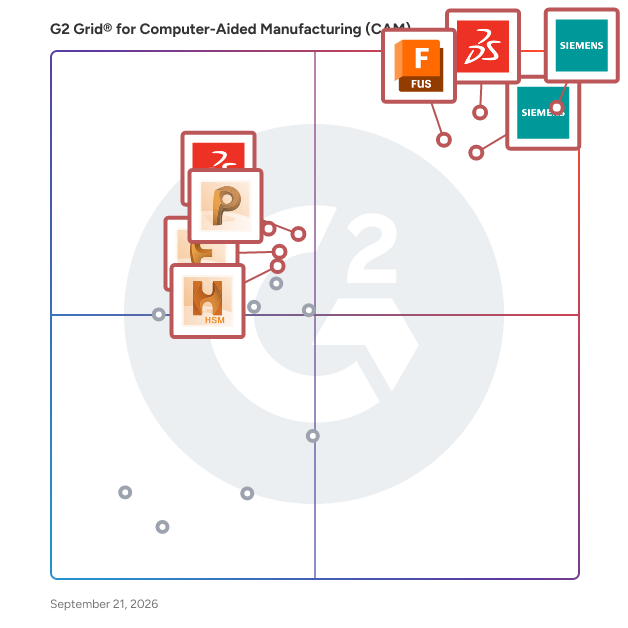
G2 Grid® for Computer-Aided Manufacturing (CAM) Software

G2 Grid® for Computer-Aided Manufacturing (CAM) Software plotting products by satisfaction and market presence

Highlighted products: NX CAM, SOLIDWORKS, Designcenter Solid Edge, Autodesk Fusion, PowerMill, SolidWorks CAM, FeatureCAM, and HSM.

Underlying data: [Grid® JSON](https://www.g2.com/categories/computer-aided-manufacturing-cam/grids.json?focus%5B%5D=nx-cam&focus%5B%5D=solidworks&focus%5B%5D=designcenter-solid-edge&focus%5B%5D=autodesk-fusion&focus%5B%5D=powermill&focus%5B%5D=solidworks-cam&focus%5B%5D=featurecam&focus%5B%5D=hsm)

ENCY

ENCY is a CAD/CAM for a new generation that combines advanced CAM technology with an intuitive user interface and natural workflow. Serving industries such as aerospace, automotive, and consumer goods, ENCY provides powerful tools for 2D/3D modeling, toolpath generation, simulation, and G-code verification, specifically tailored for CNC machining applications. As an integrated CAD/CAM solution, ENCY gives CAM programmers and engineers precise tools to control each machining step. This control ensures highly efficient workflows and consistently accurate parts, tailored to specific production requirements. Main Features and Benefits: - Advanced Toolpath Calculation: Generates optimized, machine-specific toolpaths for various processes, including 2D, 3-axis, 5-axis, and mill-turn operations, maximizing machine capability and precision. - High-Fidelity Simulation: ENCY CAM offers both solid and voxel-based simulations to replicate material removal, additive processes, and painting. These simulations detect potential issues like collisions and out-of-gauge conditions, helping avoid costly errors. - NC-Code Verification: Comprehensive G-code simulation and validation catch errors and discrepancies early, reducing machine downtime and minimizing risk. - Stock Tracking and Material Management: Tracks material removal throughout each machining operation, preventing redundant cuts and optimizing efficiency by ensuring purposeful toolpath creation and shortened machining time. - Machine Setup and Digital Twin Creation: Allows users to build digital twins of CNC machines, including tools, fixtures, and setup configurations. This capability improves setup accuracy and enables seamless transfer of setups across projects. - Integrated Collaboration via ENCY Clouds: ENCY Clouds provides real-time communication between programmers and operators, enhancing project sharing, NC-code fine-tuning, and troubleshooting. ENCY empowers industries focused on high-precision manufacturing with the tools needed to create accurate, efficient, and reliable machining workflows, enhancing productivity and minimizing downtime.

Average Rating: 5.0/5.0

Total Reviews: 3

How Do G2 Users Rate ENCY?

  • Quality of Support: 10.0/10 (Category avg: 8.3/10)
  • Operations: 9.4/10 (Category avg: 8.3/10)
  • CNC Feature Recognition: 9.4/10 (Category avg: 8.0/10)
  • Tooling and Toolpaths: 8.9/10 (Category avg: 8.4/10)

Who Is the Company Behind ENCY?

Who Uses This Product?

  • Company Size: 100% Small

What Do G2 Reviewers Say About ENCY?

AI-generated summary from verified user reviews

Pros
  • Users value the quick toolpath calculation of ENCY, enhancing their testing and simulation experience significantly.
  • Users commend the advanced capabilities of ENCY, appreciating its quick operations and superior toolpath generation.
  • Users value the CAD integration in ENCY, enhancing workflow efficiency and enabling seamless tool management.
  • Users praise the responsive customer support of ENCY, enabling quick resolutions and assistance during setup challenges.
  • Users appreciate the detailed engineering drawings of ENCY, facilitating efficient programming and minimizing downtime.
Cons
  • Users find the complexity of integration limits ENCY's effectiveness as a full CAD replacement in certain tasks.
  • Users find ENCY lacking in component management, relying on external tools for CAD integration and constraints.
  • Users have noted the difficult configuration of ENCY, particularly with the operation preset interface and hotkeys.
  • Users find the price point high for small businesses, suggesting a subscription-based option for accessibility.
  • Users find ENCY has missing features like limited CAD capability and inadequate component constraints, needing workarounds.

What Are Recent G2 Reviews of ENCY?

EZ-CAM

EZ-CAM was one of the first PC based CAM systems to enter the market and offers innovative, productive, affordable manufacturing solutions. From simple and easy to use 2 axis milling and turning to full 3 and 4 axis Milling, Mill/Turn, 5 axis Wire EDM and arc G-code Optimization.

Average Rating: 3.8/5.0

Total Reviews: 3

How Do G2 Users Rate EZ-CAM?

  • Quality of Support: 10.0/10 (Category avg: 8.3/10)
  • Operations: 8.3/10 (Category avg: 8.3/10)
  • CNC Feature Recognition: 6.7/10 (Category avg: 8.0/10)
  • Tooling and Toolpaths: 8.3/10 (Category avg: 8.4/10)

Who Is the Company Behind EZ-CAM?

Who Uses This Product?

  • Company Size: 67% Small, 33% Large

What Are Recent G2 Reviews of EZ-CAM?

Bantam Tools

Otherplan is a solution that guides you through the process of milling products from beginning to end with features like one button calibration and pre-loaded tool and material settings to help you get started.

Average Rating: 4.0/5.0

Total Reviews: 2

How Do G2 Users Rate Bantam Tools?

  • Quality of Support: 10.0/10 (Category avg: 8.3/10)
  • Operations: 9.2/10 (Category avg: 8.3/10)
  • CNC Feature Recognition: 9.2/10 (Category avg: 8.0/10)
  • Tooling and Toolpaths: 8.3/10 (Category avg: 8.4/10)

Who Is the Company Behind Bantam Tools?

Who Uses This Product?

  • Company Size: 50% Medium, 50% Small

What Are Recent G2 Reviews of Bantam Tools?

EnRoute

EnRoute is the go-to CNC software solution for everyday cutting, nested-based production, and creative design applications.

Average Rating: 4.0/5.0

Total Reviews: 2

How Do G2 Users Rate EnRoute?

  • Quality of Support: 10.0/10 (Category avg: 8.3/10)
  • Operations: 10.0/10 (Category avg: 8.3/10)
  • CNC Feature Recognition: 6.7/10 (Category avg: 8.0/10)
  • Tooling and Toolpaths: 10.0/10 (Category avg: 8.4/10)

Who Is the Company Behind EnRoute?

  • Seller: SAi
  • Year Founded: 1990
  • HQ Location: Midvale, Utah, United States
  • LinkedIn® Page: www.linkedin.com
    1,254 employees on LinkedIn®

Who Uses This Product?

  • Company Size: 100% Small

What Are Recent G2 Reviews of EnRoute?

GMSWorks

GMSWorks 4.4 is the latest release of the CAD/CAM software that helps engineers design and manufacture complex parts. This computer aided design and manufacturing (CAD/CAM) software package includes a full integration of the new DESIGNBASE advanced modeling kernel, featuring superior free form surface and solid geometry modeling and unmatched design editing capabilities.

Average Rating: 4.0/5.0

Total Reviews: 2

How Do G2 Users Rate GMSWorks?

  • Quality of Support: 9.2/10 (Category avg: 8.3/10)
  • Operations: 8.3/10 (Category avg: 8.3/10)
  • CNC Feature Recognition: 7.5/10 (Category avg: 8.0/10)
  • Tooling and Toolpaths: 8.3/10 (Category avg: 8.4/10)

Who Is the Company Behind GMSWorks?

Who Uses This Product?

  • Company Size: 50% Large, 50% Medium

What Are Recent G2 Reviews of GMSWorks?

What Are G2 Users Discussing About GMSWorks?

ModuleWorks

ModuleWorks is a leading provider of CAD/CAM components and CNC machining solutions based in Aachen, Germany. Offering 5-axis, 4-axis and 3-axis machining and simulation technology, our comprehensive product portfolio and cutting-edge software components are used by many of the leading CAM systems and specialist manufacturing companies worldwide since 2003. The company was founded with a commitment to deliver quality products and services to the CAD/CAM industry. Our development teams are made up of CAD/CAM industry experts with specialist knowledge of 5-axis machining and simulation / graphics. ModuleWorks software components have been used to manufacture complex machinery parts technology with the main focus on tool Path Development and Simulation, for 17 years and are now used by more than 500,000 users worldwide. ModuleWorks has expanded quickly to meet the demands of our clients and by now we also have colleagues and partners in Simferopol, Bucharest, the UK and Japan. With the best technical support in the industry, ModuleWorks helps you to integrate our technology and develop highly competitive solutions with minimum of risk and short lead times. From standard products to exclusive development projects, we work closely together with you as a partner to bring your own vision of Industry 4.0 to life. ModuleWorks – Get there faster!

Average Rating: 3.3/5.0

Total Reviews: 2

How Do G2 Users Rate ModuleWorks?

  • Quality of Support: 10.0/10 (Category avg: 8.3/10)
  • Operations: 7.5/10 (Category avg: 8.3/10)
  • CNC Feature Recognition: 8.3/10 (Category avg: 8.0/10)
  • Tooling and Toolpaths: 7.5/10 (Category avg: 8.4/10)

Who Is the Company Behind ModuleWorks?

  • Seller: ModuleWorks
  • Year Founded: 2003
  • HQ Location: Aachen, DE
  • Twitter: @ModuleWorks
    637 Twitter followers
  • LinkedIn® Page: de.linkedin.com
    259 employees on LinkedIn®

Who Uses This Product?

  • Company Size: 50% Large, 50% Medium

What Are G2 Users Discussing About ModuleWorks?

NCG CAM

NCG CAM Solutions Ltd provides CAM software solutions, offering all the tools needed to manufacture prototypes, models, moulds, dies, patterns and finished products. Company specializes in 3D HSM CAM.

Average Rating: 3.5/5.0

Total Reviews: 2

How Do G2 Users Rate NCG CAM?

  • Quality of Support: 5.0/10 (Category avg: 8.3/10)
  • Operations: 7.5/10 (Category avg: 8.3/10)
  • CNC Feature Recognition: 5.8/10 (Category avg: 8.0/10)
  • Tooling and Toolpaths: 5.0/10 (Category avg: 8.4/10)

Who Is the Company Behind NCG CAM?

  • Seller: NCG CAM Solutions
  • Year Founded: 2009
  • HQ Location: Histon, Cambridge, GB
  • Twitter: @NCG_CAM
    23 Twitter followers
  • LinkedIn® Page: www.linkedin.com
    8 employees on LinkedIn®

Who Uses This Product?

  • Company Size: 100% Small

What Are G2 Users Discussing About NCG CAM?

NCSIMUL 4CAM

NCSIMUL 4CAM is the NCSIMUL SOLUTIONS module that complements existing CAMs to simplify NC programming and increase the flexibility of CNC machines. It allows to change machines on the fly without new CAM programming.From the main CAMs (CATIA, NX, CREO, TOPSOLIDCAM, MASTERCAM, ...) or existing NC programs (ISO format), NCSIMUL 4CAM directly generates, without external post-processor, native NC programs, verified and optimized taking into account physical means of the workshop (tools, cutting conditions, kinematics, machine controllers ...)

Average Rating: 2.8/5.0

Total Reviews: 2

How Do G2 Users Rate NCSIMUL 4CAM?

  • Quality of Support: 6.7/10 (Category avg: 8.3/10)
  • Operations: 7.5/10 (Category avg: 8.3/10)
  • CNC Feature Recognition: 6.7/10 (Category avg: 8.0/10)
  • Tooling and Toolpaths: 7.5/10 (Category avg: 8.4/10)

Who Is the Company Behind NCSIMUL 4CAM?

  • Seller: SPRING Technologies
  • Year Founded: 1983
  • HQ Location: Stockholm, Skåne County, Sweden
  • Twitter: @NCSIMUL
    644 Twitter followers
  • LinkedIn® Page: www.linkedin.com
    1 employees on LinkedIn®

Who Uses This Product?

  • Company Size: 50% Medium, 50% Small

What Are G2 Users Discussing About NCSIMUL 4CAM?

Tebis CAM

Tebis allows to quickly and easily generate collision-checked NC programs in all manufacturing-related industries and application areas.

Average Rating: 3.8/5.0

Total Reviews: 2

How Do G2 Users Rate Tebis CAM?

  • Quality of Support: 9.2/10 (Category avg: 8.3/10)
  • Operations: 8.3/10 (Category avg: 8.3/10)
  • CNC Feature Recognition: 9.2/10 (Category avg: 8.0/10)
  • Tooling and Toolpaths: 10.0/10 (Category avg: 8.4/10)

Who Is the Company Behind Tebis CAM?

Who Uses This Product?

  • Company Size: 67% Large, 33% Small

What Are Recent G2 Reviews of Tebis CAM?

TopSolid'Cam

TopSolid Cam is A simple, intuitive and scalable global CAD/CAM solution. Easy to use to control a lathe/grinder or a continuous 5-axis machining center.

Average Rating: 3.8/5.0

Total Reviews: 2

How Do G2 Users Rate TopSolid'Cam?

  • Quality of Support: 10.0/10 (Category avg: 8.3/10)
  • Operations: 10.0/10 (Category avg: 8.3/10)
  • CNC Feature Recognition: 10.0/10 (Category avg: 8.0/10)
  • Tooling and Toolpaths: 8.3/10 (Category avg: 8.4/10)

Who Is the Company Behind TopSolid'Cam?

  • Seller: TopSolid
  • Year Founded: 1984
  • HQ Location: Evry, FR
  • Twitter: @TopSolid
    1,143 Twitter followers
  • LinkedIn® Page: www.linkedin.com
    24 employees on LinkedIn®

Who Uses This Product?

  • Company Size: 100% Medium

What Are Recent G2 Reviews of TopSolid'Cam?

What Are G2 Users Discussing About TopSolid'Cam?

Cut Optimizer

Cut Optimizer solves one specific problem: figuring out how to cut long stock, aluminum profiles, tubes, bars, and similar linear materials, while wasting as little material as possible. It's built specifically for 1D/linear cutting, not adapted from a 2D or sheet-nesting tool, so the whole workflow assumes you're working with lengths, not panels. Full-featured demo projects are available with no account needed, so you can see real optimization results, including Pro-only features like miter cutting and material joining, before deciding whether to sign up for anything. Work is split into projects. Each project can hold multiple optimization runs and multiple material types, so you're not stuck redoing a whole setup for a small change. Materials can be predefined ahead of time or pulled from active inventory, so if you're tracking real stock on hand, the optimizer works from what you actually have instead of assuming unlimited fresh bars. The optimization engine supports multiple standard stock lengths per material (up to 9), so it's not assuming every bar in your yard is the same length. Offcuts and remnants, leftover pieces from previous jobs, get tracked separately (up to 50 per material) and can be fed back in as available stock instead of being treated as waste; this limit is separate from the 9-standard-length cap, which only applies to fresh full-length stock. It also handles miter cutting from 0 to 70 degrees, rotation of symmetrical materials so valid layouts aren't missed just because a piece could be flipped, and material joining for cases where pieces can be spliced together instead of requiring one continuous length. A reverse optimization mode flips the usual question around: instead of "here's my stock, what layout wastes least," you give it your required pieces and it tells you what stock lengths to order in the first place. Piece lists can be imported from Excel or CSV instead of typed in one at a time, including batch import across multiple materials at once. Once a run is done, results export as PDF, Excel, CSV, or plain text, whatever fits how your shop already handles paperwork or files jobs. Layouts are shown graphically, so you can see the actual cutting pattern per stock piece, not just a table of numbers. Cost and weight calculations are available per plan, so you can see the material cost and weight of a given layout, not just the piece count. Starter is free with no account required, capped at 10 pieces per material, good for trying it out or for genuinely small jobs. Core and Pro are paid tiers for larger projects and add features like Excel/CSV import/export, miter cutting, material joining, remnant tracking, and reverse optimization. No ads on any tier. Built for aluminum and metal fabricators, window and door manufacturers, and anyone else cutting profiles, tubes, bars, or similar linear stock who's currently doing this math by hand or in a spreadsheet and wants to stop overbuying material or guessing at layouts.

Average Rating: 5.0/5.0

Total Reviews: 1

How Do G2 Users Rate Cut Optimizer?

  • Quality of Support: 10.0/10 (Category avg: 8.3/10)

Who Is the Company Behind Cut Optimizer?

Who Uses This Product?

  • Company Size: 100% Small

What Are Recent G2 Reviews of Cut Optimizer?

EXAPT

EXAPT represents 3D-CAD/CAM software solutions - from design to production - and offers its customers software for NC planning, production data and tool management.The extensive EXAPT technology with the emphases turning, drilling and milling enables an efficient programming solution for complex workpiece requirements with up to 5-axis simultaneous machining.

Average Rating: 4.0/5.0

Total Reviews: 1

How Do G2 Users Rate EXAPT?

  • Quality of Support: 10.0/10 (Category avg: 8.3/10)
  • Operations: 10.0/10 (Category avg: 8.3/10)
  • CNC Feature Recognition: 10.0/10 (Category avg: 8.0/10)
  • Tooling and Toolpaths: 10.0/10 (Category avg: 8.4/10)

Who Is the Company Behind EXAPT?

  • Seller: EXAPT
  • Year Founded: 1972
  • HQ Location: Aachen, DE
  • Twitter: @EXAPTSystem
    13 Twitter followers
  • LinkedIn® Page: de.linkedin.com
    27 employees on LinkedIn®

Who Uses This Product?

  • Company Size: 100% Medium

What Are Recent G2 Reviews of EXAPT?

What Are G2 Users Discussing About EXAPT?

IMSverify

IMSverify provides a unique NC verification solution to check the postprocessed code that will run on the machine. This goes beyond simple APT or CL file verification within the CAM system. Verification of the actual G-code that will run on the machine provides you with complete confidence that the part will be cut correctly.

Average Rating: 4.0/5.0

Total Reviews: 1

How Do G2 Users Rate IMSverify?

  • Quality of Support: 10.0/10 (Category avg: 8.3/10)
  • Operations: 8.3/10 (Category avg: 8.3/10)
  • CNC Feature Recognition: 10.0/10 (Category avg: 8.0/10)
  • Tooling and Toolpaths: 8.3/10 (Category avg: 8.4/10)

Who Is the Company Behind IMSverify?

Who Uses This Product?

  • Company Size: 100% Small

What Are Recent G2 Reviews of IMSverify?

MAX-PAC

MAX-PAC is specialized CAM software for turbomachinery production. Easy and fast to learn with an intuitive user interface, MAX-PAC creates smooth 5-axis toolpaths for high-speed milling and collision free toolpaths for difficult geometries. MAX-PAC uses flank- and point-milling approaches for superior surface finish and tight tolerances, producing high quality parts that don't require hand finishing or other reworking. The interface guides the programmer to enter machining operations and specify parameters for each operation, and inputs are stored and can be used for similar applications. MAX-PAC can be applied to a wide range of components including centrifugal and axial bladed parts, and integrally shrouded impellers. Strategies are available for roughing, hub finish, blade finish, leading edge, variable fillet, tip chamfer, deburring, and shrouded pocket milling. MAX-PAC can specify cutter shapes including cylindrical and conical ball end mills, barrel cutters, and burr (lollipop) cutters. The tools are defined with graphical 2D and 3D display and a master tool library can be created to easily import existing tool definitions to a new case. MAX-PAC includes a collision detection and avoidance module, automatically calculated cutter orientations, and machine simulation for a realistic look at the whole machining process. Standard output from MAX-PAC contains APT GOTO commands compatible with commercially available post-processors. Direct postprocessors can be developed on request and include custom commands for each user.

Average Rating: 3.5/5.0

Total Reviews: 1

How Do G2 Users Rate MAX-PAC?

  • Quality of Support: 10.0/10 (Category avg: 8.3/10)
  • Operations: 8.3/10 (Category avg: 8.3/10)
  • CNC Feature Recognition: 8.3/10 (Category avg: 8.0/10)
  • Tooling and Toolpaths: 8.3/10 (Category avg: 8.4/10)

Who Is the Company Behind MAX-PAC?

  • Seller: Concepts NREC
  • Year Founded: 1956
  • HQ Location: White River Junction, US
  • Twitter: @ConceptsNREC
    632 Twitter followers
  • LinkedIn® Page: www.linkedin.com
    192 employees on LinkedIn®

Who Uses This Product?

  • Company Size: 100% Large

What Are G2 Users Discussing About MAX-PAC?

NCL Multi Axis CAM

NCL is a powerful Computer-Aided Manufacturing system designed to provide a maximum degree of flexibility in creating tool paths to produce machined parts of any complexity. NCL offers a unique blend of automated and user-controlled tool path generation techniques that result in reduced programming time and increased quality.

Average Rating: 2.0/5.0

Total Reviews: 1

How Do G2 Users Rate NCL Multi Axis CAM?

  • Operations: 5.0/10 (Category avg: 8.3/10)
  • CNC Feature Recognition: 3.3/10 (Category avg: 8.0/10)
  • Tooling and Toolpaths: 3.3/10 (Category avg: 8.4/10)

Who Is the Company Behind NCL Multi Axis CAM?

Who Uses This Product?

  • Company Size: 100% Large

What Are G2 Users Discussing About NCL Multi Axis CAM?

Daniel Rivera
DR
Researched and written by Daniel Rivera
Updated October 3, 2024