Best CMMS Software - Page 49

Last updated: April 9, 2026

How Many CMMS Software Products Does G2 Track?

Total Products under this Category: 724

Category Stats (Nov 2026)

  • Average Rating: 4.4/5 The average rating of products in this category, based on all submitted ratings
  • Top Trending Product: Reftab (+2.31%) - Among all products in this category, Reftab recorded the largest rating increase compared to last month

Last updated: November 01, 2026

How Does G2 Rank CMMS Software Products?

Why You Can Trust G2's Software Rankings:

  • 30 Analysts and Data Experts
  • 13,100+ Authentic Reviews
  • 724+ Products
  • Unbiased Rankings

G2's software rankings are built on verified user reviews, rigorous moderation, and a consistent research methodology maintained by a team of analysts and data experts. Each product is measured using the same transparent criteria, with no paid placement or vendor influence. While reviews reflect real user experiences, which can be subjective, they offer valuable insight into how software performs in the hands of professionals. Together, these inputs power the G2 Score, a standardized way to compare tools within every category.

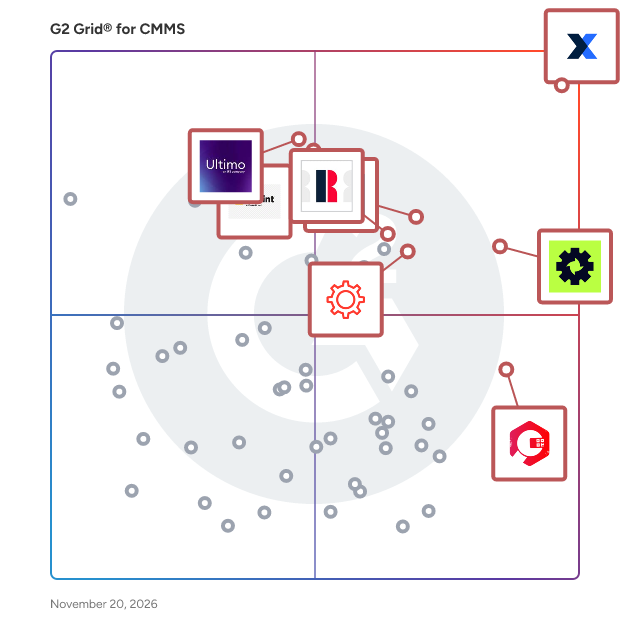
G2 Grid® for CMMS Software

G2 Grid® for CMMS Software plotting products by satisfaction and market presence

Highlighted products: MaintainX, Limble, ServiceChannel, eMaint, IFS Ultimo, UpKeep, Redzone, and Cryotos.

Underlying data: [Grid® JSON](https://www.g2.com/categories/cmms/grids.json?focus%5B%5D=maintainx&focus%5B%5D=limble&focus%5B%5D=servicechannel&focus%5B%5D=emaint&focus%5B%5D=ifs-ultimo&focus%5B%5D=upkeep&focus%5B%5D=qad-redzone&focus%5B%5D=cryotos)

Zometric Maintenance Management

Zometric Maintenance Management is a CMMS designed for manufacturing plants, not retrofitted to them. It answers the question that decides maintenance budgets: which asset is about to fail, and what will it cost if it does? Asset and work order foundations: * Asset hierarchy at any depth: Plant, Line, Cell, Machine, Sub-unit. Breakdowns, work orders and KPIs roll up correctly at every level, so the line manager sees the line and the plant head sees the plant * Work order engine with five categories: Corrective, Preventive, Predictive, Changeover and Turnaround, each with its own workflow, approvals and skill-based routing * PM scheduling with time-based, usage or cycle-count-based, and condition-based triggers, plus lead-time alerts so spares are staged and technicians are scheduled before the PM is due From reactive to predictive: * Predictive analytics ingest IoT sensor data via Zometric Edge, and the AI layer flags the failure mode before the breakdown. The shift to predictive maintenance becomes a deployment, not a multi-year project * Legacy machines join through retrofit edge devices, so automated downtime and condition tracking does not require replacing equipment. One customer cut downtime 40 percent this way Spares, costs and KPIs: * Centralised spare parts register with reorder alerts, consumption analytics and cost-per-asset tracking. Production scheduling locks against assets under maintenance * KPI dashboards for MTBF, MTTR, OEE contribution, PM compliance and cost per asset, with auto-generated shift and monthly MIS reports. The maintenance manager stops writing the report and starts reading it Breakdown root-cause analysis integrates with the platform's 8D problem-solving workflow, so recurring failures get engineered out, not just repaired. Aligned with ISO 55000, IATF 16949, 21 CFR Part 211 GMP, OSHA PSM and ISO 14224. Browser-based, works on technician phones and tablets. Free pilot configurable in 2 to 3 weeks with your real factory data.

Who Is the Company Behind Zometric Maintenance Management?

ZUD (CMMS)

Equipment inventory maintenance management software that tracks vendors, line/areas and projects; creates PM and repair work orders.

Who Is the Company Behind ZUD (CMMS)?

Zunaso Work Order

Zunaso® Work Order app is a cloud-based CMMS software that runs on Mobile and Desktop devices. Zunaso® Work Order app makes it easier to create, prioritize, approve, assign, track, and review all types of Work Orders using an intuitive, simple, and user-friendly application interface. * Facilitates both Reactive Maintenance and Planned / Preventive Maintenance for the assets in your facilities. * Helps with streamlining your entire maintenance workflow, in turn achieving increased efficiency, increased asset life, enhanced equipment performance, reduced downtime, and cost-saving. * Comprises the following 3 components that are essential to a Computerized Maintenance Management System (CMMS): Work Order Management, Planned Maintenance Scheduling, and Parts Inventory Management, which allows you to follow the best industry practices. * Automated Rules for Work Order Approval and Work Order Assignment to Technician saves time and ensures accuracy. * Setting up email notifications on Work Order updates ensures seamless and timely communication between supervisors and technicians. * Low Stock Notification ensures the timely procuring of parts. When the Facilities Managers, Facilities Supervisors, Maintenance Managers, Maintenance Technicians, and Building Managers are looking to get rid of the traditional paper forms, emails, and phone calls for managing their maintenance work orders, they can easily switch to Zunaso Work Order App free from worries. Enterprise features such as adding notes, attachments, images, and signature to the Work Order ensures seamless communication on the work between the supervisor and the technicians. Outstanding features such as checklists, kits, and classifications all provide a faster and more organized means of preparing work orders with accurate information. Estimates facilitate projection and cost analysis. The built-in barcode scanner feature allows users to quickly associate the correct assets to a work order. It also allows the users to easily upload the barcode information to the assets and parts in the system, and to easily lookup for existing parts and assets by simply scanning the barcode on them. Zunaso Work Order app supports the offline feature. This is very important when the technician does not have a reliable internet connection and would like to work on a given task and update the work order. With the offline feature, the technician does not need to worry about the changes made while the app was offline. As soon as the app is online, the pending changes will be sent to the server. Zunaso Work Order app comes with industry-standard reports that can help you measure KPIs, analyze time and costs, measure effectiveness and productivity, and make the right decisions with respect to your resources and budgets. With Zunaso Work Order App, you can streamline your maintenance work orders approval and assignment process, plan and execute scheduled maintenance of assets, improve the lifetime of your assets, achieve real-time tracking of parts inventory, procure parts on time for maintenance and repairs, track costs and send notifications.

Who Is the Company Behind Zunaso Work Order?

AI can help you find the answers. G2 helps you trust them.

Connect G2 to Claude or ChatGPT for answers grounded in G2's trusted reviews, comparisons, and pricing from real user insights.

How it works

Zuper

Zuper is the most adaptable and intelligent field service management (FSM) solution that helps service businesses automate scheduling, dispatching, mobile workforce operations, and customer communications. Designed for mid-market and enterprise organizations, such as Roofing, HVAC, Plumbing, Electrical, and other field service companies—Zuper transforms technology into a competitive advantage. With Zuper’s unrivalled technology, organizations can empower field teams, delight customers and grow their businesses, transforming their teams into Zuper heroes. Key features: Intelligent Scheduling & Dispatching Automate scheduling and routing by matching jobs to the right technician based on skills, availability, territory and proximity, and generate efficient recurring routes to save travel time and fuel. Mobile App with Offline Mode Empower technicians with a user-friendly iOS/Android interface for job details, service history, checklists and customer data—even without connectivity—so they have everything they need onsite. Customer Portal & Real-Time Updates Offer end users a self-serve portal for service requests, quote approvals, job tracking, online payments and automated ETAs/notifications to keep customers informed at every step. No-Code Workflows & Automation Empower operations teams to build end-to-end workflows for scheduling, invoicing, contract renewals and notifications via drag-and-drop logic, reducing manual effort and errors. Analytics & Reporting Turn operational data into actionable insights with customizable dashboards and reports on workforce productivity, service performance and revenue trends, accelerating business growth through upsell opportunities and instant payments. Scalable Integrations Connect to 60+ best-in-class applications—such as HubSpot, QuickBooks, Zendesk and Sage—via prebuilt connectors and open APIs to maintain a unified, extensible technology stack.

Average Rating: 4.7/5.0

Total Reviews: 146

How Do G2 Users Rate Zuper?

  • Has the product been a good partner in doing business?: 9.4/10 (Category avg: 9.1/10)

Who Is the Company Behind Zuper?

  • Seller: Zuper
  • Year Founded: 2020
  • HQ Location: Seattle, Washington
  • LinkedIn® Page: www.linkedin.com
    289 employees on LinkedIn®

Who Uses This Product?

  • Who Uses This: Director, Operations Manager
  • Top Industries: Information Technology and Services, Consumer Services
  • Company Size: 57% Small, 39% Medium

What Do G2 Reviewers Say About Zuper?

AI-generated summary from verified user reviews

Pros
  • Users praise Zuper's exceptional customer support, highlighting the team's responsiveness and tailored assistance for their business needs.
  • Users value the customization options of Zuper, tailoring the software to fit specific business needs effectively.
  • Users value the ease of use of Zuper, enjoying seamless field service operations and excellent support throughout.
  • Users value the seamless integrations of Zuper, enhancing efficiency and improving overall management of field operations.
  • Users value the easy scheduling in Zuper, enhancing field operations and improving overall efficiency in service management.
Cons
  • Users note that Zuper requires improvement in bug fixes and parts integration to enhance overall functionality.
  • Users find the long learning curve challenging, especially for first-time users adjusting to Zuper's features.
  • Users face customization difficulties with Zuper, finding it complex and needing extra support for efficient setup.
  • Users find the feature limitations in Zuper frustrating, leading to reliance on custom solutions and increased implementation times.
  • Users experience slow performance with Zuper, affecting efficiency in tasks and feature implementation.

What Are Recent G2 Reviews of Zuper?

What Are G2 Users Discussing About Zuper?

Nathan Calabrese
NC
Researched and written by Nathan Calabrese