Matrix Industrie
Who Is the Company Behind Matrix Industrie?
- Seller: Matrix Engine
- Year Founded: 2011
- HQ Location: Lyon, FR
-
LinkedIn® Page: www.linkedin.com
1 employees on LinkedIn®
Total Products under this Category: 538
Last updated: September 01, 2026
Why You Can Trust G2's Software Rankings:
G2's software rankings are built on verified user reviews, rigorous moderation, and a consistent research methodology maintained by a team of analysts and data experts. Each product is measured using the same transparent criteria, with no paid placement or vendor influence. While reviews reflect real user experiences, which can be subjective, they offer valuable insight into how software performs in the hands of professionals. Together, these inputs power the G2 Score, a standardized way to compare tools within every category.
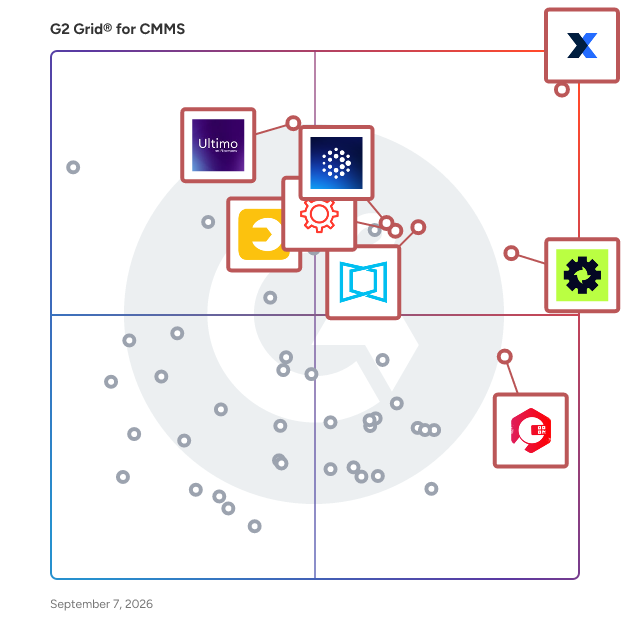
Highlighted products: MaintainX, Limble, ServiceChannel, Ultimo, Fracttal One, UpKeep, Cryotos, and eMaint.
Underlying data: [Grid® JSON](https://www.g2.com/categories/cmms/grids.json?focus%5B%5D=maintainx&focus%5B%5D=limble&focus%5B%5D=servicechannel&focus%5B%5D=ultimo&focus%5B%5D=fracttal-one&focus%5B%5D=upkeep&focus%5B%5D=cryotos&focus%5B%5D=emaint)
From asset management and reporting to mobile productivity and support, only MaxiCloud gives organisations the full breadth of capabilities they need to transform their data into smarter maintenance practices.
Smart Asset Navigator - Illustrated Part Catalog for Maximo Revolutionizes asset management by offering an illustrated part catalog for Maximo, showcasing a visual, exploded BOM view. This tool utilizes various asset data sources to visually link assets and spare parts, enabling fast and accurate part identification within Maximo. It streamlines material planning and purchasing, allowing for direct visual identification of spare parts from drawings. Enhance asset management with Smart Asset Visualization. This solution integrates smoothly with Maximo, providing a detailed, exploded view of asset components. Easily access spare part information, refine material planning, and streamline asset management processes. Developed per IBM standards, it simplifies Bill of Materials (BOM) creation and prevents item duplication. Boost operational efficiency and facilitate informed decision-making with this all-encompassing asset visualization tool. Digital Illustrated Part Catalog Creation Maximo Asset Navigator digitizes traditional illustrated part catalogs, enabling users to seamlessly transition from paper-based to digital asset management. By replicating physical catalogs within Maximo, the solution ensures that every part and component is accurately represented, enhancing accessibility and streamlining spare parts identification processes. Intuitive Part Identification With Maximo Asset Navigator, users can effortlessly identify parts and components by referencing the digital illustrated catalog. Each part is meticulously categorized and labeled within Maximo, allowing users to quickly locate and identify components, regardless of their complexity or size. Full Integration with Maximo Enjoy seamless integration as Smart Asset Visualization is fully embedded within Maximo, utilizing IBM development framework for robust functionality. Enhanced Bill of Materials (BOM) Management Maximo Asset Navigator simplifies BOM management by providing users with a comprehensive platform for creating and maintaining accurate BOMs. By centralizing BOM data within the digital catalog, the solution enables users to track component relationships and ensure BOM accuracy, facilitating seamless collaboration and improving project outcomes. Rapid Spare Parts Identification Effortlessly pinpoint spare parts for repairs or procurement using Maximo Asset Navigator. With intuitive search and filtering, locate needed parts by name, reference number, or asset category. Streamline maintenance and procurement, minimizing downtime and optimizing asset performance. Streamlined Material Planning Smart Asset Navigator streamlines material planning processes by providing users with a comprehensive view of critical assets and associated spare parts. By offering clear visibility into available resources and requirements, the solution enables users to optimize material planning efforts, minimize waste, and improve resource allocation.
Mechantix is maintenance software built for companies with in-house mechanics and a mixed fleet — trucks measured in miles alongside mowers, skid steers, generators, and trailers measured in engine hours, all in one shop. Shop Tickets runs your work orders. QR Truck Check gives drivers phone-based, DVIR-style inspections they reach by scanning a code on the unit — built for dirty hands: no desk, no typing, and serious defects open tickets automatically. Repair v Replace compares what you've spent on a unit against its replacement cost, so you know when to stop fixing and cycle it out. And a live TV Dashboard puts the day's tickets and fleet health on the shop wall. Priced per shop location — not per vehicle or per user: Starter $79/mo (up to 20 units), Pro $149/mo (up to 50 units, adds Repair v Replace and TV Dashboard), Enterprise $249/mo (unlimited units). 14-day free trial, no credit card.
Metaagrow is a cloud-based Computerized Maintenance Management System (CMMS) designed to help organizations streamline maintenance operations, improve asset reliability, and reduce equipment downtime. The platform centralizes maintenance activities by enabling teams to manage preventive maintenance schedules, work orders, inspections, asset records, inventory, and service requests from a single dashboard. Built for organizations with single or multiple locations, Metaagrow helps maintenance teams automate routine tasks, monitor asset performance, and respond to issues more efficiently. Its mobile-friendly platform allows technicians to access work orders, update job status, capture images, and complete maintenance activities from anywhere. Key features include preventive and corrective maintenance management, asset lifecycle tracking, QR code-based maintenance, inventory management, real-time notifications, reporting dashboards, multi-level escalation workflows, and role-based user access. These capabilities help businesses improve operational efficiency, increase equipment uptime, and make data-driven maintenance decisions. Metaagrow serves a wide range of industries, including manufacturing, facility management, healthcare, education, retail, hospitality, entertainment, transportation, and government organizations. Whether managing critical assets or coordinating maintenance teams across multiple sites, Metaagrow provides the tools needed to simplify maintenance management and enhance operational performance.
Highly accurate standard device for measuring the linearity of optical power meters
Simple CMMS tool to organize, optimize and measure maintenance activities. Metrikon enables you to manage your assets, work orders, warehouse inventory and track maintenance costs, work efficiency and other important metrics.
MEX CMMS (Computerised Maintenance Management System) is a software solution designed to help organisations manage their maintenance operations effectively. With over 30 years of experience in the field, MEX has established itself as a reliable tool for facilities, asset management, and preventive maintenance across various industries, including government, energy, food and beverage, and manufacturing. Its focus on usability and flexibility makes it suitable for organisations of all sizes, enabling them to streamline maintenance processes and enhance operational efficiency. The primary audience for MEX CMMS includes facility managers, maintenance teams, and asset managers who aim to optimise their maintenance workflows while reducing operational costs. The software addresses specific use cases such as automating preventive maintenance schedules, managing work orders, and tracking asset performance. By providing a centralised platform for all maintenance activities, MEX CMMS helps organisations minimise unexpected equipment failures and improve overall asset reliability. MEX CMMS is equipped with several key features that enhance its effectiveness. Its comprehensive asset management capabilities centralise information on all assets, including performance metrics, maintenance history, and associated costs. This centralisation empowers users to make informed decisions regarding asset management. The preventive maintenance function automates scheduling tasks, helping organisations avoid costly breakdowns and extend the lifespan of their equipment. Additionally, the work order management feature simplifies the creation, assignment, and tracking of tasks, ensuring that maintenance activities are completed efficiently and on time. Moreover, MEX CMMS includes inventory control features that effectively manage spare parts and stock levels, reducing the risk of downtime due to out-of-stock components. The integrated reporting and analytics tools provide customisable reports and dashboards, enabling organisations to monitor key performance indicators (KPIs) and refine their maintenance strategies based on data-driven insights. The availability of mobile applications enhances the system's utility, allowing maintenance teams to access and update information in real-time, maximising productivity and responsiveness. By reducing downtime, improving productivity, and enhancing asset reliability, MEX CMMS ultimately leads to lower maintenance costs. By consolidating maintenance activities into a single, user-friendly system, MEX empowers organisations to operate more proactively, addressing challenges such as unexpected breakdowns and inefficient workflows. This comprehensive approach to maintenance management not only improves operational efficiency but also supports organisations in making informed, strategic decisions about their assets.
Mobaro is the all‑in‑one, cloud‑based safety, maintenance & operations platform built for theme and water parks, zoos, FECs, museums, cruise ships, and more. Create digital checklists, log downtime and water quality, assign tasks, and view real‑time dashboards - everything in one app. Cut paperwork, prove compliance, and keep guests safe and attractions running with Mobaro.
Mobility Work is a Next-Gen maintenance management system, which will help you manage easier and better your maintenance interventions and budget by relying on the power of community.
"CMMS and Community Based Maintenance Management tool."
Rating: 5.0/5.0 stars
— Timothy J.
