# Best CMMS Software - Page 4

*By [Nathan Calabrese](https://research.g2.com/insights/author/nathan-calabrese)*


Computerized maintenance management system (CMMS) software helps companies manage assets and equipment across their lifecycle to optimize utilization, reduce downtime, and support data-driven maintenance decisions. Technicians use CMMS tools to keep assets in optimal condition, while managers rely on them to track performance and plan improvements.

### Core Capabilities of CMMS Software

To qualify for inclusion in the CMMS category, a product must:

- Manage various types of assets and equipment across multiple locations
- Track inventory for spare parts and materials needed for maintenance
- Schedule maintenance activities such as inspections, repairs, and upgrades
- Manage resources (human and equipment) and allocate them to maintenance operations
- Deliver reports on asset utilization, maintenance costs, and technician productivity
- Ensure asset compliance with safety and environmental regulations
- Provide a mobile-friendly interface or mobile apps for field service technicians

### How CMMS Software Differs from Other Tools

CMMS best serves small and midsize businesses, while tools such as [enterprise asset management (EAM) software](https://www.g2.com/categories/enterprise-asset-management-eam) offer more advanced capabilities for large enterprises and industries with highly complex operational needs. CMMS platforms also commonly integrate with [accounting software](https://www.g2.com/categories/accounting) to support asset valuation and depreciation tracking.

### Insights from G2 on CMMS Software

Based on category trends on G2, the value of streamlined maintenance scheduling, stronger visibility into asset performance, and the convenience of mobile access for technicians in the field.
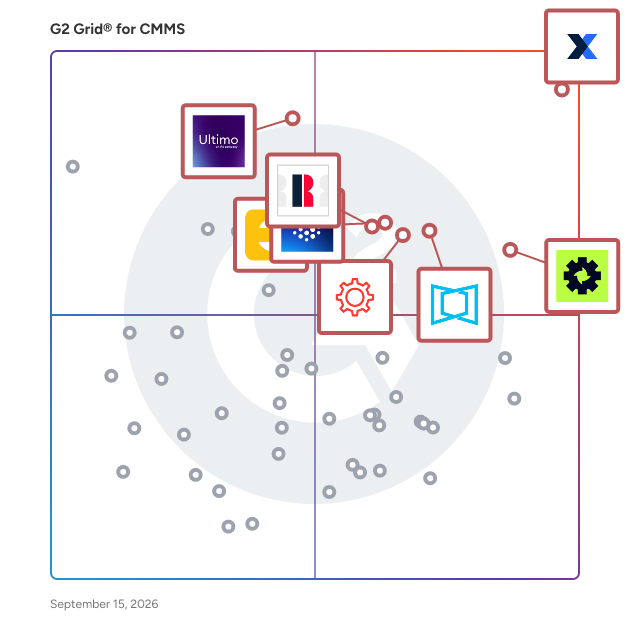


## Top CMMS Software at a Glance
| # | Product | Rating | Best For | What Users Say |
|---|---------|--------|----------|----------------|
| 1 | [MaintainX](https://www.g2.com/products/maintainx/reviews) | 4.8/5.0 (1,522 reviews) | Mobile-first CMMS with AI-assisted PM workflows | "[Helping Transform Maintenance from Reactive to Proactive](https://www.g2.com/survey_responses/maintainx-review-12996913)" |
| 2 | [Cryotos](https://www.g2.com/products/cryotos/reviews) | 4.7/5.0 (909 reviews) | Preventive and breakdown maintenance with QR-based work orders | "[Easy to use for PPM](https://www.g2.com/survey_responses/cryotos-review-12809418)" |
| 3 | [Limble](https://www.g2.com/products/limble/reviews) | 4.8/5.0 (679 reviews) | Technician-adopted preventive maintenance with QR-driven work requests | "[Simple to Learn, Fast Responses, and Excellent Customer Success Support](https://www.g2.com/survey_responses/limble-review-12914944)" |
| 4 | [Ultimo](https://www.g2.com/products/ultimo/reviews) | 4.5/5.0 (48 reviews) | Configurable asset lifecycle and work order CMMS | "[Ultimo: Comprehensive Asset Management with Stable Integration](https://www.g2.com/survey_responses/ultimo-review-12668293)" |
| 5 | [Fracttal One](https://www.g2.com/products/fracttal-one/reviews) | 4.6/5.0 (534 reviews) | Preventive maintenance scheduling with asset traceability | "[Intuitive and User-Friendly Platform That Boosts Team Efficiency](https://www.g2.com/survey_responses/fracttal-one-review-12125685)" |
| 6 | [UpKeep](https://www.g2.com/products/upkeep/reviews) | 4.5/5.0 (1,091 reviews) | Mobile-first preventive maintenance and work-order tracking | "[Upkeep Streamlined Our Work Planning and Team Communication](https://www.g2.com/survey_responses/upkeep-review-12560022)" |
| 7 | [ServiceChannel](https://www.g2.com/products/servicechannel/reviews) | 4.1/5.0 (136 reviews) | Multi-site work order and vendor coordination | "[Easy Client Communication and Streamlined Work Order Management](https://www.g2.com/survey_responses/servicechannel-review-12944629)" |
| 8 | [eMaint](https://www.g2.com/products/emaint/reviews) | 4.4/5.0 (285 reviews) | Configurable PM and asset-history tracking | "[Modern, User-Friendly CMMS That Boosts Technician Engagement](https://www.g2.com/survey_responses/emaint-review-13033021)" |
| 9 | [Fiix CMMS](https://www.g2.com/products/fiix-cmms/reviews) | 4.6/5.0 (471 reviews) | Preventive maintenance scheduling with asset-linked work orders | "[So far the best cmms System i deal With](https://www.g2.com/survey_responses/fiix-cmms-review-9589928)" |
| 10 | [Zapium](https://www.g2.com/products/zapium/reviews) | 5.0/5.0 (158 reviews) | — | "[Strong Support For Service Sales And Maintenance Account Planning](https://www.g2.com/survey_responses/zapium-review-12943460)" |

---
## What Are the Most Common Questions About CMMS Software?
*AI-generated · Last updated: May 26, 2026*
### What highest rated CMMS for Maintenance Managers meeting tight deployment deadlines based on user reviews?
Based on G2 reviews, several CMMS software options are repeatedly described as quick to set up and easy to roll out for maintenance teams working under tight timelines. According to verified users, MaintainX is often praised for easy setup, user-friendly workflows, strong onboarding help, and fast time to value. G2 reviewers also mention eMaint for straightforward setup and configurable forms, while Limble is noted for intuitive onboarding and structured implementation. Across recent reviews, buyers consistently highlight ease of deployment, clear navigation, and responsive support as the factors that matter most when deadlines are tight and teams need to get productive quickly.

**Here are some of the top-rated products on G2:**

- [MaintainX](https://www.g2.com/products/maintainx/reviews) – frequently used for fast setup, work order management, PM scheduling, and quick team rollout
- [Limble](https://www.g2.com/products/limble/reviews) – often chosen for intuitive onboarding, easy training, and centralized asset and PM management
- [eMaint](https://www.g2.com/products/emaint/reviews) – used for configurable maintenance workflows, dashboards, and straightforward deployment with support


### What CMMS platforms with reliable support and predictable product roadmaps without disrupting existing workflows during?
Based on G2 reviews, buyers looking for reliable support and steady platform improvement tend to emphasize responsiveness, guidance during rollout, and thoughtful product updates over flashy claims. According to verified users, MaintainX is repeatedly praised for fast chat support, helpful customer success managers, and onboarding assistance. G2 reviewers mention Limble for strong training resources, responsive support, and ongoing product updates. Reviews for eMaint also highlight knowledgeable support teams and one-on-one guidance, though some users note that reporting or configuration can still take time to master. Overall, recent feedback suggests the most dependable experiences come from products that combine active support with improvements that users can absorb without losing workflow continuity.


### Which CMMS solutions avoid vendor lock-in and implementation complexity without disrupting existing workflows during?
Based on G2 reviews, [MaintainX](https://www.g2.com/products/maintainx/reviews) stands out here because recent users most often describe it as easy to implement, intuitive for day-to-day work, and practical for replacing spreadsheets, paper records, or fragmented maintenance processes without an overly complex rollout. According to verified users, teams value being able to centralize work orders, assets, PM schedules, and reporting in a system that is straightforward to learn. G2 reviewers mention that implementation is smoother when the platform is easy to navigate and backed by responsive support. Reviews also show that buyers trying to reduce complexity tend to prioritize clean workflows, simple setup, and quick team adoption over highly customized but heavier deployments.


### What CMMS platforms with strong adoption rates and minimal learning curve while meeting compliance and?
Based on G2 reviews, the strongest adoption patterns appear in products that combine easy navigation with enough structure to support documentation, audit readiness, and repeatable maintenance processes. According to verified users, MaintainX is often described as easy to learn for both technicians and managers, with simple work order tracking and strong recordkeeping. G2 reviewers also mention Limble for low barriers to entry, intuitive setup, and helpful training, while Fiix is praised for user-friendly navigation and organized maintenance workflows. Recent reviews suggest that compliance-oriented teams respond best to CMMS software that reduces paperwork, centralizes records, and makes preventive maintenance and inspection history easy to find.


### What CMMS platforms most reliable by Maintenance Managers at Automotive companies based on reviews?
Based on G2 reviews, there is limited directly stated automotive company data in the recent review set, so the safest grounded read is to focus on products praised by maintenance leaders managing equipment, work orders, and uptime in industrial environments. According to verified users, MaintainX is frequently noted for scheduling, reporting, asset tracking, and reducing paperwork. G2 reviewers mention Limble for centralized PMs, inventory, and technician-friendly workflows, while eMaint is recognized for configurable maintenance programs, dashboards, and asset management. Reviews consistently point to reliability in daily use through responsive support, visible maintenance history, and better control over preventive maintenance rather than through industry-specific marketing claims.


### What top CMMS solutions for 51-200 employees needing quick team adoption and measurable ROI?
Based on G2 reviews, buyers in growing teams usually favor CMMS software that can be adopted quickly, simplify communication, and create visible gains in organization, uptime tracking, and reporting. According to verified users, MaintainX is often chosen for easy rollout, intuitive dashboards, and fast access to work order and asset data. G2 reviewers also mention Limble for simple onboarding and centralized maintenance planning, while UpKeep is praised for ease of use, streamlined work order management, and improved visibility into KPIs and asset activity. Across recent reviews, measurable ROI is usually described through reduced paperwork, faster issue response, better tracking, and improved maintenance planning rather than formal financial claims.

**Here are some of the top-rated products on G2:**

- [MaintainX](https://www.g2.com/products/maintainx/reviews) – helps teams adopt quickly with easy setup, reporting, and centralized maintenance workflows
- [Limble](https://www.g2.com/products/limble/reviews) – supports fast training, PM tracking, and asset visibility for growing maintenance teams
- [UpKeep](https://www.g2.com/products/upkeep/reviews) – used for organized work orders, asset tracking, and clearer maintenance planning across teams


### Which CMMS solutions integrate with existing tools without custom development while meeting compliance and?
Based on G2 reviews, [MaintainX](https://www.g2.com/products/maintainx/reviews) is the strongest fit in this review set because users repeatedly mention working with existing systems such as SAP, Excel-based imports, and other connected applications while still supporting maintenance tracking and documentation. According to verified users, MaintainX helps centralize asset records, work orders, and maintenance history in ways that support audits, reporting, and preventive maintenance routines. G2 reviewers also note that easy integration and straightforward deployment reduce friction for teams that do not want a heavy technical project. In recent reviews, practical compatibility and clean workflow management matter most for teams balancing system fit with compliance needs.


### Which CMMS platforms ease onboarding for non-technical team members for teams that need fast?
Based on G2 reviews, [MaintainX](https://www.g2.com/products/maintainx/reviews) is the clearest answer for teams that need fast onboarding for non-technical users. According to verified users, it is repeatedly described as intuitive, easy to teach, and simple for requesters, technicians, and managers to use without a steep learning curve. G2 reviewers mention that teams benefit from familiar workflows, easy mobile and desktop access, and training that gets users productive quickly. Reviews of Limble and UpKeep also highlight user-friendly interfaces, but MaintainX appears most consistently in recent feedback around fast adoption, simple setup, and helping teams move from paper, spreadsheets, or fragmented systems into one maintenance workflow.


### What best CMMS platforms for Maintenance Managers with limited implementation time and budget?
Based on G2 reviews, the best-fit CMMS software for limited implementation time and budget tends to be the products users describe as easy to learn, quick to launch, and practical for replacing manual processes fast. According to verified users, Limble is specifically called out by some smaller organizations as good value and straightforward to set up, while MaintainX is often praised for quick onboarding and immediate workflow improvement. G2 reviewers also mention Click Maint for user-friendly implementation and strong support, especially when teams are moving from simpler or older systems. In recent reviews, buyers with tighter constraints consistently prioritize ease of deployment, intuitive use, and visible operational gains over complex customization.

**Here are some of the top-rated products on G2:**

- [Limble](https://www.g2.com/products/limble/reviews) – highlighted for straightforward setup, easy training, and good value for smaller maintenance teams
- [MaintainX](https://www.g2.com/products/maintainx/reviews) – often used for quick implementation, simple work order tracking, and fast team adoption
- [Click Maint CMMS](https://www.g2.com/products/click-maint-cmms/reviews) – chosen for smooth rollout, simple navigation, and easy work order management


### What most trusted CMMS by Maintenance Managers at 51-200 employees based on user reviews?
Based on G2 reviews, trust in this category is usually reflected through consistent ease of use, reliable support, and proven day-to-day value rather than brand claims. According to verified users, MaintainX appears most frequently in recent review data and is widely praised for scheduling, reporting, work order organization, and responsive support. G2 reviewers also mention Limble, eMaint, and UpKeep as dependable choices for maintenance teams that need strong visibility into assets, PMs, and work history. Across the review set, the products buyers trust most are the ones that help teams stay organized, reduce paperwork, improve communication, and make maintenance information easier to access and act on.


## How Many CMMS Software Products Does G2 Track?
**Total Products under this Category:** 407

### Category Stats (Jul 2026)
- **Average Rating**: 4.37/5 The average rating of products in this category, based on all submitted ratings
- **Top Trending Product**: ServiceChannel (+1.43%) - Among all products in this category, ServiceChannel recorded the largest rating increase compared to last month
*Last updated: July 05, 2026*


## How Does G2 Rank CMMS Software Products?

**Why You Can Trust G2's Software Rankings:**

- 30 Analysts and Data Experts
- 10,100+ Authentic Reviews
- 407+ Products
- Unbiased Rankings

G2's software rankings are built on verified user reviews, rigorous moderation, and a consistent research methodology maintained by a team of analysts and data experts. Each product is measured using the same transparent criteria, with no paid placement or vendor influence. While reviews reflect real user experiences, which can be subjective, they offer valuable insight into how software performs in the hands of professionals. Together, these inputs power the G2 Score, a standardized way to compare tools within every category.


## Which CMMS Software Is Best for Your Use Case?

- **Leader:** [MaintainX](https://www.g2.com/products/maintainx/reviews)
- **Highest Performer:** [Zapium](https://www.g2.com/products/zapium/reviews)
- **Easiest to Use:** [Limble](https://www.g2.com/products/limble/reviews)
- **Top Trending:** [MaintainX](https://www.g2.com/products/maintainx/reviews)
- **Best Free Software:** [MaintainX](https://www.g2.com/products/maintainx/reviews)


---

**Sponsored**

### MaintainX

MaintainX is an AI-powered, mobile-first maintenance and asset management platform built for the new industrial workforce. It empowers frontline teams to manage maintenance, assets, parts inventory, and purchase orders more efficiently, reducing unplanned downtime and boosting operational efficiency. MaintainX manages over 50 million work orders across 10 million assets. It’s used by hundreds of thousands of workers globally, and serves some of the world’s largest enterprises, including Univar, Cintas, Michaels, Duracell, Titan America, Dollar General, Magna, and many more. The MaintainX platform leverages AI and IT/OT connections to create a unified and accessible record of asset and work data, providing real-time insights that drive proactive maintenance and operational excellence for 13,000+ customers. By combining intuitive design, enterprise scalability, and AI-driven workflows, MaintainX enables customers to achieve measurable results: 32% reduction in unplanned downtime 34% reduction in parts inventory costs 38% increase in equipment uptime 53% increase in work order completion \*Averages reported by MaintainX customers, 2026. To learn more, visit www.getmaintainx.com.


[Visit website](https://www.g2.com/external_clickthroughs/record?secure%5Bad_program%5D=gdm_share&amp;secure%5Bad_slot%5D=category_product_list&amp;secure%5Bcategory_id%5D=431&amp;secure%5Bmedium%5D=sponsored&amp;secure%5Bprioritized%5D=true&amp;secure%5Bproduct_id%5D=112031&amp;secure%5Bresource_id%5D=431&amp;secure%5Bresource_type%5D=Category&amp;secure%5Bsource_type%5D=category_page&amp;secure%5Bsource_url%5D=https%3A%2F%2Fwww.g2.com%2Fcategories%2Fcmms%3Fpage%3D15%26selected_view%3Dgrid&amp;secure%5Btoken%5D=101ee41c617f269299a7c84e508dedcb5ac02a0291f672c06961052b2b95987d&amp;secure%5Burl%5D=https%3A%2F%2Fwww.capterra.com%2Fppc%2Fclicks%2Fcollect%2FCA%2Fdirectory%2F18f4909a-8031-496e-89dc-a961006f56c7%2Fdestination%3FaffiliateDomain%3Dwww.g2.com%26specificLocation%3Dorganic-g2%26categoryId%3D9cffd4a5-739d-448a-8ef8-05cfdbad564f%26listingPosition%3D1%26sessionStartPage%3DaHR0cHM6Ly93d3cuZzIuY29tL2NhdGVnb3JpZXMvY21tcz9wYWdlPTE1JnNlbGVjdGVkX3ZpZXc9Z3JpZA&amp;secure%5Burl_type%5D=custom_url)

---

## What Are the Top-Rated CMMS Software Products in 2026?
### 1. [Gruntify](https://www.g2.com/products/gruntify/reviews)
Automate your field service operations and efficiently manage your assets with Gruntify, the all-in-one mobile solution. Features: Efficient Asset Management: Track and manage assets with ease. Create profiles, schedule tasks, and ensure optimal maintenance. Intelligent Job Scheduling: Automate task allocation and dispatch thousands of jobs effortlessly. Customizable Forms and Checklists: Capture tailored data with customizable templates for inspections, surveys, and audits. Real-Time Workforce Collaboration: Assign tasks, share information, and collaborate in real-time for enhanced productivity. Advanced Mapping and Location-Based Services: Visualize and analyze location-based data, capture precise GPS coordinates, and map assets. Media Capture and Annotations: Capture photos, videos, and audio within the app and annotate them for accurate documentation. Offline Functionality: Collect data offline and sync automatically once you regain internet access for uninterrupted workflow. Robust Analytics and Reporting: Gain valuable insights, generate comprehensive reports, and make data-driven decisions. API, Integrations, and Data Connectivity: Seamlessly integrate with existing systems, connect with platforms like Power BI and Salesforce. Signup to Gruntify to streamline your field service workflow, optimize asset management, while elevating your team&#39;s productivity. Say goodbye to manual processes and embrace the future of efficient field service management.


**Average Rating:** 4.7/5.0
**Total Reviews:** 13
**How Do G2 Users Rate Gruntify?**

- **Has the product been a good partner in doing business?:** 9.5/10 (Category avg: 9.0/10)

**Who Is the Company Behind Gruntify?**

- **Seller:** [Gruntify](https://www.g2.com/sellers/gruntify)
- **Year Founded:** 2015
- **HQ Location:** Newstead, QLD
- **Twitter:** @gruntify (388 Twitter followers)
- **LinkedIn® Page:** https://www.linkedin.com/company/4820814/ (8 employees on LinkedIn®)

**Who Uses This Product?**
- **Company Size:** 50% Small-Business, 29% Mid-Market


#### What Are Recent G2 Reviews of Gruntify?

**"[Intuitive System for BCM and OSH Programmes](https://www.g2.com/survey_responses/gruntify-review-4742926)"**

**Rating:** 5.0/5.0 stars
*— Dana Alyssa M.*

[Read full review](https://www.g2.com/survey_responses/gruntify-review-4742926)

---

**"[Easy to use Workflow Management software](https://www.g2.com/survey_responses/gruntify-review-4758470)"**

**Rating:** 4.5/5.0 stars
*— Krizza S.*

[Read full review](https://www.g2.com/survey_responses/gruntify-review-4758470)

---


#### What Are G2 Users Discussing About Gruntify?

- [What is Gruntify used for?](https://www.g2.com/discussions/what-is-gruntify-used-for)

### 2. [Makula](https://www.g2.com/products/makula/reviews)
Makula is a B2B SaaS platform built for the companies that build, service, and maintain industrial equipment. Rather than forcing every team into one rigid tool, Makula offers two focused products designed around two very different jobs. The Field Service product is made for machinery OEMs, industrial equipment manufacturers, and distributors. It brings the entire after sales operation into one place, keeping a live record of every machine in the field along with its configuration, service history, and documentation. Teams coordinate service requests, technician scheduling, and dispatch from a single system, while a branded customer portal lets clients request service, view machine histories, and order spare parts in seconds. The result is faster service, stronger customer relationships, and recurring revenue. The CMMS product is made for factories and production plants. It helps maintenance teams schedule preventive maintenance, raise and assign work orders, track assets and inventory, and run digital inspections, all designed to reduce unplanned downtime and keep operations audit ready for industry standards. Tying both products together is an AI Copilot that surfaces troubleshooting knowledge usually locked inside experienced staff, guiding faster decisions and helping new team members get up to speed quickly. Makula is modular and works across desktop and mobile, so teams can start with the product they need most today and expand as their operations grow.


**Average Rating:** 4.5/5.0
**Total Reviews:** 10
**How Do G2 Users Rate Makula?**

- **Has the product been a good partner in doing business?:** 8.3/10 (Category avg: 9.0/10)
- **Work Order Management:** 8.3/10 (Category avg: 8.6/10)
- **Preventative Maintenance (PM):** 6.7/10 (Category avg: 8.6/10)
- **Equipment Breakdown Reports:** 6.7/10 (Category avg: 8.2/10)

**Who Is the Company Behind Makula?**

- **Seller:** [Makula Technology](https://www.g2.com/sellers/makula-technology)
- **Year Founded:** 2021
- **HQ Location:** Berlin, DE
- **LinkedIn® Page:** http://www.linkedin.com/company/makula-technology (30 employees on LinkedIn®)

**Who Uses This Product?**
- **Top Industries:** Machinery
- **Company Size:** 60% Small-Business, 40% Mid-Market


#### What Are Makula's Pros and Cons?

**Pros:**

- Customer Support (4 reviews)
- Ease of Use (4 reviews)
- Data Management (3 reviews)
- Navigation Ease (3 reviews)
- User-Friendly (3 reviews)

**Cons:**

- Improvement Needed (3 reviews)
- Bug Issues (2 reviews)
- Data Management Issues (2 reviews)
- Limited Features (2 reviews)
- Missing Features (2 reviews)


### What Do G2 Reviewers Say About Makula?
*AI-generated summary from verified user reviews*

**Pros:**

- Users commend the **excellent customer support** from Makula, ensuring quick responses and effective solutions for their needs.
- Users value the **ease of use** of Makula, enjoying its intuitive interface and consolidated information for seamless operations.
- Users value the **effective data management** of Makula, consolidating all information in one efficient platform.
- Users value the **navigation ease** of Makula, finding it simple to access and manage essential functionalities.
- Users find Makula **user-friendly** , with easy navigation and accessible tools for effective customer support and planning.

**Cons:**

- Users note the need for **significant improvements** , particularly in features, bugs, and the user interface.
- Users report **bug issues** that may disrupt functionality, though many are addressed swiftly over time.
- Users face **data management issues** with missing features, bugs, and slow implementation due to IT setup dependencies.
- Users find the **limited features** of Makula hindering, as essential functionalities are missing and updates lack efficiency.
- Users find the **missing essential features** in Makula hinder functionality and usability for effective asset management.

#### What Are Recent G2 Reviews of Makula?

**"[People who know the extreme costs of machine stillstand should know Makula!](https://www.g2.com/survey_responses/makula-review-11186617)"**

**Rating:** 5.0/5.0 stars
*— André B.*

[Read full review](https://www.g2.com/survey_responses/makula-review-11186617)

---

**"[Easy to use digital online platform](https://www.g2.com/survey_responses/makula-review-11417883)"**

**Rating:** 4.5/5.0 stars
*— Lizzie W.*

[Read full review](https://www.g2.com/survey_responses/makula-review-11417883)

---


### 3. [Performo](https://www.g2.com/products/performo/reviews)
Performo is Wizard Software&#39;s CMMS solution for streamlining the management of work orders, service requests, asset management, and preventive maintenance activities.


**Average Rating:** 3.1/5.0
**Total Reviews:** 4
**How Do G2 Users Rate Performo?**

- **Has the product been a good partner in doing business?:** 9.2/10 (Category avg: 9.0/10)
- **Work Order Management:** 8.3/10 (Category avg: 8.6/10)
- **Preventative Maintenance (PM):** 8.3/10 (Category avg: 8.6/10)
- **Equipment Breakdown Reports:** 8.3/10 (Category avg: 8.2/10)

**Who Is the Company Behind Performo?**

- **Seller:** [Wizard Software Solutions](https://www.g2.com/sellers/wizard-software-solutions)
- **Year Founded:** 1995
- **HQ Location:** Chicago, IL
- **Twitter:** @WizSoftware (67 Twitter followers)
- **LinkedIn® Page:** https://www.linkedin.com/company/facility-wizard-software (24 employees on LinkedIn®)

**Who Uses This Product?**
- **Company Size:** 50% Small-Business, 25% Mid-Market


#### What Are Recent G2 Reviews of Performo?

**"[PERFORMO](https://www.g2.com/survey_responses/performo-review-9830850)"**

**Rating:** 5.0/5.0 stars
*— Paola C.*

[Read full review](https://www.g2.com/survey_responses/performo-review-9830850)

---


### 4. [Sockeye](https://www.g2.com/products/sockeye/reviews)
Sockeye is a work order scheduling and reporting bolt-on for your CMMS. How it works: Designed specifically to solve complicated, inefficient CMMS scheduling. Sockeye has seamless read/write integration with your CMMS. Sockeye’s automation assigns available labor with ready-to-schedule work orders from your CMMS to produce daily/weekly schedules with minimal effort and maximize efficiency. Schedules are live, easy to update with drag and drop functionality, visual, and easily accessible to the entire team. SMRP &amp; custom KPI dashboards and reports keep you up to date with the latest, like schedule compliance, total backlog hours and why work was delayed. -Daily/weekly work order scheduling -Live status updates -SMRP/custom KPI reports -Month-to-month subscription -1 hour training. 98% Customer Retention Rate -Cloud-based/off-premise -API read/write integrations with any CMMS -Free trial using file-based integration (Excel)


**Average Rating:** 3.5/5.0
**Total Reviews:** 4
**How Do G2 Users Rate Sockeye?**

- **Work Order Management:** 5.6/10 (Category avg: 8.6/10)
- **Preventative Maintenance (PM):** 6.1/10 (Category avg: 8.6/10)
- **Equipment Breakdown Reports:** 5.8/10 (Category avg: 8.2/10)

**Who Is the Company Behind Sockeye?**

- **Seller:** [Sockeye Technologies](https://www.g2.com/sellers/sockeye-technologies)
- **Year Founded:** 2014
- **HQ Location:** Vancouver, CA
- **Twitter:** @GetSockeye (161 Twitter followers)
- **LinkedIn® Page:** https://ca.linkedin.com/company/sockeye-work-order-scheduling (9 employees on LinkedIn®)

**Who Uses This Product?**
- **Company Size:** 50% Small-Business, 25% Mid-Market


#### What Are Recent G2 Reviews of Sockeye?

**"[Sockeye Review](https://www.g2.com/survey_responses/sockeye-review-5446676)"**

**Rating:** 4.0/5.0 stars
*— Verified User in Financial Services*

[Read full review](https://www.g2.com/survey_responses/sockeye-review-5446676)

---


#### What Are G2 Users Discussing About Sockeye?

- [What is Sockeye used for?](https://www.g2.com/discussions/what-is-sockeye-used-for)

### 5. [24/7 Software](https://www.g2.com/products/24-7-software/reviews)
Ready to Actually Like Your CMMS?! Everybody seems to use a CMMS, but nobody likes the one that they use – until now! A survey of venue leaders, revealed they felt stuck with their current cumbersome and unwieldy CMMS. Changing to yet another difficult and cumbersome system was just too painful to even consider… Well, until they saw ours. WORK ORDERS - EASY! Create, track, edit and AUTOMATICALLY communicate work orders. VENDORS SEND IN W/O FOR APPROVAL Create a web-form and let your vendors submit work orders for approval. CHAIN OF COMMAND Create chain for approvals based on type and amount. PREVENTATIVE MAINTENANCE Track in calendar format with drag and drop ability to change dates. CHECKLISTS Create checklists to give you ultimate control and consistency of asset maintenance. HEALTH AND SAFETY INSPECTIONS Your staff can easily report and manage all of your venue&#39;s safety incidents, through the 24/7 Software Inspections module. This allows you to track and manage all H&amp;S compliance issues in an easy way through a web interface as well as mobile applications. ASSET AND MATERIAL INVENTORY TRACKING Time to reorder material? Have the system alert you so you never run out of what you need ever again! Reporting &amp; Analytics You can’t manage what you don’t measure and you can’t control what you can’t measure. Because our software is so easy to use, your staff actually uses it. Now you can have valuable information that you can use. Our one-click reports and comprehensive statistics give you all the data that you need to increase your operational efficiency. ONE CLICK REPORTS, CHARTS AND GRAPHS See the information the way that you need VENDOR INSURANCE AND WARRANTY EXPIRATION Set alerts &amp; notifications and have the system let you know.


**Average Rating:** 4.6/5.0
**Total Reviews:** 25
**How Do G2 Users Rate 24/7 Software?**

- **Has the product been a good partner in doing business?:** 9.3/10 (Category avg: 9.0/10)
- **Work Order Management:** 9.3/10 (Category avg: 8.6/10)
- **Preventative Maintenance (PM):** 7.6/10 (Category avg: 8.6/10)
- **Equipment Breakdown Reports:** 8.3/10 (Category avg: 8.2/10)

**Who Is the Company Behind 24/7 Software?**

- **Seller:** [24/7 Software, Inc.](https://www.g2.com/sellers/24-7-software-inc)
- **Company Website:** https://www.247software.com/operations-management-software-for-proactive-operations
- **Year Founded:** 2007
- **HQ Location:** Boca Raton, Florida
- **Twitter:** @247_Software (769 Twitter followers)
- **LinkedIn® Page:** https://www.linkedin.com/company/1997872 (197 employees on LinkedIn®)

**Who Uses This Product?**
- **Top Industries:** Sports
- **Company Size:** 68% Mid-Market, 20% Small-Business


#### What Are 24/7 Software's Pros and Cons?

**Pros:**

- Ease of Use (2 reviews)
- Asset Management (1 reviews)
- Communication Features (1 reviews)
- Customer Support (1 reviews)
- Data Management (1 reviews)

**Cons:**

- Work Order Issues (2 reviews)
- Difficult Setup (1 reviews)
- Feature Overload (1 reviews)
- Limited Functionality (1 reviews)
- Notification Issues (1 reviews)


### What Do G2 Reviewers Say About 24/7 Software?
*AI-generated summary from verified user reviews*

**Pros:**

- Users highlight the **ease of navigation** in 24/7 Software, enhancing efficiency and user experience significantly.
- Users benefit from the **efficient asset management** and document attachment capabilities in 24/7 Software.
- Users value the **centralized communication features** that streamline operations and enhance team collaboration effectively.
- Users value the **exceptional customer support** of 24/7 Software, which enhances their overall experience significantly.
- Users value the **comprehensive data management** capabilities of 24/7 Software, streamlining paperwork and inventory processes effectively.

**Cons:**

- Users face **work order issues** , finding the process cumbersome and filters often reset on CMMS Dashboards.
- Users often face **difficult mobile setup** and experience limitations in mobile functionality with 24/7 Software.
- Users find the **feature overload** daunting for newcomers, requiring initial training to navigate the system effectively.
- Users struggle with **limited mobile functionality** , making the mobile setup experience challenging and inconvenient.
- Users face **notification issues** that complicate workflows, causing frustration and disengagement from preventative maintenance efforts.

#### What Are Recent G2 Reviews of 24/7 Software?

**"[Essential Tool for Streamlining Business Paperwork](https://www.g2.com/survey_responses/24-7-software-review-11930942)"**

**Rating:** 5.0/5.0 stars
*— Melissa A.*

[Read full review](https://www.g2.com/survey_responses/24-7-software-review-11930942)

---

**"[Effortless Lead Generation with Top-Notch Support](https://www.g2.com/survey_responses/24-7-software-review-11955596)"**

**Rating:** 5.0/5.0 stars
*— Malik Z.*

[Read full review](https://www.g2.com/survey_responses/24-7-software-review-11955596)

---


#### What Are G2 Users Discussing About 24/7 Software?

- [What is ISS 24/7 CMMS used for?](https://www.g2.com/discussions/what-is-iss-24-7-cmms-used-for)

### 6. [Asset Infinity](https://www.g2.com/products/asset-infinity/reviews)
Asset Infinity is one of the leading asset tracking and management software widely used in various industries by a multitude of brands. It is an asset tracking and management software, hosted on the Microsoft Azure Cloud Services with 99.9% of uptime guaranteed. Asset Infinity facilitates you with asset tracking, inventory management, preventive maintenance, complaints/ticketing/breakdown maintenance, depreciation management, resource allocation management, and user management to replace old spreadsheets with a new experience of customized software. The tracking of assets with Asset Infinity has become easier than before with barcodes, RFID, NFC, and geographic location to leave an asset trail behind and streamline the auditing processes. Asset Infinity is helping many companies across the globe to track, manage and monitor the assets spread in the company and has introduced streamlined processes. Some other useful features include: a) Preventive maintenance, schedules &amp; reminders; which enables our clients to align complete maintenance programs for their manufacturing unit. Timely maintenance of assets helps in avoiding any losses due to sudden breakdown. b) Inventory management can aid in the planning of stock maintenance, timely purchase of raw material to overcome sudden price fluctuations and enhance gross profit margin. c) Complaints and ticketing process can help in the easy resolution of the issues. It also contributes to the responsibility-taking abilities of the employees. d) The asset requisition process would help in the allocation of resources through a verified system, without any exception. It would also help in avoiding pilferage due to unaccounted purchases. e) Depreciation management would help in deciding the net asset value and favor the maintenance of only valuable resources. f) User management would help to ascertain restricted rights of visibility for the employees. g) Barcoding will help in tagging the resources and monitor the movement within the system. To experience the first-hand solution for yourself and your brand, Sign up today for a 14-days free trial here @ https://www.assetinfinity.com/signup/


**Average Rating:** 4.6/5.0
**Total Reviews:** 5
**How Do G2 Users Rate Asset Infinity?**

- **Has the product been a good partner in doing business?:** 10.0/10 (Category avg: 9.0/10)

**Who Is the Company Behind Asset Infinity?**

- **Seller:** [PcsInfinity](https://www.g2.com/sellers/pcsinfinity)
- **Year Founded:** 2014
- **HQ Location:** Noida, IN
- **Twitter:** @assetinfinity (269 Twitter followers)
- **LinkedIn® Page:** https://www.linkedin.com/company/asset-infinity-app/ (21 employees on LinkedIn®)

**Who Uses This Product?**
- **Company Size:** 60% Enterprise, 40% Small-Business


#### What Are Recent G2 Reviews of Asset Infinity?

**"[Robust Asset Management Tracking tool](https://www.g2.com/survey_responses/asset-infinity-review-7694055)"**

**Rating:** 4.0/5.0 stars
*— Noah M.*

[Read full review](https://www.g2.com/survey_responses/asset-infinity-review-7694055)

---

**"[Full End to End Automated Efficient &amp; Easy To Use Asset Management System](https://www.g2.com/survey_responses/asset-infinity-review-7775367)"**

**Rating:** 5.0/5.0 stars
*— Sihle John N.*

[Read full review](https://www.g2.com/survey_responses/asset-infinity-review-7775367)

---


### 7. [Bassets eDepreciation](https://www.g2.com/products/bassets-edepreciation/reviews)
Bassets eDepreciation is an on-premise fixed asset depreciation solution designed for midsize and large businesses.


**Average Rating:** 4.2/5.0
**Total Reviews:** 3
**How Do G2 Users Rate Bassets eDepreciation?**

- **Has the product been a good partner in doing business?:** 8.3/10 (Category avg: 9.0/10)
- **Work Order Management:** 10.0/10 (Category avg: 8.6/10)
- **Preventative Maintenance (PM):** 6.7/10 (Category avg: 8.6/10)
- **Equipment Breakdown Reports:** 8.3/10 (Category avg: 8.2/10)

**Who Is the Company Behind Bassets eDepreciation?**

- **Seller:** [Bassets](https://www.g2.com/sellers/bassets)
- **Year Founded:** 1998
- **HQ Location:** Suffield, US
- **Twitter:** @BassetseDepre (88 Twitter followers)
- **LinkedIn® Page:** https://www.linkedin.com/company/bassets-fixed-assets/ (2 employees on LinkedIn®)

**Who Uses This Product?**
- **Company Size:** 67% Enterprise, 33% Mid-Market


#### What Are Recent G2 Reviews of Bassets eDepreciation?

**"[Bassets eDepreciation is the best Asset Management software for Tax and Budgeting](https://www.g2.com/survey_responses/bassets-edepreciation-review-6914889)"**

**Rating:** 4.5/5.0 stars
*— Vijay S.*

[Read full review](https://www.g2.com/survey_responses/bassets-edepreciation-review-6914889)

---

**"[Review of Bassets eDepreciation](https://www.g2.com/survey_responses/bassets-edepreciation-review-6766875)"**

**Rating:** 4.5/5.0 stars
*— Verified User in Information Technology and Services*

[Read full review](https://www.g2.com/survey_responses/bassets-edepreciation-review-6766875)

---


#### What Are G2 Users Discussing About Bassets eDepreciation?

- [What is Bassets eDepreciation used for?](https://www.g2.com/discussions/what-is-bassets-edepreciation-used-for)

### 8. [CloudApper CMMS](https://www.g2.com/products/cloudapper-cloudapper-cmms/reviews)
The CloudApper CMMS software is a mobile and cloud application that simplifies the management of enterprise assets and equipment, maintenance schedules, inventory, work order routing, and reporting. The solution helps employees to operate more efficiently and provides management with real-time visibility into the status of their assets and maintenance plans.


**Average Rating:** 4.7/5.0
**Total Reviews:** 3
**How Do G2 Users Rate CloudApper CMMS?**

- **Has the product been a good partner in doing business?:** 8.3/10 (Category avg: 9.0/10)
- **Work Order Management:** 8.3/10 (Category avg: 8.6/10)
- **Preventative Maintenance (PM):** 8.3/10 (Category avg: 8.6/10)
- **Equipment Breakdown Reports:** 8.3/10 (Category avg: 8.2/10)

**Who Is the Company Behind CloudApper CMMS?**

- **Seller:** [CloudApper](https://www.g2.com/sellers/cloudapper)
- **Year Founded:** 2018
- **HQ Location:** Redwood City, US
- **Twitter:** @CloudApper (30 Twitter followers)
- **LinkedIn® Page:** https://www.linkedin.com/company/3273652/ (40 employees on LinkedIn®)

**Who Uses This Product?**
- **Company Size:** 67% Mid-Market, 33% Small-Business


#### What Are Recent G2 Reviews of CloudApper CMMS?

**"[Full-fledged CMMS solution on a budget](https://www.g2.com/survey_responses/cloudapper-cmms-review-5081804)"**

**Rating:** 5.0/5.0 stars
*— Salman R.*

[Read full review](https://www.g2.com/survey_responses/cloudapper-cmms-review-5081804)

---

**"[Affordable CMMS solution](https://www.g2.com/survey_responses/cloudapper-cmms-review-5090032)"**

**Rating:** 5.0/5.0 stars
*— Verified User in Building Materials*

[Read full review](https://www.g2.com/survey_responses/cloudapper-cmms-review-5090032)

---


#### What Are G2 Users Discussing About CloudApper CMMS?

- [What are the basic of CMMS modules?](https://www.g2.com/discussions/what-are-the-basic-of-cmms-modules)
- [What is the purpose of a CMMS system?](https://www.g2.com/discussions/what-is-the-purpose-of-a-cmms-system)
- [What are the features of CMMS?](https://www.g2.com/discussions/what-are-the-features-of-cmms)

### 9. [fixform](https://www.g2.com/products/fixform/reviews)
Discover FixForm, the fastest facility collaboration management platform transforming maintenance, cleaning, and operations across industries like property management and healthcare. With FixForm, you can experience seamless preventive and reactive maintenance, comprehensive document and asset management, and streamlined issue reporting via QR codes. Our platform fosters communication between your team, service providers and tenants, enhances data-driven decisions with advanced reporting, and simplifies compliance documentation. Enjoy multi-language support and swift onboarding within two weeks, all designed to significantly boost your operational efficiency and save time. Our customers use FixForm for a smarter, efficient facility management solution.


**Average Rating:** 4.1/5.0
**Total Reviews:** 4
**How Do G2 Users Rate fixform?**

- **Has the product been a good partner in doing business?:** 10.0/10 (Category avg: 9.0/10)
- **Work Order Management:** 10.0/10 (Category avg: 8.6/10)
- **Preventative Maintenance (PM):** 10.0/10 (Category avg: 8.6/10)
- **Equipment Breakdown Reports:** 8.3/10 (Category avg: 8.2/10)

**Who Is the Company Behind fixform?**

- **Seller:** [fixform](https://www.g2.com/sellers/fixform)
- **Year Founded:** 2020
- **HQ Location:** Doknoord Ghent, BE
- **LinkedIn® Page:** https://www.linkedin.com/company/fixform (15 employees on LinkedIn®)

**Who Uses This Product?**
- **Company Size:** 75% Mid-Market, 25% Small-Business


#### What Are fixform's Pros and Cons?

**Pros:**

- Communication Features (2 reviews)
- Photo Uploads (2 reviews)
- Asset Management (1 reviews)
- Data Tracking (1 reviews)
- Ease of Use (1 reviews)

**Cons:**

- Difficult Customization (1 reviews)
- Integration Issues (1 reviews)
- Limited Customization (1 reviews)
- Tracking Issues (1 reviews)


### What Do G2 Reviewers Say About fixform?
*AI-generated summary from verified user reviews*

**Pros:**

- Users appreciate the **communication features** of Fixform, which enhance operations and connect teams effectively.
- Users find that **photo uploads** effectively communicate employee issues, enhancing connections with the tech team for quick resolutions.
- Users find Fixform&#39;s **asset management features** enhance communication and streamline operations effectively.
- Users highlight the **data tracking features** of fixform, enhancing communication and streamlining operations effectively.
- Users value the **ease of use** of Fixform, enhancing communication and streamlining operations with various features.

**Cons:**

- Users find the **difficult customization** limits their ability to tailor Fixform to better suit their needs.
- Users note that the **integration issues** with older systems hinder functionality and limit customization options.
- Users find the **limited customization** options frustrating, wishing for better integration and tailored features to enhance usability.
- Users criticize the lack of **ticket tracking system** , making it difficult to maintain records of raised concerns.

#### What Are Recent G2 Reviews of fixform?

**"[Efficient and user friendly maintaince management system](https://www.g2.com/survey_responses/fixform-review-11065951)"**

**Rating:** 5.0/5.0 stars
*— Mukund K.*

[Read full review](https://www.g2.com/survey_responses/fixform-review-11065951)

---

**"[very pleasant application for managing internal defects](https://www.g2.com/survey_responses/fixform-review-9808969)"**

**Rating:** 4.5/5.0 stars
*— Verified User in Hospital &amp; Health Care*

[Read full review](https://www.g2.com/survey_responses/fixform-review-9808969)

---


### 10. [Flowtrac](https://www.g2.com/products/flowtrac/reviews)
Flowtrac is a cloud-based or on-premise solution that helps organizations manage their Inventory, Assets, Warehouse, Work In Process, Proof of Delivery, and other Special requirements. Clients include Commercial, Government, Education, and Humanitarian organizations. Users access the system via desktops, tablets, smartphones, or mobile barcode guns. Flowtrac staff guides you from start to finish with training, consulting, and development. Service and support offered online or on-site.


**Average Rating:** 4.4/5.0
**Total Reviews:** 13
**How Do G2 Users Rate Flowtrac?**

- **Has the product been a good partner in doing business?:** 9.2/10 (Category avg: 9.0/10)
- **Work Order Management:** 6.7/10 (Category avg: 8.6/10)
- **Preventative Maintenance (PM):** 8.3/10 (Category avg: 8.6/10)

**Who Is the Company Behind Flowtrac?**

- **Seller:** [Unanet](https://www.g2.com/sellers/unanet)
- **Year Founded:** 1988
- **HQ Location:** Dulles, VA
- **Twitter:** @UnanetTech (844 Twitter followers)
- **LinkedIn® Page:** https://www.linkedin.com/company/71832/ (464 employees on LinkedIn®)
- **Phone:** (703)-689-9440

**Who Uses This Product?**
- **Company Size:** 69% Small-Business, 23% Mid-Market


#### What Are Recent G2 Reviews of Flowtrac?

**"[Flowtrac Software has been able to grow with us, while we out grow other software](https://www.g2.com/survey_responses/flowtrac-review-7039855)"**

**Rating:** 5.0/5.0 stars
*— Eric  S.*

[Read full review](https://www.g2.com/survey_responses/flowtrac-review-7039855)

---

**"[Customizable and Cost-Effective Inventory Management](https://www.g2.com/survey_responses/flowtrac-review-12477370)"**

**Rating:** 4.0/5.0 stars
*— Tashira C.*

[Read full review](https://www.g2.com/survey_responses/flowtrac-review-12477370)

---


#### What Are G2 Users Discussing About Flowtrac?

- [What is Flowtrac used for?](https://www.g2.com/discussions/what-is-flowtrac-used-for)

### 11. [ManWinWin](https://www.g2.com/products/manwinwin/reviews)
ManWinWin is a complete maintenance and asset management solution that helps organizations streamline work orders, schedule preventive and corrective maintenance, and track assets efficiently. Trusted by municipalities, manufacturers, and service providers, it centralizes maintenance activities, boosts visibility, and reduces downtime. Create, assign, and monitor work orders in real time, while mobile apps allow technicians to update tasks, upload photos, and communicate from the field. Available on desktop, web, and mobile (Android &amp; iOS) with offline mode, ManWinWin leverages advanced technologies—including Winston AI for alerts and forecasts, augmented reality, QR/NFC tags, and digital signatures for secure approvals—making it a smart, scalable solution for modern maintenance teams.


**Average Rating:** 4.3/5.0
**Total Reviews:** 3
**How Do G2 Users Rate ManWinWin?**

- **Has the product been a good partner in doing business?:** 10.0/10 (Category avg: 9.0/10)
- **Work Order Management:** 9.2/10 (Category avg: 8.6/10)
- **Preventative Maintenance (PM):** 8.3/10 (Category avg: 8.6/10)
- **Equipment Breakdown Reports:** 8.3/10 (Category avg: 8.2/10)

**Who Is the Company Behind ManWinWin?**

- **Seller:** [Navaltik Management](https://www.g2.com/sellers/navaltik-management)
- **Year Founded:** 1981
- **HQ Location:** Lisbon, PT
- **LinkedIn® Page:** https://www.linkedin.com/company/manwinwin-software-navaltik-management-lda-- (30 employees on LinkedIn®)

**Who Uses This Product?**
- **Company Size:** 100% Mid-Market


#### What Are ManWinWin's Pros and Cons?

**Pros:**

- Ease of Use (1 reviews)
- Features (1 reviews)

**Cons:**

- Integration Issues (1 reviews)


### What Do G2 Reviewers Say About ManWinWin?
*AI-generated summary from verified user reviews*

**Pros:**

- Users value the **ease of use** in ManWinWin, finding it intuitive and simple to navigate.
- Users praise the **ease of use** and **comprehensive features** of ManWinWin, noting its great overall value.

**Cons:**

- Users often face **integration issues** with BI tools, leading to challenges in achieving a seamless workflow.

#### What Are Recent G2 Reviews of ManWinWin?

**"[Reliability, Localization, and Pricing](https://www.g2.com/survey_responses/manwinwin-review-11679578)"**

**Rating:** 4.5/5.0 stars
*— Vorapong K.*

[Read full review](https://www.g2.com/survey_responses/manwinwin-review-11679578)

---

**"[Structured solution adaptable to different realities](https://www.g2.com/survey_responses/manwinwin-review-11679708)"**

**Rating:** 4.5/5.0 stars
*— Arnaldo O.*

[Read full review](https://www.g2.com/survey_responses/manwinwin-review-11679708)

---


### 12. [MP](https://www.g2.com/products/mp/reviews)
Keep your maintenance department information dated with this practical software for maintenance planning and scheduling. Every day, the MP reports on the maintenance jobs to be carried out and once they are performed, the MP reschedules the following date to do them again, automatically adjusting the maintenance calendars. Get a free download of our CMMS and start the implementation of your computerized maintenance management software today.


**Average Rating:** 3.3/5.0
**Total Reviews:** 3
**How Do G2 Users Rate MP?**

- **Has the product been a good partner in doing business?:** 5.8/10 (Category avg: 9.0/10)
- **Work Order Management:** 6.7/10 (Category avg: 8.6/10)
- **Preventative Maintenance (PM):** 7.2/10 (Category avg: 8.6/10)
- **Equipment Breakdown Reports:** 4.4/10 (Category avg: 8.2/10)

**Who Is the Company Behind MP?**

- **Seller:** [Tecnica Aplicada Internacional](https://www.g2.com/sellers/tecnica-aplicada-internacional)
- **Year Founded:** 1974
- **HQ Location:** Naucalpan, MX
- **Twitter:** @MPsoftwareMX (96 Twitter followers)
- **LinkedIn® Page:** https://www.linkedin.com/company/2665987 (14 employees on LinkedIn®)

**Who Uses This Product?**
- **Company Size:** 100% Mid-Market


#### What Are Recent G2 Reviews of MP?

**"[ Help for Maintaining the operational quality of your equipment](https://www.g2.com/survey_responses/mp-review-2177098)"**

**Rating:** 4.5/5.0 stars
*— Andrés G.*

[Read full review](https://www.g2.com/survey_responses/mp-review-2177098)

---

**"[Efficient and effective control of maintenance and cycle times](https://www.g2.com/survey_responses/mp-review-9758265)"**

**Rating:** 4.0/5.0 stars
*— Juan Ramon G.*

[Read full review](https://www.g2.com/survey_responses/mp-review-9758265)

---


#### What Are G2 Users Discussing About MP?

- [What is MP used for?](https://www.g2.com/discussions/what-is-mp-used-for)

### 13. [nodaFi](https://www.g2.com/products/nodafi/reviews)
At nodaFi, we believe that the people who maintain our infrastructure deserve software that works as hard as they do. That’s why we’ve built a Facilities Operations System (FOS) that’s simple to use, quick to implement, and accessible wherever the job takes you. From self-storage operators to fitness centers and biotech labs, nodaFi helps facility teams prevent breakdowns, manage work orders, and track assets with ease. We’re committed to helping you reclaim time and run your operations more efficiently, every day.


**Average Rating:** 4.8/5.0
**Total Reviews:** 6
**How Do G2 Users Rate nodaFi?**

- **Has the product been a good partner in doing business?:** 9.7/10 (Category avg: 9.0/10)
- **Work Order Management:** 8.9/10 (Category avg: 8.6/10)
- **Preventative Maintenance (PM):** 7.8/10 (Category avg: 8.6/10)
- **Equipment Breakdown Reports:** 8.3/10 (Category avg: 8.2/10)

**Who Is the Company Behind nodaFi?**

- **Seller:** [nodaFi](https://www.g2.com/sellers/nodafi)
- **Year Founded:** 2018
- **HQ Location:** San Francisco, US
- **LinkedIn® Page:** https://www.linkedin.com/company/nodafi/ (22 employees on LinkedIn®)

**Who Uses This Product?**
- **Company Size:** 50% Mid-Market, 33% Small-Business


#### What Are nodaFi's Pros and Cons?

**Pros:**

- Affordable (3 reviews)
- Customer Support (3 reviews)
- Team Collaboration (3 reviews)
- Customizability (2 reviews)
- Customization (2 reviews)

**Cons:**

- Inventory Management (1 reviews)
- Limited Features (1 reviews)
- Printing Issues (1 reviews)
- Slow Performance (1 reviews)
- Work Order Issues (1 reviews)


### What Do G2 Reviewers Say About nodaFi?
*AI-generated summary from verified user reviews*

**Pros:**

- Users value the **affordability** of NodaFi, benefiting from significant productivity and transparency improvements in their processes.
- Users commend the **responsive customer support** from Nodafi, ensuring quick resolutions and strong team connections.
- Users praise the **excellent team collaboration** in Nodafi, fostering strong connections and seamless integration in operations.
- Users highlight the **customizability** of nodaFi, enabling tailored solutions that enhance operational efficiency and maintenance productivity.
- Users value the **customization options** of nodaFi, enhancing productivity and aligning with company-specific needs.

**Cons:**

- Users struggle with **inventory management limitations** , requiring tedious workarounds for updates and professional printing of ticket details.
- Users find **limited features** in NodaFi, expressing a need for enhanced editing capabilities and better printing options.
- Users experience **printing issues** with NodaFi, seeking a more professional format for completed work orders.
- Users report **slow performance** in NodaFi, leading to duplicate comments and frustrating delays in posting updates.
- Users face **work order issues** such as difficulty printing details and editing the parts inventory effectively.

#### What Are Recent G2 Reviews of nodaFi?

**"[Commitment to Inov](https://www.g2.com/survey_responses/nodafi-review-11615481)"**

**Rating:** 5.0/5.0 stars
*— Grace C.*

[Read full review](https://www.g2.com/survey_responses/nodafi-review-11615481)

---

**"[NodaFi is key to an organized department!](https://www.g2.com/survey_responses/nodafi-review-10955306)"**

**Rating:** 5.0/5.0 stars
*— Verified User in Facilities Services*

[Read full review](https://www.g2.com/survey_responses/nodafi-review-10955306)

---


### 14. [Prometheus Platform](https://www.g2.com/products/prometheus-platform/reviews)
The Prometheus Platform provides asset-intensive companies with an easy-to-use, fully interconnected enterprise asset management system that integrates with leading ERP, CMMS, and EAM providers, like SAP, Oracle, and IBM Maximo. Our cloud-based solutions provide a powerful user experience and end-to-end support throughout your enterprise asset management lifecycle. Prometheus Platform software helps streamline work management processes, permitting, operations, process safety management, and Enterprise asset master data management. We provide nine interconnected modules to simplify and increase productivity, reduce cost, and maximize ROI: Planning and Scheduling; Environmental Health and Safety; Mobility; Reporting and Analytics; Master Data; Shutdown Turnaround &amp; Outage (STO); Contractor Management; Construction and Commissioning Management; and Asset Performance Management (APM). Prometheus Group is ranked as Leader in Process Management Software for 2023 by Verdantix.


**Average Rating:** 4.0/5.0
**Total Reviews:** 3
**How Do G2 Users Rate Prometheus Platform?**

- **Has the product been a good partner in doing business?:** 5.0/10 (Category avg: 9.0/10)

**Who Is the Company Behind Prometheus Platform?**

- **Seller:** [Prometheus Group](https://www.g2.com/sellers/prometheus-group)
- **Year Founded:** 1998
- **HQ Location:** Raleigh, North Carolina
- **LinkedIn® Page:** https://www.linkedin.com/company/prometheusgroup/ (483 employees on LinkedIn®)

**Who Uses This Product?**
- **Company Size:** 50% Small-Business, 25% Enterprise


#### What Are Recent G2 Reviews of Prometheus Platform?

**"[Brilliant product and company!](https://www.g2.com/survey_responses/prometheus-platform-review-5398620)"**

**Rating:** 4.5/5.0 stars
*— Verified User in Pharmaceuticals*

[Read full review](https://www.g2.com/survey_responses/prometheus-platform-review-5398620)

---

**"[It was extremely great experience of using this product. Cost and time to implement is excellent.](https://www.g2.com/survey_responses/prometheus-platform-review-5371161)"**

**Rating:** 4.0/5.0 stars
*— Vedant G.*

[Read full review](https://www.g2.com/survey_responses/prometheus-platform-review-5371161)

---


#### What Are G2 Users Discussing About Prometheus Platform?

- [What is Prometheus Platform used for?](https://www.g2.com/discussions/what-is-prometheus-platform-used-for)

### 15. [WebCheckout](https://www.g2.com/products/webcheckout/reviews)
WebCheckout tracks the complete lifecycle for institutional asset of all sorts. The complete lifecycle includes its installation, monitoring, inventorying, scheduling, maintenance, repair and decommissioning.


**Average Rating:** 3.0/5.0
**Total Reviews:** 3
**How Do G2 Users Rate WebCheckout?**

- **Has the product been a good partner in doing business?:** 5.0/10 (Category avg: 9.0/10)
- **Work Order Management:** 8.3/10 (Category avg: 8.6/10)
- **Preventative Maintenance (PM):** 3.3/10 (Category avg: 8.6/10)
- **Equipment Breakdown Reports:** 7.8/10 (Category avg: 8.2/10)

**Who Is the Company Behind WebCheckout?**

- **Seller:** [WebCheckout](https://www.g2.com/sellers/webcheckout)
- **Year Founded:** 1999
- **HQ Location:** Chicago, US
- **Twitter:** @webcheckout (66 Twitter followers)
- **LinkedIn® Page:** https://www.linkedin.com/company/webcheckout-inc (9 employees on LinkedIn®)

**Who Uses This Product?**
- **Company Size:** 100% Enterprise


#### What Are Recent G2 Reviews of WebCheckout?

**"[Inventory Manager](https://www.g2.com/survey_responses/webcheckout-review-3293907)"**

**Rating:** 4.5/5.0 stars
*— Clayton  A.*

[Read full review](https://www.g2.com/survey_responses/webcheckout-review-3293907)

---


#### What Are G2 Users Discussing About WebCheckout?

- [What is WebCheckout used for?](https://www.g2.com/discussions/what-is-webcheckout-used-for)

### 16. [API PRO](https://www.g2.com/products/api-maintenance-systems-api-pro/reviews)
In API PRO 8 the last years of development and experience have been brought together to create a new improved version of API PRO. The changes in the new version consolidates API PRO as the most effective and flexible EAM solution on the market and improving the support for large international companies.


**Average Rating:** 4.3/5.0
**Total Reviews:** 3
**How Do G2 Users Rate API PRO?**

- **Work Order Management:** 8.3/10 (Category avg: 8.6/10)
- **Preventative Maintenance (PM):** 9.2/10 (Category avg: 8.6/10)
- **Equipment Breakdown Reports:** 6.7/10 (Category avg: 8.2/10)

**Who Is the Company Behind API PRO?**

- **Seller:** [API Maintenance Systems](https://www.g2.com/sellers/api-maintenance-systems)
- **HQ Location:** Alpharetta, Georgia, United States
- **Twitter:** @aptean (1,620 Twitter followers)
- **LinkedIn® Page:** https://www.linkedin.com/company/aptean/ (2,978 employees on LinkedIn®)

**Who Uses This Product?**
- **Company Size:** 33% Small-Business, 33% Enterprise


#### What Are Recent G2 Reviews of API PRO?

**"[Easy to use tool](https://www.g2.com/survey_responses/api-pro-review-5292462)"**

**Rating:** 4.5/5.0 stars
*— Nitin P.*

[Read full review](https://www.g2.com/survey_responses/api-pro-review-5292462)

---

**"[One of the best cloud based asset Tracking software](https://www.g2.com/survey_responses/api-pro-review-5241941)"**

**Rating:** 5.0/5.0 stars
*— AHSAN H.*

[Read full review](https://www.g2.com/survey_responses/api-pro-review-5241941)

---


### 17. [Aptien](https://www.g2.com/products/aptien/reviews)
Aptien is a comprehensive solution designed to simplify and streamline various aspects of business management, including people management, workforce administration, and team collaboration. It replaces multiple applications with a single, accessible platform, making work more efficient and organized. Whether you’re handling office management, project management, or asset management, Aptien transforms everyday tasks into well-defined processes. The cloud-based solution ensures that you can access it from anywhere, providing simplicity and efficiency in managing people, assets, and communication. Start your journey toward a more streamlined work environment with Aptien today! 🚀


**Average Rating:** 4.8/5.0
**Total Reviews:** 3
**How Do G2 Users Rate Aptien?**

- **Has the product been a good partner in doing business?:** 9.2/10 (Category avg: 9.0/10)
- **Work Order Management:** 9.2/10 (Category avg: 8.6/10)
- **Preventative Maintenance (PM):** 10.0/10 (Category avg: 8.6/10)
- **Equipment Breakdown Reports:** 9.2/10 (Category avg: 8.2/10)

**Who Is the Company Behind Aptien?**

- **Seller:** [Aptien Labs](https://www.g2.com/sellers/aptien-labs)
- **Year Founded:** 2020
- **HQ Location:** Redwood city, US
- **LinkedIn® Page:** http://www.linkedin.com/company/aptienlabs (11 employees on LinkedIn®)

**Who Uses This Product?**
- **Company Size:** 67% Mid-Market, 33% Small-Business


#### What Are Aptien's Pros and Cons?

**Pros:**

- Ease of Implementation (1 reviews)
- Ease of Use (1 reviews)
- Easy Implementation (1 reviews)
- Implementation Ease (1 reviews)
- Monitoring (1 reviews)

**Cons:**

- Poor Customer Support (1 reviews)


### What Do G2 Reviewers Say About Aptien?
*AI-generated summary from verified user reviews*

**Pros:**

- Users find Aptien **easy to implement** , allowing for a seamless integration into their daily workflow.
- Users appreciate the **ease of use** of Aptien, finding task management and reporting straightforward and efficient.
- Users appreciate the **easy implementation** of Aptien, making it simple to integrate into their workflow.
- Users find **Aptien easy to implement** , making it straightforward to integrate into their daily workflow.
- Users value the **efficient monitoring** capabilities of Aptien, enjoying easy daily progress reports for their teams.

**Cons:**

- Users miss **live customer support** in Aptien, despite appreciating their email assistance.

#### What Are Recent G2 Reviews of Aptien?

**"[Aptien Review](https://www.g2.com/survey_responses/aptien-review-10320358)"**

**Rating:** 4.5/5.0 stars
*— Samson C.*

[Read full review](https://www.g2.com/survey_responses/aptien-review-10320358)

---

**"[review of a great productive tool: Aptien that enhances the productive more than 2X.](https://www.g2.com/survey_responses/aptien-review-10290980)"**

**Rating:** 5.0/5.0 stars
*— Peter G.*

[Read full review](https://www.g2.com/survey_responses/aptien-review-10290980)

---


### 18. [ATLAS CMMS / GMAO](https://www.g2.com/products/atlas-cmms-gmao/reviews)
Atlas CMMS is a comprehensive Computerized Maintenance Management System designed to streamline and optimize maintenance operations across various industries. The platform operates under a dual licensing model, offering organizations three deployment options: cloud-hosted service with unlimited requesters and viewers, completely free self-hosted open-source deployment under GPL-3.0 license, and enterprise licensing with advanced features. Core functionality includes: Work Order Management: Creation, assignment, tracking, and historical analysis of both scheduled and unscheduled work orders, with automated generation capabilities and mobile access for field technicians. Preventive Maintenance Scheduling: Sophisticated scheduling features for time-based, usage-based, condition-based, and predictive maintenance strategies with automated alerts and notifications. Asset Tracking and Management: Detailed asset record keeping, hierarchy management, downtime monitoring, barcode/QR code scanning, and integration with location-based services. Inventory Control: Integrated inventory management with stock alerts, purchase order generation, and tracking of parts and warranty information. Analytics and Reporting: Comprehensive tools for work order compliance, cost trending, equipment downtime insights, and customizable reports for data-driven decision-making. Atlas CMMS serves maintenance managers, facility managers, and operations personnel in small to mid-sized businesses, as well as larger organizations across manufacturing, facilities management, healthcare, hospitality, and utilities. The platform caters to organizations seeking to transition from manual maintenance tracking to digital workflows, offering unlimited user scaling in the open-source version without per-user licensing fees. - LinkedIn: https://www.linkedin.com/company/atlas-cmms/ - Product Documentation: https://docs.atlas-cmms.com - Community Discord: https://discord.gg/8vE5s7FbAn - Open Source Repository: Available on GitHub under GPLv3 license : https://github.com/Grashjs/cmms


**Average Rating:** 5.0/5.0
**Total Reviews:** 2
**How Do G2 Users Rate ATLAS CMMS / GMAO?**

- **Has the product been a good partner in doing business?:** 10.0/10 (Category avg: 9.0/10)

**Who Is the Company Behind ATLAS CMMS / GMAO?**

- **Seller:** [INTELLOOP](https://www.g2.com/sellers/intelloop)
- **Year Founded:** 2023
- **HQ Location:** Casablanca, MA
- **LinkedIn® Page:** https://www.linkedin.com/company/intel-loop/ (1 employees on LinkedIn®)

**Who Uses This Product?**
- **Company Size:** 100% Small-Business


#### What Are Recent G2 Reviews of ATLAS CMMS / GMAO?

**"[True Open source free Self-hosted CMMS](https://www.g2.com/survey_responses/atlas-cmms-gmao-review-11321311)"**

**Rating:** 5.0/5.0 stars
*— M. S.*

[Read full review](https://www.g2.com/survey_responses/atlas-cmms-gmao-review-11321311)

---

**"[The best open source CMMS](https://www.g2.com/survey_responses/atlas-cmms-gmao-review-11342372)"**

**Rating:** 5.0/5.0 stars
*— Héctor Javier  A.*

[Read full review](https://www.g2.com/survey_responses/atlas-cmms-gmao-review-11342372)

---


### 19. [Axxerion Facilities and Maintenance Management (CMMS)](https://www.g2.com/products/axxerion-facilities-and-maintenance-management-cmms/reviews)
Axxerion is your one-stop-shop software solution for property, maintenance, contract and facilities management. We offer an easy-to-use, mobile and cloud-based environment for facilities, property and workspace management. With our products, you can: schedule and manage service requests/work orders; maintain key assets and inventory; create leases and contracts; reserve conference rooms/desks; handle budgeting, invoicing and purchase orders; manage assignments of vendors/ service providers; plan your spaces with moves, reservations and floor plan features; create reports and analytics; and more. Save time and money, increase productivity and optimize business outcomes.


**Average Rating:** 4.3/5.0
**Total Reviews:** 2
**How Do G2 Users Rate Axxerion Facilities and Maintenance Management (CMMS)?**

- **Has the product been a good partner in doing business?:** 8.3/10 (Category avg: 9.0/10)
- **Work Order Management:** 8.3/10 (Category avg: 8.6/10)
- **Preventative Maintenance (PM):** 8.3/10 (Category avg: 8.6/10)
- **Equipment Breakdown Reports:** 8.3/10 (Category avg: 8.2/10)

**Who Is the Company Behind Axxerion Facilities and Maintenance Management (CMMS)?**

- **Seller:** [Axxerion](https://www.g2.com/sellers/axxerion)
- **Year Founded:** 2003
- **HQ Location:** San Rafael, US
- **Twitter:** @axxerion (92 Twitter followers)
- **LinkedIn® Page:** https://www.linkedin.com/company/axxerion-usa/ (11 employees on LinkedIn®)

**Who Uses This Product?**
- **Company Size:** 50% Mid-Market, 50% Small-Business


#### What Are Recent G2 Reviews of Axxerion Facilities and Maintenance Management (CMMS)?

**"[Overall solid software which does what it says it can do](https://www.g2.com/survey_responses/axxerion-facilities-and-maintenance-management-cmms-review-6656983)"**

**Rating:** 4.0/5.0 stars
*— Verified User in Commercial Real Estate*

[Read full review](https://www.g2.com/survey_responses/axxerion-facilities-and-maintenance-management-cmms-review-6656983)

---

**"[All-In-One Maintenance Software](https://www.g2.com/survey_responses/axxerion-facilities-and-maintenance-management-cmms-review-5421106)"**

**Rating:** 4.5/5.0 stars
*— Verified User in Management Consulting*

[Read full review](https://www.g2.com/survey_responses/axxerion-facilities-and-maintenance-management-cmms-review-5421106)

---


#### What Are G2 Users Discussing About Axxerion Facilities and Maintenance Management (CMMS)?

- [What is Axxerion Facilities and Maintenance Management (CMMS) used for?](https://www.g2.com/discussions/what-is-axxerion-facilities-and-maintenance-management-cmms-used-for)

### 20. [Bimser Enterprise Asset Management &amp; CMMS](https://www.g2.com/products/bimser-enterprise-asset-management-cmms/reviews)
The primary focus in asset management is to centralise critical assets. In short, defined asset types, including facilities, critical infrastructure, machines, equipment, benches, and industrial OT/IT assets in all locations that need to be managed and monitored across businesses, can be defined and can work by connecting to each other with a flexible structure. Manage your assets from a single platform and plan the necessary work orders for your maintenance and repair processes. With BEAM Enterprise Asset Management software, provide accurate interventions before failures occur, prioritise your critical work, ensure integrated work with enterprise applications, control asset downtime, and monitor and optimise your critical infrastructure. According to Gartner&#39;s 2023 report: 📈 89% of companies that digitalised asset management reduced maintenance costs. ⏳ Average return on investment (ROI): 15 months. ⚡ 40% reduction in unplanned downtime. 📊 30% reduction in asset lifecycle costs.


**Average Rating:** 4.5/5.0
**Total Reviews:** 2
**How Do G2 Users Rate Bimser Enterprise Asset Management &amp; CMMS?**

- **Has the product been a good partner in doing business?:** 10.0/10 (Category avg: 9.0/10)
- **Work Order Management:** 10.0/10 (Category avg: 8.6/10)
- **Preventative Maintenance (PM):** 10.0/10 (Category avg: 8.6/10)
- **Equipment Breakdown Reports:** 10.0/10 (Category avg: 8.2/10)

**Who Is the Company Behind Bimser Enterprise Asset Management &amp; CMMS?**

- **Seller:** [Bimser](https://www.g2.com/sellers/bimser)
- **Year Founded:** 1998
- **HQ Location:** İstanbul , TR
- **LinkedIn® Page:** https://www.linkedin.com/company/bimser-z-m (267 employees on LinkedIn®)

**Who Uses This Product?**
- **Company Size:** 50% Enterprise, 50% Mid-Market


#### What Are Bimser Enterprise Asset Management &amp; CMMS's Pros and Cons?

**Pros:**

- Asset Management (1 reviews)
- Ease of Use (1 reviews)
- Maintenance Tracking (1 reviews)
- Mobile App (1 reviews)
- Simple (1 reviews)


### What Do G2 Reviewers Say About Bimser Enterprise Asset Management &amp; CMMS?
*AI-generated summary from verified user reviews*

**Pros:**

- Users value the **easy tracking of asset lifecycles** and streamlined maintenance management through the mobile app.
- Users find the **ease of use** of Bimser EAM &amp; CMMS enhances their asset management and maintenance processes effortlessly.
- Users value the **effective maintenance tracking** feature, allowing easy management of asset lifecycle and activities.
- Users appreciate the **mobile app&#39;s simplicity** , making asset management and maintenance activities easy and efficient in the field.
- Users find Bimser Enterprise Asset Management &amp; CMMS to be incredibly **simple to use** , enhancing their asset management experience.


#### What Are Recent G2 Reviews of Bimser Enterprise Asset Management &amp; CMMS?

**"[A USER-FRIENDLY APPLICATION](https://www.g2.com/survey_responses/bimser-enterprise-asset-management-cmms-review-11721850)"**

**Rating:** 4.0/5.0 stars
*— semra y.*

[Read full review](https://www.g2.com/survey_responses/bimser-enterprise-asset-management-cmms-review-11721850)

---

**"[Control and reduce your costs with BEAM!](https://www.g2.com/survey_responses/bimser-enterprise-asset-management-cmms-review-11787087)"**

**Rating:** 5.0/5.0 stars
*— Esra B.*

[Read full review](https://www.g2.com/survey_responses/bimser-enterprise-asset-management-cmms-review-11787087)

---


### 21. [Clue Insights](https://www.g2.com/products/clue-insights/reviews)
Clue Insights is a construction equipment management platform that centralizes fleet data for heavy civil contractors, earthmoving fleets, utilities, and infrastructure companies. It brings information such as equipment location, utilization, maintenance, inspections, rentals, and operating costs into one system so teams can manage mixed fleets more effectively. Clue is used by organizations that operate large or mixed fleets, including: • Heavy civil and earthmoving contractors • Roadbuilding and concrete companies • Utilities and infrastructure firms • Mining and energy operations • Teams managing yellow iron, trucks, tools, and site equipment Most contractors rely on multiple systems, telematics, spreadsheets, maintenance logs, dispatch boards which makes fleet management fragmented and inefficient. Clue consolidates these systems into a single source of truth for equipment performance, cost, and availability. Clue integrates with over 80 telematics, GPS, CMMS, and ERP systems to automatically collect and standardize fleet data. Integrations include VisionLink, JDLink, Komtrax, Samsara, Geotab, HCSS HeavyJob, Equipment360, Vista, and Oracle JD Edwards. The platform displays real-time insights through dashboards, maps, maintenance workflows, and cost summaries. Clue provides tools for: • 𝗨𝗻𝗶𝗳𝗶𝗲𝗱 𝗙𝗹𝗲𝗲𝘁 𝗩𝗶𝘀𝗶𝗯𝗶𝗹𝗶𝘁𝘆: Track every asset’s location, status, and utilization. • 𝗠𝗮𝗶𝗻𝘁𝗲𝗻𝗮𝗻𝗰𝗲 𝗠𝗮𝗻𝗮𝗴𝗲𝗺𝗲𝗻𝘁: Organize PMs, work orders, fault codes, and inspections. • 𝗢𝗽𝗲𝗿𝗮𝘁𝗶𝗼𝗻𝘀 &amp; 𝗣𝗿𝗼𝗱𝘂𝗰𝘁𝗶𝘃𝗶𝘁𝘆: Monitor run hours, idle time, fuel burn, and production. • 𝗗𝗶𝘀𝗽𝗮𝘁𝗰𝗵 &amp; 𝗦𝗰𝗵𝗲𝗱𝘂𝗹𝗶𝗻𝗴: View availability and maintenance status before assigning equipment. • 𝗖𝗼𝘀𝘁 𝗧𝗿𝗮𝗰𝗸𝗶𝗻𝗴: Analyze real-time equipment costs across jobs, rentals, and fuel. Field teams use Clue’s mobile app to complete inspections, report issues, log hours, and communicate with the shop, reducing paperwork and improving data accuracy. Clue helps business leaders evaluate equipment operating costs, repair-versus-replace decisions, job profitability, fleet right-sizing, and trends in fuel use, idle time, and downtime. These insights support stronger financial and operational planning. Clue integrates with existing systems and adapts to contractor workflows. Most teams begin seeing value within weeks, with minimal disruption to field or shop operations. Clue Insights centralizes equipment data, strengthens maintenance operations, improves jobsite communication, and provides clarity into fleet performance so contractors can manage equipment more efficiently and predictably.


**Average Rating:** 4.7/5.0
**Total Reviews:** 3
**How Do G2 Users Rate Clue Insights?**

- **Has the product been a good partner in doing business?:** 10.0/10 (Category avg: 9.0/10)
- **Work Order Management:** 9.2/10 (Category avg: 8.6/10)
- **Preventative Maintenance (PM):** 9.2/10 (Category avg: 8.6/10)
- **Equipment Breakdown Reports:** 8.3/10 (Category avg: 8.2/10)

**Who Is the Company Behind Clue Insights?**

- **Seller:** [Clue Insights](https://www.g2.com/sellers/clue-insights)
- **Company Website:** https://www.getclue.com
- **Year Founded:** 2019
- **HQ Location:** Los Angeles, US
- **LinkedIn® Page:** https://www.linkedin.com/company/clueinsights/ (22 employees on LinkedIn®)

**Who Uses This Product?**
- **Company Size:** 67% Mid-Market, 33% Enterprise


#### What Are Clue Insights's Pros and Cons?

**Pros:**

- Ease of Use (2 reviews)
- Customer Assistance (1 reviews)
- Customer Support (1 reviews)
- Data Management (1 reviews)
- Ease of Implementation (1 reviews)

**Cons:**

- Difficult Customization (1 reviews)
- Limited Customization (1 reviews)
- Missing Features (1 reviews)
- Selection Issues (1 reviews)


### What Do G2 Reviewers Say About Clue Insights?
*AI-generated summary from verified user reviews*

**Pros:**

- Users praise the **ease of use** of Clue Insights, appreciating its user-friendly interface and straightforward reports.
- Users commend the **unmatched customer assistance** of Clue Insights, ensuring quick resolution of issues in the field.
- Users praise the **unmatched customer service** of Clue Insights, ensuring quick resolution of all issues faced.
- Users appreciate the **smooth API integration** of Clue Insights, which simplifies reporting and navigation for equipment management.
- Users value the **ease of implementation** in Clue Insights, finding it simplifies operations and reporting significantly.

**Cons:**

- Users desire **difficult customization** in Clue Insights, wishing for more flexibility in personal widgets and asset types.
- Users desire **full customization** of widgets and asset types to enhance personalization in Clue Insights.
- Users desire **full customization of personal widgets** and specific asset type selection for better relevance to their company.
- Users desire more control with **selection options** for assets and personalized widgets in Clue Insights.

#### What Are Recent G2 Reviews of Clue Insights?

**"[User-Friendly Interface and Outstanding Customer Service](https://www.g2.com/survey_responses/clue-insights-review-12066561)"**

**Rating:** 5.0/5.0 stars
*— Samantha W.*

[Read full review](https://www.g2.com/survey_responses/clue-insights-review-12066561)

---

**"[Seamless API Integration and Effortless Reporting](https://www.g2.com/survey_responses/clue-insights-review-12079549)"**

**Rating:** 4.5/5.0 stars
*— Brian H.*

[Read full review](https://www.g2.com/survey_responses/clue-insights-review-12079549)

---


### 22. [EZ Maintenance](https://www.g2.com/products/ez-maintenance/reviews)
Schedule, Auto Notify, Track and Control Maintenance For Any Kind Of Facility, Building, Apartment, Equipment And Any Type of Vehicle Plus Inventory Control


**Average Rating:** 3.5/5.0
**Total Reviews:** 2
**How Do G2 Users Rate EZ Maintenance?**

- **Work Order Management:** 8.3/10 (Category avg: 8.6/10)
- **Preventative Maintenance (PM):** 8.3/10 (Category avg: 8.6/10)
- **Equipment Breakdown Reports:** 8.3/10 (Category avg: 8.2/10)

**Who Is the Company Behind EZ Maintenance?**

- **Seller:** [Pinacia](https://www.g2.com/sellers/pinacia)
- **HQ Location:** N/A
- **LinkedIn® Page:** https://www.linkedin.com/company/No-Linkedin-Presence-Added-Intentionally-By-DataOps (1 employees on LinkedIn®)

**Who Uses This Product?**
- **Company Size:** 100% Small-Business


#### What Are Recent G2 Reviews of EZ Maintenance?

**"[User-friendly](https://www.g2.com/survey_responses/ez-maintenance-review-7119818)"**

**Rating:** 4.0/5.0 stars
*— Verified User in Architecture &amp; Planning*

[Read full review](https://www.g2.com/survey_responses/ez-maintenance-review-7119818)

---


### 23. [Fleet](https://www.g2.com/products/fleet-2025-10-02/reviews)
About Fleet Fleet is a cloud-based Computerized Maintenance Management System (CMMS) and property management software designed for multi-site real estate and operations teams to manage assets, maintenance, and compliance in one centralized platform. The system is built for organizations with distributed properties, including retail chains, logistics hubs, hospitality venues, and mixed-use developments. By consolidating work orders, asset data, and vendor activity, Fleet provides a reliable framework for consistent operations and cost control. Core Capabilities With Fleet, property and facilities teams can: - Log and assign work orders instantly to coordinate tasks between staff, vendors, and contractors. - Automate preventive maintenance (PPM) to minimize equipment downtime and extend asset life cycles. - Track asset history and performance for data-driven capital planning and lifecycle management. - Apply role-based access controls to ensure security and alignment across departments. - Generate budget, compliance, and audit reports to support regulatory requirements and financial oversight. - Integrate with finance tools and ERPs to connect property operations with organizational systems. Mobile-First Experience Fleet operates through a browser-based interface, allowing field teams, managers, and executives to access information from any device. This mobile-first design reduces dependency on separate apps and ensures real-time visibility across multiple locations. Implementation and Support Onboarding can be completed in under seven days, with localized training, configuration, and live support provided. This enables rapid adoption and continuity for global teams managing complex property portfolios. Who Uses Fleet Fleet supports property-heavy enterprises such as: - Retail and coffee chain outlets - Shopping malls and mixed-use facilities - Logistics and distribution networks - Hotels, restaurants, and hospitality venues By unifying asset management, maintenance workflows, and vendor coordination, Fleet helps organizations standardize real estate operations at scale while maintaining compliance and cost efficiency.


**Average Rating:** 5.0/5.0
**Total Reviews:** 2
**How Do G2 Users Rate Fleet?**

- **Preventative Maintenance (PM):** 10.0/10 (Category avg: 8.6/10)
- **Equipment Breakdown Reports:** 10.0/10 (Category avg: 8.2/10)

**Who Is the Company Behind Fleet?**

- **Seller:** [Fleet](https://www.g2.com/sellers/fleet-f0b8bbb6-cbb7-4934-80c7-f329ba81cfbe)
- **Year Founded:** 2024
- **HQ Location:** N/A
- **LinkedIn® Page:** https://www.linkedin.com/company/runfleet (2 employees on LinkedIn®)

**Who Uses This Product?**
- **Company Size:** 50% Enterprise, 50% Small-Business


#### What Are Recent G2 Reviews of Fleet?

**"[Fleet: The Flexible Compliance Partner](https://www.g2.com/survey_responses/fleet-review-12911844)"**

**Rating:** 5.0/5.0 stars
*— Vera B.*

[Read full review](https://www.g2.com/survey_responses/fleet-review-12911844)

---

**"[Finally, a platform that keeps up with large-scale property management](https://www.g2.com/survey_responses/fleet-review-12894113)"**

**Rating:** 5.0/5.0 stars
*— Quang P.*

[Read full review](https://www.g2.com/survey_responses/fleet-review-12894113)

---


### 24. [FRONTU](https://www.g2.com/products/frontu/reviews)
Frontu is a field service management software provider focusing on frontline field service workers. Use Frontu as an ERP add-on or standalone. Track technicians’ working hours, manage spare parts, fill in checklists, take photos and collect signatures. Make work order digital. We started our product to help field service companies tackle the problems caused by traditional operation management methods. Many modern organizations still heavily rely on pen and paper, increasing their risk of mistakes and errors. As we dug deeper, we found out that the issue was much more significant. Unmotivated technicians, lost documents, decisions not based on data, long invoicing circle, and miscommunication between sales and service departments. It became clear that the change had to start with frontline employees. After all, they are the ones working with customers and solving their issues, meaning that the product had to be designed for their needs first. That inspired us to transform our brand and become Frontu – a technician-first FSM software solution. Benefits: - 30% increase in first time fix rate - 40% higher customer satisfaction - 2x faster invoicing - Rated 4.5/5 for “ease of use”


**Average Rating:** 4.9/5.0
**Total Reviews:** 17
**How Do G2 Users Rate FRONTU?**

- **Has the product been a good partner in doing business?:** 9.8/10 (Category avg: 9.0/10)

**Who Is the Company Behind FRONTU?**

- **Seller:** [FRONTU](https://www.g2.com/sellers/frontu)
- **Year Founded:** 2013
- **HQ Location:** Kaunas, Lithuania
- **LinkedIn® Page:** https://www.linkedin.com/company/frontu/ (22 employees on LinkedIn®)

**Who Uses This Product?**
- **Company Size:** 41% Mid-Market, 35% Small-Business


#### What Are Recent G2 Reviews of FRONTU?

**"[Beneficial and ROI positive - Frontu is an extremely easy to use solution for the FSM teams](https://www.g2.com/survey_responses/frontu-review-5382241)"**

**Rating:** 5.0/5.0 stars
*— Verified User in Computer Software*

[Read full review](https://www.g2.com/survey_responses/frontu-review-5382241)

---

**"[The team is always helpful, polite and keep in touch with the client.](https://www.g2.com/survey_responses/frontu-review-6828277)"**

**Rating:** 5.0/5.0 stars
*— Diana S.*

[Read full review](https://www.g2.com/survey_responses/frontu-review-6828277)

---


#### What Are G2 Users Discussing About FRONTU?

- [What is FRONTU used for?](https://www.g2.com/discussions/what-is-frontu-used-for)

### 25. [GP MaTe](https://www.g2.com/products/gp-mate/reviews)
Optimize the use of these assets for companies that operate shopping malls or generates electricity, manufactures elevators or bottles beer.


**Average Rating:** 5.0/5.0
**Total Reviews:** 2

**Who Is the Company Behind GP MaTe?**

- **Seller:** [MATE PCS](https://www.g2.com/sellers/mate-pcs)
- **Year Founded:** 1990
- **HQ Location:** ELLICOTT CITY, US
- **LinkedIn® Page:** https://www.linkedin.com/company/16050983 (2 employees on LinkedIn®)

**Who Uses This Product?**
- **Company Size:** 50% Enterprise, 50% Mid-Market


#### What Are Recent G2 Reviews of GP MaTe?

**"[Phenomenal](https://www.g2.com/survey_responses/gp-mate-review-7128268)"**

**Rating:** 5.0/5.0 stars
*— Shane M.*

[Read full review](https://www.g2.com/survey_responses/gp-mate-review-7128268)

---

**"[USER FRIENDLY](https://www.g2.com/survey_responses/gp-mate-review-7126993)"**

**Rating:** 5.0/5.0 stars
*— Lakshmi T.*

[Read full review](https://www.g2.com/survey_responses/gp-mate-review-7126993)

---


## What Is CMMS Software?

[Asset Management  Software](https://www.g2.com/categories/asset-management)

## What Software Categories Are Similar to CMMS Software?

- [Facility Management Software](https://www.g2.com/categories/facility-management)
- [Enterprise Asset Management (EAM) Software](https://www.g2.com/categories/enterprise-asset-management-eam)
- [Asset Tracking Software](https://www.g2.com/categories/asset-tracking)


---

## How Do You Choose the Right CMMS Software?

### What You Should Know About CMMS Software

### What is CMMS Software?

Computerized maintenance management systems (CMMS) help companies track and manage the fixed assets, tools, and equipment used in their day-to-day operations. CMMS software is usually delivered as a combination of modules for equipment data management, maintenance planning and scheduling, work order management, inventory control, and asset tracking. There are also many point solutions that focus exclusively on one or a few of the features mentioned above. These tools are sold as standalone products, and while they integrate with CMMS, they are not considered to be CMMS software.

While the terms CMMS and enterprise asset management (EAM) are often used interchangeably, the two types of software are quite different. As the term implies, EAM focuses on servicing large companies that have more complex maintenance needs. CMMS usually offers features that are geared toward small- and medium-sized businesses (SMBs). Some CMMS products can include more advanced features that can be used by large companies, like predictive maintenance, but the scope of EAM software is generally too complicated for SMBs.

**What Does CMMS Stand For?**

CMMS stands for computerized maintenance management systems, which describes the main scope of this type of software: define, manage, and monitor maintenance procedures and operations.

#### What Types of CMMS Software Exist?

CMMS software varies depending on the functionality it includes, as follows:

**Core CMMS**

Core CMMS software includes features for maintenance, asset tracking, and work order management. It is usually delivered as a single standalone package.

**Advanced CMMS**

Advanced CMMS delivers additional functionality such as purchasing, billing, and labor management. These features are provided as add-ons or separate modules that can be used together with the core CMMS software.

### What are the Common Features of CMMS Software?

The following are some core features within CMMS software that can help users manage the lifecycle of fixed assets and equipment:

**Asset tracking:** Asset tracking uses technology like barcodes, RFID, or GPS to monitor the physical locations of multiple assets, which are often distributed across various physical locations. This type of functionality also helps companies define different kinds of assets and the relationships between them. Furthermore, asset tracking maintains a history of all operations, such as maintenance and repairs, to identify potential issues.

**Work orders:** Work order management defines what needs to be done, by whom, and how. Work orders can be created based on the type of activity (such as repairs or calibration needs), the locations of equipment, or the service level agreements specified in contracts.

**Inventory:** Inventory refers to both the equipment and the spare parts required for equipment maintenance. Inventory management is essential for technicians and managers to accurately define which spare parts can be used for which type of asset and to maintain an inventory level that can help maintenance teams address emergencies.

**Maintenance:** Maintenance features are at the core of all CMMS software products. There are two types of maintenance: preventive (or scheduled), which aims to prevent issues before they happen, and corrective, which occurs when assets malfunction and need to be repaired. [Predictive maintenance](https://www.g2.com/categories/cmms/f/predictive-maintenance-pdm) is an advanced methodology that uses sensor data and information provided by complex equipment to predict potential issues without human intervention.

**Warranties:** Warranties help maintenance managers identify the operations required for various categories of assets, which may also vary by customer or contract. Warranty management functionality maintains the information on service contracts for fixed assets. Warranties and contracts also include service level agreements that maintenance teams need to comply with.

Other Features of CMMS Software: [Approval management](https://www.g2.com/categories/cmms/f/approval-management), [Compliance auditing](https://www.g2.com/categories/cmms/f/compliance-auditing), [Materials management](https://www.g2.com/categories/cmms/f/materials-management), [Vendor management](https://www.g2.com/categories/cmms/f/vendor-management)&amp;nbsp;

### What are the Benefits of CMMS Software?

The main benefits of CMMS software are:

**Maintenance:** CMMS software helps companies streamline maintenance activities. This is particularly important for complex maintenance operations that need to be managed for multiple assets across multiple locations.

**Productivity:** CMMS software can increase employee productivity by planning and scheduling maintenance activities based on resource availability. Since travel is often required for field maintenance, CMMS can also help reduce the idle time spent by technicians on the road or between jobs.

**Uptime:** CMMS software helps improve uptime and optimize the use of fixed assets. Maintenance activities should reduce equipment downtime, which means that fixed assets can be used to their full potential. Since equipment can be expensive, optimizing its use is critical to achieving a positive return on investment.

### Who Uses CMMS Software?

CMMS benefits all employees involved in any operations related to fixed assets and industrial equipment, such as:

**Maintenance teams**** :** Maintenance departments use CMMS to track fixed assets, monitor their performance, and perform maintenance operations. Maintenance managers use CMMS to plan and schedule maintenance activities, generate and assign work orders, and track the performance of their technicians.

**Field technicians**** :** Field service technicians use CMMS to plan their schedules, identify which type of maintenance is required for different types of equipment, and access technical specifications of the fixed assets they are responsible for. Mobile CMMS is particularly important for field service employees who need to be able to communicate with their managers and customers, as well as send regular updates about the status of their work.

### What are the Alternatives to CMMS Software?

The following alternatives to CMMS software can replace this type of software, either partially or completely:

[**Enterprise asset management (EAM) software**](https://www.g2.com/categories/enterprise-asset-management-eam) **:** EAM software can overlap in functionality with CMMS but can also complement it. EAM and CMMS can be used together by companies that must manage multiple locations. For example, a manufacturer may use EAM to manage the fixed assets at its manufacturing facility and CMMS to manage the equipment at its repair shops.

[**Aviation MRO software**](https://www.g2.com/categories/aviation-mro) **:** Aviation maintenance, repair, and operations (MRO) software focuses exclusively on aviation maintenance. CMMS software does not provide advanced functionality to manage aircraft maintenance, which is why some vendors have developed MRO software to take advantage of such a large industry.

[**Facility management software**](https://www.g2.com/categories/facility-management) **:** This type of software provides features to manage facilities such as warehouses, factories, or retail stores. Standard CMMS is not the right choice for facility management as it does not include functionality like space management and access control to facilities. Some CMMS vendors included these features in their offering, and their products can be used to maintain both facilities and equipment.

[**Calibration software**](https://www.g2.com/categories/calibration) **:** Calibration software measures values delivered by devices and compares them to standards to identify the equipment&#39;s accuracy. Since calibration is an essential part of asset maintenance, this functionality is usually included in CMMS software. There are also standalone calibration tools, which can be an excellent alternative to CMMS for SMBs that don&#39;t use complicated equipment.

#### Software Related to CMMS Software

Related solutions that can be used together with CMMS software include:

[**Predictive maintenance software**](https://www.g2.com/categories/predictive-maintenance) **:** Also known as condition-based maintenance, this type of software uses artificial intelligence and machine learning to identify potential problems with assets before they occur. As opposed to preventative maintenance, which relies on regular inspections to lessen the likelihood of failure, predictive maintenance monitors equipment in real time.&amp;nbsp;

[**Asset leasing software**](https://www.g2.com/categories/asset-leasing) **:** Asset leasing software automates the process of finding and processing leasing options to acquire assets. This type of software can be used by asset leasing companies and by businesses who need to lease equipment.

[**Field service management software**](https://www.g2.com/categories/asset-leasing) **:** Field service management software can help technicians and managers schedule and track work orders that require traveling to customers’ sites. CMMS can also provide field technicians with the technical specifications and work instructions required for different types of assets.

**Services:** Used asset marketplaces are used by companies who prefer to acquire equipment at lower prices. This service can also help companies sell old equipment instead of disposing of it. Disposition usually means that the value of the asset is considered a loss for the company, while selling it allows businesses to recover a part of their investment.

Fixed asset rentals are being used by companies in industries like construction and for projects that do not justify the acquisition of equipment. This service can be a good option when companies only require certain assets for a limited time.

### Challenges with CMMS Software

CMMS software solutions can come with their own set of challenges.&amp;nbsp;

**Functionality:** Functionality can become a challenge for large companies that require more advanced features than a normal CMMS can provide. While some CMMS products include functionality suitable for enterprises, EAM systems are usually a better option for complex asset management requirements. Conversely, small companies may be overwhelmed by the features offered by CMMS and the complexity of this type of software. It is therefore preferable that small companies with basic asset management needs to adopt point solutions, like asset tracking or calibration software, that are more focused in scope.

**Integration:** Seamless integration with third-party solutions like ERP systems and accounting software is critical when tracking the costs of fixed assets. While new technologies like the cloud make it easier for CMMS vendors to integrate with other solutions, tracking asset depreciation in multiple systems can still be a challenge because the data needs to be consolidated and deduplicated to be accurate.

**Data accuracy:** Effective asset data capture and management can become an issue when equipment information isn’t up to date. If maintenance professionals do not have accurate details on fixed assets, such outdated or duplicated information makes it harder for managers to track assets and their status, which can also disrupt maintenance operations.

### Which Companies Should Buy CMMS Software?

All companies that use fixed assets and equipment can benefit from using CMMS software, the most important being:

**Manufacturers:** Manufacturers use fixed assets in production, and maintain equipment to avoid downtime, accidents, and maximize their lifespan. Since manufacturing equipment is expensive, tracking the costs of the fixed assets is also essential.

**Retailers:** Retail companies and distributors require several major types of equipment: facilities like warehouses and stores, and equipment used in facilities, such as forklifts and handheld devices.&amp;nbsp;

**Maintenance providers:** This type of company provides maintenance and repair services to its customers but rarely owns fixed assets. Maintenance providers use a multitude of tools for measurements and calibration, as well as inspections and repairs.

### How to Buy CMMS Software

#### Requirements Gathering (RFI/RFP) for CMMS Software

CMMS selection requirements should cover all asset lifecycle stages, from acquisition and installation to maintenance and obsolescence. The maintenance team is mainly responsible for creating requirements, but other departments should also be involved, such as accounting and logistics. Accountants rely on CMMS data to track asset amortization and the cost of maintenance. Procurement teams need to know what spare parts to order and when to ensure that repairs are performed on time.&amp;nbsp;

CMMS requirements should take into account the present and future needs of the company. This is critical for companies planning to modernize their equipment by replacing existing fixed assets. For example, modern equipment often requires connectivity to the internet of things (IoT) or industrial internet of things (IIoT) networks, which isn&#39;t always supported by CMMS software.

Finally, technical requirements refer to the flexibility and ease of use of the software and its ability to integrate with other ERP or accounting software. The flexibility impacts software adoption which in turn increases the productivity of the maintenance team, and integration streamlines data exchange between systems which provides visibility into how fixed assets are used across the company.

#### Compare CMMS Software Products

**Create a long list**

A long list of CMMS software products should only include the options that provide the buyer&#39;s high-level functionality. For instance, a company that relies on preventive maintenance should eliminate all solutions that don&#39;t have this module. Industry-specific requirements such as facility management for retail can also be used to exclude software vendors from the selection process.

The long list should not have more than 10 products with similar modules. If there are more than 10 products that seem to be good options for the long list, buyers need to find additional criteria to differentiate between them. A few examples include the vendor&#39;s geographical presence and the integration between CMMS and other software such as ERP.

**Create a short list**

The RFI mentioned above is sent to the vendors from the long list who need to provide detailed information on each requirement. For each criterion, vendors should note how they deliver the features (out of the box, through integration or customization). For example, facility management can be a module of the CMMS system or a separate product provided by a vendor&#39;s partner.

Besides functional criteria, buyers should request customer references and use software review platforms to get objective feedback on the CMMS software. It is preferable to compare customer feedback with the information provided by the vendor to identify discrepancies. For instance, a vendor may claim to provide predictive maintenance out of the box, but some customers may argue that the functionality required extensive customization.&amp;nbsp;

Buyers must find references and user feedback from companies similar to theirs. A large manufacturer selecting CMMS doesn&#39;t need customer references from small companies in the retail or construction industries.

Finally, the cost of the software is an essential factor to consider when creating a short list.&amp;nbsp;

**Conduct demos**

Demos should follow a script and scenarios meant to show how the CMMS helps users manage real-life operations. Vendors should use the buyer&#39;s data and try to simulate their workflows, which are familiar to users. Furthermore, demos should show how field service technicians can use CMMS on their mobile devices, online and offline.

The selection team members need to attend all demos and rate the performance of the software. Along with the CMMS system, vendors may use add-ons or partner solutions during demos, which users also need to evaluate. When comparing the demos, buyers should differentiate between multiple ways to deliver functionality, such as spare parts inventory out of the box versus third-party add-ons.

#### Selection of CMMS Software

**Choose a selection team**

A CMMS selection team includes members of the maintenance team, executives, and managers from other departments that benefit from using this type of software, such as accounting and logistics. External consultants with experience in asset management and CMMS knowledge can provide an objective perspective.

The selection team is usually led by a project manager who oversees the entire process, and sometimes the implementation.&amp;nbsp;

**Negotiation**

Pricing negotiations often decide the choice of software, but there are other factors that buyers need to consider when choosing a CMMS system, such as:

- Service level agreements for the software (such as uptime) and the services provided by the vendor and its partners: Buyers need legal guarantees that the software won&#39;t cause significant disruptions, which can be costly and even dangerous in industries like construction.
- The ability of the vendor to continuously deliver new features and adapt to market changes: As IoT and robotics become mainstream in industries such as manufacturing and retail, CMMS software needs to be compatible with these types of technologies.

**Final decision**

The final decision should be based on all the information mentioned above: requirements, demos, customer references, costs, etc. When CMMS vendors work with partners for implementation, training, and support, their performance should also be evaluated.&amp;nbsp;

### What Does CMMS Software Cost?

A successful CMMS implementation requires two types of costs:

- Direct costs for software licenses, services such as customization, and the employees in charge of managing the system.&amp;nbsp;
- Indirect costs refer to any investments that help the buyer optimize the use of the system. A few examples are hardware and sensors to capture asset data or mobile devices used by field service technicians.

#### Return on Investment (ROI)

To achieve positive ROI, CMMS buyers need to realize benefits that surpass the costs mentioned above. Some of the essential benefits of CMMS software include equipment downtime reduction, increased employee productivity, and reduced maintenance costs. To compare them with costs, these benefits should be measured as a monetary value—for instance, a 10% decrease in downtime from 100 to 90 hours would represent savings of $1000 per month if the cost of equipment unavailability is $100/hour.

While some of the benefits can be realized shortly after implementation, CMMS solutions achieve ROI after six months to one year of use. This is because buyers need to make adjustments to the system to find the best configuration, and the learning curve of CMMS software can be steep.

### Implementation of CMMS Software

**How is CMMS Software Implemented?**

CMMS can be implemented together with other software, such as ERP, or separately. When asset-intensive companies decide to upgrade their technology stack, it is preferable to replace all critical systems. Using a modern ERP and an outdated CMMS system isn&#39;t efficient since the legacy system&#39;s shortcomings will impact the other software.

Companies using multiple separate solutions for asset tracking, inspections, and maintenance, should replace them all with a single CMMS software that provides these features and more.&amp;nbsp;

**Who is Responsible for CMMS Software Implementation?**

The maintenance department should always be in charge of implementing CMMS. Other teams such as IT should help with deployment, configuration, and integration, but maintenance professionals are ultimately responsible. This includes creating or revising business processes, managing roles and user access, and ensuring that users get the training and support they need to be productive.

**What Does the Implementation Process Look Like for CMMS Software?**

A typical CMMS implementation process has four phases:

**Planning:** The first step entails planning what should be done, when, how, and by whom. While planning is straightforward for small companies, it may get very complicated for medium and large organizations with multiple locations. This phase should include the CMMS vendor and its partners, the implementation team on the buyer side, and external contributors such as consultants and project managers.&amp;nbsp;

**Execution:** The execution step implements the plan defined previously but often needs to adjust it based on delays or bottlenecks. This phase includes training and testing, ideally in a production environment. For best results, CMMS should be connected to fixed assets and integrated with other enterprise software during testing.

**Go live:** Go live means that any software used previously for maintenance is discontinued, and the new company starts using the new CMMS solution. Using multiple systems in parallel is not recommended since it may generate duplicate and inaccurate data.&amp;nbsp;

**Adjustments:** The final step, adjustments after the go-live are unavoidable, and both the buyer and vendor need to address them promptly. Changes are more likely to occur when the system is implemented in multiple locations with different assets.

**When Should You Implement CMMS Software?**

There is no perfect time for a CMMS implementation, but buyers should avoid deploying it during peak season, such as winter holidays for retailers. CMMS implementations are very likely to cause business disruption, and companies should try to limit their impact on their operations. For the same reason, companies with multiple locations should gradually implement the CMMS software, starting with the main facility.&amp;nbsp;

### CMMS Software Trends

**Cloud**

While most vendors are adopting the cloud delivery model, many CMMS products are still delivered on premises. However, some vendors do offer both cloud and on-premises versions. It is expected that in the near future most CMMS products will be available as a software-as-a-service (SaaS) model.

**3D printing**

3D printing allows companies to print spare parts instead of buying them from suppliers. This type of technology isn’t yet mainstream across the entire maintenance industry, mostly due to the cost of 3D printers and the materials required for printing. 3D printing can help companies save money and time, which is why its adoption is expected to increase.

**Internet of things (IoT)**

IoT is another technology trend that is already impacting maintenance operations. As more and more devices and equipment are connected through the internet, preventive maintenance is becoming more important but also more difficult. Entire networks of connected devices can be disrupted when a component isn’t functioning properly. Also, it is difficult to identify which one of the hundreds or thousands of devices connected together should be repaired or replaced.

**Automation**

The increasing automation of industries like manufacturing and logistics will require companies and vendors to come up with new ways to maintain sophisticated tools like robots. Since some robots are capable of maintaining themselves, some CMMS features may become obsolete, because their asset maintenance and upkeep functionality become redundant. For instance, some robots can recharge their batteries without human intervention, which also means that software isn’t needed to monitor energy consumption. At the same time, advanced features like predictive maintenance will become more critical to address issues that robots cannot identify, such as environmental conditions.

### Where can I find the best CMMS app for contractors?

If you are looking for the best CMMS app for contractors, it&#39;s important to understand what features work best with your goal. Some important factors to consider are: Asset Management, Preventive Maintenance, Mobile-First CMMS, and Vendor Management. With that in mind, here is a list of a few options that cover these features:

- [**MaintainX**](https://www.g2.com/products/maintainx/reviews) 
- [**UpKeep**](https://www.g2.com/products/upkeep/reviews) 
- [**Fiix**](https://www.g2.com/products/fiix-cmms/reviews) 
- [**eMaint CMMS**](https://www.g2.com/products/emaint-cmms/reviews)

### Which is the best CMMS provider for large corporations?

For large corporations, it&#39;s important to consider specifications like Enterprise Asset management, scalability, IoT integration, and preventive maintenance when it comes to large projects. Some top CMMS software to consider are:&amp;nbsp;

- [IBM Maximo](https://www.g2.com/products/ibm-maximo-application-suite/reviews) - Known for its robust enterprise asset management capabilities, IBM Maximo uses IoT technology to manage the lifecycle of company assets. It offers real-time data and action items on each asset, preventing unnecessary downtime.
- [Facilio](https://www.g2.com/products/facilio/reviews) -&amp;nbsp;is an IoT-driven facilities management software that aims to streamline and consolidate operations for commercial real estate. It serves to optimize facility management by combining various operations into a single unified platform.&amp;nbsp;
- [Limble CMMS](https://www.g2.com/products/limble/reviews) - simplifies maintenance through easy task management and tracking, with features like preventive maintenance and asset lifespan increase.

### Computerized Maintenance Management Systems (CMMS) FAQs

### Most Popular FAQs

#### Which CMMS software has the best reviews?

If I want the strongest review-backed names first, I would start with products that pair high ratings with enough review volume to matter.

- [MaintainX](https://www.g2.com/products/maintainx/reviews): A strong fit for maintenance teams seeking a mobile-first system for work orders, assets, parts, and purchasing with a low learning curve.
- [Coast](https://www.g2.com/products/one-six-nine-coast/reviews): Works well for teams that want a simple mobile app, QR-based asset access, and fast preventive maintenance setup across multiple locations.
- [Cryotos](https://www.g2.com/products/cryotos/reviews): A good choice for teams that care about easy work order tracking, asset visibility, and maintenance reporting with a lighter learning curve.
- [Limble](https://www.g2.com/products/limble/reviews): Fits teams that want intuitive PM scheduling, spare-parts control, and strong day-to-day usability.

#### Which is the best maintenance management software for medium-sized firms?

For medium-sized firms, I usually lean toward products that give you solid maintenance depth without the overhead of a bigger asset suite.

- [Limble](https://www.g2.com/products/limble/reviews): A smart choice for mid-market teams seeking robust PM workflows, easy adoption, and clear work order management.
- [eMaint CMMS](https://www.g2.com/products/emaint-cmms/reviews): eMaint CMMS makes sense for firms that want more configurable workflows, stronger reporting, and room to grow into a more tailored setup.
- [FMX](https://www.g2.com/products/fmx/reviews): FMX works well for mid-sized operations and facilities teams that need work orders, PMs, mapping, capital planning, and easy staff onboarding.

#### Which is the leading CMMS for equipment maintenance in the U.S.?

For U.S.-based equipment maintenance teams, I would start with products that already show broad North American use and strong asset and work-order control.

- [UpKeep](https://www.g2.com/products/upkeep/reviews): A strong fit for U.S. maintenance teams seeking mobile work, inventory control, and real-time asset data in a single app.
- [eMaint CMMS](https://www.g2.com/products/emaint-cmms/reviews): A good pick for equipment-heavy operations that need PM scheduling, parts tracking, and broad use across plants or sites.
- [Accruent Maintenance Connection](https://www.g2.com/products/maintenance-connection/reviews): Accruent Maintenance Connection fits U.S. teams that want work orders, asset history, inventory, and offline mobile access in a mature CMMS.

#### Where can I find the best CMMS app for contractors?

For contractor-heavy work, the best CMMS app is usually the one that makes field updates, vendor coordination, and status tracking easy from a phone.

- [ServiceChannel](https://www.g2.com/products/servicechannel/reviews): A good fit for contractor-led work because it centralizes work orders, vendor communication, spend visibility, and provider performance.
- [Coast](https://www.g2.com/products/one-six-nine-coast/reviews): Coast works well for contractor teams that want a mobile-first app, QR-based asset access, and a simple preventive maintenance setup.
- [Infraspeak](https://www.g2.com/products/infraspeak/reviews): Infraspeak is a smart option for service teams that need internal staff and external providers to work from the same workflow.

#### Which is the most reliable CMMS tool for industrial operations?

For industrial operations, reliability usually comes down to how well the software handles PMs, asset records, reporting, and multi-site execution over time.

- [Ultimo](https://www.g2.com/products/ultimo/reviews): Ultimo is a strong fit for industrial teams seeking asset lifecycle control, flexible configuration, and a single system for maintenance, safety, and operations.
- [Fracttal One](https://www.g2.com/products/fracttal-one/reviews): Fracttal One works well for industrial groups that want centralized maintenance data, KPI tracking, multi-location control, and system integrations.
- [Megamation](https://www.g2.com/products/megamation/reviews): A good choice for industrial teams that care about customization, KPI tracking, and close support during rollout and day-to-day use.

### Small Business FAQs

#### What is the most affordable CMMS software for SMBs?

For SMBs, affordable usually means low starting cost, fast setup, and enough depth to avoid switching again too soon.

- [Coast](https://www.g2.com/products/one-six-nine-coast/reviews): Coast is one of the easiest places to start because it has a free plan and keeps work orders, PMs, and assets in a simple mobile-first setup.
- [Click Maint CMMS](https://www.g2.com/products/click-maint-cmms/reviews): Click Maint CMMS fits smaller teams that want a budget-friendly tool that is easy to implement, easy to train on, and still strong on work orders and PMs.
- [MaintainX](https://www.g2.com/products/maintainx/reviews): MaintainX is a solid value pick for small teams because its free plan covers core work-order digitization and the paid tiers scale up cleanly.

#### What is the best CMMS software for startups?

For startups, I would look for a CMMS that quickly eliminates manual tracking and does not take months to become part of daily use.

- [Click Maint CMMS](https://www.g2.com/products/click-maint-cmms/reviews): Click Maint CMMS is a strong startup choice for teams that want quick implementation, easy navigation, and a lighter path into digital maintenance.
- [MaintainX](https://www.g2.com/products/maintainx/reviews): MaintainX works well for startups that want a modern mobile experience, fast setup, and a clear way to manage work orders and assets from day one.
- [Limble](https://www.g2.com/products/limble/reviews): Limble fits startups that want strong PM scheduling, spare-parts tracking, and a system that still feels approachable for a small team.

#### Which CMMS software is the most user-friendly for startups?

For startup teams, the easiest product is the one that staff can learn fast and use every day without much admin work.

- [Coast](https://www.g2.com/products/one-six-nine-coast/reviews): Coast is the clearest answer here because G2 marks it as the easiest to use in the category.
- [Cryotos](https://www.g2.com/products/cryotos/reviews): A good fit for startup teams that want a user-friendly interface and straightforward maintenance tracking and reporting.
- [FMX](https://www.g2.com/products/fmx/reviews): FMX works well for smaller teams that want staff-friendly request workflows and quick training across facilities or operations groups.

#### Which CMMS is best for facilities teams with multiple small sites?

For multi-site facilities work, I would prioritize products that make location tracking, work requests, and asset visibility easier across buildings.

- [AkitaBox](https://www.g2.com/sellers/akitabox): A good fit for facilities teams that want asset data, work orders, and building records in one place, with minimal training.
- [FMX](https://www.g2.com/products/fmx/reviews): FMX works well for small site networks that need to manage maintenance requests, PMs, maps, and capital planning in a single system.
- [WebTMA](https://www.g2.com/products/webtma/reviews): WebTMA makes sense for teams that want configurable tools, mobile access, work-order tracking, and chargeback or cost visibility across locations.

#### Which CMMS is best for field service or facilities service teams?

Field and service teams usually need mobile execution first, with clear communication and fast status updates carrying significant weight.

- [UpKeep](https://www.g2.com/products/upkeep/reviews): UpKeep is a strong fit for dispersed service teams because it is mobile-first and gives technicians one place for work, inventory, and asset updates.
- [ServiceChannel](https://www.g2.com/products/servicechannel/reviews): ServiceChannel works well for facilities service teams that need better vendor communication, work-order control, and spend tracking.
- [OpenWrench](https://www.g2.com/products/openwrench/reviews): A good option for multi-location teams that need real-time communication within work orders and better alignment among stores, internal teams, and vendors.

### Enterprise FAQs

#### What is the best-rated CMMS software for tech enterprises?

For tech enterprises, I would favor CMMS products that can handle integrations, larger datasets, and broad operational visibility without forcing a clunky user experience.

- [Oracle Maintenance Cloud](https://www.g2.com/products/oracle-maintenance-cloud/reviews): Oracle Maintenance Cloud is a strong fit for enterprises that want maintenance tied closely to the wider Oracle environment and centralized asset management.
- [MaintainX](https://www.g2.com/products/maintainx/reviews): MaintainX works well for tech-forward enterprises that want modern mobile workflows, control over parts and purchasing, and a strong frontline user experience.
- [Fracttal One](https://www.g2.com/products/fracttal-one/reviews): Fracttal One makes sense for enterprises that want cloud access, system integrations, and centralized control across assets, locations, and warehouses.

#### What is the most reliable CMMS tool for enterprises?

At enterprise scale, reliability comes down to workflow control, reporting depth, and whether the platform can support a high volume of daily maintenance over time.

- [Ultimo](https://www.g2.com/products/ultimo/reviews): Ultimo is a dependable option for enterprises seeking flexible configuration and a single system for maintenance, safety, and operations.
- [Accruent Maintenance Connection](https://www.g2.com/products/maintenance-connection/reviews): Accruent Maintenance Connection is for enterprises that want mature work-order management, asset history, inventory control, and offline mobile access.
- [eMaint CMMS](https://www.g2.com/products/emaint-cmms/reviews): a good fit for enterprises seeking strong configurability, PM control, and support across large operations.

#### What is the best-reviewed CMMS software for enterprise app integration?

If integration is the deciding factor, I would start with products that already show clear depth around ERP, BMS, SCADA, BI, or broader business systems.

- [Oracle Maintenance Cloud](https://www.g2.com/products/oracle-maintenance-cloud/reviews): It&#39;s the clearest fit for Oracle-led enterprises that want maintenance tied to the broader Fusion stack.
- [eMaint CMMS](https://www.g2.com/products/emaint-cmms/reviews): eMaint CMMS works well for enterprises that want a configurable CMMS with ties into ERP, BI, SCADA, PLC, and building systems.
- [WebTMA](https://www.g2.com/products/webtma/reviews): WebTMA is worth a look for enterprises that want mobile access, configurable workflows, and integration support across facilities and purchasing workflows.

#### Which CMMS is best for multi-site industrial operations?

For multi-site industrial work, I prioritize products that standardize maintenance across locations while still allowing each site to retain useful local control.

- [Fracttal One](https://www.g2.com/products/fracttal-one/reviews): Fracttal One is a strong option for multi-site industrial teams that need one cloud system for assets, warehouses, maintenance tasks, and KPI tracking.
- [Ultimo](https://www.g2.com/products/ultimo/reviews): Ultimo works well for operations that want broad asset lifecycle control and one platform across maintenance and operations teams.
- [Megamation](https://www.g2.com/products/megamation/reviews): Megamation makes sense for industrial groups that want custom workflows, KPI tracking, and close support during rollout and process tuning.

#### Which CMMS is best for mobile technicians at enterprise scale?

For large technician teams, I would favor products that let people update work, parts, and asset records right where the job is happening.

- [UpKeep](https://www.g2.com/products/upkeep/reviews): A strong option for enterprise technician teams that need mobile-first work execution and fast access to work orders, inventory, and asset data.
- [Accruent Maintenance Connection](https://www.g2.com/products/maintenance-connection/reviews): Accruent Maintenance Connection fits enterprise teams that want true mobile freedom, offline work execution, and field access to asset records and work history.
- [Cryotos](https://www.g2.com/products/cryotos/reviews): Cryotos works well for technician-heavy teams that want a user-friendly mobile workflow for maintenance tracking, asset monitoring, and reporting.

Last updated on April 27, 2026


