# Best Child Care Software - Page 12

*By [Neya Kumaresan](https://research.g2.com/insights/author/neya-kumaresan)*


Child care software manages the internal operations (such as scheduling, attendance, and billing) of child care centers and preschool programs, as well as facilitates communication (messaging, notifications, alerts, and feedback) between parents and teachers. The software streamlines and centralizes child care center operations on a single platform. Child care software simplifies and increases the efficiency of the creation and modification of regular progress reports, billing invoices, student profiles, and overall documentation. Child care software increases parent engagement and classroom management via technology/mobile devices. These solutions are usually cloud-based, deployed on already existing mobile devices, and work alongside accounting and student information systems, and often include features of digital visitor management software.

To qualify for inclusion in the Child Care category, a product must:

- Be exclusively used within the child care industry and not apply to any other industry 
- Automate attendance and check-ins 
- Track development and progress of children’s learning 
- Offer a platform of communication between parent and teacher 


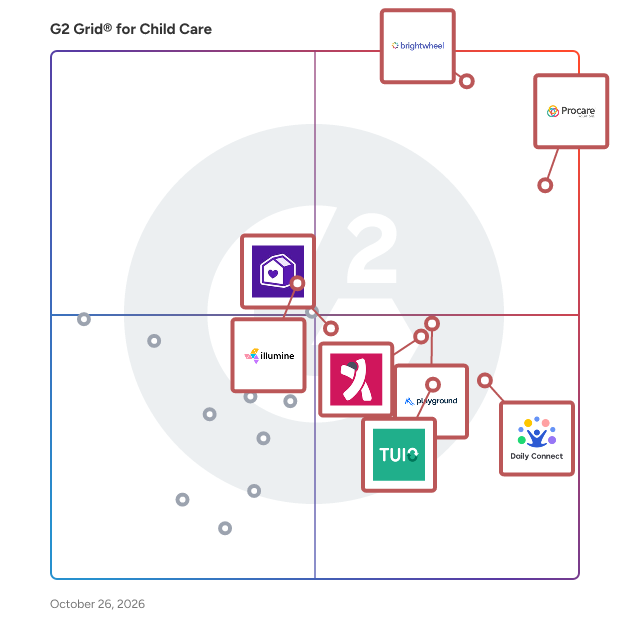
## G2 Grid® for Child Care Software
![G2 Grid® for Child Care Software plotting products by satisfaction and market presence](https://www.g2.com/categories/child-care/grids.png?focus%5B%5D=11789&focus%5B%5D=11833&focus%5B%5D=165376&focus%5B%5D=1261858&focus%5B%5D=64612&focus%5B%5D=20855&focus%5B%5D=123181&focus%5B%5D=11787)
Highlighted products: Procare Solutions, brightwheel, Playground, TUIO, KINDERPEDIA, Famly, Illumine, and Lillio (formerly HiMama).
Underlying data: [Grid® JSON](https://www.g2.com/categories/child-care/grids.json?focus%5B%5D=procare-solutions&amp;focus%5B%5D=brightwheel&amp;focus%5B%5D=playground&amp;focus%5B%5D=tuio-tuio&amp;focus%5B%5D=kinderpedia&amp;focus%5B%5D=famly&amp;focus%5B%5D=illumine-labs-pvt-ltd-illumine&amp;focus%5B%5D=lillio-formerly-himama)


## How Many Child Care Software Products Does G2 Track?
**Total Products under this Category:** 205

### Category Stats (Jul 2026)
- **Average Rating**: 4.31/5 (↑0.01 vs Jun 2026) The average rating of products in this category, based on all submitted ratings
- **Top Trending Product**: brightwheel (+0.55%) - Among all products in this category, brightwheel recorded the largest rating increase compared to last month
*Last updated: July 19, 2026*


## How Does G2 Rank Child Care Software Products?

**Why You Can Trust G2's Software Rankings:**

- 30 Analysts and Data Experts
- 1,400+ Authentic Reviews
- 205+ Products
- Unbiased Rankings

G2's software rankings are built on verified user reviews, rigorous moderation, and a consistent research methodology maintained by a team of analysts and data experts. Each product is measured using the same transparent criteria, with no paid placement or vendor influence. While reviews reflect real user experiences, which can be subjective, they offer valuable insight into how software performs in the hands of professionals. Together, these inputs power the G2 Score, a standardized way to compare tools within every category.


## Which Child Care Software Is Best for Your Use Case?

- **Leader:** [Procare Solutions](https://www.g2.com/products/procare-solutions/reviews)
- **Highest Performer:** [Playground](https://www.g2.com/products/playground/reviews)
- **Easiest to Use:** [Procare Solutions](https://www.g2.com/products/procare-solutions/reviews)
- **Top Trending:** [Procare Solutions](https://www.g2.com/products/procare-solutions/reviews)
- **Best Free Software:** [Lillio (formerly HiMama)](https://www.g2.com/products/lillio-formerly-himama/reviews)


---

**Sponsored**

### TextUs

TextUs is a performance SMS engagement platform specifically designed to assist marketers, sales professionals, and recruiters in enhancing communication and driving conversions. This innovative solution enables users to connect more effectively with prospects, customers, and candidates, ultimately leading to improved conversion rates and pipeline generation. By streamlining the communication process, TextUs helps organizations maximize their outreach efforts and achieve their revenue objectives. The platform serves a diverse audience, including recruitment agencies, corporate HR departments, and sales and marketing teams across various sectors. Marketers can leverage TextUs to send targeted campaigns, conduct A/B testing on messaging, and incorporate additional outreach channels into their outbound strategies. Sales professionals benefit from the platform by maintaining consistent communication with prospects, ensuring they remain engaged throughout the sales cycle. Recruiters can utilize TextUs to interact with potential candidates in real-time, facilitating quicker responses and fostering stronger relationships. This versatility makes TextUs an essential tool for anyone aiming to enhance their engagement strategies. TextUs offers several key features that distinguish it from other communication tools. A standout capability is its ability to send and receive text messages at scale, allowing users to reach multiple prospects and candidates simultaneously. This feature not only saves time but also increases the likelihood of receiving timely responses. Additionally, TextUs integrates seamlessly with existing customer relationship management (CRM) software and applicant tracking systems (ATS), enabling users to manage their communications within a familiar environment, thus enhancing workflow efficiency. Another significant advantage of TextUs is its analytics and reporting functionality. Users can track engagement metrics, such as response rates and message open rates, providing valuable insights into the effectiveness of their communication strategies. This data-driven approach allows organizations to refine their outreach efforts, ensuring they are targeting the right audience with the right message. Furthermore, the platform&#39;s user-friendly interface makes it accessible for individuals with varying levels of technical expertise, ensuring that teams can adopt it quickly and efficiently without a steep learning curve. TextUs stands out in the SMS marketing and engagement platform category by offering a comprehensive solution tailored to the needs of marketing, sales, and recruiting professionals. Its focus on effective communication, integration capabilities, and robust analytics empowers users to enhance their engagement strategies, ultimately driving better outcomes for their organizations.


[Visit website](https://www.g2.com/external_clickthroughs/record?secure%5Bad_program%5D=ppc&amp;secure%5Bad_slot%5D=category_product_list&amp;secure%5Bcategory_id%5D=424&amp;secure%5Bchosen_at%5D=2026-07-19T20%3A30%3A51Z&amp;secure%5Bdisplayable_resource_id%5D=1781&amp;secure%5Bdisplayable_resource_type%5D=Category&amp;secure%5Bmedium%5D=sponsored&amp;secure%5Bplacement_reason%5D=retargeted_product&amp;secure%5Bplacement_resource_ids%5D%5B%5D=61377&amp;secure%5Bprioritized%5D=false&amp;secure%5Bproduct_id%5D=61377&amp;secure%5Bresource_id%5D=424&amp;secure%5Bresource_type%5D=Category&amp;secure%5Bsource_type%5D=category_page&amp;secure%5Bsource_url%5D=https%3A%2F%2Fwww.g2.com%2Fcategories%2Fchild-care%3Fpage%3D10&amp;secure%5Btoken%5D=a3f6088fce66919589a6ecd42dc14060f7a1eaaf1390d236a80c18a35f33133f&amp;secure%5Burl%5D=https%3A%2F%2Ftextus.com%2Fplatform%2F&amp;secure%5Burl_type%5D=custom_url)

---


## What Is Child Care Software?

[Vertical Industry Software](https://www.g2.com/categories/vertical-industry)


---

## How Do You Choose the Right Child Care Software?

### Why Use Child Care Software?

### Why Use Child Care Software?

Child care management software can make it easy for both staff and families to stay organized and informed. Staff can perform administrative tasks to keep day-to-day operations running smoothly, and parents can remain apprised of how their child is performing and what activities they are doing on a daily basis. With real-time updates via a mobile app, families can have peace of mind, and staff can spend more time with students.

**Data Organization —** Running a nursery or other child care business requires maintaining a large amount of records and other information. From immunization records to attendance tracking to payment history, staff must be confident that all data is accurate and up to date. Child care software helps keep all this data easily accessible so parents don’t need to send duplicate information.

**Parent Portal —** Parent portals and mobile apps make it easy for parents to stay in contact with staff and update any relevant information quickly. Parents may also be able to make payments within the portal or parent app, saving time and avoiding missed payments. For staff using web-based software, the parents portal makes it easy for staff to see updates and send notifications for payments or signatures.

### What is Child Care Software?

Child care management software is designed to help those working for an early childhood education center or other child care program manage their business and their students’ information. The software can help with business tasks such as billing and invoicing as well as planning an educational program for students. Staff may also use these solutions to provide parents with updates on their child’s behavior and educational and social progress. Overall, child care software is designed to make a child care business run smoothly for both staff and parents.

Child care businesses must take into consideration their budgets and requirements when researching which software program to buy. A child care center can operate as a standalone venture or as a multilocation enterprise, in addition to a school or community center or as an extension of a family home, so buyers must carefully take into account the services they are able or unable to offer. Child care software can range from modular (software that can be separated into functionalities that can work independent of each other or the platform) to one-size-fits-all, so buyers need to take a look at their existing business plan and identify any inefficiencies that software can help solve.

Effective management of a child care center is crucial to its ongoing operations. Administration can cover anything from reporting, data management, billing, staff management, and parent-caretaker communication. Buyers should consider what aspects of child care will benefit from automation and what areas need better bookkeeping or metric tracking. The latter is important, as child care centers must adhere to specific industry regulations. Child care centers will ultimately benefit from software that can consolidate communication, paperwork, and employee scheduling into a singular database.

Security is a crucial element to consider when implementing and using a child care software product. The on-premise versus cloud debate necessitates the discussion about security. Child care centers store a lot of private, personal data about their clients and clients’ families. Additionally, it’s unthinkable in today’s world that users will not access the software remotely or through a VPN. Buyers need to take a close look at the kinds of security permissions the software offers.

Key Benefits of Child Care Software

- Simplify the process of online registration and/or enrollment
- Create payment and profile portals for parents
- Better manage employee scheduling, monitoring, and payroll
- Better communicate and engage with parents about the day-to-day activities of their child
- Train staff and plan programming
- Manage multiple child care sites and centers

### Who Uses Child Care Software?

**Early Childhood Professionals and Child Care Staff —** Those who perform administrative tasks for a child care business will primarily be the ones using child care software. However, any staff may use the software to track attendance, update parents, or create activities.

**Parents and Families —** Using a companion app or parent portal, families and guardians can receive updates about their child, make payments, and update crucial information.

### Kinds of Child Care Software

**On-Premise vs. Cloud-Based —** Buyers need to consider whether they want a cloud-based or on-premise child care solution. There are pros and cons to both, but the most significant consideration is price. Cloud-based software programs can be accessed via a subscription license and are more likely to help the child care center adhere more strictly to any industry regulations. On-premise solutions require extra fees for support, training, and updating of the hardware or server that hosts the software. There is a much larger upfront fee with the on-premise option. On the flip side, cloud-based solutions give users more freedom to customize. Buyers need to figure out whether they anticipate their child care business scaling rapidly in the future, as that will play a big part in which kind of deployment will better serve the business. Additionally, cloud-based software guarantees accessibility to the tool from anywhere.

### Child Care Software Features

**Administration —** Child care businesses have many of the same requirements as other businesses, and child care software can help with back-office tasks such as accounting, invoicing, and employee management. Some tools will integrate with [accounting software](https://www.g2.com/categories/accounting) to make it even easier to perform these tasks.

**Parent Portal —** Parent portals allow parents to access the child care software using a customer-facing portal or app in order to make payments or update crucial information such as immunization records. This makes it easy for parents to access information about their children from any online device.

**Attendance Tracking —** Attendance tracking enables child care workers to keep track of which children are in attendance and which are not. Doing this digitally saves time and the effort of maintaining paper records. Knowing how many children are in attendance or expected to attend helps caregivers and other staff design activities and purchase supplies.

**Classroom Management —** Classroom management features help teachers and caregivers plan lessons and activities while also tracking student progress. Parents often want to be updated on their child’s progress in areas like reading and counting, and child care software makes it easy to both monitor progress and update parents easily.

**Payment —** The ability for parents and guardians to be able to receive notifications about payments and then easily pay online relieves much of the stress for both parents and staff. Parents don’t need to worry about forgetting a payment, and staff can rest easy knowing that payments are easily processed without staff input.


