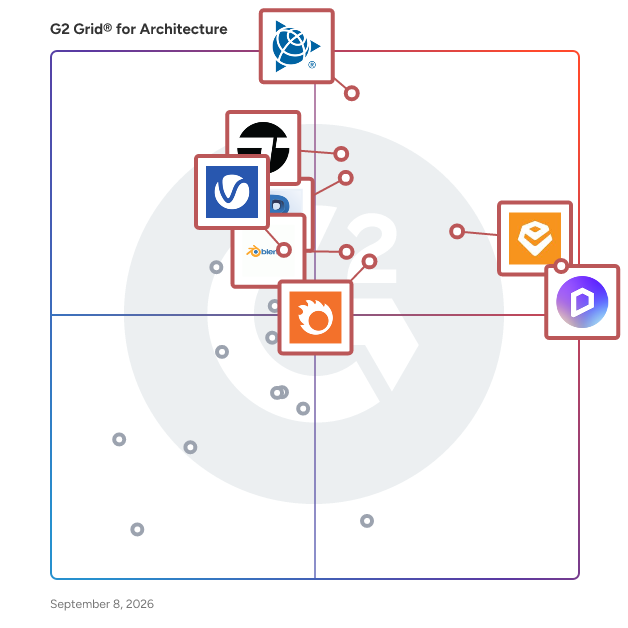
# Best Enterprise Architecture Software

  *By [Neya Kumaresan](https://research.g2.com/insights/author/neya-kumaresan)*

   Products classified in the overall Architecture category are similar in many regards and help companies of all sizes solve their business problems. However, enterprise business features, pricing, setup, and installation differ from businesses of other sizes, which is why we match buyers to the right Enterprise Business Architecture to fit their needs. Compare product ratings based on reviews from enterprise users or connect with one of G2&#39;s buying advisors to find the right solutions within the Enterprise Business Architecture category.

In addition to qualifying for inclusion in the Architecture Software category, to qualify for inclusion in the Enterprise Business Architecture Software category, a product must have at least 10 reviews left by a reviewer from an enterprise business.


## Category Overview

**Total Products under this Category:** 79


## Trust & Credibility Stats

**Why You Can Trust G2's Software Rankings:**

- 30 Analysts and Data Experts
- 5,600+ Authentic Reviews
- 79+ Products
- Unbiased Rankings

G2's software rankings are built on verified user reviews, rigorous moderation, and a consistent research methodology maintained by a team of analysts and data experts. Each product is measured using the same transparent criteria, with no paid placement or vendor influence. While reviews reflect real user experiences, which can be subjective, they offer valuable insight into how software performs in the hands of professionals. Together, these inputs power the G2 Score, a standardized way to compare tools within every category.


---

**Sponsored**

### Cedreo

Cedreo is the only cloud-based 3D architecture software designed specifically for building and remodeling professionals — with zero learning curve required. Create professional conceptual designs in just 2 hours, even with no design experience. From concept to presentation: - Professional 2D and 3D floor plans - Detailed electrical and site plans - Cross-sections and elevation drawings - Photorealistic 3D renderings of interiors and exteriors - Automated surface area reports - Client-ready proposal documents with your branding Why building and remodeling professionals love Cedreo: ✓ Learn in minutes, not months - Intuitive drag-and-drop interface anyone can master ✓ Keep design in-house - No more waiting weeks for external designers nor costly design fees ✓ Close deals on the spot - Show breathtaking 3D renderings during your first meeting Perfect for professionals who want to win more jobs without the complexity of traditional design software.


[Visit website](https://www.g2.com/external_clickthroughs/record?secure%5Bad_program%5D=ppc&amp;secure%5Bad_slot%5D=category_product_list&amp;secure%5Bcategory_id%5D=473&amp;secure%5Bdisplayable_resource_id%5D=473&amp;secure%5Bdisplayable_resource_type%5D=Category&amp;secure%5Bmedium%5D=sponsored&amp;secure%5Bplacement_reason%5D=page_category&amp;secure%5Bplacement_resource_ids%5D%5B%5D=473&amp;secure%5Bprioritized%5D=false&amp;secure%5Bproduct_id%5D=69227&amp;secure%5Bresource_id%5D=473&amp;secure%5Bresource_type%5D=Category&amp;secure%5Bsource_type%5D=category_page&amp;secure%5Bsource_url%5D=https%3A%2F%2Fwww.g2.com%2Fcategories%2Farchitecture%3Fpage%3D5&amp;secure%5Btoken%5D=11c6ca7e0fb7984846431803b32913af3a1a49e7194be17a75a858a9eae70d69&amp;secure%5Burl%5D=https%3A%2F%2Fcedreo.com%2Fsignup%2F%3Futm_campaign%3D25017129-g2-sponsored%26utm_source%3Dg2%26utm_medium%3Ddirectories%26utm_content%3Dsponsored&amp;secure%5Burl_type%5D=free_trial&amp;secure%5Bvisitor_segment%5D=180)

---

## Top-Rated Products (Ranked by G2 Score)
### 1. [Revit](https://www.g2.com/products/revit/reviews)
  Autodesk® Revit® software is built for Building Information Modeling (BIM), helping professionals design, build, and maintain higher-quality, more energy-efficient buildings. Using the information-rich models created with Autodesk Revit software, architects, engineers, and construction firms can collaborate to make more-informed decisions earlier in the design process to deliver projects more efficiently. Any design changes made in Revit models are automatically updated throughout the model, keeping designs and documentation coordinated and more reliable. Autodesk Revit includes features for architectural design, mechanical, electrical, and plumbing, structural engineering, and construction, providing a comprehensive solution for the entire building project team. Revit pricing starts at $290.00 per month, per user. Revit does offer a free trial. Flexible subscription options available. Talk to sales at: Call: (818) 639-7755


  **Average Rating:** 4.6/5.0
  **Total Reviews:** 908

**User Satisfaction Scores:**

- **Quality of Support:** 7.8/10 (Category avg: 8.3/10)
- **Ease of Use:** 7.5/10 (Category avg: 8.5/10)


**Seller Details:**

- **Seller:** [Autodesk](https://www.g2.com/sellers/autodesk)
- **Year Founded:** 1982
- **HQ Location:** San Francisco
- **Twitter:** @autodesk (275,060 Twitter followers)
- **LinkedIn® Page:** https://www.linkedin.com/company/autodesk/ (15,679 employees on LinkedIn®)
- **Ownership:** NASDAQ:ADSK

**Reviewer Demographics:**
  - **Who Uses This:** BIM Manager, Architect
  - **Top Industries:** Architecture &amp; Planning, Construction
  - **Company Size:** 42% Mid-Market, 38% Small-Business


#### Pros & Cons

**Pros:**

- Collaboration (22 reviews)
- 3D Modeling (19 reviews)
- Ease of Use (19 reviews)
- Features (16 reviews)
- Drawing (11 reviews)

**Cons:**

- Revit Compatibility (13 reviews)
- Performance Issues (10 reviews)
- Slow Performance (9 reviews)
- Expensive (8 reviews)
- High Hardware Requirements (8 reviews)

### 2. [SketchUp](https://www.g2.com/products/sketchup/reviews)
  SketchUp helps architects and designers turn their ideas into reality with simple, powerful 3D modeling software. Whether your design is massive or miniature, we&#39;ll be with you every step of the way. Sketch it, share your vision, refine concepts, and bring them into the real world. Owned by Trimble Inc., an entrepreneurial company focused on leveraging technology to change how the world works, SketchUp is intuitive and interoperable. From the ability to create stunning renderings, to powerful sharing and presentation tools, it&#39;s easy to see why professionals trust SketchUp to build their ideas.


  **Average Rating:** 4.5/5.0
  **Total Reviews:** 1,295

**User Satisfaction Scores:**

- **Quality of Support:** 8.1/10 (Category avg: 8.3/10)
- **Ease of Use:** 8.9/10 (Category avg: 8.5/10)


**Seller Details:**

- **Seller:** [Trimble](https://www.g2.com/sellers/trimble)
- **Year Founded:** 1978
- **HQ Location:** Sunnyvale, CA
- **Twitter:** @TrimbleCorpNews (12,036 Twitter followers)
- **LinkedIn® Page:** https://www.linkedin.com/company/5160/ (10,636 employees on LinkedIn®)
- **Ownership:** NASDAQ

**Reviewer Demographics:**
  - **Who Uses This:** Architect, Designer
  - **Top Industries:** Architecture &amp; Planning, Design
  - **Company Size:** 75% Small-Business, 18% Mid-Market


#### Pros & Cons

**Pros:**

- Ease of Use (14 reviews)
- 3D Modeling (10 reviews)
- Ease of Learning (9 reviews)
- Intuitive (8 reviews)
- Drawing (7 reviews)

**Cons:**

- Poor Rendering Quality (7 reviews)
- Expensive (5 reviews)
- Limited Rendering Capabilities (5 reviews)
- Plugin Issues (5 reviews)
- Poor Rendering (5 reviews)

### 3. [Enscape 3D](https://www.g2.com/products/enscape-3d/reviews)
  Enscape is a real-time rendering software solution designed specifically for architects and designers, enabling them to visualize their designs with remarkable speed and precision. By integrating seamlessly with popular BIM and CAD software such as Revit, SketchUp, Rhino, Archicad, and Vectorworks, Enscape facilitates a smooth workflow that allows users to make informed design decisions in real-time. This innovative tool combines advanced rendering capabilities with AI-powered features, making it an essential companion for professionals seeking to enhance their design processes. The target audience for Enscape primarily includes architects, interior designers, and landscape architects who require a robust visualization tool to bring their concepts to life. With its intuitive interface and minimal setup requirements, Enscape caters to both seasoned professionals and those new to architectural visualization. The software is particularly beneficial for teams that need to collaborate effectively, as it allows for instant evaluation of design options and fosters a more dynamic creative environment. By eliminating the need for manual exporting and switching between applications, Enscape streamlines the design workflow from initial concept to final presentation. Key features of Enscape include real-time rendering and visualization, which enables users to see design changes live, facilitating quicker iterations and decision-making. The AI-powered ideation tools, such as the Veras integration, allow designers to explore various creative directions effortlessly. Additionally, the AI-enhanced scene enrichment feature provides lifelike visuals through the Chaos AI Enhancer, while the AI image upscaler transforms low-resolution drafts into high-quality visuals, reaching up to 16K resolution. The bi-directional sync feature ensures that any updates made in the model or within Enscape are reflected instantly, maintaining consistency throughout the design process. Enscape also supports sustainable design practices with its Impact add-on, optimizing building performance directly within the workflow. Full virtual reality support allows clients to experience projects at full scale, enhancing engagement and understanding. Users can create shareable panoramas and interactive tours, produce realistic animations, and access a library of high-quality 3D assets, all contributing to a more immersive presentation experience. With its integrated workflow and compatibility with existing design tools, Enscape stands out as a trusted solution used by leading architecture firms in over 150 countries, helping teams to explore ideas, make faster decisions, and deliver clear, impactful presentations.


  **Average Rating:** 4.6/5.0
  **Total Reviews:** 411

**User Satisfaction Scores:**

- **Quality of Support:** 8.4/10 (Category avg: 8.3/10)
- **Ease of Use:** 9.2/10 (Category avg: 8.5/10)


**Seller Details:**

- **Seller:** [Chaos Software](https://www.g2.com/sellers/chaos-software-e2cbdfdf-80da-45a8-bf0c-d06604e5ab26)
- **Company Website:** https://www.chaos.com/
- **Year Founded:** 1997
- **HQ Location:** Karlsruhe, Germany
- **Twitter:** @ChaosGroup (30,527 Twitter followers)
- **LinkedIn® Page:** https://www.linkedin.com/company/100462/ (918 employees on LinkedIn®)

**Reviewer Demographics:**
  - **Who Uses This:** Architect, Student
  - **Top Industries:** Architecture &amp; Planning, Design
  - **Company Size:** 71% Small-Business, 13% Mid-Market


#### Pros & Cons

**Pros:**

- Ease of Use (107 reviews)
- Speed (52 reviews)
- Real-time Rendering (46 reviews)
- Visualization (42 reviews)
- Ease of Learning (32 reviews)

**Cons:**

- Lighting Issues (28 reviews)
- Limited Materials (25 reviews)
- Poor Rendering Quality (24 reviews)
- Limited Assets (23 reviews)
- Performance Issues (15 reviews)

### 4. [V-Ray](https://www.g2.com/products/v-ray/reviews)
  V-Ray is a sophisticated photorealistic rendering solution tailored for architectural visualization and the media and entertainment sectors. This powerful tool is designed to assist architects, designers, 3D artists, and visualization specialists in producing high-quality imagery with comprehensive control over lighting, materials, and rendering processes. Its seamless integration with major 3D modeling software enables users to transition effortlessly from initial design concepts to final production-ready outputs. The target audience for V-Ray includes professionals in various fields, such as architecture, product design, and visual effects. These users require a rendering tool that can deliver photorealistic accuracy and creative flexibility. V-Ray stands out in its category by providing physically based rendering capabilities that closely mimic real-world lighting and materials. This level of realism is crucial for professionals who need to present their designs convincingly to clients or stakeholders. With support for CPU, GPU, and hybrid rendering, V-Ray offers the performance and adaptability necessary for high-quality visualizations across diverse workflows. Key features of V-Ray include its physically based rendering engine, which allows users to simulate authentic lighting, materials, and global illumination. This capability is essential for creating true-to-life stills and animations. Additionally, V-Ray can handle large, complex scenes containing billions of polygons and thousands of lights without requiring manual optimization, making it suitable for intricate projects. The built-in post-processing tools, such as LightMix and VFB, enable users to adjust lighting, colors, and effects directly within the application, streamlining the workflow. V-Ray also offers access to Chaos Cosmos, a library of over 13,000 render-ready models, materials, and HDRIs, which helps users build scenes more efficiently. The integration of powerful AI tools enhances the material creation process and improves realism in surrounding details, such as people and foliage, without the need for re-rendering. Furthermore, the standardized .vrscene format facilitates easy scene transfer between CAD and DCC tools, ensuring a cohesive workflow across various applications. The integrated workflow of V-Ray allows users to work directly within their preferred 3D modeling software, such as 3ds Max, Cinema 4D, SketchUp, and more, while maintaining consistency in lighting, materials, and rendering. With features like Chaos Cloud for collaborative design reviews and distributed rendering to accelerate render times, V-Ray is trusted by teams worldwide for its reliability and high-quality output in architectural visualization, product design, VFX, and 3D animation.


  **Average Rating:** 4.5/5.0
  **Total Reviews:** 214

**User Satisfaction Scores:**

- **Quality of Support:** 8.0/10 (Category avg: 8.3/10)
- **Ease of Use:** 7.1/10 (Category avg: 8.5/10)


**Seller Details:**

- **Seller:** [Chaos Software](https://www.g2.com/sellers/chaos-software-e2cbdfdf-80da-45a8-bf0c-d06604e5ab26)
- **Company Website:** https://www.chaos.com/
- **Year Founded:** 1997
- **HQ Location:** Karlsruhe, Germany
- **Twitter:** @ChaosGroup (30,527 Twitter followers)
- **LinkedIn® Page:** https://www.linkedin.com/company/100462/ (918 employees on LinkedIn®)

**Reviewer Demographics:**
  - **Who Uses This:** Architect, Designer
  - **Top Industries:** Architecture &amp; Planning, Design
  - **Company Size:** 81% Small-Business, 11% Mid-Market


#### Pros & Cons

**Pros:**

- Ease of Use (43 reviews)
- Rendering Quality (40 reviews)
- Realistic Rendering (33 reviews)
- Quality (30 reviews)
- Rendering (29 reviews)

**Cons:**

- Difficult Learning (21 reviews)
- Poor Rendering Quality (19 reviews)
- Complex Interface (18 reviews)
- Complexity (15 reviews)
- Expensive (13 reviews)

### 5. [Blender](https://www.g2.com/products/blender/reviews)
  Blender is a free and open-source 3D creation suite that supports the entire 3D pipeline, including modeling, rigging, animation, simulation, rendering, compositing, motion tracking, and video editing. Designed for versatility, Blender caters to a wide range of users, from hobbyists to professionals, enabling the creation of high-quality 3D content across various media platforms. Key Features and Functionality: - Modeling: Comprehensive tools for creating and editing 3D models, including sculpting and retopology. - Rendering: Integrated rendering engines like Cycles and EEVEE for realistic and real-time rendering. - Animation &amp; Rigging: Advanced animation tools with a robust rigging system for character animation. - Video Editing: Built-in video editor for cutting, splicing, and adding effects to videos. - VFX: Tools for motion tracking, masking, and compositing to create visual effects. - Simulation: Capabilities for simulating fluids, smoke, fire, cloth, and rigid bodies. - Scripting: Python API for custom tools and add-ons. Primary Value and User Solutions: Blender&#39;s primary value lies in its comprehensive, all-in-one toolset that eliminates the need for multiple software applications, streamlining the 3D creation process. Its open-source nature ensures continuous improvement and adaptability, driven by a global community of developers and artists. Blender empowers users to produce professional-grade 3D content without financial barriers, fostering creativity and innovation across industries such as film, gaming, and design.


  **Average Rating:** 4.6/5.0
  **Total Reviews:** 303

**User Satisfaction Scores:**

- **Quality of Support:** 8.6/10 (Category avg: 8.3/10)
- **Ease of Use:** 7.2/10 (Category avg: 8.5/10)


**Seller Details:**

- **Seller:** [Blender](https://www.g2.com/sellers/blender)
- **Year Founded:** 2002
- **HQ Location:** Amsterdam
- **Twitter:** @BlenderDev (86,152 Twitter followers)
- **LinkedIn® Page:** https://www.linkedin.com/company/blender-org/ (1,493 employees on LinkedIn®)

**Reviewer Demographics:**
  - **Who Uses This:** Software Engineer, Graphic Designer
  - **Top Industries:** Animation, Computer Games
  - **Company Size:** 76% Small-Business, 12% Mid-Market


#### Pros & Cons

**Pros:**

- 3D Modeling (13 reviews)
- Ease of Use (13 reviews)
- Modeling (13 reviews)
- Animation (12 reviews)
- Features (11 reviews)

**Cons:**

- Learning Curve (9 reviews)
- Difficult Learning (8 reviews)
- Steep Learning Curve (7 reviews)
- Difficulty for Beginners (6 reviews)
- Learning Difficulty (6 reviews)


## Parent Category

[Vertical Industry Software](https://www.g2.com/categories/vertical-industry)


---

## Buyer Guide

### What You Should Know About Architecture Software

### What is Architecture Software?

Architecture software allows architects to communicate their designs, intentions, and expectations in a digital format. That communication happens between architect, designer, contractor, engineer, material supplier, and (most importantly) client. At the minimum, architectural software reduces errors, boosts efficiency, and ensures accuracy of calculations. Architecture software can enhance manual drawings and workflows, as well as streamline and provide comprehensive oversight for the entire architect and construction project lifecycle. The software also allows architects and contractors to ensure their agendas and cost estimates are set in place–—and agreed upon with the client—prior to embarking upon a project. Architecture software makes sure that those plans meets legal and safety requirements.

The requirements and needs of architects blur the lines between architectural software, [BIM applications](https://www.g2.com/categories/building-design-and-building-information-modeling-bim), and [CAD systems](https://www.g2.com/categories/general-purpose-cad). Architecture software also isn’t architect- or architectural firm-exclusive; this software type can be used by drafters, engineers, contractors, and builders.

Architectural software facilitates the creation of any and all documents regarding the plans for a project.

While the idea of an architect’s studio covered in blueprints and paper contracts is romantic, it’s neither efficient nor desirable. Human error is always an inevitable part of any industry, but it comes at a higher cost (literally) in the architectural industry. Why slowly and manually calculate mathematical equations or painstakingly redraw plans after client feedback? Software is equipped with algorithms and allows designers to manipulate their drawings at will. Architects are no longer constrained by the limits of paper; they can easily work in 3D and 4D.

With an architecture software tool, you can:

- Publish designs in PDF format
- Develop overall standards for the production of design content
- Produce more precise designs
- Manage and organize assets

### Why Use Architecture Software?

A major benefit of utilizing architecture software is that it opens up channels of collaboration and communication between architects, designers, engineers, and clients. Architectural software enhances workflow, regardless of whether an architectural firm uses it for design. Software enables electronic file sharing, automatic quantity takeoff and estimation, and overall project management. Editing features ensure that everyone relevant has contributed to the project, before and during construction.

Architectural software also reduces fragmentation between different players: All designs, information, edits, and changes are centralized into one database. This minimizes conflict, creates a source of truth, and simplifies project coordination. Additionally, architecture software improves business outcomes for clients, because of its tendency to create transparency at every step of the project.

### Who Uses Architecture Software?

Those who are involved in architecture agencies and projects utilize architectural software. This includes architects, designers, contractors, subcontractors, clients, and compliance and legal professionals.

### Architecture Software Features

**Rendering –** 2D and 3D renderings (even without the help of [augmented reality (AR)](https://www.g2.com/categories/augmented-reality) technology) enable architects to show clients realistic models and visualizations. By rendering their concepts, architects can present to clients how their plans will look upon completion.

**Drafting –** Architectural software must allow for direct drafting or the import and/or export of drafts in the software. Whether the drafts can be initially drawn in 2D and then prototyped in 3D doesn’t matter, so long as the software enables drafting capability. An added bonus to this drafting feature is architecture calculators, which can automate the counting of resources, materials, and finances.

**Workflow –** Effective architect software should facilitate the integration of existing workflows. Once those workflows are uploaded into the software, they can be better monitored and tracked, ultimately enabling full collaboration across the organization. Integrated workflows also speed up the entire design and construction processes, because they reduce redundant, back-and-forth communication.

**Database –** A lot of architecture software offers some version of a database. This can range from a materials database, full of updated costs and availability, to a file storage database. Regardless of database type, it will be helpful for the architect who wants to go back and find context for their original drafts and plans.

**Document management –** Architect assets are digital designs and drafts. Architecture software that provides a place to store, edit, and share those pieces of content helps professionals stay on top of things. With document management capabilities, drafts, plans, and communication can be standardized and tracked more efficiently. Additionally, some document management modules can ensure file compatibility. For those that do, this can be a make-it-or-break-it feature; if a software is unable to export or import files in a certain file type, then architects are forced to jump through hoops during presentation and sharing. Some software will integrate with [business content management](https://www.g2.com/categories/business-content-management) solutions, easing the entire process of identifying, discovering, and tracking down relevant content.

#### Additional Architecture Features

**Project management –** Job costing, job coordination, time tracking, and business reports are not architecture industry-specific features, but they are crucial to keeping architecture projects from blowing past initial estimates and undermining client relationships.

**Integration with accounting solutions –** Beyond basic invoicing and generating of BOQs (bill of quantities), architecture software usually does not offer a full-fledged accounting module. Integration with third-party accounting solutions, then, can enhance the benefits of architectural software within a design firm.

**Integration with CAD and BIM –** Despite any overlaps between CAD and BIM software with architecture software, not all architecture software necessarily offers those capabilities. Integration with CAD and BIM enables architectural software to demonstrate a greater ability for visualization and design generation.

**Construction site management –** Contractors, engineers, and construction crews make possible the physical reconstruction of design plans into tangible buildings. Therefore, architectural software that offers construction site management features helps provide synchronization and consistency across the entire building lifecycle.

### Trends Related to Architecture Software

**Continued benefits of automation —** The more menial and manual tasks that can be automated with architectural software, the more creative and technical energy architects can put towards their projects. Instead of wasting time redrafting or editing drawings, architects and designers can better client relationships, adhere to any and all regulations, and attempt to keep to budget.

**New developments in AEC —** The intersection between the different industries that make up AEC (architecture, engineering, and construction) and developments in technology continues to transform and innovate design. [Virtual reality (VR)](https://www.g2.com/categories/virtual-reality) and augmented reality (AR) will only add to the capabilities of simulations and 3D modeling, rendering, and other visualizations. Additionally, plugins and mobile applications are regularly cropping up and enhancing existing tools, based on newly discovered needs and requirements of AEC.

**New applications for** [**AR/VR**](https://www.g2.com/categories/ar-vr) **—** These technologies will continue to transform construction site observation and building and field inspection. VR can enhance existing construction processes, keeping open the lines of communication between architecture firms and relevant players throughout the entire project lifecycle. VR makes possible the synchronizing of virtual environments with planned-out data points and design plans. AR can better capture the layouts of construction sites, adding to the usefulness of plans and models, by creating realistic visualizations of the &quot;real world.&quot; AR also promises to further reduce project costs, as both architects and contractors can plan out every single variable before physically breaking ground.

**Cloud and/or mobile technology —** While architects may generally draft up building plans at their desks, cloud and/or mobile technology is a boon because it encourages and allows for the presence of the architect at a site. Gathering, storing, and sharing data from any device at any time is hugely desirable and almost expected at this point in time. Cloud technology can also be updated in real-time, which is helpful to accurately track the progress of projects.

### Potential Issues with Architecture Software

Ideally, architecture software reduces the time and energy spent on creating drafts, communicating with clients and relevant parties, and adjusting plans throughout the project lifecycle. Architecture software equips agencies and professionals with the tools to discover efficiencies, ensure accuracy despite speeding up the lifecycle, and facilitate integration between disparate solutions that may already be in place.

However, despite the hundreds, if not more, hours of manpower that could be saved by utilizing such software, there are still some issues that arise when implementing it:

**Sweeping learning curve –** Ironically, the biggest hurdle with architecture software is the technology bit. Like landscape designers or other trades that put emphasis on hand drawing skills, it’s difficult to convince professionals to switch to a mostly—if not entirely—digital platform. Additionally, some architecture solutions are either too expensive for smaller-sized design firms or independent architects or too expansive for the technically-unsavvy user to comfortably learn.

**Hand drawing versus digital drawing –** Architecture software logically increases efficiencies in drawing, drafting, and file sharing. However, some architects resolutely prefer the old-school creative process. The issue, then, is how to onboard those architects who refuse to adopt new technologies. The silver lining here, though, is that those architects would probably gravitate toward software that allows them to export their hand drawn sketches into the software.

**Project management –** If an architecture software doesn’t provide visibility into the progress of projects and continued availability of resources, it’s difficult to argue that the unfamiliar tool will ultimately be useful. Helpful architectural software should take over the manual process of coordinating project leads, contractors, and team members. The tool should also unify the entire architecture project, allowing for harmony and reduced friction and misunderstanding.

### Software and Services Related to Architecture Software

[**CAD**](https://www.g2.com/categories/general-purpose-cad) **—** CAD stands for &quot;computer-aided design,&quot; and CAD software can be used across a number of industries to produce technical drawings of buildings and physical objects.

[**BIM**](https://www.g2.com/categories/building-design-and-building-information-modeling-bim) **—** Building information modeling (BIM) software offers the architecture and construction industries with a model-based process for designing buildings and infrastructures. The appealing aspect of BIM is its ability to generate a granular, digital design which professionals can better present to their clients.

[**Sketching**](https://www.g2.com/categories/sketching) **—** Sketching software digitizes the previously manual process of creating drawings on paper. The software can transform 2D digital sketches into 3D files and typically integrates with CAD solutions.

[**Drawing**](https://www.g2.com/categories/drawing) **—** Similar to sketching software, drawing software enables users to draw on their computers or other relevant mobile devices. Drawing software always allows users to export completed drawings into commonly used file types.

[**3D Rendering**](https://www.g2.com/categories/3d-rendering) **—** 3D rendering software fully realizes both 2D and 3D models, designs, and images. Architecture software that provides 3D rendering capabilities further helps clients visually imagine the plans of architects and designers.

[**Team Collaboration**](https://www.g2.com/categories/team-collaboration) **—** An already touched-upon benefit of architecture software is its capability to induce collaboration and communication between team members. While architectural software’s collaboration features might not necessarily integrate with team collaboration-specific tools, it still echoes or mimics them.

[**Project Management**](https://www.g2.com/categories/project-management) **—** Like any other project, architectural projects require a lot of coordinating and monitoring, especially considering that they tend to quickly blow past their initial budget.

[**Construction Management**](https://www.g2.com/categories/construction-management) **—** Architect designs and plans are realized on construction sites. Construction management software helps companies oversee and follow the progress of construction projects and activities of construction crews.

[**Field Service Management**](https://www.g2.com/categories/field-service-management) **—** Because construction management solutions specifically oversee the activities of construction crews, field service management (FSM) software would be a helpful supplement for architectural software. After all, construction field workers are not the only extra personnel involved in architectural projects.