Best Animation Software - Page 5

Last updated: March 3, 2025

How Many Animation Software Products Does G2 Track?

Total Products under this Category: 172

Category Stats (Nov 2026)

  • Average Rating: 4.4/5 (↑0.01 vs Oct 2026) The average rating of products in this category, based on all submitted ratings
  • Top Trending Product: Adobe Animate (+0.74%) - Among all products in this category, Adobe Animate recorded the largest rating increase compared to last month

Last updated: November 20, 2026

How Does G2 Rank Animation Software Products?

Why You Can Trust G2's Software Rankings:

  • 30 Analysts and Data Experts
  • 15,400+ Authentic Reviews
  • 172+ Products
  • Unbiased Rankings

G2's software rankings are built on verified user reviews, rigorous moderation, and a consistent research methodology maintained by a team of analysts and data experts. Each product is measured using the same transparent criteria, with no paid placement or vendor influence. While reviews reflect real user experiences, which can be subjective, they offer valuable insight into how software performs in the hands of professionals. Together, these inputs power the G2 Score, a standardized way to compare tools within every category.

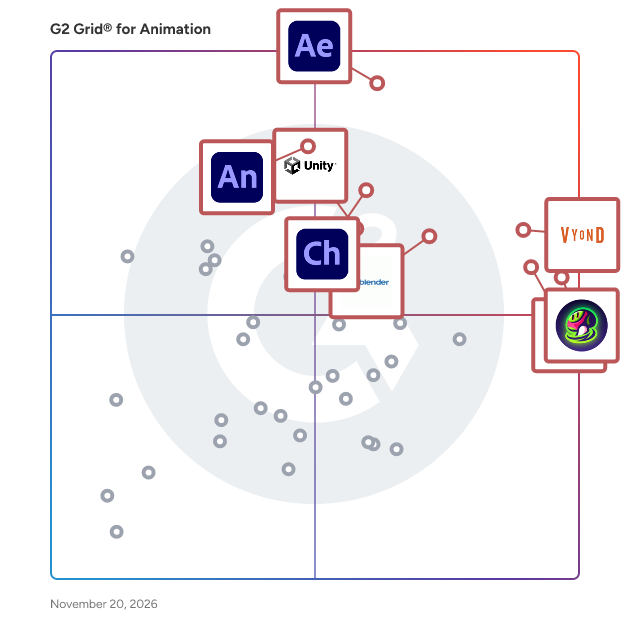
G2 Grid® for Animation Software

G2 Grid® for Animation Software plotting products by satisfaction and market presence

Highlighted products: Adobe After Effects, Vyond, Meshy, Animaker, Blender, Adobe Character Animator, Adobe Animate, and Unity.

Underlying data: [Grid® JSON](https://www.g2.com/categories/animation/grids.json?focus%5B%5D=adobe-after-effects&focus%5B%5D=vyond&focus%5B%5D=meshy&focus%5B%5D=animaker&focus%5B%5D=blender&focus%5B%5D=adobe-character-animator&focus%5B%5D=adobe-animate&focus%5B%5D=unity)

Adobe XD

Adobe XD is a vector-based design and prototyping tool developed by Adobe Inc., tailored for creating user experiences for web and mobile applications. It enables designers to craft intricate wireframes, detailed mockups, and interactive prototypes, streamlining the design process from concept to final product. Key Features and Functionality: - Design Tools: Provides a comprehensive set of tools for wireframing, visual design, and creating production-ready artwork. - Prototyping and Animation: Allows for the creation of animated prototypes by linking artboards, which can be previewed on supported mobile devices. - Repeat Grid: Facilitates the creation of grids of repeating items, such as lists and photo galleries, enhancing design efficiency. - Interoperability: Supports and can open files from Illustrator, Photoshop, Sketch, and After Effects, and integrates with tools like Slack and Microsoft Teams for collaboration. - Responsive Resize: Automatically adjusts and sizes images and other objects on artboards, ensuring designs adapt seamlessly to different screen sizes. - Voice Design: Enables the design of applications using voice commands, allowing for the creation and preview of voice interfaces. - Plugins: Compatible with custom plugins that add additional features and functionalities, ranging from design enhancements to automation and animation. Primary Value and User Solutions: Adobe XD streamlines the UX design process by integrating design, prototyping, and collaboration tools into a single platform. This consolidation reduces the need for multiple applications, enhancing workflow efficiency. Its real-time collaboration features and cross-platform support enable teams to work cohesively, regardless of location. By offering a comprehensive suite of tools, Adobe XD empowers designers to create engaging and responsive user experiences effectively.

Average Rating: 4.2/5.0

Total Reviews: 522

How Do G2 Users Rate Adobe XD?

  • Has the product been a good partner in doing business?: 8.2/10 (Category avg: 8.8/10)
  • Quality of Support: 7.9/10 (Category avg: 8.3/10)
  • Ease of Setup: 8.9/10 (Category avg: 9.0/10)
  • Ease of Admin: 8.4/10 (Category avg: 8.6/10)

Who Is the Company Behind Adobe XD?

  • Seller: Adobe
  • Year Founded: 1982
  • HQ Location: San Jose, CA
  • LinkedIn® Page: www.linkedin.com
    42,975 employees on LinkedIn®
  • Ownership: NASDAQ:ADBE
  • Phone: +1 (888) 649-2990

Who Uses This Product?

  • Who Uses This: Graphic Designer, Designer
  • Top Industries: Design, Computer Software
  • Company Size: 63% Small, 25% Medium

What Do G2 Reviewers Say About Adobe XD?

AI-generated summary from verified user reviews

Pros
  • Users appreciate the ease of use of Adobe XD, finding its interface simple and fast for design tasks.
  • Users appreciate the seamless integrations of Adobe XD, enhancing design workflows with other Adobe applications effortlessly.
  • Users love the effortless prototyping capabilities of Adobe XD, facilitating faster and interactive design processes.
  • Users value the minimal and fast interface of Adobe XD, which enhances productivity in UI design tasks.
  • Users value Adobe XD for its time-saving features, enabling quick and efficient design workflows without unnecessary complexity.
Cons
  • Users are disappointed by the lack of updates for Adobe XD, feeling the product has been abandoned.
  • Users feel Adobe XD has a lack of features, particularly compared to competitors like Figma, affecting usability.
  • Users feel Adobe XD lacks advanced features, making it less competitive and more cumbersome for collaborative design work.
  • Users feel Adobe XD has missing features compared to competitors, making it less appealing for UI/UX design.
  • Users experience plugin issues in Adobe XD, leading to bugs and unreliable integrations that hinder productivity.

What Are Recent G2 Reviews of Adobe XD?

What Are G2 Users Discussing About Adobe XD?

Autodesk Architecture, Engineering & Construction Collection

Integrated BIM tools for building design, civil infrastructure, and construction. Get access to a set of integrated tools that equip you to meet any project challenge – now and in the future. Use powerful BIM and CAD workflows enabled by a comprehensive set of software and services to deliver your best work and stay competitive. Why a collection? • Be ready for anything with a full set of BIM tools Get an essential set of tools, including Revit and AutoCAD, at a great price. And with access to over a dozen more tools, you can try new workflows or projects. • Easier software and license management Eliminate the headache of managing multiple product licenses. Get insights on product use. Easily download, install, and use as many products within the collection as you want, whenever you like. • Access the latest and previous releases Ensure software compatibility with all team members by accessing previous versions when you need them. Stay current with the latest releases. Deploy updates whenever you want. • Choose access for individuals or teams Choose between subscriptions that provide single-user access for an individual or give teams permission to share licenses with multi-user access.

Average Rating: 4.6/5.0

Total Reviews: 24

How Do G2 Users Rate Autodesk Architecture, Engineering & Construction Collection?

  • Has the product been a good partner in doing business?: 8.7/10 (Category avg: 8.8/10)
  • Quality of Support: 8.3/10 (Category avg: 8.3/10)
  • Ease of Setup: 8.3/10 (Category avg: 9.0/10)
  • Ease of Admin: 7.2/10 (Category avg: 8.6/10)

Who Is the Company Behind Autodesk Architecture, Engineering & Construction Collection?

  • Seller: Autodesk
  • Year Founded: 1982
  • HQ Location: San Francisco
  • LinkedIn® Page: www.linkedin.com
    15,757 employees on LinkedIn®
  • Ownership: NASDAQ:ADSK
  • Total Revenue (USD mm): $3,790

Who Uses This Product?

  • Top Industries: Architecture & Planning
  • Company Size: 40% Medium, 36% Large

What Are Recent G2 Reviews of Autodesk Architecture, Engineering & Construction Collection?

What Are G2 Users Discussing About Autodesk Architecture, Engineering & Construction Collection?

doppio

doppio turns static design into motion reels in minutes, with knobs instead of keyframes. Drop in case studies, campaign visuals or Figma links, then pick a template that adapts to your work. Fine-tune it shot by shot, right in the browser. No complicated software, no learning curve. Made by studio folk who know the grind of getting proper work out the door.

Average Rating: 5.0/5.0

Total Reviews: 2

How Do G2 Users Rate doppio?

  • Quality of Support: 9.2/10 (Category avg: 8.3/10)
  • Ease of Setup: 10.0/10 (Category avg: 9.0/10)

Who Is the Company Behind doppio?

Who Uses This Product?

  • Company Size: 100% Small

What Are Recent G2 Reviews of doppio?

AI can help you find the answers. G2 helps you trust them.

Connect G2 to Claude or ChatGPT for answers grounded in G2's trusted reviews, comparisons, and pricing from real user insights.

How it works

FlipBook

DigiCel FlipBook Makes Animation Easier!

Average Rating: 5.0/5.0

Total Reviews: 2

Who Is the Company Behind FlipBook?

Who Uses This Product?

  • Company Size: 50% Large, 50% Small

What Are Recent G2 Reviews of FlipBook?

Gifmock

Gifmock helps you create high-quality GIFs from static images and mockups.

Average Rating: 4.8/5.0

Total Reviews: 2

How Do G2 Users Rate Gifmock?

  • Quality of Support: 5.0/10 (Category avg: 8.3/10)

Who Is the Company Behind Gifmock?

  • Seller: Gifmock
  • Year Founded: 2017
  • HQ Location: Bondi, AU
  • LinkedIn® Page: www.linkedin.com
    2 employees on LinkedIn®

Who Uses This Product?

  • Company Size: 50% Large, 50% Medium

What Are Recent G2 Reviews of Gifmock?

Spine Animation Software

Spine is 2D skeletal animation software for video games.

Average Rating: 5.0/5.0

Total Reviews: 2

How Do G2 Users Rate Spine Animation Software?

  • Has the product been a good partner in doing business?: 8.3/10 (Category avg: 8.8/10)
  • Quality of Support: 9.2/10 (Category avg: 8.3/10)
  • Ease of Setup: 8.3/10 (Category avg: 9.0/10)
  • Ease of Admin: 8.3/10 (Category avg: 8.6/10)

Who Is the Company Behind Spine Animation Software?

Who Uses This Product?

  • Company Size: 100% Small

What Are Recent G2 Reviews of Spine Animation Software?

Spirit App

The animation-tool for the web.

Average Rating: 4.3/5.0

Total Reviews: 2

How Do G2 Users Rate Spirit App?

  • Quality of Support: 8.3/10 (Category avg: 8.3/10)

Who Is the Company Behind Spirit App?

Who Uses This Product?

  • Company Size: 100% Small

What Are Recent G2 Reviews of Spirit App?

Synfig Studio

Synfig is a powerful, industrial-strength vector-based 2D animation software package, designed from the ground-up for producing feature-film quality animation with fewer people and resources.

Average Rating: 4.5/5.0

Total Reviews: 2

How Do G2 Users Rate Synfig Studio?

  • Quality of Support: 8.3/10 (Category avg: 8.3/10)

Who Is the Company Behind Synfig Studio?

Who Uses This Product?

  • Company Size: 100% Small

What Are Recent G2 Reviews of Synfig Studio?

What Are G2 Users Discussing About Synfig Studio?

Wondershare Anireel

The easy way to create riveting animated explainer videos.

Average Rating: 4.5/5.0

Total Reviews: 2

How Do G2 Users Rate Wondershare Anireel?

  • Has the product been a good partner in doing business?: 10.0/10 (Category avg: 8.8/10)
  • Quality of Support: 10.0/10 (Category avg: 8.3/10)
  • Ease of Setup: 10.0/10 (Category avg: 9.0/10)
  • Ease of Admin: 10.0/10 (Category avg: 8.6/10)

Who Is the Company Behind Wondershare Anireel?

  • Seller: Wondershare
  • Year Founded: 2003
  • HQ Location: Shenzen, CN
  • LinkedIn® Page: www.linkedin.com
    639 employees on LinkedIn®
  • Ownership: SHE: 300624
  • Total Revenue (USD mm): $49

Who Uses This Product?

  • Company Size: 50% Medium, 50% Small

What Are Recent G2 Reviews of Wondershare Anireel?

AccuRIG

ActorCore AccuRIG, developed by Reallusion, is a free, standalone 3D character auto-rigging application designed to dramatically reduce the time and effort required to rig 3D biped models. Offered as a complimentary tool within the broader ActorCore ecosystem (Reallusion’s premium 3D asset and motion library), AccuRIG allows 3D artists, game developers, and animators to transform static, unrigged meshes into fully animatable characters in minutes. By eliminating the steep learning curve and tedious manual labor of traditional rigging, AccuRIG serves as a critical bridge in the 3D pipeline—empowering creators to easily prepare characters for game engines, rendering software, and motion capture workflows. Core Features & Capabilities 1-Click Auto-Rigging: AccuRIG utilizes advanced algorithms to automatically calculate perfectly placed skeletal joints and generate highly accurate skin weights for any bipedal 3D model. Multi-Mesh & Accessory Handling: Easily rig complex characters with multiple meshes (e.g., layered clothing, pouches, or armor). AccuRIG’s intuitive masking tools allow you to designate hard-surface items so they do not distort during animation. Hand & Finger Precision: Generates accurate multi-joint finger rigs (supporting up to 5 fingers) for intricate hand animations and gestures. Manual Refinement Tools: While automated, users retain full control. You can manually adjust joint placement, define symmetry, correct neutral poses, and test the rig instantly using built-in animation presets. Built-in Pose & Animation Checking: Instantly preview your rigged character’s flexibility and joint limits using an embedded library of fundamental motions directly within the viewport. The ActorCore Ecosystem Connection Because AccuRIG is part of the ActorCore toolset, it connects natively to ActorCore’s cloud-based library of thousands of professional 3D motion capture animations. Once a character is rigged, it can be instantly paired with ActorCore motions for game development, architectural visualization, film previs, and digital twin simulations. Seamless 3D Pipeline & Export Integrations AccuRIG is designed to be completely software-agnostic, easily slotting into any professional 3D workflow: Broad Software Compatibility: Exported rigs are natively compatible with industry standards, including Unreal Engine, Unity, Blender, Autodesk Maya, 3ds Max, Cinema 4D, and NVIDIA Omniverse. Flexible Export Formats: Export your fully rigged characters in standard FBX format, USD (Universal Scene Description), or iAvatar (for direct integration into Reallusion’s iClone 8 and Character Creator 5). Who is AccuRIG Best For? ActorCore AccuRIG is the ideal, budget-friendly solution for Indie Game Developers, Freelance 3D Artists, Animation Students, and Archviz Professionals. It is perfect for creators who need to quickly rig purchased marketplace models, custom ZBrush sculpts, or 3D-scanned characters without spending hours painting skin weights or adjusting bone hierarchies.

Average Rating: 2.5/5.0

Total Reviews: 1

How Do G2 Users Rate AccuRIG?

  • Quality of Support: 5.0/10 (Category avg: 8.3/10)

Who Is the Company Behind AccuRIG?

  • Seller: Reallusion
  • Year Founded: 2000
  • HQ Location: San Jose, US
  • LinkedIn® Page: www.linkedin.com
    162 employees on LinkedIn®
  • Ownership: Reallusion Inc.
  • Phone: +14085736107

Who Uses This Product?

  • Company Size: 100% Small

Adobe Express

Quickly and easily make standout content from thousands of beautiful templates with the all-new Adobe Express. Simply choose a template, add images and text, and quickly resize your creations to fit your favorite social media site. Available on web and mobile. Make stunning content. Start from thousands of templates for social media graphics, stories, and thumbnails, as well as posters, flyers, business cards, logos, and more. Get free Adobe Stock images. Access the Adobe Stock royalty-free photo collection* with millions of on-trend and seasonal images. Give your photos pro effects. Get the look you want with easy-to-apply effects, filters, textures, and overlays. Remove backgrounds instantly. Effortlessly cut out backgrounds without having to outline your subject — and start with a fresh canvas. Add design elements. Discover just what you need from tons of images, icons, backgrounds, and design assets. Resize content in a snap. Instantly resize and reflow content to fit any size for Instagram, Facebook, YouTube, banners, flyers, and more. Your content will adjust instantly using intuitive Adobe tools. Make it move. Create attention-grabbing content with features to animate text and photos. Apply your brand. Upload your brand logo, fonts, and colors and apply them to any design with one tap. Make videos made for social. Easily trim, crop, resize, and convert videos. Play with text. Choose from over 18,000 licensed fonts from the Adobe Fonts library. Start from text templates that feature curved type, grids, and beautiful font pairs. Remix it. Customize predesigned graphics and text to make them your own. Work better together. Share templates, assets, and brand identity across your team so content consistently reflects your look. Save favorite templates to your library for a faster start. *Adobe Express membership required. The Adobe Stock photo collection does not include Premium or editorial content. Limited Adobe Stock functionality available in web page and video features within the desktop app.​

Average Rating: 4.4/5.0

Total Reviews: 1,078

How Do G2 Users Rate Adobe Express?

  • Has the product been a good partner in doing business?: 9.1/10 (Category avg: 8.8/10)
  • Quality of Support: 8.7/10 (Category avg: 8.3/10)
  • Ease of Setup: 8.8/10 (Category avg: 9.0/10)
  • Ease of Admin: 9.4/10 (Category avg: 8.6/10)

Who Is the Company Behind Adobe Express?

  • Seller: Adobe
  • Company Website:
  • Year Founded: 1982
  • HQ Location: San Jose, CA
  • LinkedIn® Page: www.linkedin.com
    42,975 employees on LinkedIn®
  • Ownership: NASDAQ:ADBE

Who Uses This Product?

  • Who Uses This: Graphic Designer, Marketing Manager
  • Top Industries: Marketing and Advertising, Graphic Design
  • Company Size: 56% Small, 28% Medium

What Do G2 Reviewers Say About Adobe Express?

AI-generated summary from verified user reviews

Pros
  • Users appreciate the ease of use of Adobe Express, making design accessible and efficient for non-professionals.
  • Users love the vast template library of Adobe Express, simplifying design tasks and enhancing workflow efficiency.
  • Users love the speed of Adobe Express, allowing for quick project completion and seamless creativity without hassle.
  • Users praise the easy creation process in Adobe Express, making design accessible without prior experience.
  • Users find Adobe Express to be highly intuitive, enabling effortless design creation without prior experience.
Cons
  • Users find limited features in Adobe Express, especially when needing more advanced customization and control over designs.
  • Users find feature limitations in Adobe Express, especially for advanced editing and complex design projects.
  • Users find the limited customization options of Adobe Express frustrating for advanced design needs and complex projects.
  • Users find Adobe Express offers limited options for advanced customization and detailed design, leading to frustration for experienced designers.
  • Users experience slow performance with Adobe Express, leading to frustrating delays and an unresponsive app during use.

What Are Recent G2 Reviews of Adobe Express?

What Are G2 Users Discussing About Adobe Express?

Amberlight

Amberlight is a unique art tool that creates beautiful computer-generated images and animations. Millions of particles are flying through your canvas and you can drive them with special fields. It was made both as a tool for advanced artists as well as for people who want to explore their artistic side and want to create unique artworks. Have fun and feel free to experiment with this one-of-a-kind tool!

Average Rating: 3.5/5.0

Total Reviews: 1

Who Is the Company Behind Amberlight?

Who Uses This Product?

  • Company Size: 100% Small

animatiQ

Animatiq creates editable videos from code using React and HTML — generates clips, animations, and images with gen-AI models, edits and captions footage, and builds motion design components.

Average Rating: 5.0/5.0

Total Reviews: 1

How Do G2 Users Rate animatiQ?

  • Quality of Support: 10.0/10 (Category avg: 8.3/10)
  • Ease of Setup: 10.0/10 (Category avg: 9.0/10)

Who Is the Company Behind animatiQ?

Who Uses This Product?

  • Company Size: 100% Small

What Are Recent G2 Reviews of animatiQ?

Aphalina

Aphalina helps to create HTML5 animation, svg animations, animated banners, icons, sliders, interactive web pages and infographics

Average Rating: 3.5/5.0

Total Reviews: 1

Who Is the Company Behind Aphalina?

Who Uses This Product?

  • Company Size: 100% Small

Doodles Creator

DoodlesCreator is the first futuristic AI-enabled doodle video-making software. You can create studio-quality videos in minutes without any technical skills

Average Rating: 5.0/5.0

Total Reviews: 1

How Do G2 Users Rate Doodles Creator?

  • Quality of Support: 8.3/10 (Category avg: 8.3/10)

Who Is the Company Behind Doodles Creator?

Who Uses This Product?

  • Company Size: 100% Small

What Are Recent G2 Reviews of Doodles Creator?

Neeraja Prakash
NP
Researched and written by Neeraja Prakash