Croniqs
Who Is the Company Behind Croniqs?
- Seller: Croniqs
- HQ Location: N/A
-
LinkedIn® Page: www.linkedin.com
1 employees on LinkedIn®
Total Products under this Category: 587
Last updated: October 26, 2026
Why You Can Trust G2's Software Rankings:
G2's software rankings are built on verified user reviews, rigorous moderation, and a consistent research methodology maintained by a team of analysts and data experts. Each product is measured using the same transparent criteria, with no paid placement or vendor influence. While reviews reflect real user experiences, which can be subjective, they offer valuable insight into how software performs in the hands of professionals. Together, these inputs power the G2 Score, a standardized way to compare tools within every category.
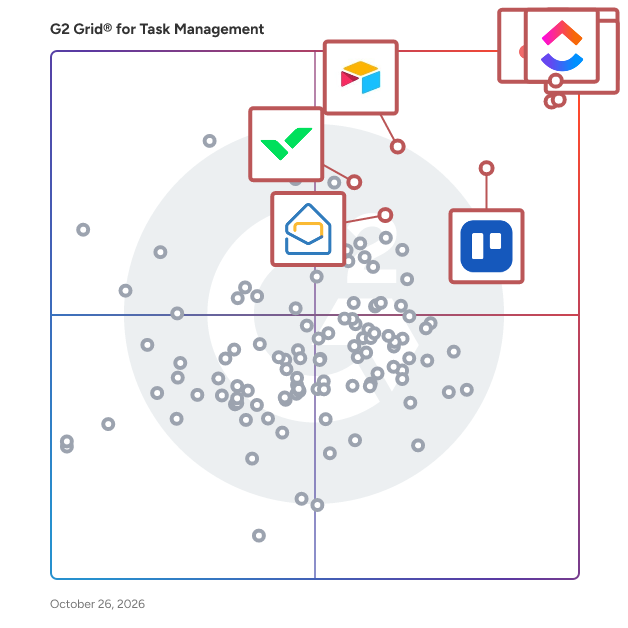
Highlighted products: Asana, ClickUp, monday AI Work Platform, Smartsheet, Trello, Airtable, Wrike, and Zoho Mail.
Underlying data: [Grid® JSON](https://www.g2.com/categories/task-management-software/grids.json?focus%5B%5D=asana&focus%5B%5D=clickup&focus%5B%5D=monday-com&focus%5B%5D=smartsheet&focus%5B%5D=trello&focus%5B%5D=airtable&focus%5B%5D=wrike&focus%5B%5D=zoho-mail)
Cubicl is a cloud-based work management, project planning, and CRM software designed to help businesses, remote teams, and growing companies streamline their daily operations, track tasks, and manage client relationships from a single centralized workspace. Built for simplicity and scalability, Cubicl eliminates the friction of juggling multiple disjointed tools by combining robust project tracking, time tracking, collaboration features, and customer relationship management into one unified platform. Key Features & Capabilities Task & Project Management: Organize work using customizable Kanban boards, list and workload views. Follow projects on Gantt and Time Charts. Break down complex projects into subtasks, assign responsibilities, and set clear deadlines to keep teams aligned. Integrated CRM: Manage sales pipelines, track client interactions, and maintain a clear history of client communications directly alongside your ongoing project deliverables. Time Tracking & Reporting: Monitor time spent on specific tasks and projects with built-in timers and manual logging. Generate detailed reports to analyze team productivity, labor distribution, and project health. Client Portal: Provide clients with secure, controlled access to view task progress, status updates, and files without exposing internal conversations or sensitive company data. Collaboration & Communication: Centralize team discussions with task-specific comments, real-time updates, and notifications to keep all project context searchable and accessible in one place. Document & File Sharing: Attach briefs, images, design files, and documents directly to relevant tasks and projects to ensure team members always have the right resources on hand. Flexible Views & Customization: Adapt the workspace to your team’s workflow with custom task fields, priority levels, and category tags tailored to your exact operational needs. Target Audience & Ideal Use Cases Small to Medium-Sized Businesses (SMBs): Companies looking to replace a stack of expensive, fragmented tools with a single, cost-effective platform to manage internal operations and client work. Marketing & Creative Agencies: Teams handling multiple client accounts simultaneously who need robust task delegation, time tracking, and client-facing status portals. Remote & Hybrid Teams: Distributed workforces requiring a reliable, cloud-based source of truth to maintain transparency, accountability, and seamless daily synchronization. Project Managers: Professionals seeking an intuitive work OS that reduces administrative overhead, minimizes status meetings, and provides clear visibility into team workloads. Benefits & Competitive Advantages Unified Workspace: Brings project management, team collaboration, and CRM together, removing the need for separate apps and reducing context switching. Intuitive Learning Curve: Features a clean, user-friendly interface that allows team members to get onboarded and productive within minutes rather than weeks. Transparent Client Collaboration: Bridges the gap between internal teams and external clients through dedicated portal controls, improving client satisfaction and trust. Actionable Insights: Delivers clear, data-driven visibility into time allocation and project bottlenecks, empowering managers to make informed operational decisions.
Cudo.co is a task management software to effectively organize work and achieve project objectives faster. Cudo.co saves a lot of time spent on sending e-mails with descriptions and attachments, numerous phone calls, meetings, plus it significantly increases satisfaction with effective cooperation.
Connect G2 to Claude or ChatGPT for answers grounded in G2's trusted reviews, comparisons, and pricing from real user insights.
Cupkey is a time based productivity and planning platform built to help people plan realistically and execute their work without overloading their day. Cupkey was created from a simple observation: traditional to-do lists help you track what needs to be done, but they don't tell you whether you actually have enough time to do it. Cupkey turns tasks into a realistic schedule based on your working hours, calendar commitments, breaks, and estimated task duration. With Google and Outlook calendar integration, automatic task scheduling, daily capacity limits, time tracking, estimate-vs-actual insights, streaks, and weekly productivity reports, Cupkey helps users understand what fits into their day and what needs to move. Its 80% default capacity limit leaves room for unexpected work and interruptions, while time tracking helps users improve their estimates over time based on how they actually work. Cupkey is designed for individuals and professionals who want to stop endlessly adding tasks to a list and start making better decisions about their time. Plan realistically. Execute consistently. Know where your time goes.
Cushion is a tool for freelancers to plan and manage their projects.
Darlean is an all-in-one platform designed for professional service businesses to maximize operational efficiency, reduce costs, and drive growth. With integrated tools for project management, communication, time tracking, and invoicing, you can run your business simply, efficiently, and at scale—without compromising service quality, from anywhere, at any time.
DayViewer is an online planner system comprising of multiple productivity tools and systems all inside one easy to use application. Businesses & professionals use for appointments, information management, notes, scheduling jobs and tasks. Plan daily to help manage you time and business and become more effective every day. DayViewer Team Rooms help management and collaboration in a team and is an excellent workforce management solution. Think of Team Rooms as a diary that everyone in the team can access and view what's happening and to stay synchronized.
Average Rating: 4.0/5.0
Total Reviews: 2
Rating: 4.0/5.0 stars
— Hira S.
Rating: 4.0/5.0 stars
— Verified User in Airlines/Aviation
DeloPulse is a free Telegram bot and Mini App for task control in work groups. A task assigned to several people gets a separate status for each assignee, and each one reports for themselves; the card in the group shows who accepted, who is working, who finished and who is late. The task closes after everyone reports. Tasks are created with the /task command in the group or with a form in the Mini App. Deadlines can be shared or set per person. The bot sends private reminders 24 hours, 3 hours and 1 hour before the deadline, only to people who have not reported, and posts one message in the group when a deadline is missed. Optional review lets the author accept a result or send it back. Recurring tasks, checklists, comments, attachments, a deadline calendar and per-person on-time statistics are included. No paid plans, no limits on members or tasks.
DevPlanner is a time planning and to-do list software that allows keeping track of projects, personal tasks, and other activities.
Done is an AI to-do list app with its own MCP server. Add tasks in plain language, then hand them to Claude, ChatGPT, Cursor or any MCP client. The agent posts its plan, progress and result to the task, and a task cannot be marked done until you approve it. Includes projects, tags, recurring tasks, subtasks, dependencies, Slack and Google Calendar integrations, and web, iPhone, iPad and Android apps. Free plan with 100 agent calls a month; Pro is $5/month for unlimited calls; Teams is $20/month with shared workspaces and teammate invites.
Dovilo is a to-do list, a focus timer and an isometric city builder in one app. Finishing a task or a focus session earns bricks, and bricks buy houses, offices, parks and roads for a city that grows as a record of work actually done. Nothing decays, and no streak punishes you for a quiet week. Free on iOS and Android: unlimited tasks, categories and focus sessions, Pomodoro (25 min focus, 5 min break), a basic city, basic statistics, dark and light themes, and five languages (English, Turkish, Spanish, French, German). Offline-first. No ads on any tier. Dovilo Pro ($2.49/month, $19.99/year or $49.99 lifetime, 7-day free trial) adds a separate AI task list for coding agents. Dovilo Desktop for Windows and macOS runs a local MCP server that Claude Code, Cursor, Claude Desktop, Windsurf, Codex CLI and Gemini CLI connect to. Agents get 9 tools scoped to one project: they read their tasks and report steps, notes, tokens and cost back, which you can follow from your phone. They cannot create or delete tasks and never see your personal list. The AI task list runs on a monthly quota. Pro also includes signed webhooks, cloud sync, advanced statistics, and both one-time packs: the Focus Ambience Pack (5 full-screen scenes, 12 sound layers) and the Full City Package. Not yet: data export and a remote MCP server are on the public roadmap.
Create amazing customer experiences. When you and your team have the visibility and tools to keep work flowing it creates better experiences for you, your team, and your customers. If you are sending individuals and teams to customer locations, then Dusk Field Service Management will make it easier for you to schedule, dispatch, track, and invoice work every day. Dusk FSM is Field Services Management reimagined! With Dusk FSM unlock: Power - Create better operations by automating how you schedule and dispatch work Visibility - Make it easy to manage teams and communicate progress to customers Control - Improve data quality, power better communications, and keep jobs on schedule Value - Increase cash flow by automating closeout-to-invoice cycles Whether you schedule work in the app or on your operations dashboard, your team will be able to communicate work status, progress, and challenges in real time. The app even provides turn-by-turn navigation and an advanced scheduler to make sure everyone knows where to go and when to be there. Managing field service operations with multiple tools, spreadsheets, and manual processes is complex and inefficient. It almost always results in incorrect and out-of-sync data. Dusk FSM is your single pane of glass; all of your jobs, projects and team communications are integrated into one single platform. For your business, that means better data, better work, and better results. If you're looking for easy field service management software, Dusk FSM is the product for you. Dusk FSM is Field Services Management reimagined!
