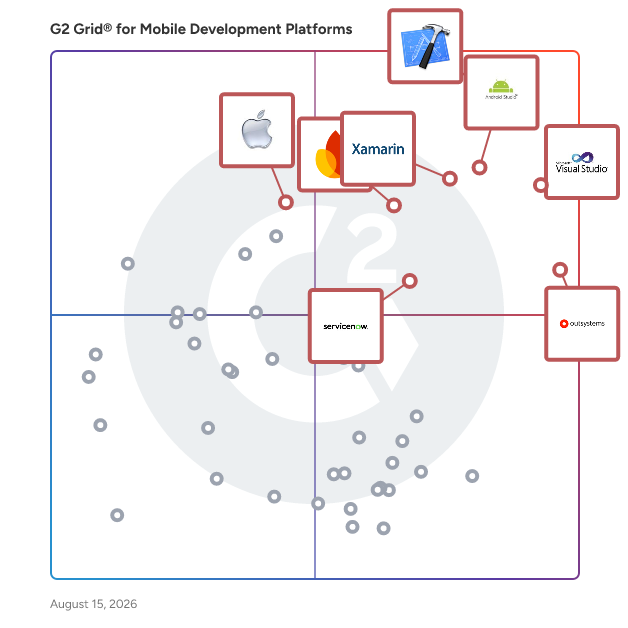
Total Products under this Category: 183
Last updated: July 17, 2026
Why You Can Trust G2's Software Rankings:
G2's software rankings are built on verified user reviews, rigorous moderation, and a consistent research methodology maintained by a team of analysts and data experts. Each product is measured using the same transparent criteria, with no paid placement or vendor influence. While reviews reflect real user experiences, which can be subjective, they offer valuable insight into how software performs in the hands of professionals. Together, these inputs power the G2 Score, a standardized way to compare tools within every category.
What do users say?
Users consistently praise the product for its ease of use and fast setup, allowing even non-technical users to quickly implement backends and manage databases. The integration of essential features li
Pros and Cons
Product Description
Convert Your Magento Store into a Native Android and iOS app with ease using MageNative Magento Mobile App Builder. The Magento App builder will replicate your store without compromising the website f
Pros and Cons
Product Description
Open source cross platform development tool allowing developers to write code in Java and automatically translates the code to native platforms e.g. iOS, Android etc.
What do users say?
Users consistently praise the product for its ease of use and ability to modernize legacy systems, making it easier to access AS400 servers through a browser-based interface. Many appreciate the quick
Product Description
Stacks is an AI builder that helps you build native mobile apps, websites, POS systems, and digital menus with a single prompt, all managed from a single dashboard. You're in control of each and ev
Product Description
Bravo Studio is a platform that uses Figma or Adobe XD app designs to create and maintain native mobile apps (both iOS and Android). These designs can be connected to APIs to deliver functionality, en
Product Description
The only Enterprise Open source platform that combines No code and Low code. The purpose of the platform : 1) Divide by 10 the software development cycles of IT teams (Low code). 2) Give busine
Product Description
Devum® empowers non-software developers to rapidly build enterprise-grade software solutions on their own. Devum® is a one-stop low-code platform that empowers businesses to build, deploy and manage t
Pros and Cons
Product Description
We design and develop engaging bespoke mobile apps for both iOS and Android. With our expertise we will create the perfect app to fit your needs, encompassing the perfect balance of user-oriented desi
Product Description
MobileCoderz is a leading Digital Transformation Company with years of expertise in mobile app development, website development, UI/UX design, eCommerce development, etc. We specialize in developing f
Product Description
Simba is a connectivity solution that provides business users with secure and dependable data access. With features such as real-time federation, cloud migration, and integration for transformation in
Pros and Cons
Mobile app usage is on the rise, and not just for personal use. Because of the huge volume of mobile devices currently in use—phones, tablets, etc.—businesses are designing mobile applications not only for sale or external profit but also for internal business use. For midsize and enterprise companies, as well as individuals with strong development knowledge, mobile development platforms are a key tool to make app desires a reality.
Mobile development platforms aim to bring together all the tools a developer would need to build an app from start to finish under one unified software offering. By using a mobile development platform, developers don’t have to worry about bouncing between different software for certain aspects of the mobile development lifecycle, which can lead to information loss or improper characterization of data.
Key Benefits of Mobile Development Platforms
Mobile development platforms help simplify the mobile development process by consolidating every key function and feature into one offering. Everything from planning to UI/UX design to testing can be done with a single piece of software.
Time savings — By using several pieces of software to cover the mobile development lifecycle, developers will likely spend a lot of time having to switch from software to software to work. They also may need to verify their code integrity with each switch to make sure each piece of software is using the latest version of the app or the most recent code changes. Alongside the learning curve of each new piece of software, hopping from solution to solution can be time-consuming and reduce time spent on other valuable components of the app.
Cost savings — Because developers using these platforms have to spend less time learning and switching between software to develop a mobile app, businesses can save on labor costs by using a mobile development platform. Additionally, the ability to use a single platform as opposed to several individual software offerings can save businesses money on both upfront and subscription software costs.
As the name of the product may suggest, mobile developers and development teams are the intended audience for these products. Mobile development platforms typically require at least some, if not intermediate, programming knowledge specifically around mobile development languages (e.g., C++, Swift, Java), which can make using this software fairly exclusive to developers. Those looking to develop an app but not having much or any development experience may want to use a low-code or no-code development platform instead.
Mobile development platforms differ by the mobile operating system (OS) they cater to.
Android — As of December 2018, the Android mobile OS held 54.4% of the market share in the United States. Android mobile development platforms cater specifically to this highly popular mobile OS, allowing developers to build mobile applications for a huge variety of Android-based devices.
iOS — Of the December 2018 remaining market share, 44.8% was held by Apple’s iOS. Unlike Android, which can be run on numerous hardware brands, iOS is proprietary software and only runs on Apple’s devices (iPhone, iPad, etc.). iOS mobile development platforms help companies cater to iOS users and verify that their apps will run well for users.
Other — The remaining 1% of U.S. market share is a mixed bag of other mobile OS with systems such as Blackberry and Microsoft. These mobile OS are typically designed for proprietary mobile hardware. The mobile development platforms built to handle these other OS keep in mind the strict requirements to run on these proprietary operating systems and hardware.
Hybrid — A class of mobile development platforms that might see growth in the future, hybrid platforms allow developers to build applications for multiple OS types on a single platform. Hybrid mobile development platforms help companies reach several audiences without having to build two or more separate but similar applications. Instead, they can build for multiple operating systems under the same platform, usually with HTML5, without loss of quality or scope.
While the following list is not exhaustive, these are the features you would typically find in a mobile development platform solution.
Front-end design tools — These tools typically comprise the user interface (UI) and user experience (UX) components of the app. Front-end design tools help companies and developers create an easy-to-use, engaging experience for the end user, aiming to minimize frustration and confusion while maximizing utility and feature quality.
Back-end design tools — While the front-end handles user interaction, the back-end handles the raw functionality of the app. Back-end design tools can include code editors, code libraries, snippet libraries, frameworks, and a vast array of other development resources that can be used towards constructing a mobile application.
Debugging — The process of finding errors in code, debugging allows developers to verify their app code is completely and correctly built out. It can be incredibly frustrating to compile code and have it fail without understanding why—debugging helps prevent that frustration.
App testing — While debugging can help identify syntactic errors in code, testing tools help find practical errors in an app’s function. Testing tools can help identify issues such as workflows that work syntactically but not practically, links that don’t properly launch, graphics that don’t load, and more. This function helps to create and maintain a quality user experience.
Integration capabilities — Some mobile development platforms offer an integration option—via plugins or APIs—with a variety of software, from product and project management offerings to service desk software and beyond. Software integration can help the overall development process be more fluid and unified through multiple departments or teams.
Learning curve — All development platforms are different, which can introduce issues when switching to a new platform. Developers will not only need to worry about building the app itself but also about how to use the platform. If switching to a new development platform, consider taking some time to train the devs on the platform and its features.
Feature saturation — As with any platform, it can be easy to get overwhelmed by the volume of features available. You might end up getting a platform that does far more than you need it to, which can end up being more distracting (and expensive) than helpful for some developers. Before purchasing a mobile development platform, work with your development team to see what features they might need in particular or what features might go to waste. This will help with making a better, more informed decision for your business needs.
Low-code development platforms — As previously mentioned, low-code development platforms are a good option for companies or developers that have at least some coding experience. While their capabilities aren’t as extensive as full-stack mobile development platforms, they offer the basic necessities to build an app from scratch.
No-code development platforms — The simplified version of low-code, no-code development platforms offer mobile app development capabilities for those with no development experience. Apps built with no-code platforms tend to be very lightweight and can lack feature depth due to the limitations around not using any code.
Drag and drop app builders — Drag and drop app builders function similarly to low-code or no-code platforms, but focus entirely on building an app through a drag-and-drop interface. These solutions tend not to be as feature-extensive as other platforms.