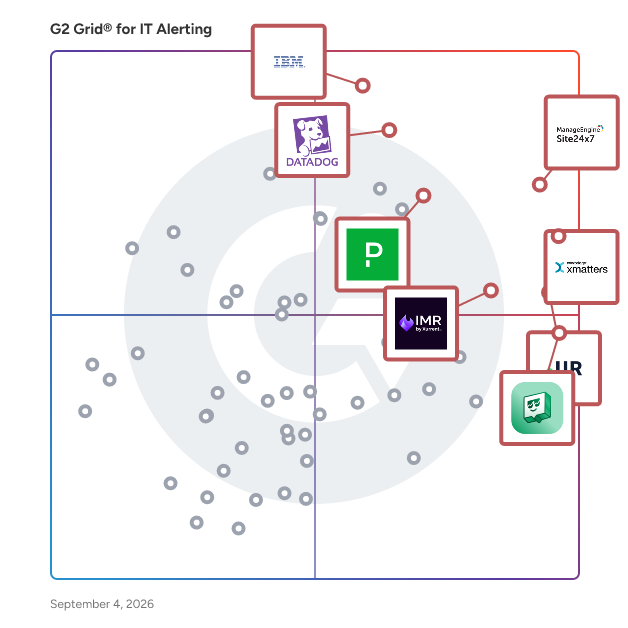
# Best IT Alerting Software

*By [Tian Lin](https://research.g2.com/insights/author/tian-lin)*


IT alerting software delivers notifications for IT systems failures. These tools will monitor systems for poor performance, infrastructure issues, and other IT management issues. These notifications may be delivered via email, SMS, or other means of communication. Companies use these tools to identify issues within their networks, IT infrastructure, and other IT systems to reduce downtime and prevent potential permanent damage. Some tools provide incident logging, historical records, or analysis features to expedite the resolution and recovery processes. [Network monitoring](https://www.g2.com/categories/network-monitoring) and [incident management](https://www.g2.com/categories/incident-management) software solutions have strong ties to IT alerting solutions, but provide a wider breadth of features. In addition to delivering incident notification alerts, network monitoring tools examine and optimize performance while providing detailed performance data for reporting. Incident management solutions provide tools to mitigate issues and standardize IT and DevOps workflows.

To qualify for inclusion in the IT Alerting category, a product must:

- Monitor IT systems for abnormalities
- Automate alerts for incidents
- Deliver notifications to system administrators


## Top IT Alerting Software at a Glance
| # | Product | Rating | Best For | What Users Say |
|---|---------|--------|----------|----------------|
| 1 | [xMatters](https://www.g2.com/products/xmatters/reviews) | 4.5/5.0 (767 reviews) | ServiceNow-integrated on-call escalation and incident paging | "[X-Matters Makes 2 AM Escalations Effortless with Reliable Multi-Channel Alerts](https://www.g2.com/survey_responses/xmatters-review-12974416)" |
| 2 | [IBM Instana](https://www.g2.com/products/ibm-instana/reviews) | 4.4/5.0 (468 reviews) | Real-time root cause tracing in microservices | "[Instant Service Discovery and Game-Changing Alerting for Faster Incident Response](https://www.g2.com/survey_responses/ibm-instana-review-12370400)" |
| 3 | [Site24x7](https://www.g2.com/products/site24x7/reviews) | 4.6/5.0 (427 reviews) | Proactive uptime monitoring with multi-channel alerting | "[Single Dashboard Monitoring That Makes Infrastructure Management Effortless](https://www.g2.com/survey_responses/site24x7-review-11331109)" |
| 4 | [Datadog](https://www.g2.com/products/datadog/reviews) | 4.4/5.0 (708 reviews) | Unified observability across cloud infrastructure and microservices | "[Easy Datadog Integration with Powerful, Insightful Dashboards](https://www.g2.com/survey_responses/datadog-review-12925009)" |
| 5 | [UptimeRobot](https://www.g2.com/products/uptimerobot/reviews) | 4.7/5.0 (288 reviews) | External uptime monitoring with instant downtime alerts | "[Simple, Reliable Monitoring with Instant Alerts—A Daily Essential](https://www.g2.com/survey_responses/uptimerobot-review-12541129)" |
| 6 | [Uptime.com](https://www.g2.com/products/uptime-com/reviews) | 4.6/5.0 (364 reviews) | External synthetic monitoring with global probe coverage | "[Reliable Real-Time Monitoring with Room for Growth](https://www.g2.com/survey_responses/uptime-com-review-12510484)" |
| 7 | [New Relic](https://www.g2.com/products/new-relic/reviews) | 4.4/5.0 (568 reviews) | Full-stack observability with distributed tracing | "[Real-Time Insights, Smooth Troubleshooting](https://www.g2.com/survey_responses/new-relic-review-12023699)" |
| 8 | [PagerDuty](https://www.g2.com/products/pagerduty/reviews) | 4.5/5.0 (935 reviews) | — | "[Reliable paging that keeps our Azure on-call rotation sane](https://www.g2.com/survey_responses/pagerduty-review-12831402)" |
| 9 | [Jira Service Management](https://www.g2.com/products/jira-service-management/reviews) | 4.3/5.0 (961 reviews) | ITSM ticketing with Atlassian ecosystem integration | "[Jira Service Management for Efficient Ticket Tracking and Support Workflow](https://www.g2.com/survey_responses/jira-service-management-review-12817846)" |
| 10 | [Xurrent IMR](https://www.g2.com/products/xurrent-imr/reviews) | 4.5/5.0 (180 reviews) | Multi-channel incident alerting with on-call automation | "[Streamlined Incident Management with Great GCP Integration and Support](https://www.g2.com/survey_responses/xurrent-imr-review-12908520)" |

---
## What Are the Most Common Questions About IT Alerting Software?
*AI-generated · Last updated: May 26, 2026*
### Which solution supports alert escalation workflows?
Based on G2 reviews, several IT alerting software products support alert escalation workflows, but xMatters appears repeatedly in recent feedback for automated escalation chains, fallback contacts, and routing alerts to backup responders when the primary contact does not respond. According to verified users, PagerDuty and SIGNL4 also help teams manage escalation paths and on-call response, especially for after-hours incidents and distributed teams. G2 reviewers mention that these tools reduce manual follow-up, clarify ownership, and help teams respond faster when incidents occur. Reviewers also note that setup quality and alert tuning matter, because poorly configured workflows can still create noise even when escalation features are strong.


### What platform provides analytics on alert resolution times?
Based on G2 reviews, xMatters is frequently mentioned for visibility into incident timelines, response data, and post-incident reporting that helps teams review how long it takes to acknowledge and work through alerts. According to verified users, PagerDuty and ITOC360 also provide incident timelines and reporting that support retrospective analysis and operational review. G2 reviewers mention that these capabilities are useful for tracking ownership, understanding who responded, and improving follow-up processes after incidents. Buyers should note that reviewers sometimes call out limits in deeper custom reporting, but the overall feedback shows these platforms help teams analyze alert handling and resolution workflows more clearly than relying on email or chat alone.


### Which tool supports IT alerting for cloud and on-premise systems?
Based on G2 reviews, Datadog supports IT alerting across both cloud and infrastructure environments by bringing logs, metrics, traces, and alerting into one platform. According to verified users, teams use it across AWS, GCP, servers, and distributed applications to centralize monitoring and incident response. G2 reviewers mention that Datadog helps unify visibility across modern environments, making it easier to spot problems and act before they escalate. Reviews also note broad integrations and support for multiple platforms, which is valuable for teams managing mixed deployments. Some users mention setup complexity and cost as tradeoffs, but the recurring feedback points to strong coverage for cloud and on-premise alerting needs.


### Which vendor offers AI-powered alert prioritization?
Based on G2 reviews, IBM Instana is frequently described as using smart or AI-based alerting to help teams reduce noise and focus on meaningful incidents. According to verified users, its alerting can learn normal behavior, correlate related events, and support faster root cause analysis when applications or infrastructure degrade. G2 reviewers mention that Dynatrace and PagerDuty also bring AI-driven features into alerting, including grouping related alerts, surfacing likely root causes, and helping teams prioritize what needs action first. Reviewers still note that tuning is important, since some AI-driven alerts can create false positives if configurations are not refined. Overall, the strongest AI-prioritization language in recent reviews appears around Instana and Dynatrace.


### Which IT alerting platform offers the fastest incident notifications?
Based on G2 reviews, PagerDuty is repeatedly described as fast and reliable for getting critical alerts to the right person through phone, SMS, app, and email notifications. According to verified users, teams value how quickly mobile alerts arrive and how escalation policies help prevent incidents from being missed. G2 reviewers mention similar strengths for xMatters and SIGNL4, especially for after-hours support and urgent notification delivery. The strongest pattern across reviews is that speed depends not only on the platform, but also on alert routing and tuning. Buyers looking for fast incident notifications should prioritize products that combine multi-channel delivery, dependable escalation, and simple on-call management rather than relying on email alone.


### What is the top-rated IT alerting software for enterprises?
Based on G2 reviews, enterprise buyers often highlight IBM Instana, xMatters, and PagerDuty for IT alerting software, with recurring praise for automation, integrations, on-call workflows, and incident response coordination. According to verified users, IBM Instana stands out for smart alerts, real-time visibility, and root cause analysis, while xMatters is often praised for escalation workflows and coordination, and PagerDuty for reliable alert delivery and on-call management. G2 reviewers mention that enterprise teams value centralized visibility, reduced alert fatigue, and integrations with broader monitoring and collaboration stacks. The best fit depends on whether the priority is observability-led alerting, incident orchestration, or responder management across large teams.

**Here are some of the top-rated products on G2:**

- [IBM Instana](https://www.g2.com/products/ibm-instana/reviews) – strong for smart alerts, root cause analysis, and real-time visibility across dynamic environments
- [xMatters](https://www.g2.com/products/xmatters/reviews) – well suited for escalation workflows, on-call coordination, and incident communication
- [PagerDuty](https://www.g2.com/products/pagerduty/reviews) – commonly used for reliable alert routing, scheduling, and fast incident response


### What is the best IT alerting tool for large-scale IT environments?
Based on G2 reviews, Datadog is a strong fit for large-scale IT environments because reviewers consistently describe it as a unified platform for monitoring infrastructure, applications, logs, and alerts across complex systems. According to verified users, it helps teams manage distributed environments, centralize visibility, and investigate incidents faster without jumping across multiple tools. G2 reviewers mention that it works well for large cloud footprints and multi-service architectures where observability and alerting need to stay connected. Other products like IBM Instana and New Relic are also mentioned for broad visibility, but Datadog appears especially well aligned with teams handling scale, diverse integrations, and high operational complexity.

**Here are some of the top-rated products on G2:**

- [Datadog](https://www.g2.com/products/datadog/reviews) – unified monitoring and alerting across cloud infrastructure, applications, and logs
- [IBM Instana](https://www.g2.com/products/ibm-instana/reviews) – useful for dynamic microservices environments with smart alerts and root cause analysis
- [New Relic](https://www.g2.com/products/new-relic/reviews) – helps large teams monitor applications, infrastructure, and user experience in one place


### What platform integrates IT alerting with monitoring systems?
Based on G2 reviews, xMatters is consistently described as a platform that integrates IT alerting with monitoring systems and communication workflows. According to verified users, it connects with tools such as ServiceNow, Splunk, Jira, Slack, and other monitoring platforms to automate routing, escalation, and incident collaboration. G2 reviewers mention that it helps centralize incident response by tying alerts from monitoring systems to the right people and actions. PagerDuty, Opsgenie, and SIGNL4 are also mentioned for connecting alerts from multiple sources, but xMatters stands out in recent reviews for workflow-driven integrations and alert orchestration. Buyers should still expect some setup effort for more advanced or custom workflows.


### Which vendor provides multi-channel alert delivery?
Based on G2 reviews, PagerDuty is one of the clearest examples of a vendor providing multi-channel alert delivery. According to verified users, it reliably sends alerts through phone calls, SMS, email, mobile push, and integrations with collaboration tools, helping teams avoid missed incidents. G2 reviewers mention that xMatters, SIGNL4, and OnPage also support multi-channel delivery, especially for urgent after-hours communication and on-call response. The main buyer takeaway from reviews is that multi-channel coverage matters most when teams need dependable escalation and rapid acknowledgment across shifts. Reviewers also note that alert tuning is still important, because broad delivery options can create noise if routing rules are not configured carefully.


### What is the most affordable IT alerting system for SMBs?
Based on G2 reviews, SMB buyers looking for affordable IT alerting software often mention UptimeRobot, Site24x7, and Better Stack because reviewers repeatedly describe them as cost-effective, easy to set up, and practical for smaller teams. According to verified users, these tools help monitor uptime, websites, APIs, and services without the heavier cost or complexity often associated with enterprise-focused platforms. G2 reviewers mention generous free plans, straightforward setup, and useful alerts as major strengths for growing businesses. While they may not cover every advanced incident orchestration need, they are consistently described as strong options for teams that want reliable alerting with simpler administration and lower budget pressure.

**Here are some of the top-rated products on G2:**

- [UptimeRobot](https://www.g2.com/products/uptimerobot/reviews) – popular for easy website and service uptime alerts with a generous free option
- [Site24x7](https://www.g2.com/products/site24x7/reviews) – useful for affordable all-in-one monitoring across sites, servers, and services
- [Better Stack](https://www.g2.com/products/better-stack/reviews) – praised for simple setup, clean monitoring workflows, and real-time alerting


## How Many IT Alerting Software Products Does G2 Track?
**Total Products under this Category:** 120

### Category Stats (Jun 2026)
- **Average Rating**: 4.55/5 The average rating of products in this category, based on all submitted ratings
- **Top Trending Product**: Amazon Simple Notification Service (SNS) (+0.23%) - Among all products in this category, Amazon Simple Notification Service (SNS) recorded the largest rating increase compared to last month
*Last updated: June 23, 2026*


## How Does G2 Rank IT Alerting Software Products?

**Why You Can Trust G2's Software Rankings:**

- 30 Analysts and Data Experts
- 14,500+ Authentic Reviews
- 120+ Products
- Unbiased Rankings

G2's software rankings are built on verified user reviews, rigorous moderation, and a consistent research methodology maintained by a team of analysts and data experts. Each product is measured using the same transparent criteria, with no paid placement or vendor influence. While reviews reflect real user experiences, which can be subjective, they offer valuable insight into how software performs in the hands of professionals. Together, these inputs power the G2 Score, a standardized way to compare tools within every category.


## Which IT Alerting Software Is Best for Your Use Case?

- **Leader:** [xMatters](https://www.g2.com/products/xmatters/reviews)
- **Highest Performer:** [Uptime.com](https://www.g2.com/products/uptime-com/reviews)
- **Easiest to Use:** [xMatters](https://www.g2.com/products/xmatters/reviews)
- **Top Trending:** [Dash0](https://www.g2.com/products/dash0/reviews)
- **Best Free Software:** [Dynatrace](https://www.g2.com/products/dynatrace/reviews)


---

**Sponsored**

### Status.io

Status.io is a status page management and incident communication software solution that helps organizations communicate system health, service disruptions, and maintenance events to customers and stakeholders through hosted status pages. Status.io is a type of status page and incident communication solution that helps SaaS providers, DevOps teams, enterprise IT departments, and API providers maintain transparent communication with users during service outages and planned maintenance windows. The platform serves organizations that need to reduce support ticket volume during incidents, maintain customer trust through proactive status updates, and automate status communication through integrations with existing monitoring infrastructure. The software enables users to create and manage public or private status pages that display real-time system health, component-level status information, performance metrics, active incidents, and scheduled maintenance events. Status pages operate on infrastructure separate from the user&#39;s primary systems, ensuring availability during outages. The platform supports customization through design tools or custom HTML, CSS, and JavaScript to align status pages with organizational branding. • \*\*Status Page Management\*\*: Create branded status pages displaying overall system health, component status for websites, APIs, mobile apps, and services, real-time performance metrics, active incidents, scheduled maintenance, and historical status updates • \*\*Incident and Maintenance Tracking\*\*: Create, update, and resolve incidents with automatic component status updates, schedule maintenance windows with automated subscriber reminders, and maintain comprehensive event history timelines • \*\*Multi-Channel Notifications\*\*: Send unlimited notifications via email, SMS, webhooks, RSS feeds, iCalendar, IRC, Microsoft Teams, Slack, and Twitter/X, with subscriber preference management for notification channels • \*\*Monitoring Tool Integrations\*\*: Automate status updates through integrations with monitoring and alerting tools including Nagios, New Relic, OpsGenie, PagerDuty, Pingdom, Site24x7, StatusCake, UptimeRobot, Datadog, LogicMonitor, Dynatrace, and Zabbix, with support for custom integrations via Developer API • \*\*Metrics and Analytics\*\*: Display live performance charts using real-time data from Custom Metric API or external sources, tracking response times, uptime percentages, and other performance indicators • \*\*Developer API Access\*\*: Provide programmatic access to status information through public Status API returning JSON format data, enabling API consumers to handle service disruptions programmatically in applications • \*\*Enterprise Security Features\*\*: Support for private status pages with single sign-on authentication via OIDC or SAML Identity Providers including OneLogin, Auth0, Okta, Azure AD, and Google Workspace, with optional IP Access Control The platform infrastructure is distributed across multiple geographic regions and cloud providers to maintain availability and redundancy. Status pages remain accessible when primary infrastructure experiences outages, providing a communication channel during critical incidents. The solution serves organizations ranging from startups to large enterprises managing complex, multi-tenant infrastructure.


[Visit website](https://www.g2.com/external_clickthroughs/record?secure%5Bad_program%5D=ppc&amp;secure%5Bad_slot%5D=category_product_list&amp;secure%5Bcategory_id%5D=1236&amp;secure%5Bdisplayable_resource_id%5D=1236&amp;secure%5Bdisplayable_resource_type%5D=Category&amp;secure%5Bmedium%5D=sponsored&amp;secure%5Bplacement_reason%5D=page_category&amp;secure%5Bplacement_resource_ids%5D%5B%5D=1236&amp;secure%5Bprioritized%5D=false&amp;secure%5Bproduct_id%5D=84907&amp;secure%5Bresource_id%5D=1236&amp;secure%5Bresource_type%5D=Category&amp;secure%5Bsource_type%5D=category_page&amp;secure%5Bsource_url%5D=https%3A%2F%2Fwww.g2.com%2Fcategories%2Fit-alerting%3Fpage%3D8&amp;secure%5Btoken%5D=a1d18a225c95e62f5f5991cac1fd82fc941d297b23d29453ca31f5e9d62dfcaf&amp;secure%5Burl%5D=https%3A%2F%2Fstatus.io%2F%3Futm_source%3Dg2%26utm_medium%3Dpaid%26utm_campaign%3Dprofile&amp;secure%5Burl_type%5D=custom_url)

---

## What Are the Top-Rated IT Alerting Software Products in 2026?
### 1. [xMatters](https://www.g2.com/products/xmatters/reviews)
xMatters end-to-end incident management platform automates each step of the incident lifecycle—from event to resolution—reducing the frequency, duration, and cost of critical service disruptions. xMatters Purpose-built AI significantly slashes resolution times with seamless integration across any DevOps or ITSM toolchain, ensuring every team has the necessary context to avert disruptions before they occur. We partner with our customers to create workflows that lower MTTA/MTTR, increase customer and employee satisfaction, and improve compliance and reporting. Build operational resilience into your digital services and automate responses all the way to resolution with Everbridge xMatters.


**Average Rating:** 4.5/5.0
**Total Reviews:** 767
**How Do G2 Users Rate xMatters?**

- **Has the product been a good partner in doing business?:** 9.3/10 (Category avg: 9.0/10)
- **Quality of Support:** 9.1/10 (Category avg: 9.0/10)
- **Ease of Use:** 8.9/10 (Category avg: 8.9/10)
- **Ease of Admin:** 8.8/10 (Category avg: 8.7/10)

**Who Is the Company Behind xMatters?**

- **Seller:** [Everbridge](https://www.g2.com/sellers/everbridge)
- **Company Website:** https://www.everbridge.com
- **Year Founded:** 2002
- **HQ Location:** Vienna, VA
- **Twitter:** @Everbridge (4,786 Twitter followers)
- **LinkedIn® Page:** https://www.linkedin.com/company/33883 (1,609 employees on LinkedIn®)

**Who Uses This Product?**
- **Who Uses This:** Software Engineer, Incident Manager
- **Top Industries:** Information Technology and Services, Financial Services
- **Company Size:** 58% Enterprise, 27% Mid-Market


#### What Are xMatters's Pros and Cons?

**Pros:**

- Alerting System (62 reviews)
- Ease of Use (54 reviews)
- Alert Management (50 reviews)
- Automation (43 reviews)
- Notifications (40 reviews)

**Cons:**

- Complexity (26 reviews)
- Learning Curve (22 reviews)
- Alert Issues (17 reviews)
- Complex Setup (16 reviews)
- Difficult Setup (16 reviews)


### What Do G2 Reviewers Say About xMatters?
*AI-generated summary from verified user reviews*

**Pros:**

- Users value the **reliable and fast incident notifications** of xMatters, enhancing communication during critical situations.
- Users value the **ease of use** of xMatters, highlighting its intuitive interface and efficient task automation.
- Users value the **effective alert management** of xMatters, ensuring timely communication and streamlined incident response across teams.
- Users value the **powerful automation** of xMatters for streamlining incident management and enhancing workflow efficiency.
- Users value the **timely notification alerts** from xMatters, enhancing their responsiveness and overall efficiency.

**Cons:**

- Users find the **steep learning curve** of xMatters challenging, particularly during initial setup and complex integrations.
- Users face a **steep learning curve** with xMatters&#39; administrative interface, complicating initial configuration and setup.
- Users often face **alert issues** with xMatters, leading to potential mistakes and slow notifications, especially under pressure.
- Users face a **complex setup** that presents a steep learning curve and challenges in configuring workflows effectively.
- Users find the **difficult setup** of xMatters challenging, impacting timely notifications and requiring extra attention from managers.

#### What Are Recent G2 Reviews of xMatters?

**"[X-Matters Makes 2 AM Escalations Effortless with Reliable Multi-Channel Alerts](https://www.g2.com/survey_responses/xmatters-review-12974416)"**

**Rating:** 5.0/5.0 stars
*— Alexander P.*

[Read full review](https://www.g2.com/survey_responses/xmatters-review-12974416)

---

**"[No-Code Flow Designer and Reliable Multi-Channel Escalations](https://www.g2.com/survey_responses/xmatters-review-12874202)"**

**Rating:** 5.0/5.0 stars
*— Zuhaib I.*

[Read full review](https://www.g2.com/survey_responses/xmatters-review-12874202)

---


#### What Are G2 Users Discussing About xMatters?

- [What is xMatters used for?](https://www.g2.com/discussions/what-is-xmatters-used-for) - 1 comment

### 2. [IBM Instana](https://www.g2.com/products/ibm-instana/reviews)
IBM Instana, now part of the Concert platform, discovers and maps all services, infrastructure, and their inter-dependencies automatically. Instana ingests all observability metrics, traces each request, profiles every process, and updates application dependency maps in real-time to deliver the context and actionable feedback needed by DevOps to optimize application performance, enable innovation and mitigate risk to help them add value and efficiency to the pipeline. IBM Instana is available on AWS Marketplace.


**Average Rating:** 4.4/5.0
**Total Reviews:** 468
**How Do G2 Users Rate IBM Instana?**

- **Has the product been a good partner in doing business?:** 8.5/10 (Category avg: 9.0/10)
- **Quality of Support:** 8.6/10 (Category avg: 9.0/10)
- **Ease of Use:** 8.6/10 (Category avg: 8.9/10)
- **Ease of Admin:** 8.4/10 (Category avg: 8.7/10)

**Who Is the Company Behind IBM Instana?**

- **Seller:** [IBM](https://www.g2.com/sellers/ibm)
- **Company Website:** https://www.ibm.com
- **Year Founded:** 1911
- **HQ Location:** Armonk, New York, United States
- **Twitter:** @IBMSecurity (74,660 Twitter followers)
- **LinkedIn® Page:** https://www.linkedin.com/company/1009/ (328,202 employees on LinkedIn®)

**Who Uses This Product?**
- **Who Uses This:** Software Engineer, System Engineer
- **Top Industries:** Information Technology and Services, Computer Software
- **Company Size:** 41% Mid-Market, 36% Enterprise


#### What Are IBM Instana's Pros and Cons?

**Pros:**

- Ease of Use (126 reviews)
- Monitoring (116 reviews)
- Real-time Monitoring (106 reviews)
- Monitoring Capabilities (99 reviews)
- Easy Setup (65 reviews)

**Cons:**

- Expensive (43 reviews)
- User Interface Issues (41 reviews)
- Learning Curve (40 reviews)
- Difficult Learning (36 reviews)
- Pricing Issues (36 reviews)


### What Do G2 Reviewers Say About IBM Instana?
*AI-generated summary from verified user reviews*

**Pros:**

- Users praise the **ease of use** of IBM Instana, detailing effortless monitoring and seamless integration.
- Users appreciate the **effortless monitoring** of complex applications with IBM Instana, enhancing productivity and analysis accuracy.
- Users value the **real-time monitoring** capabilities of IBM Instana, enhancing efficiency in tracking and resolving application issues.
- Users appreciate the **effortless monitoring capabilities** of IBM Instana, enabling quick root cause analysis and easy navigation.
- Users appreciate the **easy setup** of IBM Instana, enabling effortless monitoring of complex applications with minimal configuration.

**Cons:**

- Users find the **pricing to be expensive** , especially as their infrastructure grows, making it a potential barrier.
- Users report **user interface issues** that contribute to a steep learning curve and confusion in data analysis.
- Users face a notable **learning curve** with IBM Instana, making setup and customization challenging for some.
- Users find the **difficult learning** curve challenging, especially with complex features that can confuse new users.
- Users are concerned about **high pricing** as IBM Instana scales, which can be challenging for startups and large deployments.

#### What Are Recent G2 Reviews of IBM Instana?

**"[Instant Service Discovery and Game-Changing Alerting for Faster Incident Response](https://www.g2.com/survey_responses/ibm-instana-review-12370400)"**

**Rating:** 4.5/5.0 stars
*— Sabina K.*

[Read full review](https://www.g2.com/survey_responses/ibm-instana-review-12370400)

---

**"[Powerful Analytics and Automation Drive Exceptional Performance](https://www.g2.com/survey_responses/ibm-instana-review-12064579)"**

**Rating:** 4.5/5.0 stars
*— Konjengbam  M.*

[Read full review](https://www.g2.com/survey_responses/ibm-instana-review-12064579)

---


#### What Are G2 Users Discussing About IBM Instana?

- [What is Application Performance Monitoring (APM)?](https://www.g2.com/discussions/what-is-application-performance-monitoring-apm) - 2 comments
- [What is Instana?](https://www.g2.com/discussions/instana-what-is-instana)
- [What is Instana?](https://www.g2.com/discussions/what-is-instana) - 2 comments

### 3. [Site24x7](https://www.g2.com/products/site24x7/reviews)
ManageEngine Site24x7 offers unified cloud monitoring for DevOps and IT operations within small to large organizations. The solution monitors the experience of real users accessing websites and applications from desktop and mobile devices. In-depth monitoring capabilities enable DevOps teams to monitor and troubleshoot applications, servers and network infrastructure, including private and public clouds. End-user experience monitoring is done from more than 100 locations across the world and various wireless carriers.


**Average Rating:** 4.6/5.0
**Total Reviews:** 427
**How Do G2 Users Rate Site24x7?**

- **Has the product been a good partner in doing business?:** 8.9/10 (Category avg: 9.0/10)
- **Quality of Support:** 8.7/10 (Category avg: 9.0/10)
- **Ease of Use:** 8.8/10 (Category avg: 8.9/10)
- **Ease of Admin:** 8.8/10 (Category avg: 8.7/10)

**Who Is the Company Behind Site24x7?**

- **Seller:** [Zoho](https://www.g2.com/sellers/zoho-b00ca9d5-bca8-41b5-a8ad-275480841704)
- **Year Founded:** 1996
- **HQ Location:** Austin, TX
- **Twitter:** @Zoho (137,880 Twitter followers)
- **LinkedIn® Page:** https://www.linkedin.com/company/38373/ (30,766 employees on LinkedIn®)
- **Phone:** +1 (888) 900-9646 

**Who Uses This Product?**
- **Who Uses This:** CEO, CTO
- **Top Industries:** Information Technology and Services, Computer Software
- **Company Size:** 45% Mid-Market, 43% Small-Business


#### What Are Site24x7's Pros and Cons?

**Pros:**

- Ease of Use (78 reviews)
- Monitoring (73 reviews)
- Real-time Monitoring (61 reviews)
- Monitoring Features (52 reviews)
- Monitoring Services (49 reviews)

**Cons:**

- Complexity (25 reviews)
- Alert Issues (23 reviews)
- Learning Curve (21 reviews)
- Expensive (20 reviews)
- Not User-Friendly (18 reviews)


### What Do G2 Reviewers Say About Site24x7?
*AI-generated summary from verified user reviews*

**Pros:**

- Users highlight the **ease of use** of Site24x7, enjoying straightforward setup and effective multi-location monitoring.
- Users appreciate the **single pane of glass visibility** offered by Site24x7, making monitoring a seamless experience.
- Users value the **real-time monitoring** of Site24x7, appreciating timely alerts and centralized oversight of various services.
- Users value the **monitoring features** of Site24x7, enabling comprehensive insights across their entire infrastructure from various locations.
- Users value the **timely alerts and comprehensive monitoring capabilities** of Site24x7 for effective infrastructure oversight.

**Cons:**

- Users find **billing complexity** increases with growth, and navigating features requires time to learn the platform effectively.
- Users often face **alert issues** with excessive and repetitive notifications, complicating the monitoring experience.
- Users find the **learning curve challenging** , as the complexity can lead to confusion and increased costs.
- Users find the pricing of Site24x7 to be **expensive and confusing** , especially when adding monitors and add-ons.
- Users feel the **interface is not user-friendly** , finding it overwhelming due to the numerous available options.

#### What Are Recent G2 Reviews of Site24x7?

**"[Significantly more satisfied with Site24x7: Clear mobile app with a clear status overview](https://www.g2.com/survey_responses/site24x7-review-12980837)"**

**Rating:** 4.5/5.0 stars
*— Verified User in Consumer Goods*

[Read full review](https://www.g2.com/survey_responses/site24x7-review-12980837)

---

**"[Single Dashboard Monitoring That Makes Infrastructure Management Effortless](https://www.g2.com/survey_responses/site24x7-review-11331109)"**

**Rating:** 4.5/5.0 stars
*— Kavikumar N.*

[Read full review](https://www.g2.com/survey_responses/site24x7-review-11331109)

---


#### What Are G2 Users Discussing About Site24x7?

- [What is the use of network monitoring tool?](https://www.g2.com/discussions/what-is-the-use-of-network-monitoring-tool)
- [What is Site24x7?](https://www.g2.com/discussions/what-is-site24x7) - 1 comment
- [What are the key features of network monitoring tool?](https://www.g2.com/discussions/what-are-the-key-features-of-network-monitoring-tool)
- [What is the use of Site24x7?](https://www.g2.com/discussions/what-is-the-use-of-site24x7) - 1 comment

### 4. [Datadog](https://www.g2.com/products/datadog/reviews)
Datadog is the monitoring, security and analytics platform for developers, IT operations teams, security engineers and business users in the cloud age. The SaaS platform integrates and automates infrastructure monitoring, application performance monitoring and log management to provide unified, real-time observability of our customers&#39; entire technology stack. Datadog is used by organizations of all sizes and across a wide range of industries to enable digital transformation and cloud migration, drive collaboration among development, operations, security and business teams, accelerate time to market for applications, reduce time to problem resolution, secure applications and infrastructure, understand user behavior and track key business metrics.


**Average Rating:** 4.4/5.0
**Total Reviews:** 708
**How Do G2 Users Rate Datadog?**

- **Has the product been a good partner in doing business?:** 8.5/10 (Category avg: 9.0/10)
- **Quality of Support:** 8.4/10 (Category avg: 9.0/10)
- **Ease of Use:** 8.2/10 (Category avg: 8.9/10)
- **Ease of Admin:** 8.3/10 (Category avg: 8.7/10)

**Who Is the Company Behind Datadog?**

- **Seller:** [Datadog](https://www.g2.com/sellers/datadog)
- **Company Website:** https://www.datadoghq.com/
- **Year Founded:** 2010
- **HQ Location:** New York
- **Twitter:** @datadoghq (51,207 Twitter followers)
- **LinkedIn® Page:** https://www.linkedin.com/company/1066442/ (9,386 employees on LinkedIn®)

**Who Uses This Product?**
- **Who Uses This:** Software Engineer, DevOps Engineer
- **Top Industries:** Computer Software, Information Technology and Services
- **Company Size:** 47% Mid-Market, 34% Enterprise


#### What Are Datadog's Pros and Cons?

**Pros:**

- Ease of Use (158 reviews)
- Monitoring (150 reviews)
- Real-time Monitoring (129 reviews)
- Features (98 reviews)
- Analytics (94 reviews)

**Cons:**

- Expensive (102 reviews)
- Pricing Issues (81 reviews)
- Learning Curve (75 reviews)
- Cost (72 reviews)
- Learning Difficulty (56 reviews)


### What Do G2 Reviewers Say About Datadog?
*AI-generated summary from verified user reviews*

**Pros:**

- Users appreciate the **user-friendly design** of Datadog, making dashboard setup and analysis seamless and intuitive.
- Users appreciate the **convenient UI integration** of Datadog, enabling effective monitoring and insights across various environments.
- Users appreciate the **real-time monitoring** capabilities of Datadog, enhancing visibility across applications and infrastructure.
- Users appreciate the **ease of use and robust features** of Datadog, enhancing monitoring and management tasks efficiently.
- Users commend the **user-friendly analytics** of Datadog, appreciating its integration and intuitive dashboard creation.

**Cons:**

- Users find the **subscription costs of Datadog too high** , wishing for more affordability and better value for money.
- Users express concerns about **pricing issues** as costs can escalate quickly and unexpectedly, particularly for logs.
- Users face a challenging **learning curve** with Datadog, making it difficult to keep up with new features.
- Users find Datadog&#39;s **cost burdensome** , expressing concerns over rapidly increasing and unpredictable pricing structures.
- Users find **learning difficulty** in Datadog, especially new users needing training to navigate its complex features.

#### What Are Recent G2 Reviews of Datadog?

**"[Easy Datadog Integration with Powerful, Insightful Dashboards](https://www.g2.com/survey_responses/datadog-review-12925009)"**

**Rating:** 5.0/5.0 stars
*— Gunther C.*

[Read full review](https://www.g2.com/survey_responses/datadog-review-12925009)

---

**"[Unified Observability with Powerful Integrations and Fast Root Cause Analysis](https://www.g2.com/survey_responses/datadog-review-12783228)"**

**Rating:** 4.5/5.0 stars
*— Ravindra N.*

[Read full review](https://www.g2.com/survey_responses/datadog-review-12783228)

---


#### What Are G2 Users Discussing About Datadog?

- [How good is Datadog?](https://www.g2.com/discussions/how-good-is-datadog)
- [Does Datadog use AWS?](https://www.g2.com/discussions/does-datadog-use-aws) - 2 comments
- [What can Datadog monitor?](https://www.g2.com/discussions/what-can-datadog-monitor)
- [What is the use of Datadog?](https://www.g2.com/discussions/what-is-the-use-of-datadog) - 3 comments

### 5. [UptimeRobot](https://www.g2.com/products/uptimerobot/reviews)
The free online uptime monitoring service with an App available for iOS and Android (https://uptimerobot.com). With the Free Plan, you can monitor up to 50 URLs, check for the content of a website (using the keyword monitor), ping your server or monitor your ports in 5-minute intervals. You can create a status page to showcase your uptime. SMS or Call alerts can be bought anytime. Receive notifications via email, phone call, SMS, or integrations like Microsoft Teams, Telegram, Slack, Twitter, Zapier, Pagerduty, Splunk On-Call, Pushbullet, Webhooks, Google Chat, or Pushover. Upgrade to Pro to get more monitors, 1-minute intervals, unlimited status pages that you can customize, share announcements on your status page to which your customers can subscribe and receive them via email. With the Pro Plan, you can monitor SSL certificates or use the Heartbeat monitor to keep an eye on your cron jobs. Adjust and manage your monitoring with maintenance windows or advanced notifications, to avoid getting alerts during maintenance, or to receive notifications after a certain time of downtime.


**Average Rating:** 4.7/5.0
**Total Reviews:** 288
**How Do G2 Users Rate UptimeRobot?**

- **Has the product been a good partner in doing business?:** 9.5/10 (Category avg: 9.0/10)
- **Quality of Support:** 9.3/10 (Category avg: 9.0/10)
- **Ease of Use:** 9.6/10 (Category avg: 8.9/10)
- **Ease of Admin:** 9.5/10 (Category avg: 8.7/10)

**Who Is the Company Behind UptimeRobot?**

- **Seller:** [Uptime Robot](https://www.g2.com/sellers/uptime-robot)
- **Year Founded:** 2010
- **HQ Location:** Sliema, Malta
- **Twitter:** @uptimerobot (17,426 Twitter followers)
- **LinkedIn® Page:** https://www.linkedin.com/company/9396064/ (16 employees on LinkedIn®)

**Who Uses This Product?**
- **Who Uses This:** CEO, Founder
- **Top Industries:** Information Technology and Services, Computer Software
- **Company Size:** 70% Small-Business, 20% Mid-Market


#### What Are UptimeRobot's Pros and Cons?

**Pros:**

- Notifications (71 reviews)
- Easy Setup (67 reviews)
- Monitoring (61 reviews)
- Ease of Use (52 reviews)
- Reliability (51 reviews)

**Cons:**

- Inadequate Notifications (20 reviews)
- Plan Limitations (13 reviews)
- Expensive (9 reviews)
- Poor UI (9 reviews)
- Limited Monitoring (8 reviews)


### What Do G2 Reviewers Say About UptimeRobot?
*AI-generated summary from verified user reviews*

**Pros:**

- Users love the **instant notifications** from UptimeRobot, enhancing customer service and allowing proactive issue management.
- Users love the **easy setup** of UptimeRobot, enabling quick and effective monitoring in just seconds.
- Users appreciate the **instant monitoring** of UptimeRobot, as it effectively alerts them about website downtimes swiftly.
- Users love the **ease of use** of UptimeRobot, highlighting its simple setup and timely notifications.
- Users value the **reliability** of UptimeRobot, ensuring their services remain online and issues are addressed promptly.

**Cons:**

- Users express frustration over **inadequate notifications** , including multiple emails and missed alerts for service downtime.
- Users find UptimeRobot&#39;s **plan limitations** frustrating, particularly regarding monitor intervals and the number of available monitors.
- Users find UptimeRobot&#39;s pricing **expensive** , especially with limitations on alerts and external notifications.
- Users find UptimeRobot&#39;s **poor UI** challenging, with confusion caused by multiple versions and occasional glitches affecting usability.
- Users find the **monitoring capabilities limited** , lacking support for internal parameters and complex setups.

#### What Are Recent G2 Reviews of UptimeRobot?

**"[Simple, Reliable Uptime Monitoring That Just Works](https://www.g2.com/survey_responses/uptimerobot-review-12671436)"**

**Rating:** 4.0/5.0 stars
*— Javier C.*

[Read full review](https://www.g2.com/survey_responses/uptimerobot-review-12671436)

---

**"[Simple, Reliable Monitoring with Instant Alerts—A Daily Essential](https://www.g2.com/survey_responses/uptimerobot-review-12541129)"**

**Rating:** 5.0/5.0 stars
*— maha n.*

[Read full review](https://www.g2.com/survey_responses/uptimerobot-review-12541129)

---


#### What Are G2 Users Discussing About UptimeRobot?

- [What are the benefits and drawbacks of using UptimeRobot for website uptime monitoring?](https://www.g2.com/discussions/what-are-the-benefits-and-drawbacks-of-using-uptimerobot-for-website-uptime-monitoring) - 1 comment
- [Where is UptimeRobot located?](https://www.g2.com/discussions/where-is-uptimerobot-located) - 1 comment
- [Is UptimeRobot down?](https://www.g2.com/discussions/is-uptimerobot-down)
- [How do I cancel UptimeRobot?](https://www.g2.com/discussions/how-do-i-cancel-uptimerobot) - 1 upvote
- [How do I use UptimeRobot?](https://www.g2.com/discussions/how-do-i-use-uptimerobot)

### 6. [Uptime.com](https://www.g2.com/products/uptime-com/reviews)
Uptime.com provides comprehensive, unified visibility into the availability and performance of critical services. Monitoring tools empower engineering, operations and SRE teams to maintain oversight of their web stack and respond to outages through customizable alerting channels. Uptime.com offers a broad set of monitoring capabilities, including web, network, and email. API and transaction checks offer synthetic monitoring to perform multi-step validations of critical flows and services. Monitor public and private resources through a unified interface that streamlines configuration and alerting. Set up and customize Status Pages with your company branding to communicate incidents and maintenance to both customers and internal teams. Provide a single-page overview that shows your overall service health at a glance. Robust and customizable SLA reporting allows stakeholders to stay informed on incidents and downtime. Scheduled Reports send a breakdown of monitoring status at your chosen frequency and timing. Simple &amp; intuitive industry leading Enterprise-grade features delivered at a fair price, that are continuously improving. Used by small and large businesses, Uptime.com&#39;s services scale to any organizational size and structure. G2, Sourceforge and TechRadar Pro have recognized Uptime.com as one of the world’s best uptime monitors for several consecutive years, including current awards.


**Average Rating:** 4.6/5.0
**Total Reviews:** 364
**How Do G2 Users Rate Uptime.com?**

- **Has the product been a good partner in doing business?:** 9.3/10 (Category avg: 9.0/10)
- **Quality of Support:** 9.2/10 (Category avg: 9.0/10)
- **Ease of Use:** 9.2/10 (Category avg: 8.9/10)
- **Ease of Admin:** 9.0/10 (Category avg: 8.7/10)

**Who Is the Company Behind Uptime.com?**

- **Seller:** [Uptime.com](https://www.g2.com/sellers/uptime-com)
- **Company Website:** https://www.Uptime.com
- **Year Founded:** 2013
- **HQ Location:** Longboat Key, Florida
- **Twitter:** @UptimeDotCom (1,244 Twitter followers)
- **LinkedIn® Page:** https://www.linkedin.com/company/27454224/ (24 employees on LinkedIn®)

**Who Uses This Product?**
- **Who Uses This:** CTO, Software Engineer
- **Top Industries:** Information Technology and Services, Computer Software
- **Company Size:** 40% Mid-Market, 37% Small-Business


#### What Are Uptime.com's Pros and Cons?

**Pros:**

- Ease of Use (85 reviews)
- Easy Setup (53 reviews)
- Notifications (45 reviews)
- Monitoring Services (44 reviews)
- Monitoring (43 reviews)

**Cons:**

- Complex Configuration (18 reviews)
- Expensive (18 reviews)
- Notification Issues (16 reviews)
- Inadequate Notifications (14 reviews)
- Difficult Setup (12 reviews)


### What Do G2 Reviewers Say About Uptime.com?
*AI-generated summary from verified user reviews*

**Pros:**

- Users appreciate the **ease of use** of Uptime.com, enjoying its intuitive UI and straightforward setup process.
- Users appreciate the **easy setup** of Uptime.com, enabling quick and hassle-free monitoring implementation for their needs.
- Users value the **reliable and timely notifications** from Uptime.com, enhancing operational efficiency and responsiveness.
- Users appreciate the **real-time monitoring capabilities** of Uptime.com, enhancing system health management and customer support.
- Users value the **real-time monitoring** capabilities of Uptime.com, enhancing system health awareness and management efficiency.

**Cons:**

- Users find the **complex configuration** challenging, making setup and maintenance feel unnecessarily complicated and time-consuming.
- Users find Uptime.com to be **expensive** , making it challenging for small businesses or startups on a tight budget.
- Users note **notification issues** with Uptime.com, citing lack of clarity and delay in alert updates during operations.
- Users express concerns about **inadequate notifications** for critical operations, leading to confusion and unawareness of changes.
- Users find the **difficult setup** for SSL monitoring and lack of Android support frustrating and time-consuming.

#### What Are Recent G2 Reviews of Uptime.com?

**"[All-in-One Monitoring Platform: Uptime, Synthetic &amp; API Checks, Alerts, Reports, and RUM](https://www.g2.com/survey_responses/uptime-com-review-12966607)"**

**Rating:** 5.0/5.0 stars
*— Carlo Joseph P.*

[Read full review](https://www.g2.com/survey_responses/uptime-com-review-12966607)

---

**"[Reliable Real-Time Monitoring with Room for Growth](https://www.g2.com/survey_responses/uptime-com-review-12510484)"**

**Rating:** 4.5/5.0 stars
*— Munikiran R.*

[Read full review](https://www.g2.com/survey_responses/uptime-com-review-12510484)

---


#### What Are G2 Users Discussing About Uptime.com?

- [What is Uptime.com used for?](https://www.g2.com/discussions/what-is-uptime-com-used-for)

### 7. [New Relic](https://www.g2.com/products/new-relic/reviews)
New Relic invented cloud APM for application engineers. Today it is a leader in observability and source of truth for all engineers to make decisions with data across their entire software stack and the software life cycle. There are an estimated 25 million engineers in the world across more than 25 distinct functions. As every company becomes a software company, engineers are using New Relic to gather real-time insights and trending data about the performance of their software so they can be more resilient and deliver exceptional customer experiences. Only New Relic provides an all-in-one platform that is built and sold as a unified experience. With New Relic, customers get access to a secure telemetry cloud for all metrics, events, logs, and traces; powerful full-stack analysis tools; and predictable user-based pricing. New Relic has also curated one of the industry’s largest ecosystems of open source integrations, making it easy for every engineer to get started with observability and use New Relic alongside their other favorite applications.


**Average Rating:** 4.4/5.0
**Total Reviews:** 568
**How Do G2 Users Rate New Relic?**

- **Has the product been a good partner in doing business?:** 8.5/10 (Category avg: 9.0/10)
- **Quality of Support:** 8.6/10 (Category avg: 9.0/10)
- **Ease of Use:** 8.4/10 (Category avg: 8.9/10)
- **Ease of Admin:** 8.5/10 (Category avg: 8.7/10)

**Who Is the Company Behind New Relic?**

- **Seller:** [New Relic](https://www.g2.com/sellers/new-relic)
- **Company Website:** https://newrelic.com
- **Year Founded:** 2008
- **HQ Location:** San Francisco, CA
- **Twitter:** @newrelic (65,727 Twitter followers)
- **LinkedIn® Page:** https://www.linkedin.com/company/426253/ (3,053 employees on LinkedIn®)

**Who Uses This Product?**
- **Who Uses This:** Software Engineer, Senior Software Engineer
- **Top Industries:** Information Technology and Services, Computer Software
- **Company Size:** 43% Mid-Market, 30% Enterprise


#### What Are New Relic's Pros and Cons?

**Pros:**

- Ease of Use (150 reviews)
- Real-time Monitoring (137 reviews)
- Monitoring (117 reviews)
- Insights (104 reviews)
- Analytics (90 reviews)

**Cons:**

- Expensive (83 reviews)
- Pricing Issues (68 reviews)
- Learning Curve (66 reviews)
- Complexity (59 reviews)
- Difficult Learning (52 reviews)


### What Do G2 Reviewers Say About New Relic?
*AI-generated summary from verified user reviews*

**Pros:**

- Users appreciate the **intuitive and easy-to-use interface** of New Relic, facilitating quick access to vital data.
- Users value the **real-time monitoring capabilities** of New Relic, enhancing visibility into application performance and environments.
- Users value the **real-time monitoring** capabilities of New Relic, enabling proactive issue detection and resolution.
- Users value the **intuitive interface and real-time performance insights** provided by New Relic for enhanced monitoring.
- Users praise the **detailed analytics** in New Relic, particularly valuing the powerful APM and customizable dashboards.

**Cons:**

- Users find New Relic&#39;s pricing model to be **expensive** , especially for smaller teams and high data volumes.
- Users find the **pricing model expensive** , especially for teams with high data volumes or multiple users.
- Users find a **steep learning curve** with New Relic, as mastering advanced features requires time and effort.
- Users find the **complexity** of New Relic daunting, with a steep learning curve and a cumbersome interface.
- Users find learning New Relic&#39;s features and **NRQL challenging** , requiring significant expertise for effective use.

#### What Are Recent G2 Reviews of New Relic?

**"[Real-Time Insights, Smooth Troubleshooting](https://www.g2.com/survey_responses/new-relic-review-12023699)"**

**Rating:** 5.0/5.0 stars
*— Rahul P.*

[Read full review](https://www.g2.com/survey_responses/new-relic-review-12023699)

---

**"[New Relic User Experience Review](https://www.g2.com/survey_responses/new-relic-review-10695865)"**

**Rating:** 5.0/5.0 stars
*— bhavik m.*

[Read full review](https://www.g2.com/survey_responses/new-relic-review-10695865)

---


#### What Are G2 Users Discussing About New Relic?

- [What does observability mean?](https://www.g2.com/discussions/what-does-observability-mean)
- [How do you use New Relic?](https://www.g2.com/discussions/how-do-you-use-new-relic)
- [What is full stack visibility?](https://www.g2.com/discussions/what-is-full-stack-visibility) - 2 comments
- [What is New Relic tool used for?](https://www.g2.com/discussions/what-is-new-relic-tool-used-for) - 1 comment

### 8. [PagerDuty](https://www.g2.com/products/pagerduty/reviews)
PagerDuty helps organizations of all sizes deliver seamless digital experiences by providing real-time insights and automation through the PagerDuty Operations Cloud. Designed to manage critical incidents, PagerDuty enables teams to detect, assess, and resolve issues faster, preventing downtime and ensuring business continuity. Key Features and Product Functionality PagerDuty Operations Cloud is the heart of our platform, providing proactive incident response, on-call management, automated workflows, and AI-powered insights. With seamless integrations to over 700 tools, including monitoring and collaboration platforms, PagerDuty helps teams centralize their operations to improve service reliability and avoid disruption. What Makes us Different PagerDuty empowers teams to solve critical problems quickly and efficiently, enhancing operational resilience and improving overall performance. Trusted by leading organizations, the Operations Cloud is uniquely built to handle the complexities of today’s digital businesses. Our ability to deliver real-time incident resolution sets us apart, giving IT leaders and CIOs the confidence to maintain always-on services. Get Started Experience the power of the PagerDuty Operations Cloud. Learn more and start your free trial at www.pagerduty.com/free-trial


**Average Rating:** 4.5/5.0
**Total Reviews:** 935
**How Do G2 Users Rate PagerDuty?**

- **Has the product been a good partner in doing business?:** 8.9/10 (Category avg: 9.0/10)
- **Quality of Support:** 8.9/10 (Category avg: 9.0/10)
- **Ease of Use:** 8.6/10 (Category avg: 8.9/10)
- **Ease of Admin:** 8.5/10 (Category avg: 8.7/10)

**Who Is the Company Behind PagerDuty?**

- **Seller:** [PagerDuty](https://www.g2.com/sellers/pagerduty)
- **Company Website:** https://www.pagerduty.com/
- **Year Founded:** 2009
- **HQ Location:** San Francisco, CA
- **Twitter:** @pagerduty (24,689 Twitter followers)
- **LinkedIn® Page:** https://www.linkedin.com/company/482819/ (1,267 employees on LinkedIn®)

**Who Uses This Product?**
- **Who Uses This:** Software Engineer, Senior Software Engineer
- **Top Industries:** Information Technology and Services, Computer Software
- **Company Size:** 43% Mid-Market, 38% Enterprise


#### What Are PagerDuty's Pros and Cons?

**Pros:**

- Alert Notifications (21 reviews)
- Alerting System (19 reviews)
- Alert Management (17 reviews)
- Ease of Use (15 reviews)
- Easy Integrations (15 reviews)

**Cons:**

- Alert Issues (12 reviews)
- Expensive (8 reviews)
- Complexity (7 reviews)
- Inefficient Alert System (7 reviews)
- Complex UI (6 reviews)


### What Do G2 Reviewers Say About PagerDuty?
*AI-generated summary from verified user reviews*

**Pros:**

- Users value the **automated and priority-based notifications** of PagerDuty, enabling swift team responses and reduced MTTR.
- Users appreciate the **automated and priority-based notifications** of PagerDuty, enhancing response times and team coordination.
- Users value the **reliable and easy management of on-call alerts** , enhancing their incident response with effective integrations.
- Users appreciate the **ease of use** with PagerDuty&#39;s intuitive scheduling and mobile app for incident management.
- Users value the **easy integrations** of PagerDuty, simplifying collaboration across multiple tools and enhancing incident management.

**Cons:**

- Users report difficulties with **alert issues** , including rigidity in integrations and confusion over incident management.
- Users find PagerDuty **expensive** , especially for small teams, making it less cost-friendly despite its overall functionality.
- Users find the **interface and configuration complexity** of PagerDuty challenging, especially for those new to the platform.
- Users experience an **inefficient alert system** in PagerDuty, leading to overwhelming noise and complexity for new users.
- Users find the **complex UI** of PagerDuty challenging, especially for newcomers trying to navigate its features.

#### What Are Recent G2 Reviews of PagerDuty?

**"[Technical efficiency approach](https://www.g2.com/survey_responses/pagerduty-review-12856233)"**

**Rating:** 4.0/5.0 stars
*— Johnny C.*

[Read full review](https://www.g2.com/survey_responses/pagerduty-review-12856233)

---

**"[Reliable paging that keeps our Azure on-call rotation sane](https://www.g2.com/survey_responses/pagerduty-review-12831402)"**

**Rating:** 4.5/5.0 stars
*— Nik H.*

[Read full review](https://www.g2.com/survey_responses/pagerduty-review-12831402)

---


#### What Are G2 Users Discussing About PagerDuty?

- [What is PagerDuty used for?](https://www.g2.com/discussions/what-is-pagerduty-used-for) - 2 comments
- [Who are PagerDuty competitors?](https://www.g2.com/discussions/who-are-pagerduty-competitors)
- [How much does PagerDuty cost?](https://www.g2.com/discussions/how-much-does-pagerduty-cost) - 1 comment
- [Who uses PagerDuty?](https://www.g2.com/discussions/who-uses-pagerduty)
- [What is PagerDuty software?](https://www.g2.com/discussions/what-is-pagerduty-software)

### 9. [Jira Service Management](https://www.g2.com/products/jira-service-management/reviews)
Jira Service Management is an IT Service Management (ITSM) solution. Built on the Atlassian platform, Jira Service Management enables teams to deliver and manage services for internal and external stakeholders. Teams from Development to IT to HR use Jira Service Management to intake requests from employees, respond to incidents, deploy changes to improve products or services, track assets, surface knowledge, and automate workflows.


**Average Rating:** 4.3/5.0
**Total Reviews:** 961
**How Do G2 Users Rate Jira Service Management?**

- **Has the product been a good partner in doing business?:** 8.7/10 (Category avg: 9.0/10)
- **Quality of Support:** 8.4/10 (Category avg: 9.0/10)
- **Ease of Use:** 8.2/10 (Category avg: 8.9/10)
- **Ease of Admin:** 8.0/10 (Category avg: 8.7/10)

**Who Is the Company Behind Jira Service Management?**

- **Seller:** [Atlassian](https://www.g2.com/sellers/atlassian)
- **Company Website:** https://www.atlassian.com/
- **Year Founded:** 2002
- **HQ Location:** Sydney and San Francisco
- **Twitter:** @Atlassian (106,496 Twitter followers)
- **LinkedIn® Page:** https://www.linkedin.com/company/atlassian (21,081 employees on LinkedIn®)

**Who Uses This Product?**
- **Who Uses This:** Software Engineer, Senior Software Engineer
- **Top Industries:** Information Technology and Services, Computer Software
- **Company Size:** 42% Mid-Market, 38% Enterprise


#### What Are Jira Service Management's Pros and Cons?

**Pros:**

- Ease of Use (46 reviews)
- Integrations (32 reviews)
- Automation (31 reviews)
- Ticket Management (31 reviews)
- Tracking Ease (29 reviews)

**Cons:**

- Learning Curve (33 reviews)
- Steep Learning Curve (29 reviews)
- Complexity (28 reviews)
- Complex Setup (22 reviews)
- Complex UI (16 reviews)


### What Do G2 Reviewers Say About Jira Service Management?
*AI-generated summary from verified user reviews*

**Pros:**

- Users appreciate the **ease of use** in Jira Service Management, facilitating collaboration and efficiency across departments.
- Users value the **seamless integration** of Jira Service Management with Atlassian tools, enhancing collaboration and efficiency.
- Users benefit from **effective automation** in Jira Service Management, reducing manual tasks and streamlining workflows efficiently.
- Users value the **user-friendly ticket management system** that simplifies tracking and integrates seamlessly with workflows.
- Users appreciate the **ease of tracking** in Jira Service Management, enhancing efficiency and accountability in service management.

**Cons:**

- Users face a **steep learning curve** with Jira Service Management, especially during initial setup and customization.
- Users struggle with a **steep learning curve** and complex interface, making onboarding and full utilization challenging.
- Users find the **steep learning curve** of Jira Service Management challenging, particularly for newcomers and non-technical teams.
- Users find the **complex setup** of Jira Service Management to be challenging, especially for newcomers and non-technical teams.
- Users find the **UI complex and overwhelming** , making navigation difficult for first-time users and non-technical stakeholders.

#### What Are Recent G2 Reviews of Jira Service Management?

**"[JIRA review on panel](https://www.g2.com/survey_responses/jira-service-management-review-11356967)"**

**Rating:** 4.5/5.0 stars
*— Gaurav S.*

[Read full review](https://www.g2.com/survey_responses/jira-service-management-review-11356967)

---

**"[Jira Service Management for Efficient Ticket Tracking and Support Workflow](https://www.g2.com/survey_responses/jira-service-management-review-12817846)"**

**Rating:** 5.0/5.0 stars
*— Priyanka B.*

[Read full review](https://www.g2.com/survey_responses/jira-service-management-review-12817846)

---


#### What Are G2 Users Discussing About Jira Service Management?

- [What is Jira Service Management used for?](https://www.g2.com/discussions/what-is-jira-service-management-used-for) - 2 comments, 1 upvote
- [What does Jira Service Desk do?](https://www.g2.com/discussions/what-does-jira-service-desk-do) - 1 comment
- [Does Jira Service Desk include JIRA software?](https://www.g2.com/discussions/does-jira-service-desk-include-jira-software)
- [What are the features of JIRA?](https://www.g2.com/discussions/jira-service-management-what-are-the-features-of-jira) - 1 comment
- [Is Jira a service management tool?](https://www.g2.com/discussions/is-jira-a-service-management-tool) - 2 comments

### 10. [Xurrent IMR](https://www.g2.com/products/xurrent-imr/reviews)
Xurrent IMR (Incident Management and Response) is an end-to-end platform designed to help infrastructure and support teams manage the full incident response lifecycle — from the first alert to the final post-mortem. Built for speed, clarity, and operational accountability, it gives on-call teams the structure they need to respond decisively when systems fail. At its core, Xurrent IMR brings together alert correlation, on-call scheduling, task delegation, and SLA compliance into a single, unified workflow. Rather than stitching together multiple point solutions, teams get a coherent system that handles every stage of incident response without context-switching. Key capabilities include: Intelligent alert routing and correlation: Custom routing rules and alert context surface the right information at the right time, helping teams accelerate root cause analysis and reduce noise. On-call management with escalation policies: Fully customizable schedules and escalation chains ensure incidents are acknowledged and resolved within SLA thresholds, with no gaps in coverage. Incident roles, task templates, and playbooks: Structured delegation frameworks reduce chaos during high-severity events, ensuring every team member knows their responsibilities before an incident strikes. Response automation: Automated workflows enable self-healing system behaviors, reducing mean time to resolution and minimizing manual intervention for recurring failure patterns. Advanced analytics and reporting: Team, service, and user-level reporting gives engineering and operations leaders the visibility to measure performance, identify gaps, and continuously improve. Xurrent IMR integrates with 150+ monitoring, observability, and ticketing tools — including Datadog, Prometheus, PagerDuty, Splunk, Jira, ServiceNow, Grafana, New Relic, and AWS CloudWatch — making it compatible with the stacks modern infrastructure teams already rely on. Whether managing a distributed engineering organization or a lean operations team, Xurrent IMR provides the coordination layer that turns reactive firefighting into a repeatable, measurable discipline.


**Average Rating:** 4.5/5.0
**Total Reviews:** 180
**How Do G2 Users Rate Xurrent IMR?**

- **Has the product been a good partner in doing business?:** 9.4/10 (Category avg: 9.0/10)
- **Quality of Support:** 9.0/10 (Category avg: 9.0/10)
- **Ease of Use:** 8.8/10 (Category avg: 8.9/10)
- **Ease of Admin:** 9.1/10 (Category avg: 8.7/10)

**Who Is the Company Behind Xurrent IMR?**

- **Seller:** [Xurrent](https://www.g2.com/sellers/xurrent)
- **Company Website:** https://www.xurrent.com/
- **Year Founded:** 2010
- **HQ Location:** Santa Barbara, US
- **Twitter:** @4me (250 Twitter followers)
- **LinkedIn® Page:** https://www.linkedin.com/company/xurrent/ (174 employees on LinkedIn®)

**Who Uses This Product?**
- **Who Uses This:** Software Engineer, Senior Software Engineer
- **Top Industries:** Computer Software, Information Technology and Services
- **Company Size:** 48% Mid-Market, 27% Small-Business


#### What Are Xurrent IMR's Pros and Cons?

**Pros:**

- Alert Management (25 reviews)
- Ease of Use (19 reviews)
- Integrations (16 reviews)
- Customer Support (11 reviews)
- Intuitive (11 reviews)

**Cons:**

- Notification Issues (6 reviews)
- Missing Features (5 reviews)
- Feature Issues (4 reviews)
- Scheduling Issues (4 reviews)
- Integration Issues (3 reviews)


### What Do G2 Reviewers Say About Xurrent IMR?
*AI-generated summary from verified user reviews*

**Pros:**

- Users appreciate the **ease of alert management** with Zenduty, enhancing workflow and accessibility across devices.
- Users find it incredibly simple to integrate and manage their on-call processes with **easy integration capabilities** of Xurrent IMR.
- Users appreciate the **seamless integrations** of Xurrent IMR, enhancing alert configurations and incident management effortlessly.
- Users praise the **excellent customer support** of Xurrent IMR, noting quick responses and helpful documentation.
- Users love the **intuitive design** of Xurrent IMR, praising its ease of use and helpful features for newcomers.

**Cons:**

- Users report **notification issues** , noting limited sound options and a need for better alert configurations and analytics.
- Users find a **lack of advanced features** in Xurrent IMR, limiting its effectiveness for comprehensive reporting and team collaboration.
- Users often experience **feature issues** with the web UI, finding it unintuitive and challenging to navigate during critical incidents.
- Users face significant **scheduling issues** , finding the UI confusing and the process of implementation challenging.
- Users note **integration issues** with certain third-party tools, which can complicate their overall experience with Xurrent IMR.

#### What Are Recent G2 Reviews of Xurrent IMR?

**"[Intuitive UI with strong features, but some features needs improvement](https://www.g2.com/survey_responses/xurrent-imr-review-12696020)"**

**Rating:** 4.0/5.0 stars
*— Verified User in Financial Services*

[Read full review](https://www.g2.com/survey_responses/xurrent-imr-review-12696020)

---

**"[Streamlined Incident Management with Great GCP Integration and Support](https://www.g2.com/survey_responses/xurrent-imr-review-12908520)"**

**Rating:** 4.0/5.0 stars
*— Hatim B.*

[Read full review](https://www.g2.com/survey_responses/xurrent-imr-review-12908520)

---


#### What Are G2 Users Discussing About Xurrent IMR?

- [What is StatusCast used for?](https://www.g2.com/discussions/what-is-statuscast-used-for)
- [What is Zenduty used for?](https://www.g2.com/discussions/what-is-zenduty-used-for) - 1 comment

### 11. [Dynatrace](https://www.g2.com/products/dynatrace/reviews)
Dynatrace is advancing observability for today’s digital businesses, helping to transform the complexity of modern digital ecosystems into powerful business assets. By leveraging AI-powered insights, Dynatrace enables organizations to analyze, automate, and innovate faster to drive their business forward. Learn more at www.dynatrace.com.


**Average Rating:** 4.5/5.0
**Total Reviews:** 1,231
**How Do G2 Users Rate Dynatrace?**

- **Has the product been a good partner in doing business?:** 8.7/10 (Category avg: 9.0/10)
- **Quality of Support:** 8.7/10 (Category avg: 9.0/10)
- **Ease of Use:** 8.3/10 (Category avg: 8.9/10)
- **Ease of Admin:** 8.2/10 (Category avg: 8.7/10)

**Who Is the Company Behind Dynatrace?**

- **Seller:** [Dynatrace](https://www.g2.com/sellers/dynatrace)
- **Year Founded:** 2005
- **HQ Location:** Boston, MA
- **Twitter:** @Dynatrace (18,668 Twitter followers)
- **LinkedIn® Page:** https://www.linkedin.com/company/125999/ (6,060 employees on LinkedIn®)
- **Ownership:** NYSE: DT

**Who Uses This Product?**
- **Who Uses This:** Software Engineer, Senior Software Engineer
- **Top Industries:** Information Technology and Services, Financial Services
- **Company Size:** 69% Enterprise, 23% Mid-Market


#### What Are Dynatrace's Pros and Cons?

**Pros:**

- Ease of Use (112 reviews)
- Insights (69 reviews)
- Monitoring (63 reviews)
- Debugging (62 reviews)
- Features (62 reviews)

**Cons:**

- Learning Curve (56 reviews)
- Missing Features (53 reviews)
- Complexity (42 reviews)
- Learning Difficulty (36 reviews)
- Expensive (33 reviews)


### What Do G2 Reviewers Say About Dynatrace?
*AI-generated summary from verified user reviews*

**Pros:**

- Users appreciate the **ease of use** of Dynatrace, praising its effortless instrumenting and insightful debugging capabilities.
- Users value the **comprehensive insights** provided by Dynatrace, enhancing visibility and simplifying performance monitoring.
- Users find Dynatrace&#39;s **monitoring capabilities** invaluable for problem identification and performance measurement, enhancing application management.
- Users value the **AI-driven diagnostics** of Dynatrace, making problem identification and root cause analysis efficient.
- Users value the **extensive insights** from Dynatrace, enhancing monitoring with powerful analytics and integration features.

**Cons:**

- Users find the **steep learning curve** challenging, often feeling overwhelmed by the extensive features and inconsistencies.
- Users note that **missing features** in Dynatrace limit OTel support and hinder detailed analysis and communication.
- Users find the **complexity** of Dynatrace overwhelming, especially with its steep learning curve and extensive features.
- Users find the **learning difficulty** daunting due to the overwhelming amount of information and inconsistencies in functionality.
- Users find Dynatrace **expensive** , especially for smaller companies, limiting accessibility and increasing operational costs.

#### What Are Recent G2 Reviews of Dynatrace?

**"[Davis AI Delivers Clear Root-Cause Insights and Real-Time User Monitoring](https://www.g2.com/survey_responses/dynatrace-review-12645823)"**

**Rating:** 4.5/5.0 stars
*— Sabina K.*

[Read full review](https://www.g2.com/survey_responses/dynatrace-review-12645823)

---

**"[Fully Automated Root-Cause Analysis with Lightning-Fast Performance](https://www.g2.com/survey_responses/dynatrace-review-12592533)"**

**Rating:** 4.5/5.0 stars
*— Chirag A.*

[Read full review](https://www.g2.com/survey_responses/dynatrace-review-12592533)

---


#### What Are G2 Users Discussing About Dynatrace?

- [What is Dynatrace used for?](https://www.g2.com/discussions/what-is-dynatrace-used-for) - 3 comments
- [How do you use Rookout?](https://www.g2.com/discussions/how-do-you-use-rookout)
- [What is the use of Rookout?](https://www.g2.com/discussions/what-is-the-use-of-rookout)
- [What is offline debugging?](https://www.g2.com/discussions/what-is-offline-debugging)
- [What does Rookout do?](https://www.g2.com/discussions/what-does-rookout-do) - 2 comments

### 12. [Rakuten SixthSense Observability](https://www.g2.com/products/rakuten-sixthsense-observability/reviews)
In today&#39;s digital landscape, businesses need a powerful and comprehensive Application Performance Monitoring (APM) solution to stay ahead of the curve. Introducing Rakuten SixthSense Observability - a next-generation APM tool that transforms the way you monitor, analyze, and optimize your applications and infrastructure. With its robust suite of features and advanced analytics, Rakuten SixthSense Observability empowers you to proactively identify and resolve issues, streamline operations, and enhance customer experiences. Key Capabilities: • Comprehensive Monitoring and Alerting: Rakuten SixthSense Observability offers end-to-end monitoring of your applications, infrastructure, and network performance. With real-time alerting and customizable dashboards, you can quickly detect issues and gain actionable insights into the health and performance of your systems. • Distributed Tracing and Correlation: Gain full visibility into your application&#39;s performance with distributed tracing, which tracks transactions and requests across multiple services and components. This feature helps you identify bottlenecks, latency issues, and errors, making it easier to optimize your application and enhance customer experiences. • Anomaly Detection and Machine Learning: Leverage Rakuten SixthSense&#39;s advanced machine learning capabilities to automatically identify unusual patterns and deviations in application performance and resource utilization. This proactive approach enables you to detect and resolve issues before they impact your business and customers. • Advanced Analytics and Visualization: Rakuten SixthSense&#39;s rich data visualization and analytics tools allow you to dive deep into your application performance data. Generate custom reports, analyze trends, and uncover hidden patterns that can drive continuous improvement and optimization. • Log Management and Integration: Effortlessly collect, analyze, and store logs from various sources with Rakuten SixthSense&#39;s integrated log management feature. This seamless integration enables you to correlate log data with performance metrics and traces, providing a comprehensive understanding of your application&#39;s behaviour. • Scalability and Flexibility: Rakuten SixthSense Observability is built to scale with your growing business needs, supporting a wide range of applications, services, and infrastructure. Its flexible architecture allows you to customize the tool to your specific requirements and integrate it with other monitoring and observability solutions. Current Feature set: • Application Performance Monitoring: Full stack visibility across Java, PHP, Node.js, Python, Go and a lot more! Key Features include, Distributed Tracing, Profiling, Database Monitoring • Infrastructure Monitoring: Get a birds-eye view of your infrastructure health and gain granular insights with easy deployment Key Features include Kubernetes, VMs, Web Servers, Cloud Integrations • Digital Experience Monitoring: Improve the end-user experience of your applications mapped with contextual information of application performance metrics • Browser Monitoring: Metrics to optimize end users’ experience and help in improving application performance. • Mobile Monitoring: Monitor crashes, performance &amp; usage metrics for your mobile applications • Synthetic Monitoring: Stimulate end-user transactions using low code, no code test scripts • VM Monitoring: VM monitoring capability lets you view your infrastructure performance and health of servers, virtual machines, containers, databases etc. at a glance. • SixthSense Cognitive Engine: Modern observability and the proactive approach using artificial intelligence. The application uses different AI/ML algorithms that can predict performance metrics with an accuracy of up to 98% and a confidence level of 90%.


**Average Rating:** 4.6/5.0
**Total Reviews:** 52
**How Do G2 Users Rate Rakuten SixthSense Observability?**

- **Has the product been a good partner in doing business?:** 9.2/10 (Category avg: 9.0/10)
- **Quality of Support:** 9.3/10 (Category avg: 9.0/10)
- **Ease of Use:** 9.3/10 (Category avg: 8.9/10)
- **Ease of Admin:** 9.2/10 (Category avg: 8.7/10)

**Who Is the Company Behind Rakuten SixthSense Observability?**

- **Seller:** [Rakuten SixthSense](https://www.g2.com/sellers/rakuten-sixthsense-f1af4c23-8be7-4bf4-a775-a4d50eebce5d)
- **Year Founded:** 2016
- **HQ Location:** Bengaluru, IN
- **LinkedIn® Page:** https://www.linkedin.com/company/rakuten-sixthsense/ (5 employees on LinkedIn®)
- **Ownership:** TYO: 4755

**Who Uses This Product?**
- **Who Uses This:** Senior Software Engineer
- **Top Industries:** Information Technology and Services, Computer Games
- **Company Size:** 47% Enterprise, 38% Mid-Market


#### What Are Rakuten SixthSense Observability's Pros and Cons?

**Pros:**

- Monitoring (11 reviews)
- Alerting System (9 reviews)
- Customer Support (9 reviews)
- Ease of Use (9 reviews)
- Implementation Ease (9 reviews)

**Cons:**

- Complex Setup (3 reviews)
- Poor Documentation (3 reviews)
- Alert Issues (2 reviews)
- Inefficient Alert System (2 reviews)
- Insufficient Information (2 reviews)


### What Do G2 Reviewers Say About Rakuten SixthSense Observability?
*AI-generated summary from verified user reviews*

**Pros:**

- Users appreciate the **easy-to-use monitoring** of Rakuten SixthSense, enhancing visibility and simplifying issue resolution across systems.
- Users value the **integrated alerting system** for its efficiency and ease of use in debugging issues promptly.
- Users value the **excellent customer support** of Rakuten SixthSense, which ensures quick resolution of issues and enhances usability.
- Users find Rakuten SixthSense Observability very **easy to operate and manage** , enhancing overall efficiency and monitoring.
- Users highlight the **implementation ease** of Rakuten SixthSense, enjoying smooth onboarding and efficient management of logs.

**Cons:**

- Users find the **complex setup** challenging initially, requiring significant onboarding effort despite responsive support.
- Users find the **documentation lacking** , making initial setup and customization more challenging than necessary.
- Users report **false positive alerts** and desire improved alert functionality for error record monitoring with dashboards.
- Users experience **inefficient alert systems** due to false positives and lack of desired error record notifications.
- Users find the **documentation insufficient** , hindering effective use of Rakuten SixthSense Observability features.

#### What Are Recent G2 Reviews of Rakuten SixthSense Observability?

**"[A very good SAAS monitoring &amp; observability tool](https://www.g2.com/survey_responses/rakuten-sixthsense-observability-review-11287792)"**

**Rating:** 5.0/5.0 stars
*— Verified User in Computer Games*

[Read full review](https://www.g2.com/survey_responses/rakuten-sixthsense-observability-review-11287792)

---

**"[Great monitoring tool!](https://www.g2.com/survey_responses/rakuten-sixthsense-observability-review-8230168)"**

**Rating:** 5.0/5.0 stars
*— Verified User in Information Technology and Services*

[Read full review](https://www.g2.com/survey_responses/rakuten-sixthsense-observability-review-8230168)

---


### 13. [Amazon Simple Notification Service (SNS)](https://www.g2.com/products/amazon-simple-notification-service-sns/reviews)
Amazon Simple Notification Service (SNS) is a fully managed messaging service that enables the decoupling of microservices, distributed systems, and serverless applications. It facilitates the seamless transmission of messages from publishers to subscribers through a publish/subscribe (pub/sub) model, supporting a variety of communication protocols. Key Features and Functionality: - Multiple Protocol Support: SNS delivers messages to various endpoints, including Amazon SQS queues, AWS Lambda functions, HTTP/S webhooks, email, SMS, and mobile push notifications. - Message Filtering: Subscribers can define filter policies to receive only relevant messages, reducing unnecessary processing. - Message Batching: Supports publishing multiple messages in a single API request, optimizing throughput and reducing costs. - Message Durability: Ensures high availability by storing messages across multiple, geographically separated servers and data centers. - Security Features: Offers message encryption using AWS Key Management Service (KMS) and supports private communication channels via AWS PrivateLink. Primary Value and User Solutions: Amazon SNS simplifies the development of event-driven applications by providing a reliable and scalable messaging infrastructure. It enables real-time communication between decoupled components, enhancing system resilience and scalability. By supporting multiple delivery protocols and offering features like message filtering and batching, SNS allows developers to build efficient and cost-effective applications. Its integration with other AWS services further streamlines workflows, making it a versatile solution for various messaging needs.


**Average Rating:** 4.3/5.0
**Total Reviews:** 85
**How Do G2 Users Rate Amazon Simple Notification Service (SNS)?**

- **Has the product been a good partner in doing business?:** 8.6/10 (Category avg: 9.0/10)
- **Quality of Support:** 8.7/10 (Category avg: 9.0/10)
- **Ease of Use:** 8.5/10 (Category avg: 8.9/10)
- **Ease of Admin:** 8.6/10 (Category avg: 8.7/10)

**Who Is the Company Behind Amazon Simple Notification Service (SNS)?**

- **Seller:** [Amazon Web Services (AWS)](https://www.g2.com/sellers/amazon-web-services-aws-3e93cc28-2e9b-4961-b258-c6ce0feec7dd)
- **Year Founded:** 2006
- **HQ Location:** Seattle, WA
- **Twitter:** @awscloud (2,232,483 Twitter followers)
- **LinkedIn® Page:** https://www.linkedin.com/company/amazon-web-services/ (156,424 employees on LinkedIn®)
- **Ownership:** NASDAQ: AMZN

**Who Uses This Product?**
- **Who Uses This:** Software Engineer
- **Top Industries:** Information Technology and Services, Computer Software
- **Company Size:** 44% Small-Business, 30% Mid-Market


#### What Are Amazon Simple Notification Service (SNS)'s Pros and Cons?

**Pros:**

- Cloud Storage (7 reviews)
- Cost Saving (6 reviews)
- Scalability (5 reviews)
- Security Protection (4 reviews)
- Ease of Use (3 reviews)

**Cons:**

- Complexity Issues (6 reviews)
- Learning Curve (5 reviews)
- Complexity (4 reviews)
- Expensive (3 reviews)
- Slow Performance (2 reviews)


### What Do G2 Reviewers Say About Amazon Simple Notification Service (SNS)?
*AI-generated summary from verified user reviews*

**Pros:**

- Users appreciate the **scalability and cost optimization** of AWS Cloud Storage, enabling efficient access to storage resources.
- Users value the **cost-effective pricing model** of Amazon SNS, which optimizes spending based on usage patterns.
- Users appreciate the **high scalability** of Amazon SNS, allowing efficient handling of large data volumes effortlessly.
- Users value the **high security protection** of AWS Cloud Storage, ensuring data safety and reliability across environments.
- Users find Amazon SNS to be **easy to use** , enhancing collaboration and notification tracking effortlessly.

**Cons:**

- Users find AWS Cloud Storage&#39;s **complexity issues** daunting, especially for newcomers navigating its features and billing system.
- Users find the **learning curve steep** , especially those unfamiliar with AWS, making initial setup and management challenging.
- Users find the **complexity** of Amazon SNS challenging, especially for those new to AWS and cloud services.
- Users express that unexpected costs can make Amazon SNS **expensive** , complicating budgeting and financial planning.
- Users experience **slow performance** with Amazon SNS, leading to automatic logouts and the need for frequent refreshing.

#### What Are Recent G2 Reviews of Amazon Simple Notification Service (SNS)?

**"[Real-Time Alerts and Event-Driven Notifications Made Easy with Amazon Simple Notification Services](https://www.g2.com/survey_responses/amazon-simple-notification-service-sns-review-12904930)"**

**Rating:** 5.0/5.0 stars
*— mani s.*

[Read full review](https://www.g2.com/survey_responses/amazon-simple-notification-service-sns-review-12904930)

---

**"[Efficient Event Distribution with Minor Setup Challenges](https://www.g2.com/survey_responses/amazon-simple-notification-service-sns-review-12863337)"**

**Rating:** 4.5/5.0 stars
*— Atharva P.*

[Read full review](https://www.g2.com/survey_responses/amazon-simple-notification-service-sns-review-12863337)

---


#### What Are G2 Users Discussing About Amazon Simple Notification Service (SNS)?

- [What are the benefits and drawbacks of using Amazon SNS for message broadcasting?](https://www.g2.com/discussions/what-are-the-benefits-and-drawbacks-of-using-amazon-sns-for-message-broadcasting)
- [How does SNS notification work?](https://www.g2.com/discussions/how-does-sns-notification-work)
- [Which operations are supported by simple notification service SNS select 3?](https://www.g2.com/discussions/which-operations-are-supported-by-simple-notification-service-sns-select-3)
- [What is the functionality of Amazon SNS service?](https://www.g2.com/discussions/what-is-the-functionality-of-amazon-sns-service)
- [Which are features of the Amazon Simple Notification Service?](https://www.g2.com/discussions/which-are-features-of-the-amazon-simple-notification-service)

### 14. [Freshservice](https://www.g2.com/products/freshservice/reviews)
Freshservice by Freshworks is an AI-powered ServiceOps platform built for modern enterprises that need to move fast without sacrificing control. By unifying ITSM, ITOM, IT asset management, and enterprise service management on a single platform with a shared data layer, Freshservice eliminates the tool sprawl and visibility gaps that slow teams down - creating one source of truth across services, assets, and infrastructure. IT teams get full visibility into their environment: automated discovery, a robust CMDB for impact analysis and root cause resolution, and streamlined incident, problem, change, and major incident management. Beyond IT, Freshservice extends seamlessly to HR, finance, and facilities - giving every business team the same consistent, efficient service experience without the complexity of separate tools. Freshservice comes with a natively embedded AI layer called Freddy AI, that helps agents resolve issues faster, automates employee service requests, and gives leaders the insights they need to make better decisions. The result isn&#39;t just faster service; it&#39;s a fundamentally more proactive operation that surfaces and resolves issues before they impact employees.


**Average Rating:** 4.6/5.0
**Total Reviews:** 1,290
**How Do G2 Users Rate Freshservice?**

- **Has the product been a good partner in doing business?:** 9.1/10 (Category avg: 9.0/10)
- **Quality of Support:** 9.0/10 (Category avg: 9.0/10)
- **Ease of Use:** 9.2/10 (Category avg: 8.9/10)
- **Ease of Admin:** 9.0/10 (Category avg: 8.7/10)

**Who Is the Company Behind Freshservice?**

- **Seller:** [Freshworks](https://www.g2.com/sellers/freshworks)
- **Company Website:** https://www.freshworks.com/
- **Year Founded:** 2010
- **HQ Location:** San Mateo, CA
- **Twitter:** @FreshworksInc (19,020 Twitter followers)
- **LinkedIn® Page:** https://www.linkedin.com/company/freshworks-inc/ (7,505 employees on LinkedIn®)

**Who Uses This Product?**
- **Who Uses This:** IT Manager, IT Director
- **Top Industries:** Information Technology and Services, Computer Software
- **Company Size:** 61% Mid-Market, 21% Enterprise


#### What Are Freshservice's Pros and Cons?

**Pros:**

- Ease of Use (229 reviews)
- Features (116 reviews)
- Automation (101 reviews)
- Ticketing System (101 reviews)
- Ticket Management (92 reviews)

**Cons:**

- Missing Features (83 reviews)
- Limited Features (56 reviews)
- Limited Customization (47 reviews)
- Learning Curve (45 reviews)
- Ticketing Issues (44 reviews)


### What Do G2 Reviewers Say About Freshservice?
*AI-generated summary from verified user reviews*

**Pros:**

- Users highlight the **ease of use** of Freshservice, making it intuitive and user-friendly for all agents.
- Users appreciate the **user-friendly interface** of Freshservice, which simplifies complex tasks while offering extensive features.
- Users value the **automation capabilities** of Freshservice, enhancing efficiency and streamlining helpdesk operations.
- Users value the **ease of use and efficiency** in the Freshservice ticketing system, enhancing team collaboration and tracking.
- Users value the **ease of use** in ticket management, streamlining requests and enhancing team efficiency significantly.

**Cons:**

- Users find the **lack of essential features** in Freshservice limits its effectiveness and increases overall costs.
- Users are frustrated with **limited features** in Freshservice, wishing for more quality-of-life options like those in Zendesk.
- Users point out the **limited customization** options in Freshservice, requiring extensive effort for necessary modifications.
- Users find a **steep learning curve** due to insufficient tutorials and the complexity of advanced features in Freshservice.
- Users experience **ticketing issues** like limited features, inconvenient workflows, and clunky permissions, impacting overall usability.

#### What Are Recent G2 Reviews of Freshservice?

**"[Strong visibility and control, but takes effort to get it right](https://www.g2.com/survey_responses/freshservice-review-12723378)"**

**Rating:** 4.5/5.0 stars
*— Brooks A.*

[Read full review](https://www.g2.com/survey_responses/freshservice-review-12723378)

---

**"[Powerful Ticketing, SLAs, Automations, and Analytics That Boost Agent Organization](https://www.g2.com/survey_responses/freshservice-review-12805161)"**

**Rating:** 4.0/5.0 stars
*— Davi A.*

[Read full review](https://www.g2.com/survey_responses/freshservice-review-12805161)

---


#### What Are G2 Users Discussing About Freshservice?

- [What is Freshservice used for?](https://www.g2.com/discussions/what-is-freshservice-used-for) - 3 comments, 1 upvote

### 15. [Better Stack](https://www.g2.com/products/better-stack/reviews)
Better Stack is an eBPF-based, AI SRE observability tool. It helps engineers ship high-quality software faster and be the hero of their engineering teams.


**Average Rating:** 4.8/5.0
**Total Reviews:** 322
**How Do G2 Users Rate Better Stack?**

- **Has the product been a good partner in doing business?:** 9.6/10 (Category avg: 9.0/10)
- **Quality of Support:** 9.4/10 (Category avg: 9.0/10)
- **Ease of Use:** 9.5/10 (Category avg: 8.9/10)
- **Ease of Admin:** 9.7/10 (Category avg: 8.7/10)

**Who Is the Company Behind Better Stack?**

- **Seller:** [Better Stack](https://www.g2.com/sellers/better-stack-3c077b8c-37c5-4d79-9e19-15cf3bd1960b)
- **Year Founded:** 2021
- **HQ Location:** San Francisco, CA
- **Twitter:** @BetterStackHQ (10,698 Twitter followers)
- **LinkedIn® Page:** https://www.linkedin.com/company/betterstack/ (31 employees on LinkedIn®)

**Who Uses This Product?**
- **Who Uses This:** CEO, CTO
- **Top Industries:** Computer Software, Information Technology and Services
- **Company Size:** 88% Small-Business, 8% Mid-Market


#### What Are Better Stack's Pros and Cons?

**Pros:**

- Ease of Use (118 reviews)
- Easy Setup (97 reviews)
- User Interface (73 reviews)
- Setup Ease (55 reviews)
- Alerting System (52 reviews)

**Cons:**

- Expensive (23 reviews)
- Missing Features (22 reviews)
- Pricing Issues (14 reviews)
- Limited Features (13 reviews)
- Log Management (12 reviews)


### What Do G2 Reviewers Say About Better Stack?
*AI-generated summary from verified user reviews*

**Pros:**

- Users appreciate the **ease of use** of Better Stack, praising its simple setup and excellent UI for monitoring.
- Users highlight the **easy setup** of Better Stack, finding it simple to implement and integrate seamlessly.
- Users praise the **excellent user interface** of Better Stack, appreciating its ease of implementation and integration.
- Users love the **easy setup** of Better Stack, enabling quick deployment and seamless usage right from the start.
- Users find Better Stack&#39;s **alerting system to be essential** , with easy setup and effective monitoring tools.

**Cons:**

- Users find the product **expensive** once the free tier is exhausted, limiting access to advanced features.
- Users are disappointed by the **missing features** in Better Stack, particularly the lack of Discord integration and webhook options.
- Users find **pricing issues** a concern, especially after exhausting free tier limits and needing a paid plan for extras.
- Users find the **limited features** in Better Stack can restrict growth and integration capabilities for their projects.
- Users find the **log management process challenging** , citing issues with usability, customization, and inconsistent log collection.

#### What Are Recent G2 Reviews of Better Stack?

**"[Polished UI and a Free Tier That Covers All My Domain Monitoring Needs](https://www.g2.com/survey_responses/better-stack-review-12970056)"**

**Rating:** 5.0/5.0 stars
*— Alejandro G.*

[Read full review](https://www.g2.com/survey_responses/better-stack-review-12970056)

---

**"[Better Stack Simplifies Monitoring, Alerting, and Logs with Fast, Reliable Outage Detection](https://www.g2.com/survey_responses/better-stack-review-12954208)"**

**Rating:** 4.5/5.0 stars
*— Ravindra N.*

[Read full review](https://www.g2.com/survey_responses/better-stack-review-12954208)

---


#### What Are G2 Users Discussing About Better Stack?

- [Which tools can you use to monitor a website&#39;s Uptime?](https://www.g2.com/discussions/which-tools-can-you-use-to-monitor-a-website-s-uptime)
- [What is Hexometer browser?](https://www.g2.com/discussions/better-uptime-what-is-hexometer-browser)
- [What is betteruptime?](https://www.g2.com/discussions/what-is-betteruptime)
- [Is better Uptime free?](https://www.g2.com/discussions/is-better-uptime-free) - 7 comments, 1 upvote

### 16. [SolarWinds Observability](https://www.g2.com/products/solarwinds-worldwide-llc-solarwinds-observability/reviews)
SolarWinds® Observability is a comprehensive full-stack observability solution designed to meet the diverse needs of modern organizations, regardless of their size. This solution provides deep visibility into hybrid ecosystems, enabling users to monitor and manage both on-premises and cloud environments effectively. By optimizing performance and ensuring availability across distributed hybrid IT infrastructures, SolarWinds Observability supports organizations in navigating the complexities of their IT environments. Targeted at IT professionals and organizations that require robust monitoring capabilities, SolarWinds Observability caters to a wide range of use cases. It is particularly beneficial for businesses operating in hybrid environments, where the integration of on-premises and cloud resources is essential. The solution allows users to gain a holistic view of their networks, applications, databases, and user experiences, thereby facilitating better decision-making and operational efficiency. This is especially crucial in today’s fast-paced digital landscape, where downtime can significantly impact service reliability and customer satisfaction. One of the standout features of SolarWinds Observability is its built-in intelligence powered by AIOps capabilities. This functionality accelerates issue remediation by enabling users to detect, troubleshoot, and resolve problems more efficiently. The advanced predictive analysis and anomaly-based alerts help organizations proactively address potential issues before they escalate, ultimately reducing downtime and enhancing service reliability. Additionally, the solution&#39;s log pattern analysis further streamlines the troubleshooting process, allowing IT teams to focus on strategic initiatives rather than being bogged down by operational challenges. SolarWinds Observability offers flexibility in deployment, providing users with the option to choose between self-hosted and SaaS models. The self-hosted option integrates seamlessly with other SolarWinds services, such as security and storage monitoring, while the SaaS option is tailored for deeper monitoring of custom and cloud-based applications. This adaptability ensures that organizations can select the deployment method that best aligns with their operational needs and infrastructure. Moreover, SolarWinds Observability stands out by consolidating multiple monitoring tools into a single, integrated solution. This not only simplifies the monitoring process but also helps organizations reduce costs associated with managing disparate systems. By offering comprehensive visibility across hybrid IT environments, SolarWinds Observability empowers organizations to optimize their operations and enhance overall performance.


**Average Rating:** 4.3/5.0
**Total Reviews:** 816
**How Do G2 Users Rate SolarWinds Observability?**

- **Has the product been a good partner in doing business?:** 8.3/10 (Category avg: 9.0/10)
- **Quality of Support:** 8.2/10 (Category avg: 9.0/10)
- **Ease of Use:** 8.3/10 (Category avg: 8.9/10)
- **Ease of Admin:** 8.3/10 (Category avg: 8.7/10)

**Who Is the Company Behind SolarWinds Observability?**

- **Seller:** [SolarWinds Worldwide LLC](https://www.g2.com/sellers/solarwinds-worldwide-llc)
- **Company Website:** https://www.solarwinds.com
- **Year Founded:** 1999
- **HQ Location:** Austin, TX
- **Twitter:** @solarwinds (19,570 Twitter followers)
- **LinkedIn® Page:** https://www.linkedin.com/company/166039/ (2,824 employees on LinkedIn®)

**Who Uses This Product?**
- **Who Uses This:** Network Engineer, Network Administrator
- **Top Industries:** Information Technology and Services, Hospital &amp; Health Care
- **Company Size:** 44% Enterprise, 36% Mid-Market


#### What Are SolarWinds Observability's Pros and Cons?

**Pros:**

- Ease of Use (64 reviews)
- Monitoring (63 reviews)
- Monitoring Performance (55 reviews)
- Monitoring Capabilities (51 reviews)
- User Interface (41 reviews)

**Cons:**

- Expensive (35 reviews)
- Learning Curve (21 reviews)
- Integration Issues (20 reviews)
- Complex Setup (19 reviews)
- Configuration Difficulty (18 reviews)


### What Do G2 Reviewers Say About SolarWinds Observability?
*AI-generated summary from verified user reviews*

**Pros:**

- Users value the **ease of use** of SolarWinds Observability, noting its intuitive interface and simple installation process.
- Users value the **unified view for monitoring** , streamlining troubleshooting and enhancing performance analysis across the infrastructure.
- Users value the **unified visibility** offered by SolarWinds Observability, enhancing monitoring efficiency and troubleshooting speed.
- Users appreciate the **monitoring capabilities** of SolarWinds Observability for efficiently managing and analyzing critical network environments.
- Users praise the **intuitive user interface** of SolarWinds Observability for enhancing monitoring and operational efficiency.

**Cons:**

- Users find the pricing of SolarWinds Observability **expensive for small companies** , despite appreciating its great features.
- Users find the **steep learning curve** for SolarWinds Observability challenging, making initial setup and understanding difficult.
- Users face **integration issues** with SolarWinds Observability, leading to compatibility challenges and a less seamless experience.
- Users find the **complex setup** of SolarWinds Observability to be a significant hurdle requiring extensive technical skills.
- Users find the **configuration difficulty** of SolarWinds Observability a challenge, requiring significant technical expertise for deployment.

#### What Are Recent G2 Reviews of SolarWinds Observability?

**"[Powerful, Scalable Monitoring with Strong Integrations and AI-Driven Insights](https://www.g2.com/survey_responses/solarwinds-observability-review-12939607)"**

**Rating:** 5.0/5.0 stars
*— Marc R.*

[Read full review](https://www.g2.com/survey_responses/solarwinds-observability-review-12939607)

---

**"[Powerful Database Observability](https://www.g2.com/survey_responses/solarwinds-observability-review-12663147)"**

**Rating:** 4.5/5.0 stars
*— Naveen  T.*

[Read full review](https://www.g2.com/survey_responses/solarwinds-observability-review-12663147)

---


#### What Are G2 Users Discussing About SolarWinds Observability?

- [What is SolarWinds Network Performance Monitor used for?](https://www.g2.com/discussions/what-is-solarwinds-network-performance-monitor-used-for) - 2 comments
- [What is SolarWinds NetFlow Traffic Analyzer used for?](https://www.g2.com/discussions/what-is-solarwinds-netflow-traffic-analyzer-used-for) - 1 comment
- [What is SolarWinds Network Configuration Manager used for?](https://www.g2.com/discussions/what-is-solarwinds-network-configuration-manager-used-for)
- [What is SolarWinds Storage Resource Monitor used for?](https://www.g2.com/discussions/what-is-solarwinds-storage-resource-monitor-used-for)
- [What is SolarWinds Log Analyzer used for?](https://www.g2.com/discussions/what-is-solarwinds-log-analyzer-used-for)

### 17. [Dash0](https://www.g2.com/products/dash0/reviews)
Dash0 is the only OpenTelemetry Native observability platform built with developers in mind. With granular, resource-centric monitoring, Dash0 provides real-time visibility across your applications and infrastructure. Its simple, transparent pricing and seamless integration with open standards like Perses, PromQL, and Kubernetes make it a breeze to use. Dash0 helps you quickly spot issues and optimize performance with actionable insights from logs, traces, and metrics, all in one place.


**Average Rating:** 4.8/5.0
**Total Reviews:** 42
**How Do G2 Users Rate Dash0?**

- **Has the product been a good partner in doing business?:** 9.9/10 (Category avg: 9.0/10)
- **Quality of Support:** 9.9/10 (Category avg: 9.0/10)
- **Ease of Use:** 9.2/10 (Category avg: 8.9/10)
- **Ease of Admin:** 9.2/10 (Category avg: 8.7/10)

**Who Is the Company Behind Dash0?**

- **Seller:** [Dash0](https://www.g2.com/sellers/dash0-d8c455c3-cd78-4a96-904e-add5fd91946b)
- **Company Website:** https://www.dash0.com
- **Year Founded:** 2023
- **HQ Location:** New York
- **Twitter:** @dash0hq (2,320 Twitter followers)
- **LinkedIn® Page:** https://www.linkedin.com/company/dash0hq (167 employees on LinkedIn®)

**Who Uses This Product?**
- **Top Industries:** Computer Software, Information Technology and Services
- **Company Size:** 50% Small-Business, 31% Mid-Market


#### What Are Dash0's Pros and Cons?

**Pros:**

- Ease of Use (31 reviews)
- Customer Support (30 reviews)
- User Interface (24 reviews)
- Easy Setup (19 reviews)
- Easy Integrations (18 reviews)

**Cons:**

- Limited Features (10 reviews)
- Feature Deficiency (9 reviews)
- Missing Features (9 reviews)
- Limited Customization (6 reviews)
- Feature Limitations (5 reviews)


### What Do G2 Reviewers Say About Dash0?
*AI-generated summary from verified user reviews*

**Pros:**

- Users love the **ease of use** in Dash0, allowing for quick setup and intuitive navigation for all roles.
- Users rave about Dash0&#39;s **responsive customer support** , ensuring a smooth and helpful experience in using the product.
- Users commend Dash0&#39;s **intuitive UI/UX** , enhancing their experience with seamless functionality and quick issue resolution.
- Users appreciate the **easy setup** of Dash0, enabling quick integration and seamless onboarding experiences.
- Users highlight the **easy integrations** with Dash0, appreciating the seamless setup and efficient data handling.

**Cons:**

- Users note the **limited features** of Dash0, with fewer advanced options compared to more established tools.
- Users note the **feature deficiency** in Dash0, lacking some advanced tools compared to more established options.
- Users point out the **missing features** in Dash0, noting gaps compared to more established tools.
- Users find the **limited customization** of Dash0 challenging, particularly in mobile functionality and querying capabilities.
- Users note the **feature limitations** of Dash0, as it lacks advanced functionalities found in more established tools.

#### What Are Recent G2 Reviews of Dash0?

**"[Dash0 impresses with a focus on OpenTelemetry, fast UI, strong support, and full cost control.](https://www.g2.com/survey_responses/dash0-review-12458066)"**

**Rating:** 5.0/5.0 stars
*— Verified User in Computer Software*

[Read full review](https://www.g2.com/survey_responses/dash0-review-12458066)

---

**"[Sleek, OTel-Native Observability with Fast UI and Excellent Support](https://www.g2.com/survey_responses/dash0-review-12212252)"**

**Rating:** 4.5/5.0 stars
*— Michael E.*

[Read full review](https://www.g2.com/survey_responses/dash0-review-12212252)

---


### 18. [SIGNL4](https://www.g2.com/products/signl4-derdack/reviews)
SIGNL4 is an operational alerting and response platform that ensures critical events, alerts and incidents trigger immediate action - anywhere. Modern monitoring, IT infrastructure, cloud services, and IoT systems can detect problems instantly - but problem detection alone does not guarantee response. Simple notifications sent via email, SMS, or chat are often missed, delayed, or fail to reach the right person, especially outside the office or during off-hours. SIGNL4 ensures that critical alerts reach the right responders - wherever they are and in a fully automated manner. With mobile-first alerting, automated escalation, and reliable delivery, it bridges the gap between alert detection and real-world response. The platform provides capabilities for alert unification and triage, on-call alerting, incident response, and alert escalation, including push notifications with mute override, SMS text and voice alerts, escalation policies, AI-assisted duty scheduling, and real-time acknowledgment tracking. Alerts are escalated automatically until a responder takes ownership, ensuring no critical issue is left unattended. The comprehensive and intuitive mobile app works as the anywhere incident command center. Designed for IT operations, DevOps, security teams, and operational environments beyond the desk, SIGNL4 enables fast, reliable response across IT, OT, and IoT systems. The convenience of interfaces such as email, webhooks, and pre-built two-way connectors further enhances SIGNL4&#39;s functionality. These features facilitate the integration of the alerting and response layer into the entire operations stack, allowing organizations to leverage their current infrastructure while improving incident response capabilities. By turning alerts into immediate, accountable action - anywhere - SIGNL4 helps organizations reduce downtime and maintain mission-critical operations and operational excellence. SIGNL4 is built for the heroes who keep everything running.


**Average Rating:** 4.6/5.0
**Total Reviews:** 84
**How Do G2 Users Rate SIGNL4?**

- **Has the product been a good partner in doing business?:** 8.9/10 (Category avg: 9.0/10)
- **Quality of Support:** 9.1/10 (Category avg: 9.0/10)
- **Ease of Use:** 8.7/10 (Category avg: 8.9/10)
- **Ease of Admin:** 9.0/10 (Category avg: 8.7/10)

**Who Is the Company Behind SIGNL4?**

- **Seller:** [Derdack](https://www.g2.com/sellers/derdack)
- **Company Website:** https://www.derdack.com
- **Year Founded:** 1999
- **HQ Location:** Potsdam, Germany
- **Twitter:** @Derdack (10,176 Twitter followers)
- **LinkedIn® Page:** https://www.linkedin.com/company/136208/ (33 employees on LinkedIn®)

**Who Uses This Product?**
- **Top Industries:** Information Technology and Services, Government Administration
- **Company Size:** 37% Small-Business, 35% Mid-Market


#### What Are SIGNL4's Pros and Cons?

**Pros:**

- Ease of Use (11 reviews)
- Features (11 reviews)
- Alerting System (9 reviews)
- Alert Management (8 reviews)
- Customer Support (8 reviews)

**Cons:**

- Integration Issues (3 reviews)
- Expensive (2 reviews)
- Missing Features (2 reviews)
- Notification Issues (2 reviews)
- Complex UI (1 reviews)


### What Do G2 Reviewers Say About SIGNL4?
*AI-generated summary from verified user reviews*

**Pros:**

- Users commend the **ease of use** of SIGNL4, appreciating its seamless integration and streamlined management experience.
- Users commend SIGNL4 for its **seamless integrations** and enhanced features that streamline operations and improve team efficiency.
- Users value the **reliable and fast alerting** system of SIGNL4, enhancing IT incident management and real-time responses.
- Users appreciate the **robust alert management** features of SIGNL4, enabling reliable and seamless integration across their systems.
- Users appreciate the **prompt and effective customer support** of SIGNL4, enhancing their IT alerting and monitoring experience.

**Cons:**

- Users face **integration issues** due to the lack of an on-premises option and complex SaaS requirements.
- Users find SIGNL4 **expensive** due to the need for multiple subscriptions for different license tiers.
- Users desire more **built-in connections and remote action features** in SIGNL4 to enhance functionality.
- Users experience **notification issues** with SIGNL4, citing difficulties in managing alerts and overwhelming information.
- Users find the **complex UI** of SIGNL4 unintuitive, making it hard to efficiently navigate and manage alerts.

#### What Are Recent G2 Reviews of SIGNL4?

**"[Real added value for reliable IT monitoring](https://www.g2.com/survey_responses/signl4-review-10878599)"**

**Rating:** 5.0/5.0 stars
*— Verified User in Government Administration*

[Read full review](https://www.g2.com/survey_responses/signl4-review-10878599)

---

**"[SIGNL4: Reliable alerting with a strong app and easy integration](https://www.g2.com/survey_responses/signl4-review-12668379)"**

**Rating:** 4.5/5.0 stars
*— Stefan F.*

[Read full review](https://www.g2.com/survey_responses/signl4-review-12668379)

---


#### What Are G2 Users Discussing About SIGNL4?

- [What is SIGNL4 used for?](https://www.g2.com/discussions/what-is-signl4-used-for) - 1 comment

### 19. [Pulsetic](https://www.g2.com/products/pulsetic/reviews)
Pulsetic is a comprehensive website uptime monitoring solution that enables businesses to safeguard their online operations and maintain customer trust. The service delivers real-time browser monitoring and alerts via multiple channels, including phone call, SMS, email, and Slack, ensuring that website downtime is immediately identified and addressed. Additionally, Pulsetic features customizable status pages that provide transparent and up-to-date information to customers regarding website incidents, as well as status badges that allow for easy, on-demand status checks without the need to navigate away from the current page.


**Average Rating:** 4.8/5.0
**Total Reviews:** 208
**How Do G2 Users Rate Pulsetic?**

- **Has the product been a good partner in doing business?:** 9.7/10 (Category avg: 9.0/10)
- **Quality of Support:** 9.5/10 (Category avg: 9.0/10)
- **Ease of Use:** 9.5/10 (Category avg: 8.9/10)
- **Ease of Admin:** 9.5/10 (Category avg: 8.7/10)

**Who Is the Company Behind Pulsetic?**

- **Seller:** [Pulsetic](https://www.g2.com/sellers/pulsetic)
- **HQ Location:** N/A
- **Twitter:** @getpulsetic (143 Twitter followers)
- **LinkedIn® Page:** https://www.linkedin.com/company/No-Linkedin-Presence-Added-Intentionally-By-DataOps (1 employees on LinkedIn®)

**Who Uses This Product?**
- **Who Uses This:** Owner, Founder
- **Top Industries:** Information Technology and Services, Computer Software
- **Company Size:** 84% Small-Business, 10% Mid-Market


#### What Are Pulsetic's Pros and Cons?

**Pros:**

- Ease of Use (45 reviews)
- Monitoring Services (27 reviews)
- Easy Setup (23 reviews)
- Notifications (20 reviews)
- User Interface (18 reviews)

**Cons:**

- Limited Free Services (6 reviews)
- Limitations (5 reviews)
- Monitoring Issues (5 reviews)
- Expensive (3 reviews)
- Plan Limitations (3 reviews)


### What Do G2 Reviewers Say About Pulsetic?
*AI-generated summary from verified user reviews*

**Pros:**

- Users find Pulsetic to be **easy to use** with a straightforward setup and intuitive interface for monitoring uptime.
- Users value the **easy setup and intuitive interface** of Pulsetic, enabling straightforward website monitoring with real-time alerts.
- Users find the **easy setup** of Pulsetic a major advantage, enabling quick integration and effective uptime monitoring.
- Users value the **direct notifications** from Pulsetic, ensuring immediate awareness of website status and reliability.
- Users appreciate the **clear and simple UI** of Pulsetic, making monitoring and setup straightforward and efficient.

**Cons:**

- Users feel the **limited free services** hinder their ability to fully test Pulsetic&#39;s capabilities before upgrading.
- Users wish for a **more flexible pricing model** for team access and less restrictive limits on notifications.
- Users express concerns about **monitoring issues** like false positives and lack of country selection for alerts.
- Users find Pulsetic to be **expensive** , especially for non-profits needing flexible pricing for team access.
- Users find the **limited monitors on the free plan** restrictive, hindering the ability to fully test the platform.

#### What Are Recent G2 Reviews of Pulsetic?

**"[Pulsetic Is Easy to Set Up and Reliably Alerts Us During Outages](https://www.g2.com/survey_responses/pulsetic-review-12626221)"**

**Rating:** 4.0/5.0 stars
*— Verified User in Computer Software*

[Read full review](https://www.g2.com/survey_responses/pulsetic-review-12626221)

---

**"[Effortless Setup and Easy Monitoring with Pulsetic](https://www.g2.com/survey_responses/pulsetic-review-12128414)"**

**Rating:** 5.0/5.0 stars
*— Aryo S.*

[Read full review](https://www.g2.com/survey_responses/pulsetic-review-12128414)

---


### 20. [Checkmk](https://www.g2.com/products/checkmk/reviews)
Checkmk is a full-stack monitoring and observability platform designed to provide unified visibility into hybrid IT infrastructures. With more than 2,000 built-in integrations, it offers broad coverage across networks, servers, cloud workloads, Kubernetes and applications. The platform is highly automated, featuring auto-discovery of hosts and services and rule-based configuration to reduce manual setup. It is highly scalable, capable of efficiently monitoring thousands of hosts and millions of services. A central web-based interface allows users to manage configuration, visualize data with customizable dashboards, and track system performance over time. Checkmk is available as packages for all common Linux distributions, as a virtual or physical appliance, through AWS and Azure Marketplace images, or as SaaS. Checkmk is available in four editions: Checkmk Community offers free and open source monitoring for small infrastructures. Checkmk Pro allows for monitoring at speed and scale for data center infrastructures. Checkmk Ultimate offers full-stack observability for hybrid and cloud-native infrastructures which is also available with multi-tenancy and data segregation to support security and compliance. And Checkmk Cloud for full-stack observability for hybrid and cloud-native infrastructures in a SaaS platform. Available extensions include synthetic monitoring and OpenTelemetry for application monitoring. The Checkmk Relay enables secure data collection for segmented networks using outbound-only communication, supporting fully air-gapped and zero-inbound monitoring deployments. Checkmk supports integration with ITSM tools and third-party platforms, enabling automatic ticket creation and consistent alerting. Features such as forecasting, capacity planning, and asset inventory as well as lifecycle management and auto-registration help teams manage dynamic IT environments. Monitoring capabilities: - Monitoring of hybrid infrastructures: cloud, on-premises, virtual, and container environments. - 2000+ built-in integrations networks, servers, cloud workloads, Kubernetes and applications out-of-the-box dashboards provide key metrics for AWS and Azure environments, Linux and Windows servers, and Kubernetes clusters. - Automated discovery and configuration. - Alerting with native ITSM integrations. Operational benefits: - Provides insights into system health, capacity trends, and future resource needs through built-in assessments and forecasting tools. - Reduces manual effort with auto-discovery, rule-based configuration, and centralized agent management as well as auto-registration and host lifecycle management. - Accelerates incident response time by using custom self-healing workflows via the ‘Alert Handler’. - Allows creation of tailored dashboards and views to focus on the most relevant metrics for each team. - Maintains an up-to-date inventory of hardware and software assets, enriched with live monitoring data. - Supports distributed monitoring and can handle massive amounts of data. Why choose Checkmk? - Cost Efficiency: Transparent pricing model with a strong price-performance ratio - Security: Meets stringent security requirements, including fully air-gapped deployments and zero-inbound monitoring. - Visibility: Delivers broad and deep visibility with flexible deployment options. - Scalability: Scales efficiently to support large, distributed environments with high host and service counts. - Extensibility: Supports custom plug-ins, integrations, synthetic monitoring to monitor you applications from the user’s perspective and OpenTelemetry for application monitoring. Customers include: Adobe, Cloudera, Fujitsu, Siemens, Orange, VW, HP, Zalando, Fitbit, NEC, Continental, NHL, Capgemini, Sixt, Intesa SanPaolo


**Average Rating:** 4.7/5.0
**Total Reviews:** 291
**How Do G2 Users Rate Checkmk?**

- **Has the product been a good partner in doing business?:** 9.0/10 (Category avg: 9.0/10)
- **Quality of Support:** 8.8/10 (Category avg: 9.0/10)
- **Ease of Use:** 8.1/10 (Category avg: 8.9/10)
- **Ease of Admin:** 8.2/10 (Category avg: 8.7/10)

**Who Is the Company Behind Checkmk?**

- **Seller:** [Checkmk](https://www.g2.com/sellers/checkmk)
- **Company Website:** https://checkmk.com/
- **Year Founded:** 2007
- **HQ Location:** Munich, DE
- **Twitter:** @checkmk (1,755 Twitter followers)
- **LinkedIn® Page:** https://www.linkedin.com/company/11824415/ (223 employees on LinkedIn®)

**Who Uses This Product?**
- **Who Uses This:** IT Engineer, Systemadministrator
- **Top Industries:** Information Technology and Services, Computer &amp; Network Security
- **Company Size:** 42% Mid-Market, 40% Enterprise


#### What Are Checkmk's Pros and Cons?

**Pros:**

- Ease of Use (27 reviews)
- Monitoring (24 reviews)
- Monitoring Services (23 reviews)
- Flexibility (21 reviews)
- Real-time Monitoring (19 reviews)

**Cons:**

- Learning Curve (18 reviews)
- Difficult Learning (15 reviews)
- Learning Difficulty (12 reviews)
- Complex Configuration (11 reviews)
- Complex Setup (10 reviews)


### What Do G2 Reviewers Say About Checkmk?
*AI-generated summary from verified user reviews*

**Pros:**

- Users appreciate the **ease of use** in Checkmk, benefiting from a user-friendly interface and straightforward deployment.
- Users value the **real-time alerting** and comprehensive monitoring capabilities of Checkmk for IT infrastructure.
- Users appreciate the **flexibility and ease of integration** with Checkmk, enhancing IT infrastructure monitoring seamlessly.
- Users love the **flexibility and customization** of Checkmk, making it versatile and powerful for various monitoring needs.
- Users value the **real-time monitoring** capabilities of Checkmk, enhancing IT infrastructure oversight and alerting efficiency.

**Cons:**

- Users note the **steep learning curve** in customizing Checkmk, requiring extensive programming knowledge for advanced data insights.
- Users find the **difficult learning curve** of Checkmk limits their ability to fully utilize its features.
- Users report a **steep learning curve** with Checkmk, particularly for advanced configurations and niche troubleshooting.
- Users find the **complex configuration** of Checkmk challenging, making it difficult to fully utilize its capabilities.
- Users find the **setup complex** , noting that many configuration options can make the installation tricky.

#### What Are Recent G2 Reviews of Checkmk?

**"[Enterprise grade monitoring as it should be](https://www.g2.com/survey_responses/checkmk-review-1510115)"**

**Rating:** 5.0/5.0 stars
*— Rolf A.*

[Read full review](https://www.g2.com/survey_responses/checkmk-review-1510115)

---

**"[Efficient monitoring, but reports need improvement](https://www.g2.com/survey_responses/checkmk-review-9773274)"**

**Rating:** 5.0/5.0 stars
*— Martin K.*

[Read full review](https://www.g2.com/survey_responses/checkmk-review-9773274)

---


#### What Are G2 Users Discussing About Checkmk?

- [Why Checkmk?](https://www.g2.com/discussions/why-checkmk) - 1 comment
- [Is Check MK free?](https://www.g2.com/discussions/is-check-mk-free) - 1 comment, 1 upvote
- [Is Checkmk open source?](https://www.g2.com/discussions/is-checkmk-open-source) - 8 comments
- [What does Checkmk do?](https://www.g2.com/discussions/what-does-checkmk-do) - 2 comments

### 21. [Pandora FMS](https://www.g2.com/products/pandora-fms/reviews)
Pandora FMS is a unified monitoring and observability platform designed to consolidate visibility, alerting, reporting, and automation across heterogeneous IT environments. Instead of combining multiple point tools for networks, servers, applications, and cloud services, Pandora FMS centralizes data collection and operational workflows in a single console, reducing integration effort and operational complexity in on-premise, hybrid, and multi-cloud architectures. The platform collects telemetry using multiple methods, including agents, remote checks, standard protocols (e.g., SNMP/WMI), APIs, and log/event ingestion. This enables teams to monitor infrastructure and services end-to-end, correlate signals, and maintain consistent alerting policies and dashboards across distributed estates. Pandora FMS also supports capacity and trend analysis to anticipate resource constraints and identify recurring patterns, and includes AI-assisted capabilities for anomaly detection and automated thresholds to surface hard-to-spot operational signals. Pandora FMS is extensible through a large plugin ecosystem (500+ plugins and integrations), covering a wide range of enterprise and infrastructure technologies such as SAP, Oracle, Citrix, JBoss, VMware, AWS, SQL Server, Red Hat, and WebSphere. This extensibility helps organizations standardize monitoring across legacy and modern stacks without redesigning their monitoring approach per technology. Core capabilities: -Unified monitoring for networks, servers, applications, cloud services, endpoints, and logs -Centralized alerting, event correlation, dashboards, and scheduled reporting -Flexible data collection via agents, remote checks, APIs, and plugins -Scalability for distributed environments and large numbers of monitored elements -Analytics for trend/capacity planning plus AI-assisted anomaly detection and dynamic thresholds -A key differentiator is direct vendor support, which simplifies escalation and ensures continuity of expertise for deployment, tuning, and ongoing operations.


**Average Rating:** 4.6/5.0
**Total Reviews:** 212
**How Do G2 Users Rate Pandora FMS?**

- **Has the product been a good partner in doing business?:** 9.0/10 (Category avg: 9.0/10)
- **Quality of Support:** 9.0/10 (Category avg: 9.0/10)
- **Ease of Use:** 9.1/10 (Category avg: 8.9/10)
- **Ease of Admin:** 8.5/10 (Category avg: 8.7/10)

**Who Is the Company Behind Pandora FMS?**

- **Seller:** [Pandora FMS](https://www.g2.com/sellers/pandora-fms)
- **Company Website:** https://pandorafms.com/
- **Year Founded:** 2004
- **HQ Location:** Madrid, Spain
- **Twitter:** @pandorafms (5,458 Twitter followers)
- **LinkedIn® Page:** https://www.linkedin.com/company/pandora-pfms/ (56 employees on LinkedIn®)

**Who Uses This Product?**
- **Who Uses This:** Data Analyst
- **Top Industries:** Information Technology and Services, Telecommunications
- **Company Size:** 50% Mid-Market, 37% Small-Business


#### What Are Pandora FMS's Pros and Cons?

**Pros:**

- Monitoring (138 reviews)
- Ease of Use (114 reviews)
- Real-time Monitoring (96 reviews)
- Flexibility (64 reviews)
- Network Monitoring (61 reviews)

**Cons:**

- Learning Curve (44 reviews)
- Complex Setup (32 reviews)
- Learning Difficulty (29 reviews)
- Complex Configuration (27 reviews)
- Difficult Learning (27 reviews)


### What Do G2 Reviewers Say About Pandora FMS?
*AI-generated summary from verified user reviews*

**Pros:**

- Users value the **reliable and efficient remote monitoring** capabilities of Pandora FMS, enhancing their digital system security.
- Users find the **ease of use** of Pandora FMS exceptional, allowing seamless monitoring and management of systems.
- Users value the **real-time monitoring** of Pandora FMS, which enhances visibility and quick response across IT infrastructures.
- Users value the **flexibility** of Pandora FMS, enabling seamless monitoring across diverse environments and systems.
- Users value the **real-time network monitoring** of Pandora FMS, ensuring proactive management of their systems and devices.

**Cons:**

- Users find the **learning curve steep** , particularly with initial script setup and specific MIB usage.
- Users find the initial **setup complexity** of Pandora FMS daunting, requiring significant time and effort to configure.
- Users find the **learning difficulty** of Pandora FMS daunting due to its complex setup and extensive customization options.
- Users experience **complex configuration** challenges with Pandora FMS, necessitating significant time and expertise for effective setup.
- Users find the **difficult learning curve** of Pandora FMS can complicate initial setup and overall usability.

#### What Are Recent G2 Reviews of Pandora FMS?

**"[Fast Deployment, Easy to Use, and Strong Performance Even in the Community Version](https://www.g2.com/survey_responses/pandora-fms-review-12677659)"**

**Rating:** 5.0/5.0 stars
*— David D.*

[Read full review](https://www.g2.com/survey_responses/pandora-fms-review-12677659)

---

**"[Why we decided to bet on PandoraFMS](https://www.g2.com/survey_responses/pandora-fms-review-7666873)"**

**Rating:** 4.5/5.0 stars
*— Verified User in Commercial Real Estate*

[Read full review](https://www.g2.com/survey_responses/pandora-fms-review-7666873)

---


#### What Are G2 Users Discussing About Pandora FMS?

- [What are the benefits and drawbacks of using Pandora FMS for IT monitoring?](https://www.g2.com/discussions/what-are-the-benefits-and-drawbacks-of-using-pandora-fms-for-it-monitoring)

### 22. [Splunk On-Call](https://www.g2.com/products/splunk-on-call/reviews)
Splunk On-Call makes on-call management less frustrating while reducing mean time to acknowledge and resolve incidents. Splunk On-Call empowers DevOps teams by delivering alerts to the right people so they can collaborate and solve problems. Teams receive context-rich notifications and collaborate cross-functionally to empower fast, efficient incident resolution with reduced downtime. Stakeholders can gain visibility to critical incidents and steps taken to resolve them.


**Average Rating:** 4.5/5.0
**Total Reviews:** 52
**How Do G2 Users Rate Splunk On-Call?**

- **Has the product been a good partner in doing business?:** 9.5/10 (Category avg: 9.0/10)
- **Quality of Support:** 9.1/10 (Category avg: 9.0/10)
- **Ease of Use:** 8.6/10 (Category avg: 8.9/10)
- **Ease of Admin:** 8.8/10 (Category avg: 8.7/10)

**Who Is the Company Behind Splunk On-Call?**

- **Seller:** [Cisco](https://www.g2.com/sellers/cisco)
- **Year Founded:** 1984
- **HQ Location:** San Jose, CA
- **Twitter:** @Cisco (720,366 Twitter followers)
- **LinkedIn® Page:** https://www.linkedin.com/company/cisco/ (95,545 employees on LinkedIn®)
- **Ownership:** NASDAQ:CSCO

**Who Uses This Product?**
- **Top Industries:** Computer Software, Information Technology and Services
- **Company Size:** 46% Mid-Market, 35% Enterprise


#### What Are Splunk On-Call's Pros and Cons?

**Pros:**

- Configuration Ease (2 reviews)
- On-Call Services (2 reviews)
- Alerting System (1 reviews)
- Alert Management (1 reviews)
- Analytics (1 reviews)

**Cons:**

- Complexity (1 reviews)
- Complex UI (1 reviews)
- Difficult Customization (1 reviews)
- Feature Limitations (1 reviews)
- Licensing Issues (1 reviews)


### What Do G2 Reviewers Say About Splunk On-Call?
*AI-generated summary from verified user reviews*

**Pros:**

- Users appreciate the **configuration ease** of Splunk On-Call, finding it simple to set up and integrate with tools.
- Users value the **robust notification system** of Splunk On-Call, which enhances incident management and stabilizes infrastructure.
- Users value the **flexibility of the alerting system** , enhancing incident management and streamlining communication for on-call teams.
- Users value the **flexibility and real-time alert management** features of Splunk On-Call for effective incident handling.
- Users value the **flexibility and integration capabilities** of Splunk On-Call, enhancing incident management and context.

**Cons:**

- Users find the **complexity of the interface** frustrating, leading to reliance on support for basic configurations.
- Users find the **complex UI** of Splunk On-Call frustrating, hindering efficient configuration and overall usability.
- Users find **difficult customization** a significant drawback, as the interface lacks flexibility and requires support for changes.
- Users are frustrated by **feature limitations** and lack of improvements since its acquisition, impacting overall user experience.
- Users find **licensing issues** frustrating, especially with limited user management and inadequate report generation capabilities.

#### What Are Recent G2 Reviews of Splunk On-Call?

**"[Overall great experience with Incident Management](https://www.g2.com/survey_responses/splunk-on-call-review-8023692)"**

**Rating:** 5.0/5.0 stars
*— Ramiro C.*

[Read full review](https://www.g2.com/survey_responses/splunk-on-call-review-8023692)

---

**"[Splunk On call Makes Escalations and Incident Tracking Easy](https://www.g2.com/survey_responses/splunk-on-call-review-12502793)"**

**Rating:** 4.5/5.0 stars
*— Madhusri A.*

[Read full review](https://www.g2.com/survey_responses/splunk-on-call-review-12502793)

---


#### What Are G2 Users Discussing About Splunk On-Call?

- [What is Splunk On-Call used for?](https://www.g2.com/discussions/what-is-splunk-on-call-used-for)

### 23. [Coralogix](https://www.g2.com/products/coralogix/reviews)
Coralogix is a modern, full-stack observability platform transforming how businesses process and understand their data. Our unique architecture powers in-stream analytics without reliance on indexing or hot storage. We specialize in comprehensive monitoring of logs, metrics, trace and security events, enhancing operational efficiency and reducing total cost of ownership by up to 70%. Coralogix stands out for its simple pricing model, based solely on data volume ingested and retained, and offers free, fast customer support with less than 30 second response time and 1 hour resolution time. Our platform covers the entire range of observability with features such as APM, RUM, SIEM, Kubernetes monitoring and more, all streamlined for quick integration and immediate value. Components within the stream store the system state to provide stateful insights and real-time alerting without ever needing to index the data — so there are never any trade-offs to achieve observability. Once ingested, parsed, and enriched, data is written remotely to an archive bucket controlled by the client. The archive can be queried directly at any time, from the platform UI or via CLI, giving users infinite retention with full control over, and access to, their data. View and query your data from any dashboard using any syntax. Coralogix has successfully completed relevant security and privacy compliances by BDO including GDPR, SOC 2, PCI, HIPAA, and ISO 27001/27701.


**Average Rating:** 4.6/5.0
**Total Reviews:** 339
**How Do G2 Users Rate Coralogix?**

- **Has the product been a good partner in doing business?:** 9.4/10 (Category avg: 9.0/10)
- **Quality of Support:** 9.4/10 (Category avg: 9.0/10)
- **Ease of Use:** 8.8/10 (Category avg: 8.9/10)
- **Ease of Admin:** 8.8/10 (Category avg: 8.7/10)

**Who Is the Company Behind Coralogix?**

- **Seller:** [Coralogix](https://www.g2.com/sellers/coralogix)
- **Company Website:** https://www.coralogix.com
- **Year Founded:** 2014
- **HQ Location:** San Francisco, CA
- **Twitter:** @Coralogix (4,102 Twitter followers)
- **LinkedIn® Page:** https://www.linkedin.com/company/3763125/ (591 employees on LinkedIn®)

**Who Uses This Product?**
- **Who Uses This:** Software Engineer, DevOps Engineer
- **Top Industries:** Computer Software, Information Technology and Services
- **Company Size:** 53% Mid-Market, 34% Enterprise


#### What Are Coralogix's Pros and Cons?

**Pros:**

- Ease of Use (82 reviews)
- Log Management (70 reviews)
- Customer Support (65 reviews)
- Real-time Monitoring (57 reviews)
- User Interface (57 reviews)

**Cons:**

- Learning Curve (25 reviews)
- Missing Features (25 reviews)
- Difficult Learning (24 reviews)
- Slow Performance (24 reviews)
- Learning Difficulty (22 reviews)


### What Do G2 Reviewers Say About Coralogix?
*AI-generated summary from verified user reviews*

**Pros:**

- Users highlight the **ease of use** of Coralogix, appreciating its intuitive setup and seamless integrations for efficient monitoring.
- Users value the **seamless log integration** of Coralogix for faster and more accurate root-cause analysis.
- Users commend the **excellent customer support** of Coralogix, appreciating quick assistance and responsive service.
- Users appreciate the **real-time monitoring** capabilities of Coralogix, enhancing their understanding of user behavior and experience.
- Users love the **intuitive user interface** of Coralogix, making it easy to search and export logs efficiently.

**Cons:**

- Users find the **learning curve steep** , making it challenging for beginners to navigate and understand Coralogix effectively.
- Users find the **missing feature for downloading log results** limits usability, particularly for beginners navigating the interface.
- Users find **difficult learning** curves in Coralogix, particularly for beginners navigating its many options and metrics collection.
- Users experience **slow performance** with Coralogix, leading to frustrating delays in loading and fetching logs.
- Users find **learning difficulties** with Coralogix, especially navigating options and understanding advanced features as beginners.

#### What Are Recent G2 Reviews of Coralogix?

**"[Coralogix Game Changer Logging Tool](https://www.g2.com/survey_responses/coralogix-review-11633887)"**

**Rating:** 4.5/5.0 stars
*— Shakti V.*

[Read full review](https://www.g2.com/survey_responses/coralogix-review-11633887)

---

**"[Reliable Log Monitoring with Room for Improvement](https://www.g2.com/survey_responses/coralogix-review-12091026)"**

**Rating:** 4.5/5.0 stars
*— Aayush M.*

[Read full review](https://www.g2.com/survey_responses/coralogix-review-12091026)

---


### 24. [incident.io](https://www.g2.com/products/incident-io/reviews)
Incidents can be stressful, but they don’t have to be. incident.io helps tech-led businesses navigate incidents from declaration to post-mortem and well beyond. Built on the experience from thousands of incidents, from small bugs to SEV-1’s, incident.io eliminates anxiety, uncertainty, and chaos experienced by responders during an incident. With an elegantly-designed interface, streamlined and transparent communication channels via Slack, and powerful workflows that bring automation and flexibility to your response process, incident.io minimizes communication silos and helps eliminate manual processes. With incident.io, you can focus on improving your product’s reliability and reducing downtime. With over a dozen integrations with popular tools like PagerDuty, Jira, and Backstage, incident.io ensures seamless connectivity throughout the incident response process. Trusted by industry-leading companies, including Etsy, monday.com, and Skyscanner, incident.io empowers faster incident resolution and cultivates shared understanding of roles and responsibilities among your team members. End-to-end incident management from the first alert to the final follow-up, with On-call, incident response, and status pages in one powerful incident management platform. Leveraging powerful dashboards that provide deep insights, engineering teams can learn from past incidents and apply cumulative knowledge to build more resilient products. With an intuitive interface that can be used by everyone — from the SRE, to the CS rep, to the CEO — and a seamless user experience, incident.io meaningfully improves your incident management process so that you can spend less time responding to incidents and more time fostering customer trust.


**Average Rating:** 4.8/5.0
**Total Reviews:** 181
**How Do G2 Users Rate incident.io?**

- **Has the product been a good partner in doing business?:** 9.7/10 (Category avg: 9.0/10)
- **Quality of Support:** 9.8/10 (Category avg: 9.0/10)
- **Ease of Use:** 9.5/10 (Category avg: 8.9/10)
- **Ease of Admin:** 9.3/10 (Category avg: 8.7/10)

**Who Is the Company Behind incident.io?**

- **Seller:** [incident.io](https://www.g2.com/sellers/incident-io)
- **Company Website:** https://incident.io
- **Year Founded:** 2021
- **HQ Location:** New York, US
- **Twitter:** @incident_io (3,684 Twitter followers)
- **LinkedIn® Page:** https://www.linkedin.com/company/incident-io/ (199 employees on LinkedIn®)

**Who Uses This Product?**
- **Who Uses This:** Senior Software Engineer, Site Reliability Engineer
- **Top Industries:** Financial Services, Computer Software
- **Company Size:** 67% Mid-Market, 20% Enterprise


#### What Are incident.io's Pros and Cons?

**Pros:**

- Ease of Use (29 reviews)
- Customer Support (27 reviews)
- Slack Integration (24 reviews)
- Integrations (20 reviews)
- Customer Satisfaction (18 reviews)

**Cons:**

- Missing Features (8 reviews)
- Limited Features (7 reviews)
- Feature Issues (4 reviews)
- Integration Issues (3 reviews)
- Confusion (2 reviews)


### What Do G2 Reviewers Say About incident.io?
*AI-generated summary from verified user reviews*

**Pros:**

- Users appreciate the **ease of use** of incident.io, finding it straightforward to set up and configure effectively.
- Users praise the **responsive customer support** of incident.io, making incident management seamless and effective.
- Users value the **seamless Slack integration** of incident.io, enhancing efficiency and collaboration during incident management.
- Users value the **seamless integrations** of Incident.io, enhancing teamwork and efficiency in incident management.
- Users commend **incident.io&#39;s excellent customer support** , with rapid responses and effective collaboration enhancing their incident management experience.

**Cons:**

- Users express disappointment over **missing features** like multi-language support and SLA tracking, limiting broader adoption.
- Users find the **limited features** of incident.io restricts customization and overlooks important functionalities like SLA tracking.
- Users face challenges with **feature issues** such as limited API functionality and cumbersome catalog creation processes.
- Users note significant **integration issues** , particularly with Microsoft Teams and limited options for automated incident management.
- Users find the **configuration of escalation paths confusing** and struggle with frequent UI changes impacting usability.

#### What Are Recent G2 Reviews of incident.io?

**"[Seamless Incident Management with Responsive Support](https://www.g2.com/survey_responses/incident-io-review-12836485)"**

**Rating:** 4.5/5.0 stars
*— David H.*

[Read full review](https://www.g2.com/survey_responses/incident-io-review-12836485)

---

**"[AI-First Incident Management with AI that Actually Saves Time](https://www.g2.com/survey_responses/incident-io-review-12135100)"**

**Rating:** 5.0/5.0 stars
*— Alex N.*

[Read full review](https://www.g2.com/survey_responses/incident-io-review-12135100)

---


#### What Are G2 Users Discussing About incident.io?

- [What do you like most about incident.io for incident management, and what could be improved?](https://www.g2.com/discussions/what-do-you-like-most-about-incident-io-for-incident-management-and-what-could-be-improved) - 1 comment
- [What is incident.io used for?](https://www.g2.com/discussions/what-is-incident-io-used-for) - 1 comment

### 25. [AlertOps](https://www.g2.com/products/alertops/reviews)
AlertOps is software that enables an organization to take control of incidents and automate actions that reduce cost, protect revenue and improve the customer experience. AlertOps is a SaaS-based, Alerting &amp; Real-Time Platform that helps ITOps, DevOps, SecOps, HybridOps, BusinessOps, IndustrialOps and Support teams respond to business-critical incidents better and faster.   With AlertOps you get: ✓ Total Flexibility, no compromises. ✓ End-to-end Workflow Automation. ✓ Full Stack Incident Visibility ✓ Expert Guidance, on-demand. Visit us at: alertops.com and schedule a personalized demo. We will be happy to discuss your use case and show you why, many of the world’s largest companies leverage AlertOps to respond more rapidly, outmaneuver their competitors and win when moments matter.


**Average Rating:** 4.7/5.0
**Total Reviews:** 151
**How Do G2 Users Rate AlertOps?**

- **Has the product been a good partner in doing business?:** 9.6/10 (Category avg: 9.0/10)
- **Quality of Support:** 9.3/10 (Category avg: 9.0/10)
- **Ease of Use:** 8.8/10 (Category avg: 8.9/10)
- **Ease of Admin:** 8.8/10 (Category avg: 8.7/10)

**Who Is the Company Behind AlertOps?**

- **Seller:** [AlertOps](https://www.g2.com/sellers/alertops)
- **Year Founded:** 2019
- **HQ Location:** Bloomingdale, IL
- **Twitter:** @AlertOps (1,348 Twitter followers)
- **LinkedIn® Page:** https://www.linkedin.com/company/5396593/ (49 employees on LinkedIn®)

**Who Uses This Product?**
- **Who Uses This:** Systems Engineer, Service Manager
- **Top Industries:** Information Technology and Services, Computer &amp; Network Security
- **Company Size:** 71% Small-Business, 22% Mid-Market


#### What Are AlertOps's Pros and Cons?

**Pros:**

- Alert Management (6 reviews)
- Customer Support (6 reviews)
- Team Collaboration (6 reviews)
- Alerting System (5 reviews)
- Customer Satisfaction (5 reviews)

**Cons:**

- Scheduling Issues (3 reviews)
- Complexity (1 reviews)
- Complex UI (1 reviews)
- Delays (1 reviews)
- Distracting Design (1 reviews)


### What Do G2 Reviewers Say About AlertOps?
*AI-generated summary from verified user reviews*

**Pros:**

- Users appreciate the **efficient alert management** of AlertOps, highlighting its excellent support and seamless setup experience.
- Users appreciate the **responsive customer support** of AlertOps, finding them helpful and exceptional in their assistance.
- Users value the **exceptional team collaboration** in AlertOps, enhancing workflow and integration with their systems seamlessly.
- Users commend AlertOps for its **reliable alerting system** , praising excellent support and seamless integrations for enhanced efficiency.
- Users commend the **exceptional support** and responsiveness of AlertOps, ensuring a seamless experience throughout setup and implementation.

**Cons:**

- Users find the **scheduling issues** in AlertOps can be daunting and require extra steps for specific needs.
- Users find the **complex interface** of AlertOps can be challenging and may hinder user experience.
- Users face a **complex UI** that can hinder intuitive use, despite helpful documentation and support.
- Users report occasional **delays in the webcal feed** to Outlook Calendar, impacting scheduling efficiency.
- Users find the **distracting design** of AlertOps to be clunky, indicating a need for improvement in usability.

#### What Are Recent G2 Reviews of AlertOps?

**"[Simplify on-call notifications with AlertOps](https://www.g2.com/survey_responses/alertops-review-11116652)"**

**Rating:** 5.0/5.0 stars
*— Jason R.*

[Read full review](https://www.g2.com/survey_responses/alertops-review-11116652)

---

**"[Reliable for Outages and After-Hours Emergencies](https://www.g2.com/survey_responses/alertops-review-12722199)"**

**Rating:** 4.5/5.0 stars
*— Brigite M.*

[Read full review](https://www.g2.com/survey_responses/alertops-review-12722199)

---


#### What Are G2 Users Discussing About AlertOps?

- [What do you recommend for maximizing the efficiency of AlertOps in incident management?](https://www.g2.com/discussions/what-do-you-recommend-for-maximizing-the-efficiency-of-alertops-in-incident-management)
- [How do you use Alertops?](https://www.g2.com/discussions/how-do-you-use-alertops)
- [What are the features of Alertops?](https://www.g2.com/discussions/what-are-the-features-of-alertops) - 1 comment
- [What is the use of xMatters?](https://www.g2.com/discussions/what-is-the-use-of-xmatters)
- [What does AlertOps do?](https://www.g2.com/discussions/what-does-alertops-do) - 1 comment


## What Is IT Alerting Software?

[IT Management Software](https://www.g2.com/categories/it-management)

## What Software Categories Are Similar to IT Alerting Software?

- [Application Performance Monitoring (APM) Tools](https://www.g2.com/categories/application-performance-monitoring-apm)
- [Incident Management Software](https://www.g2.com/categories/incident-management)
- [Cloud Infrastructure Monitoring  Software](https://www.g2.com/categories/cloud-infrastructure-monitoring)


