Best Database Backup Software - Page 6

How Many Database Backup Software Products Does G2 Track?

Total Products under this Category: 139

Category Stats (Oct 2026)

  • Average Rating: 4.46/5 The average rating of products in this category, based on all submitted ratings
  • Top Trending Product: Commvault Cloud (+0.78%) - Among all products in this category, Commvault Cloud recorded the largest rating increase compared to last month

Last updated: October 31, 2026

How Does G2 Rank Database Backup Software Products?

Why You Can Trust G2's Software Rankings:

  • 30 Analysts and Data Experts
  • 5,200+ Authentic Reviews
  • 139+ Products
  • Unbiased Rankings

G2's software rankings are built on verified user reviews, rigorous moderation, and a consistent research methodology maintained by a team of analysts and data experts. Each product is measured using the same transparent criteria, with no paid placement or vendor influence. While reviews reflect real user experiences, which can be subjective, they offer valuable insight into how software performs in the hands of professionals. Together, these inputs power the G2 Score, a standardized way to compare tools within every category.

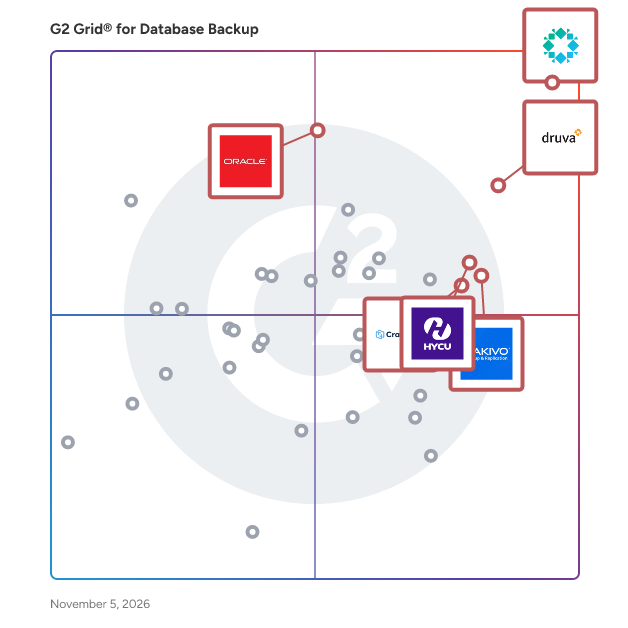
G2 Grid® for Database Backup Software

G2 Grid® for Database Backup Software plotting products by satisfaction and market presence

Highlighted products: Rubrik, Datto SIRIS, Druva Data Security Cloud, HYCU, CrashPlan Platform, Oracle Database Backup Service, Spanning Backup, and NAKIVO Backup & Replication.

Underlying data: [Grid® JSON](https://www.g2.com/categories/database-backup/grids.json?focus%5B%5D=rubrik&focus%5B%5D=kaseya-datto-siris&focus%5B%5D=druva-data-security-cloud&focus%5B%5D=hycu&focus%5B%5D=crashplan-platform&focus%5B%5D=oracle-database-backup-service&focus%5B%5D=spanning-backup&focus%5B%5D=nakivo-backup-replication)

BitRecover Email Backup Wizard

Email Backup Tool to Securely Save Emails from Multiple Sources and Accounts with Complete Details on Mac & Windows.

Who Is the Company Behind BitRecover Email Backup Wizard?

BitRecover Gmail Backup Wizard

Securely Backup Gmail emails with 35+ saving options using an ADA CASA-certified trusted solution.

Who Is the Company Behind BitRecover Gmail Backup Wizard?

BitRecover GMX Backup Tool

BitRecover GMX Backup Tool securely backs up GMX emails to PST, EML, MSG, PDF, MBOX, and 25+ formats with easy filtering.

Who Is the Company Behind BitRecover GMX Backup Tool?

AI can help you find the answers. G2 helps you trust them.

Connect G2 to Claude or ChatGPT for answers grounded in G2's trusted reviews, comparisons, and pricing from real user insights.

How it works

BitRecover Office 365 Backup Wizard

Secure Office 365 backup tool to save emails, attachments, contacts & calendars from primary, shared & archive mailboxes.

Who Is the Company Behind BitRecover Office 365 Backup Wizard?

BitRecover Thunderbird Backup Wizard

Thunderbird Converter Export Backup & Migrate Thunderbird emails contacts & calendars to PST, MBOX, EML & More formats safely.

Who Is the Company Behind BitRecover Thunderbird Backup Wizard?

BoostBackup.com

Backup files and databases on any external storage and monitor application performance and server resources and logs

Who Is the Company Behind BoostBackup.com?

Compass

Incredibly rich and customizable role-based access control is available to allow granular administration of Compass. Default or custom roles can be assigned to users and groups or integrated with Active Directory (AD) or Lightweight Directory Access Protocol (LDAP). Permission levels may be customized by the type of user (admin vs. end-user) and by source of protected data. Access can be further customized through projects, locations, and over 50 selectable fine grain access elements.

Average Rating: 5.0/5.0

Total Reviews: 1

Who Is the Company Behind Compass?

Who Uses This Product?

  • Company Size: 100% Small

What Are Recent G2 Reviews of Compass?

Database Labs

Database Labs offers Postgres as a service.

Who Is the Company Behind Database Labs?

DRS SQL Backup Recovery Tool

DRS SQL Backup Recovery software is a reliable and free solution that is helpful for recovering and restoring healthy as well as corrupted SQL Backup files. The software performs hassle-free recovery of MDF and LDF files of SQL Backup. Using its dual scanning mode, you can scan corrupted .bak files and extract the data from there. It offers you to backup and restore BAK file to a new database. To run this software and access your database backup file, you don't need to install SQL Server on your computer or machine. The preview facility is available to preview the recovered bak files. Using this software, you can also restore the compressed .bak files to manage the database size. The SQL Backup Recovery tool also repair split backup files you have splitted while performing backup process. If you want to evaluate the working functionality of the software, you can simply download its demo version from its official website. The demo version of the software allows you to view the list of data in the preview pane of the software. To save the data, you must need to purchase its premium version license.

Who Is the Company Behind DRS SQL Backup Recovery Tool?

DT Database Backup Wizard

Easily back up and restore your databases with a fast, reliable, and user-friendly database backup solution.

Who Is the Company Behind DT Database Backup Wizard?

EMS DB Extract for MySQL

EMS DB Extract for MySQL is an impressive and easy-to-use tool for creating MySQL database backups in a form of SQL scripts. This database script utility allows you to save metadata of all MySQL database objects as well as MySQL table data as database snapshot. DB Extract scripts MySQL database objects in the correct order according to their dependencies. Flexible customization of the extract process enables you to select objects and data tables for MySQL database dump and tune many other extract options.

Who Is the Company Behind EMS DB Extract for MySQL?

EMS DB Extract for PostgreSQL

EMS DB Extract for PostgreSQL is an impressive and easy-to-use tool for creating PostgreSQL database backups in a form of SQL scripts. This database script utility allows you to save metadata of all PostgreSQL database objects as well as PostgreSQL table data as database snapshot. DB Extract scripts PostgreSQL database objects in the correct order according to their dependencies. Flexible customization of the extract process enables you to select objects and data tables for PostgreSQL database dump and tune many other extract options.

Who Is the Company Behind EMS DB Extract for PostgreSQL?

Files Backup

Files Backup automates file and directory archiving, creating encrypted backups to local, external, or NAS drives to prevent data loss.

Who Is the Company Behind Files Backup?

Gmail Backup & Export Software to PST and MBOX

Gmail Backup & Export Software to PST and MBOX is a Windows desktop program for people who want a Gmail backup on their own disk and not only in the cloud. It connects to the mailbox over IMAP, shows each folder and label together with how many messages it holds, and writes whatever you tick as EML, MBOX or PST files. That makes it a practical route for Gmail backup export to PST and MBOX. Run it again later and it fetches only the messages that arrived since the previous pass, without downloading the rest again. 🛠️ How to use 1. Install the program and click Connect Gmail account. 2. Enter your address and a Google app password. Google issues one only after 2-Step Verification is switched on. 3. Tick the folders and labels to save, then pick EML, MBOX or PST and a target folder on any drive. 4. Click Start backup. Next time, open the same mailbox and click Download new emails. 💼 Why IT and office teams pick it • The program writes the PST itself, so the machine doing the export to PST does not need Outlook installed. • Access is read-only. Nothing in the account gets erased, moved or flagged as read, and messages come down to the PC directly, with no stop on third-party servers. • A stopped or dropped run picks up at the same message. The program retries a lost connection several times and checks free disk space before it starts. • Every Gmail label turns into a folder in the backup, so sorting by client or project carries over to disk. • Presets cover Yahoo Mail and iCloud Mail, and any other IMAP server can be added by host, port and encryption. 👥 Who uses it Home users keeping ten or more years of personal mail, freelancers whose client threads are sorted by Gmail labels, and the person who maintains PCs for family or a small office and runs a Gmail backup for several mailboxes one after another. ❓ FAQ Does Gmail support PST files? No. Gmail neither opens nor creates PST. This tool reads your mail over IMAP and builds the Outlook data file locally during the Gmail backup. How do I backup my entire Gmail? Tick every folder and label you use. All Mail is unticked by default so labeled messages are not stored twice, and you can tick it as well if you archive mail without labels. How do I back up a very large Gmail mailbox? Google sets a daily ceiling on IMAP downloads per account. When a run reaches it, the program stops and says so, and clicking Continue backup on another day resumes from that point. Can I keep a Gmail backup on an external drive? Yes. Any folder works as the target, including one on a USB disk, and later runs keep adding new messages to that same copy. 🆓 Free trial and system requirements The free trial keeps the 25 most recent messages per folder, with no time limit. You need Windows 10 or 11, 64-bit, and a personal Google account with an app password to sign in.

Who Is the Company Behind Gmail Backup & Export Software to PST and MBOX?

Tian Lin
TL
Researched and written by Tian Lin
Updated October 3, 2024