  # Best CMMS Software - Page 5

  *By [Nathan Calabrese](https://research.g2.com/insights/author/nathan-calabrese)*

   Computerized maintenance management system (CMMS) software helps companies manage assets and equipment across their lifecycle to optimize utilization, reduce downtime, and support data-driven maintenance decisions. Technicians use CMMS tools to keep assets in optimal condition, while managers rely on them to track performance and plan improvements.

### Core Capabilities of CMMS Software

To qualify for inclusion in the CMMS category, a product must:

- Manage various types of assets and equipment across multiple locations
- Track inventory for spare parts and materials needed for maintenance
- Schedule maintenance activities such as inspections, repairs, and upgrades
- Manage resources (human and equipment) and allocate them to maintenance operations
- Deliver reports on asset utilization, maintenance costs, and technician productivity
- Ensure asset compliance with safety and environmental regulations
- Provide a mobile-friendly interface or mobile apps for field service technicians

### How CMMS Software Differs from Other Tools

CMMS best serves small and midsize businesses, while tools such as [enterprise asset management (EAM) software](https://www.g2.com/categories/enterprise-asset-management-eam) offer more advanced capabilities for large enterprises and industries with highly complex operational needs. CMMS platforms also commonly integrate with [accounting software](https://www.g2.com/categories/accounting) to support asset valuation and depreciation tracking.

### Insights from G2 on CMMS Software

Based on category trends on G2, the value of streamlined maintenance scheduling, stronger visibility into asset performance, and the convenience of mobile access for technicians in the field.
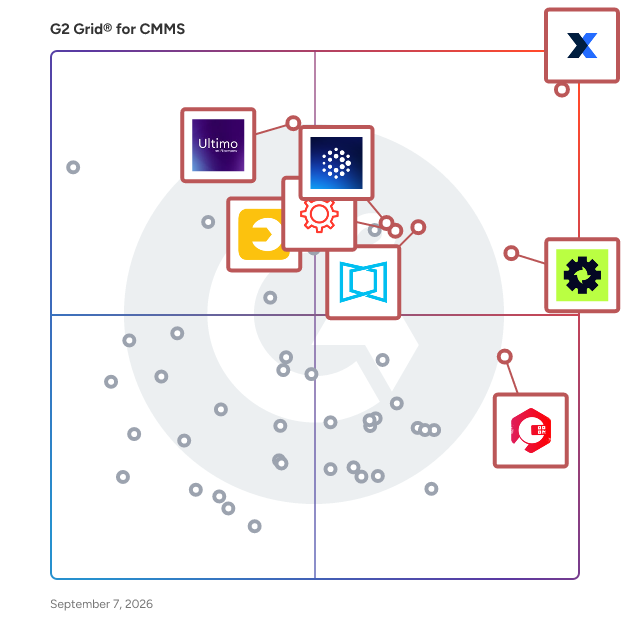


  ## How Many CMMS Software Products Does G2 Track?
**Total Products under this Category:** 399

  
## How Does G2 Rank CMMS Software Products?

**Why You Can Trust G2's Software Rankings:**

- 30 Analysts and Data Experts
- 9,500+ Authentic Reviews
- 399+ Products
- Unbiased Rankings

G2's software rankings are built on verified user reviews, rigorous moderation, and a consistent research methodology maintained by a team of analysts and data experts. Each product is measured using the same transparent criteria, with no paid placement or vendor influence. While reviews reflect real user experiences, which can be subjective, they offer valuable insight into how software performs in the hands of professionals. Together, these inputs power the G2 Score, a standardized way to compare tools within every category.

  
## Which CMMS Software Is Best for Your Use Case?

- **Leader:** [MaintainX](https://www.g2.com/products/maintainx/reviews)
- **Highest Performer:** [Zapium](https://www.g2.com/products/zapium/reviews)
- **Easiest to Use:** [Coast](https://www.g2.com/products/one-six-nine-coast/reviews)
- **Top Trending:** [MaintainX](https://www.g2.com/products/maintainx/reviews)
- **Best Free Software:** [MaintainX](https://www.g2.com/products/maintainx/reviews)

  
---

**Sponsored**

### Fiix CMMS

Fiix CMMS by Rockwell Automation is a premier, cloud-based maintenance management platform designed to help organizations plan, track, and optimize maintenance work. It combines asset, work order, scheduling, and parts management tools all in one place, providing a consumer-grade experience on both desktop and mobile. The Fiix CMMS mobile app empowers maintenance technicians to access work orders, view asset information, and update parts records in real time from anywhere— even offline. Advanced features like AI-powered analytics dashboards generate insights to help teams understand performance, costs, and KPIs to support better decision-making. And a highly open API integrates the CMMS with business, ERP, and operational systems to keep data synced. Most recently, Fiix has partnered with FactoryTalk Optix to make hardware integrations and condition-based maintenance accessible for the average team. Fiix CMMS also boasts numerous quality-of-life tools for maintenance departments, such as a comprehensive Audit Trail feature that makes standards compliance easier. Founded in 2008 in Toronto, Canada by a team of former maintenance professionals, Fiix CMMS was built from the ground up with a “by maintenance, for maintenance” philosophy. Its founders strongly believed that maintenance teams need their own dedicated digital tools, and spreadsheets or borrowed ERPs won’t cut it. The company’s focus on in-house maintenance expertise continues to this day, with over 400 years of industry experience on staff. A core belief is that partnership is just as important as product. In 2020, Fiix was acquired by Rockwell Automation, the world’s largest company dedicated to industrial automation, bringing over 120 years of tech leadership and new resources to the growing CMMS platform. No matter where you are in your maintenance journey, from beginner to advanced, Fiix CMMS provides tools to facilitate and transform operations. Over 4,200 companies use Fiix CMMS to increase uptime, reduce costs, and plan maintenance based on real data instead of guesswork. Find out more at www.fiixsoftware.com.


[Visit website](https://www.g2.com/external_clickthroughs/record?secure%5Bad_program%5D=ppc&amp;secure%5Bad_slot%5D=category_product_list&amp;secure%5Bcategory_id%5D=431&amp;secure%5Bdisplayable_resource_id%5D=431&amp;secure%5Bdisplayable_resource_type%5D=Category&amp;secure%5Bmedium%5D=sponsored&amp;secure%5Bplacement_reason%5D=page_category&amp;secure%5Bplacement_resource_ids%5D%5B%5D=431&amp;secure%5Bprioritized%5D=false&amp;secure%5Bproduct_id%5D=11912&amp;secure%5Bresource_id%5D=431&amp;secure%5Bresource_type%5D=Category&amp;secure%5Bsource_type%5D=category_page&amp;secure%5Bsource_url%5D=https%3A%2F%2Fwww.g2.com%2Fcategories%2Fcmms%3Fpage%3D22&amp;secure%5Btoken%5D=375bf2d376bb689436a66d7f62070e435b2a81e3c4f29cfc6cce6b8418ad70b4&amp;secure%5Burl%5D=https%3A%2F%2Ffiixsoftware.com%2Fcmms%2Fcmms-software%2F&amp;secure%5Burl_type%5D=free_trial)

---

  ## What Are the Top-Rated CMMS Software Products in 2026?
### 1. [Hector](https://www.g2.com/products/hector/reviews)
  Looking for an easier way to keep track of your equipment, software, and inventory? Hector is a cloud-based asset inventory management solution built for small and midsize organizations that want more control and less hassle. Whether you work in IT, education, construction, or real estate, Hector helps you manage the full asset lifecycle — from purchase to maintenance — all in one place. With Hector, you can: - Track IT equipment, tools, and shared resources with barcode scanning - Stay on top of loans, rentals, warranties, and depreciation automatically - Get real-time updates on repairs, replacements, and upcoming maintenance - Simplify permissions and keep data secure with role-based access and SSO - Receive smart reports and recommendations to save money and plan ahead Instead of juggling spreadsheets or losing track of who borrowed what, Hector makes asset tracking simple, accurate, and cost-effective. Plus, you only pay for the assets you register — no wasted budget. Ready to save time, cut costs, and make asset management stress-free? Discover how Hector can help your team today.


  **Average Rating:** 4.5/5.0
  **Total Reviews:** 2
**How Do G2 Users Rate Hector?**

- **Work Order Management:** 8.3/10 (Category avg: 8.6/10)
- **Preventative Maintenance (PM):** 10.0/10 (Category avg: 8.6/10)
- **Equipment Breakdown Reports:** 8.3/10 (Category avg: 8.2/10)

**Who Is the Company Behind Hector?**

- **Seller:** [Hector](https://www.g2.com/sellers/hector)
- **HQ Location:** Québec, CA
- **LinkedIn® Page:** https://www.linkedin.com/company/hectorasset/ (56 employees on LinkedIn®)

**Who Uses This Product?**
  - **Company Size:** 50% Mid-Market, 50% Small-Business


### 2. [iMaint](https://www.g2.com/products/imaint/reviews)
  iMaint is a robust EAM software offered by DPSI, an industry-leading CMMS provider. iMaint has helped organizations resolve critical maintenance challenges, maximize ROI, enhance productivity, ensure compliance and much more. It’s suitable for a variety of industries ranging from small businesses to large corporations, and is highly scalable. iMaint is offered as an on-premise or online, cloud-hosted solution; it can also be accessed on mobile devices. Pricing begins at $60 per user/month. Since 1986, DPSI has served over 6,000 companies and 50,000 users in over 50 countries, including more than 400 of the Fortune 500 companies.


  **Average Rating:** 4.3/5.0
  **Total Reviews:** 2
**How Do G2 Users Rate iMaint?**

- **Has the product been a good partner in doing business?:** 7.5/10 (Category avg: 9.0/10)
- **Work Order Management:** 8.3/10 (Category avg: 8.6/10)
- **Preventative Maintenance (PM):** 8.3/10 (Category avg: 8.6/10)
- **Equipment Breakdown Reports:** 7.5/10 (Category avg: 8.2/10)

**Who Is the Company Behind iMaint?**

- **Seller:** [DPSI](https://www.g2.com/sellers/dpsi)
- **Year Founded:** 1986
- **HQ Location:** Greensboro, US
- **Twitter:** @dpsiCMMS (182 Twitter followers)
- **LinkedIn® Page:** https://www.linkedin.com/company/dpsicmms/ (119 employees on LinkedIn®)

**Who Uses This Product?**
  - **Company Size:** 50% Enterprise, 50% Mid-Market


### 3. [InnoMaint](https://www.g2.com/products/innomaint/reviews)
  InnoMaint is a cloud-based equipment maintenance management system (cloud CMMS), scheduled maintenance activities, schedule, and solution bank for engineers.


  **Average Rating:** 4.8/5.0
  **Total Reviews:** 2
**How Do G2 Users Rate InnoMaint?**

- **Work Order Management:** 8.3/10 (Category avg: 8.6/10)
- **Preventative Maintenance (PM):** 9.2/10 (Category avg: 8.6/10)
- **Equipment Breakdown Reports:** 9.2/10 (Category avg: 8.2/10)

**Who Is the Company Behind InnoMaint?**

- **Seller:** [InnoThink Infotech Pvt Ltd](https://www.g2.com/sellers/innothink-infotech-pvt-ltd)
- **Year Founded:** 2006
- **HQ Location:** Madurai, IN
- **LinkedIn® Page:** https://www.linkedin.com/company/11370346 (25 employees on LinkedIn®)

**Who Uses This Product?**
  - **Company Size:** 50% Mid-Market, 50% Small-Business


### 4. [Maintenance.io](https://www.g2.com/products/maintenance-io/reviews)
  Maintenance.io is a CMMS that operates in the cloud allowing your data to be safely stored on their servers. There are no additional infrastructure costs and Maintenance.io offers features such as asset management, inventory management, and vendor management.


  **Average Rating:** 5.0/5.0
  **Total Reviews:** 3
**How Do G2 Users Rate Maintenance.io?**

- **Work Order Management:** 10.0/10 (Category avg: 8.6/10)
- **Preventative Maintenance (PM):** 10.0/10 (Category avg: 8.6/10)
- **Equipment Breakdown Reports:** 10.0/10 (Category avg: 8.2/10)

**Who Is the Company Behind Maintenance.io?**

- **Seller:** [Eontek](https://www.g2.com/sellers/eontek)
- **HQ Location:** N/A
- **Twitter:** @maintenance_io (1,093 Twitter followers)
- **LinkedIn® Page:** https://www.linkedin.com/company/5150054 (1 employees on LinkedIn®)

**Who Uses This Product?**
  - **Company Size:** 75% Enterprise, 25% Small-Business


### 5. [Maxpanda CMMS](https://www.g2.com/products/maxpanda-cmms/reviews)
  Best Computerized Maintenance Management CMMS Software Maxpanda CMMS Software is widely used for maintaining a computerized database of information related to the maintenance operation of your company. This information is stored in the cloud and assists maintenance departments of all sizes to perform preventive maintenance tasks more efficiently and effectively through GoMAX mobile apps. Make wiser decisions. We&#39;re disrupting CMMS Software with a platform that&#39;s simpler and more affordable allowing you to eliminate errors/delays existing with pen &amp; paper. Pressures from the real world are driving computerized maintenance management, work order maintenance management software and enterprise asset management CMMS / EAM software vendors to rethink not only the product itself, but how a service industry can help management achieve lower maintenance costs. The cmms software of today has to be quite consolidated in functionality and feature rich with instant ROI. Managing the work requests efficiently: Maxpanda CMMS Software will enable your designated staff to submit their request directly into the system. Once they do this, they are sent emails regarding the request statuses. With this system, the maintenance manager of your facility will be easily able to respond to inbound calls. Apart from that, Maxpanda CMMS can be used to prioritize the submitted work requests as per their type, SLA, frequency, approval and more. Organized scheduling and planning: Your maintenance department can easily setup automatic schedules for recurring activities. Preventive maintenance procedures are auto-generated, with assigned deadlines for completion per work order. With GoMAX mobile be assured all your Work Orders, PMs, Meters and Tasks are completed on time and viewed in real-time. Analyzing data trends: Maxpanda CMMS software is helpful in analyzing data trends and identifying problem areas such as constant damages, low productivity &amp; rising costs. With a Maxpanda CMMS Software System, a manager can keep better track of equipment breakdowns and costs involved. Manage Inventory, Purchase Orders and RFQ: Facility managers usually have to deal with disorganized undocumented store rooms. They face difficulty while looking for supplies needed to certain assets or situations. Maxpanda CMMS Software helps make the impossible possible. Use Maxpanda to automate your parts reordering with low levels monitored in real-time.


  **Average Rating:** 4.0/5.0
  **Total Reviews:** 2
**How Do G2 Users Rate Maxpanda CMMS?**

- **Has the product been a good partner in doing business?:** 10.0/10 (Category avg: 9.0/10)
- **Work Order Management:** 9.2/10 (Category avg: 8.6/10)
- **Preventative Maintenance (PM):** 10.0/10 (Category avg: 8.6/10)

**Who Is the Company Behind Maxpanda CMMS?**

- **Seller:** [Maxpanda Software](https://www.g2.com/sellers/maxpanda-software)
- **Year Founded:** 2004
- **HQ Location:** Winnipeg, CA
- **LinkedIn® Page:** https://www.linkedin.com/company/maxpanda-cmms (2 employees on LinkedIn®)

**Who Uses This Product?**
  - **Company Size:** 100% Small-Business


### 6. [NEXGEN Asset Management](https://www.g2.com/products/nexgen-asset-management/reviews)
  Maximize asset life and labor productivity through an intuitively designed and incredibly versatile CMMS software. NEXGEN&#39;s enterprise-wide asset management software is designed to capture and manage every aspect of your asset inventory, create an effective maintenance program and prioritize maintenance funding by risk and criticality. NEXGEN Asset Management is the only software program to combine a robust computerized maintenance management system (CMMS) with advanced asset management planning capabilities. The result is improved operational efficiency, complete awareness of asset performance and powerful risk analysis for maintenance prioritization.


  **Average Rating:** 4.0/5.0
  **Total Reviews:** 2
**How Do G2 Users Rate NEXGEN Asset Management?**

- **Has the product been a good partner in doing business?:** 8.3/10 (Category avg: 9.0/10)
- **Work Order Management:** 8.3/10 (Category avg: 8.6/10)
- **Preventative Maintenance (PM):** 6.7/10 (Category avg: 8.6/10)
- **Equipment Breakdown Reports:** 6.7/10 (Category avg: 8.2/10)

**Who Is the Company Behind NEXGEN Asset Management?**

- **Seller:** [NEXGEN](https://www.g2.com/sellers/nexgen)
- **Year Founded:** 2006
- **HQ Location:** Sacramento, US
- **Twitter:** @nexgenam1 (75 Twitter followers)
- **LinkedIn® Page:** https://www.linkedin.com/company/nexgen-am/ (37 employees on LinkedIn®)

**Who Uses This Product?**
  - **Company Size:** 67% Mid-Market, 33% Small-Business


#### What Are NEXGEN Asset Management's Pros and Cons?

**Pros:**

- Customer Support (1 reviews)
- Ease of Use (1 reviews)
- Inventory Management (1 reviews)
- User Interface (1 reviews)

**Cons:**

- Expensive (1 reviews)

### 7. [opsmanager](https://www.g2.com/products/opsmanager/reviews)
  Operations Management (opsmanager) is the most adept operations management software and the path to an optimum business transition, designed to simplify intricate tasks and deliver top-notch services. This radical software not only changes your work style, but also keeps you stay focused on your business, giving you the flexibility to access information you need, from anywhere, anytime. Likewise, have extra access and control of the entire business system that aids you to grow and accomplish timely goals.


  **Average Rating:** 3.3/5.0
  **Total Reviews:** 2
**How Do G2 Users Rate opsmanager?**

- **Has the product been a good partner in doing business?:** 7.5/10 (Category avg: 9.0/10)
- **Work Order Management:** 8.3/10 (Category avg: 8.6/10)

**Who Is the Company Behind opsmanager?**

- **Seller:** [opsmanager](https://www.g2.com/sellers/opsmanager)
- **Year Founded:** 1990
- **HQ Location:** Braeside, AU
- **LinkedIn® Page:** https://www.linkedin.com/company/14463505 (8 employees on LinkedIn®)

**Who Uses This Product?**
  - **Company Size:** 50% Mid-Market, 50% Small-Business


### 8. [Reftab](https://www.g2.com/products/reftab/reviews)
  Designed for IT departments who want to focus on automation. Reftab is a customizable platform for hardware and software asset management. Recognized by Forbes as the best in its class for 2023, 2024 and 2025, and a 2026 leader in Gartner&#39;s IT Management category, Reftab offers a suite of integrations such as Intune, Jamf, Kandji, Microsoft and more. Reftab&#39;s platform improves your processes, strengthens security standards, and ensures compliance with regulations and best practices. Seamlessly integrating with device management tools, identity providers like Entra and Okta, and ticketing systems, Reftab is designed to adapt to any organization’s needs, providing automation and ease of use you&#39;ll rely on for years.


  **Average Rating:** 4.3/5.0
  **Total Reviews:** 4
**How Do G2 Users Rate Reftab?**

- **Has the product been a good partner in doing business?:** 10.0/10 (Category avg: 9.0/10)
- **Work Order Management:** 9.2/10 (Category avg: 8.6/10)
- **Preventative Maintenance (PM):** 8.3/10 (Category avg: 8.6/10)
- **Equipment Breakdown Reports:** 9.2/10 (Category avg: 8.2/10)

**Who Is the Company Behind Reftab?**

- **Seller:** [Reftab](https://www.g2.com/sellers/reftab)
- **Year Founded:** 2013
- **HQ Location:** New York, US
- **Twitter:** @reftab (73 Twitter followers)
- **LinkedIn® Page:** https://www.linkedin.com/company/reftab (7 employees on LinkedIn®)

**Who Uses This Product?**
  - **Company Size:** 50% Mid-Market, 50% Small-Business


#### What Are Reftab's Pros and Cons?

**Pros:**

- Inventory Management (2 reviews)
- Centralization (1 reviews)
- Customer Support (1 reviews)
- Dashboard Customization (1 reviews)
- Data Tracking (1 reviews)

**Cons:**

- Asset Management Issues (1 reviews)
- Notification Issues (1 reviews)
- Poor Notifications (1 reviews)

### 9. [ResQ](https://www.g2.com/products/resq/reviews)
  The leading platform for restaurants to request, manage, and pay for repairs and maintenance. www.getresq.com


  **Average Rating:** 4.5/5.0
  **Total Reviews:** 2

**Who Is the Company Behind ResQ?**

- **Seller:** [ResQ](https://www.g2.com/sellers/resq)
- **Year Founded:** 2018
- **HQ Location:** Toronto, CA
- **Twitter:** @GetResQ (535 Twitter followers)
- **LinkedIn® Page:** https://www.linkedin.com/company/getresq-restaurant-repair (158 employees on LinkedIn®)

**Who Uses This Product?**
  - **Company Size:** 50% Mid-Market, 50% Small-Business


### 10. [RFgen](https://www.g2.com/products/rfgen/reviews)
  RFgen Software empowers businesses with flexible mobile barcoding systems to reduce inventory and warehouse productivity issues and increase accuracy. Enabling you to mobilize critical warehouse and supply chain workflows, your mobile workforce has real-time and on-demand access to enterprise data. RFgen’s app suites easily connect Windows, Android, and Apple iOS barcode scanners, tablets, handheld computers, RFID, and more. Extend your back-office ERP systems and databases, including Oracle’s JD Edwards, Oracle E-Business Suite, SAP, Deltek Costpoint, Microsoft Dynamics, and allow your team to achieve more on a day-to-day basis. Typical results include: 99.5%+ Inventory Accuracy +30% Plant Efficiency +30% Worker Productivity Key Features include: - Pre-Built Mobile App Templates: Includes suites of mobile app templates that are ERP-certified, supply chain-specific, and open source. Rapidly customize and deploy. - Offline Mobility: Industry’s best off-network mobility and data collection solutions to keep operations running 365/24/7. - Fast Mobile App Building: Save time and money developing in-house using low code drag-n-drop and easy codebase with the RFgen Mobile Development Studio. - Easy to Use: Manage, deploy, and support remotely. Leverage existing SAP security. - All-in-One Ecosystem: Total enterprise mobility solution for ERPs, including software, hardware, and services. - Zero Footprint: No impact to ERP environment and no additional database.


  **Average Rating:** 4.6/5.0
  **Total Reviews:** 15
**How Do G2 Users Rate RFgen?**

- **Has the product been a good partner in doing business?:** 9.4/10 (Category avg: 9.0/10)
- **Work Order Management:** 8.3/10 (Category avg: 8.6/10)
- **Preventative Maintenance (PM):** 10.0/10 (Category avg: 8.6/10)
- **Equipment Breakdown Reports:** 8.3/10 (Category avg: 8.2/10)

**Who Is the Company Behind RFgen?**

- **Seller:** [RFgen Software](https://www.g2.com/sellers/rfgen-software)
- **Year Founded:** 1983
- **HQ Location:** El Dorado Hills, CA
- **Twitter:** @RFgenSoftware (383 Twitter followers)
- **LinkedIn® Page:** https://www.linkedin.com/company/236615/ (104 employees on LinkedIn®)

**Who Uses This Product?**
  - **Company Size:** 88% Mid-Market, 6% Enterprise


#### What Are RFgen's Pros and Cons?

**Pros:**

- Ease of Use (1 reviews)
- Equipment Management (1 reviews)
- Warehouse Management (1 reviews)

**Cons:**

- Printing Issues (1 reviews)

### 11. [Sterling CMMS](https://www.g2.com/products/sterling-cmms/reviews)
  The Sterling Computerized Maintenance Management System (Sterling CMMS) is a powerful system designed exclusively for service related businesses to help you save time and stay organized in managing your information.


  **Average Rating:** 4.3/5.0
  **Total Reviews:** 2
**How Do G2 Users Rate Sterling CMMS?**

- **Work Order Management:** 8.3/10 (Category avg: 8.6/10)
- **Preventative Maintenance (PM):** 8.3/10 (Category avg: 8.6/10)
- **Equipment Breakdown Reports:** 8.3/10 (Category avg: 8.2/10)

**Who Is the Company Behind Sterling CMMS?**

- **Seller:** [Sterlingsoft](https://www.g2.com/sellers/sterlingsoft)
- **HQ Location:** N/A
- **LinkedIn® Page:** https://www.linkedin.com/company/No-Linkedin-Presence-Added-Intentionally-By-DataOps (1 employees on LinkedIn®)

**Who Uses This Product?**
  - **Company Size:** 50% Enterprise, 50% Small-Business


#### What Are Sterling CMMS's Pros and Cons?

**Pros:**

- Ease of Use (1 reviews)
- Intuitive (1 reviews)
- PM Scheduling (1 reviews)
- Reliability (1 reviews)
- Reporting (1 reviews)

**Cons:**

- Learning Curve (1 reviews)
- Poor Customer Support (1 reviews)

### 12. [AMPRO](https://www.g2.com/products/ampro/reviews)
  AMPRO is a CMMS (computerised maintenance management software) application that allows the structuring of your assets (plant, equipment, vehicles etc.) in an organised and logical manner.


  **Average Rating:** 4.5/5.0
  **Total Reviews:** 1
**How Do G2 Users Rate AMPRO?**

- **Has the product been a good partner in doing business?:** 8.3/10 (Category avg: 9.0/10)

**Who Is the Company Behind AMPRO?**

- **Seller:** [AMPRO Software](https://www.g2.com/sellers/ampro-software)
- **HQ Location:** N/A
- **LinkedIn® Page:** https://www.linkedin.com/company/No-Linkedin-Presence-Added-Intentionally-By-DataOps (1 employees on LinkedIn®)

**Who Uses This Product?**
  - **Company Size:** 100% Mid-Market


### 13. [AndonCloud System](https://www.g2.com/products/andoncloud-system/reviews)
  AndonCloud is a company that helps you save money by minimizing delay between machine&#39;s breakdown and maintenance services arrival.


  **Average Rating:** 3.5/5.0
  **Total Reviews:** 1
**How Do G2 Users Rate AndonCloud System?**

- **Work Order Management:** 8.3/10 (Category avg: 8.6/10)
- **Preventative Maintenance (PM):** 8.3/10 (Category avg: 8.6/10)
- **Equipment Breakdown Reports:** 8.3/10 (Category avg: 8.2/10)

**Who Is the Company Behind AndonCloud System?**

- **Seller:** [AndonCloud sp. z o. o.](https://www.g2.com/sellers/andoncloud-sp-z-o-o)
- **Year Founded:** 2017
- **HQ Location:** Wrocław, PL
- **LinkedIn® Page:** https://www.linkedin.com/company/10914252 (5 employees on LinkedIn®)

**Who Uses This Product?**
  - **Company Size:** 100% Enterprise


### 14. [AnyMaint](https://www.g2.com/products/anymaint/reviews)
  AnyMaint is an AI-powered CMMS and maintenance management software platform — your maintenance co-pilot for equipment-intensive organizations. The all-in-one platform supports preventive, corrective, and predictive maintenance while transforming maintenance and asset data into real-time operational intelligence. AnyMaint’s AI continuously connects work orders, human input, equipment data, and operational signals to surface smart alerts, prioritize tasks, detect emerging issues, and help teams act before failures occur. Designed for rapid rollout and high workforce adoption, AnyMaint is intuitive, mobile-first, and fully multilingual — enabling technicians and managers to work naturally in their own language across sites and regions. Teams can go live in days, not months. Customers use AnyMaint to significantly reduce downtime, improve asset reliability, maintain compliance, and scale maintenance operations efficiently across single-site and multi-site environments.


  **Average Rating:** 4.4/5.0
  **Total Reviews:** 4

**Who Is the Company Behind AnyMaint?**

- **Seller:** [AnyMaint](https://www.g2.com/sellers/anymaint)
- **Year Founded:** 2021
- **HQ Location:** Rehovot, IL
- **LinkedIn® Page:** https://www.linkedin.com/company/anymaint (6 employees on LinkedIn®)

**Who Uses This Product?**
  - **Company Size:** 75% Small-Business, 25% Mid-Market


#### What Are AnyMaint's Pros and Cons?

**Pros:**

- Downtime Reduction (1 reviews)


### 15. [Apriso Maintenance](https://www.g2.com/products/apriso-maintenance/reviews)
  Apriso Maintenance works in close coordination with other DELMIA Apriso applications, allowing you to more effectively manage maintenance to minimize disruptions and maximize uptime within your manufacturing environment. With DELMIA Apriso Maintenance, you can maximize equipment availability by synchronizing production, quality and other activities with maintenance operations to avoid disruptions and better anticipate equipment repairs.


  **Average Rating:** 3.5/5.0
  **Total Reviews:** 1
**How Do G2 Users Rate Apriso Maintenance?**

- **Work Order Management:** 5.0/10 (Category avg: 8.6/10)
- **Preventative Maintenance (PM):** 6.7/10 (Category avg: 8.6/10)
- **Equipment Breakdown Reports:** 6.7/10 (Category avg: 8.2/10)

**Who Is the Company Behind Apriso Maintenance?**

- **Seller:** [Dassault Systemes](https://www.g2.com/sellers/dassault-systemes)
- **Year Founded:** 1981
- **HQ Location:** Velizy-Villacoublay
- **Twitter:** @Dassault3DS (74,160 Twitter followers)
- **LinkedIn® Page:** https://www.linkedin.com/company/3896/ (27,256 employees on LinkedIn®)
- **Ownership:** EPA: DSY.PA

**Who Uses This Product?**
  - **Company Size:** 100% Enterprise


### 16. [Artintech ERP](https://www.g2.com/products/artintech-erp/reviews)
  Artintech ERP is a comprehensive, integrated solution designed to streamline and optimize your business operations. Tailored for medium to large enterprises, Artintech ERP offers robust features to enhance productivity, improve decision-making, and drive growth. With its user-friendly interface and modular architecture, Artintech ERP can meet the unique needs of various industries, ensuring seamless integration with your existing processes and systems. Experience unparalleled efficiency and control over your business functions with Artintech ERP. Key Features: :: Comprehensive Modules: Includes supply chain management, inventory control, and customer relationship management, ensuring all aspects of your business are covered. :: Real-Time Analytics: Provides actionable insights with advanced data analytics and reporting tools, enabling informed decision-making and strategic planning. :: Scalability: Designed to grow with your business, Artintech ERP supports both horizontal and vertical scalability, accommodating expanding operations and increasing transaction volumes. :: User-Friendly Interface: Intuitive and customizable dashboards and interfaces enhance user experience and reduce the learning curve for employees. :: Integration Capabilities: Seamlessly integrates with existing software and third-party applications, minimizing disruptions and ensuring a smooth transition. ============= Artintech ERP is the ultimate solution for businesses seeking to enhance operational efficiency, reduce costs, and drive strategic growth. Transform your enterprise management with Artintech ERP and stay ahead in the competitive landscape.


  **Average Rating:** 5.0/5.0
  **Total Reviews:** 3
**How Do G2 Users Rate Artintech ERP?**

- **Has the product been a good partner in doing business?:** 10.0/10 (Category avg: 9.0/10)
- **Work Order Management:** 10.0/10 (Category avg: 8.6/10)
- **Preventative Maintenance (PM):** 10.0/10 (Category avg: 8.6/10)
- **Equipment Breakdown Reports:** 10.0/10 (Category avg: 8.2/10)

**Who Is the Company Behind Artintech ERP?**

- **Seller:** [Artintech Inc](https://www.g2.com/sellers/artintech-inc)
- **Year Founded:** 2016
- **HQ Location:** Toronto, CA
- **LinkedIn® Page:** https://www.linkedin.com/company/artintech/ (21 employees on LinkedIn®)

**Who Uses This Product?**
  - **Company Size:** 100% Small-Business


#### What Are Artintech ERP's Pros and Cons?

**Pros:**

- Ease of Use (1 reviews)
- Integrations (1 reviews)
- Interface Design (1 reviews)
- Simple (1 reviews)
- Training (1 reviews)


### 17. [BulbThings](https://www.g2.com/products/bulbthings/reviews)
  BulbThings is a solution to help companies manage the business &quot;things&quot;: vehicles, mobile devices, and equipments. It helps to collaborate with people and suppliers in real time.


  **Average Rating:** 1.0/5.0
  **Total Reviews:** 1
**How Do G2 Users Rate BulbThings?**

- **Has the product been a good partner in doing business?:** 6.7/10 (Category avg: 9.0/10)
- **Work Order Management:** 1.7/10 (Category avg: 8.6/10)
- **Preventative Maintenance (PM):** 1.7/10 (Category avg: 8.6/10)
- **Equipment Breakdown Reports:** 3.3/10 (Category avg: 8.2/10)

**Who Is the Company Behind BulbThings?**

- **Seller:** [Bulb Software](https://www.g2.com/sellers/bulb-software)
- **Year Founded:** 2014
- **HQ Location:** London, GB
- **Twitter:** @BulbThings (540 Twitter followers)
- **LinkedIn® Page:** https://www.linkedin.com/company/bulb-things (6 employees on LinkedIn®)

**Who Uses This Product?**
  - **Company Size:** 100% Small-Business


### 18. [COGZ EZ](https://www.g2.com/products/cogz-ez/reviews)
  COGZ EZ focuses on Preventive Maintenance and Work Orders. Supporting features such as Inventory and Purchasing are also included.


  **Average Rating:** 4.0/5.0
  **Total Reviews:** 1
**How Do G2 Users Rate COGZ EZ?**

- **Work Order Management:** 8.3/10 (Category avg: 8.6/10)
- **Preventative Maintenance (PM):** 8.3/10 (Category avg: 8.6/10)

**Who Is the Company Behind COGZ EZ?**

- **Seller:** [COGZ Systems](https://www.g2.com/sellers/cogz-systems)
- **HQ Location:** WOODBURY, US
- **Twitter:** @COGZSystemsLLC (3 Twitter followers)
- **LinkedIn® Page:** https://www.linkedin.com/company/cogz-systems-llc/about/ (2 employees on LinkedIn®)

**Who Uses This Product?**
  - **Company Size:** 100% Mid-Market


### 19. [Coherent](https://www.g2.com/products/coherent/reviews)
  Coherent is an easy to solution that enables organization to easily and efficiently track work order administration, equipment preventive maintenance, asset management functions, and CMMS operations.


  **Average Rating:** 4.5/5.0
  **Total Reviews:** 1

**Who Is the Company Behind Coherent?**

- **Seller:** [Synergy International Systems](https://www.g2.com/sellers/synergy-international-systems)
- **Year Founded:** 1997
- **HQ Location:** McLean, US
- **LinkedIn® Page:** https://www.linkedin.com/company/synergy-international-systems (192 employees on LinkedIn®)

**Who Uses This Product?**
  - **Company Size:** 100% Small-Business


### 20. [CWorks NETMain](https://www.g2.com/products/cworks-netmain/reviews)
  Works CMMS allows to easily record for all Assets, what was done, how long it took, what inventory parts and outside materials and services were used and at what cost.


  **Average Rating:** 1.5/5.0
  **Total Reviews:** 1
**How Do G2 Users Rate CWorks NETMain?**

- **Has the product been a good partner in doing business?:** 1.7/10 (Category avg: 9.0/10)
- **Work Order Management:** 3.3/10 (Category avg: 8.6/10)
- **Preventative Maintenance (PM):** 3.3/10 (Category avg: 8.6/10)
- **Equipment Breakdown Reports:** 3.3/10 (Category avg: 8.2/10)

**Who Is the Company Behind CWorks NETMain?**

- **Seller:** [CWorks Systems](https://www.g2.com/sellers/cworks-systems)
- **Year Founded:** 2001
- **HQ Location:** Bandar Kinrara, MY
- **Twitter:** @CWorksSystems
- **LinkedIn® Page:** https://www.linkedin.com/company/461702 (50 employees on LinkedIn®)

**Who Uses This Product?**
  - **Company Size:** 100% Mid-Market


### 21. [Dynaway EAM for Business Central](https://www.g2.com/products/dynaway-eam-for-business-central/reviews)
  EAM built in Microsoft Dynamics 365 Business Central Spend less time behind the computer and more time maintaining your assets. EAM for Microsoft D365 Business Central offers Asset Management, Work Orders, Spare Parts, Counters, Measurements and Document Management. Seamlessly integrate machine data from your control systems and IoT sensors.


  **Average Rating:** 4.0/5.0
  **Total Reviews:** 1
**How Do G2 Users Rate Dynaway EAM for Business Central?**

- **Equipment Breakdown Reports:** 10.0/10 (Category avg: 8.2/10)

**Who Is the Company Behind Dynaway EAM for Business Central?**

- **Seller:** [Dynaway](https://www.g2.com/sellers/dynaway)
- **Year Founded:** 2001
- **HQ Location:** Aalborg, DK
- **LinkedIn® Page:** http://linkedin.com/company/dynaway (36 employees on LinkedIn®)

**Who Uses This Product?**
  - **Company Size:** 100% Enterprise


#### What Are Dynaway EAM for Business Central's Pros and Cons?

**Pros:**

- Asset Management (1 reviews)
- Centralized Management (1 reviews)
- Cost Tracking (1 reviews)
- Downtime Reduction (1 reviews)
- Inventory Management (1 reviews)

**Cons:**

- Poor User Experience (1 reviews)

### 22. [EasyMaint Software](https://www.g2.com/products/easymaint-software/reviews)
  EasyMaint es un Software de Mantenimiento Industrial, es decir, un Sistema Computarizado para la Administración del Mantenimiento, CMMS con el cual podrá gestionar la administración del mantenimiento industrial de su empresa. Como un Sistema de Gestión del Mantenimiento (CMMS) ayudamos a las organizaciones a controlar el mantenimiento de sus activos y costos asociados del trabajo, con el objetivo de prolongar la vida útil de un activo con un costo mínimo. Con nuestro programa para mantenimiento usted podrá reducir fallas insesperadas en los equipos y tener reportes sobre el estado de estos, además EasyMaint le proporcionará un informe detallado de Análisis de Fallas, con el cual reducirá los costos de mantenimiento, creará Órdenes de Trabajo, y planes de mantenimiento.


  **Average Rating:** 5.0/5.0
  **Total Reviews:** 1
**How Do G2 Users Rate EasyMaint Software?**

- **Work Order Management:** 10.0/10 (Category avg: 8.6/10)
- **Preventative Maintenance (PM):** 10.0/10 (Category avg: 8.6/10)
- **Equipment Breakdown Reports:** 10.0/10 (Category avg: 8.2/10)

**Who Is the Company Behind EasyMaint Software?**

- **Seller:** [Abesoft Technologies](https://www.g2.com/sellers/abesoft-technologies)
- **Year Founded:** 1995
- **HQ Location:** Ciudad de Mexico, MX
- **LinkedIn® Page:** https://www.linkedin.com/company/easymaint-software-llc/ (9 employees on LinkedIn®)

**Who Uses This Product?**
  - **Company Size:** 100% Enterprise


### 23. [EasyManny](https://www.g2.com/products/easymanny/reviews)
  EasyManny is a free webapp for managing home and business maintenance: https://www.easymanny.it/en/ Easy Manny is an innovative application for managing company and home maintenance/craftsman activities. He wants to digitally recreate what is sometimes written on paper or just kept in mind, it is the first step to start a TPM (Total Productive Maintenance) methodology with maintenance managed in a more orderly, detailed and structured way. EasyManny: give bit to Maintenance!


  **Average Rating:** 5.0/5.0
  **Total Reviews:** 1

**Who Is the Company Behind EasyManny?**

- **Seller:** [Frascao Lab](https://www.g2.com/sellers/frascao-lab)
- **HQ Location:** N/A
- **LinkedIn® Page:** https://www.linkedin.com/company/No-Linkedin-Presence-Added-Intentionally-By-DataOps (1 employees on LinkedIn®)

**Who Uses This Product?**
  - **Company Size:** 100% Small-Business


#### What Are EasyManny's Pros and Cons?

**Pros:**

- Setup Ease (1 reviews)
- Task Management (1 reviews)
- Work Orders (1 reviews)


### 24. [ECOBPM](https://www.g2.com/products/ecobpm/reviews)
  ECOBPM is a CMMS for Gov Contractors fulfilling Task Orders currently. Whether dispatching Service Orders or doing Recurring Maintenance, ECOBPM is fully adapted to your contract requirements.


  **Average Rating:** 4.0/5.0
  **Total Reviews:** 1
**How Do G2 Users Rate ECOBPM?**

- **Work Order Management:** 6.7/10 (Category avg: 8.6/10)
- **Preventative Maintenance (PM):** 10.0/10 (Category avg: 8.6/10)
- **Equipment Breakdown Reports:** 8.3/10 (Category avg: 8.2/10)

**Who Is the Company Behind ECOBPM?**

- **Seller:** [ECOBPM](https://www.g2.com/sellers/ecobpm)
- **HQ Location:** N/A
- **LinkedIn® Page:** https://www.linkedin.com/company/No-Linkedin-Presence-Added-Intentionally-By-DataOps (1 employees on LinkedIn®)

**Who Uses This Product?**
  - **Company Size:** 100% Enterprise


#### What Are ECOBPM's Pros and Cons?

**Pros:**

- Efficiency (1 reviews)
- Efficiency Improvement (1 reviews)

**Cons:**

- Asset Management Issues (1 reviews)
- Poor Reporting (1 reviews)

### 25. [EZO CMMS](https://www.g2.com/products/ezo-cmms/reviews)
  EZO offers a comprehensive solution for maintenance operations by shifting from reactive to proactive strategies with scheduled preventive maintenance. This solution optimizes equipment performance, reduces the risk of costly failures, and maximizes asset lifespan. By automating preventive tasks, EZO ensures maintenance at optimal intervals, minimizing unplanned downtime and helping teams avoid expensive repairs. With deep insights into asset conditions and maintenance history, organizations can make data-driven decisions to improve asset reliability and reduce operating costs. EZO’s platform delivers end-to-end asset management, from monitoring and scheduling to execution and reporting, empowering organizations to streamline their maintenance workflows and achieve sustainable operational success.


  **Average Rating:** 5.0/5.0
  **Total Reviews:** 1
**How Do G2 Users Rate EZO CMMS?**

- **Has the product been a good partner in doing business?:** 10.0/10 (Category avg: 9.0/10)
- **Work Order Management:** 10.0/10 (Category avg: 8.6/10)
- **Preventative Maintenance (PM):** 10.0/10 (Category avg: 8.6/10)
- **Equipment Breakdown Reports:** 10.0/10 (Category avg: 8.2/10)

**Who Is the Company Behind EZO CMMS?**

- **Seller:** [EZO](https://www.g2.com/sellers/ezo)
- **Year Founded:** 2011
- **HQ Location:** Carson City, Nevada
- **Twitter:** @EZOsolutions (809 Twitter followers)
- **LinkedIn® Page:** https://www.linkedin.com/company/ezosolutions/ (268 employees on LinkedIn®)

**Who Uses This Product?**
  - **Company Size:** 100% Small-Business


    ## What Is CMMS Software?
  [Asset Management  Software](https://www.g2.com/categories/asset-management)
  ## What Software Categories Are Similar to CMMS Software?
    - [Field Service Management Software](https://www.g2.com/categories/field-service-management)
    - [Facility Management Software](https://www.g2.com/categories/facility-management)
    - [Enterprise Asset Management (EAM) Software](https://www.g2.com/categories/enterprise-asset-management-eam)
    - [Asset Tracking Software](https://www.g2.com/categories/asset-tracking)
    - [Asset Performance Management Software](https://www.g2.com/categories/asset-performance-management)
    - [Connected Worker Platforms](https://www.g2.com/categories/connected-worker-platform)
    - [Predictive Maintenance Software](https://www.g2.com/categories/predictive-maintenance)

  
---

## How Do You Choose the Right CMMS Software?

### What You Should Know About CMMS Software

### What is CMMS Software?

Computerized maintenance management systems (CMMS) help companies track and manage the fixed assets, tools, and equipment used in their day-to-day operations. CMMS software is usually delivered as a combination of modules for equipment data management, maintenance planning and scheduling, work order management, inventory control, and asset tracking. There are also many point solutions that focus exclusively on one or a few of the features mentioned above. These tools are sold as standalone products, and while they integrate with CMMS, they are not considered to be CMMS software.

While the terms CMMS and enterprise asset management (EAM) are often used interchangeably, the two types of software are quite different. As the term implies, EAM focuses on servicing large companies that have more complex maintenance needs. CMMS usually offers features that are geared toward small- and medium-sized businesses (SMBs). Some CMMS products can include more advanced features that can be used by large companies, like predictive maintenance, but the scope of EAM software is generally too complicated for SMBs.

**What Does CMMS Stand For?**

CMMS stands for computerized maintenance management systems, which describes the main scope of this type of software: define, manage, and monitor maintenance procedures and operations.

#### What Types of CMMS Software Exist?

CMMS software varies depending on the functionality it includes, as follows:

**Core CMMS**

Core CMMS software includes features for maintenance, asset tracking, and work order management. It is usually delivered as a single standalone package.

**Advanced CMMS**

Advanced CMMS delivers additional functionality such as purchasing, billing, and labor management. These features are provided as add-ons or separate modules that can be used together with the core CMMS software.

### What are the Common Features of CMMS Software?

The following are some core features within CMMS software that can help users manage the lifecycle of fixed assets and equipment:

**Asset tracking:** Asset tracking uses technology like barcodes, RFID, or GPS to monitor the physical locations of multiple assets, which are often distributed across various physical locations. This type of functionality also helps companies define different kinds of assets and the relationships between them. Furthermore, asset tracking maintains a history of all operations, such as maintenance and repairs, to identify potential issues.

**Work orders:** Work order management defines what needs to be done, by whom, and how. Work orders can be created based on the type of activity (such as repairs or calibration needs), the locations of equipment, or the service level agreements specified in contracts.

**Inventory:** Inventory refers to both the equipment and the spare parts required for equipment maintenance. Inventory management is essential for technicians and managers to accurately define which spare parts can be used for which type of asset and to maintain an inventory level that can help maintenance teams address emergencies.

**Maintenance:** Maintenance features are at the core of all CMMS software products. There are two types of maintenance: preventive (or scheduled), which aims to prevent issues before they happen, and corrective, which occurs when assets malfunction and need to be repaired. [Predictive maintenance](https://www.g2.com/categories/cmms/f/predictive-maintenance-pdm) is an advanced methodology that uses sensor data and information provided by complex equipment to predict potential issues without human intervention.

**Warranties:** Warranties help maintenance managers identify the operations required for various categories of assets, which may also vary by customer or contract. Warranty management functionality maintains the information on service contracts for fixed assets. Warranties and contracts also include service level agreements that maintenance teams need to comply with.

Other Features of CMMS Software: [Approval management](https://www.g2.com/categories/cmms/f/approval-management), [Compliance auditing](https://www.g2.com/categories/cmms/f/compliance-auditing), [Materials management](https://www.g2.com/categories/cmms/f/materials-management), [Vendor management](https://www.g2.com/categories/cmms/f/vendor-management)&amp;nbsp;

### What are the Benefits of CMMS Software?

The main benefits of CMMS software are:

**Maintenance:** CMMS software helps companies streamline maintenance activities. This is particularly important for complex maintenance operations that need to be managed for multiple assets across multiple locations.

**Productivity:** CMMS software can increase employee productivity by planning and scheduling maintenance activities based on resource availability. Since travel is often required for field maintenance, CMMS can also help reduce the idle time spent by technicians on the road or between jobs.

**Uptime:** CMMS software helps improve uptime and optimize the use of fixed assets. Maintenance activities should reduce equipment downtime, which means that fixed assets can be used to their full potential. Since equipment can be expensive, optimizing its use is critical to achieving a positive return on investment.

### Who Uses CMMS Software?

CMMS benefits all employees involved in any operations related to fixed assets and industrial equipment, such as:

**Maintenance teams**** :** Maintenance departments use CMMS to track fixed assets, monitor their performance, and perform maintenance operations. Maintenance managers use CMMS to plan and schedule maintenance activities, generate and assign work orders, and track the performance of their technicians.

**Field technicians**** :** Field service technicians use CMMS to plan their schedules, identify which type of maintenance is required for different types of equipment, and access technical specifications of the fixed assets they are responsible for. Mobile CMMS is particularly important for field service employees who need to be able to communicate with their managers and customers, as well as send regular updates about the status of their work.

### What are the Alternatives to CMMS Software?

The following alternatives to CMMS software can replace this type of software, either partially or completely:

[**Enterprise asset management (EAM) software**](https://www.g2.com/categories/enterprise-asset-management-eam) **:** EAM software can overlap in functionality with CMMS but can also complement it. EAM and CMMS can be used together by companies that must manage multiple locations. For example, a manufacturer may use EAM to manage the fixed assets at its manufacturing facility and CMMS to manage the equipment at its repair shops.

[**Aviation MRO software**](https://www.g2.com/categories/aviation-mro) **:** Aviation maintenance, repair, and operations (MRO) software focuses exclusively on aviation maintenance. CMMS software does not provide advanced functionality to manage aircraft maintenance, which is why some vendors have developed MRO software to take advantage of such a large industry.

[**Facility management software**](https://www.g2.com/categories/facility-management) **:** This type of software provides features to manage facilities such as warehouses, factories, or retail stores. Standard CMMS is not the right choice for facility management as it does not include functionality like space management and access control to facilities. Some CMMS vendors included these features in their offering, and their products can be used to maintain both facilities and equipment.

[**Calibration software**](https://www.g2.com/categories/calibration) **:** Calibration software measures values delivered by devices and compares them to standards to identify the equipment&#39;s accuracy. Since calibration is an essential part of asset maintenance, this functionality is usually included in CMMS software. There are also standalone calibration tools, which can be an excellent alternative to CMMS for SMBs that don&#39;t use complicated equipment.

#### Software Related to CMMS Software

Related solutions that can be used together with CMMS software include:

[**Predictive maintenance software**](https://www.g2.com/categories/predictive-maintenance) **:** Also known as condition-based maintenance, this type of software uses artificial intelligence and machine learning to identify potential problems with assets before they occur. As opposed to preventative maintenance, which relies on regular inspections to lessen the likelihood of failure, predictive maintenance monitors equipment in real time.&amp;nbsp;

[**Asset leasing software**](https://www.g2.com/categories/asset-leasing) **:** Asset leasing software automates the process of finding and processing leasing options to acquire assets. This type of software can be used by asset leasing companies and by businesses who need to lease equipment.

[**Field service management software**](https://www.g2.com/categories/asset-leasing) **:** Field service management software can help technicians and managers schedule and track work orders that require traveling to customers’ sites. CMMS can also provide field technicians with the technical specifications and work instructions required for different types of assets.

**Services:** Used asset marketplaces are used by companies who prefer to acquire equipment at lower prices. This service can also help companies sell old equipment instead of disposing of it. Disposition usually means that the value of the asset is considered a loss for the company, while selling it allows businesses to recover a part of their investment.

Fixed asset rentals are being used by companies in industries like construction and for projects that do not justify the acquisition of equipment. This service can be a good option when companies only require certain assets for a limited time.

### Challenges with CMMS Software

CMMS software solutions can come with their own set of challenges.&amp;nbsp;

**Functionality:** Functionality can become a challenge for large companies that require more advanced features than a normal CMMS can provide. While some CMMS products include functionality suitable for enterprises, EAM systems are usually a better option for complex asset management requirements. Conversely, small companies may be overwhelmed by the features offered by CMMS and the complexity of this type of software. It is therefore preferable that small companies with basic asset management needs to adopt point solutions, like asset tracking or calibration software, that are more focused in scope.

**Integration:** Seamless integration with third-party solutions like ERP systems and accounting software is critical when tracking the costs of fixed assets. While new technologies like the cloud make it easier for CMMS vendors to integrate with other solutions, tracking asset depreciation in multiple systems can still be a challenge because the data needs to be consolidated and deduplicated to be accurate.

**Data accuracy:** Effective asset data capture and management can become an issue when equipment information isn’t up to date. If maintenance professionals do not have accurate details on fixed assets, such outdated or duplicated information makes it harder for managers to track assets and their status, which can also disrupt maintenance operations.

### Which Companies Should Buy CMMS Software?

All companies that use fixed assets and equipment can benefit from using CMMS software, the most important being:

**Manufacturers:** Manufacturers use fixed assets in production, and maintain equipment to avoid downtime, accidents, and maximize their lifespan. Since manufacturing equipment is expensive, tracking the costs of the fixed assets is also essential.

**Retailers:** Retail companies and distributors require several major types of equipment: facilities like warehouses and stores, and equipment used in facilities, such as forklifts and handheld devices.&amp;nbsp;

**Maintenance providers:** This type of company provides maintenance and repair services to its customers but rarely owns fixed assets. Maintenance providers use a multitude of tools for measurements and calibration, as well as inspections and repairs.

### How to Buy CMMS Software

#### Requirements Gathering (RFI/RFP) for CMMS Software

CMMS selection requirements should cover all asset lifecycle stages, from acquisition and installation to maintenance and obsolescence. The maintenance team is mainly responsible for creating requirements, but other departments should also be involved, such as accounting and logistics. Accountants rely on CMMS data to track asset amortization and the cost of maintenance. Procurement teams need to know what spare parts to order and when to ensure that repairs are performed on time.&amp;nbsp;

CMMS requirements should take into account the present and future needs of the company. This is critical for companies planning to modernize their equipment by replacing existing fixed assets. For example, modern equipment often requires connectivity to the internet of things (IoT) or industrial internet of things (IIoT) networks, which isn&#39;t always supported by CMMS software.

Finally, technical requirements refer to the flexibility and ease of use of the software and its ability to integrate with other ERP or accounting software. The flexibility impacts software adoption which in turn increases the productivity of the maintenance team, and integration streamlines data exchange between systems which provides visibility into how fixed assets are used across the company.

#### Compare CMMS Software Products

**Create a long list**

A long list of CMMS software products should only include the options that provide the buyer&#39;s high-level functionality. For instance, a company that relies on preventive maintenance should eliminate all solutions that don&#39;t have this module. Industry-specific requirements such as facility management for retail can also be used to exclude software vendors from the selection process.

The long list should not have more than 10 products with similar modules. If there are more than 10 products that seem to be good options for the long list, buyers need to find additional criteria to differentiate between them. A few examples include the vendor&#39;s geographical presence and the integration between CMMS and other software such as ERP.

**Create a short list**

The RFI mentioned above is sent to the vendors from the long list who need to provide detailed information on each requirement. For each criterion, vendors should note how they deliver the features (out of the box, through integration or customization). For example, facility management can be a module of the CMMS system or a separate product provided by a vendor&#39;s partner.

Besides functional criteria, buyers should request customer references and use software review platforms to get objective feedback on the CMMS software. It is preferable to compare customer feedback with the information provided by the vendor to identify discrepancies. For instance, a vendor may claim to provide predictive maintenance out of the box, but some customers may argue that the functionality required extensive customization.&amp;nbsp;

Buyers must find references and user feedback from companies similar to theirs. A large manufacturer selecting CMMS doesn&#39;t need customer references from small companies in the retail or construction industries.

Finally, the cost of the software is an essential factor to consider when creating a short list.&amp;nbsp;

**Conduct demos**

Demos should follow a script and scenarios meant to show how the CMMS helps users manage real-life operations. Vendors should use the buyer&#39;s data and try to simulate their workflows, which are familiar to users. Furthermore, demos should show how field service technicians can use CMMS on their mobile devices, online and offline.

The selection team members need to attend all demos and rate the performance of the software. Along with the CMMS system, vendors may use add-ons or partner solutions during demos, which users also need to evaluate. When comparing the demos, buyers should differentiate between multiple ways to deliver functionality, such as spare parts inventory out of the box versus third-party add-ons.

#### Selection of CMMS Software

**Choose a selection team**

A CMMS selection team includes members of the maintenance team, executives, and managers from other departments that benefit from using this type of software, such as accounting and logistics. External consultants with experience in asset management and CMMS knowledge can provide an objective perspective.

The selection team is usually led by a project manager who oversees the entire process, and sometimes the implementation.&amp;nbsp;

**Negotiation**

Pricing negotiations often decide the choice of software, but there are other factors that buyers need to consider when choosing a CMMS system, such as:

- Service level agreements for the software (such as uptime) and the services provided by the vendor and its partners: Buyers need legal guarantees that the software won&#39;t cause significant disruptions, which can be costly and even dangerous in industries like construction.
- The ability of the vendor to continuously deliver new features and adapt to market changes: As IoT and robotics become mainstream in industries such as manufacturing and retail, CMMS software needs to be compatible with these types of technologies.

**Final decision**

The final decision should be based on all the information mentioned above: requirements, demos, customer references, costs, etc. When CMMS vendors work with partners for implementation, training, and support, their performance should also be evaluated.&amp;nbsp;

### What Does CMMS Software Cost?

A successful CMMS implementation requires two types of costs:

- Direct costs for software licenses, services such as customization, and the employees in charge of managing the system.&amp;nbsp;
- Indirect costs refer to any investments that help the buyer optimize the use of the system. A few examples are hardware and sensors to capture asset data or mobile devices used by field service technicians.

#### Return on Investment (ROI)

To achieve positive ROI, CMMS buyers need to realize benefits that surpass the costs mentioned above. Some of the essential benefits of CMMS software include equipment downtime reduction, increased employee productivity, and reduced maintenance costs. To compare them with costs, these benefits should be measured as a monetary value—for instance, a 10% decrease in downtime from 100 to 90 hours would represent savings of $1000 per month if the cost of equipment unavailability is $100/hour.

While some of the benefits can be realized shortly after implementation, CMMS solutions achieve ROI after six months to one year of use. This is because buyers need to make adjustments to the system to find the best configuration, and the learning curve of CMMS software can be steep.

### Implementation of CMMS Software

**How is CMMS Software Implemented?**

CMMS can be implemented together with other software, such as ERP, or separately. When asset-intensive companies decide to upgrade their technology stack, it is preferable to replace all critical systems. Using a modern ERP and an outdated CMMS system isn&#39;t efficient since the legacy system&#39;s shortcomings will impact the other software.

Companies using multiple separate solutions for asset tracking, inspections, and maintenance, should replace them all with a single CMMS software that provides these features and more.&amp;nbsp;

**Who is Responsible for CMMS Software Implementation?**

The maintenance department should always be in charge of implementing CMMS. Other teams such as IT should help with deployment, configuration, and integration, but maintenance professionals are ultimately responsible. This includes creating or revising business processes, managing roles and user access, and ensuring that users get the training and support they need to be productive.

**What Does the Implementation Process Look Like for CMMS Software?**

A typical CMMS implementation process has four phases:

**Planning:** The first step entails planning what should be done, when, how, and by whom. While planning is straightforward for small companies, it may get very complicated for medium and large organizations with multiple locations. This phase should include the CMMS vendor and its partners, the implementation team on the buyer side, and external contributors such as consultants and project managers.&amp;nbsp;

**Execution:** The execution step implements the plan defined previously but often needs to adjust it based on delays or bottlenecks. This phase includes training and testing, ideally in a production environment. For best results, CMMS should be connected to fixed assets and integrated with other enterprise software during testing.

**Go live:** Go live means that any software used previously for maintenance is discontinued, and the new company starts using the new CMMS solution. Using multiple systems in parallel is not recommended since it may generate duplicate and inaccurate data.&amp;nbsp;

**Adjustments:** The final step, adjustments after the go-live are unavoidable, and both the buyer and vendor need to address them promptly. Changes are more likely to occur when the system is implemented in multiple locations with different assets.

**When Should You Implement CMMS Software?**

There is no perfect time for a CMMS implementation, but buyers should avoid deploying it during peak season, such as winter holidays for retailers. CMMS implementations are very likely to cause business disruption, and companies should try to limit their impact on their operations. For the same reason, companies with multiple locations should gradually implement the CMMS software, starting with the main facility.&amp;nbsp;

### CMMS Software Trends

**Cloud**

While most vendors are adopting the cloud delivery model, many CMMS products are still delivered on premises. However, some vendors do offer both cloud and on-premises versions. It is expected that in the near future most CMMS products will be available as a software-as-a-service (SaaS) model.

**3D printing**

3D printing allows companies to print spare parts instead of buying them from suppliers. This type of technology isn’t yet mainstream across the entire maintenance industry, mostly due to the cost of 3D printers and the materials required for printing. 3D printing can help companies save money and time, which is why its adoption is expected to increase.

**Internet of things (IoT)**

IoT is another technology trend that is already impacting maintenance operations. As more and more devices and equipment are connected through the internet, preventive maintenance is becoming more important but also more difficult. Entire networks of connected devices can be disrupted when a component isn’t functioning properly. Also, it is difficult to identify which one of the hundreds or thousands of devices connected together should be repaired or replaced.

**Automation**

The increasing automation of industries like manufacturing and logistics will require companies and vendors to come up with new ways to maintain sophisticated tools like robots. Since some robots are capable of maintaining themselves, some CMMS features may become obsolete, because their asset maintenance and upkeep functionality become redundant. For instance, some robots can recharge their batteries without human intervention, which also means that software isn’t needed to monitor energy consumption. At the same time, advanced features like predictive maintenance will become more critical to address issues that robots cannot identify, such as environmental conditions.

### Where can I find the best CMMS app for contractors?

If you are looking for the best CMMS app for contractors, it&#39;s important to understand what features work best with your goal. Some important factors to consider are: Asset Management, Preventive Maintenance, Mobile-First CMMS, and Vendor Management. With that in mind, here is a list of a few options that cover these features:

- [**MaintainX**](https://www.g2.com/products/maintainx/reviews) 
- [**UpKeep**](https://www.g2.com/products/upkeep/reviews) 
- [**Fiix**](https://www.g2.com/products/fiix-cmms/reviews) 
- [**eMaint CMMS**](https://www.g2.com/products/emaint-cmms/reviews)

### Which is the best CMMS provider for large corporations?

For large corporations, it&#39;s important to consider specifications like Enterprise Asset management, scalability, IoT integration, and preventive maintenance when it comes to large projects. Some top CMMS software to consider are:&amp;nbsp;

- [IBM Maximo](https://www.g2.com/products/ibm-maximo-application-suite/reviews) - Known for its robust enterprise asset management capabilities, IBM Maximo uses IoT technology to manage the lifecycle of company assets. It offers real-time data and action items on each asset, preventing unnecessary downtime.
- [Facilio](https://www.g2.com/products/facilio/reviews) -&amp;nbsp;is an IoT-driven facilities management software that aims to streamline and consolidate operations for commercial real estate. It serves to optimize facility management by combining various operations into a single unified platform.&amp;nbsp;
- [Limble CMMS](https://www.g2.com/products/limble/reviews) - simplifies maintenance through easy task management and tracking, with features like preventive maintenance and asset lifespan increase.

### Computerized Maintenance Management Systems (CMMS) FAQs

### Most Popular FAQs

#### Which CMMS software has the best reviews?

If I want the strongest review-backed names first, I would start with products that pair high ratings with enough review volume to matter.

- [MaintainX](https://www.g2.com/products/maintainx/reviews): A strong fit for maintenance teams seeking a mobile-first system for work orders, assets, parts, and purchasing with a low learning curve.
- [Coast](https://www.g2.com/products/one-six-nine-coast/reviews): Works well for teams that want a simple mobile app, QR-based asset access, and fast preventive maintenance setup across multiple locations.
- [Cryotos](https://www.g2.com/products/cryotos/reviews): A good choice for teams that care about easy work order tracking, asset visibility, and maintenance reporting with a lighter learning curve.
- [Limble](https://www.g2.com/products/limble/reviews): Fits teams that want intuitive PM scheduling, spare-parts control, and strong day-to-day usability.

#### Which is the best maintenance management software for medium-sized firms?

For medium-sized firms, I usually lean toward products that give you solid maintenance depth without the overhead of a bigger asset suite.

- [Limble](https://www.g2.com/products/limble/reviews): A smart choice for mid-market teams seeking robust PM workflows, easy adoption, and clear work order management.
- [eMaint CMMS](https://www.g2.com/products/emaint-cmms/reviews): eMaint CMMS makes sense for firms that want more configurable workflows, stronger reporting, and room to grow into a more tailored setup.
- [FMX](https://www.g2.com/products/fmx/reviews): FMX works well for mid-sized operations and facilities teams that need work orders, PMs, mapping, capital planning, and easy staff onboarding.

#### Which is the leading CMMS for equipment maintenance in the U.S.?

For U.S.-based equipment maintenance teams, I would start with products that already show broad North American use and strong asset and work-order control.

- [UpKeep](https://www.g2.com/products/upkeep/reviews): A strong fit for U.S. maintenance teams seeking mobile work, inventory control, and real-time asset data in a single app.
- [eMaint CMMS](https://www.g2.com/products/emaint-cmms/reviews): A good pick for equipment-heavy operations that need PM scheduling, parts tracking, and broad use across plants or sites.
- [Accruent Maintenance Connection](https://www.g2.com/products/maintenance-connection/reviews): Accruent Maintenance Connection fits U.S. teams that want work orders, asset history, inventory, and offline mobile access in a mature CMMS.

#### Where can I find the best CMMS app for contractors?

For contractor-heavy work, the best CMMS app is usually the one that makes field updates, vendor coordination, and status tracking easy from a phone.

- [ServiceChannel](https://www.g2.com/products/servicechannel/reviews): A good fit for contractor-led work because it centralizes work orders, vendor communication, spend visibility, and provider performance.
- [Coast](https://www.g2.com/products/one-six-nine-coast/reviews): Coast works well for contractor teams that want a mobile-first app, QR-based asset access, and a simple preventive maintenance setup.
- [Infraspeak](https://www.g2.com/products/infraspeak/reviews): Infraspeak is a smart option for service teams that need internal staff and external providers to work from the same workflow.

#### Which is the most reliable CMMS tool for industrial operations?

For industrial operations, reliability usually comes down to how well the software handles PMs, asset records, reporting, and multi-site execution over time.

- [Ultimo](https://www.g2.com/products/ultimo/reviews): Ultimo is a strong fit for industrial teams seeking asset lifecycle control, flexible configuration, and a single system for maintenance, safety, and operations.
- [Fracttal One](https://www.g2.com/products/fracttal-one/reviews): Fracttal One works well for industrial groups that want centralized maintenance data, KPI tracking, multi-location control, and system integrations.
- [Megamation](https://www.g2.com/products/megamation/reviews): A good choice for industrial teams that care about customization, KPI tracking, and close support during rollout and day-to-day use.

### Small Business FAQs

#### What is the most affordable CMMS software for SMBs?

For SMBs, affordable usually means low starting cost, fast setup, and enough depth to avoid switching again too soon.

- [Coast](https://www.g2.com/products/one-six-nine-coast/reviews): Coast is one of the easiest places to start because it has a free plan and keeps work orders, PMs, and assets in a simple mobile-first setup.
- [Click Maint CMMS](https://www.g2.com/products/click-maint-cmms/reviews): Click Maint CMMS fits smaller teams that want a budget-friendly tool that is easy to implement, easy to train on, and still strong on work orders and PMs.
- [MaintainX](https://www.g2.com/products/maintainx/reviews): MaintainX is a solid value pick for small teams because its free plan covers core work-order digitization and the paid tiers scale up cleanly.

#### What is the best CMMS software for startups?

For startups, I would look for a CMMS that quickly eliminates manual tracking and does not take months to become part of daily use.

- [Click Maint CMMS](https://www.g2.com/products/click-maint-cmms/reviews): Click Maint CMMS is a strong startup choice for teams that want quick implementation, easy navigation, and a lighter path into digital maintenance.
- [MaintainX](https://www.g2.com/products/maintainx/reviews): MaintainX works well for startups that want a modern mobile experience, fast setup, and a clear way to manage work orders and assets from day one.
- [Limble](https://www.g2.com/products/limble/reviews): Limble fits startups that want strong PM scheduling, spare-parts tracking, and a system that still feels approachable for a small team.

#### Which CMMS software is the most user-friendly for startups?

For startup teams, the easiest product is the one that staff can learn fast and use every day without much admin work.

- [Coast](https://www.g2.com/products/one-six-nine-coast/reviews): Coast is the clearest answer here because G2 marks it as the easiest to use in the category.
- [Cryotos](https://www.g2.com/products/cryotos/reviews): A good fit for startup teams that want a user-friendly interface and straightforward maintenance tracking and reporting.
- [FMX](https://www.g2.com/products/fmx/reviews): FMX works well for smaller teams that want staff-friendly request workflows and quick training across facilities or operations groups.

#### Which CMMS is best for facilities teams with multiple small sites?

For multi-site facilities work, I would prioritize products that make location tracking, work requests, and asset visibility easier across buildings.

- [AkitaBox](https://www.g2.com/sellers/akitabox): A good fit for facilities teams that want asset data, work orders, and building records in one place, with minimal training.
- [FMX](https://www.g2.com/products/fmx/reviews): FMX works well for small site networks that need to manage maintenance requests, PMs, maps, and capital planning in a single system.
- [WebTMA](https://www.g2.com/products/webtma/reviews): WebTMA makes sense for teams that want configurable tools, mobile access, work-order tracking, and chargeback or cost visibility across locations.

#### Which CMMS is best for field service or facilities service teams?

Field and service teams usually need mobile execution first, with clear communication and fast status updates carrying significant weight.

- [UpKeep](https://www.g2.com/products/upkeep/reviews): UpKeep is a strong fit for dispersed service teams because it is mobile-first and gives technicians one place for work, inventory, and asset updates.
- [ServiceChannel](https://www.g2.com/products/servicechannel/reviews): ServiceChannel works well for facilities service teams that need better vendor communication, work-order control, and spend tracking.
- [OpenWrench](https://www.g2.com/products/openwrench/reviews): A good option for multi-location teams that need real-time communication within work orders and better alignment among stores, internal teams, and vendors.

### Enterprise FAQs

#### What is the best-rated CMMS software for tech enterprises?

For tech enterprises, I would favor CMMS products that can handle integrations, larger datasets, and broad operational visibility without forcing a clunky user experience.

- [Oracle Maintenance Cloud](https://www.g2.com/products/oracle-maintenance-cloud/reviews): Oracle Maintenance Cloud is a strong fit for enterprises that want maintenance tied closely to the wider Oracle environment and centralized asset management.
- [MaintainX](https://www.g2.com/products/maintainx/reviews): MaintainX works well for tech-forward enterprises that want modern mobile workflows, control over parts and purchasing, and a strong frontline user experience.
- [Fracttal One](https://www.g2.com/products/fracttal-one/reviews): Fracttal One makes sense for enterprises that want cloud access, system integrations, and centralized control across assets, locations, and warehouses.

#### What is the most reliable CMMS tool for enterprises?

At enterprise scale, reliability comes down to workflow control, reporting depth, and whether the platform can support a high volume of daily maintenance over time.

- [Ultimo](https://www.g2.com/products/ultimo/reviews): Ultimo is a dependable option for enterprises seeking flexible configuration and a single system for maintenance, safety, and operations.
- [Accruent Maintenance Connection](https://www.g2.com/products/maintenance-connection/reviews): Accruent Maintenance Connection is for enterprises that want mature work-order management, asset history, inventory control, and offline mobile access.
- [eMaint CMMS](https://www.g2.com/products/emaint-cmms/reviews): a good fit for enterprises seeking strong configurability, PM control, and support across large operations.

#### What is the best-reviewed CMMS software for enterprise app integration?

If integration is the deciding factor, I would start with products that already show clear depth around ERP, BMS, SCADA, BI, or broader business systems.

- [Oracle Maintenance Cloud](https://www.g2.com/products/oracle-maintenance-cloud/reviews): It&#39;s the clearest fit for Oracle-led enterprises that want maintenance tied to the broader Fusion stack.
- [eMaint CMMS](https://www.g2.com/products/emaint-cmms/reviews): eMaint CMMS works well for enterprises that want a configurable CMMS with ties into ERP, BI, SCADA, PLC, and building systems.
- [WebTMA](https://www.g2.com/products/webtma/reviews): WebTMA is worth a look for enterprises that want mobile access, configurable workflows, and integration support across facilities and purchasing workflows.

#### Which CMMS is best for multi-site industrial operations?

For multi-site industrial work, I prioritize products that standardize maintenance across locations while still allowing each site to retain useful local control.

- [Fracttal One](https://www.g2.com/products/fracttal-one/reviews): Fracttal One is a strong option for multi-site industrial teams that need one cloud system for assets, warehouses, maintenance tasks, and KPI tracking.
- [Ultimo](https://www.g2.com/products/ultimo/reviews): Ultimo works well for operations that want broad asset lifecycle control and one platform across maintenance and operations teams.
- [Megamation](https://www.g2.com/products/megamation/reviews): Megamation makes sense for industrial groups that want custom workflows, KPI tracking, and close support during rollout and process tuning.

#### Which CMMS is best for mobile technicians at enterprise scale?

For large technician teams, I would favor products that let people update work, parts, and asset records right where the job is happening.

- [UpKeep](https://www.g2.com/products/upkeep/reviews): A strong option for enterprise technician teams that need mobile-first work execution and fast access to work orders, inventory, and asset data.
- [Accruent Maintenance Connection](https://www.g2.com/products/maintenance-connection/reviews): Accruent Maintenance Connection fits enterprise teams that want true mobile freedom, offline work execution, and field access to asset records and work history.
- [Cryotos](https://www.g2.com/products/cryotos/reviews): Cryotos works well for technician-heavy teams that want a user-friendly mobile workflow for maintenance tracking, asset monitoring, and reporting.

Last updated on April 27, 2026


