# Best Cloud Cost Management Tools for Medium-Sized Businesses - Page 3

## How Many Cloud Cost Management Tools Products Does G2 Track?

**Total Products under this Category:** 237

### Category Stats (Aug 2026)

- **Average Rating:** 4.59/5 (↓0.01 vs Jul 2026) The average rating of products in this category, based on all submitted ratings
- **Top Trending Product:** Harness Platform (+0.22%) - Among all products in this category, Harness Platform recorded the largest rating increase compared to last month

_Last updated: August 01, 2026_

## How Does G2 Rank Cloud Cost Management Tools Products?

**Why You Can Trust G2's Software Rankings:**

- 30 Analysts and Data Experts
- 6,200+ Authentic Reviews
- 237+ Products
- Unbiased Rankings

G2's software rankings are built on verified user reviews, rigorous moderation, and a consistent research methodology maintained by a team of analysts and data experts. Each product is measured using the same transparent criteria, with no paid placement or vendor influence. While reviews reflect real user experiences, which can be subjective, they offer valuable insight into how software performs in the hands of professionals. Together, these inputs power the G2 Score, a standardized way to compare tools within every category.

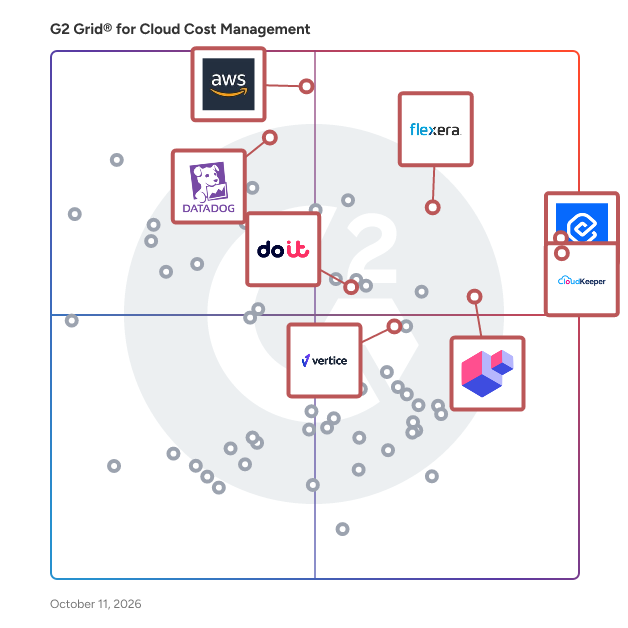
## G2 Grid® for Cloud Cost Management Tools
 ![G2 Grid® for Cloud Cost Management Tools plotting products by satisfaction and market presence](https://www.g2.com/categories/cloud-cost-management/grids.png?focus%5B%5D=150881&focus%5B%5D=136001&focus%5B%5D=1386881&focus%5B%5D=98296&focus%5B%5D=17881&focus%5B%5D=3824&focus%5B%5D=1188126&focus%5B%5D=100655)

Highlighted products: CloudKeeper, Cast AI, ScaleOps, DoiT Cloud Intelligence, Amazon CloudWatch, Datadog, Vertice, and Harness Platform.

Underlying data: [Grid® JSON](https://www.g2.com/categories/cloud-cost-management/grids.json?focus%5B%5D=cloudkeeper&focus%5B%5D=cast-ai&focus%5B%5D=scaleops-cloud-native-optimization-scaleops&focus%5B%5D=doit-cloud-intelligence&focus%5B%5D=amazon-cloudwatch&focus%5B%5D=datadog&focus%5B%5D=vertice&focus%5B%5D=harness-platform&segment=mid-market)

**Sponsored**

### ScaleOps

ScaleOps is a cloud resource management platform designed to automate resource optimization in real-time based on application context-awareness. This innovative solution continuously monitors live application behavior and dynamically adjusts Kubernetes workload resources according to actual usage and contextual demands. By leveraging ScaleOps, organizations can achieve significant cost reductions, of up to 80%, while ensuring that availability, performance, and compliance with production constraints are maintained. The primary target audience for ScaleOps includes DevOps teams, cloud architects, and IT administrators who manage Kubernetes environments. These professionals often face challenges related to resource allocation, cost management, and application performance. ScaleOps addresses these issues by providing a solution that operates autonomously, eliminating the need for manual intervention or code modifications. This allows teams to focus on higher-level strategic initiatives rather than getting bogged down in the minutiae of resource management. Key features of ScaleOps include automated pod-level resource management, which encompasses CPU, memory, replicas, and scheduling. This capability allows the platform to adapt in real-time to the changing behavior of workloads, ensuring optimal resource utilization. Additionally, ScaleOps employs application context-aware optimization, taking into account factors such as burstiness, Pod Disruption Budgets (PDBs), statefulness, and the presence of noisy neighbors. This level of sophistication enables organizations to maintain performance and availability even in complex environments. ScaleOps also offers flexible deployment options, making it suitable for various infrastructures, including air-gapped, on-premises, hybrid, and cloud-native environments. Its compatibility with existing Kubernetes scaling tools, such as Horizontal Pod Autoscaler (HPA), KEDA, and Karpenter, allows for a gradual rollout without disrupting current systems. Furthermore, the platform provides granular policy control, enabling teams to define performance, cost, or availability priorities at the namespace, workload, or environment level. This feature empowers organizations to tailor their resource management strategies to meet specific operational goals and constraints. By integrating seamlessly into existing workflows and providing continuous, context-aware resource optimization, ScaleOps stands out as a comprehensive solution for organizations looking to enhance their Kubernetes resource management. Its unique approach not only drives cost efficiency but also ensures that applications run smoothly and reliably, regardless of the underlying infrastructure.

[Visit website](https://www.g2.com/external_clickthroughs/record?secure%5Bad_program%5D=ppc&secure%5Bad_slot%5D=category_product_list_llm&secure%5Bcategory_id%5D=1388&secure%5Bchosen_at%5D=2026-08-02T23%3A13%3A35Z&secure%5Bdisplayable_resource_id%5D=1388&secure%5Bdisplayable_resource_type%5D=Category&secure%5Bmedium%5D=sponsored&secure%5Bplacement_reason%5D=page_category&secure%5Bplacement_resource_ids%5D%5B%5D=1388&secure%5Bprioritized%5D=false&secure%5Bproduct_id%5D=1386881&secure%5Bresource_id%5D=1388&secure%5Bresource_type%5D=Category&secure%5Bsource_type%5D=category_page&secure%5Bsource_url%5D=https%3A%2F%2Fwww.g2.com%2Fcategories%2Fcloud-cost-management%2Fmid-market%3Fpage%3D3&secure%5Btoken%5D=8103e95eccd393c5517d80f12b7e475b4d432211db58890b6656730be966d214&secure%5Burl%5D=https%3A%2F%2Fscaleops.com&secure%5Burl_type%5D=custom_url)

### [IBM Terraform (formerly HashiCorp Terraform)](https://www.g2.com/products/ibm-terraform-formerly-hashicorp-terraform/reviews)

IBM Terraform (formerly HashiCorp Terraform) is an infrastructure as code tool that lets you define both cloud and on-prem resources in human-readable configuration files that you can version, reuse, and share. You can then use a consistent workflow to provision and manage all of your infrastructure throughout its lifecycle. Terraform can manage low-level components like compute, storage, and networking resources, as well as high-level components like DNS entries and SaaS features. Terraform creates and manages resources on cloud platforms and other services through their application programming interfaces (APIs). Providers enable Terraform to work with virtually any platform or service with an accessible API.

**Average Rating:** 4.6/5.0

**Total Reviews:** 107

#### How Do G2 Users Rate IBM Terraform (formerly HashiCorp Terraform)?

- **Has the product been a good partner in doing business?:** 9.0/10 (Category avg: 9.3/10)
- **Automation:** 9.7/10 (Category avg: 8.6/10)
- **Reporting:** 9.2/10 (Category avg: 8.8/10)
- **Usage Monitoring:** 9.7/10 (Category avg: 8.9/10)

#### Who Is the Company Behind IBM Terraform (formerly HashiCorp Terraform)?

- **Seller:** [HashiCorp](https://www.g2.com/sellers/hashicorp)
- **Company Website:** www.hashicorp.com
- **Year Founded:** 2012
- **HQ Location:** San Francisco, CA
- **Twitter:** @hashicorp  
103,221 Twitter followers
- **LinkedIn® Page:** [www.linkedin.com](https://www.g2.com/external_clickthroughs/record?secure%5Bsource_type%5D=product_profile&secure%5Btoken%5D=7a8ea2037550810dd476598fbad4d6deacd5ace6fab9b5da215c073ebd049f00&secure%5Burl%5D=https%3A%2F%2Fwww.linkedin.com%2Fcompany%2F2830763%2F&secure%5Burl_type%5D=linkedin_company_website)  
2,181 employees on LinkedIn®

#### Who Uses This Product?

- **Who Uses This:** DevOps Engineer, Software Engineer
- **Top Industries:** Information Technology and Services, Computer Software
- **Company Size:** 36% Large, 35% Medium

#### What Do G2 Reviewers Say About IBM Terraform (formerly HashiCorp Terraform)?

_AI-generated summary from verified user reviews_

##### Pros

- Users value the **automation capabilities** of IBM Terraform, streamlining deployments and enhancing collaboration in team environments.
- Users benefit from **automation efficiency** in IBM Terraform, simplifying infrastructure management across multiple cloud providers seamlessly.
- Users appreciate the **ease of use** of IBM Terraform, enjoying streamlined deployments and intuitive management across cloud providers.
- Users value the **efficiency** of Terraform in managing infrastructure, streamlining processes across multiple cloud platforms effortlessly.
- Users appreciate the **effortless infrastructure management** with Terraform, enjoying its multi-cloud support and modularity.

##### Cons

- Users face challenges with **conflict management** in Terraform, particularly during collaboration on state file handling.
- Users often face **data management issues** with Terraform, particularly with state file handling in collaborative setups.
- Users find the **learning curve steep** , particularly for beginners grappling with complex configurations and state management.
- Users find the **learning difficulty** significant, especially for beginners managing state files and advanced features.
- Users often face **merge conflicts** due to challenging state file management, particularly in collaborative environments.

#### What Are Recent G2 Reviews of IBM Terraform (formerly HashiCorp Terraform)?

**["Good for Infrastructure Automation but Has a Learning Curve"](https://www.g2.com/survey_responses/ibm-terraform-formerly-hashicorp-terraform-review-12917227)**

**Rating:** 4.5/5.0 stars

_— Ashish S._

[Read full review](https://www.g2.com/survey_responses/ibm-terraform-formerly-hashicorp-terraform-review-12917227)

**["Brings Consistency and Scalability to Cloud Management"](https://www.g2.com/survey_responses/ibm-terraform-formerly-hashicorp-terraform-review-12882200)**

**Rating:** 4.5/5.0 stars

_— Verified User_

[Read full review](https://www.g2.com/survey_responses/ibm-terraform-formerly-hashicorp-terraform-review-12882200)

#### What Are G2 Users Discussing About IBM Terraform (formerly HashiCorp Terraform)?

- [How does terraform work internally?](https://www.g2.com/discussions/how-does-terraform-work-internally) - 1 comment
- [What kind of tool is terraform?](https://www.g2.com/discussions/what-kind-of-tool-is-terraform) - 2 comments
- [Is terraform free?](https://www.g2.com/discussions/is-terraform-free) - 3 comments
- [What does HashiCorp terraform do?](https://www.g2.com/discussions/what-does-hashicorp-terraform-do)

### [Umbrella](https://www.g2.com/products/umbrella-formerly-anodot-umbrella/reviews)

Anodot’s augmented analytics platform is the next generation in business intelligence. Anodot proactively identifies revenue-critical business incidents, recommends actions, and automates the remediation process, in real time. Anodot’s patented technology goes beyond data visualization by constantly analyzing and correlating business metrics, alerts and forecasts in their context. Leveraging AI and ML, Anodot’s augmented analytics proactively alert companies to revenue-critical business incidents and automates their remediation in real-time. The company’s Cloud Costs solution provides accurate monitoring and forecasting as well as savings recommendations that cut up to 40% on annual cloud spend. Fortune 500 companies leverage Anodot for cloud cost management and Anodot for payment intelligence to help reduce cloud waste and protect revenue streams. Our team spans several continents, with headquarters in the U.S. and Israel, with business units dedicated to digital, financial services, and telecommunications. To learn more, visit www.anodot.com or check us out on LinkedIn and Twitter.

**Average Rating:** 4.5/5.0

**Total Reviews:** 36

#### How Do G2 Users Rate Umbrella?

- **Has the product been a good partner in doing business?:** 9.4/10 (Category avg: 9.3/10)
- **Reporting:** 6.7/10 (Category avg: 8.8/10)
- **Usage Monitoring:** 8.3/10 (Category avg: 8.9/10)

#### Who Is the Company Behind Umbrella?

- **Seller:** [Umbrella (formerly Anodot)](https://www.g2.com/sellers/umbrella-formerly-anodot)
- **Year Founded:** 2014
- **HQ Location:** Ashburn, Virginia
- **Twitter:** @TeamAnodot  
1,139 Twitter followers
- **LinkedIn® Page:** [www.linkedin.com](https://www.g2.com/external_clickthroughs/record?secure%5Bsource_type%5D=product_profile&secure%5Btoken%5D=aa2fcbe2a08bb81c95fa3eeb99e7eeee5ddf6d8db875b4026c0a61f3e0e8990b&secure%5Burl%5D=https%3A%2F%2Fwww.linkedin.com%2Fcompany%2F5229141%2F&secure%5Burl_type%5D=linkedin_company_website)  
80 employees on LinkedIn®

#### Who Uses This Product?

- **Top Industries:** Information Technology and Services, Computer Software
- **Company Size:** 44% Medium, 31% Small

#### What Do G2 Reviewers Say About Umbrella?

_AI-generated summary from verified user reviews_

##### Pros

- Users value the **time-saving features** of the Umbrella, enabling quick identification and resolution of critical issues.
- Users value the **fast problem detection** of the Alerting System, significantly reducing time and stress in issue resolution.
- Users appreciate the **quick and critical alerts** from Umbrella, which help in promptly addressing data issues.
- Users value the **AI-Powered Cost Optimization** for effectively managing and reducing unnecessary cloud spending swiftly.
- Users value the **quick problem detection** by Anodot, which helps resolve issues efficiently and reduces stress.

##### Cons

- Users find the **lack of advanced role-based permissions** challenging, especially in larger organizational contexts.
- Users find the **complexity** of managing alerts and user roles to be a frustrating aspect of the Umbrella product.
- Users find the **interface not intuitive** , making it challenging for non-technical product managers to navigate effectively.
- Users find the **confusing usability** of the umbrella limits effective use, especially for non-technical product managers.
- Users find the **difficult learning curve** of Umbrella challenging, especially for non-technical product managers.

#### What Are Recent G2 Reviews of Umbrella?

**["AI-Powered Cost Optimization Makes Cloud Savings Effortless"](https://www.g2.com/survey_responses/umbrella-review-11827832)**

**Rating:** 5.0/5.0 stars

_— Shaik c._

[Read full review](https://www.g2.com/survey_responses/umbrella-review-11827832)

**["Fast Problem Detection, But Alert Overload Needs Tweaking"](https://www.g2.com/survey_responses/umbrella-review-11897718)**

**Rating:** 5.0/5.0 stars

_— Nishant S._

[Read full review](https://www.g2.com/survey_responses/umbrella-review-11897718)

#### What Are G2 Users Discussing About Umbrella?

- [Where is Anodot located?](https://www.g2.com/discussions/where-is-anodot-located)
- [What is anomaly detection used for?](https://www.g2.com/discussions/what-is-anomaly-detection-used-for)
- [How much does Anodot cost?](https://www.g2.com/discussions/how-much-does-anodot-cost)
- [What does Anodot do?](https://www.g2.com/discussions/what-does-anodot-do)

### [Economize](https://www.g2.com/products/economize/reviews)

Economize is a cloud cost management platform for engineering teams to analyze, manage and optimize their cloud costs. Economize provides advanced cost reports, cost anomaly detection, recommendations for your cloud workloads. Apart from these, Economize also provides with additional features like Slack reports, Unit Cost Economics, Custom Dashboards. Economize integrates with your cloud provider seamlessly and provides you complete context and information about the workloads that you run. With Economize, you can have greater understanding of your infrastructure, gather the right datapoints to make informed decisions, granular reports to your finance teams and thereby optimize your cost as well.

**Average Rating:** 4.8/5.0

**Total Reviews:** 36

#### How Do G2 Users Rate Economize?

- **Has the product been a good partner in doing business?:** 9.7/10 (Category avg: 9.3/10)
- **Automation:** 9.3/10 (Category avg: 8.6/10)
- **Reporting:** 9.6/10 (Category avg: 8.8/10)
- **Usage Monitoring:** 9.5/10 (Category avg: 8.9/10)

#### Who Is the Company Behind Economize?

- **Seller:** [Economize](https://www.g2.com/sellers/economize)
- **Year Founded:** 2020
- **HQ Location:** San Francisco, California
- **Twitter:** @economize  
164 Twitter followers
- **LinkedIn® Page:** [www.linkedin.com](https://www.g2.com/external_clickthroughs/record?secure%5Bsource_type%5D=product_profile&secure%5Btoken%5D=62dc8c66794aa1c01ee12eb2929963b7dd0601206e0d3dab059531dee9fd4e6f&secure%5Burl%5D=https%3A%2F%2Fwww.linkedin.com%2Fcompany%2Feconomize%2F&secure%5Burl_type%5D=linkedin_company_website)  
35 employees on LinkedIn®

#### Who Uses This Product?

- **Top Industries:** Computer Software, Information Technology and Services
- **Company Size:** 69% Small, 28% Medium

#### What Are Recent G2 Reviews of Economize?

**["A cloud cost management platform that assisted us in saving money."](https://www.g2.com/survey_responses/economize-review-8826602)**

**Rating:** 5.0/5.0 stars

_— Deep B._

[Read full review](https://www.g2.com/survey_responses/economize-review-8826602)

**["Economize helps our multi-cloud deployment"](https://www.g2.com/survey_responses/economize-review-8753866)**

**Rating:** 5.0/5.0 stars

_— Dinesh A._

[Read full review](https://www.g2.com/survey_responses/economize-review-8753866)

#### What Are G2 Users Discussing About Economize?

- [What is Economize used for?](https://www.g2.com/discussions/what-is-economize-used-for)

- [&lsaquo; Prev‹ Prev](/categories/cloud-cost-management/mid-market?order=g2_score&page=2#product-list)
- [1](/categories/cloud-cost-management/mid-market?order=g2_score#product-list)
- [2](/categories/cloud-cost-management/mid-market?order=g2_score&page=2#product-list)
- 3
- Next &rsaquo;Next ›

Spotlight Categories

[VoIP Providers](https://www.g2.com/categories/voip)

[Audit Management Software Solutions](https://www.g2.com/categories/audit-management)

[HCM Software](https://www.g2.com/categories/hcm-software)

[Payment Processing Software](https://www.g2.com/categories/payment-processing)

[CMMS Software](https://www.g2.com/categories/cmms)

Similar Categories

- [Application Portfolio Management](/categories/application-portfolio-management)
- [Auto Scaling](/categories/auto-scaling)
- [Cloud Management Platforms](/categories/cloud-management-platforms)
- [Cloud Migration Assessment Tools](/categories/cloud-migration-assessment-tools)
- [Columnar Databases](/categories/columnar-databases)

- [Data as a Service (DaaS)](/categories/data-as-a-service-daas)
- [Data Destruction](/categories/data-destruction)
- [Data Extraction](/categories/data-extraction-tools)
- [Data Governance](/categories/data-governance-tools)
- [Data Observability](/categories/data-observability)

- [Data Recovery](/categories/data-recovery)
- [Digital Employee Experience (DEX) Management](/categories/digital-employee-experience-dex-management)
- [Digital Experience Monitoring (DEM)](/categories/digital-experience-monitoring-dem)
- [Digital Governance](/categories/digital-governance)
- [Disk Cleanup](/categories/disk-cleanup)

[Browse Cloud Cost Management Themes](/categories/cloud-cost-management/themes)

 ![Rachana Hasyagar](/assets/transparent-ad5be28fbcd25b7b08d2cebe1d957125437fb5407d75ee717965ad22c8808791.gif "Rachana Hasyagar")
RH

Researched and written by [Rachana Hasyagar](https://research.g2.com/insights/author/rachana-hasyagar)

Updated 

Products classified in the overall Cloud Cost Management category are similar in many regards and help companies of all sizes solve their business problems. However, medium-sized business features, pricing, setup, and installation differ from businesses of other sizes, which is why we match buyers to the right Medium-Sized Business Cloud Cost Management to fit their needs. Compare product ratings based on reviews from enterprise users or connect with one of G2's buying advisors to find the right solutions within the Medium-Sized Business Cloud Cost Management category.

In addition to qualifying for inclusion in the Cloud Cost Management Tools category, to qualify for inclusion in the Medium-Sized Business Cloud Cost Management Tools category, a product must have at least 10 reviews left by a reviewer from a medium-sized business.

Show More

* * *

## How Do You Choose the Right Cloud Cost Management Tools?

### What You Should Know About Cloud Cost Management Tools

### What are Cloud Cost Management Tools?

Cloud cost management tools are software platforms a company utilizes to manage all costs related to cloud resources, optimization, and management. The software allows organizations to manage the costs associated with cloud computing. Managing cloud computing costs is done primarily with one focus in mind—to maximize cloud usage and increase operational efficiency.

Cloud computing has been at the forefront due to its subscription or pay-per-use model. However, as companies wish to scale in terms of operations, tracking the cost of cloud services becomes a complex task and is not as transparent as “pay-per-use”. Numerous functions within an organization would have access to their cloud computing platforms, and having this decentralized approach could rack up massive amounts in cloud computing costs. Hence, having a cloud cost management tool ensures that cloud spend is kept in check and that the cloud resources are optimized and worth every penny spent.

Cloud cost management focuses on understanding the different costs associated with cloud computing. Some key costs associated with the cloud include software licenses, web services, compute and storage costs, network costs, virtualized infrastructure/virtual machine instances, and additional costs such as training staff and personnel.

As more companies move to the cloud, either partially or entirely, cloud storage costs do not remain the same. When a company needs to scale, IT staff can easily focus on acquiring more cloud services to ensure and support daily work activities without keeping concern for costs. Engineers or developers need to ensure that their products have a shorter time to market, thereby spinning up more cloud resources. This could have a huge impact on the business since there are no savings, but a huge cloud bill.

Regardless of the cloud service provider, such as Amazon Web Services (AWS), Microsoft Azure, and Google Cloud Platform, among several others, it is certain that money will be spent across resources that may or may not be utilized. When different cloud infrastructure is involved, cloud cost management software can make it much easier for companies to support cost optimization. For example, customers that have opted for multi-cloud environments. Cloud cost optimization needs to be given priority since different cloud service providers are being used. Hence, costs may vary across all providers, making it complex and difficult to track. By understanding the costs, companies can focus on cost optimization and ensure accountability. Cloud cost management is therefore, not just about cost control, it's about resource optimization, forecasting and budgeting, and reducing wastage.

### What are the Common Features of Cloud Cost Management Tools?

Cloud cost management software has several features that makes it a strong choice for companies that want to keep track of their spending on cloud. The following are some core features within the software that can help users in several ways:

**Automatic scaling:** The promise of unlimited scalability is one of the biggest pros of cloud computing technology. Automatic scaling ensures that resources are used and available when needed, and powered down when not in use. Companies do not need to spend large amounts on unutilized cloud resources. The software helps companies automate governance of costs, compliance, security, and cloud operations. Planning for maximum utilization all the time when using only some percentage of it is extremely expensive in the long run.

**Instance management:** A key cost driver for cloud computing is the number of unused instances that a company opts for. If a firm is not using an instance, the cloud cost optimization software can track and alert the customer if there is no need for the instance and help to save costs. The software can also find discount instances that can be used for non-critical workloads that do not need to run constantly, thereby driving more savings.

**Automated alerts and notifications:** Cloud spend management platforms allow users to set up automated alerts and budgets. These alerts warn the user when there are authorization failures, sudden cost spikes, untagged infrastructure, and when budget limits are crossed. Having alerts sets is critical to ensure business continuity and keep costs optimized.

**Cost allocation:** A key feature of cloud cost management tools is that it allows the user to keep track of the team spends on cloud computing resources. This will allow management to set up appropriate budgets and track spends by various company functions.&nbsp;

**Chargeback:** Chargeback is a feature where the cost of cloud services is applied or “charged-back” to the business unit responsible for the cloud expense. The chargeback feature in different cloud cost savings platforms allows companies to track the departments that are making the most (and least) use of cloud costs—this information is useful while making budgeting decisions.

### What are the Benefits of Cloud Cost Management Tools?

Benefits of cloud spend management platforms include:

**Reduce cost:** This is understandably the most important benefit of cloud cost management software. Companies use cloud cost management software to ensure cloud optimization. Companies can monitor and track their spending, ensure optimal resource allocation, and take advantage of discounts offered by cloud service providers such as AWS, Microsoft Azure, GCP. Companies can even use this software to visualize and understand their cost profile when evaluating cloud migration, deploying new cloud security policies, and maintaining cloud health.

**Eliminate waste:** By understanding and tracking their cloud usage and cloud bills, companies can reduce waste and ensure that they are making the best of their cloud resources. Techniques that support this include automatic scaling and load balancing.

**Improve business performance:** A business needs to ensure its cloud strategies align closely with its business goals. Overprovisioning of cloud resources means significant wastage of company profits and underprovisioning could cause workloads and applications to suffer if there is no proper cloud support. In such a situation, planning for the right cloud cost management solution is key to ensuring smooth performance in any environment—whether on a public, private, hybrid, or moving from on-premises to cloud.

**Gain visibility into cloud storage costs:** Cloud spend management platforms provide visibility into cloud resource costs that are kept idle, unallocated, over-utilized. Some cloud cost management software provide an hourly granularity as well. Having a single pane of glass dashboards ensures a single point for admins to manage, organize and optimize their cloud environment.

**Get recommendations to cut costs:** One of the key benefits is that the software can provide recommendations to reduce costs. These recommendations are based on analyzing different workloads and their cloud requirements. Costs are analyzed down to the root sources, and recommendations are made to the user.

**Improve reporting and analytics:** Data-driven decisions will help the user make better decisions regarding their cloud spending. By tracking patterns in cloud spending, cloud cost management tools can provide their users with graphs or tables of data that can be used for data analysis—these analytics can be cross-referenced with business outcomes to ensure the company is on the right track with its cloud strategy. Major cloud providers provide reporting as part of their subscription packages such as AWS Cost and Usage report.&nbsp;

### Who Uses Cloud Cost Management Tools?

**Cloud architects:** Cloud architects manage the technical requirements of cloud architecture and oversee a company’s cloud environment and strategies. A cloud architect is the main persona that uses cloud cost management software. Understanding how to manage cloud spends and optimize cloud resources falls upon the cloud architect. A cloud architect doesn't just work with engineering and development, they also work closely with HR, finance, logistics, and security to ensure that cloud strategies are being optimized.

**Cloud cost managers:** Cloud cost managers handle various tasks such as forecasting, budgeting, business development practices and processes, identification of trends and opportunities, cloud governance best practices, among many others. Managers can use the analytics dashboard to keep track of cloud strategies and propose changes and suggestions to decision makers based on derived insights.

**IT teams and admins:** IT admins use cloud cost management tools to optimize cloud infrastructure and ensure all resources are being used judiciously. Cloud admins can use the software to set up real-time monitoring, budget, notifications, and alerts. Administrators gain access and control the cost view over the company cloud through a web-based interface they can access from anywhere.

**Cross-functional teams:** Cloud computing has become an integral part of enterprises across the globe. Several cross-functional teams such as engineering teams and application development and testing teams within an organization depend on cloud to ensure they create and release products with a much lower time to market. The heads of cross-functional teams within an organization can keep track of how spending on cloud resources to ensure they are well within the budget provided.

**Cloud service providers:** Cloud service providers offer cloud cost optimization options. Having internal cost management options that are reliable, scalable, consistent, and available as required is a key benefit for several customers. Some of the biggest names in cloud platforms include AWS, Microsoft Azure, Google Cloud Platform (GCP), Alibaba Cloud, IBM Cloud, and several others have their specific cloud spend management platforms such as Amazon CloudWatch, AWS Budgets, Azure Cost Management, Cost management by Google Cloud, among several others. Integrated cost management tools along with billing support are offered at no additional costs by these cloud giants.

#### Software Related to Cloud Cost Management Tools

[Cloud management platforms](https://www.g2.com/categories/cloud-management-platforms) **:** Cloud cost management forms a key part of cloud management platforms. A cloud management platform is a set of unified software tools which help companies monitor and control cloud computing resources. This software brings the administrative visibility and capability of cloud cost management solutions.

[Infrastructure as a service (IaaS) providers](https://www.g2.com/categories/infrastructure-as-a-service-iaas) **:** Cloud cost management tools are typically paired with infrastructure as a service (IaaS) offerings to minimize the costs of a pay-as-you-go model. Companies also use a combination of these tools to increase the efficiency of their cloud service usage—these solutions often provide reporting features to outline waste and redundancies.&nbsp;

[SaaS spend management software](https://www.g2.com/categories/saas-spend-management) **:** Cloud cost management software has some overlap with SaaS spend management software, but the latter is used to monitor and manage spending on cloud applications rather than cloud infrastructure.

### Challenges with Cloud Cost Management Tools

Cloud cost optimization solutions can come with their own set of challenges.&nbsp;

**Billing challenges:** Complexity in billing practices and not understanding what the customer bill contains is a key challenge. Without understanding the bill itself, optimizing costs is a difficult task since the customer cannot identify avenues for cost optimization.

**Approach towards policies:** Each team would follow their respective budgets allocated and manage their cloud resources and cost. Having a cloud cost management tool could generate some backlash since costs by each team are being monitored, which could be quite tricky to manage.

**Budget forecasting:** Cloud cost optimization is difficult when there are plans in the pipeline to add new products and services, handle unexpected business demand, or make any changes to software design. Forecasting is complex, and cloud spend management platforms must rapidly adjust to capacity or alerting users of sudden spikes in cost due to such scenarios.

**Cloud sprawl:** One of the biggest challenges that companies face is that in the excitement of cloud computing technology, they end up moving entire databases and applications without a plan. This leads to cloud sprawl, wherein an organization does not have a complete view of all the cloud infrastructure. Organizations will end up managing several cloud instances, providers, services, and therefore are unable to view or maintain accountability for all cloud components. Even with cloud cost management software, organizations might not be able to understand and deploy the full use of this software due to cloud sprawl.

**Lack of skilled resources:** Finding the right talent to invest, track, and optimize all cloud resources within an organization is tough. Identifying the type of skills required and finding the right fit is a huge challenge.

### How to Buy Cloud Cost Management Tools

#### Requirements Gathering (RFI/RFP) for Cloud Cost Management Tools

When researching cloud cost management platforms, the first and foremost step is to ask one question—what issues could potentially be solved using a cloud cost management tool? It is essential to understand cloud spend inefficiencies and identify the ones harming the buyer’s organization. Taking into consideration the reasons for cost inefficiencies is critical. Some of the key reasons that cause companies to rack up huge cloud bills are:&nbsp;

**Poor resource management caused by oversizing:** Companies usually end up spending a lot on acquiring resources but only utilize half of that at any point in time. A capacity that isn't needed is a part of the wasted cloud costs. Rightsizing ensures that costs are being optimized and the company is not facing copious amounts in bills.

**Software inefficiency:** Since several different teams would be using the cloud resources within the company, it becomes quite difficult to keep track of the cloud storage costs. Failure to measure software efficiency or not having set targets can lead to an increase in the wastage of cloud computing resources.

**Forecast issues:** As discussed earlier, scaling is a key feature of cloud computing. However, when companies fail to forecast their needs (which is a difficult task) such as developing new services or changing existing ones, it could rack up unintentional costs since the company would be over or underprepared for the additional needs.

**Architectural design:** With the hype around moving to cloud, several companies are moving to cloud just to enter the hype; realizing later that it is much more expensive than anticipated. Workloads might not be suitable for some specific cloud environments or not supported, additional licensing might be required, governance issues might crop up, and a host of other problems that would only drive costs further up.

Once a company has identified the issues and cost inefficiencies, it becomes much easier for the customer to filter out and identify what type of cloud cost management they are looking for. If the buyer prefers having a single software solution owner, they could opt for a single cloud provider with inherent cloud cost optimization capabilities. However, if the buyer prefers a separate tool to manage various cloud environments like hybrid and multi-cloud environments, they could opt for another stand-alone solution altogether. Customers can use reviews here at G2.com as a guide to move forward with choosing the software.

#### Compare Cloud Cost Management Tools Products

**Create a long list**

This step involves creating a long list of cloud cost management software providers that assist buyers in cost optimization plans. Some key factors to consider include automation, server instances tracking, billing methods, dashboard functionality, cost reduction, security support, data privacy, etc. In this step, it is important to note that many top cloud service providers provide cloud cost optimization as a part of their cloud offerings (on a subscription basis), hence it is important to evaluate whether the added functionality is sufficient or a stand-alone solution is required.

**Create a short list**

Once the long list of cloud cost management tools has been identified, it is time to remove software that does not meet all the business criteria. For this, it is important to fall back on the assessment made earlier on what is to be done before choosing a cloud spend management solution. Based on the assessment, buyers can further shorten their list and only choose those software vendors that meet all the business requirements.

**Conduct demos**

Once the list has been reduced to a couple of vendors, buyers may begin to request a demo. The demo will give them an idea of how the software will work once and help them assess all the various features the software has to offer. Having a demo on resources and applications is a good way to ensure the best fit. At this step, the buyer should ask several questions to the vendor about after-service support, staff training, and other additional features that can be provided. Understanding the dashboard and visualization of the cost parameters is essential during demos.

#### Selection of Cloud Cost Management Tools

**Choose a selection team**

Choosing the right team to work together on choosing the software is a critical part of the process. This team will be in charge of identifying pain points to finally overseeing the entire implementation of the cloud management software. The team should include a mix of different personas who have the required skills, interest, and time. Some roles include cloud architects and cloud admins, IT admin and staff, department heads, and finance managers (for budget allocations).&nbsp;

**Negotiation**

When choosing a cloud cost management tool, bringing in negotiation factors is very important especially on pricing. Since a buyer’s requirement for the cloud might change based on the types of workloads being run and applications being developed, buyers should ensure that the software accurately reflects the resources being utilized at that point in time and account for possible changes in the future. This is necessary to ensure that the customer is not being overcharged. Bringing such discussions to the negotiation table is key. In addition, it is important to negotiate possible additional costs that might come in for the remainder of the contract.

**Final decision**

Once all the steps are complete, the final decision is made weighing all factors and scenarios. Buyers can first try to run cloud cost management software with a smaller number of instances and monitor the cost savings and resources being optimized. Based on this feedback, it can be used for enterprise-wide cloud cost management.