Best Animation Software - Page 11

Last updated: March 3, 2025

How Many Animation Software Products Does G2 Track?

Total Products under this Category: 172

Category Stats (Nov 2026)

  • Average Rating: 4.4/5 (↑0.01 vs Oct 2026) The average rating of products in this category, based on all submitted ratings
  • Top Trending Product: Adobe Animate (+0.74%) - Among all products in this category, Adobe Animate recorded the largest rating increase compared to last month

Last updated: November 20, 2026

How Does G2 Rank Animation Software Products?

Why You Can Trust G2's Software Rankings:

  • 30 Analysts and Data Experts
  • 15,400+ Authentic Reviews
  • 172+ Products
  • Unbiased Rankings

G2's software rankings are built on verified user reviews, rigorous moderation, and a consistent research methodology maintained by a team of analysts and data experts. Each product is measured using the same transparent criteria, with no paid placement or vendor influence. While reviews reflect real user experiences, which can be subjective, they offer valuable insight into how software performs in the hands of professionals. Together, these inputs power the G2 Score, a standardized way to compare tools within every category.

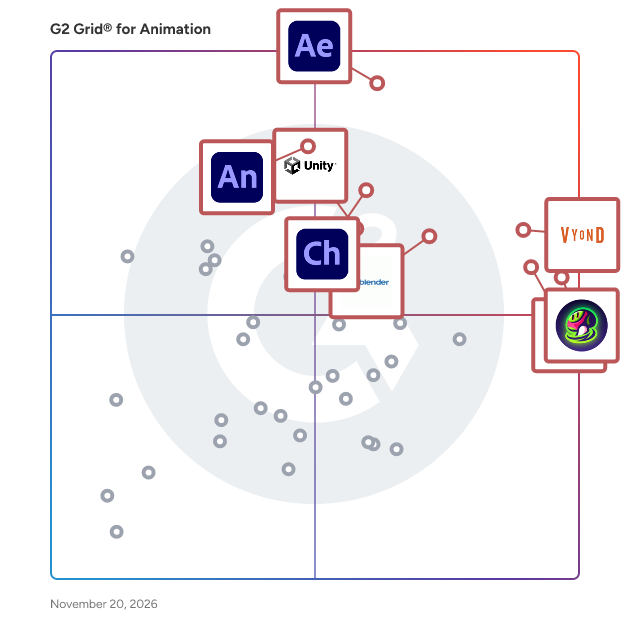
G2 Grid® for Animation Software

G2 Grid® for Animation Software plotting products by satisfaction and market presence

Highlighted products: Adobe After Effects, Vyond, Meshy, Animaker, Blender, Adobe Character Animator, Adobe Animate, and Unity.

Underlying data: [Grid® JSON](https://www.g2.com/categories/animation/grids.json?focus%5B%5D=adobe-after-effects&focus%5B%5D=vyond&focus%5B%5D=meshy&focus%5B%5D=animaker&focus%5B%5D=blender&focus%5B%5D=adobe-character-animator&focus%5B%5D=adobe-animate&focus%5B%5D=unity)

Mompozt Animation Studio

Mompozt is a leading animation & cinematics studio that creates highly-engaging animated stories, cinematic trailers, commercials, and characters for agencies, brands, and game developers. We are constantly evolving and adapting to the needs of our global clients, such as Nestle, Ferrero Rocher, BBVA, Colgate, Palmolive, Renault, Kia, and others. At Mompozt, we thrive on providing clients with bespoke solutions and have effectively used 3D/2D animation, cinematics, VFX, and creative storytelling to help many notable brands bring their ideas to life, and we’d love to do the same for you too! Why clients choose us: 14+ years of industry experience 50+ successful projects delivered for clients globally High-quality animation Engaging storytelling Outstanding characters Our creative portfolio: https://vimeo.com/mompozt Contacts: United States: +1 786 7961483 Colombia: +57 1 7452505, +57 304 6381018 Mexico: +52 1 55 3213 7775

Who Is the Company Behind Mompozt Animation Studio?

Motion Control AI

Motion Control AI is a browser-based AI video creation platform that transfers motion, gestures, and expressions from a reference video to a character image. Marketing teams, content studios, game creators, and ecommerce brands can turn static artwork, avatars, mascots, and product characters into publishable video without motion-capture equipment, rigging, or manual keyframes. Users upload a character image and a motion reference, choose generation settings, and produce animated clips for social campaigns, ads, explainers, game concepts, training content, and branded storytelling. The platform also provides image-to-video, video-to-video, character and body swap, lip-sync, talking-photo, and text-to-image workflows with multiple AI models and reusable templates. Motion Control AI includes generation history, commercial-ready exports, multilingual guidance, and credit-based plans for recurring production. It helps teams prototype and produce visual content faster while reducing the time and specialist skills required by a traditional animation workflow.

Who Is the Company Behind Motion Control AI?

AI can help you find the answers. G2 helps you trust them.

Connect G2 to Claude or ChatGPT for answers grounded in G2's trusted reviews, comparisons, and pricing from real user insights.

How it works

Motion Hero ‑ GSAP Shopify Animations

Motion Hero is a visual video editor and interactive video player built for Shopify. It helps merchants create product experiences that feel closer to Apple-style product pages without requiring custom front-end development. Motion Hero includes three video modes: • GSAP frame-by-frame scroll — visitors control video progress by scrolling forward or backward. • Guided playback — videos can play, pause at specific moments, continue on scroll, and resume automatically. • Standard video player — regular video playback for banners, product sections, and landing pages. The built-in visual editor lets merchants add text, images, buttons, icons, and shapes directly over the video. Every element can be positioned on a timeline so it appears and disappears at specific moments. Desktop and mobile layouts can be configured separately, making it possible to build responsive interactive video experiences without editing theme code. Motion Hero is designed for ecommerce brands that want to use product videos for storytelling, product launches, feature demonstrations, fashion, technology, automotive, luxury products, and other visually driven storefront experiences.

Who Is the Company Behind Motion Hero ‑ GSAP Shopify Animations?

Navisworks

Autodesk Navisworks is a comprehensive project review and coordination software designed to enhance Building Information Modeling (BIM) workflows. It enables construction and design teams to integrate, analyze, and visualize complex 3D models, facilitating improved project delivery and collaboration. Key Features and Functionality: - Model Integration: Combine design and construction data into a single, federated model, allowing for a holistic project view. - Clash Detection: Identify and resolve clashes and interferences before construction begins, reducing on-site issues and rework. - 4D and 5D Simulation: Animate and interact with model objects to simulate construction schedules (4D) and cost analysis (5D), aiding in project planning and management. - Quantification: Extract material quantities from 2D or 3D designs, facilitating accurate cost estimation and resource planning. - Collaboration Tools: Integrate with Autodesk Construction Cloud to keep project teams connected, enabling issue tracking and resolution within the model environment. Primary Value and User Solutions: Navisworks addresses the challenges of coordinating multidisciplinary design data by providing a unified platform for model aggregation and analysis. By detecting potential issues early through clash detection and simulation, it minimizes costly construction delays and rework. The software's integration capabilities enhance team collaboration, ensuring all stakeholders are aligned throughout the project lifecycle. Ultimately, Navisworks improves project predictability, efficiency, and overall quality.

Average Rating: 4.5/5.0

Total Reviews: 190

How Do G2 Users Rate Navisworks?

  • Has the product been a good partner in doing business?: 8.4/10 (Category avg: 8.8/10)
  • Quality of Support: 8.5/10 (Category avg: 8.3/10)
  • Ease of Setup: 8.7/10 (Category avg: 9.0/10)
  • Ease of Admin: 8.2/10 (Category avg: 8.6/10)

Who Is the Company Behind Navisworks?

  • Seller: Autodesk
  • Year Founded: 1982
  • HQ Location: San Francisco
  • LinkedIn® Page: www.linkedin.com
    15,757 employees on LinkedIn®
  • Ownership: NASDAQ:ADSK
  • Total Revenue (USD mm): $3,790

Who Uses This Product?

  • Who Uses This: BIM Engineer, Senior Engineer
  • Top Industries: Construction, Civil Engineering
  • Company Size: 50% Medium, 28% Large

What Do G2 Reviewers Say About Navisworks?

AI-generated summary from verified user reviews

Pros
  • Users value the effective collaboration features of Navisworks, enhancing coordination and clarity in complex projects.
  • Users find Navisworks to be incredibly easy to use, making it accessible for beginners and efficient for task completion.
  • Users value the effective 3D modeling capabilities of Navisworks, enhancing clarity in clash detection and coordination.
  • Users appreciate the incredible BIM data integration of Navisworks, enhancing clash detection and digital delivery optimization.
  • Users value the ease of access with Navisworks, benefiting from its free version for convenient model reviews.
Cons
  • Users find the difficult navigation in Navisworks frustrating, especially when handling larger models and complex files.
  • Users find the learning curve steep with Navisworks, especially due to its unintuitive interface and navigation challenges.
  • Users experience slow processing with Navisworks, especially when handling large files and multiple disciplines, causing frustration.
  • Users find the difficult learning curve of Autodesk Navisworks frustrating, particularly for beginners navigating its outdated interface.
  • Users report inaccuracy issues in Navisworks, causing confusion with overlapping NWC files and missing model information.

What Are Recent G2 Reviews of Navisworks?

What Are G2 Users Discussing About Navisworks?

PandaSuite

The most interactive no code builder. Developed by a Parisian team and launched in 2015, PandaSuite is a simple & creative SaaS platform to build applications and interactive experiences without a line of code. Create visually using PandaSuite Studio: design your screens, play with +40 components and create animations. Deploy as a web app, native app for mobile/tablet (iOS, Android) and desktop (MacOS, Windows). Start for free and deploy from 79/month/app.

Average Rating: 4.6/5.0

Total Reviews: 14

How Do G2 Users Rate PandaSuite?

  • Has the product been a good partner in doing business?: 10.0/10 (Category avg: 8.8/10)
  • Quality of Support: 9.1/10 (Category avg: 8.3/10)
  • Ease of Setup: 8.8/10 (Category avg: 9.0/10)
  • Ease of Admin: 10.0/10 (Category avg: 8.6/10)

Who Is the Company Behind PandaSuite?

Who Uses This Product?

  • Company Size: 80% Small, 13% Medium

What Do G2 Reviewers Say About PandaSuite?

AI-generated summary from verified user reviews

Pros
  • Users highlight PandaSuite's excellent customer support, appreciating quick responses and helpful resources for their projects.
  • Users find PandaSuite easy to use, with helpful resources and responsive support simplifying the creation process.
  • Users praise PandaSuite for its superior support, enabling easy app creation and updates without programming skills.
  • Users praise the top-notch support responsiveness of PandaSuite, highlighting quick replies and helpful assistance.
  • Users value the outstanding support from PandaSuite, making it easy for beginners to create projects successfully.
Cons
  • Users find the inadequate tutorials insufficient for understanding components, especially for non-experts seeking guidance.
  • Users feel there's a lack of detailed learning resources, making it challenging for non-experts to utilize PandaSuite effectively.
  • Users find the insufficient tutorials of PandaSuite challenging, as they lack detailed guidance for non-experts.
  • Users feel a lack of guidance in PandaSuite, as existing resources do not fully support all users effectively.
  • Users find the slow learning curve of PandaSuite challenging, requiring detailed tutorials for better understanding.

What Are Recent G2 Reviews of PandaSuite?

What Are G2 Users Discussing About PandaSuite?

Paper Animation

Paper Animation turns images and short phrases into paper-inspired videos and GIFs in the browser. It offers Paper Fold, Newspaper Highlight, Magazine Letters, and Press Coverage styles with customizable colors, typography, timing, textures, and aspect ratios. Creators and marketing teams can preview animations live and export watermarked 720p files for free; 1080p and watermark-free exports use pay-as-you-go credits with no subscription.

Who Is the Company Behind Paper Animation?

PaperAnimationLab

PaperAnimationLab is an intuitive, browser-based creative animation studio and editorial platform designed to bring authentic tactile paper aesthetics into modern digital video. Featuring a rich suite of deterministic paper motion effects including newspaper phrase search, realistic crumple and unfold, animated cutout borders, line boil/wobble, origami fold reveals, and handcrafted textures PaperAnimationLab empowers creators, motion designers, and video editors to craft frame-by-frame paper animations with instant client-side preview, full timeline control, and transparent GIF/video export.

Who Is the Company Behind PaperAnimationLab?

Quickmagic

QuickMagic Motion Capture is an AI-powered solution designed to streamline the process of 3D animation generation by capturing motion from video inputs. It enables users to create realistic animations without the need for specialized equipment or extensive manual effort. Key Features and Functionality: - AI Video Motion Capture: Utilizes advanced artificial intelligence to accurately capture and translate human movements from video footage into 3D animations. - User-Friendly Interface: Designed with simplicity in mind, allowing users of all skill levels to generate animations efficiently. - Versatile Application: Suitable for various industries, including gaming, film production, virtual reality, and more. Primary Value and User Solutions: QuickMagic Motion Capture addresses the challenges of traditional motion capture methods by offering a cost-effective and accessible alternative. It eliminates the need for expensive equipment and complex setups, enabling creators to produce high-quality animations swiftly. This solution empowers users to bring their creative visions to life with greater ease and efficiency.

Who Is the Company Behind Quickmagic?

RenderSplash

RenderSplash turns the 3D pool design a builder already rendered into a real-looking video the homeowner can watch before they sign. Builders upload the stills from Pool Studio, Vip3D, VizTerra or SketchUp and get back a video of that same design: a Walkthrough, or a Story with a family in it. Most Walkthroughs are ready in about 100 seconds. We do not train on your uploads. Free plan, no card.

Who Is the Company Behind RenderSplash?

  • Seller: RenderSplash
  • Year Founded: 2023
  • HQ Location: Sheridan, Wyoming, United States
  • LinkedIn® Page: www.linkedin.com
    1 employees on LinkedIn®

SlotVFX

SlotVFX is a desktop app for macOS and Windows for making game effects and animations fast. Studios use it to get high-quality VFX without long production time. Spine animators use it to juice up their animations with glows, particles, and shaders on bones and slots, and to retarget and merge skeletons. Web game developers drop complex, optimized effects into PixiJS, Phaser, or Cocos games with a royalty-free runtime. Work by hand or ask your AI assistant (Claude or ChatGPT). Free plan available; paid plans add export and cloud sync. Contact: Support@slotvfx.com

Who Is the Company Behind SlotVFX?

Toon Boom Storyboard Pro

The only professional-grade solution designed from the ground up to support the craft of storyboarding. Whether you are thumbnailing your first pass, refining the visual storytelling on your project, pitching your boards or timing out camera moves in an animatic, Storyboard Pro is built to support your creative work throughout the preproduction process. Learn why storyboard artists, directors and studios around the world rely on Storyboard Pro.

Who Is the Company Behind Toon Boom Storyboard Pro?

  • Seller: Toon Boom
  • Year Founded: 1994
  • HQ Location: Montreal, Canada
  • LinkedIn® Page: www.linkedin.com
    197 employees on LinkedIn®
Neeraja Prakash
NP
Researched and written by Neeraja Prakash