AI-Generated Results
Finding matches…
Dotsquares QuickView Magento 2 extension allows you to show product detail on the Catalogue page when the user clicks the "QuickView" button. Admin can easily enable/disable this Module shown on Catalogue Page. Admin can also update the "Quick View" button title, background color, and text color. This extension is easy to use and is manageable without any technical proficiency. It also supports Multi-browser.
Not seeing what you're looking for?
Dive deeper into "OAG" on G2 AI
Magento 2 Shipping Dispatch Timer Extension helps you to display the shipping dispatch timer for the users on the product details page.
From the Admin Panel, you can set the time of dispatch and specify whether the dispatch is made on Saturdays and Sundays.
This module allows you to import and export your categories and subcategories and related category data like meta descriptions, meta titles, and meta keywords, as well as whether the category is Active or is an anchor category and its description and category image in Magento 2.

Crawlmagic provide customized web scraping bot, that directly scrape data from targeted website. Also we provide you the advanced web scraping bot, web crawling bot, and web automation bot.
This Product FAQ extension is specially developed to provide an interface on the product details page to ask a question related to that product to the store owners. A question form will appear where a user can ask his relevant question and submit it on the site by filling in his email address, question, etc., fields. The store owner will get a notification email when the question is submitted.
In the admin panel, the store owner can view the questions submitted for different products and can answer these in the admin interface. A notification email is sent to the customer also when a response is given by a store owner so that he can instantly view the response. On the product detail page, the answer given by the store owner can be seen if the status of that response is set as public by the admin user.
Features
1) A customer can ask questions from the product page through a form with appropriate fields.
2) Different users' questions about a product are displayed on its detail page.
3) Only those questions with the status public can be seen.
4) Email notifications are sent to the store owner when a user posts a question.
5) The store owner can see all the questions in the admin panel, answer each from the admin panel, and set the status as public or hidden.
6) When an answer is given to the user by the store owner, then email about the answer is sent to the user.

The Magento Auto Switch Language and Currency Extension allows the Magento store admin to show the website content in the customers preferred language and currency. This Magento Language and Currency Switch Module automatically changes the default language and currency of the store as per the users location. It detects the customer's IP address and changes the language and currency of the site accordingly. This helps the store admin to enhance the user experience which in turns help to boost the sale.

The Mobile App Builder module will help the Magento 2 store admin to develop his own Mobile Application. Live chat makes you win your customers building a trust. The mobile and tablet responsive Mobile App get synced automatically without any efforts needed. Push Notifications helps you increase the conversion giving the customers a reason to shop at your store.
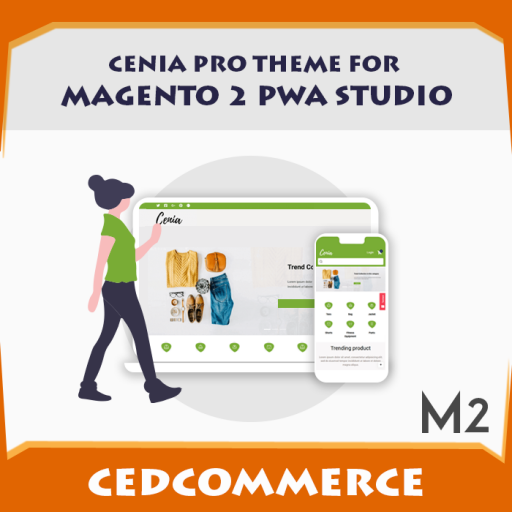
After getting an exceptional response for Cenia free PWA theme, we took a challenge to take it to next level. Here's the Cenia Pro theme for Magento PWA Studio, a wholesome eCommerce solution for the Magento platform. It is calibrated using Magento PWA studio, React.JS & GraphQL with precision. Experience it to feel the difference.

Magento 2 Products Reviews Import Export extension helps store owners export and import product reviews and related information via CSV file. Buy this and create an unlimited number of review data in one click.
Magento 2 Customer Group Payment Method extension helps store owners restrict payment methods based on customer groups of the Magento 2 store. Download this and enjoy 90 days of free support.

Magento 2 Limit Quantity Grouped By Product extension helps store owners set the minimum and maximum limit of the group product purchase quantity. Install now and get 90 days of free and quick support.

Magento 2 Restrict Products By Customer Group extension helps store owners to restrict access to specific products, categories and other pages for a particular group of customers. Restrict customers groups to access the selected content page by buying this module.
Magento 2 Multiple Store View Pricing extension helps store owners to set up different prices for the same product and sell products at different prices per store view. Manage the product prices and currencies for all your store views with this module.

Magento 2 First Data Payeezy Payment by Meetanshi integrates Magento 2 store with Payeezy payment gateway.
Security is the most important aspect of an E-commerce store. Hence, Meetanshi has developed Magento 2 First Data Payeezy Payment extension to integrate the Magento 2 store with Payeezy payment gateway, by First Data.
The extension allows the merchant to check the card balance and auto capture the order amount. Moreover, it offers a 3D secure checkout and CVC/CVV verification to prevent the hacks and spam in the Magento 2 store.
With the Magento 2 First Data Payeezy Payment module, implement the direct payment method. It offers full control of the process, making it faster!
Benefits of Magento 2 First Data Payeezy Payment:
• Fast payment processing with the direct payment method.
• Display the custom title for the payment method.
• Display Payeezy logo on the checkout.
• Offers sandbox mode for testing.
• Integrate the payment gateway with store using the API key, API secret, and merchant token.
• Option for payment actions:
- Authorization Only
- Authorization and Capture
• Accept payments from selected credit card types.
• Allow selected countries to use the payment method.
• Display additional details on the checkout page.
• Allow customers to add credit card details on the checkout page to place the order.
• Facilitate customers to see the payment details in the "My Account" section after order is placed.
• Admin can navigate to Sales > Orders > Order View section in the backend to view the payment details.
• Facilitates to use the payment method for backend orders.
• Provides 3D security
For more information, visit https://meetanshi.com/magento-2-first-data-payeezy-payment.html

Guest checkouts provide an online store with a lot of benefits. For example, customers can complete their purchases without any disruption. They don't have to create an account on the store to be able to make a purchase. This is a huge user experience booster and a measure that can reduce cart abandonment considerably. Because when customers add a product to the Cart, they expect the checkout process to be smooth and simple. And also because customers, particularly first-time visitors are not comfortable providing their details. The mandatory account creation hinders their checkout process and causes them to quit the purchase.
Second, when you allow visitors to checkout without creating an account, they feel trusted.
On the other hand, merchants prefer registered accounts to use the details they get for marketing purposes. They can send their deals, promotional materials, important news to the email addresses customers provide during account creation.
So how to leverage the pros of both guest checkouts and customer accounts? Also, if you have a Magento 2 store where it's mandatory to create an account in order to make a purchase, how to add the guest checkout feature while at the same time reaping the benefits of registered accounts? The solution is Magento 2 Convert Guest to Customer extension.
The extension allows merchants to manually or automatically convert guest users to customers once they place orders. It offers the following features.
Automatically register guest buyers as customers
Segregate guests in customer groups
Send emails to guests with login credentials
Import guests users as customers
Register guests in bulk or one by one
Convert guest buyers from orders

Magento 2 Zip Code COD Check extension allows store owners to help their customers to check their zip code, delivery availability and simplify the delivery process. To add cash on delivery for a specific zip code and pin code, buy this now!
Magento 2 Store Login Access Permissions is designed to help users manage the store access permissions.

The Magento Previous Next buttons extension on product page plugin allows the customer to view the previous and next product on the same page without going to the category list.

Complete vendor-independent key management solution.

Magento 2 Preselected Configurable Products extension provides by default preselected child products options for the configurable products. Magento 2 Configurable Products Preselect extension helps promote sales of child products. So, customers can easily purchase in your online store.