# Best Photo Management Software - Page 9

## How Many Photo Management Software Products Does G2 Track?

**Total Products under this Category:** 142

### Category Stats (Jul 2026)

- **Average Rating:** 4.38/5 The average rating of products in this category, based on all submitted ratings
- **Top Trending Product:** Corel AfterShot Pro (+0.19%) - Among all products in this category, Corel AfterShot Pro recorded the largest rating increase compared to last month

_Last updated: July 28, 2026_

## How Does G2 Rank Photo Management Software Products?

**Why You Can Trust G2's Software Rankings:**

- 30 Analysts and Data Experts
- 4,300+ Authentic Reviews
- 142+ Products
- Unbiased Rankings

G2's software rankings are built on verified user reviews, rigorous moderation, and a consistent research methodology maintained by a team of analysts and data experts. Each product is measured using the same transparent criteria, with no paid placement or vendor influence. While reviews reflect real user experiences, which can be subjective, they offer valuable insight into how software performs in the hands of professionals. Together, these inputs power the G2 Score, a standardized way to compare tools within every category.

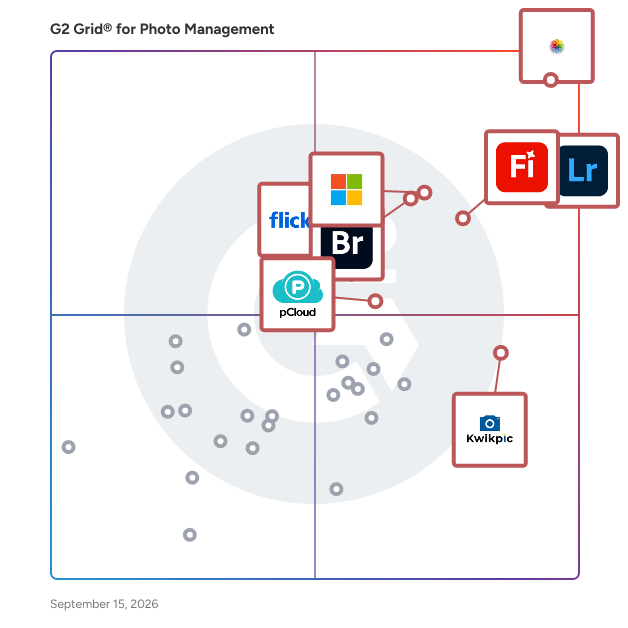
## G2 Grid® for Photo Management Software
 ![G2 Grid® for Photo Management Software plotting products by satisfaction and market presence](https://www.g2.com/categories/photo-management/grids.png?focus%5B%5D=17211&focus%5B%5D=52004&focus%5B%5D=149035&focus%5B%5D=1304029&focus%5B%5D=9073&focus%5B%5D=1461804&focus%5B%5D=19931&focus%5B%5D=4543)

Highlighted products: Photos, Adobe Photoshop Lightroom Classic, Microsoft Photos, Adobe Firefly, Adobe Bridge, Kwikpic, pCloud, and Flickr.

Underlying data: [Grid® JSON](https://www.g2.com/categories/photo-management/grids.json?focus%5B%5D=photos&focus%5B%5D=adobe-photoshop-lightroom-classic&focus%5B%5D=microsoft-photos&focus%5B%5D=adobe-firefly&focus%5B%5D=adobe-bridge&focus%5B%5D=kwikpic&focus%5B%5D=pcloud&focus%5B%5D=flickr)

[
Photomall
](https://www.g2.com/products/photomall/reviews)

By [Jovee Infotech](https://www.g2.com/sellers/jovee-infotech)

[

0/5(0)

](https://www.g2.com/products/photomall/reviews)

Product Description

Photomall is an all-in-one photography business platform that helps photographers deliver event photos instantly using AI-powered face recognition and QR code sharing with up to 99.9% accuracy. Client

### [Photomall](https://www.g2.com/products/photomall/reviews)

Photomall is an all-in-one photography business platform that helps photographers deliver event photos instantly using AI-powered face recognition and QR code sharing with up to 99.9% accuracy. Clients can view and select their favourite photos online through a smooth photo selection tool, and photographers can create and send professional billings directly from the platform without any separate billing software. With a branded mobile app, e-albums, event video sharing, live streaming, and a photography website, Photomall helps photographers increase their brand visibility, attract more clients, and grow their business, all managed from a single platform.

#### Who Is the Company Behind Photomall?

- **Seller:** [Jovee Infotech](https://www.g2.com/sellers/jovee-infotech)
- **Year Founded:** 2009
- **HQ Location:** Madurai, IN
- **LinkedIn® Page:** [www.linkedin.com](https://www.g2.com/external_clickthroughs/record?secure%5Bsource_type%5D=product_profile&secure%5Btoken%5D=b7006fec2ab0e6eab2477054825213cfdf306ee7a1f0689e38bbf85261752226&secure%5Burl%5D=https%3A%2F%2Fwww.linkedin.com%2Fcompany%2Fjoveeinfotech%2F&secure%5Burl_type%5D=linkedin_company_website)  
29 employees on LinkedIn®

[
Picklink
](https://www.g2.com/products/picklink/reviews)

By [piclink](https://www.g2.com/sellers/piclink)

[

0/5(0)

](https://www.g2.com/products/picklink/reviews)

Product Description

piclink is the most beautiful way to deliver and showcase your photography. Upload a session and share it with one permanent link: a full-screen, on-brand gallery where clients mark favorites, downloa

### [Picklink](https://www.g2.com/products/picklink/reviews)

piclink is the most beautiful way to deliver and showcase your photography. Upload a session and share it with one permanent link: a full-screen, on-brand gallery where clients mark favorites, download (if you allow it), and nothing expires. Protect with a password, control downloads, and add a watermark. Build your public portfolio at piclink.mx/@your-handle without code, and manage quotes and projects in one place. Spanish-native with pricing built for Latin America, and a free-forever plan (5 GB, no card). The Spanish-first alternative to Pixieset.

#### Who Is the Company Behind Picklink?

- **Seller:** [piclink](https://www.g2.com/sellers/piclink)
- **HQ Location:** N/A
- **LinkedIn® Page:** [www.linkedin.com](https://www.g2.com/external_clickthroughs/record?secure%5Bsource_type%5D=product_profile&secure%5Btoken%5D=7886df2ed926834e5eb248c77dcfa8e5c815d3ab1f0fe3132ced0dba45868834&secure%5Burl%5D=https%3A%2F%2Fwww.linkedin.com%2Fcompany%2FNo-Linkedin-Presence-Added-Intentionally-By-DataOps&secure%5Burl_type%5D=linkedin_company_website)  
1 employees on LinkedIn®

[
Picstack
](https://www.g2.com/products/picstack/reviews)

By [Picstack](https://www.g2.com/sellers/picstack)

[

0/5(0)

](https://www.g2.com/products/picstack/reviews)

Product Description

A better way to share photos with your clients and their guests.

### [Picstack](https://www.g2.com/products/picstack/reviews)

A better way to share photos with your clients and their guests.

#### Who Is the Company Behind Picstack?

- **Seller:** [Picstack](https://www.g2.com/sellers/picstack)
- **HQ Location:** Berlin, DE
- **LinkedIn® Page:** [www.linkedin.com](https://www.g2.com/external_clickthroughs/record?secure%5Bsource_type%5D=product_profile&secure%5Btoken%5D=80ddf919e12df42e1f7ec53b500d29161291edd7e14f48e0a3c02a18ec112676&secure%5Burl%5D=https%3A%2F%2Fwww.linkedin.com%2Fcompany%2Fpicstack%2F&secure%5Burl_type%5D=linkedin_company_website)  
1 employees on LinkedIn®

[
PictureEcho
](https://www.g2.com/products/pictureecho/reviews)

By [Sorcim Technologies](https://www.g2.com/sellers/sorcim-technologies)

[

0/5(0)

](https://www.g2.com/products/pictureecho/reviews)

Product Description

PictureEcho intelligently analyzes duplicate photos faster than you can do yourself. The PictureEcho promises human-like analysis of photos yet achieves the AI speed levels in scanning, finding, and d

### [PictureEcho](https://www.g2.com/products/pictureecho/reviews)

PictureEcho intelligently analyzes duplicate photos faster than you can do yourself. The PictureEcho promises human-like analysis of photos yet achieves the AI speed levels in scanning, finding, and deleting the similar images from Windows and MacOS—Intel and Apple Silicon (M1, M2, M3, M4). The duplicate photo cleaner utility 20+ photo formats including the RAW format photos. It also scans photo libraries such as Apple Photos, Adobe Lightroom, and Windows Photos using its smart Similarity Threshold Algorithm.

#### Who Is the Company Behind PictureEcho?

- **Seller:** [Sorcim Technologies](https://www.g2.com/sellers/sorcim-technologies)
- **Year Founded:** 2004
- **HQ Location:** Islamabad, PK
- **LinkedIn® Page:** [www.linkedin.com](https://www.g2.com/external_clickthroughs/record?secure%5Bsource_type%5D=product_profile&secure%5Btoken%5D=37fc37fb21034c55cd28466bab560bf98caca392baa0bf8384d96742f080470d&secure%5Burl%5D=https%3A%2F%2Fwww.linkedin.com%2Fcompany%2Fsorcim-technologies%2F&secure%5Burl_type%5D=linkedin_company_website)  
25 employees on LinkedIn®

[
PIKPRINT
](https://www.g2.com/products/pikprint/reviews)

By [PIKPRINT Technologies](https://www.g2.com/sellers/pikprint-technologies)

[

0/5(0)

](https://www.g2.com/products/pikprint/reviews)

Product Description

PIKPRINT offers a user friendly and smart solution for professional photographers to manage thier post event jobs efficienlty.

### [PIKPRINT](https://www.g2.com/products/pikprint/reviews)

PIKPRINT offers a user friendly and smart solution for professional photographers to manage thier post event jobs efficienlty.

#### Who Is the Company Behind PIKPRINT?

- **Seller:** [PIKPRINT Technologies](https://www.g2.com/sellers/pikprint-technologies)
- **HQ Location:** N/A
- **LinkedIn® Page:** [www.linkedin.com](https://www.g2.com/external_clickthroughs/record?secure%5Bsource_type%5D=product_profile&secure%5Btoken%5D=7886df2ed926834e5eb248c77dcfa8e5c815d3ab1f0fe3132ced0dba45868834&secure%5Burl%5D=https%3A%2F%2Fwww.linkedin.com%2Fcompany%2FNo-Linkedin-Presence-Added-Intentionally-By-DataOps&secure%5Burl_type%5D=linkedin_company_website)  
1 employees on LinkedIn®

[
PixaConnect
](https://www.g2.com/products/pixaconnect/reviews)

By [Yantrashala](https://www.g2.com/sellers/yantrashala)

[

0/5(0)

](https://www.g2.com/products/pixaconnect/reviews)

Product Description

The only gallery platform that uses AI to cull your photos, group faces, and help clients select their favorites in seconds.

### [PixaConnect](https://www.g2.com/products/pixaconnect/reviews)

The only gallery platform that uses AI to cull your photos, group faces, and help clients select their favorites in seconds.

#### Who Is the Company Behind PixaConnect?

- **Seller:** [Yantrashala](https://www.g2.com/sellers/yantrashala)
- **HQ Location:** N/A
- **LinkedIn® Page:** [www.linkedin.com](https://www.g2.com/external_clickthroughs/record?secure%5Bsource_type%5D=product_profile&secure%5Btoken%5D=dfe1178ea45ce196046d70c565e8a878f1fe137a87e172547e33d183299ba8ca&secure%5Burl%5D=https%3A%2F%2Fwww.linkedin.com%2Fcompany%2Fpixaconnect%2F&secure%5Burl_type%5D=linkedin_company_website)  
1 employees on LinkedIn®

[
Prestashop FB Album Addons
](https://www.g2.com/products/prestashop-fb-album-addons/reviews)

By [Knowband](https://www.g2.com/sellers/knowband)

[

0/5(0)

](https://www.g2.com/products/prestashop-fb-album-addons/reviews)

Product Description

Prestashop Facebook Photo Album Module helps you create attractive and engaging Facebook photo albums directly from your store in a few simple steps.

### [Prestashop FB Album Addons](https://www.g2.com/products/prestashop-fb-album-addons/reviews)

Prestashop Facebook Photo Album Module helps you create attractive and engaging Facebook photo albums directly from your store in a few simple steps.

#### Who Is the Company Behind Prestashop FB Album Addons?

- **Seller:** [Knowband](https://www.g2.com/sellers/knowband)
- **Year Founded:** 2006
- **HQ Location:** Noida, Uttar Pradesh
- **Twitter:** @KnowbandPlugin  
500 Twitter followers
- **LinkedIn® Page:** [www.linkedin.com](https://www.g2.com/external_clickthroughs/record?secure%5Bsource_type%5D=product_profile&secure%5Btoken%5D=282528f0c545e83b8c47c96b03c4c1400a5fd18b3b6f7ac14d6d981d345ac3ca&secure%5Burl%5D=https%3A%2F%2Fwww.linkedin.com%2Fcompany%2F13614958%2F&secure%5Burl_type%5D=linkedin_company_website)  
3 employees on LinkedIn®

[
Print Artist Photo Projects...
](https://www.g2.com/products/print-artist-photo-projects-2-mac/reviews)

By [Claranova](https://www.g2.com/sellers/claranova)

[

0/5(0)

](https://www.g2.com/products/print-artist-photo-projects-2-mac/reviews)

Product Description

Everything you need to create sensational photo projects for home, school or the office! Includes thousands of design templates to create greeting cards, calendars, crafts and more!

### [Print Artist Photo Projects 2 (Mac)](https://www.g2.com/products/print-artist-photo-projects-2-mac/reviews)

Everything you need to create sensational photo projects for home, school or the office! Includes thousands of design templates to create greeting cards, calendars, crafts and more!

#### Who Is the Company Behind Print Artist Photo Projects 2 (Mac)?

- **Seller:** [Claranova](https://www.g2.com/sellers/claranova)
- **Year Founded:** 1984
- **HQ Location:** Courbevoie, Île-de-
- **Twitter:** @Avanquest\_Soft  
746 Twitter followers
- **LinkedIn® Page:** [www.linkedin.com](https://www.g2.com/external_clickthroughs/record?secure%5Bsource_type%5D=product_profile&secure%5Btoken%5D=d659ca8ce7066bfda60185fe194eaeca4d421cf1085a066432ba8131c3909a1c&secure%5Burl%5D=https%3A%2F%2Fwww.linkedin.com%2Fcompany%2F18459004%2F&secure%5Burl_type%5D=linkedin_company_website)  
13 employees on LinkedIn®
- **Ownership:** CLA.PA

[
RealTime.Photos
](https://www.g2.com/products/realtime-photos/reviews)

By [RealTime.Photos](https://www.g2.com/sellers/realtime-photos)

[

0/5(0)

](https://www.g2.com/products/realtime-photos/reviews)

Product Description

RealTime.Photos is a live event photo-sharing platform built for photographers and event professionals who want to deliver more than just a gallery link sent days after the event. The way event pho

### [RealTime.Photos](https://www.g2.com/products/realtime-photos/reviews)

RealTime.Photos is a live event photo-sharing platform built for photographers and event professionals who want to deliver more than just a gallery link sent days after the event. The way event photography works today hasn't changed in years: the photographer shoots, spends days editing, and sends a link to a gallery that arrives long after the moment has passed. By then, the energy is gone and social sharing is nearly zero. RealTime.Photos fixes that gap. Photographers push curated selects to a live gallery as the event unfolds — during breaks, between sessions, or whenever it fits their workflow. Guests access the gallery instantly by scanning a QR code at the venue. No app download. No account. No friction. And with built-in face recognition, every guest can take a quick selfie and instantly filter to every photo they appear in, out of hundreds. The full professional gallery can still be delivered on the photographer's normal timeline. RealTime.Photos sits alongside that process — not instead of it. For event agencies and corporate clients, the platform offers full branding control: a custom logo in the gallery, a personalized QR code, and a custom watermark on photos. A real-time analytics dashboard tracks gallery views, likes, face search opt-ins, and filter interactions — so organizers can report back to their clients with data, not just photos. Privacy is built in from the ground up. Guest selfies are processed in real time and immediately discarded — never stored, never indexed. The gallery is accessed anonymously, with no record of who visited or when. Face recognition is a navigation tool, not an identification system. No name is ever attached to a face. RealTime.Photos is priced per event, with no subscription. Plans start at €49 for small events and scale up to €399 for large conferences, festivals, and marathons.

#### Who Is the Company Behind RealTime.Photos?

- **Seller:** [RealTime.Photos](https://www.g2.com/sellers/realtime-photos)
- **HQ Location:** N/A
- **LinkedIn® Page:** [www.linkedin.com](https://www.g2.com/external_clickthroughs/record?secure%5Bsource_type%5D=product_profile&secure%5Btoken%5D=7886df2ed926834e5eb248c77dcfa8e5c815d3ab1f0fe3132ced0dba45868834&secure%5Burl%5D=https%3A%2F%2Fwww.linkedin.com%2Fcompany%2FNo-Linkedin-Presence-Added-Intentionally-By-DataOps&secure%5Burl_type%5D=linkedin_company_website)  
1 employees on LinkedIn®

[
RelayCam
](https://www.g2.com/products/relaycam/reviews)

By [RelayCam](https://www.g2.com/sellers/relaycam)

[

0/5(0)

](https://www.g2.com/products/relaycam/reviews)

Product Description

CrewCam is a photo first solution that saves and stores jobsite documentation and communication for commercial service businesses while teams are in the field and on the go. The app allows users to st

### [RelayCam](https://www.g2.com/products/relaycam/reviews)

CrewCam is a photo first solution that saves and stores jobsite documentation and communication for commercial service businesses while teams are in the field and on the go. The app allows users to store, organize, and share jobsite photos, videos, comments, and tasks by project. Photos and videos uploaded to CrewCam are geo-tagged and time-stamped for businesses to get organized and visually communicate.

#### Who Is the Company Behind RelayCam?

- **Seller:** [RelayCam](https://www.g2.com/sellers/relaycam)
- **Year Founded:** 2012
- **HQ Location:** Ottawa, CA
- **LinkedIn® Page:** [www.linkedin.com](https://www.g2.com/external_clickthroughs/record?secure%5Bsource_type%5D=product_profile&secure%5Btoken%5D=b6d7fe0ef4b1e2db5a460a54bbc31de792c8bd19d3e152f400b0dbbf7c74da5f&secure%5Burl%5D=https%3A%2F%2Fwww.linkedin.com%2Fcompany%2Frelaycam%2F&secure%5Burl_type%5D=linkedin_company_website)  
2 employees on LinkedIn®

[
Savor
](https://www.g2.com/products/savor/reviews)

By [Nitin Malhotra](https://www.g2.com/sellers/nitin-malhotra)

[

0/5(0)

](https://www.g2.com/products/savor/reviews)

Product Description

savor.live is a social media website helping you with making and sharing online photo album in an easy way. It allows you to control who can see your albums or page, and also you can allow certain peo

### [Savor](https://www.g2.com/products/savor/reviews)

savor.live is a social media website helping you with making and sharing online photo album in an easy way. It allows you to control who can see your albums or page, and also you can allow certain people(or everyone) to add photos/files to your album. Pictures quality is not decreased after you upload it. Now you no longer need to send pictures individually to all family members to share with them.

#### Who Is the Company Behind Savor?

- **Seller:** [Nitin Malhotra](https://www.g2.com/sellers/nitin-malhotra)
- **HQ Location:** N/A
- **LinkedIn® Page:** [www.linkedin.com](https://www.g2.com/external_clickthroughs/record?secure%5Bsource_type%5D=product_profile&secure%5Btoken%5D=7886df2ed926834e5eb248c77dcfa8e5c815d3ab1f0fe3132ced0dba45868834&secure%5Burl%5D=https%3A%2F%2Fwww.linkedin.com%2Fcompany%2FNo-Linkedin-Presence-Added-Intentionally-By-DataOps&secure%5Burl_type%5D=linkedin_company_website)  
1 employees on LinkedIn®

[
ShootZilla
](https://www.g2.com/products/shootzilla/reviews)

By [ShootZilla](https://www.g2.com/sellers/shootzilla)

[

0/5(0)

](https://www.g2.com/products/shootzilla/reviews)

Product Description

Photo studio management software - designed by photographers for photographers - Keep track of the progress on all your shoots from inquiry to final delivery of your images - Pre-filled email template

### [ShootZilla](https://www.g2.com/products/shootzilla/reviews)

Photo studio management software - designed by photographers for photographers - Keep track of the progress on all your shoots from inquiry to final delivery of your images - Pre-filled email templates and workflows in your language. Always know what to do next and never let anything fall through the cracks with ShootZilla.

#### Who Is the Company Behind ShootZilla?

- **Seller:** [ShootZilla](https://www.g2.com/sellers/shootzilla)
- **HQ Location:** N/A
- **LinkedIn® Page:** [www.linkedin.com](https://www.g2.com/external_clickthroughs/record?secure%5Bsource_type%5D=product_profile&secure%5Btoken%5D=3d5d4c4bedc62ee6d77338934fffc529b552e9785f0ba52b87e3e7f2a8f1ba2d&secure%5Burl%5D=http%3A%2F%2Fwww.linkedin.com%2Fcompany%2Fshootzilla&secure%5Burl_type%5D=linkedin_company_website)  
1 employees on LinkedIn®

[
SpotMyPhotos
](https://www.g2.com/products/spotmyphotos/reviews)

By [SpotMyPhotos](https://www.g2.com/sellers/spotmyphotos)

[

0/5(0)

](https://www.g2.com/products/spotmyphotos/reviews)

Product Description

SpotMyPhotos is the only photo sharing platform that empowers photographers and event pros to deliver VIP experiences, drive brand growth, and scale without burnout. Whether delivered in real time or

### [SpotMyPhotos](https://www.g2.com/products/spotmyphotos/reviews)

SpotMyPhotos is the only photo sharing platform that empowers photographers and event pros to deliver VIP experiences, drive brand growth, and scale without burnout. Whether delivered in real time or post-edit, our customizable system puts creators in control—streamlining delivery to attendees, capturing leads, and growing your footprint in the background. No privacy fears. No guesswork. Just smart, seamless, customizable photo delivery that keeps your brand in the spotlight.

#### Who Is the Company Behind SpotMyPhotos?

- **Seller:** [SpotMyPhotos](https://www.g2.com/sellers/spotmyphotos)
- **Year Founded:** 2014
- **HQ Location:** Tampa, US
- **LinkedIn® Page:** [www.linkedin.com](https://www.g2.com/external_clickthroughs/record?secure%5Bsource_type%5D=product_profile&secure%5Btoken%5D=2ada223a2ded58179cb25d11263196015970d73ca12a71326bb9eb4c9fbee505&secure%5Burl%5D=https%3A%2F%2Fwww.linkedin.com%2Fcompany%2Fcloudspotter-technologies-llc%2F&secure%5Burl_type%5D=linkedin_company_website)  
8 employees on LinkedIn®

[
Stockfresh
](https://www.g2.com/products/stockfresh/reviews)

By [Stockfresh](https://www.g2.com/sellers/stockfresh)

[

0/5(0)

](https://www.g2.com/products/stockfresh/reviews)

Product Description

Stockfresh is a content marketplace offering stock photos and vectors.

### [Stockfresh](https://www.g2.com/products/stockfresh/reviews)

Stockfresh is a content marketplace offering stock photos and vectors.

#### Who Is the Company Behind Stockfresh?

- **Seller:** [Stockfresh](https://www.g2.com/sellers/stockfresh)
- **HQ Location:** Koksijde, BE
- **LinkedIn® Page:** [www.linkedin.com](https://www.g2.com/external_clickthroughs/record?secure%5Bsource_type%5D=product_profile&secure%5Btoken%5D=e82736e9b5acc5a323a9a5d7a2bcade5f19c6b20dd7367f4bf1b63d912ddac09&secure%5Burl%5D=http%3A%2F%2Fwww.linkedin.com%2Fcompany%2Fstockfresh&secure%5Burl_type%5D=linkedin_company_website)  
1 employees on LinkedIn®

[
Synaptica OASIS
](https://www.g2.com/products/synaptica-oasis/reviews)

By [Synaptica](https://www.g2.com/sellers/synaptica)

[

0/5(0)

](https://www.g2.com/products/synaptica-oasis/reviews)

Product Description

Synaptica OASIS stands for Open Annotation Semantic Imaging System, a software application that lets you dive deep inside any image to highlight and annotate points of interest at specific coordinates

### [Synaptica OASIS](https://www.g2.com/products/synaptica-oasis/reviews)

Synaptica OASIS stands for Open Annotation Semantic Imaging System, a software application that lets you dive deep inside any image to highlight and annotate points of interest at specific coordinates and levels of zoom.

#### Who Is the Company Behind Synaptica OASIS?

- **Seller:** [Synaptica](https://www.g2.com/sellers/synaptica)
- **Year Founded:** 1995
- **HQ Location:** New York, US
- **Twitter:** @Synaptica  
1,382 Twitter followers
- **LinkedIn® Page:** [www.linkedin.com](https://www.g2.com/external_clickthroughs/record?secure%5Bsource_type%5D=product_profile&secure%5Btoken%5D=6d53b16d7c317bd6bbe46495618f52866890f0c36d1f54469c86430f1b79ab17&secure%5Burl%5D=https%3A%2F%2Fwww.linkedin.com%2Fcompany%2Fsynaptica-llc%2F&secure%5Burl_type%5D=linkedin_company_website)  
2 employees on LinkedIn®

- [&lsaquo; Prev‹ Prev](/categories/photo-management?open_modal_url=%2Fproducts%2Flychee%2Fwishlists%3Fhost_path%3D%252Fcategories%252Fphoto-management&order=g2_score&page=8&source=category#product-list)
- [1](/categories/photo-management?open_modal_url=%2Fproducts%2Flychee%2Fwishlists%3Fhost_path%3D%252Fcategories%252Fphoto-management&order=g2_score&source=category#product-list)
- [2](/categories/photo-management?open_modal_url=%2Fproducts%2Flychee%2Fwishlists%3Fhost_path%3D%252Fcategories%252Fphoto-management&order=g2_score&page=2&source=category#product-list)
- …
- [5](/categories/photo-management?open_modal_url=%2Fproducts%2Flychee%2Fwishlists%3Fhost_path%3D%252Fcategories%252Fphoto-management&order=g2_score&page=5&source=category#product-list)
- [6](/categories/photo-management?open_modal_url=%2Fproducts%2Flychee%2Fwishlists%3Fhost_path%3D%252Fcategories%252Fphoto-management&order=g2_score&page=6&source=category#product-list)
- [7](/categories/photo-management?open_modal_url=%2Fproducts%2Flychee%2Fwishlists%3Fhost_path%3D%252Fcategories%252Fphoto-management&order=g2_score&page=7&source=category#product-list)
- [8](/categories/photo-management?open_modal_url=%2Fproducts%2Flychee%2Fwishlists%3Fhost_path%3D%252Fcategories%252Fphoto-management&order=g2_score&page=8&source=category#product-list)
- 9
- [10](/categories/photo-management?open_modal_url=%2Fproducts%2Flychee%2Fwishlists%3Fhost_path%3D%252Fcategories%252Fphoto-management&order=g2_score&page=10&source=category#product-list)
- [Next &rsaquo;Next ›](/categories/photo-management?open_modal_url=%2Fproducts%2Flychee%2Fwishlists%3Fhost_path%3D%252Fcategories%252Fphoto-management&order=g2_score&page=10&source=category#product-list)

Spotlight Categories

[Managed File Transfer (MFT) Software](https://www.g2.com/categories/managed-file-transfer-mft)

[CPQ Software](https://www.g2.com/categories/cpq)

[Product Information Management (PIM) Systems](https://www.g2.com/categories/product-information-management-pim)

[Chatbots Software](https://www.g2.com/categories/chatbots)

[Mobile Device Management (MDM) Software](https://www.g2.com/categories/mobile-device-management-mdm)

Similar Categories

- [Photo Editing](/categories/photo-editing)

[Browse Photo Management Themes](/categories/photo-management/themes)

 ![Neeraja Prakash](/assets/transparent-ad5be28fbcd25b7b08d2cebe1d957125437fb5407d75ee717965ad22c8808791.gif "Neeraja Prakash")
NP

Researched and written by [Neeraja Prakash](https://research.g2.com/insights/author/neeraja-prakash)

Updated October 3, 2024

Photo management software organizes and maintains repositories of image files for organizations and users. Photo management tools are used to help users easily find the image files they are looking for. Organizations use photo management programs to organize large number of digital images, avoid duplicate files, and to share images in a central location. These tools are most commonly implemented by marketing, creative, or media departments or individuals with a large volume of images to manage, such as professional photographers. Photo management tools are often incorporated into the workflows of people using images and are used alongside [graphic design](https://www.g2.com/categories/graphic-design) or [photo editing](https://www.g2.com/categories/photo-editing) tools.

To qualify as a photo editing tool, a product must:

- Import and export image files in a variety of formats (i.e. JPEG, PNG, GIF)
- Allow users to create folders and subfolders
- Have image tagging capabilities
- Offer fields for image descriptions
- Have image search functionality

Show More

* * *

## How Do You Choose the Right Photo Management Software?

### What You Should Know About Photo Management Software

### What is Photo Management Software?

Photo management software organizes and maintains an archive of image files for organizations and users. Photo management tools help users easily find the image files they are looking for. Organizations use photo management programs to organize a large number of digital images, avoid duplicate photos, and share photos in a central location. These tools are most commonly implemented by marketing, creative, or media departments or individuals with a large volume of images to manage, such as professional photographers. Many photo management tools are categorized as digital asset management (DAM) software, and there is typically an overlap between these two software categories.

### What are the Common Features of Photo Management Software?

Photo management software, sometimes called image management software, is fairly straightforward. However, depending on the individual product, there may be varying feature sets available. Listed below are some of the key features offered by photo management solutions, but this list is by no means exhaustive.

**Storage:** Photo management software allows users to store large amounts of images for safekeeping. This storage is often cloud based, ensuring that photos remain safe regardless of any issues that may arise with a user’s hard drive. These cloud-based photo libraries are perfect for professionals who need to manage thousands of images and beginners who want to manage their personal photo collections. Cloud storage tools allow users to store many files without worrying about clearing disk space on a hard drive.

**Image editing:** While the primary function of photo management software is to organize and structure raw files, some photo management tools provide extensive editing features. These features may include basic photo enhancement functionality&nbsp; (brightness, contrast, saturation, resizing, red-eye removal, etc.) to more advanced editing capabilities, like image manipulation, editing metadata, batch processing, batch editing, and applying presets. These tools allow users to save files in various formats (such as jpeg, png, gif)&nbsp; and rename images in the photo library.

**Facial recognition** : Some photo management tools include facial recognition, powered by artificial intelligence, to recognize faces and organize and sort photos into albums based on the people captured within them. This is great for photographers who capture many portraits or group photos. Face recognition is an unexpected yet brilliant organizational tool for users.

**Advanced organization and search:** Photo management tools provide advanced search functionality, saving users time and effort when looking for a particular image. Some tools may include features such as image tagging, color labels, facial recognition (powered by artificial intelligence), star rating, etc., to help organize, identify, and sort images. This software also allows users to create various subfolders within a photo library, detects duplicate images to eliminate unnecessary files when users import images, and performs batch renaming.&nbsp;

**Privacy options:** Many photo management tools allow users to add watermarks to images, control access and privacy settings, and password-protect images. These features help organizations and individuals maintain control over who has access to certain files as well as who can edit or manipulate them.

### What are the Benefits of Photo Management Software?

Photo management software provides creative teams and professionals with tactical features to help them organize, manage, and edit a large number of digital assets. While the individual features of these software tools vary depending on the product, the overall benefits remain the same. Below are the most basic benefits of photo management software.

**Excellent organization and viewing options:** Photo management software provides users with the ultimate organizational solution for digital assets. These tools allow users to organize a high volume of images with as little effort as possible. Users can organize pictures based on location, camera type (such as digital camera vs. analog camera), file size, image content, and more. Photo management tools also allow users to organize and view albums in different views, including thumbnails, full-screen, and slide shows. This is particularly helpful for photographers and creative teams that handle many image files daily.

**Editing options:** One of the benefits of photo management software is that there are often basic editing tools built into the software, even though editing isn’t the primary use case of photo management tools. Depending on the product, some tools have advanced editing and manipulation capabilities that users won’t need to buy additional photo editing software. Other products may have very basic or limited editing features, which may be better suited for users who are primarily looking for an organizational tool and don’t require the extra features.

**Enhanced security options:** Photo management software provides a secure way to store and share images between individuals or across teams in an organization. Digital assets often need to be protected while also being accessible to those who need them. Photo management tools provide the necessary security while giving users the flexibility to share and distribute photos in a variety of image formats, manage digital rights, and collaborate.

### Who Uses Photo Management Software?

The need for organization is universal, and most businesses have digital assets requiring management. Marketing and media teams, for example, frequently use and share a significant amount of photos and videos. On the other hand, photo management software isn’t limited to enterprises. Individuals, such as photographers, designers, and other creative professionals, often require image management tools. Many photo management tools have pricing tiers, making the software accessible to various buyers regardless of budget.&nbsp;

### Challenges with Photo Management Software

**Slow:** One of the main complaints users have about photo management software is that these tools can sometimes be slow, unresponsive, or lagged. This could be due to the sheer volume of images uploaded to a user’s photo album, or the tool may consume a lot of resources when running on a user’s machine. Machine requirements should be taken into consideration when purchasing a photo management tool.

**Needs a computer:** To get the most out of photo management software, users will likely need a laptop or desktop computer. While some photo management software tools can be used on an android or Apple iOS mobile device, most tools will need to be used on a computer. Many tools are operable on both Windows and macOS. Individuals looking for a personal photo management tool can import photos from their mobile device or digital camera.

### How to Buy Photo Management Software

#### Requirements Gathering (RFI/RFP) for Photo Management Software

Whether a company is just starting to explore photo management software or looking for a more appropriate solution for its needs, g2.com can help inform buyers of the market and assist them in selecting the best software for their business.

The first step in deciding which kind of photo management software a buyer should look at is assessing the organization's needs as a whole. Does the organization already use this kind of software? If so, what works and what doesn’t? Is this the first time the organization will be using photo management software? If that’s the case, buyers will need to determine if they only need it for storage and organization or if they are looking for additional features. Some points to consider are:

**Company size:** Buyers will need to ensure that the products they are looking at will suit the size and needs of the organization. When purchasing software, it’s important to ensure the product has the appropriate scalability to adapt to changing needs. Some free photo management software options are available if an individual is looking for a personal photo management tool. These free options may or may not include basic photo editing features.&nbsp;

**Feature set:** Buyers will need to determine if photo editing features are an important part of their decision-making process when selecting photo management tools. As mentioned earlier, many photo management software products come with basic photo editing functionality. However, some products come with robust photo editing features, potentially eliminating the need to purchase separate photo editor software. Knowing the organization’s upfront requirements will help save time and money when assessing software needs in the future.

#### Compare Photo Management Software Products

**Create a long list**

The first step to finding the perfect software is to create a preliminary list of products that fit the buyer’s general needs. The next step is to narrow down the list by selecting key features that are must haves or requirements for the buyer. G2.com provides information about the best photo management software, allowing buyers to filter options and user reviews to help narrow the product list to a more relevant selection.

**Create a short list**

Creating a short list of products is an important step in the buying process. While it may be daunting to filter through various products, users can get help by utilizing G2’s compare feature. This feature will take products of choice and display them side by side so the buyer can easily determine which software ticks the important boxes on the list.&nbsp;

**Conduct demos**

Once the buyer has narrowed down the product list, the next step is to conduct a demo. Demos allow buyers to see a product and its features in more detail. To ensure a buyer gets the most out of a demo, it’s essential to prepare. Buyers should have a business scenario ready that will fully test each product in consideration. Additionally, buyers should inquire about cost, vendor support, and any concerns they have about the product. Adequate preparation will make it easier for a buyer to compare products after demos have been completed.

#### Selection of Photo Management Software

**Choose a selection team**

Photo management software is very useful for creative professionals and teams within organizations that use and manage digital assets. While individual contributors only need to assess products for themselves, enterprises should select three to five team members from various teams and seniority levels to be part of the selection team. The more varied the selection team is, the better a company can assess how well a product will meet its needs.&nbsp;

**Negotiation**

Once the selection team has narrowed down their software picks, it’s time to discuss customization options, pricing, and the type of support needed from the vendor. It’s always important to address pricing options, even when they are listed on a vendor’s website. Many software vendors will provide discounts and custom pricing options based on what the buyer is looking to purchase.&nbsp;

**Final decision**

Once a buyer has made the final decision on a product and is ready to move forward with a purchase, it is recommended that the buyer conducts a final demo, inquires about a trial run, and determines what the next steps are if the product doesn’t ultimately fit their needs. It's also important to look into the kind of support the vendor provides following implementation. Most vendors will provide customer support services to ensure a pleasant customer experience. These steps can give a buyer an additional sense of security and confidence when making a final decision.