Gendex VixWin Platinum
Who Is the Company Behind Gendex VixWin Platinum?
- Seller: KaVo Dental
- Year Founded: 1909
- HQ Location: Biberach, DE
-
LinkedIn® Page: www.linkedin.com
704 employees on LinkedIn®
Last updated: October 3, 2024
Total Products under this Category: 114
Last updated: November 23, 2026
Why You Can Trust G2's Software Rankings:
G2's software rankings are built on verified user reviews, rigorous moderation, and a consistent research methodology maintained by a team of analysts and data experts. Each product is measured using the same transparent criteria, with no paid placement or vendor influence. While reviews reflect real user experiences, which can be subjective, they offer valuable insight into how software performs in the hands of professionals. Together, these inputs power the G2 Score, a standardized way to compare tools within every category.
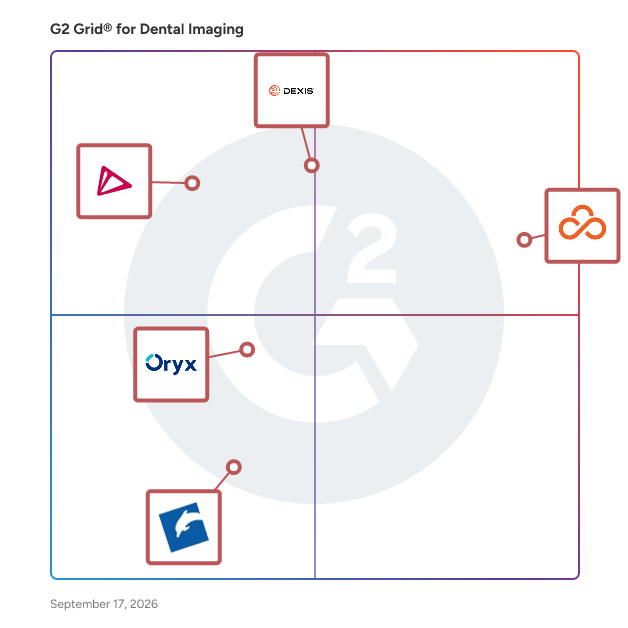
Highlighted products: Curve Dental, DEXIS Imaging Suite, 3Shape, Oryx Dental Software, and Dolphin Imaging.
Underlying data: [Grid® JSON](https://www.g2.com/categories/dental-imaging/grids.json?focus%5B%5D=curve-dental-curve-dental&focus%5B%5D=dexis-imaging-suite&focus%5B%5D=3shape&focus%5B%5D=oryx-dental-software&focus%5B%5D=dolphin-imaging)
GuideDesign is a module of the Implant 3D software designed to allow the design of guides for performing implant-prosthetic intervention in guided surgery.
Image-Pro Premier 3D is a 3D image analysis software designed for research professionals.
Connect G2 to Claude or ChatGPT for answers grounded in G2's trusted reviews, comparisons, and pricing from real user insights.
This is a free, and freely-distributable, stand-alone Dolphin patient viewing program.
Implant 3D is a dental implant simulation software and in-house surgical guide creation.
3D dental imagining software that helps capture, view, print, and store images. Integrates with modern healthcare systems.
Osteoid has been a market leader developing the most advanced 3D rendering software for both medical and dental specialists for more than ten years. Invivo6 Plus, our latest version, maintains an intuitive user interface while delivering a wide range of diagnostic capabilities to provide the best patient outcomes. Invivo6 Plus lets you work work with scans from virtually any CBCT or CT device and supports a number of dental, orthodontic, endodontic and radiological applications.
ACTEON Imaging Suite is a Practice Management Software and can be installed on the sharing devices on the clinic's computers as well as on a common centralised database which enables your imaging workflow to run more efficiently.
Maple Dental Software is a Canadian company that makes MapleDent Cloud, practice management software for dental practices, denturist clinics and independent dental hygiene clinics across Canada. Many clinics run on a base system and then buy the rest in pieces: one program for imaging, another for online booking, another for patient texting, others for recare reminders, a patient portal, team chat, task boards and reporting. Each comes with its own login, its own bill and often a fee for every extra computer or location. MapleDent Cloud unites all of it in one system. Scheduling, guided notes and charting, perio charting, imaging, electronic insurance claims, billing and reports, two-way patient texting, appointment and recare reminders, cancellation recovery, online booking, a patient portal, team chat, task boards and timesheets work together, because they are one product. Pricing is open. Prices are published on the website. Paid yearly, MapleDent Cloud starts at $270 a month for dental practices and $180 a month for denturist and dental hygiene clinics, and MapleDent Lite for hygiene clinics starts at $90 a month. The price depends only on the number of providers, with no fees per screen, staff member or location. There is no setup fee, and the first month is free. Data processing is open too. Patient data is hosted in Canada, and the company publishes its subprocessors, the providers that handle data on its behalf. Maple Dental Software is fully Canadian. It is not owned by venture capital firms or American multinationals. More at www.mapledentcloud.ca.
Medicasoft RIS/PACS is a cloud-based radiology information and image management platform for imaging clinics, hospitals and multi-site imaging groups. One system covers the whole imaging journey: booking the patient, running the exam, reading the images, reporting, and sharing results with patients and referring physicians. It works with any DICOM modality, including X-Ray, CT, MRI, Ultrasound, Mammography, PET-CT, Nuclear Medicine, Fluoroscopy, Angiography, Bone Densitometry and anything else your devices can send. There is nothing to install, no hardware to buy and no software licenses to maintain. Medicasoft is a Canadian healthcare software company, founded in 2005 and based in Ontario. Medicasoft RIS/PACS is rebuilt on a modern web platform and runs in any current browser on Windows, Mac and tablets. SCHEDULING AND BOOKING (RIS) - Patient and room calendars with drag-and-drop booking, undo and redo. - Set up calendars, opening hours and capacity for each site, room, modality and exam type. Availability planning checks room capacity, exam type and staff, so a patient is never booked into a room that cannot take the exam. - Multi-site scheduling, with daylight-saving time handled correctly across locations. - Smart slot suggestions offer the best times around the time the patient asks for. They can prefer a chosen clinician, fill gaps in the schedule, and suggest a nearby site when your own is full. They respect the patient's own limits and your minimum notice. - A slot is held while a booking is pending, so two people cannot take it at once. The hold expires on its own if nobody confirms. - Booking risk rules decide whether a booking completes automatically or goes to a person for approval. - Call-center screens let your staff book, reschedule and cancel by phone. - Patients can book and see their upcoming appointments in the patient portal. AI BOOKING - A secure vendor API lets an AI voice agent run a booking call from start to finish: identify the caller, offer real appointment times and book one. - Identity checks and a risk score decide whether the AI may book unattended. Wrong answers raise the risk, and repeated failures lock identity checks for the rest of the call, so nobody can guess their way into another patient's record. - A blocklist, minimum-notice rules and human-approval queues keep your staff in control. Anything the rules do not trust waits for a person. - Every call is reviewable: who the caller was, whether they were verified, the risk level, how the call ended and every request made, in order. - Each integration is authenticated with its own key and scoped to one organization. BROWSER IMAGE VIEWER (PACS) - Opens every modality in the browser with no software to install, with dedicated tools for the ones that need them. - Large CT and MR stacks scroll quickly. Images are decoded in the browser and the next images are loaded ahead of the reader. - MPR, a cine player for multi-frame and ultrasound clips, PET-CT and nuclear medicine views, and calcium-score CT. - Mammography hanging protocols, drawings and measurements, and presentation states. - Compare with prior studies in the same window, or in a second window on another monitor, with synchronized scrolling. - Study images open beside the worklist, or in a window on the screen you choose. REPORTING - Admins design their own report forms, with Word or PDF templates and letterheads, per client and per modality. No developer is needed. - Measurements from DICOM Structured Reports fill report fields automatically. Filled fields are clearly marked and can be edited or reverted, and admins choose which study fact or measurement feeds each field. - The report workspace shows prior reports and the images beside the report being written, and works across several monitors. - A reading list moves through a run of reports. Text shortcuts expand typed keys into stored statements, and a full-screen mode removes distraction. - Return, reopen, addendum and cancel are recorded with a reason, giving a full audit trail. - Reports are available as PDFs and are shared through the portals. WORKFLOW AND STUDY MANAGEMENT - Auto-assign rules, manual assignment and task management send each study to the right reader, with a notification in the app. - Studies lists update live, with color-coded status, counts and hover cards. They handle very large archives by paging cleanly by patient. - Held studies, such as an unknown patient or a mismatched order, are reviewed on their own screen. The system tolerates typos and changed last names, and a reviewer can correct the record from the images, then merge and file the study. - Duplicate patients can be merged, and a recycle bin restores removed studies. - Studies can be uploaded directly, exported in standard formats with redaction, and shared on request. - Modality worklist (MWL) keeps patient and order details on the device so technologists do not retype them. CONNECTIVITY - A lightweight Medicasoft DICOM Gateway sits beside your modalities. It supports DICOM store, query/retrieve and modality worklist, manages connections centrally, and can keep a local copy of images at the clinic. - It works with DICOM devices from any manufacturer and any modality. - HL7 (ORM, ADT and ORU) and a REST API connect it to EMR, HIS and RIS systems, and to referring systems and AI partners. - Studies can be received from other PACS and archives, including studies migrated from an older system. PATIENT AND PHYSICIAN PORTALS - Patients and external physicians sign in with an e-mailed one-time code. There is no password to forget. - Patients see only what your clinic releases. Each organization sets its own rule: when the report is final, when the images arrive, or manual release only. Staff can hold or release any single study. - Staff can drop studies into a referring physician's account, with the report and documents if wanted. A drop can have a view limit and can be anonymized, so the physician sees the case and not the patient. The physician is told by an e-mail that contains no patient details. - A phone-friendly viewer supports swipe, pinch-zoom and pan, so images and reports open on any device. - Your organization's logo appears beside Medicasoft, with light and dark themes and automatic sign-out when idle. - Staff manage it all from the main system. They can invite, pause, cancel and sign out portal users, and the change takes effect within seconds. They can see who opened what and from which country, are alerted to unusual sign-ins, and can limit access by country or by amount of data downloaded. - The portals fail closed. Every page needs a live session that is checked on each request, and the portal has its own narrow database access with no route into the staff application. SECURITY, PRIVACY AND CONTROL - Role-based access down to each screen, with roles and permissions you define yourself. - Each organization and location is isolated from the others, and each organization chooses which menus its users see. - Every write is audited for about seven years and every read for about one year. A tamper-evident hash chain protects the audit records, and the audit rules are set on the server so they cannot be weakened from a browser. - Sign-in uses Microsoft Entra ID. An idle lock protects unattended screens. - Hosted in Canada, with backups and a Web Application Firewall. DESIGNED FOR REAL CLINICS - Light and dark modes and a screen layout that adapts to the work. - Live updates, so a result or a new study appears without a refresh. - Configurable by your own administrators: forms, report templates, roles, menus and rules, without a software release. - Supported by a live technical team by phone, email or chat, and built to need minimal training for technologists and doctors.
Muntra is a cloud based xray and imaging software for dentists.
Neo 3D is a user-friendly Digital Image Management & Processing Software which icon design supports 2D and 3D display diagnosis on the PC.
OnyxCeph is a powerful client/server Windows application with SQL database for processing of 2D and 3D image records in dental institutions in particular for image-based diagnostics, treatment planning and patient education in general dentistry, orthodontics, prosthodontics, implantology and maxillo-facial surgery.
Orbit Imaging strives to excel for excellence and we are committed to providing the highest standards of quality and customer service in the dental imaging industry.
Ossidex is a DICOM viewer for dental and radiology professionals. The browser viewer opens CT, MRI and dental CBCT studies from local files, folders and ZIP archives. The iPhone and iPad app includes multiplanar reconstruction, 3D views, curved dental arch reconstruction and implant planning tools. Clinicians use it to review studies and explain images to patients.
