# Best Photo Management Software - Page 4

*By [Neeraja Prakash](https://research.g2.com/insights/author/neeraja-prakash)*


Photo management software organizes and maintains repositories of image files for organizations and users. Photo management tools are used to help users easily find the image files they are looking for. Organizations use photo management programs to organize large number of digital images, avoid duplicate files, and to share images in a central location. These tools are most commonly implemented by marketing, creative, or media departments or individuals with a large volume of images to manage, such as professional photographers. Photo management tools are often incorporated into the workflows of people using images and are used alongside [graphic design](https://www.g2.com/categories/graphic-design) or [photo editing](https://www.g2.com/categories/photo-editing) tools.

To qualify as a photo editing tool, a product must:

- Import and export image files in a variety of formats (i.e. JPEG, PNG, GIF)
- Allow users to create folders and subfolders
- Have image tagging capabilities
- Offer fields for image descriptions
- Have image search functionality


## Top Photo Management Software at a Glance
| # | Product | Rating | Best For | What Users Say |
|---|---------|--------|----------|----------------|
| 1 | [Photos](https://www.g2.com/products/photos/reviews) | 4.5/5.0 (781 reviews) | AI-organized photo libraries with cross-device sync | "[Simple, Free, and Always Improving—Apple Photos Just Works](https://www.g2.com/survey_responses/photos-review-12979565)" |
| 2 | [Adobe Photoshop Lightroom Classic](https://www.g2.com/products/adobe-photoshop-lightroom-classic/reviews) | 4.6/5.0 (872 reviews) | Batch RAW editing with non-destructive cataloging | "[Endless possibilities for image editing &amp; managing library](https://www.g2.com/survey_responses/adobe-photoshop-lightroom-classic-review-13039434)" |
| 3 | [Microsoft Photos](https://www.g2.com/products/microsoft-photos/reviews) | 4.3/5.0 (292 reviews) | Windows-native photo organization with OneDrive sync | "[Effortless Photo Viewing and Basic Edits Built Right Into Windows](https://www.g2.com/survey_responses/microsoft-photos-review-12959169)" |
| 4 | [Adobe Firefly](https://www.g2.com/products/adobe-firefly/reviews) | 4.4/5.0 (354 reviews) | Generative photo editing inside Adobe Creative Cloud | "[Effortless Creativity and Instant Results with Firefly](https://www.g2.com/survey_responses/adobe-firefly-review-11927637)" |
| 5 | [Adobe Bridge](https://www.g2.com/products/adobe-bridge/reviews) | 4.3/5.0 (347 reviews) | Adobe-native DAM with batch RAW processing | "[A User-Friendly, Professional Way to Organize and Preview Assets](https://www.g2.com/survey_responses/adobe-bridge-review-12707974)" |
| 6 | [Kwikpic](https://www.g2.com/products/kwikpic/reviews) | 4.9/5.0 (23 reviews) | AI face-recognition photo delivery for photographers | "[Problem Solver](https://www.g2.com/survey_responses/kwikpic-review-12223014)" |
| 7 | [Flickr](https://www.g2.com/products/flickr/reviews) | 4.1/5.0 (329 reviews) | High-resolution photo hosting with community discovery | "[Unrivalled Photo Cataloguing with Excellent Metadata Support](https://www.g2.com/survey_responses/flickr-review-8683805)" |
| 8 | [pCloud](https://www.g2.com/products/pcloud/reviews) | 4.3/5.0 (164 reviews) | Lifetime photo backup with virtual-drive access | "[Keeps Files Organized, Synchronized, and Easy to Access](https://www.g2.com/survey_responses/pcloud-review-12955283)" |
| 9 | [ACDSee](https://www.g2.com/products/acdsee/reviews) | 4.4/5.0 (278 reviews) | Non-destructive RAW culling and batch cataloging | "[Affordable, Easy Licensing and Subscription](https://www.g2.com/survey_responses/acdsee-review-12910980)" |
| 10 | [Pickit](https://www.g2.com/products/pickit/reviews) | 4.5/5.0 (116 reviews) | Brand asset distribution inside Microsoft Office | "[Effortless Asset Management with Exceptional Support](https://www.g2.com/survey_responses/pickit-review-10142085)" |


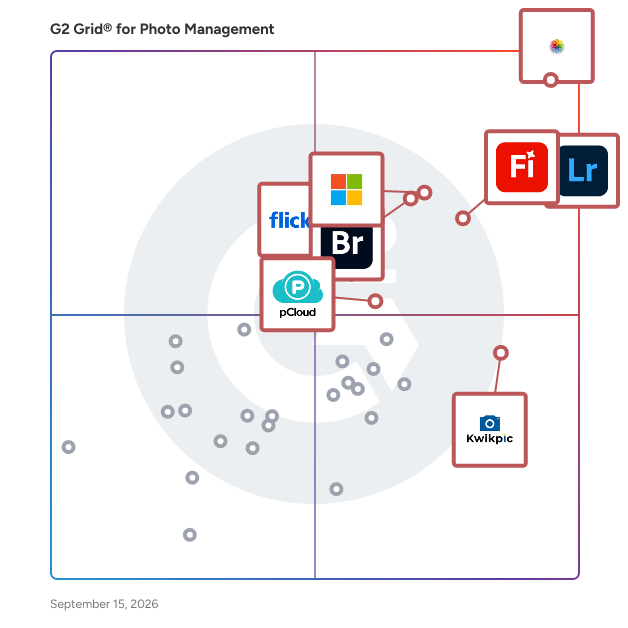
## G2 Grid® for Photo Management Software
![G2 Grid® for Photo Management Software plotting products by satisfaction and market presence](https://www.g2.com/categories/photo-management/grids.png?focus%5B%5D=17211&focus%5B%5D=52004&focus%5B%5D=149035&focus%5B%5D=1304029&focus%5B%5D=9073&focus%5B%5D=1461804&focus%5B%5D=19931&focus%5B%5D=4543)
Highlighted products: Photos, Adobe Photoshop Lightroom Classic, Microsoft Photos, Adobe Firefly, Adobe Bridge, Kwikpic, pCloud, and Flickr.
Underlying data: [Grid® JSON](https://www.g2.com/categories/photo-management/grids.json?focus%5B%5D=photos&amp;focus%5B%5D=adobe-photoshop-lightroom-classic&amp;focus%5B%5D=microsoft-photos&amp;focus%5B%5D=adobe-firefly&amp;focus%5B%5D=adobe-bridge&amp;focus%5B%5D=kwikpic&amp;focus%5B%5D=pcloud&amp;focus%5B%5D=flickr)


## How Many Photo Management Software Products Does G2 Track?
**Total Products under this Category:** 142

### Category Stats (Jul 2026)
- **Average Rating**: 4.38/5 (↑0.01 vs Jun 2026) The average rating of products in this category, based on all submitted ratings
- **Top Trending Product**: Corel AfterShot Pro (+0.19%) - Among all products in this category, Corel AfterShot Pro recorded the largest rating increase compared to last month
*Last updated: July 23, 2026*


## How Does G2 Rank Photo Management Software Products?

**Why You Can Trust G2's Software Rankings:**

- 30 Analysts and Data Experts
- 4,300+ Authentic Reviews
- 142+ Products
- Unbiased Rankings

G2's software rankings are built on verified user reviews, rigorous moderation, and a consistent research methodology maintained by a team of analysts and data experts. Each product is measured using the same transparent criteria, with no paid placement or vendor influence. While reviews reflect real user experiences, which can be subjective, they offer valuable insight into how software performs in the hands of professionals. Together, these inputs power the G2 Score, a standardized way to compare tools within every category.


## What Are the Top-Rated Photo Management Software Products in 2026?
### 1. [Photler](https://www.g2.com/products/photler/reviews)
A website to create beautiful Photography and look at other photography.


**Average Rating:** 5.0/5.0
**Total Reviews:** 1
**How Do G2 Users Rate Photler?**

- **Quality of Support:** 10.0/10 (Category avg: 8.5/10)
- **Ease of Use:** 10.0/10 (Category avg: 8.9/10)

**Who Is the Company Behind Photler?**

- **Seller:** [Photler](https://www.g2.com/sellers/photler)
- **Year Founded:** 2015
- **HQ Location:** N/A
- **Twitter:** @photlercom (702 Twitter followers)
- **LinkedIn® Page:** http://www.linkedin.com/company/photler (2 employees on LinkedIn®)

**Who Uses This Product?**
- **Company Size:** 200% Small-Business


#### What Are Recent G2 Reviews of Photler?

**"[Great start !!!](https://www.g2.com/survey_responses/photler-review-1986958)"**

**Rating:** 5.0/5.0 stars
*— Valery  K.*

[Read full review](https://www.g2.com/survey_responses/photler-review-1986958)

---


#### What Are G2 Users Discussing About Photler?

- [What is Photler used for?](https://www.g2.com/discussions/what-is-photler-used-for)

### 2. [Picsy](https://www.g2.com/products/picsy/reviews)
Add Photos, Set and its Done Picsy tells the stories behind your memories in your way styled to last for a lifetime. Perfect gift for self and loved ones.


**Average Rating:** 4.5/5.0
**Total Reviews:** 1
**How Do G2 Users Rate Picsy?**

- **Quality of Support:** 10.0/10 (Category avg: 8.5/10)
- **Ease of Use:** 10.0/10 (Category avg: 8.9/10)

**Who Is the Company Behind Picsy?**

- **Seller:** [Picsy Prints](https://www.g2.com/sellers/picsy-prints)
- **HQ Location:** N/A
- **Twitter:** @hellopicsy (243 Twitter followers)
- **LinkedIn® Page:** https://www.linkedin.com/company/No-Linkedin-Presence-Added-Intentionally-By-DataOps (1 employees on LinkedIn®)

**Who Uses This Product?**
- **Company Size:** 100% Small-Business


#### What Are Recent G2 Reviews of Picsy?

**"[Picsy Album Genius ](https://www.g2.com/survey_responses/picsy-review-3003966)"**

**Rating:** 4.5/5.0 stars
*— Verified User in Electrical/Electronic Manufacturing*

[Read full review](https://www.g2.com/survey_responses/picsy-review-3003966)

---


#### What Are G2 Users Discussing About Picsy?

- [What is Picsy used for?](https://www.g2.com/discussions/what-is-picsy-used-for)

### 3. [Pictor](https://www.g2.com/products/pictor/reviews)
Pictor is a smart downloader for Flickr. Pictor helps you download your own photos/videos as well as publicly shared ones from photographers you admire.


**Average Rating:** 5.0/5.0
**Total Reviews:** 1
**How Do G2 Users Rate Pictor?**

- **Quality of Support:** 10.0/10 (Category avg: 8.5/10)
- **Ease of Use:** 10.0/10 (Category avg: 8.9/10)

**Who Is the Company Behind Pictor?**

- **Seller:** [Pictor](https://www.g2.com/sellers/pictor)
- **HQ Location:** N/A
- **LinkedIn® Page:** https://www.linkedin.com/company/No-Linkedin-Presence-Added-Intentionally-By-DataOps (1 employees on LinkedIn®)

**Who Uses This Product?**
- **Company Size:** 100% Small-Business


#### What Are Recent G2 Reviews of Pictor?

**"[Editing photos with basic and advanced features](https://www.g2.com/survey_responses/pictor-review-1516413)"**

**Rating:** 5.0/5.0 stars
*— José Manuel R.*

[Read full review](https://www.g2.com/survey_responses/pictor-review-1516413)

---


#### What Are G2 Users Discussing About Pictor?

- [What is Pictor used for?](https://www.g2.com/discussions/what-is-pictor-used-for)

### 4. [Pixsoffice](https://www.g2.com/products/dynmatrix-pixsoffice/reviews)
asdasdasd


**Average Rating:** 4.5/5.0
**Total Reviews:** 1
**How Do G2 Users Rate Pixsoffice?**

- **Quality of Support:** 10.0/10 (Category avg: 8.5/10)
- **Ease of Use:** 10.0/10 (Category avg: 8.9/10)

**Who Is the Company Behind Pixsoffice?**

- **Seller:** [Dynmatrix](https://www.g2.com/sellers/dynmatrix)
- **HQ Location:** N/A
- **LinkedIn® Page:** https://www.linkedin.com/company/No-Linkedin-Presence-Added-Intentionally-By-DataOps (1 employees on LinkedIn®)

**Who Uses This Product?**
- **Company Size:** 100% Small-Business


#### What Are Recent G2 Reviews of Pixsoffice?

**"[Managing events were never so easy](https://www.g2.com/survey_responses/pixsoffice-review-8230713)"**

**Rating:** 4.5/5.0 stars
*— Aashutosh A.*

[Read full review](https://www.g2.com/survey_responses/pixsoffice-review-8230713)

---


### 5. [Pringery](https://www.g2.com/products/pringery/reviews)
Kodak PRINERGY Workflow is a comprehensive prepress automation software designed to streamline and unify production processes across both digital and analog printing platforms. By integrating tasks such as job creation, file processing, trapping, proofing, imposition, and color management, PRINERGY enhances operational efficiency and reduces manual interventions. Its modular and scalable architecture allows businesses to customize the system according to their specific needs, ensuring adaptability as requirements evolve. Compatible with a wide range of third-party software and equipment, PRINERGY facilitates seamless connectivity with various digital presses, promoting a cohesive and efficient workflow environment. Key Features and Functionality: - Smart Automation: Automates core prepress functions, minimizing manual touchpoints and potential errors. - Modular Design: Offers flexibility to add or modify components, allowing businesses to tailor the system to their evolving needs. - Broad Compatibility: Supports integration with most third-party press equipment and software, ensuring a versatile and adaptable workflow. - Enhanced Packaging Capabilities: Features such as MAXTONE SX Screening deliver high-resolution outputs suitable for complex packaging requirements. - Digital and Analog Support: Consolidates production processes across both digital and traditional printing methods, providing a unified workflow solution. Primary Value and Solutions Provided: PRINERGY Workflow addresses the challenges of managing complex printing operations by offering a centralized platform that enhances productivity, reduces operational costs, and improves output quality. By automating routine tasks and integrating various production processes, it minimizes errors and accelerates turnaround times. Its compatibility with diverse equipment and software ensures that businesses can maintain a cohesive workflow, regardless of their existing infrastructure. Ultimately, PRINERGY empowers print service providers to meet client demands efficiently while maintaining high standards of quality and consistency.


**Average Rating:** 5.0/5.0
**Total Reviews:** 1
**How Do G2 Users Rate Pringery?**

- **Has the product been a good partner in doing business?:** 5.0/10 (Category avg: 8.6/10)
- **Quality of Support:** 6.7/10 (Category avg: 8.5/10)
- **Ease of Use:** 5.0/10 (Category avg: 8.9/10)

**Who Is the Company Behind Pringery?**

- **Seller:** [Kodak](https://www.g2.com/sellers/kodak)
- **Year Founded:** 1892
- **HQ Location:** Rochester, New York, United States
- **LinkedIn® Page:** https://www.linkedin.com/company/eastman-kodak/ (8,310 employees on LinkedIn®)
- **Ownership:** NYSE: KODK

**Who Uses This Product?**
- **Company Size:** 100% Enterprise


#### What Are Recent G2 Reviews of Pringery?

**"[Best JDF Workflow in the Industry](https://www.g2.com/survey_responses/pringery-review-8745559)"**

**Rating:** 5.0/5.0 stars
*— Mike C.*

[Read full review](https://www.g2.com/survey_responses/pringery-review-8745559)

---


### 6. [Printbox](https://www.g2.com/products/printbox/reviews)
Printbox is an enterprise-level solution designed for a photo product business. Boost your online shop performance with our unique combination of ready-to-use robust software and extensively customizable solutions. From multiple journey paths, through user-friendly editors for a variety of photo products, to a built-in e-commerce platform and file generator. Printbox is connecting both the power of robust technology and freedom of flexibility. Our approach to business is to be your partner, not just a software supplier.


**Average Rating:** 5.0/5.0
**Total Reviews:** 1

**Who Is the Company Behind Printbox?**

- **Seller:** [Printbox](https://www.g2.com/sellers/printbox)
- **Year Founded:** 2012
- **HQ Location:** Cracow, PL
- **Twitter:** @get_Printbox (107 Twitter followers)
- **LinkedIn® Page:** https://www.linkedin.com/company/printbox-personalized-products/ (98 employees on LinkedIn®)

**Who Uses This Product?**
- **Company Size:** 100% Enterprise


#### What Are Recent G2 Reviews of Printbox?

**"[varity of editors available](https://www.g2.com/survey_responses/printbox-review-8766669)"**

**Rating:** 5.0/5.0 stars
*— Shannoan P.*

[Read full review](https://www.g2.com/survey_responses/printbox-review-8766669)

---


### 7. [Rescue Digital Media](https://www.g2.com/products/rescue-digital-media/reviews)
It helps one to recover deleted, corrupted, missing &amp; formatted digital contents like photos, videos &amp; music files on Windows &amp; Mac.


**Average Rating:** 4.0/5.0
**Total Reviews:** 1
**How Do G2 Users Rate Rescue Digital Media?**

- **Quality of Support:** 10.0/10 (Category avg: 8.5/10)
- **Ease of Use:** 10.0/10 (Category avg: 8.9/10)

**Who Is the Company Behind Rescue Digital Media?**

- **Seller:** [Alice Jolly](https://www.g2.com/sellers/alice-jolly)
- **Year Founded:** 2013
- **HQ Location:** Jamshedpur, IN
- **LinkedIn® Page:** https://www.linkedin.com/company/rescue-digital-media (1 employees on LinkedIn®)

**Who Uses This Product?**
- **Company Size:** 100% Small-Business


#### What Are Rescue Digital Media's Pros and Cons?

**Pros:**

- Photo Editing (1 reviews)
- Photo Management (1 reviews)

**Cons:**

- Poor Customer Support (1 reviews)


### What Do G2 Reviewers Say About Rescue Digital Media?
*AI-generated summary from verified user reviews*

**Pros:**

- Users praise the **amazing recovery quality** of Rescue Digital Media, finding it easy to recover precious photos.
- Users find Rescue Digital Media&#39;s **photo recovery quality amazing** , appreciating its ease of use and effectiveness.

**Cons:**

- Users report **poor customer support** , indicating the team is unresponsive and needs significant improvement.

#### What Are Recent G2 Reviews of Rescue Digital Media?

**"[Amazing for recovering old deleted photos](https://www.g2.com/survey_responses/rescue-digital-media-review-10738406)"**

**Rating:** 4.0/5.0 stars
*— Ansh J.*

[Read full review](https://www.g2.com/survey_responses/rescue-digital-media-review-10738406)

---


### 8. [SamSaidYes](https://www.g2.com/products/samsaidyes/reviews)
SamSaidYes is a powerful way to connect people, interact effortlessly and collect moments at events. We are a Zurich-based company that combines technology and fun for you. Our team consists of young photographers, digital experts, software engineers, and creative people that are passionate about the magical moments of our precious lives. We have developed an app that allows you to instantly create events for free, invite your guests, and share photos. Beyond sharing, our app guarantees more fun by providing icebreaker features and networking opportunities.


**Average Rating:** 2.5/5.0
**Total Reviews:** 1
**How Do G2 Users Rate SamSaidYes?**

- **Ease of Use:** 3.3/10 (Category avg: 8.9/10)

**Who Is the Company Behind SamSaidYes?**

- **Seller:** [SamSaidYes](https://www.g2.com/sellers/samsaidyes)
- **Year Founded:** 2020
- **HQ Location:** Zurich, CH
- **LinkedIn® Page:** http://www.linkedin.com/company/samsaidyes (4 employees on LinkedIn®)

**Who Uses This Product?**
- **Company Size:** 100% Small-Business


### 9. [Studio Ninja](https://www.g2.com/products/studio-ninja/reviews)
Created just for you, Studio Ninja boasts a beautifully designed user interface that is hailed by photographers and videographers worldwide.


**Average Rating:** 5.0/5.0
**Total Reviews:** 1

**Who Is the Company Behind Studio Ninja?**

- **Seller:** [Studio Ninja](https://www.g2.com/sellers/studio-ninja)
- **Year Founded:** 2015
- **HQ Location:** South Yarra, AU
- **LinkedIn® Page:** http://www.linkedin.com/company/studio-ninja (7 employees on LinkedIn®)

**Who Uses This Product?**
- **Company Size:** 100% Small-Business


#### What Are Recent G2 Reviews of Studio Ninja?

**"[Great product love the ease of use](https://www.g2.com/survey_responses/studio-ninja-review-6801423)"**

**Rating:** 5.0/5.0 stars
*— Aaron L.*

[Read full review](https://www.g2.com/survey_responses/studio-ninja-review-6801423)

---


### 10. [SuccessWare](https://www.g2.com/products/successware/reviews)
Professional photography studio management software for individual photographers and studio businesses of all sizes.


**Average Rating:** 4.0/5.0
**Total Reviews:** 1

**Who Is the Company Behind SuccessWare?**

- **Seller:** [SuccessWare](https://www.g2.com/sellers/successware)
- **HQ Location:** United States
- **LinkedIn® Page:** http://www.linkedin.com/company/successware (1 employees on LinkedIn®)

**Who Uses This Product?**
- **Company Size:** 100% Enterprise


#### What Are Recent G2 Reviews of SuccessWare?

**"[Amazing business centric software model for reporting for sales/back office management](https://www.g2.com/survey_responses/successware-review-4999860)"**

**Rating:** 4.0/5.0 stars
*— Kiran H.*

[Read full review](https://www.g2.com/survey_responses/successware-review-4999860)

---


### 11. [Swift Galleries](https://www.g2.com/products/swift-galleries/reviews)
Leave your computer science degree at the door, you won&#39;t be needing that here. If you can point and click, you can show your clients their photos, on their walls, at exactly the right size.


**Average Rating:** 4.0/5.0
**Total Reviews:** 1
**How Do G2 Users Rate Swift Galleries?**

- **Quality of Support:** 10.0/10 (Category avg: 8.5/10)
- **Ease of Use:** 6.7/10 (Category avg: 8.9/10)

**Who Is the Company Behind Swift Galleries?**

- **Seller:** [Swift Galleries](https://www.g2.com/sellers/swift-galleries)
- **Year Founded:** 2015
- **HQ Location:** The Road, US
- **LinkedIn® Page:** http://www.linkedin.com/company/swiftgalleries (1 employees on LinkedIn®)

**Who Uses This Product?**
- **Company Size:** 100% Mid-Market, 100% Small-Business


#### What Are Recent G2 Reviews of Swift Galleries?

**"[Smoothed out the whole deal process](https://www.g2.com/survey_responses/swift-galleries-review-10183203)"**

**Rating:** 4.0/5.0 stars
*— Celebi K.*

[Read full review](https://www.g2.com/survey_responses/swift-galleries-review-10183203)

---


### 12. [Visual Society](https://www.g2.com/products/visual-society/reviews)
Make a beautiful photography website. Showcase your best work, sell photos, and build your brand.


**Average Rating:** 5.0/5.0
**Total Reviews:** 1

**Who Is the Company Behind Visual Society?**

- **Seller:** [Visual Society](https://www.g2.com/sellers/visual-society)
- **Year Founded:** 2017
- **HQ Location:** United States
- **LinkedIn® Page:** http://www.linkedin.com/company/visual-society (5 employees on LinkedIn®)

**Who Uses This Product?**
- **Company Size:** 100% Small-Business


#### What Are Recent G2 Reviews of Visual Society?

**"[When you need prints, you can&#39;t beat the speed and beauty of these!](https://www.g2.com/survey_responses/visual-society-review-4979911)"**

**Rating:** 5.0/5.0 stars
*— Stefan G.*

[Read full review](https://www.g2.com/survey_responses/visual-society-review-4979911)

---


#### What Are G2 Users Discussing About Visual Society?

- [What is Visual Society used for?](https://www.g2.com/discussions/what-is-visual-society-used-for)

### 13. [Wedding Book](https://www.g2.com/products/wedding-book/reviews)
Wedding Book is the ultimate post production solution for wedding photographers. Wedding Book helps in Creating Delivery Solution for Wedding Photographers With the help of Artificial Intelligence Share Event ID with your Friends &amp; Relative &amp; they can see Photo, Videos &amp; Album even the ones who couldn&#39;t make it to the event Clients can mark photos they like as ‘Favorites’ &amp; share them with the Photographer instantly for the photo album With face Recognition, any guest can click a selfie and get their photos in a separate Album. You can also Share your work easily through stunning AI-powered online albums. Many Marketing Tools, Push Notifications, Unlimited Data Sharing, Event Uploads &amp; Much More... You Can also Get Your Own App &amp; Promote your brand by sharing photos with clients and guests on your own app For Both Android &amp; iOS. Say goodbye to old pattern and say hello to convince - WeddingBook is the perfect way to take your photography business to the next level.


**Average Rating:** 5.0/5.0
**Total Reviews:** 1
**How Do G2 Users Rate Wedding Book?**

- **Ease of Admin:** 8.3/10 (Category avg: 8.9/10)
- **Has the product been a good partner in doing business?:** 8.3/10 (Category avg: 8.6/10)
- **Quality of Support:** 8.3/10 (Category avg: 8.5/10)
- **Ease of Use:** 10.0/10 (Category avg: 8.9/10)

**Who Is the Company Behind Wedding Book?**

- **Seller:** [Wedding Book](https://www.g2.com/sellers/wedding-book)
- **Year Founded:** 2022
- **HQ Location:** Jaipur, IN
- **LinkedIn® Page:** https://www.linkedin.com/company/weddingbook-in/ (8 employees on LinkedIn®)

**Who Uses This Product?**
- **Company Size:** 100% Small-Business


#### What Are Recent G2 Reviews of Wedding Book?

**"[Bundles of joy &amp; happiness](https://www.g2.com/survey_responses/wedding-book-review-8361709)"**

**Rating:** 5.0/5.0 stars
*— Abdul R.*

[Read full review](https://www.g2.com/survey_responses/wedding-book-review-8361709)

---


### 14. [WorkPhotos](https://www.g2.com/products/workphotos/reviews)
You need photos of every job you and your team do, WorkPhotos makes this simple. To understand how WorkPhotos functions, imagine a WhatsApp group chat except everything is recorded job by job. Our mobile app removes the need for device storage and sharing images by email, messaging apps or upload. Record and share images that are organised by default and instantly saved to a workspace you control. The web app gives office staff a live view of what is happening and a quick way to find and use images collected. Find out how valuable photos can be for your business with WorkPhotos. Contact us to set up WorkPhotos the way you need it.


**Average Rating:** 5.0/5.0
**Total Reviews:** 1
**How Do G2 Users Rate WorkPhotos?**

- **Ease of Use:** 10.0/10 (Category avg: 8.9/10)

**Who Is the Company Behind WorkPhotos?**

- **Seller:** [WorkPhotos Ltd](https://www.g2.com/sellers/workphotos-ltd)
- **Year Founded:** 2023
- **HQ Location:** Stirling, GB
- **LinkedIn® Page:** https://www.linkedin.com/company/workphotos (4 employees on LinkedIn®)

**Who Uses This Product?**
- **Company Size:** 100% Small-Business


#### What Are Recent G2 Reviews of WorkPhotos?

**"[Like a WhatsApp but recorded job by job!](https://www.g2.com/survey_responses/workphotos-review-11323528)"**

**Rating:** 5.0/5.0 stars
*— Ross S.*

[Read full review](https://www.g2.com/survey_responses/workphotos-review-11323528)

---


### 15. [Zilla](https://www.g2.com/products/zilla/reviews)
Zilla is the best Flickr uploader to bulk upload &amp; automate backups of your photos and videos to your Flickr account. Zilla works on the Flickr free account as well as the Flickr pro account.


**Average Rating:** 4.5/5.0
**Total Reviews:** 1
**How Do G2 Users Rate Zilla?**

- **Quality of Support:** 6.7/10 (Category avg: 8.5/10)
- **Ease of Use:** 8.3/10 (Category avg: 8.9/10)

**Who Is the Company Behind Zilla?**

- **Seller:** [Zilla](https://www.g2.com/sellers/zilla)
- **HQ Location:** N/A
- **LinkedIn® Page:** https://www.linkedin.com/company/No-Linkedin-Presence-Added-Intentionally-By-DataOps (1 employees on LinkedIn®)

**Who Uses This Product?**
- **Company Size:** 100% Mid-Market


#### What Are Recent G2 Reviews of Zilla?

**"[Zilla is excellent product](https://www.g2.com/survey_responses/zilla-review-8129820)"**

**Rating:** 4.5/5.0 stars
*— Akshay P.*

[Read full review](https://www.g2.com/survey_responses/zilla-review-8129820)

---


### 16. [9Pic AI](https://www.g2.com/products/9pic-ai/reviews)
We specialize in Photo tagging for marathons and other events. We provide OCR based bib search options, facial data based photo search option and also AI based video clipping service.


**Who Is the Company Behind 9Pic AI?**

- **Seller:** [9Pic AI](https://www.g2.com/sellers/9pic-ai)
- **HQ Location:** N/A
- **LinkedIn® Page:** https://linkedin.com/company/9picai/ (1 employees on LinkedIn®)


### 17. [Andpad](https://www.g2.com/products/andpad/reviews)
Open AndPad to view the latest data on the spot, in the office, at the customer, anytime, anywhere.


**Who Is the Company Behind Andpad?**

- **Seller:** [Andpad](https://www.g2.com/sellers/andpad)
- **HQ Location:** N/A
- **LinkedIn® Page:** https://www.linkedin.com/company/No-Linkedin-Presence-Added-Intentionally-By-DataOps (1 employees on LinkedIn®)


### 18. [Bokeh](https://www.g2.com/products/tomorrow-studio-bokeh/reviews)
Bokeh is an intelligent portfolio and brand platform for photographers that grows with your work. It turns your photo library into a stunning website, with client galleries, messaging, mailing lists, and more.


**Who Is the Company Behind Bokeh?**

- **Seller:** [Tomorrow Studio](https://www.g2.com/sellers/tomorrow-studio)
- **HQ Location:** N/A
- **LinkedIn® Page:** https://www.linkedin.com/company/No-Linkedin-Presence-Added-Intentionally-By-DataOps (1 employees on LinkedIn®)


### 19. [Boolpic](https://www.g2.com/products/boolpic/reviews)
This unique toolkit is an extremely time-saving, totally free, all-in-one, lightweight, and high-quality image processing platform. Leverage the power of AI to turn your pictures into masterpieces!


**Average Rating:** 4.0/5.0
**Total Reviews:** 2
**How Do G2 Users Rate Boolpic?**

- **Ease of Admin:** 8.3/10 (Category avg: 8.9/10)
- **Has the product been a good partner in doing business?:** 8.3/10 (Category avg: 8.6/10)
- **Quality of Support:** 8.3/10 (Category avg: 8.5/10)
- **Ease of Use:** 8.3/10 (Category avg: 8.9/10)

**Who Is the Company Behind Boolpic?**

- **Seller:** [Boolv Tech](https://www.g2.com/sellers/boolv-tech)
- **Year Founded:** 2021
- **HQ Location:** Shenzhen, CN
- **LinkedIn® Page:** https://www.linkedin.com/company/boolv-tech/ (12 employees on LinkedIn®)

**Who Uses This Product?**
- **Company Size:** 50% Mid-Market, 50% Small-Business


#### What Are Recent G2 Reviews of Boolpic?

**"[Awesome Photo Editing Tool](https://www.g2.com/survey_responses/boolpic-review-7509632)"**

**Rating:** 4.5/5.0 stars
*— Reema D.*

[Read full review](https://www.g2.com/survey_responses/boolpic-review-7509632)

---


### 20. [Bublup](https://www.g2.com/products/bublup/reviews)
Bublup is an AI-powered online community management platform that combines structured content organization, member collaboration, and discussion tools in a single visual environment. Designed for communities built around shared resources, ideas, and collaboration, Bublup enables organizations to create engaging spaces where members can connect, contribute, and easily discover information. COMMUNITY STRUCTURE &amp; MEMBER EXPERIENCE Bublup allows you to create dedicated community spaces for forums, chats, and shared resources. Members can explore curated content, join discussions, and navigate community hubs without the clutter of traditional chat-based platforms. Bublup is HIPAA and SOC 2 Type II compliant. DISCUSSIONS &amp; ENGAGEMENT Built-in discussions, comments, reactions, and activity feeds allow members to engage directly within the context of shared content. Bublup includes AI-powered content moderation tools to help keep communities safe, respectful, and on-topic. Admins can apply pre-defined moderation rules or customize their own, making it easier to manage conversations at scale while maintaining a positive community environment. CONTENT MANAGEMENT &amp; DISCOVERABILITY Unlike traditional community platforms, Bublup is designed to organize both content and conversations. Users can save links, documents, notes, videos, and more into structured collections that are easy to browse, search, and revisit—making it ideal for knowledge-driven communities. COMMUNITY MAPS &amp; MEMBER DIRECTORY Bublup provides interactive community maps and directories that help members discover people, resources, and content geographically and contextually. Admins can enable searchable member profiles, tag content with location data, and visualize communities on maps—making it easier to find relevant people and information. PERMISSIONS &amp; ADMIN CONTROL Admins can manage access with flexible permission settings, role-based assignments, and team structures. Features like controlled-access communities, bulk user imports, and role-based grouping make it easy to scale and manage large or private communities. ROLLS: TURN CONTENT INTO WEB PAGES Bublup’s unique “Rolls” feature allows users to turn any folder into a visually rich website in one click. Community admins can publish curated content as branded web pages, share them publicly, and keep them updated automatically as content evolves. Rolls include customizable layouts, themes, and interactive elements for showcasing community resources. USE CASES - Bublup supports a wide range of community types, including: - Membership and subscription communities - Nonprofits and associations - Internal team and employee communities - Education programs and cohorts - Creator and interest-based communities ALL-IN-ONE PLATFORM Bublup replaces the need for multiple tools by combining features typically spread across community platforms, cloud storage, and collaboration apps. It serves as an alternative to using separate solutions for chat, file sharing, content management, and community engagement. By bringing together community interaction, structured content organization, and publishing capabilities, Bublup offers a unique approach to building communities that are not only active—but also organized, discoverable, and scalable over time.


**Average Rating:** 3.7/5.0
**Total Reviews:** 3
**How Do G2 Users Rate Bublup?**

- **Ease of Admin:** 10.0/10 (Category avg: 8.9/10)
- **Has the product been a good partner in doing business?:** 10.0/10 (Category avg: 8.6/10)
- **Quality of Support:** 5.0/10 (Category avg: 8.5/10)
- **Ease of Use:** 10.0/10 (Category avg: 8.9/10)

**Who Is the Company Behind Bublup?**

- **Seller:** [Bublup](https://www.g2.com/sellers/bublup)
- **HQ Location:** Arlington, US
- **LinkedIn® Page:** https://www.linkedin.com/company/bublupinc/ (20 employees on LinkedIn®)

**Who Uses This Product?**
- **Company Size:** 100% Small-Business


#### What Are Bublup's Pros and Cons?

**Pros:**

- Ease of Use (3 reviews)
- Organization (2 reviews)
- Organization Management (2 reviews)
- All-in-one Solutions (1 reviews)
- Collaboration (1 reviews)

**Cons:**

- Expensive (2 reviews)
- Access Issues (1 reviews)
- Access Limitations (1 reviews)
- Capacity Limitations (1 reviews)
- Export Limitations (1 reviews)


### What Do G2 Reviewers Say About Bublup?
*AI-generated summary from verified user reviews*

**Pros:**

- Users find Bublup&#39;s **ease of use** impressive, enabling effective organization and collaboration through a visual and intuitive interface.
- Users value the **visual organization** capabilities of Bublup, making project management intuitive and aesthetically pleasing.
- Users value the **visual project organization** and no-code sharing features of Bublup for enhanced collaboration.
- Users value Bublup for its **all-in-one solutions** , streamlining project management and enhancing overall productivity effortlessly.
- Users enjoy the **visual organization and easy collaboration** features of Bublup, enhancing project sharing and aesthetics.

**Cons:**

- Users find the app **too expensive** at $9.99/month, especially with limited shared space and no affordable options.
- Users are frustrated by the **500 limit on shared space** , restricting access for large communities despite high costs.
- Users express frustration with the **500 limit on shared space** , restricting access for larger communities on the expensive plan.
- Users face **capacity limitations** with just 500 shared spaces, restricting access for larger communities on the costly plan.
- Users are frustrated with the **export limitations** , feeling betrayed by the lack of affordable options after years of loyalty.

#### What Are Recent G2 Reviews of Bublup?

**"[Beautiful No-Code Visual Project Boards That Feel Like Mini Websites](https://www.g2.com/survey_responses/bublup-review-12384497)"**

**Rating:** 5.0/5.0 stars
*— Amie L.*

[Read full review](https://www.g2.com/survey_responses/bublup-review-12384497)

---

**"[An excellent no-IT solution for SMBs 👏](https://www.g2.com/survey_responses/bublup-review-10634109)"**

**Rating:** 5.0/5.0 stars
*— Pradeep S.*

[Read full review](https://www.g2.com/survey_responses/bublup-review-10634109)

---


### 21. [Bwith.us](https://www.g2.com/products/bwith-us/reviews)
Bwith.us is a social media management software that allows collecting photos live, moderate photostream with an admin panel, publish the content on as many websites and edit caption, choose photos and publish instantly.


**Who Is the Company Behind Bwith.us?**

- **Seller:** [Bwith.us](https://www.g2.com/sellers/bwith-us)
- **Year Founded:** 2014
- **HQ Location:** N/A
- **LinkedIn® Page:** https://www.linkedin.com/company/bwith-us (1 employees on LinkedIn®)


### 22. [Click](https://www.g2.com/products/click/reviews)
Click is a portfolio website builder platform, best for services providers like photographers and related services. It&#39;s an unique platform with no code, no drag and drop, no customisation, and no hassle. We also help users with lead generation and lead management.


**Who Is the Company Behind Click?**

- **Seller:** [Genii IT Services](https://www.g2.com/sellers/genii-it-services)
- **Twitter:** @clickme_club (1 Twitter followers)
- **LinkedIn® Page:** https://www.linkedin.com/company/clickme-club (1 employees on LinkedIn®)


### 23. [CloudSpot](https://www.g2.com/products/cloudspot/reviews)
Empowering photographers to ✨succeed ✨one gallery at a time. CloudSpot was designed and created for photographers who are tired of spending so much time managing, delivering, and marketing their work in a way that&#39;s confusing and not customized to their business. CloudSpot is quick to use, a seamless extension of your brand, and delightfully easy for clients! Coupled with a beautiful gallery experience and flexible sales options, CloudSpot&#39;s platform is used by thousands of photographers worldwide who value spending less time behind their computer and more time doing what they love!


**Who Is the Company Behind CloudSpot?**

- **Seller:** [CloudSpot](https://www.g2.com/sellers/cloudspot)
- **HQ Location:** Argyle, US
- **LinkedIn® Page:** https://www.linkedin.com/company/cloudspot/ (10 employees on LinkedIn®)


### 24. [Cureyta](https://www.g2.com/products/cureyta/reviews)
Cureyta is the ultimate AI-powered solution for professional photographers to tag, sort, and cull photos at lightning speed ⚡️ With Cureyta, you go from thousands of images to the perfect selection in a few minutes – not days. Just tell Cureyta what you’re looking for in plain words and it instantly tags and groups your photos, letting you focus on capturing unforgettable moments rather than sorting through endless images 📸 Cureyta speeds up your workflow, making post-shoot organization hassle-free and efficient. Spend less time behind the computer and more time doing what you love—Cureyta gives photographers their time back and delivers the fast, accurate results trusted by professionals.


**Who Is the Company Behind Cureyta?**

- **Seller:** [Cureyta](https://www.g2.com/sellers/cureyta)
- **HQ Location:** N/A
- **LinkedIn® Page:** https://www.linkedin.com/company/No-Linkedin-Presence-Added-Intentionally-By-DataOps (1 employees on LinkedIn®)


### 25. [Digital Photo Frame App](https://www.g2.com/products/digital-photo-frame-app/reviews)
The best photo frame app for iPad, iPhone, Mac and Apple TV.


**Who Is the Company Behind Digital Photo Frame App?**

- **Seller:** [Digital Photo Frame App](https://www.g2.com/sellers/digital-photo-frame-app)
- **Year Founded:** 2016
- **HQ Location:** Zurich, CH
- **LinkedIn® Page:** https://www.linkedin.com/company/digital-photo-frame-app/ (1 employees on LinkedIn®)


## What Is Photo Management Software?

[Photography Software](https://www.g2.com/categories/photography)

## What Software Categories Are Similar to Photo Management Software?

- [Photo Editing Software](https://www.g2.com/categories/photo-editing)


---

## How Do You Choose the Right Photo Management Software?

### What You Should Know About Photo Management Software

### What is Photo Management Software?

Photo management software organizes and maintains an archive of image files for organizations and users. Photo management tools help users easily find the image files they are looking for. Organizations use photo management programs to organize a large number of digital images, avoid duplicate photos, and share photos in a central location. These tools are most commonly implemented by marketing, creative, or media departments or individuals with a large volume of images to manage, such as professional photographers. Many photo management tools are categorized as digital asset management (DAM) software, and there is typically an overlap between these two software categories.

### What are the Common Features of Photo Management Software?

Photo management software, sometimes called image management software, is fairly straightforward. However, depending on the individual product, there may be varying feature sets available. Listed below are some of the key features offered by photo management solutions, but this list is by no means exhaustive.

**Storage:** Photo management software allows users to store large amounts of images for safekeeping. This storage is often cloud based, ensuring that photos remain safe regardless of any issues that may arise with a user’s hard drive. These cloud-based photo libraries are perfect for professionals who need to manage thousands of images and beginners who want to manage their personal photo collections. Cloud storage tools allow users to store many files without worrying about clearing disk space on a hard drive.

**Image editing:** While the primary function of photo management software is to organize and structure raw files, some photo management tools provide extensive editing features. These features may include basic photo enhancement functionality&amp;nbsp; (brightness, contrast, saturation, resizing, red-eye removal, etc.) to more advanced editing capabilities, like image manipulation, editing metadata, batch processing, batch editing, and applying presets. These tools allow users to save files in various formats (such as jpeg, png, gif)&amp;nbsp; and rename images in the photo library.

**Facial recognition** : Some photo management tools include facial recognition, powered by artificial intelligence, to recognize faces and organize and sort photos into albums based on the people captured within them. This is great for photographers who capture many portraits or group photos. Face recognition is an unexpected yet brilliant organizational tool for users.

**Advanced organization and search:** Photo management tools provide advanced search functionality, saving users time and effort when looking for a particular image. Some tools may include features such as image tagging, color labels, facial recognition (powered by artificial intelligence), star rating, etc., to help organize, identify, and sort images. This software also allows users to create various subfolders within a photo library, detects duplicate images to eliminate unnecessary files when users import images, and performs batch renaming.&amp;nbsp;

**Privacy options:** Many photo management tools allow users to add watermarks to images, control access and privacy settings, and password-protect images. These features help organizations and individuals maintain control over who has access to certain files as well as who can edit or manipulate them.

### What are the Benefits of Photo Management Software?

Photo management software provides creative teams and professionals with tactical features to help them organize, manage, and edit a large number of digital assets. While the individual features of these software tools vary depending on the product, the overall benefits remain the same. Below are the most basic benefits of photo management software.

**Excellent organization and viewing options:** Photo management software provides users with the ultimate organizational solution for digital assets. These tools allow users to organize a high volume of images with as little effort as possible. Users can organize pictures based on location, camera type (such as digital camera vs. analog camera), file size, image content, and more. Photo management tools also allow users to organize and view albums in different views, including thumbnails, full-screen, and slide shows. This is particularly helpful for photographers and creative teams that handle many image files daily.

**Editing options:** One of the benefits of photo management software is that there are often basic editing tools built into the software, even though editing isn’t the primary use case of photo management tools. Depending on the product, some tools have advanced editing and manipulation capabilities that users won’t need to buy additional photo editing software. Other products may have very basic or limited editing features, which may be better suited for users who are primarily looking for an organizational tool and don’t require the extra features.

**Enhanced security options:** Photo management software provides a secure way to store and share images between individuals or across teams in an organization. Digital assets often need to be protected while also being accessible to those who need them. Photo management tools provide the necessary security while giving users the flexibility to share and distribute photos in a variety of image formats, manage digital rights, and collaborate.

### Who Uses Photo Management Software?

The need for organization is universal, and most businesses have digital assets requiring management. Marketing and media teams, for example, frequently use and share a significant amount of photos and videos. On the other hand, photo management software isn’t limited to enterprises. Individuals, such as photographers, designers, and other creative professionals, often require image management tools. Many photo management tools have pricing tiers, making the software accessible to various buyers regardless of budget.&amp;nbsp;

### Challenges with Photo Management Software

**Slow:** One of the main complaints users have about photo management software is that these tools can sometimes be slow, unresponsive, or lagged. This could be due to the sheer volume of images uploaded to a user’s photo album, or the tool may consume a lot of resources when running on a user’s machine. Machine requirements should be taken into consideration when purchasing a photo management tool.

**Needs a computer:** To get the most out of photo management software, users will likely need a laptop or desktop computer. While some photo management software tools can be used on an android or Apple iOS mobile device, most tools will need to be used on a computer. Many tools are operable on both Windows and macOS. Individuals looking for a personal photo management tool can import photos from their mobile device or digital camera.

### How to Buy Photo Management Software

#### Requirements Gathering (RFI/RFP) for Photo Management Software

Whether a company is just starting to explore photo management software or looking for a more appropriate solution for its needs, g2.com can help inform buyers of the market and assist them in selecting the best software for their business.

The first step in deciding which kind of photo management software a buyer should look at is assessing the organization&#39;s needs as a whole. Does the organization already use this kind of software? If so, what works and what doesn’t? Is this the first time the organization will be using photo management software? If that’s the case, buyers will need to determine if they only need it for storage and organization or if they are looking for additional features. Some points to consider are:

**Company size:** Buyers will need to ensure that the products they are looking at will suit the size and needs of the organization. When purchasing software, it’s important to ensure the product has the appropriate scalability to adapt to changing needs. Some free photo management software options are available if an individual is looking for a personal photo management tool. These free options may or may not include basic photo editing features.&amp;nbsp;

**Feature set:** Buyers will need to determine if photo editing features are an important part of their decision-making process when selecting photo management tools. As mentioned earlier, many photo management software products come with basic photo editing functionality. However, some products come with robust photo editing features, potentially eliminating the need to purchase separate photo editor software. Knowing the organization’s upfront requirements will help save time and money when assessing software needs in the future.

#### Compare Photo Management Software Products

**Create a long list**

The first step to finding the perfect software is to create a preliminary list of products that fit the buyer’s general needs. The next step is to narrow down the list by selecting key features that are must haves or requirements for the buyer. G2.com provides information about the best photo management software, allowing buyers to filter options and user reviews to help narrow the product list to a more relevant selection.

**Create a short list**

Creating a short list of products is an important step in the buying process. While it may be daunting to filter through various products, users can get help by utilizing G2’s compare feature. This feature will take products of choice and display them side by side so the buyer can easily determine which software ticks the important boxes on the list.&amp;nbsp;

**Conduct demos**

Once the buyer has narrowed down the product list, the next step is to conduct a demo. Demos allow buyers to see a product and its features in more detail. To ensure a buyer gets the most out of a demo, it’s essential to prepare. Buyers should have a business scenario ready that will fully test each product in consideration. Additionally, buyers should inquire about cost, vendor support, and any concerns they have about the product. Adequate preparation will make it easier for a buyer to compare products after demos have been completed.

#### Selection of Photo Management Software

**Choose a selection team**

Photo management software is very useful for creative professionals and teams within organizations that use and manage digital assets. While individual contributors only need to assess products for themselves, enterprises should select three to five team members from various teams and seniority levels to be part of the selection team. The more varied the selection team is, the better a company can assess how well a product will meet its needs.&amp;nbsp;

**Negotiation**

Once the selection team has narrowed down their software picks, it’s time to discuss customization options, pricing, and the type of support needed from the vendor. It’s always important to address pricing options, even when they are listed on a vendor’s website. Many software vendors will provide discounts and custom pricing options based on what the buyer is looking to purchase.&amp;nbsp;

**Final decision**

Once a buyer has made the final decision on a product and is ready to move forward with a purchase, it is recommended that the buyer conducts a final demo, inquires about a trial run, and determines what the next steps are if the product doesn’t ultimately fit their needs. It&#39;s also important to look into the kind of support the vendor provides following implementation. Most vendors will provide customer support services to ensure a pleasant customer experience. These steps can give a buyer an additional sense of security and confidence when making a final decision.