Best Photo Management Software - Page 10

Sponsored content: This content is sponsored.

Adobe Firefly

Adobe Firefly is an advanced generative AI platform designed to empower creatives by streamlining content creation across various media types. Integrated seamlessly into Adobe's Creative Cloud suite, Firefly offers tools for generating images, videos, audio, and vector graphics from simple text prompts, enabling users to produce high-quality, customizable content efficiently. Key Features and Functionality: - Text-to-Image and Text-to-Video Generation: Transform textual descriptions into compelling visuals and videos, facilitating rapid ideation and content development. - Vector Graphic Creation: Utilize the Firefly Vector Model to generate editable vector graphics, enhancing design flexibility and precision. - Audio and Video Editing: Leverage AI-powered tools for translating audio and video into multiple languages, maintaining authentic voice and tone, and upscaling video content to higher resolutions. - 3D to 2D Image Conversion: Convert 3D sketches into high-resolution images, allowing for dynamic perspective adjustments and detailed visual guides. - Mobile Accessibility: Access Firefly's capabilities on mobile devices, enabling content creation on-the-go without compromising functionality. Primary Value and User Solutions: Adobe Firefly addresses the growing demand for rapid, high-quality content creation by automating complex processes and reducing the time required to produce diverse media assets. By integrating generative AI into familiar tools, Firefly enhances creative workflows, allowing users to focus on innovation and storytelling. Its commercially safe models ensure that generated content is suitable for professional use, providing peace of mind regarding copyright and licensing concerns. Whether for marketing campaigns, design projects, or multimedia productions, Firefly equips users with the tools to generate personalized, on-brand content at scale, thereby accelerating time-to-market and enhancing audience engagement.

Average Rating: 4.4/5.0

Total Reviews: 355

How Do G2 Users Rate Adobe Firefly?

  • Ease of Admin: 9.2/10 (Category avg: 8.9/10)
  • Has the product been a good partner in doing business?: 8.9/10 (Category avg: 8.7/10)
  • Quality of Support: 8.7/10 (Category avg: 8.5/10)
  • Ease of Use: 8.5/10 (Category avg: 8.9/10)

Who Is the Company Behind Adobe Firefly?

  • Seller: Adobe
  • Company Website:
  • Year Founded: 1982
  • HQ Location: San Jose, CA
  • Twitter: @Adobe
    956,842 Twitter followers
  • LinkedIn® Page: www.linkedin.com
    42,975 employees on LinkedIn®

Who Uses This Product?

  • Who Uses This: Graphic Designer
  • Top Industries: Marketing and Advertising, Graphic Design
  • Company Size: 46% Small, 25% Medium

What Do G2 Reviewers Say About Adobe Firefly?

AI-generated summary from verified user reviews

Pros
  • Users appreciate the user-friendly interface of Adobe Firefly, enhancing their creative workflows seamlessly within Adobe tools.
  • Users value the creativity of Adobe Firefly, enhancing their design workflows and visualizing complex ideas effortlessly.
  • Users appreciate the seamless integration of Adobe Firefly with Adobe's ecosystem, enhancing their creative workflows effortlessly.
  • Users value Adobe Firefly for its deep integration and powerful AI capabilities, enhancing real creative work across multiple platforms.
  • Users value the seamless integrations of Adobe Firefly, enhancing their creative workflow across various Adobe applications.
Cons
  • Users experience inaccuracy with Adobe Firefly, often requiring multiple attempts for precise results and longer processing times.
  • Users experience inaccurate results from Adobe Firefly, often requiring multiple revisions to achieve desired outcomes.
  • Users find AI limitations hinder their creative process, with challenges in generating accurate visuals and consistent outputs.
  • Users face poor results from Adobe Firefly, with issues in detail accuracy and limited style variety affecting satisfaction.
  • Users find the prompt issues in Adobe Firefly can hinder creativity and result in less accurate outputs.

What Are Recent G2 Reviews of Adobe Firefly?

Updated August 2026.

How Many Photo Management Software Products Does G2 Track?

Total Products under this Category: 202

Category Stats (Sep 2026)

  • Average Rating: 4.37/5 The average rating of products in this category, based on all submitted ratings
  • Top Trending Product: Stencil (+1.73%) - Among all products in this category, Stencil recorded the largest rating increase compared to last month

Last updated: September 15, 2026

How Does G2 Rank Photo Management Software Products?

Why You Can Trust G2's Software Rankings:

  • 30 Analysts and Data Experts
  • 4,300+ Authentic Reviews
  • 202+ Products
  • Unbiased Rankings

G2's software rankings are built on verified user reviews, rigorous moderation, and a consistent research methodology maintained by a team of analysts and data experts. Each product is measured using the same transparent criteria, with no paid placement or vendor influence. While reviews reflect real user experiences, which can be subjective, they offer valuable insight into how software performs in the hands of professionals. Together, these inputs power the G2 Score, a standardized way to compare tools within every category.

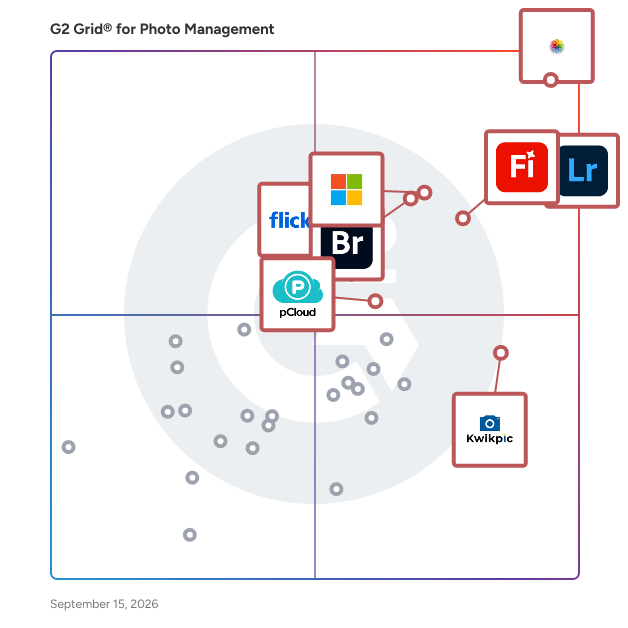
G2 Grid® for Photo Management Software

G2 Grid® for Photo Management Software plotting products by satisfaction and market presence

Highlighted products: Photos, Adobe Photoshop Lightroom Classic, Adobe Firefly, Microsoft Photos, Adobe Bridge, Kwikpic, pCloud, and Flickr.

Underlying data: [Grid® JSON](https://www.g2.com/categories/photo-management/grids.json?focus%5B%5D=photos&focus%5B%5D=adobe-photoshop-lightroom-classic&focus%5B%5D=adobe-firefly&focus%5B%5D=microsoft-photos&focus%5B%5D=adobe-bridge&focus%5B%5D=kwikpic&focus%5B%5D=pcloud&focus%5B%5D=flickr)

Honcho

Honcho helps you unlock your photos. It lets event and wedding photographers upload photos from their cameras to the cloud while shooting. They can then send the right photos to the right people, faster than ever possible, with AI-powered face recognition.

Who Is the Company Behind Honcho?

Image Arranger

Image Arranger is a web-based tool for organizing and renaming images in ZIP archives. The software allows users to upload compressed files, rearrange images through drag-and-drop functionality, and export them with sequential filenames. Supporting formats like JPG, PNG, WEBP, GIF, and SVG, Image Arranger handles archives with folder structures while preserving existing hierarchies. The platform processes collections containing more than two hundred images, making it suitable for managing photography collections or digital asset libraries. The browser-based interface simplifies file management by enabling visual arrangement of images. Exported collections are saved as new ZIP files with automatic numbering, which eliminates the need for manual renaming. Image Arranger requires only JavaScript and operates entirely online without installation or configuration steps.

Who Is the Company Behind Image Arranger?

ImageRanger

ImageRanger is a powerful tool saving you precious time by helping to manage your image folders efficiently.

Who Is the Company Behind ImageRanger?

Iris Works

Iris Works is a all-inclusive studio management software for photographers - client & document tracking, session & workflow mgmt, accounting assistance & client gallery sharing

Who Is the Company Behind Iris Works?

Who Uses This Product?

  • Company Size: 100% Large

What Are Recent G2 Reviews of Iris Works?

What Are G2 Users Discussing About Iris Works?

Knotpix

Who Is the Company Behind Knotpix?

Lyncpix

Who Is the Company Behind Lyncpix?

Momento: AI Guest Camera For Events

Momento: AI Guest Camera For Events is a digital photography platform allowing guests to capture and share photos and 60-second videos via a browser-based interface. By scanning a QR code and entering a nickname, guests access the camera without downloading an app. Features include standard photos, boomerang GIFs, photo strips, video recording, filters, and augmented reality props. Uploads appear in a shared event gallery, and hosts can create an AI-curated highlight reel post-event. The AI selects key moments, removes duplicates, and assembles a video with effects, captions, and music. The platform also offers AI-verified photo challenges with a live leaderboard, face search to locate images, a digital guestbook, live polling, host moderation tools, printable QR codes, and slideshow mode. Events remain private, accessible only via QR codes or links, and guests can delete uploads anytime.

Who Is the Company Behind Momento: AI Guest Camera For Events?

Moments Designer

Professional Photo Album Design Software for Photographers Moments Designer

Who Is the Company Behind Moments Designer?

MyInspo

Who Is the Company Behind MyInspo?

Our Event Album Agency Platform

Our Event Album is a cloud-based event photo sharing platform that enables hosts, agencies, and event organisers to create branded digital albums for weddings, parties, and corporate events. Guests access albums instantly via QR codes (no app required) and can upload, view, and download photos in real time.

Who Is the Company Behind Our Event Album Agency Platform?

Neeraja Prakash
NP
Researched and written by Neeraja Prakash
Updated October 3, 2024