AI-Generated Results
Finding matches…
You can display various offers on your site using a banner image with a countdown timer. Using this, you can also link the offer banner with an offer URL so that the user will automatically navigate to that offer page.
In admin, you can upload a banner image and attach an offer page to that banner. You can also manage the Start date and End date of the offer via the admin panel for each banner.
A small offer description can also be added to the banner image. You can display the offer banner on the CMS page, widgets, or any other site location. To place a specific banner at a particular location, you can use the ID of that banner in the code. Multiple banners can be added by placing comma-separated IDs in the code file.
Not seeing what you're looking for?
Dive deeper into "OAG" on G2 AI
The Delete Order(s) extension allows you to delete order(s) from your Magento storefront right from the orders grid on the admin side of your store. It gives you a batch/mass delete action feature to delete single or multiple orders from the orders grid.

This GDPR support extension makes your website compliant with the GDPR policies the European Union brought into effect on May 25, 2018. With this extension, the admin can customize varied forms on the website, including the ones on the Contact Us, Customer Registration, and Checkout pages, to make them compliant with the GDPR policies. This means there will be appropriate checkboxes with all the forms, using which customers can control how the website processes their information.
The primary checkboxes added to your website when you install this extension are for Newsletter subscription consent and the ‘default’ terms and conditions agreement. It is only after agreeing to these checkboxes the entries in the corresponding databases are made.
Other than these checkboxes, your customers can manage their information by deleting their identifiable records from your website. For the feature to work, the admin has to enable the setting from the admin panel. They can also set anonymous default values for the fields like email address, name, and contact number—that way, the deleted records can be replaced with anonymous data. Once enabled, the customers can delete their details from the website using their account dashboard. Doing so will delete all the identifiable data replacing it with anonymous information. Notably, only the customers with completed orders can delete their records. Customers with pending or under-process orders cannot delete their account until all their orders’ statuses are set as completed.
The extension allows the admin to enable or disable the traditional Cookies consent popups. Using the same window, they can also change the display content of those popups.
Features
1) Admin can enable and disable the extension.
2) Admin can enable/disable website policy links on checkout and contact-us pages.
3) Admin can enable/disable the setting that allows customers to delete their accounts from the dashboard.
4) Admin can manage the popup/message display content regarding the website and the GDPR policy.
5) Admin can enable/disable the cookies compliance popup on the website.
6) A checkbox control is there in the configuration, which, if enabled in the admin, will allow the customer to delete his account and anonymize his order details.
7) If any customer has orders with statuses as pending/processing on the website, he cannot delete his account. He can only delete his account if all the orders are set to 'complete' status.
Magento version Compatible
Compatible with CE:2.3.3, 2.4
Installation
Unzip the extension and upload it to the app/code directory. Enter the command of upgrade after uploading the file.

The Ultimate Sitemap Extension for Magento 2 allows you to create HTML Sitemap for your e-commerce store. It includes every page on the website in a well-organized table of data. You can simply click on the page link to open a particular page on a website. It contains category and product links on the sitemap as well. The Ultimate sitemap displays Categories and Products in separate views and Dependent Associated Views. Users can set one view to show category and product on the sitemap.
This Extension also supports Add Additional or External Links from the system configuration section. Sitemap Extension provides a facility to manage page titles and page heading from the configuration section. It can also add user links in a sitemap like a login, register, etc.
The Ultimate HTML sitemap extension can ultimately help improve website navigation and user experience, and it also helps improve your search engine rankings.
Key Features
1) Generate & configure HTML Sitemap according to your requirements.
2) Display Page Links, including user, links like sign up and log in.
3) Display Category and Product Links.
4) Automatically adds Sitemap link in the footer area.
5) You can set the Category Product Dependency as well as Display Product And Categories in two views: Separate View or Dependent Associated View.
6) It supports Add Additional Links or External Links from the system configuration section.
7) It can manage Page Titles and Page Heading from the configuration section.
8) Enable Page Links and drive more visitors.
9) Compatible with Magento Community 2.4 and above.

FMEextensions' Magento 2 Product Attachments extension offers a comprehensive solution for seamlessly managing and presenting additional information related to your products. This extension enhances the overall shopping experience by providing a user-friendly platform for sharing relevant documents, manuals, images, and more directly on the product pages.
Key Features:
Versatile Attachment Types:
Easily attach various file types such as PDFs, Word documents, images, or any other format relevant to your products. This flexibility ensures you can provide diverse information to cater to your customers' needs.
Smart Display Options:
Effortlessly showcase attachments through customizable tabs or direct links on product pages. This feature ensures a clean and organized presentation, allowing customers to access additional information without any hassle.
Customer-Focused Accessibility:
Enable customers to download product-related documents directly, fostering transparency and empowering them with valuable resources. This accessibility enhances customer trust and satisfaction.
Dynamic Management:
Enjoy a user-friendly admin interface to efficiently manage, add, edit, or remove attachments for each product. The extension provides a seamless backend experience, making it easy for store owners to keep product information up-to-date.
Responsive Design Compatibility:
Ensure a consistent and appealing display across various devices with the extension's responsiveness. Whether customers are browsing on desktops, tablets, or smartphones, the product attachments remain accessible and user-friendly.
With FMEextensions' Magento 2 Product Attachments extension, you can elevate your e-commerce store by providing a rich source of information, engaging customers, and fostering a positive shopping experience.

The Magento 2 Order Editor by FMEextensions is a robust solution designed to empower merchants with the flexibility to modify and manage orders seamlessly within the Magento 2 environment. This extension enhances the order management process, allowing for efficient order adjustments, updates, and customization to meet the evolving needs of your business and customers.
Key Features:
Comprehensive Order Editing: Modify various order details, including product quantities, prices, shipping information, and customer details, providing a comprehensive editing capability to accommodate changes after order placement.
Edit Multiple Order Items: Easily update multiple items within an order simultaneously, streamlining the editing process and saving time for store administrators.
Product and Customer Information Update: Edit product details, such as SKU, name, and price, as well as customer information, ensuring accurate and up-to-date order records.
Order Status Adjustment: Update order status and other relevant order attributes, helping to manage and communicate the order status accurately throughout the fulfillment process.
Real-Time Order Total Calculation: Experience real-time order total calculation as you make changes, ensuring accuracy and transparency in the updated order summary.
Invoice and Shipment Editing: Modify invoice and shipment details associated with an order, allowing for flexibility in handling various aspects of order fulfillment.
Edit Custom Options and Attributes: Adjust custom options and attributes associated with products within an order, providing a high level of customization to meet specific customer requirements.
Compatibility with Payment Gateways: Seamlessly edit orders without affecting payment information, ensuring compatibility with various payment gateways and preserving accurate financial records.
Audit Trail and Logging: Maintain a detailed audit trail of order edits, keeping a record of changes made over time for transparency and accountability.
The Magento 2 Order Editor by FMEextensions is a valuable tool for merchants looking to streamline their order management processes, enhance customer satisfaction through flexible order adjustments, and maintain accurate and up-to-date order records within the Magento 2 platform.

The Magento 2 Form Builder by FMEextensions empowers merchants to create customized and interactive forms effortlessly within the Magento 2 environment. With its user-friendly interface and a plethora of features, this extension enables businesses to collect valuable information, engage with customers, and enhance the overall user experience on their Magento 2 store.
Key Features:
Drag-and-Drop Form Builder: Easily design forms with a user-friendly drag-and-drop interface, allowing merchants to create customized forms without the need for coding skills.
Multi-Purpose Forms: Build versatile forms for various purposes, including contact forms, customer feedback surveys, registration forms, and more, catering to the specific needs of your business.
Customizable Form Fields: Choose from a wide range of form fields such as text fields, checkboxes, radio buttons, dropdowns, file uploads, and others. Customize each field to gather specific information from users.
Conditional Logic: Implement conditional logic within forms to dynamically show or hide fields based on user responses, creating a personalized and interactive form-filling experience.
Pre-built Form Templates: Expedite the form creation process with pre-built form templates, providing a foundation that can be easily customized to suit your specific requirements.
Responsive Design: Ensure a seamless user experience across devices with responsive form designs that adapt to different screen sizes, making it easy for users to interact with forms on desktops, tablets, and smartphones.
Email Notifications: Receive instant email notifications when users submit forms, allowing for prompt response and follow-up, ensuring a timely and efficient communication process.
Data Export and Integration: Export form submission data in various formats or integrate it with third-party tools and services, enabling seamless data management and analysis.
CAPTCHA Integration: Enhance form security by integrating CAPTCHA to prevent automated submissions and ensure that the data collected is genuine and reliable.
The Magento 2 Form Builder by FMEextensions is a versatile solution for businesses looking to create, customize, and manage forms seamlessly on their Magento 2 store. Whether collecting customer feedback, processing inquiries, or managing registrations, this extension streamlines the form-building process and enhances user engagement.

The Magento 2 Order Attributes Extension by FMEextensions is a robust solution designed to enhance the order management process on your Magento 2 store by allowing merchants to collect additional information from customers during the checkout process. This extension facilitates the customization of order attributes, providing a flexible and efficient way to gather specific details required for processing orders accurately.
Key Features:
Dynamic Order Attribute Creation: Create custom order attributes effortlessly within the Magento 2 admin panel, allowing merchants to collect additional information from customers during the checkout process.
Multiple Attribute Types: Utilize various attribute types, including text fields, dropdowns, checkboxes, radio buttons, and more, ensuring flexibility in capturing different types of information based on business requirements.
Attribute Dependency: Implement attribute dependencies to show or hide specific attributes based on customer selections, providing a dynamic and personalized checkout experience.
Customizable Attribute Display: Define the position and appearance of custom order attributes on the checkout page, ensuring seamless integration with your store's design and layout.
Required and Optional Attributes: Set custom order attributes as required or optional, allowing merchants to specify which information is crucial for order processing and which is optional for customers to provide.
Visibility Control: Control the visibility of custom order attributes based on customer groups or specific conditions, tailoring the attribute display to different segments of your customer base.
Attribute Validation: Implement validation rules for custom order attributes, ensuring that customers provide accurate and valid information during the checkout process.
Multi-Store Support: Extend custom order attribute functionality across multiple store views or websites within a Magento 2 multi-store environment, allowing for consistent customization across diverse storefronts.
Data Export and Import: Export and import custom order attribute data for efficient management and analysis, providing a streamlined approach to attribute configuration and updates.
The Magento 2 Order Attributes Extension by FMEextensions is a versatile tool for merchants looking to enhance the checkout process, gather specific information for order processing, and customize the order attributes to align with their business needs. By providing flexibility in attribute creation, display, and management, this extension contributes to a more tailored and efficient order management experience on your Magento 2 store.

The Magento 2 Force Login Extension by FMEextensions is a powerful solution designed to enhance the security and control over your Magento 2 store by enforcing customer login requirements. This extension ensures that visitors must log in or create an account before accessing specific store pages, helping merchants protect sensitive information and create a more personalized shopping experience.
Key Features:
Selective Page Access Control: Enforce login requirements for specific pages or sections of your Magento 2 store, restricting access to areas that contain sensitive information or require user authentication.
Customizable Login Messages: Display customizable messages prompting visitors to log in or create an account when attempting to access restricted pages, providing a clear and user-friendly communication about login requirements.
Flexible Restriction Rules: Set flexible restriction rules based on customer groups, specific products, or other criteria, allowing merchants to tailor login requirements to different segments of their customer base.
Guest to Customer Conversion: Automatically prompt guest visitors to create an account during the checkout process, encouraging account creation and capturing valuable customer information for future engagement.
Redirect Options: Choose from various redirect options when users attempt to access restricted pages, such as redirecting them to the login page or a custom URL, providing flexibility in managing user journeys.
Force Login for Specific Customer Groups: Implement force login requirements for specific customer groups, ensuring that access to certain pages is restricted to authorized customers based on their group affiliation.
Multi-Store Support: Extend force login functionality across multiple store views or websites within a Magento 2 multi-store environment, ensuring consistent security measures across various storefronts.
Password Recovery Integration: Seamlessly integrate with Magento 2's password recovery system, allowing users who forget their passwords to easily recover and regain access to their accounts.
The Magento 2 Force Login Extension by FMEextensions is an essential tool for merchants looking to enhance the security of their Magento 2 store, control access to specific pages, and create a more personalized and secure shopping experience for their customers. By enforcing login requirements, this extension helps protect sensitive information and ensures that only authorized users can access designated areas of the store.

Since our founding in 1991, InfoMagnetics Technologies Corporation (IMT) has been an innovator and incubator of emerging technologies.

Magento Back in Stock Notification addon allows the customer to sign up for a back in the stock email alert. As soon as the product will be restocked the waiting customers are emailed automatically to bring them back to your store so that they can complete their purchase.

Knowband Magento filter pro extension allows the eCommerce store owner to display advance filter options on the website without any code changes.

Magento Deskoid Helpdesk moduke integrates a helpdesk ticket system on the Magento store.

NetTracer Baggage Tracing & Resolution utilizes a single application platform that combines service recovery best practices with advanced technology and clear proactive communication to manage customer expectations and help airlines transform passenger disappointment and frustration into surprise and delight.

The Magento Product Update Notification Extension offers the customers two types of benefits just in a single subscription, i.e. Stock Alert Notification & Price Update Notification.

The Magento Auto Subscribe Extension allows the admin to simply add a “subscription form” on the home page of your website so that visitors coming to your website get registered by entering the required information on it.

Google Customer Reviews lets you collect feedback from users who’ve made a purchase from your store. Meetanshi’s Magento 2 Google Customer Reviews extension integrates this Google customer reviews with Magento 2.
The extension enables to display the Google Customer Reviews Badge on your Magento 2 store. It helps visitors trust your business, hence boosting traffic and sales!
Display the customer reviews on the store frontend to guide potential customers and prompt them to make a purchase! Collect maximum reviews to flaunt them as well as learn from them to improve the store functionalities.
With Magento 2 Google Customer Reviews extension, add the Survey Opt-in in the checkout page as per the Google Customer Reviews service. Display the reviews in the badge, shopping ads or search results to enhance the online presence and boost the SEO efforts.
Benefits of Meetanshi’s Magento 2 Google Customer Reviews:
• Integrates Google Customer Reviews with Magento 2
• Display the Google Customer Reviews badge at the desired position on store frontend in the desired language.
• Add the Survey Opt-in in the checkout page in the store. Set the estimated delivery days for the survey Email
• Offers GTIN integration and option to map GTIN attribute.
• Earn potential customers’ trust with the help of the customers’ reviews displayed on the frontend.
• Drives traffic.
• Increases the click-through rate and conversions.
• Improve store performances by analyzing the collected customer reviews for free!
• Improve the online presence and SEO of the store by displaying the reviews in the search results and shopping ads.
For more information,
Visit https://meetanshi.com/magento-2-google-customer-reviews.html
Note: Get a free account at Google Merchant Center. Check if the service is available in your country at Google Merchant Center Help. Setup a Google Customer Reviews program and integrate it with your store easily using the extension.

Jaguar Media Solutions specializes in helping startups, solopreneurs, and small- and medium-sized businesses with "white label" digital marketing services.

The OAuth2 Proxy Container Solution is a reverse proxy and static file server that provides authentication using various providers, such as Google and GitHub. It validates user accounts based on email, domain, or group, ensuring secure access to applications. Packaged by Bitnami, this solution is up-to-date, secure, and ready to deploy on Kubernetes environments.
Key Features and Functionality:
- Authentication Support: Integrates with multiple OAuth 2.0 providers, including Google and GitHub, to authenticate users.
- Reverse Proxy Capabilities: Acts as a reverse proxy, forwarding client requests to backend servers while handling authentication.
- Static File Serving: Serves static files directly, reducing the need for additional web servers.
- Kubernetes Compatibility: Designed for seamless deployment on Kubernetes clusters using Helm charts.
- Security and Updates: Regularly updated to address vulnerabilities and ensure compatibility with the latest software versions.
Primary Value and User Solutions:
This solution simplifies the implementation of authentication mechanisms for applications, allowing developers to secure their services without modifying existing codebases. By acting as an intermediary, it offloads authentication responsibilities, enabling applications to focus on core functionalities. Its compatibility with Kubernetes and Helm charts ensures easy deployment and scalability, making it ideal for modern cloud-native environments.
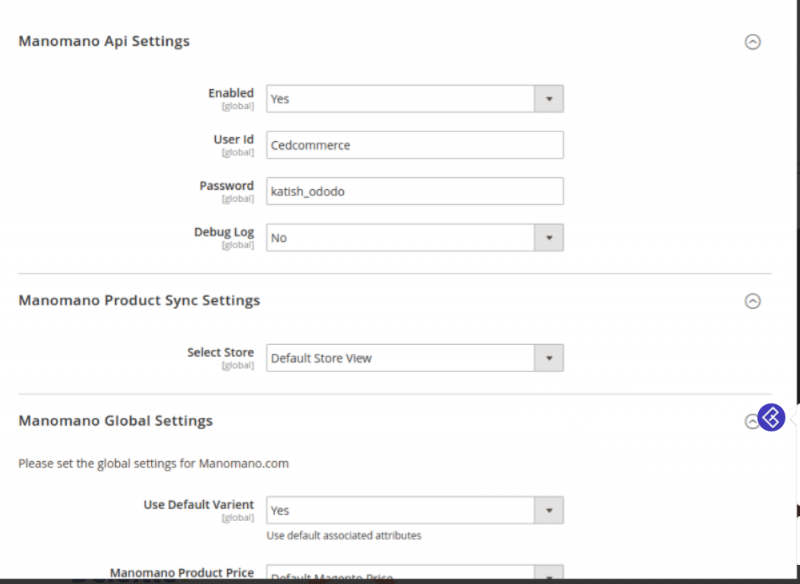
Manomano Magento 2 Integration by Cedcommerce is a tool that connects Magento store with Manomano marketplace efficiently. This Manomano integration establishes perfect sync between the store and marketplace. With this integration, merchants can automate their selling process and enhance online sale without facing hurdles.
Key Hold Features of Manomano Magento 2 Integration Extension:
-Synchronized Inventory and Profile-based pricing
-Rejected Product Notification
-Profile Based Product Upload
-New Order Notification
-Creation Of Magento Order
-Bulk Product Upload
-Auto Acknowledgement of Orders