Best Augmented Reality (AR) SDK Software

Adam Crivello
AC
Researched and written by Adam Crivello

An augmented reality software development kit, or AR SDK, allows developers to build digital objects that appear to blend into the real world. An AR SDK is crucial to any business that creates AR experiences. These tools offer functions such as 3D object tracking, image recognition, visual SLAM (simultaneous localization and mapping), multi-tracking, and more, which allow developers to produce digital images. AR engineers can utilize these SDKs to develop mobile apps, various CAD platforms, marketing experiences, and more. These SDKs are typically intended for specific frameworks and hardware; however, some AR SDKs can be supported across multiple systems, creating more flexibility.

While some AR SDKs also have the functionality to generate VR experiences, these tools should not be confused with VR SDKs, which give developers the tools to create and test virtual reality apps. In addition, these tools are often able to be customized through the use of an API.

To qualify for inclusion in the AR SDK category, a product must:

Offer the functionality to create custom AR experiences
Allow for the editing of existing AR experiences
Integrate with operating systems and hardware that can display AR
Show More
Show Less

Best Augmented Reality (AR) SDK Software At A Glance

Leader:
Highest Performer:
Easiest to Use:
Top Trending:
Best Free Software:
Show LessShow More
Easiest to Use:
Top Trending:
Best Free Software:

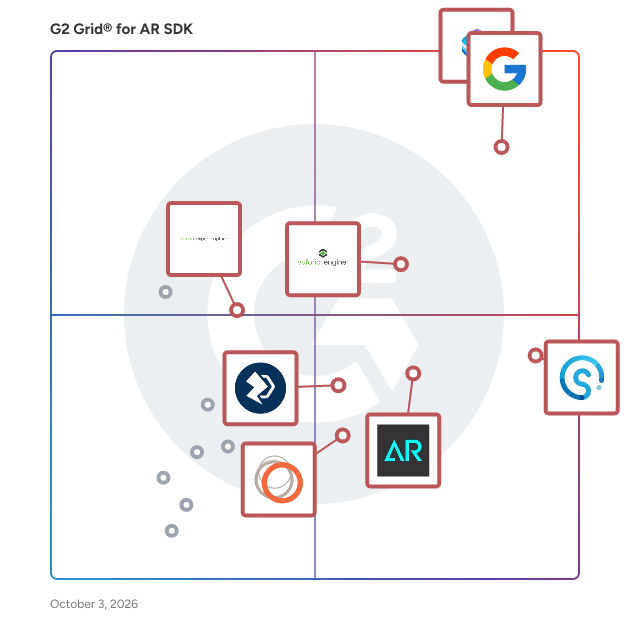
G2 takes pride in showing unbiased reviews on user satisfaction in our ratings and reports. We do not allow paid placements in any of our ratings, rankings, or reports. Learn about our scoring methodologies.

No filters applied
56 Listings in AR SDK Available
G2 Advertising
Sponsored
G2 Advertising
Get 2x conversion than Google Ads with G2 Advertising!
G2 Advertising places your product in premium positions on high-traffic pages and on targeted competitor pages to reach buyers at key comparison moments.
Entry Level Price:$12.99

Learn More About Augmented Reality (AR) SDK Software

What are AR SDKs?

An AR SDK, or an augmented reality software development kit, arms developers with all the necessary tools to create their own augmented reality apps or platforms. Some AR SDK platforms do not require any expertise in programming or 3D graphics, while others offer numerous advanced features. In this sense, AR SDK can be well-suited for beginners who have limited to no expertise—while still catering to experienced developers who are looking for a detailed software development tool. By the same token, some AR SDKs are free with limited features, while others are paid offerings that offer a more robust set of functionalities.

AR SDKs are responsible for all the features and components that make up a typical AR application. This includes AR tracking, which represents the visual effects of the program; content rendering, which relates to how effectively 3D objects can be overlaid in the real world; and scene recognition, which makes it possible to recognize, track, and augment feature-rich rooms, scenes, and larger objects.

What are the common features of AR SDKs?

  • Plane tracking: Plane tracking, also known as plane detection, allows users to develop an AR product that detects horizontal planes such as floors, tables, and ceilings.
  • SLAM: Simultaneous localization and mapping (SLAM) allows users to place a 3D object into the camera and hold it at a point in space, no matter how much the camera moves. Users can then map an environment and track their own movements in it, helping create maps for indoor navigation.
  • Face tracking: Face tracking features allow users to create an AR experience that identifies and verifies a human face from a digital image or live video frame. Game creators sometimes use face tracking to allow players to become avatars.
  • Object recognition: Object recognition features allow users to develop AR systems that can identify objects in the real world. This allows developers to overlay digital information about the object into the field of view.
  • Cloud recognition: Cloud recognition and storage is an online storage solution for large-scale AR projects. AR SDK platforms that have cloud recognition are capable of recognizing lots of different markers since the markers are stored in the cloud, which requires less space.
  • Geolocation: Geolocation features aid users in creating location-based AR apps. They allow users to add virtual points of interest, such as the nearest restaurants or movie theaters.
  • Wearables support: While most AR applications are built to function through smartphones, some are built with the intention to use smart glasses.

What types of AR SDK software exist?

  • Supported platforms: While most AR SDK platforms are compatible with Android and iOS, some users need to develop desktop apps for operating systems such as Windows or macOS. It is, therefore crucial to confirm an AR SDK's compatibility supports delivery to its intended audience.
  • Marker-based AR platform: Marker-based augmented reality platforms are based on image recognition, which can recognize objects in the real world. The most advanced AR SDK platforms can handle the recognition of real-life objects and 3D markers.
  • Location-based AR: Location-based AR is geo-based and does not require special markers to identify where to place a virtual object in the real world. Some AR SDK platforms include mapping and support for horizontal and vertical environments.
  • Free vs. paid solutions: Many vendors that offer AR SDK platforms give the option of either a free or paid version. Free versions, which are beneficial to casual users, often do not include the more robust features that paid versions offer. For example, free versions don’t offer as many object targets; paid versions may offer upwards of a thousand object targets.

What are the benefits of AR SDK

  • Accelerated development time: AR SDKs significantly streamline the development process by providing a ready-made framework for creating AR applications. Developers can avoid the time-consuming task of writing extensive code from scratch, as SDKs come equipped with a rich set of libraries and development tools that facilitate faster application building and testing.
  • Cross-platform integration: These SDKs offer compatibility with various operating systems, allowing developers to create applications that function seamlessly across multiple platforms.
  • User-friendly interfaces for beginners: AR SDKs are designed to be accessible, making it easier for newcomers to familiarize themselves with AR development through intuitive development interfaces.
  • Simulation capabilities: With built-in simulation tools, AR SDKs enable developers to visualize how an AR app will function before it’s fully developed. This early testing helps identify and resolve potential issues in the design phase, ultimately saving time and resources.
  • Accelerated learning opportunities: Many AR SDK providers offer extensive resources, including guides, tutorials, and community forums. These tools help new users navigate the learning curve, providing answers to common questions and fostering a supportive learning environment.
  • Seamless integrations: AR SDKs often integrate smoothly with other essential development tools, enhancing the overall functionality and robustness of AR applications.

Who uses AR SDKs?

The main audience for AR SDK software is software developers. AR SDKs provide developers with the necessary framework to customize code, essentially supplying the skeleton for developers to fill the application with their ideas. While augmented reality was once primarily used to develop games, the technology is now finding its way into a variety of industries.

For example, developers can use AR SDK software to aid architects with building design. Through technology, architects can experience entire building designs before they are actually built. Manufacturers, warehouse workers, and retail workers are now being trained with augmented reality software for faster onboarding. The health care industry is utilizing AR-enabled devices to train doctors on surgical techniques and observe a patient’s vitals.

In this sense, AR SDK software is not truly limited to just developers. Any industry with a use case for AR should be familiar with the various kinds of AR SDK software and how it can help users fulfill their vision.

AR SDK pricing

  • Freemium model: Many AR SDKs offer a freemium model where basic features are available for free, allowing developers to start building AR applications without initial costs. However, access to advanced features, tools, or higher usage limits often require a subscription or one-time payment.
  • Subscription-based pricing: This model charges users a recurring fee (monthly or annually) for access to the SDK and its updates. Subscription tiers may vary based on the level of support, the number of users, or access to premium features. This model is popular because it provides predictable costs and continuous access to new features.
  • Usage-based pricing: In this model, costs are based on the actual usage of the SDK, such as the number of AR sessions, API calls, or data processed. This pricing can be beneficial for applications with variable usage patterns, as developers only pay for what they use.

Challenges with AR SDK

  • Limited device compatibility: AR SDKs may not be fully compatible with all devices or operating systems, which can limit the accessibility of AR applications. 
  • Performance and resource constraints: AR applications often demand significant processing power and resources, which can be a challenge, especially on mobile devices. High-quality graphics, real-time tracking, and complex interactions can lead to performance issues such as lag or crashes. 
  • Creating a seamless and intuitive user experience. Designing a high-quality user interface (UI) in AR applications can be difficult. Factors such as UI design, interaction methods, and spatial awareness must be carefully considered. Poor user experiences can lead to frustration and decreased adoption of AR applications.

How to choose AR SDK

Define your project requirements

Before selecting an AR SDK, clearly outline your project’s objectives, target audience, and specific features you need. Consider factors such as the type of AR experience you want to create (marker-based, location-based, etc.), the devices you plan to support, and the integration requirements with other tools or platforms.

Evaluate compatibility

Ensure that the AR SDK is compatible with the devices and operating systems you intend to target. Check if it supports major platforms like Android and iOS, as well as any specific hardware, such as smart glasses or AR headsets. Compatibility is crucial for reaching a broader audience and ensuring a seamless user experience.

Assess performance and scalability

Analyze the performance capabilities of the AR SDK, especially in terms of rendering graphics, tracking accuracy, and response time. Look for an SDK that can handle high-quality visuals and real-time interactions without significant lag. Additionally, consider whether the SDK can scale with your project as it grows, accommodating more complex features and a larger user base.

Review documentation and community support

Examine the quality of the SDK’s documentation, tutorials, and community support. Comprehensive and well-organized documentation can greatly ease the development process, especially for beginners. A strong developer community can provide valuable resources, troubleshooting tips, and best practices, enhancing your learning experience and project development.

Consider pricing and licensing options

Evaluate the pricing structure and licensing terms of the AR SDK. Some SDKs offer free versions with limited features, while others may require a subscription or a one-time fee. Consider your budget and whether the SDK provides good value for the features it offers. Be sure to check for any hidden costs associated with scaling, support, or additional services that may arise as your project develops.