G2 takes pride in showing unbiased reviews on user satisfaction in our ratings and reports. We do not allow paid placements in any of our ratings, rankings, or reports. Learn about our scoring methodologies.
Marketing Hub consolidates marketing tools and customer data into a unified platform, eliminating scattered point solutions and simplifying software management for modern marketing teams. Core Valu
HubSpot Marketing Hub is a marketing automation platform that integrates CRM, email marketing, and automation workflows, aiming to centralize marketing efforts and actions. Users like the platform's ease of use, robust CRM, automation features, and the ability to track data from emails, which helps in understanding clients better and delivering the right content. Reviewers noted that the platform can be complex with too many settings and options, and the pricing structure can be steep as the contact database grows, making it challenging for smaller businesses.
Insider One is the #1 platform that brings everything marketing and customer engagement teams need in one place so they can reach their peak potential and become unstoppable. With AI at its core a
Braze is the leading customer engagement platform that empowers brands to Be Absolutely Engaging.™ Braze helps brands deliver great customer experiences that drive value both for consumers and for
Klaviyo is the all-in-one platform that helps B2C businesses grow by integrating marketing, analytics, and customer service in one solution. Powered by unified data and built-in AI , Klaviyo empowe
Glassbox is a customer intelligence and digital experience analytics platform designed to help enterprises understand, optimize, and enhance the customer experience and digital accessibility of their
Evam is a leading technology company that provides comprehensive solutions and products for real-time, cross-channel customer experiences. Our cutting-edge continuous intelligence technology leverages
Contentsquare is the AI-powered, all-in-one experience intelligence platform that helps teams understand why customers engage or abandon—and what to do about it. Trusted by 2,000+ enterprise brands
With over 25+ years of experience and a global presence across Asia, Europe, and the USA, Netcore is an AI-powered platform designed to transform customer experience and personalization in the world o
WebEngage is a full-stack Retention OS that simplifies customer engagement for 800+ brands across the globe. The platform enables businesses to build personalized and meaningful relationships with the
MoEngage is an insights-led customer engagement platform trusted by 1,350+ global consumer brands, including Edelweiss, Samsung, McAfee, Flipkart, Domino’s, Nestle, Deutsche Telekom, OYO, and more.
ChurnZero is the AI platform and partner for customer growth. Customer teams use ChurnZero to drive revenue and retention, work more efficiently, and deliver the best possible customer experience.
Dotdigital is a global customer engagement, marketing automation, and data platform that helps you and your marketing teams create connected, personalized experiences across every channel. You can bri
Adobe Customer Journey Analytics connects customer identities and interactions across channels, devices, and time for fast, holistic analyses that deliver accessible and precise customer insights. Wit
ContactPigeon empowers retailers to build interactions that resonate deeply with their customers. By unifying real-time customer data with advanced AI and automation engines, we enable businesses to s
At Teradata, we believe that people thrive when empowered with better information. That’s why we built the most complete cloud analytics and data platform for AI. By delivering harmonized data, trust
Teradata Vantage is a database solution that provides data analysis, SQL queries, and data integration capabilities. Reviewers frequently mention the product's high performance, scalability, and efficient handling of complex SQL and analytic joins, as well as the responsiveness of the support team. Users mentioned issues such as the complexity of the Teradata studio software, the need for cost optimisation, the requirement for specialised skills and training, and the high cost and steep learning curve of the product.
A customer journey analytics software connects all customer activity data together and places them under one roof, allowing users to have a clear picture of every customer touchpoint, irrespective of the channels. It empowers users to visualize a customer’s journey across multiple channels in sequence and to conduct cross-channel analysis. These tools help companies deliver a personalized, efficient, and engaging CX that drives new customer acquisition, brand loyalty, and customer lifetime value (CLV).
A customer journey analytics software starts with a map or diagram that shows all the steps that customers will take when engaging with a business, which is referred to as customer journey mapping. Both customer journey mapping and customer journey analytics are designed to get closer to the customer with the goal to create a pleasant user experience and eventually, long-term customer loyalty.
When I dug into G2 review data for customer journey analytics tools, I could see that the prime reason teams consider it is to turn scattered customer signals into a single, actionable view of “what happened, why it happened, and what to do next.” In practice, the best customer journey analytics software sits at the intersection of measurement and orchestration, helping teams visualize journeys, identify drop-offs, and trigger the next-best action across channels.
Based on the reviews, customer journey analytics tools are strongly rated. Products in the category hold an average rating of 4.56/5, with a high likelihood to recommend of 9.2/10 average. Besides this, Ease of use trends high with 6.18/7, and support is also strong with 6.35/7 on average.
The biggest buying pattern I see across reviews is that teams evaluating the best customer journey analytics software are trying to balance two priorities at once: getting a unified, trustworthy view of the customer journey and keeping implementation complexity manageable. The best customer journey analytics software tends to win when it combines fast time-to-insight, flexible segmentation, and clear journey visualization, without forcing teams into brittle integrations or opaque configurations. Ultimately, buyers aren’t just shopping for analytics; they’re choosing whether their customer journey analytics tools will stay a reporting layer or become operational solutions that teams rely on every day.
Common use cases and how businesses benefit:
Pricing typically scales based on usage volume, data integrations, and access to advanced capabilities such as real-time processing, attribution, and orchestration. Many vendors offer tiered plans, with higher tiers unlocking deeper journey analysis, more connectors, stronger governance, and enterprise support. For high-volume teams, total cost is often driven by how much behavioral data they collect, how many channels they analyze, and whether they need real-time activation across customer journey platforms.
Top 5 FAQs from software buyers
G2’s top-rated customer journey analytics software includes HubSpot Marketing Hub, Braze, Adobe customer Journey Analytics, WebEngage, Insider One
Adobe Customer Journey Analytics
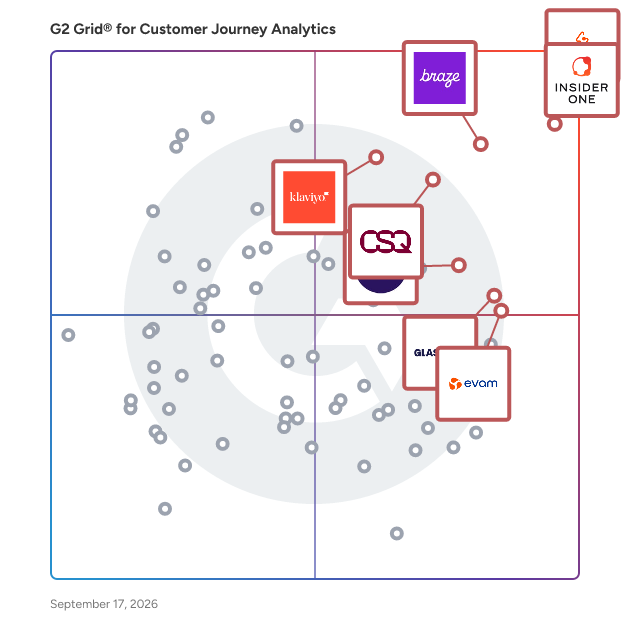
Satisfaction reflects how users rate their experience with the product based on review signals such as usability, support quality, and likelihood to recommend. (Source 2)
Market Presence represents a product’s footprint in the market using signals such as company size, user adoption, and product growth indicators. (Source 2)
G2 Score combines Satisfaction and Market Presence to provide a category-level comparison between products. (Source 2)
Learn more about how G2 calculates these scores. (Source 1)
“I find Adobe Customer Journey Analytics to be particularly useful for its strong segmentation capabilities. We can build detailed segments based on customer behavior over time and across channels, which I really like. Another feature I appreciate is the flexible data modeling, allowing us to bring in event profile data in a very flexible way. This makes it easier to answer business questions in the product's analytical studio without forcing our data into rigid schemas.”
- Vinay Prasad A, Adobe Customer Journey Analytics Review
“I like the personalized messages sent at the desired frequency and preferences. I like the ability to connect with customers and not miss the chances of convincing them. Its real-time data reading and responding are appreciable. Its capabilities expand across multiple channels. Adobe Journey Optimizer fulfills the need of engaging customers at various touch points and influencing their decisions by sending personalized messages based on real-time data, while keeping in mind the customers' preferences and automating aspects of marketing and sales workflow.”
- Sheeba T, Adobe Journey Optimizer Review
“I use WebEngage to automate omnichannel marketing campaigns which significantly improve user retention. I appreciate the Journey Designer, with its intuitive drag-and-drop interface that allows me to map out complex customer workflows without needing a technical background. I also value the omnichannel integration that saves a lot of time by having SMS, Email, and Web Push all in one place, providing us with a unified view of our users. The Split (A/B testing) feature in the Journey Designer is particularly beneficial as it enables me to test different communication branches in real-time. I also like that the initial setup was smoother than expected thanks to the well-documented SDK and the onboarding team. WebEngage is powerful enough for advanced automation but still intuitive, letting the marketing team run campaigns without relying heavily on developers.”
- Md Intekhab, WebEngage Review
“There’s a learning curve to fully maximising Architect’s advanced journey builder, though the documentation and onboarding support help minimize obstacles; regular platform improvements address most feedback quickly”
- Ali.Y, Insider One Review
“The ease of implementation could be better. Setting things up, especially for web, needed some back and forth. The documentation wasn’t very clear in some places, and the ease of integration depends a lot on your setup. It wasn’t super difficult, but I did expect it to be smoother. Also, customer support was helpful, but responses could have been a little quicker during the setup phase.”
- Neelesh S, WebEngage Review
“I see an improvement on reports. While the dashboards cover core campaign performance, more advanced analytics such as cohort analysis, incremental lift measurement, and deeper LTV views require exporting data to external BI tools”
- Fernando d, Insider One Review
G2 review data suggests that customer journey analytics software performs especially well in the areas that tend to drive long-term adoption: measurable value, strong fit with team workflows, and confidence in the insights teams are acting on. The category averages 4.56 out of 5 stars, paired with a 9.12 out of 10 likelihood-to-recommend score, indicating that most teams see meaningful outcomes once journey analytics is embedded in day-to-day decision-making.
Where I see the biggest difference between average and high-performing teams is how they operationalize the insights. Teams that get the most value don’t treat journey analytics as a one-time reporting layer. They use customer journey analytics tools to run a weekly rhythm: map key journeys, isolate friction points by segment, validate hypotheses with performance signals, and then push changes into campaigns, onboarding flows, and customer support motions. In other words, the best customer journey analytics software becomes a continuous optimization system, not just a measurement dashboard.
I also notice stronger adoption patterns in industries where customer experience is both high-volume and multi-touch, including Computer Software, Marketing/Advertising, IT Services, Financial Services, and Retail. These teams typically have more channels, more lifecycle complexity, and higher pressure to personalize without breaking consistency. In those environments, customer journey analytics solutions work best when they can unify customer signals across sources and make it easy to compare paths, so teams can act on what’s actually happening, not what they assume is happening.
Another clear trend in the data is that usability and support influence adoption, but setup complexity remains a real constraint. Quantitatively, category-level scores trend high for Meets Requirements (6.30/7), Ease of Use (6.18/7), and Quality of Support (6.35/7). That combination tells me most teams are satisfied once they’re live. But written feedback consistently implies the learning curve and integration work can slow early momentum, especially when teams are trying to connect data sources, define taxonomy, and build advanced journey logic.
If I were advising a team evaluating the best customer journey analytics software, I would focus on three things early in the buying process: how quickly you can connect and trust your data, how easily non-technical teams can use insights to take action, and how well the platform supports segmentation and multi-channel journey analysis without creating operational overhead. The customer journey platforms that perform best in those areas usually become foundational infrastructure, not only for analytics, but for how growth, product, and CX teams coordinate around the customer journey.
Predictive modeling matters most when teams want to move beyond “what happened” and start forecasting churn risk, conversion likelihood, or next-best action at key journey moments. In this category, the platforms that tend to support that kind of forward-looking analysis are the ones built for unified customer data, advanced segmentation, and journey-level decisioning. Common options include:
Enterprise teams typically need governance, consistency across business units, and enough depth to support cross-channel measurement at scale. Top choices that are talked about on G2:
Most teams want journey analytics to be connected to customer records so segmentation, attribution, and follow-up actions reflect the real account context. Platforms that sit close to customer profiles and activation workflows tend to be the most practical for CRM-connected journeys. Common choices include:
Teams looking for bottlenecks usually need path visibility, drop-off diagnostics, and segmentation that isolates where specific audiences stall. The strongest tools make it easy to compare journeys across channels and pinpoint friction without weeks of manual slicing. Top options include:
Real-time tracking is most valuable when teams can act on signals immediately, triggering outreach, adjusting experiences, or rerouting journeys based on live behavior. Platforms that combine fast segmentation with multi-channel activation tend to perform best here. Common options include:
Attribution-ready journey analysis requires unified data, consistent identity, and reporting that connects touchpoints to outcomes. The strongest options are usually the ones that can stitch interactions across channels and make the results usable for optimization decisions. Top choices include:
Multi-channel journey analysis works best when teams can see journeys end-to-end and then operationalize what they learn into real changes. Platforms that combine journey visualization, segmentation, and activation are typically the most effective for this use case. Top options include:
Reviewed by: Alanna Iwuh
Last updated on: March 16, 2026