2026 Best Software Awards are here!See the list

Best Single Sign-On (SSO) Software

Brandon Summers-Miller
BS
Researched and written by Brandon Summers-Miller

Single sign-on (SSO) solutions are authentication tools that allows users to sign into multiple applications or databases with a single set of credentials. Federation is the linking of IT systems, organizations, and personal identities with credentials and repositories. The best SSO solutions serve to simplify identification processes and create an uninhibited feel when working to access applications, portals, and servers. The software is designed to provide users with access to multiple applications or datasets without requiring multiple logins.

The goal of SSO software is not only to improve ease of use while navigating across applications but also to minimize work for IT administrators and developers by centralizing access management. SSO products effectively join the desired applications and route logins through an SSO server. These solutions often include features such as dashboards for simplified navigation, application clouds, directory integration, and mobile applications for remote access.

There is some crossover between SSO software and solution types such as cloud identity and access management software, password management software, and user provisioning/governance software, but single sign-on products focus mainly on secure enterprise access to servers, applications, and databases rather than the management of data or passwords.

To qualify for inclusion in the SSO category, a product must:

Allow users access to multiple applications or databases through one portal
Automate authentication to prevent multiple logins
Centralize authentication servers across applications
Provide secure access to applications and data
Integrate login access to business applications
Show More
Show Less

Featured Single Sign-On (SSO) Solutions At A Glance

Leader:
Highest Performer:
Easiest to Use:
Top Trending:
Show LessShow More
Highest Performer:
Easiest to Use:
Top Trending:

G2 takes pride in showing unbiased reviews on user satisfaction in our ratings and reports. We do not allow paid placements in any of our ratings, rankings, or reports. Learn about our scoring methodologies.

No filters applied
170 Listings in Single Sign-On (SSO) Available
(1,166)4.5 out of 5
2nd Easiest To Use in Single Sign-On (SSO) software
View top Consulting Services for Okta
Entry Level Price:$6.00
  • Overview
    Expand/Collapse Overview
  • Product Description
    How are these determined?Information
    This description is provided by the seller.

    Okta, Inc. is The World’s Identity Company™. We secure AI, machine, and human identity so everyone is free to safely use any technology. Our customer and workforce solutions empower businesses and dev

    Users
    • Software Engineer
    • Account Executive
    Industries
    • Computer Software
    • Information Technology and Services
    Market Segment
    • 50% Mid-Market
    • 39% Enterprise
  • Pros and Cons
    Expand/Collapse Pros and Cons
  • Okta Pros and Cons
    How are these determined?Information
    Pros and Cons are compiled from review feedback and grouped into themes to provide an easy-to-understand summary of user reviews.
    Pros
    Ease of Use
    207
    Security
    158
    Authentication Security
    153
    Single Sign-On
    143
    Easy Access
    140
    Cons
    Authentication Issues
    77
    Login Issues
    64
    Expensive
    46
    Complex Setup
    44
    Frequent Authentication
    39
  • User Satisfaction
    Expand/Collapse User Satisfaction
  • Okta features and usability ratings that predict user satisfaction
    8.9
    Has the product been a good partner in doing business?
    Average: 8.9
    9.0
    Partner Access
    Average: 8.8
    9.1
    Ease of connecting applications
    Average: 8.6
    9.0
    Supports BYOD users
    Average: 8.7
  • Seller Details
    Expand/Collapse Seller Details
  • Seller Details
    Seller
    Okta
    Company Website
    Year Founded
    2009
    HQ Location
    San Francisco, California
    Twitter
    @okta
    42,638 Twitter followers
    LinkedIn® Page
    www.linkedin.com
    7,230 employees on LinkedIn®
Product Description
How are these determined?Information
This description is provided by the seller.

Okta, Inc. is The World’s Identity Company™. We secure AI, machine, and human identity so everyone is free to safely use any technology. Our customer and workforce solutions empower businesses and dev

Users
  • Software Engineer
  • Account Executive
Industries
  • Computer Software
  • Information Technology and Services
Market Segment
  • 50% Mid-Market
  • 39% Enterprise
Okta Pros and Cons
How are these determined?Information
Pros and Cons are compiled from review feedback and grouped into themes to provide an easy-to-understand summary of user reviews.
Pros
Ease of Use
207
Security
158
Authentication Security
153
Single Sign-On
143
Easy Access
140
Cons
Authentication Issues
77
Login Issues
64
Expensive
46
Complex Setup
44
Frequent Authentication
39
Okta features and usability ratings that predict user satisfaction
8.9
Has the product been a good partner in doing business?
Average: 8.9
9.0
Partner Access
Average: 8.8
9.1
Ease of connecting applications
Average: 8.6
9.0
Supports BYOD users
Average: 8.7
Seller Details
Seller
Okta
Company Website
Year Founded
2009
HQ Location
San Francisco, California
Twitter
@okta
42,638 Twitter followers
LinkedIn® Page
www.linkedin.com
7,230 employees on LinkedIn®
  • Overview
    Expand/Collapse Overview
  • Product Description
    How are these determined?Information
    This description is provided by the seller.

    Transform your organization’s IT operations with Rippling’s unified platform for identity, device, access, and security management. Centralize every IT workflow, from provisioning apps and laptops to

    Users
    • Software Engineer
    • CEO
    Industries
    • Computer Software
    • Information Technology and Services
    Market Segment
    • 61% Mid-Market
    • 27% Small-Business
  • Pros and Cons
    Expand/Collapse Pros and Cons
  • Rippling IT Pros and Cons
    How are these determined?Information
    Pros and Cons are compiled from review feedback and grouped into themes to provide an easy-to-understand summary of user reviews.
    Pros
    Ease of Use
    670
    Intuitive
    467
    Simple
    413
    Easy Access
    374
    User Interface
    361
    Cons
    Missing Features
    165
    Limited Features
    112
    Improvement Needed
    89
    Learning Curve
    75
    Poor Customer Support
    73
  • User Satisfaction
    Expand/Collapse User Satisfaction
  • Rippling IT features and usability ratings that predict user satisfaction
    8.9
    Has the product been a good partner in doing business?
    Average: 8.9
    9.1
    Partner Access
    Average: 8.8
    9.3
    Ease of connecting applications
    Average: 8.6
    9.1
    Supports BYOD users
    Average: 8.7
  • Seller Details
    Expand/Collapse Seller Details
  • Seller Details
    Seller
    Rippling
    Company Website
    Year Founded
    2016
    HQ Location
    San Francisco, CA
    Twitter
    @Rippling
    11,873 Twitter followers
    LinkedIn® Page
    www.linkedin.com
    6,941 employees on LinkedIn®
Product Description
How are these determined?Information
This description is provided by the seller.

Transform your organization’s IT operations with Rippling’s unified platform for identity, device, access, and security management. Centralize every IT workflow, from provisioning apps and laptops to

Users
  • Software Engineer
  • CEO
Industries
  • Computer Software
  • Information Technology and Services
Market Segment
  • 61% Mid-Market
  • 27% Small-Business
Rippling IT Pros and Cons
How are these determined?Information
Pros and Cons are compiled from review feedback and grouped into themes to provide an easy-to-understand summary of user reviews.
Pros
Ease of Use
670
Intuitive
467
Simple
413
Easy Access
374
User Interface
361
Cons
Missing Features
165
Limited Features
112
Improvement Needed
89
Learning Curve
75
Poor Customer Support
73
Rippling IT features and usability ratings that predict user satisfaction
8.9
Has the product been a good partner in doing business?
Average: 8.9
9.1
Partner Access
Average: 8.8
9.3
Ease of connecting applications
Average: 8.6
9.1
Supports BYOD users
Average: 8.7
Seller Details
Seller
Rippling
Company Website
Year Founded
2016
HQ Location
San Francisco, CA
Twitter
@Rippling
11,873 Twitter followers
LinkedIn® Page
www.linkedin.com
6,941 employees on LinkedIn®
G2 Advertising
Sponsored
G2 Advertising
Get 2x conversion than Google Ads with G2 Advertising!
G2 Advertising places your product in premium positions on high-traffic pages and on targeted competitor pages to reach buyers at key comparison moments.
(3,940)4.5 out of 5
Optimized for quick response
5th Easiest To Use in Single Sign-On (SSO) software
Entry Level Price:$3.00
  • Overview
    Expand/Collapse Overview
  • Product Description
    How are these determined?Information
    This description is provided by the seller.

    JumpCloud® delivers a unified identity, device, and access management platform that makes it easy to securely manage identities, devices, and access across your organization. With JumpCloud, IT teams

    Users
    • IT Manager
    • System Administrator
    Industries
    • Information Technology and Services
    • Computer Software
    Market Segment
    • 53% Mid-Market
    • 36% Small-Business
    User Sentiment
    How are these determined?Information
    These insights, currently in beta, are compiled from user reviews and grouped to display a high-level overview of the software.
    • JumpCloud is a tool that manages user access and authentication, unifying identity, access, and device management into a single, cloud-native platform.
    • Users frequently mention that JumpCloud simplifies IT operations by providing a single source of truth for users and devices, enabling strong security through SSO, MFA, and automated onboarding/offboarding.
    • Reviewers noted that the initial setup and policy configuration can be complex, especially for organizations migrating from traditional Active Directory or managing advanced security use cases.
  • Pros and Cons
    Expand/Collapse Pros and Cons
  • JumpCloud Pros and Cons
    How are these determined?Information
    Pros and Cons are compiled from review feedback and grouped into themes to provide an easy-to-understand summary of user reviews.
    Pros
    Ease of Use
    881
    Device Management
    664
    Security
    519
    Integrations
    482
    Features
    431
    Cons
    Missing Features
    382
    Improvement Needed
    301
    Limited Features
    235
    Limitations
    177
    Learning Curve
    156
  • User Satisfaction
    Expand/Collapse User Satisfaction
  • JumpCloud features and usability ratings that predict user satisfaction
    9.0
    Has the product been a good partner in doing business?
    Average: 8.9
    8.4
    Partner Access
    Average: 8.8
    8.7
    Ease of connecting applications
    Average: 8.6
    8.4
    Supports BYOD users
    Average: 8.7
  • Seller Details
    Expand/Collapse Seller Details
  • Seller Details
    Company Website
    Year Founded
    2012
    HQ Location
    Louisville, CO
    Twitter
    @JumpCloud
    36,556 Twitter followers
    LinkedIn® Page
    www.linkedin.com
    959 employees on LinkedIn®
Product Description
How are these determined?Information
This description is provided by the seller.

JumpCloud® delivers a unified identity, device, and access management platform that makes it easy to securely manage identities, devices, and access across your organization. With JumpCloud, IT teams

Users
  • IT Manager
  • System Administrator
Industries
  • Information Technology and Services
  • Computer Software
Market Segment
  • 53% Mid-Market
  • 36% Small-Business
User Sentiment
How are these determined?Information
These insights, currently in beta, are compiled from user reviews and grouped to display a high-level overview of the software.
  • JumpCloud is a tool that manages user access and authentication, unifying identity, access, and device management into a single, cloud-native platform.
  • Users frequently mention that JumpCloud simplifies IT operations by providing a single source of truth for users and devices, enabling strong security through SSO, MFA, and automated onboarding/offboarding.
  • Reviewers noted that the initial setup and policy configuration can be complex, especially for organizations migrating from traditional Active Directory or managing advanced security use cases.
JumpCloud Pros and Cons
How are these determined?Information
Pros and Cons are compiled from review feedback and grouped into themes to provide an easy-to-understand summary of user reviews.
Pros
Ease of Use
881
Device Management
664
Security
519
Integrations
482
Features
431
Cons
Missing Features
382
Improvement Needed
301
Limited Features
235
Limitations
177
Learning Curve
156
JumpCloud features and usability ratings that predict user satisfaction
9.0
Has the product been a good partner in doing business?
Average: 8.9
8.4
Partner Access
Average: 8.8
8.7
Ease of connecting applications
Average: 8.6
8.4
Supports BYOD users
Average: 8.7
Seller Details
Company Website
Year Founded
2012
HQ Location
Louisville, CO
Twitter
@JumpCloud
36,556 Twitter followers
LinkedIn® Page
www.linkedin.com
959 employees on LinkedIn®
(892)4.5 out of 5
6th Easiest To Use in Single Sign-On (SSO) software
View top Consulting Services for Microsoft Entra ID
Entry Level Price:Free
  • Overview
    Expand/Collapse Overview
  • Product Description
    How are these determined?Information
    This description is provided by the seller.

    Entra ID is a complete identity and access management solution with integrated security that connects people to their apps, devices, and data and helps protect from identity compromise. With Entra ID,

    Users
    • Software Engineer
    • Senior Software Engineer
    Industries
    • Information Technology and Services
    • Computer Software
    Market Segment
    • 38% Mid-Market
    • 36% Enterprise
  • Pros and Cons
    Expand/Collapse Pros and Cons
  • Microsoft Entra ID Pros and Cons
    How are these determined?Information
    Pros and Cons are compiled from review feedback and grouped into themes to provide an easy-to-understand summary of user reviews.
    Pros
    Ease of Use
    129
    Security
    122
    Single Sign-On
    90
    Identity Management
    89
    Integrations
    80
    Cons
    Complexity
    56
    Expensive
    53
    Complex Administration
    42
    Difficult Learning
    38
    Complex Setup
    37
  • User Satisfaction
    Expand/Collapse User Satisfaction
  • Microsoft Entra ID features and usability ratings that predict user satisfaction
    9.0
    Has the product been a good partner in doing business?
    Average: 8.9
    8.8
    Partner Access
    Average: 8.8
    8.7
    Ease of connecting applications
    Average: 8.6
    8.8
    Supports BYOD users
    Average: 8.7
  • Seller Details
    Expand/Collapse Seller Details
  • Seller Details
    Seller
    Microsoft
    Year Founded
    1975
    HQ Location
    Redmond, Washington
    Twitter
    @microsoft
    13,088,873 Twitter followers
    LinkedIn® Page
    www.linkedin.com
    226,132 employees on LinkedIn®
    Ownership
    MSFT
Product Description
How are these determined?Information
This description is provided by the seller.

Entra ID is a complete identity and access management solution with integrated security that connects people to their apps, devices, and data and helps protect from identity compromise. With Entra ID,

Users
  • Software Engineer
  • Senior Software Engineer
Industries
  • Information Technology and Services
  • Computer Software
Market Segment
  • 38% Mid-Market
  • 36% Enterprise
Microsoft Entra ID Pros and Cons
How are these determined?Information
Pros and Cons are compiled from review feedback and grouped into themes to provide an easy-to-understand summary of user reviews.
Pros
Ease of Use
129
Security
122
Single Sign-On
90
Identity Management
89
Integrations
80
Cons
Complexity
56
Expensive
53
Complex Administration
42
Difficult Learning
38
Complex Setup
37
Microsoft Entra ID features and usability ratings that predict user satisfaction
9.0
Has the product been a good partner in doing business?
Average: 8.9
8.8
Partner Access
Average: 8.8
8.7
Ease of connecting applications
Average: 8.6
8.8
Supports BYOD users
Average: 8.7
Seller Details
Seller
Microsoft
Year Founded
1975
HQ Location
Redmond, Washington
Twitter
@microsoft
13,088,873 Twitter followers
LinkedIn® Page
www.linkedin.com
226,132 employees on LinkedIn®
Ownership
MSFT
(495)4.5 out of 5
Optimized for quick response
11th Easiest To Use in Single Sign-On (SSO) software
View top Consulting Services for Cisco Duo
Entry Level Price:Free
  • Overview
    Expand/Collapse Overview
  • Product Description
    How are these determined?Information
    This description is provided by the seller.

    Duo stops identity-based threats and boosts workforce productivity. Our Continuous Identity Security solution provides the best access management experience across users, devices, and applications whi

    Users
    • Software Engineer
    • Consultant
    Industries
    • Information Technology and Services
    • Higher Education
    Market Segment
    • 41% Enterprise
    • 37% Mid-Market
  • Pros and Cons
    Expand/Collapse Pros and Cons
  • Cisco Duo Pros and Cons
    How are these determined?Information
    Pros and Cons are compiled from review feedback and grouped into themes to provide an easy-to-understand summary of user reviews.
    Pros
    Ease of Use
    71
    Security
    67
    Authentication
    46
    Easy Access
    46
    Authentication Ease
    40
    Cons
    Authentication Issues
    24
    Login Issues
    16
    Complexity
    15
    Notification Issues
    15
    Delay Issues
    14
  • User Satisfaction
    Expand/Collapse User Satisfaction
  • Cisco Duo features and usability ratings that predict user satisfaction
    9.2
    Has the product been a good partner in doing business?
    Average: 8.9
    9.1
    Partner Access
    Average: 8.8
    9.3
    Ease of connecting applications
    Average: 8.6
    9.2
    Supports BYOD users
    Average: 8.7
  • Seller Details
    Expand/Collapse Seller Details
  • Seller Details
    Seller
    Cisco
    Company Website
    Year Founded
    1984
    HQ Location
    San Jose, CA
    Twitter
    @Cisco
    721,514 Twitter followers
    LinkedIn® Page
    www.linkedin.com
    95,386 employees on LinkedIn®
Product Description
How are these determined?Information
This description is provided by the seller.

Duo stops identity-based threats and boosts workforce productivity. Our Continuous Identity Security solution provides the best access management experience across users, devices, and applications whi

Users
  • Software Engineer
  • Consultant
Industries
  • Information Technology and Services
  • Higher Education
Market Segment
  • 41% Enterprise
  • 37% Mid-Market
Cisco Duo Pros and Cons
How are these determined?Information
Pros and Cons are compiled from review feedback and grouped into themes to provide an easy-to-understand summary of user reviews.
Pros
Ease of Use
71
Security
67
Authentication
46
Easy Access
46
Authentication Ease
40
Cons
Authentication Issues
24
Login Issues
16
Complexity
15
Notification Issues
15
Delay Issues
14
Cisco Duo features and usability ratings that predict user satisfaction
9.2
Has the product been a good partner in doing business?
Average: 8.9
9.1
Partner Access
Average: 8.8
9.3
Ease of connecting applications
Average: 8.6
9.2
Supports BYOD users
Average: 8.7
Seller Details
Seller
Cisco
Company Website
Year Founded
1984
HQ Location
San Jose, CA
Twitter
@Cisco
721,514 Twitter followers
LinkedIn® Page
www.linkedin.com
95,386 employees on LinkedIn®
(1,702)4.6 out of 5
4th Easiest To Use in Single Sign-On (SSO) software
View top Consulting Services for 1Password
100% Off: 0
  • Overview
    Expand/Collapse Overview
  • Product Description
    How are these determined?Information
    This description is provided by the seller.

    The Most Used Enterprise Password Manager, trusted by over 180,00 businesses, 1Password helps improve security, visibility and control over how their passwords and company data are protected. Secu

    Users
    • Software Engineer
    • CEO
    Industries
    • Computer Software
    • Information Technology and Services
    Market Segment
    • 55% Small-Business
    • 31% Mid-Market
  • Pros and Cons
    Expand/Collapse Pros and Cons
  • 1Password Pros and Cons
    How are these determined?Information
    Pros and Cons are compiled from review feedback and grouped into themes to provide an easy-to-understand summary of user reviews.
    Pros
    Ease of Use
    333
    Security
    271
    Password Management
    182
    Intuitive
    144
    Easy Access
    134
    Cons
    Password Management
    95
    Expensive
    91
    Login Issues
    69
    Autofill Issues
    64
    Cost
    60
  • User Satisfaction
    Expand/Collapse User Satisfaction
  • 1Password features and usability ratings that predict user satisfaction
    9.3
    Has the product been a good partner in doing business?
    Average: 8.9
    8.0
    Partner Access
    Average: 8.8
    8.6
    Ease of connecting applications
    Average: 8.6
    8.5
    Supports BYOD users
    Average: 8.7
  • Seller Details
    Expand/Collapse Seller Details
  • Seller Details
    Seller
    1Password
    Company Website
    Year Founded
    2005
    HQ Location
    Ontario
    Twitter
    @1Password
    139,467 Twitter followers
    LinkedIn® Page
    www.linkedin.com
    2,911 employees on LinkedIn®
Product Description
How are these determined?Information
This description is provided by the seller.

The Most Used Enterprise Password Manager, trusted by over 180,00 businesses, 1Password helps improve security, visibility and control over how their passwords and company data are protected. Secu

Users
  • Software Engineer
  • CEO
Industries
  • Computer Software
  • Information Technology and Services
Market Segment
  • 55% Small-Business
  • 31% Mid-Market
1Password Pros and Cons
How are these determined?Information
Pros and Cons are compiled from review feedback and grouped into themes to provide an easy-to-understand summary of user reviews.
Pros
Ease of Use
333
Security
271
Password Management
182
Intuitive
144
Easy Access
134
Cons
Password Management
95
Expensive
91
Login Issues
69
Autofill Issues
64
Cost
60
1Password features and usability ratings that predict user satisfaction
9.3
Has the product been a good partner in doing business?
Average: 8.9
8.0
Partner Access
Average: 8.8
8.6
Ease of connecting applications
Average: 8.6
8.5
Supports BYOD users
Average: 8.7
Seller Details
Seller
1Password
Company Website
Year Founded
2005
HQ Location
Ontario
Twitter
@1Password
139,467 Twitter followers
LinkedIn® Page
www.linkedin.com
2,911 employees on LinkedIn®
(1,985)4.5 out of 5
Optimized for quick response
3rd Easiest To Use in Single Sign-On (SSO) software
View top Consulting Services for LastPass
Entry Level Price:$4.25
  • Overview
    Expand/Collapse Overview
  • Product Description
    How are these determined?Information
    This description is provided by the seller.

    LastPass is a secure, cloud-based password manager that takes the hassle out of remembering and managing passwords. It works across all your devices, so you can log in faster and stay protected everyw

    Users
    • Owner
    • CEO
    Industries
    • Information Technology and Services
    • Computer Software
    Market Segment
    • 63% Small-Business
    • 25% Mid-Market
  • Pros and Cons
    Expand/Collapse Pros and Cons
  • LastPass Pros and Cons
    How are these determined?Information
    Pros and Cons are compiled from review feedback and grouped into themes to provide an easy-to-understand summary of user reviews.
    Pros
    Ease of Use
    227
    Password Management
    170
    Security
    155
    Autofill Feature
    107
    Password Security
    99
    Cons
    Autofill Issues
    83
    Password Management
    78
    Login Issues
    66
    Password Issues
    44
    Browser Extension Issues
    43
  • User Satisfaction
    Expand/Collapse User Satisfaction
  • LastPass features and usability ratings that predict user satisfaction
    8.6
    Has the product been a good partner in doing business?
    Average: 8.9
    8.6
    Partner Access
    Average: 8.8
    8.7
    Ease of connecting applications
    Average: 8.6
    8.8
    Supports BYOD users
    Average: 8.7
  • Seller Details
    Expand/Collapse Seller Details
  • Seller Details
    Seller
    LastPass
    Company Website
    Year Founded
    2008
    HQ Location
    Boston, Massachusetts
    Twitter
    @LastPass
    46,137 Twitter followers
    LinkedIn® Page
    www.linkedin.com
    772 employees on LinkedIn®
Product Description
How are these determined?Information
This description is provided by the seller.

LastPass is a secure, cloud-based password manager that takes the hassle out of remembering and managing passwords. It works across all your devices, so you can log in faster and stay protected everyw

Users
  • Owner
  • CEO
Industries
  • Information Technology and Services
  • Computer Software
Market Segment
  • 63% Small-Business
  • 25% Mid-Market
LastPass Pros and Cons
How are these determined?Information
Pros and Cons are compiled from review feedback and grouped into themes to provide an easy-to-understand summary of user reviews.
Pros
Ease of Use
227
Password Management
170
Security
155
Autofill Feature
107
Password Security
99
Cons
Autofill Issues
83
Password Management
78
Login Issues
66
Password Issues
44
Browser Extension Issues
43
LastPass features and usability ratings that predict user satisfaction
8.6
Has the product been a good partner in doing business?
Average: 8.9
8.6
Partner Access
Average: 8.8
8.7
Ease of connecting applications
Average: 8.6
8.8
Supports BYOD users
Average: 8.7
Seller Details
Seller
LastPass
Company Website
Year Founded
2008
HQ Location
Boston, Massachusetts
Twitter
@LastPass
46,137 Twitter followers
LinkedIn® Page
www.linkedin.com
772 employees on LinkedIn®
  • Overview
    Expand/Collapse Overview
  • Product Description
    How are these determined?Information
    This description is provided by the seller.

    Zscaler Private Access (ZPA) is a cloud-based zero trust solution that securely connects users to private applications hosted in public clouds, data centers, or on-premises environments without relyin

    Users
    No information available
    Industries
    • Information Technology and Services
    • Computer Software
    Market Segment
    • 46% Enterprise
    • 28% Mid-Market
    User Sentiment
    How are these determined?Information
    These insights, currently in beta, are compiled from user reviews and grouped to display a high-level overview of the software.
    • Zscaler Private Access is a security tool that provides secure access to internal applications without using a traditional VPN.
    • Reviewers like the fast and reliable connection, the ease of use, and the enhanced security features that Zscaler Private Access offers.
    • Users mentioned that the initial setup can be complex and time-consuming, and troubleshooting issues can take longer than expected.
  • Pros and Cons
    Expand/Collapse Pros and Cons
  • Zscaler Private Access Pros and Cons
    How are these determined?Information
    Pros and Cons are compiled from review feedback and grouped into themes to provide an easy-to-understand summary of user reviews.
    Pros
    Security
    64
    Ease of Use
    53
    Secure Access
    49
    VPN Efficiency
    30
    Reliability
    25
    Cons
    Connection Issues
    24
    Error Handling
    21
    Slow Loading
    20
    Expensive
    18
    Slow Internet
    16
  • User Satisfaction
    Expand/Collapse User Satisfaction
  • Zscaler Private Access features and usability ratings that predict user satisfaction
    9.2
    Has the product been a good partner in doing business?
    Average: 8.9
    7.9
    Partner Access
    Average: 8.8
    8.9
    Ease of connecting applications
    Average: 8.6
    7.9
    Supports BYOD users
    Average: 8.7
  • Seller Details
    Expand/Collapse Seller Details
  • Seller Details
    Seller
    Zscaler
    Company Website
    Year Founded
    2008
    HQ Location
    San Jose, California
    Twitter
    @zscaler
    17,377 Twitter followers
    LinkedIn® Page
    www.linkedin.com
    9,540 employees on LinkedIn®
Product Description
How are these determined?Information
This description is provided by the seller.

Zscaler Private Access (ZPA) is a cloud-based zero trust solution that securely connects users to private applications hosted in public clouds, data centers, or on-premises environments without relyin

Users
No information available
Industries
  • Information Technology and Services
  • Computer Software
Market Segment
  • 46% Enterprise
  • 28% Mid-Market
User Sentiment
How are these determined?Information
These insights, currently in beta, are compiled from user reviews and grouped to display a high-level overview of the software.
  • Zscaler Private Access is a security tool that provides secure access to internal applications without using a traditional VPN.
  • Reviewers like the fast and reliable connection, the ease of use, and the enhanced security features that Zscaler Private Access offers.
  • Users mentioned that the initial setup can be complex and time-consuming, and troubleshooting issues can take longer than expected.
Zscaler Private Access Pros and Cons
How are these determined?Information
Pros and Cons are compiled from review feedback and grouped into themes to provide an easy-to-understand summary of user reviews.
Pros
Security
64
Ease of Use
53
Secure Access
49
VPN Efficiency
30
Reliability
25
Cons
Connection Issues
24
Error Handling
21
Slow Loading
20
Expensive
18
Slow Internet
16
Zscaler Private Access features and usability ratings that predict user satisfaction
9.2
Has the product been a good partner in doing business?
Average: 8.9
7.9
Partner Access
Average: 8.8
8.9
Ease of connecting applications
Average: 8.6
7.9
Supports BYOD users
Average: 8.7
Seller Details
Seller
Zscaler
Company Website
Year Founded
2008
HQ Location
San Jose, California
Twitter
@zscaler
17,377 Twitter followers
LinkedIn® Page
www.linkedin.com
9,540 employees on LinkedIn®
  • Overview
    Expand/Collapse Overview
  • Product Description
    How are these determined?Information
    This description is provided by the seller.

    Auth0 takes a modern approach to Identity, providing secure access to any application, for any user. Safeguarding billions of login transactions each month, Auth0 delivers convenience, privacy, and se

    Users
    • Software Engineer
    • Software Developer
    Industries
    • Computer Software
    • Information Technology and Services
    Market Segment
    • 47% Small-Business
    • 30% Mid-Market
  • Pros and Cons
    Expand/Collapse Pros and Cons
  • Auth0 Pros and Cons
    How are these determined?Information
    Pros and Cons are compiled from review feedback and grouped into themes to provide an easy-to-understand summary of user reviews.
    Pros
    Ease of Use
    54
    Security
    47
    Authentication
    39
    Integrations
    34
    Easy Integrations
    33
    Cons
    Expensive
    27
    Cost
    20
    Expensive Pricing
    17
    Difficult Learning
    15
    Complexity
    12
  • User Satisfaction
    Expand/Collapse User Satisfaction
  • Auth0 features and usability ratings that predict user satisfaction
    8.3
    Has the product been a good partner in doing business?
    Average: 8.9
    8.8
    Partner Access
    Average: 8.8
    9.1
    Ease of connecting applications
    Average: 8.6
    8.9
    Supports BYOD users
    Average: 8.7
  • Seller Details
    Expand/Collapse Seller Details
  • Seller Details
    Seller
    Okta
    Company Website
    Year Founded
    2009
    HQ Location
    San Francisco, California
    Twitter
    @okta
    42,638 Twitter followers
    LinkedIn® Page
    www.linkedin.com
    7,230 employees on LinkedIn®
Product Description
How are these determined?Information
This description is provided by the seller.

Auth0 takes a modern approach to Identity, providing secure access to any application, for any user. Safeguarding billions of login transactions each month, Auth0 delivers convenience, privacy, and se

Users
  • Software Engineer
  • Software Developer
Industries
  • Computer Software
  • Information Technology and Services
Market Segment
  • 47% Small-Business
  • 30% Mid-Market
Auth0 Pros and Cons
How are these determined?Information
Pros and Cons are compiled from review feedback and grouped into themes to provide an easy-to-understand summary of user reviews.
Pros
Ease of Use
54
Security
47
Authentication
39
Integrations
34
Easy Integrations
33
Cons
Expensive
27
Cost
20
Expensive Pricing
17
Difficult Learning
15
Complexity
12
Auth0 features and usability ratings that predict user satisfaction
8.3
Has the product been a good partner in doing business?
Average: 8.9
8.8
Partner Access
Average: 8.8
9.1
Ease of connecting applications
Average: 8.6
8.9
Supports BYOD users
Average: 8.7
Seller Details
Seller
Okta
Company Website
Year Founded
2009
HQ Location
San Francisco, California
Twitter
@okta
42,638 Twitter followers
LinkedIn® Page
www.linkedin.com
7,230 employees on LinkedIn®
  • Overview
    Expand/Collapse Overview
  • Product Description
    How are these determined?Information
    This description is provided by the seller.

    Citrix Secure Workspace Access provides a comprehensive, zero-trust approach to deliver secure and contextual access to the corporate internal web apps, SaaS, and virtual applications. It enables the

    Users
    No information available
    Industries
    • Information Technology and Services
    • Computer Software
    Market Segment
    • 59% Enterprise
    • 26% Mid-Market
  • Pros and Cons
    Expand/Collapse Pros and Cons
  • Citrix Secure Private Access Pros and Cons
    How are these determined?Information
    Pros and Cons are compiled from review feedback and grouped into themes to provide an easy-to-understand summary of user reviews.
    Pros
    Ease of Use
    2
    Easy Access
    1
    Intuitive
    1
    Login Efficiency
    1
    Simple
    1
    Cons
    Connection Issues
    1
    Delay Issues
    1
    Login Issues
    1
    Slow Internet
    1
  • User Satisfaction
    Expand/Collapse User Satisfaction
  • Citrix Secure Private Access features and usability ratings that predict user satisfaction
    8.9
    Has the product been a good partner in doing business?
    Average: 8.9
    9.1
    Partner Access
    Average: 8.8
    9.0
    Ease of connecting applications
    Average: 8.6
    9.1
    Supports BYOD users
    Average: 8.7
  • Seller Details
    Expand/Collapse Seller Details
  • Seller Details
    Seller
    Citrix
    Year Founded
    1989
    HQ Location
    Fort Lauderdale, FL
    Twitter
    @citrix
    198,864 Twitter followers
    LinkedIn® Page
    www.linkedin.com
    4,262 employees on LinkedIn®
    Ownership
    NASDAQ:CTXS
Product Description
How are these determined?Information
This description is provided by the seller.

Citrix Secure Workspace Access provides a comprehensive, zero-trust approach to deliver secure and contextual access to the corporate internal web apps, SaaS, and virtual applications. It enables the

Users
No information available
Industries
  • Information Technology and Services
  • Computer Software
Market Segment
  • 59% Enterprise
  • 26% Mid-Market
Citrix Secure Private Access Pros and Cons
How are these determined?Information
Pros and Cons are compiled from review feedback and grouped into themes to provide an easy-to-understand summary of user reviews.
Pros
Ease of Use
2
Easy Access
1
Intuitive
1
Login Efficiency
1
Simple
1
Cons
Connection Issues
1
Delay Issues
1
Login Issues
1
Slow Internet
1
Citrix Secure Private Access features and usability ratings that predict user satisfaction
8.9
Has the product been a good partner in doing business?
Average: 8.9
9.1
Partner Access
Average: 8.8
9.0
Ease of connecting applications
Average: 8.6
9.1
Supports BYOD users
Average: 8.7
Seller Details
Seller
Citrix
Year Founded
1989
HQ Location
Fort Lauderdale, FL
Twitter
@citrix
198,864 Twitter followers
LinkedIn® Page
www.linkedin.com
4,262 employees on LinkedIn®
Ownership
NASDAQ:CTXS
(182)4.3 out of 5
Optimized for quick response
Entry Level Price:$1.71 / user, per month
  • Overview
    Expand/Collapse Overview
  • Product Description
    How are these determined?Information
    This description is provided by the seller.

    A centralized solution for managing customer and workforce identity and access including capabilities such as single-sign-on, multifactor authentication, adaptive AI-based access, passwordless access,

    Users
    No information available
    Industries
    • Information Technology and Services
    • Computer Software
    Market Segment
    • 53% Enterprise
    • 40% Mid-Market
    User Sentiment
    How are these determined?Information
    These insights, currently in beta, are compiled from user reviews and grouped to display a high-level overview of the software.
    • IBM Verify CIAM is a customer identity and access management solution that manages customer accounts, handles identity verification, and ensures secure logins across various platforms.
    • Reviewers like the strong security features of IBM Verify CIAM, including single sign-on and multi-factor authentication, which reduce login problems and protect user data.
    • Users experienced complexity during the initial setup and configuration, and suggested improvements such as a more visual dashboard and step-by-step tutorial features.
  • Pros and Cons
    Expand/Collapse Pros and Cons
  • IBM Verify CIAM Pros and Cons
    How are these determined?Information
    Pros and Cons are compiled from review feedback and grouped into themes to provide an easy-to-understand summary of user reviews.
    Pros
    Security
    61
    Ease of Use
    48
    Authentication
    38
    Features
    29
    MFA Authentication
    29
    Cons
    Complex Setup
    38
    Complexity
    35
    Difficult Learning
    33
    Difficult Setup
    31
    Complex Administration
    30
  • User Satisfaction
    Expand/Collapse User Satisfaction
  • IBM Verify CIAM features and usability ratings that predict user satisfaction
    8.3
    Has the product been a good partner in doing business?
    Average: 8.9
    8.0
    Partner Access
    Average: 8.8
    7.9
    Ease of connecting applications
    Average: 8.6
    7.8
    Supports BYOD users
    Average: 8.7
  • Seller Details
    Expand/Collapse Seller Details
  • Seller Details
    Seller
    IBM
    Company Website
    Year Founded
    1911
    HQ Location
    Armonk, NY
    Twitter
    @IBM
    708,798 Twitter followers
    LinkedIn® Page
    www.linkedin.com
    339,241 employees on LinkedIn®
Product Description
How are these determined?Information
This description is provided by the seller.

A centralized solution for managing customer and workforce identity and access including capabilities such as single-sign-on, multifactor authentication, adaptive AI-based access, passwordless access,

Users
No information available
Industries
  • Information Technology and Services
  • Computer Software
Market Segment
  • 53% Enterprise
  • 40% Mid-Market
User Sentiment
How are these determined?Information
These insights, currently in beta, are compiled from user reviews and grouped to display a high-level overview of the software.
  • IBM Verify CIAM is a customer identity and access management solution that manages customer accounts, handles identity verification, and ensures secure logins across various platforms.
  • Reviewers like the strong security features of IBM Verify CIAM, including single sign-on and multi-factor authentication, which reduce login problems and protect user data.
  • Users experienced complexity during the initial setup and configuration, and suggested improvements such as a more visual dashboard and step-by-step tutorial features.
IBM Verify CIAM Pros and Cons
How are these determined?Information
Pros and Cons are compiled from review feedback and grouped into themes to provide an easy-to-understand summary of user reviews.
Pros
Security
61
Ease of Use
48
Authentication
38
Features
29
MFA Authentication
29
Cons
Complex Setup
38
Complexity
35
Difficult Learning
33
Difficult Setup
31
Complex Administration
30
IBM Verify CIAM features and usability ratings that predict user satisfaction
8.3
Has the product been a good partner in doing business?
Average: 8.9
8.0
Partner Access
Average: 8.8
7.9
Ease of connecting applications
Average: 8.6
7.8
Supports BYOD users
Average: 8.7
Seller Details
Seller
IBM
Company Website
Year Founded
1911
HQ Location
Armonk, NY
Twitter
@IBM
708,798 Twitter followers
LinkedIn® Page
www.linkedin.com
339,241 employees on LinkedIn®
(1,186)4.6 out of 5
Optimized for quick response
9th Easiest To Use in Single Sign-On (SSO) software
100% Off
  • Overview
    Expand/Collapse Overview
  • Product Description
    How are these determined?Information
    This description is provided by the seller.

    Keeper Security is transforming cybersecurity for millions of individuals and thousands of organizations globally. Built with end-to-end encryption, Keeper's intuitive cybersecurity platform is truste

    Users
    • IT Manager
    • Owner
    Industries
    • Information Technology and Services
    • Financial Services
    Market Segment
    • 42% Mid-Market
    • 42% Small-Business
  • Pros and Cons
    Expand/Collapse Pros and Cons
  • Keeper Password Manager Pros and Cons
    How are these determined?Information
    Pros and Cons are compiled from review feedback and grouped into themes to provide an easy-to-understand summary of user reviews.
    Pros
    Ease of Use
    168
    Security
    128
    Secure Sharing
    88
    Password Management
    87
    Features
    74
    Cons
    Password Management
    71
    Autofill Issues
    49
    Login Issues
    39
    Password Issues
    34
    Learning Curve
    33
  • User Satisfaction
    Expand/Collapse User Satisfaction
  • Keeper Password Manager features and usability ratings that predict user satisfaction
    9.0
    Has the product been a good partner in doing business?
    Average: 8.9
    8.3
    Partner Access
    Average: 8.8
    8.8
    Ease of connecting applications
    Average: 8.6
    8.7
    Supports BYOD users
    Average: 8.7
  • Seller Details
    Expand/Collapse Seller Details
  • Seller Details
    Company Website
    Year Founded
    2011
    HQ Location
    Chicago, IL
    Twitter
    @keepersecurity
    18,965 Twitter followers
    LinkedIn® Page
    www.linkedin.com
    723 employees on LinkedIn®
Product Description
How are these determined?Information
This description is provided by the seller.

Keeper Security is transforming cybersecurity for millions of individuals and thousands of organizations globally. Built with end-to-end encryption, Keeper's intuitive cybersecurity platform is truste

Users
  • IT Manager
  • Owner
Industries
  • Information Technology and Services
  • Financial Services
Market Segment
  • 42% Mid-Market
  • 42% Small-Business
Keeper Password Manager Pros and Cons
How are these determined?Information
Pros and Cons are compiled from review feedback and grouped into themes to provide an easy-to-understand summary of user reviews.
Pros
Ease of Use
168
Security
128
Secure Sharing
88
Password Management
87
Features
74
Cons
Password Management
71
Autofill Issues
49
Login Issues
39
Password Issues
34
Learning Curve
33
Keeper Password Manager features and usability ratings that predict user satisfaction
9.0
Has the product been a good partner in doing business?
Average: 8.9
8.3
Partner Access
Average: 8.8
8.8
Ease of connecting applications
Average: 8.6
8.7
Supports BYOD users
Average: 8.7
Seller Details
Company Website
Year Founded
2011
HQ Location
Chicago, IL
Twitter
@keepersecurity
18,965 Twitter followers
LinkedIn® Page
www.linkedin.com
723 employees on LinkedIn®
  • Overview
    Expand/Collapse Overview
  • Product Description
    How are these determined?Information
    This description is provided by the seller.

    A suite that simplifies enterprise single sign-on deployments for system administrators and extends the benefits of ESSO to remote and mobile users.

    Users
    No information available
    Industries
    No information available
    Market Segment
    • 82% Enterprise
    • 29% Mid-Market
  • User Satisfaction
    Expand/Collapse User Satisfaction
  • Oracle SSO features and usability ratings that predict user satisfaction
    7.7
    Has the product been a good partner in doing business?
    Average: 8.9
    8.9
    Partner Access
    Average: 8.8
    8.6
    Ease of connecting applications
    Average: 8.6
    7.8
    Supports BYOD users
    Average: 8.7
  • Seller Details
    Expand/Collapse Seller Details
  • Seller Details
    Seller
    Oracle
    Year Founded
    1977
    HQ Location
    Austin, TX
    Twitter
    @Oracle
    825,309 Twitter followers
    LinkedIn® Page
    www.linkedin.com
    198,071 employees on LinkedIn®
    Ownership
    NYSE:ORCL
Product Description
How are these determined?Information
This description is provided by the seller.

A suite that simplifies enterprise single sign-on deployments for system administrators and extends the benefits of ESSO to remote and mobile users.

Users
No information available
Industries
No information available
Market Segment
  • 82% Enterprise
  • 29% Mid-Market
Oracle SSO features and usability ratings that predict user satisfaction
7.7
Has the product been a good partner in doing business?
Average: 8.9
8.9
Partner Access
Average: 8.8
8.6
Ease of connecting applications
Average: 8.6
7.8
Supports BYOD users
Average: 8.7
Seller Details
Seller
Oracle
Year Founded
1977
HQ Location
Austin, TX
Twitter
@Oracle
825,309 Twitter followers
LinkedIn® Page
www.linkedin.com
198,071 employees on LinkedIn®
Ownership
NYSE:ORCL
(618)4.5 out of 5
Optimized for quick response
8th Easiest To Use in Single Sign-On (SSO) software
100% Off
  • Overview
    Expand/Collapse Overview
  • Product Description
    How are these determined?Information
    This description is provided by the seller.

    Dashlane provides complete credential security, protecting businesses against the threat of human risk. Our intelligent Omnix™ platform unifies credential protection and password management, equipping

    Users
    • CEO
    • Owner
    Industries
    • Information Technology and Services
    • Computer Software
    Market Segment
    • 64% Small-Business
    • 32% Mid-Market
  • Pros and Cons
    Expand/Collapse Pros and Cons
  • Dashlane Password Manager Pros and Cons
    How are these determined?Information
    Pros and Cons are compiled from review feedback and grouped into themes to provide an easy-to-understand summary of user reviews.
    Pros
    Ease of Use
    126
    Security
    96
    Sharing Ease
    92
    Intuitive
    74
    Secure Storage
    71
    Cons
    Autofill Issues
    59
    Password Issues
    57
    Login Issues
    46
    Password Management
    29
    Expensive
    23
  • User Satisfaction
    Expand/Collapse User Satisfaction
  • Dashlane Password Manager features and usability ratings that predict user satisfaction
    8.8
    Has the product been a good partner in doing business?
    Average: 8.9
    9.0
    Partner Access
    Average: 8.8
    8.9
    Ease of connecting applications
    Average: 8.6
    9.2
    Supports BYOD users
    Average: 8.7
  • Seller Details
    Expand/Collapse Seller Details
  • Seller Details
    Seller
    Dashlane
    Company Website
    Year Founded
    2009
    HQ Location
    New York
    Twitter
    @dashlane
    28,385 Twitter followers
    LinkedIn® Page
    www.linkedin.com
    301 employees on LinkedIn®
Product Description
How are these determined?Information
This description is provided by the seller.

Dashlane provides complete credential security, protecting businesses against the threat of human risk. Our intelligent Omnix™ platform unifies credential protection and password management, equipping

Users
  • CEO
  • Owner
Industries
  • Information Technology and Services
  • Computer Software
Market Segment
  • 64% Small-Business
  • 32% Mid-Market
Dashlane Password Manager Pros and Cons
How are these determined?Information
Pros and Cons are compiled from review feedback and grouped into themes to provide an easy-to-understand summary of user reviews.
Pros
Ease of Use
126
Security
96
Sharing Ease
92
Intuitive
74
Secure Storage
71
Cons
Autofill Issues
59
Password Issues
57
Login Issues
46
Password Management
29
Expensive
23
Dashlane Password Manager features and usability ratings that predict user satisfaction
8.8
Has the product been a good partner in doing business?
Average: 8.9
9.0
Partner Access
Average: 8.8
8.9
Ease of connecting applications
Average: 8.6
9.2
Supports BYOD users
Average: 8.7
Seller Details
Seller
Dashlane
Company Website
Year Founded
2009
HQ Location
New York
Twitter
@dashlane
28,385 Twitter followers
LinkedIn® Page
www.linkedin.com
301 employees on LinkedIn®
(639)4.5 out of 5
Optimized for quick response
7th Easiest To Use in Single Sign-On (SSO) software
20% Off: $2.87 user / month
  • Overview
    Expand/Collapse Overview
  • Product Description
    How are these determined?Information
    This description is provided by the seller.

    Trusted by more than 9,000 businesses worldwide, NordPass is a password management tool that upholds the finest privacy and security standards for businesses. Unlock the ease of cybersecurity and b

    Users
    • CEO
    • CTO
    Industries
    • Information Technology and Services
    • Marketing and Advertising
    Market Segment
    • 72% Small-Business
    • 25% Mid-Market
  • Pros and Cons
    Expand/Collapse Pros and Cons
  • NordPass Business Pros and Cons
    How are these determined?Information
    Pros and Cons are compiled from review feedback and grouped into themes to provide an easy-to-understand summary of user reviews.
    Pros
    Ease of Use
    198
    Security
    158
    Password Management
    131
    Intuitive
    121
    Sharing Ease
    118
    Cons
    Password Management
    92
    Password Issues
    68
    Login Issues
    55
    Autofill Issues
    50
    Browser Extension Issues
    44
  • User Satisfaction
    Expand/Collapse User Satisfaction
  • NordPass Business features and usability ratings that predict user satisfaction
    9.0
    Has the product been a good partner in doing business?
    Average: 8.9
    8.4
    Partner Access
    Average: 8.8
    8.5
    Ease of connecting applications
    Average: 8.6
    8.1
    Supports BYOD users
    Average: 8.7
  • Seller Details
    Expand/Collapse Seller Details
  • Seller Details
    Company Website
    Year Founded
    2012
    HQ Location
    Global
    Twitter
    @NordPass
    9,517 Twitter followers
    LinkedIn® Page
    www.linkedin.com
    1,883 employees on LinkedIn®
Product Description
How are these determined?Information
This description is provided by the seller.

Trusted by more than 9,000 businesses worldwide, NordPass is a password management tool that upholds the finest privacy and security standards for businesses. Unlock the ease of cybersecurity and b

Users
  • CEO
  • CTO
Industries
  • Information Technology and Services
  • Marketing and Advertising
Market Segment
  • 72% Small-Business
  • 25% Mid-Market
NordPass Business Pros and Cons
How are these determined?Information
Pros and Cons are compiled from review feedback and grouped into themes to provide an easy-to-understand summary of user reviews.
Pros
Ease of Use
198
Security
158
Password Management
131
Intuitive
121
Sharing Ease
118
Cons
Password Management
92
Password Issues
68
Login Issues
55
Autofill Issues
50
Browser Extension Issues
44
NordPass Business features and usability ratings that predict user satisfaction
9.0
Has the product been a good partner in doing business?
Average: 8.9
8.4
Partner Access
Average: 8.8
8.5
Ease of connecting applications
Average: 8.6
8.1
Supports BYOD users
Average: 8.7
Seller Details
Company Website
Year Founded
2012
HQ Location
Global
Twitter
@NordPass
9,517 Twitter followers
LinkedIn® Page
www.linkedin.com
1,883 employees on LinkedIn®

Learn More About Single Sign-On (SSO) Solutions

What are Single Sign-On (SSO) Solutions?

Single sign-on (SSO) solutions are user authentication solution that helps companies secure access to business applications and assets. It does so while also providing end users with a convenient, easy-to-use portal that requires them only to sign in and authenticate once to access multiple corporate applications and resources. 

SSO solutions share authentication sessions between a trusted identity provider, which manages digital identities and applications. In practice, commonly, an identity provider requires the user to log in and authenticate; the identity provider then shares this authentication session with other applications by passing digitally signed tokens for the receiving application to verify that it is coming from a trusted provider before granting the user with access to the application. If the user identity token is accepted, the user is automatically granted access to the application.

Companies use SSO software mainly to improve security and enhance the end-user sign-on experience, whether that be internal employees, end customers, or corporate business partners. SSO solutions also centralizes user access management, thus reducing the security management burden on administrators. Using an SSO solution, IT administrators can reduce or eliminate common time-consuming tasks like password resets. SSO products contain features that benefit both end users and administrators. For end users, this includes an easy-to-use user portal, intuitive authentication, and often a mobile application. For administrators, these solutions often include an identity directory or directory integrations, multiple multi-factor authentication (MFA) methods, audit features, and prebuilt application integrations. 

What Does SSO Stand For?

SSO most commonly stands for single sign-on. The acronym SSO is less frequently used to describe same sign-on, which is different from single sign-on; same sign-on does not rely on trusted tokens, but rather credential sharing. Rarely, the acronym SSO is used to describe single sign-out.

Other common acronyms people may encounter regarding SSO products include:

FIM: federated identity management, of which SSO is a part

IAM: identity and access management

IdP: identity provider

JWT: JSON Web Token, a protocol commonly used in business-to-consumer (B2C) SSO applications

LDAP: lightweight directory access protocol, an open protocol used for directory services authentication

MFA: multi-factor authentication

OIDC: OpenID Connect, an authentication protocol

OAuth: an open standard authentication protocol

SAML: Security Assertion Markup Language, an open standard used for SSO solutions

What Types of Single Sign-On (SSO) Solutions Exist?

Business to employee (B2E)

Companies use B2E SSO solutions to securely manage their employees’ access to corporate accounts, provide an easy-to-use user experience, and reduce user need for IT administrators services.

Business to business (B2B)

Companies use B2B SSO solutions to enable their business partners and corporate customers to best utilize the company’s services, using the partner or corporate customer’s preferred identity providers.

Business to consumer (B2C) or customer identity and access management (CIAM)

In B2C or CIAM use cases, customers are able to sign into other accounts and connect them to the business’ app to provide an SSO experience. Most commonly, customers authenticate using social media identity providers like Facebook or Google enabling them access to connected accounts. 

What are the Common Features of Single Sign-On (SSO) Solutions?

The following are some core features within SSO solutions that can help users and administrators.

User portal: User portals provide an intuitive, easy-to-use end-user interface.

Mobile app: Many SSO solutions offer a mobile app for end users to both authenticate and access the SSO solution from their mobile devices.

MFA methods: Most SSO providers offer multiple authentication methods to end users, from software or hardware token-based authentication, to mobile push, passwordless authentication, biometric authentication, or one-time passcodes (OTPs). 

Adaptive or contextual access: Some SSO software offers advanced authentication tools, such as adaptive or contextual access. Using machine learning to understand a user’s contextual use of the SSO product, such as location, IP address, time, and other real-time factors to create a user baseline profile. This profile is then used to determine anomalous access activity to prevent access when risk is deemed too high.

Directory or integration: To assist with user provisioning and management, SSO solutions either integrate with standard directories, such as Microsoft Active Directory, LDAP-based directories, or Google Cloud Directory or offer their own cloud directories built into the SSO software.

Prebuilt integration application catalog: SSO solutions commonly provide prebuilt integrations to widely used SaaS applications, which are available on an application catalog.

Role management: SSO solutions assist administrators with user provisioning and assigning permissions based on user role for access control.

Audit features: Audit features provide administrators audit logs to monitor user access.

What are the Benefits of Single Sign-On (SSO) Solutions?

Increases security: The main benefit of using an SSO solution is for securing user access to company applications and other resources through user authentication.

Reduces password authentication risk: Since users must only sign in and authenticate once to access multiple applications, SSO solutions reduce the risks associated with poor password management and using only a single factor for authentication.

Saves users time and frustration: SSO solutions reduce the number of logins end users such as employees or customers must remember and SSO solutions reduce user frustration when switching between multiple applications once authenticated.

Saves administrators time and money: Users can access their accounts in one centralized location, reducing the number of calls to administrators for password resets, saving time and, therefore money on labor costs.

Seamless experience across assets: SSO solutions reduce login friction for end users once authenticated and give them access to multiple accounts. 

Centralizes consumer profiles: SSO software consolidates end-user experiences in one tool to provide a centralized view of end-user or customer data.

Who Uses Single Sign-On (SSO) Solutions?

Systems administrators: Systems administrators are responsible for deploying and managing a company’s SSO solutions.

Employees: Employees are end users of SSO solutions in a B2E use case to sign on and authenticate with the user portal to access their corporate accounts.

Customers: Customers are end users of SSO solutions in a B2C use case and sign in and authenticate using an identity provider, often a social media account, to access a business’ applications.

Business contacts: Companies may use SSO software to enable their business partners and corporate customers to securely authenticate and access the company’s assets, often with multiple identity providers.

Software Related to Single Sign-On (SSO) Solutions

Related solutions that can be used together with SSO software include:

Identity and access management (IAM) software: For employee use cases, IAM software offers broader identity solutions, of which SSO is often a part. IAM software authenticates users, provides access to systems and data based on company policies, tracks user activity, and provides reporting tools to ensure employees comply with company policies and regulations.

Customer identity and access management (CIAM) software: For customer use cases, CIAM software provides robust identity functionality. CIAM software enables businesses to centralize and manage customer identities, preferences, and profile information at scale while offering customers self-registration options.

Password manager software: Password managers are secure repositories that store individual user passwords, much like a vault. SSO solutions differs from password managers because SSO software provides authentication before granting a trusted token, not an actual password, for access to an application. 

SaaS operations management software: SaaS operations management software tools enable businesses to manage, govern, and secure their SaaS product portfolios; many of these tools integrate with SSO solutions to manage user permissions.   

SaaS spend management software: This software enables companies to manage SaaS utilization to identify cost savings. Many of these tools integrate with SSO software to manage end-user utilization of SaaS subscriptions.

Challenges with Single Sign-On (SSO) Solutions

Software solutions can come with their own set of challenges. Issues to consider include: 

Legacy applications: SSO tools may not integrate with legacy applications; a solution to overcome this may include password vaulting tools within the SSO software to provide the end user with ease of use, despite not technically functioning as SSO regarding authentication. 

High availability: It is important that the SSO provider has high availability to avoid users being locked out of their systems; with applications managed centrally with an SSO solution, any downtime can prevent end users from accessing their applications and resources. If a company has mission-critical applications that must be available 24/7, many companies will not integrate these tools with SSO providers and instead log in and authenticate separately.

Which Companies Should Buy Single Sign-On (SSO) Solutions?

All companies can benefit from securing their login process to corporate assets.

Companies securing employees: Companies of all sizes that want to secure their employees’ access to corporate applications use SSO solutions.

Companies securing customers: Companies that want to enable their customers to provide self service to securely authenticate and login to applications use SSO solutions.

Companies securing partners: Companies that want to secure their partners and contractors access to corporate applications use SSO solutions.

How to Buy Single Sign-On (SSO) Solutions

Requirements Gathering (RFI/RFP) for Single Sign-On (SSO) Software

Prior to selecting an SSO software service provider or solution, buyers must consider what factors are important to the company, which may include:

End-user use case: Buyers must determine their end users—whether employees, customers, or business partners—to determine what kind of SSO solution works best for these constituencies.

Cloud vs. on-premises application support: The buyer should determine what applications and company resources will be connected to the SSO software. For applications that need high availability (24/7), they may not wish to connect those in case of downtime with the SSO provider. Many SSO providers offer prebuilt integrations with the most popular business software. If the business has applications that are custom-built, legacy, or on-premises, those may need integrations built to connect with the SSO. Another workaround would be to use a password vault within an SSO solution for legacy applications that are difficult to connect.

Federation protocols: If the organization needs to integrate with multiple identity providers outside of the organization, especially for authenticating business partners, FIM can achieve this. Federation protocols include SAML 1.1, SAML2, WS-Federation, OAuth2, OpenID Connect, WS-Trust, and other protocols.

Authentication type: The company should ensure that the authentication types its employees, customers, or partners will use are supported by the SSO solution of choice. This may include software or hardware-token-based authentication for employees and OTPs via email, SMS, or phone for customers, among many other authentication methods. Many SSO solutions now offer contextual or risk-based authentication measures to learn user behaviors, identify patterns, and thus provide risk-based assessments when the authentication process does not meet typical patterns. 

Mobile app: If end users will access corporate applications from mobile devices, ensure the SSO software provider’s mobile app meets particular business needs. 

Developer support: Buyers must ensure the SSO provider has the developer support the team requires, including software development kits (SDKs) and application programming interface (API) lifecycle management functions, particularly for B2C SSO use cases. 

Meets security standards: SSO is a security tool providing users with authenticated access to their company resources. It is important that the SSO service provider meet security standards that are important to the company, which may include ISO 27017, ISO 27018, ISO 27001, SOC 2 Type 2, and others. 

Compare Single Sign-On Software (SSO) Products

Create a long list

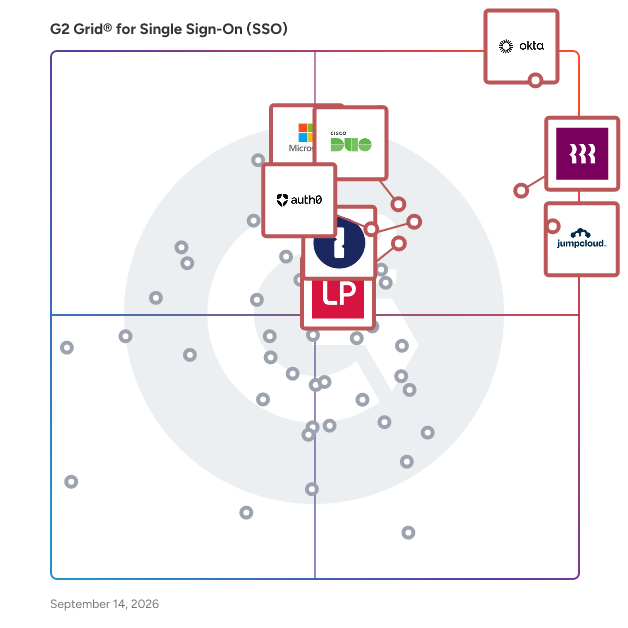
Buyers should create a long list of software solutions by researching on g2.com, by reading real-user reviews, seeing how vendors compare on G2 Grid® reports, and saving the software selections to “My List” to reference them in the future. Using g2.com, users can learn about which solutions are most often used in the geographic market and which ones are best for every business segment size—whether that is for small, medium, and enterprise businesses.

Create a short list

After creating a long list of vendors, buyers must do further research to narrow down the selections. Using g2.com’s compare feature, they can stack specific software up side by side to learn about how real users of the software rate their functionality. G2 also has quarterly reports showcasing users’ perception of return on investment (in months), the software provider’s average implementation time in months, usability scores, and many other factors.

Conduct demos

Up next is time to demo the products. Many vendors enable buyers to contact them directly from g2’s website by clicking the “Get a quote” button on their product profile. Buyers must prepare for each demo by having a standard list of questions and clarifications to ask each vendor. 

Selection of Single Sign-On (SSO) Solutions 

Choose a selection team

Single sign-on solutions impact users across the business—from employees, customers, business partners, IT teams, infosec teams, and more. The company’s software selection team should include people representative of these groups. They must start with three to five people to join the selection committee and clearly define project roles. 

Negotiation

It is important to know how many licenses are needed, as pricing often depends on the number of licenses the buyer purchases and the length of time they purchase it for. Often buyers can get discounts if they purchase large blocks of licenses for a longer duration. They must be sure to negotiate not just on price, but also implementation. Companies may be able to get free or reduced implementation services or ongoing support, as well.

Final decision

Before making a final choice, buyers should check if they can get a trial run of the product to test adoption with a small sample size of users. If the tool is well used and well received, the buyer can be confident that the selection was correct.