Learn More About Advanced Planning and Scheduling (APS) Software
What is Advanced Planning and Scheduling (APS) Software?
Advanced planning and scheduling (APS) software helps manufacturers optimize the allocation of raw materials and production capacity to fulfill demand. This software allows manufacturers to manage production planning and shop floor scheduling. This software helps generate achievable production schedules using advanced algorithms to balance demand and capacity. Using APS software can help with shorter lead times to meet customer demands and easier, more rapid responses to unexpected production changes.
APS is most beneficial to companies with complex manufacturing operations which require advanced planning functionality. Other departments such as inventory management and procurement can also leverage APS software.
What Does APS Stand For?
APS stands for advanced planning and scheduling and is commonly referred to as advanced manufacturing.
What are the Common Features of Advanced Planning and Scheduling (APS) Software?
The following are some core features of advanced planning and scheduling (APS) software:
Production schedules based on demand and constraints: Using advanced algorithms to balance demand and capacity, APS software enables manufacturers to quickly analyze and calculate achievable production schedules while considering multiple constraints and business rules.
Modeling capabilities: APS software can create detailed digital models of the production environment, including production constraints.
Algorithm optimization: Algorithms optimization allows the comparison of a plan or schedule variations in order to arrive at the best possible solution.
Distribution planning: Distribution planning coordinates the demand for a future period with the on-hand inventory and the safety stock requirements for that period. Overall, this component determines how much inventory of each material or part is needed to achieve high order-fulfillment status.
Transportation planning: Transportation planning identifies the transportation needs of a facility and assesses the efficiency, cost, and design of the transportation model. Transportation planning also involves defining future policies, goals, investments, and designs to adequately prepare for future transportation needs.
What are the Benefits of Advanced Planning and Scheduling (APS) Software?
Advanced planning and scheduling solutions improve the coordination of manufacturing processes and provide greater visibility to increase on-time delivery while reducing inventory levels and waste. The benefits of this software include:
Increased visibility: APS software can identify what types of products are running, any capacity bottlenecks, and late orders or materials.
Waste reduction: By streamlining production operations, APS software helps to reduce waste within operations, cuts costs, and improves profitability.
Heightened responsiveness: APS software can quickly respond to customer and market demands by automatically generating production schedules, allowing planners and schedulers to change strategies and production schedules, accommodate new products, and support fast changeovers.
Who Uses Advanced Planning and Scheduling (APS) Software?
The following teams use advanced planning and scheduling software:
Inventory management teams: Inventory management teams use APS software to track how much inventory is available within a specific period and set up alerts if the inventory levels are experiencing a shortage, below the safety stock, adequate, or above the maximum inventory allowed.
Manufacturing teams: Manufacturing teams use APS software to manage production planning and shop floor scheduling, as well as balance demand and capacity and generate achievable production schedules.
Challenges with Advanced Planning and Scheduling (APS) Software
APS solutions can come with their own set of challenges.
Real-time data requirements: The more data APS systems have to work with, the more effectively they can provide workable plans, but this information should include data from as many touch points on the value chain as possible. Manufacturing is dynamic, so it’s necessary that capacity, lead time, and workloads are based on real-time data and not assumed information.
Disconnected from software ecosystem: APS platforms typically don’t feature the transactional elements similar to an ERP system, which can leave it disconnected from the rest of its software ecosystem. This could lead to the generation of plans that don’t reflect recent changes to the production area.
Production triggers: Manufacturing orders can be triggered by demand forecasting, customer orders, or a combination of both. If the production management has both triggers, the software should be flexible enough to accommodate both. If not, it can lead to overproduction of some products in real time or backorders on others.
How to Buy Advanced Planning and Scheduling (APS) Software
Requirements Gathering (RFI/RFP) for Advanced Planning and Scheduling (APS) Software
When selecting APS software, it is essential to first look at how the business operates and then familiarize oneself with the different types of software available. There are various options for APS software products, including those designed for the business needs of small and medium-sized companies. Some things to consider while buying APS software include its ability to calculate production schedules, how many constraints and business rules it can handle, and how quickly it can change strategies.
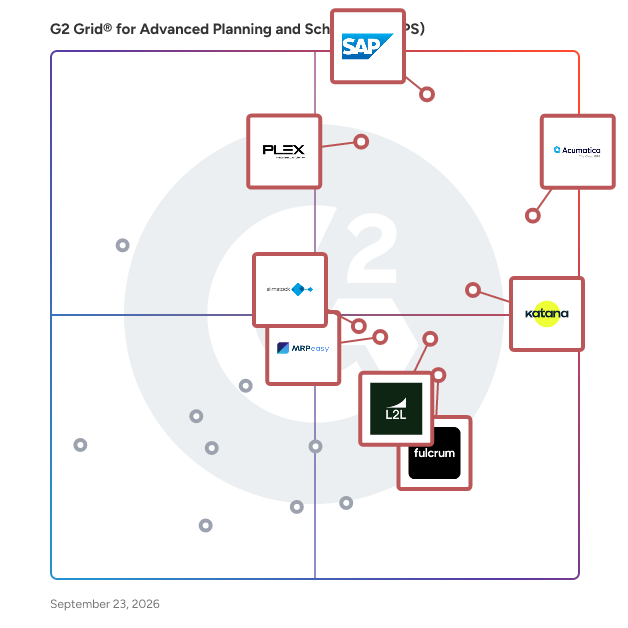
Compare Advanced Planning and Scheduling (APS) Software Products
Create a long list
Depending on the industry, the buyer might want to create a long list of software products designed to help businesses in that particular industry. For example, there are platforms specifically built for enterprise-sized manufacturers, while other platforms have flexibility with the number of users and allow additional production locations to be integrated.
Create a short list
After reviewing and researching the software on the long list, the buyer can whittle it down based on the budget. APS software is available for all budgets, and some general applications may be downloaded free or bought off the shelf at a lower price.
However, buyers must keep in mind that the more specialized a software is, the more expensive it gets. This is the case because the user base for specialized software is relatively small. The company should be prepared to pay a premium if it wants something specific to its industry or customized for its business.
Conduct demos
As a rule of thumb, companies should demo all products on their short list. During demos, buyers should ask specific questions about the functionalities they care about most. For example, one might ask to be walked through any features for revenue recognition and allocation, forecasting project cost and revenue and analyzing the performance of special offers, packages, and incentives.
Selection of Advanced Planning and Scheduling (APS) Software
Choose a selection team
The managers from departments such as manufacturing, inventory, and procurement using this software must be involved in the selection process. Every business is different, and frequent users are most likely in the best position to offer an educated opinion about the best choice for the business's particular needs. Users may even be able to help the company install and set up the software of choice.
After choosing a software, buyers must remember that they don’t have to be stuck with this selection forever; most platforms allow for add-ons or modifications. However, the company shouldn’t make this decision lightly because no matter what software is chosen, it will involve considerable time and money commitment. To see a return on investment (ROI), buyers can’t change their minds a few months later and switch software again.
Negotiation
Negotiating a software contract is vital to minimize risk, whether in terms of performance protection, security protection, or simply ensuring that both parties agree on what to expect from the other. If the business has the cash flow, it could ask for a discount in return for an annual upfront payment, and many software providers are happy to make that deal. A software provider may offer unlimited usage if the buyer pays up front instead of a monthly or quarterly package price.
Buyers should also determine if they need help implementing or integrating the software with another system. Usually, a software provider's first offer will include some implementation services in a given timeframe. Buyers can ask for these services to be removed if they can manage it themselves or if a third party can do it for cheaper.
Buyers also need to decide for how long they will need this software. If the company uses the software for years, the buyer can negotiate longer terms which sometimes results in more favorable pricing.
Final decision
The final decision should be based on all the information gathered previously. Businesses should try to prioritize needs and select the solution that meets most, if not all, of their requirements. Companies must remember that there isn't a perfect software, but there is one that is best for their business. If possible, buyers should try to conduct a pilot program with a smaller sample size of users to gauge how well the software is received. If the platform gets high marks, they can buy with more confidence. If the tool is inefficient or not performing as expected, it might be time to test another software.