  # Best Cloud Content Collaboration Software - Page 2

  *By [Neeraja Prakash](https://research.g2.com/insights/author/neeraja-prakash)*

   Cloud content collaboration software provides dedicated cloud storage and file sharing solutions for documents, images, videos, spreadsheets, and other files created and used by businesses. These tools act as flexible and synchronized repositories for all business content, aiming to be a one-stop solution for storing, sharing, creating, collaborating on, and retrieving content across multiple devices.

For remote and hybrid teams, cloud content collaboration solutions facilitate accessing and co-editing files in real time from various locations. Marketing teams use it to share campaign assets with clients. Legal and compliance teams use cloud content collaboration products to manage contract revisions and regulated documentation. These solutions also support product and design teams in coordinating on launch strategies and visual content, and enable finance teams to securely share reports and regulatory documents across departments and with external partners.

There is significant overlap between [cloud content collaboration software](https://www.g2.com/categories/cloud-content-collaboration), [document management software](https://www.g2.com/categories/document-management?source=search), and [enterprise content management (ECM) software](https://www.g2.com/categories/enterprise-content-management-ecm?source=search) in terms of features. However, as the name implies, enterprise content management tools are designed for enterprise-level businesses and organizations, offering tighter security, greater storage capacity, and on-premises deployment options. Document management tools focus on document lifecycle control and centralized file repositories. The best cloud content collaboration tools can integrate with ECM and other content management systems to create a comprehensive content storage ecosystem.

To qualify for inclusion in the Cloud Content Collaboration category, a product must:

- Provide cloud-based storage across multiple file types
- Synchronize files across repositories and devices
- Provide tools for both external and internal file sharing
- Support versioning across files
- Offer access to files from multiple devices
- Enable secure and compliant file sharing with real-time monitoring and risk mitigation
- Feature prominent collaboration tools


  ## How Many Cloud Content Collaboration Software Products Does G2 Track?
**Total Products under this Category:** 207

  
## How Does G2 Rank Cloud Content Collaboration Software Products?

**Why You Can Trust G2's Software Rankings:**

- 30 Analysts and Data Experts
- 117,000+ Authentic Reviews
- 207+ Products
- Unbiased Rankings

G2's software rankings are built on verified user reviews, rigorous moderation, and a consistent research methodology maintained by a team of analysts and data experts. Each product is measured using the same transparent criteria, with no paid placement or vendor influence. While reviews reflect real user experiences, which can be subjective, they offer valuable insight into how software performs in the hands of professionals. Together, these inputs power the G2 Score, a standardized way to compare tools within every category.

  
## Which Cloud Content Collaboration Software Is Best for Your Use Case?

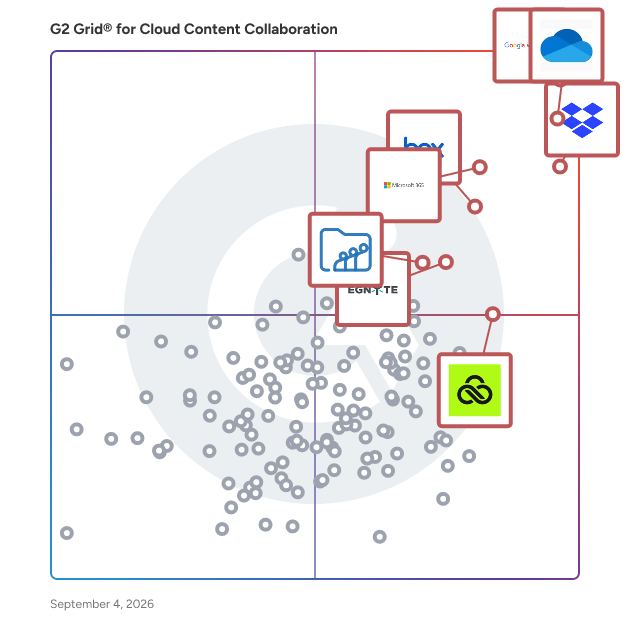
- **Leader:** [Google Workspace](https://www.g2.com/products/google-workspace/reviews)
- **Highest Performer:** [LucidLink](https://www.g2.com/products/lucidlink/reviews)
- **Easiest to Use:** [Air](https://www.g2.com/products/air-labs-inc-air/reviews)
- **Top Trending:** [Air](https://www.g2.com/products/air-labs-inc-air/reviews)
- **Best Free Software:** [Google Workspace](https://www.g2.com/products/google-workspace/reviews)

  
---

**Sponsored**

### Tresorit

Tresorit is a secure content collaboration platform designed to help individuals and organizations store, sync, and share sensitive information while prioritizing privacy. This comprehensive solution integrates encrypted storage, file sharing, collaboration tools, data rooms, and e-signatures into a single product family. Trusted by thousands of organizations worldwide, Tresorit is part of Swiss Post and serves as a privacy-first alternative to mainstream cloud tools, particularly for teams managing confidential files, regulated data, or client-facing work. At the heart of Tresorit is its commitment to zero-knowledge, end-to-end encryption. This means that files are encrypted on the user&#39;s device before being uploaded, and the encryption keys remain inaccessible to Tresorit itself. As a result, the platform cannot read customer content, ensuring that sensitive information remains protected even in the event of infrastructure compromise. Tresorit&#39;s cryptographic design choices are specifically intended to prevent data leakage through content matching or server-side visibility, providing users with peace of mind regarding their data security. Tresorit SecureCloud serves as an encrypted workspace that facilitates both internal collaboration and external exchanges. It supports secure file storage, syncing, and team collaboration while maintaining user-friendly workflows. The platform offers personal and business plans, with personal use functioning as an encrypted vault for sensitive documents and business use providing a secure workspace that emphasizes IT control, governance, and collaboration. This dual approach caters to a wide range of users, from individuals to large organizations. The Tresorit Drive experience allows users to access encrypted content through familiar interfaces such as Windows File Explorer and macOS Finder. This feature includes “cloud-only” access, which prevents the need to store all files locally, thus enhancing efficiency while maintaining centralized control. Administrators have the capability to take action if a device is lost or compromised, such as revoking access and unlinking the device to mitigate risks. For secure external sharing, Tresorit FileSharing offers robust access control features. Users can protect sharing links with expiration rules, passwords, watermarks, and restrictions on downloading or printing, all while benefiting from detailed activity tracking and auditing. Additionally, Tresorit integrates seamlessly into email workflows like Outlook and Gmail, helping to minimize the risks associated with sending sensitive attachments. For structured client collaboration, Tresorit Engage provides customizable, encrypted data rooms that support ongoing projects, role-based access control, and granular permissions, making it particularly useful for industries such as legal, finance, and consulting. Tresorit also enhances its offerings with Tresorit eSign, which combines document signing with encrypted file handling, supporting EU-qualified electronic signatures for high-trust workflows. Tresorit Email Encryption allows users to send encrypted emails directly from Outlook, ensuring secure communication without imposing complex setups on recipients. On the compliance front, Tresorit boasts strong security validation and certifications, including ISO 27001:2022 and Common Criteria EAL4+, while also supporting compliance with frameworks like GDPR and HIPAA. With data residency options across multiple regions, organizations can align their storage locations with legal and governance requirements, further solidifying Tresorit&#39;s position as a trusted solution for secure content collaboration.


[Visit website](https://www.g2.com/external_clickthroughs/record?secure%5Bad_program%5D=ppc&amp;secure%5Bad_slot%5D=category_product_list&amp;secure%5Bcategory_id%5D=236&amp;secure%5Bdisplayable_resource_id%5D=236&amp;secure%5Bdisplayable_resource_type%5D=Category&amp;secure%5Bmedium%5D=sponsored&amp;secure%5Bplacement_reason%5D=page_category&amp;secure%5Bplacement_resource_ids%5D%5B%5D=236&amp;secure%5Bprioritized%5D=false&amp;secure%5Bproduct_id%5D=20629&amp;secure%5Bresource_id%5D=236&amp;secure%5Bresource_type%5D=Category&amp;secure%5Bsource_type%5D=category_page&amp;secure%5Bsource_url%5D=https%3A%2F%2Fwww.g2.com%2Fcategories%2Fcloud-content-collaboration&amp;secure%5Btoken%5D=a4128f6341ff20bd33b7fdeb829c18b7f08c2b4b29e60c8fde246b1f96f26f46&amp;secure%5Burl%5D=https%3A%2F%2Ftresorit.com&amp;secure%5Burl_type%5D=company_website)

---

  ## What Are the Top-Rated Cloud Content Collaboration Software Products in 2026?
### 1. [DocuWare](https://www.g2.com/products/docuware/reviews)
  DocuWare is a type of digital document management and automated workflow solution designed to help organizations streamline their document processes and enhance operational efficiency. This versatile platform caters to businesses of all sizes and spans various industries, including but not limited to manufacturing, finance, education, and government. By offering a comprehensive suite of tools for managing documents and automating workflows, DocuWare enables users to reduce manual tasks, improve collaboration, and ensure compliance with regulatory requirements. The target audience for DocuWare includes organizations seeking to optimize their document management practices and automate repetitive processes. This solution is particularly beneficial for businesses that handle large volumes of paperwork or require secure access to sensitive information. With its capabilities, DocuWare serves a diverse clientele, from small businesses to large enterprises, making it a flexible choice for any organization looking to enhance its document handling capabilities. DocuWare&#39;s key features include robust document storage, intelligent document processing, advanced search functionalities, and customizable workflow automation. Users can easily store and retrieve documents in a secure digital environment, ensuring that critical information is always accessible. The platform&#39;s advanced search capabilities allow users to locate documents quickly, saving time and improving productivity. Additionally, the customizable workflow automation tools enable organizations to design processes tailored to their specific needs, facilitating smoother operations and reducing the likelihood of errors. One of the standout aspects of DocuWare is its adaptability to various deployment options. Organizations can choose between cloud-based or on-premises solutions, allowing them to select the deployment method that best fits their infrastructure and security requirements. With support for 24 languages, DocuWare is accessible to a global audience, making it a suitable choice for multinational organizations. The platform currently serves over 20,000 customers and 930,000 users across more than 100 countries, backed by a network of over 800 partners, which highlights its widespread acceptance and reliability in the market. Overall, DocuWare provides a comprehensive solution for organizations looking to modernize their document management and workflow processes. By leveraging its advanced features and flexible deployment options, businesses can enhance efficiency, improve collaboration, and ensure that they remain compliant with industry regulations.


  **Average Rating:** 4.4/5.0
  **Total Reviews:** 232
**How Do G2 Users Rate DocuWare?**

- **Has the product been a good partner in doing business?:** 9.0/10 (Category avg: 8.8/10)
- **Performance and Reliability:** 8.8/10 (Category avg: 8.7/10)
- **File following:** 9.5/10 (Category avg: 8.7/10)
- **Device Syncing:** 8.0/10 (Category avg: 8.7/10)

**Who Is the Company Behind DocuWare?**

- **Seller:** [DocuWare](https://www.g2.com/sellers/docuware)
- **Company Website:** https://docuware.com
- **Year Founded:** 1988
- **HQ Location:** Beacon, NY
- **Twitter:** @DocuWare (2,281 Twitter followers)
- **LinkedIn® Page:** https://www.linkedin.com/company/101401/ (633 employees on LinkedIn®)

**Who Uses This Product?**
  - **Who Uses This:** Software Analyst
  - **Top Industries:** Information Technology and Services, Pharmaceuticals
  - **Company Size:** 47% Mid-Market, 30% Enterprise


#### What Are DocuWare's Pros and Cons?

**Pros:**

- Ease of Use (16 reviews)
- Integrations (13 reviews)
- Automation (12 reviews)
- Document Management (12 reviews)
- Easy Integrations (12 reviews)

**Cons:**

- Learning Curve (7 reviews)
- Complexity (5 reviews)
- Missing Features (5 reviews)
- Limited Customization (4 reviews)
- Training Required (4 reviews)

### 2. [Synology Office Suite](https://www.g2.com/products/synology-office-suite/reviews)
  Synology Office Suite is a comprehensive on-prem productivity solution designed to help organizations embrace AI transformation, enhancing communication, streamlining workflows, and accelerating content creation. With a one-time purchase, it provides a cost-effective solution for organizations of all sizes. The suite brings user-friendly and intuitive tools including Synology Drive, Office, MailPlus, Chat, Calendar, Contacts, Note Station, and AI Console, making it easy for teams to get started. For more information please visit: https://www.synology.com/en-global/dsm/overview/productivity


  **Average Rating:** 4.4/5.0
  **Total Reviews:** 22
**How Do G2 Users Rate Synology Office Suite?**

- **Has the product been a good partner in doing business?:** 8.9/10 (Category avg: 8.8/10)
- **Performance and Reliability:** 8.7/10 (Category avg: 8.7/10)
- **File following:** 8.8/10 (Category avg: 8.7/10)
- **Device Syncing:** 9.3/10 (Category avg: 8.7/10)

**Who Is the Company Behind Synology Office Suite?**

- **Seller:** [Synology](https://www.g2.com/sellers/synology)
- **Year Founded:** 2000
- **HQ Location:** Taiwan
- **Twitter:** @Synology (67,469 Twitter followers)
- **LinkedIn® Page:** https://www.linkedin.com/company/synology/ (986 employees on LinkedIn®)

**Who Uses This Product?**
  - **Company Size:** 68% Small-Business, 32% Mid-Market


#### What Are Synology Office Suite's Pros and Cons?

**Pros:**

- Ease of Use (13 reviews)
- Integrations (11 reviews)
- Team Collaboration (11 reviews)
- Collaboration (10 reviews)
- Features (10 reviews)

**Cons:**

- Limited Features (6 reviews)
- Missing Features (5 reviews)
- Lack of Features (4 reviews)
- Microsoft Comparison (4 reviews)
- Lacking Features (3 reviews)

### 3. [Stockpress](https://www.g2.com/products/stockpress/reviews)
  Stockpress is an affordable Digital Asset Management (DAM) software solution with unlimited users that helps marketing, creative, and content teams organize, find, and share digital assets across their organization. Stockpress is designed for teams managing growing volumes of files—such as images, videos, design files, and documents—who need a structured, searchable system without the complexity typically associated with enterprise DAM platforms. It combines elements of traditional file management systems with DAM-specific capabilities like metadata tagging, version control, and controlled sharing, enabling teams to maintain visibility and access across internal and external collaborators. The platform is commonly used by marketing, creative, and content teams to support workflows such as campaign execution, brand asset distribution, content production, and collaboration with partners or clients. It is structured to support both small teams and larger organizations by offering scalable access without per-user licensing constraints. Stockpress supports the full lifecycle of digital assets—from upload and organization to distribution and reuse—helping teams reduce time spent searching for files and improving consistency in how assets are used across channels. Key features and capabilities include: - Asset organization and search: AI-powered and manual tagging, collections, and filters to make files easier to locate and manage - Collaboration and sharing: Controlled access, share links, and guest upload functionality for internal teams and external contributors - Version control and duplication management: Track file updates and reduce redundant assets with duplicate detection - Integrations with creative tools: Connections with platforms such as Adobe, Canva, and web tools to support existing workflows - Flexible pricing model: Storage-based pricing with unlimited users, supporting broader team adoption without per-seat costs Stockpress is typically adopted by teams that have outgrown basic file storage tools but do not require the overhead of highly complex DAM implementations. It is used to improve asset accessibility, maintain organization as content scales, and enable more efficient collaboration across distributed teams.


  **Average Rating:** 4.8/5.0
  **Total Reviews:** 98
**How Do G2 Users Rate Stockpress?**

- **Has the product been a good partner in doing business?:** 9.8/10 (Category avg: 8.8/10)
- **Performance and Reliability:** 9.7/10 (Category avg: 8.7/10)
- **File following:** 9.6/10 (Category avg: 8.7/10)
- **Device Syncing:** 8.8/10 (Category avg: 8.7/10)

**Who Is the Company Behind Stockpress?**

- **Seller:** [Stockpress](https://www.g2.com/sellers/stockpress)
- **Company Website:** https://stockpress.co
- **Year Founded:** 2018
- **HQ Location:** Boston, US
- **Twitter:** @GoStockpress (12 Twitter followers)
- **LinkedIn® Page:** https://www.linkedin.com/company/stockpress/ (13 employees on LinkedIn®)

**Who Uses This Product?**
  - **Top Industries:** Marketing and Advertising, Non-Profit Organization Management
  - **Company Size:** 36% Small-Business, 17% Mid-Market


#### What Are Stockpress's Pros and Cons?

**Pros:**

- Ease of Use (40 reviews)
- Customer Support (23 reviews)
- Intuitive (20 reviews)
- Asset Management (14 reviews)
- Easy Organization (13 reviews)

**Cons:**

- Tagging Issues (5 reviews)
- Folder Navigation (4 reviews)
- Integration Issues (3 reviews)
- Poor Navigation (3 reviews)
- Expensive (2 reviews)

### 4. [CloudFiles](https://www.g2.com/products/cloudfiles-cloudfiles/reviews)
  CloudFiles is an all-in-one document operations platform for Salesforce and HubSpot that helps organizations manage, generate, process, share, and automate documents directly from their CRM. Built for document-intensive business processes, CloudFiles combines document management, AI-powered document processing, document generation, secure sharing, external storage integrations, and workflow automation into a single platform. Organizations use CloudFiles to connect Salesforce and HubSpot with SharePoint, Google Drive, OneDrive, Dropbox, Amazon S3, and other enterprise storage platforms while maintaining structured document organization, centralized visibility, and secure access across teams. With CloudFiles, teams can: • Manage files and folders directly inside Salesforce and HubSpot • Automate document generation for agreements, proposals, onboarding forms, financial documents, and client communications • Extract and process data from documents using AI • Build secure datarooms and external document-sharing workflows • Automate document-heavy processes like client onboarding, loan processing, document verification, intake forms, and operational workflows • Configure CRM-native automations using flows, widgets, and custom actions CloudFiles helps organizations reduce manual work, centralize document operations, streamline document-heavy workflows, and improve productivity without leaving Salesforce or HubSpot. CloudFiles supports enterprise security and compliance requirements with SOC 2, HIPAA, GDPR, and ISO 27001 aligned practices. Data residency is supported across the US, EU, UK, and AU, while files remain securely stored within customers’ external storage platforms and are never used to train AI models. Trusted by teams across financial services, healthcare, insurance, legal, real estate, technology, and professional services, CloudFiles enables businesses to modernize document workflows with enterprise-grade security, flexible storage integrations, and AI-powered automation.


  **Average Rating:** 4.5/5.0
  **Total Reviews:** 219
**How Do G2 Users Rate CloudFiles?**

- **Has the product been a good partner in doing business?:** 8.8/10 (Category avg: 8.8/10)
- **Performance and Reliability:** 9.0/10 (Category avg: 8.7/10)
- **File following:** 8.7/10 (Category avg: 8.7/10)
- **Device Syncing:** 9.1/10 (Category avg: 8.7/10)

**Who Is the Company Behind CloudFiles?**

- **Seller:** [CloudFiles](https://www.g2.com/sellers/cloudfiles)
- **Year Founded:** 2021
- **HQ Location:** Fremont, US
- **Twitter:** @cloudfilesapp (54 Twitter followers)
- **LinkedIn® Page:** https://www.linkedin.com/company/cloudfilesapp/ (24 employees on LinkedIn®)

**Who Uses This Product?**
  - **Who Uses This:** Manager
  - **Top Industries:** Information Technology and Services, Computer Software
  - **Company Size:** 43% Small-Business, 28% Mid-Market


#### What Are CloudFiles's Pros and Cons?

**Pros:**

- Ease of Use (24 reviews)
- Security (13 reviews)
- Cloud Storage (11 reviews)
- Easy Access (10 reviews)
- Easy Setup (9 reviews)

**Cons:**

- Slow Loading (4 reviews)
- Slow Uploads (4 reviews)
- Training Required (4 reviews)
- Limited Customization (3 reviews)
- Limited Storage (3 reviews)

### 5. [Proton Drive For Business](https://www.g2.com/products/proton-drive-for-business/reviews)
  Proton Drive for Business is a secure cloud storage and collaboration solution specifically designed to assist small and medium-sized businesses (SMBs) in safely storing, sharing, and managing their files and documents. This platform prioritizes privacy and security, employing robust encryption methods to protect sensitive business data. By ensuring that only authorized users can access files, Proton Drive for Business also helps organizations comply with various data protection regulations, making it an essential tool for businesses that handle confidential information. The target audience for Proton Drive for Business includes SMBs that require stringent safeguards for client data, intellectual property, and operational documents while facilitating seamless team collaboration. Typical use cases encompass securely storing business files, sharing documents with internal teams or external partners, and enabling real-time editing of documents and spreadsheets. The platform’s central administrative interface allows for effective management of access controls and compliance measures, ensuring that businesses can operate securely and efficiently. Key features of Proton Drive for Business include end-to-end encrypted cloud storage, which ensures that files are encrypted on the user’s device before being uploaded, with only authorized users able to access them. This level of security means that even Proton cannot decrypt customer files, providing an added layer of privacy. The solution also supports regulatory compliance with international standards such as ISO 27001, GDPR, HIPAA, and CCPA, making it particularly valuable for SMBs operating in regulated industries. Additionally, data stored in Proton Drive benefits from Swiss legal protections, which offer stronger safeguards against surveillance and unauthorized access compared to many other jurisdictions. Collaboration and sharing features are integral to Proton Drive for Business, allowing users to share files securely via encrypted links or email invites. Users can set passwords, expiration dates, and revoke access at any time, ensuring flexibility in file sharing. The platform also supports real-time collaboration, enabling teams to work together on documents and spreadsheets with synchronized updates. Features such as file versioning and recovery further enhance business continuity by allowing users to track changes and restore previous versions of files, mitigating risks associated with accidental alterations or data loss. For administrators, Proton Drive for Business offers a centralized panel for managing users, permissions, and storage limits, along with monitoring sharing activity. The solution supports multi-user environments and allows for the implementation of security policies, including two-factor authentication (2FA) and hardware security keys. This comprehensive approach to security and management positions Proton Drive for Business as a privacy-centric alternative to mainstream cloud services, ensuring that business data remains accessible only to authorized personnel while integrating essential compliance features for SMBs in regulated environments.


  **Average Rating:** 4.8/5.0
  **Total Reviews:** 46
**How Do G2 Users Rate Proton Drive For Business?**

- **Has the product been a good partner in doing business?:** 10.0/10 (Category avg: 8.8/10)
- **Performance and Reliability:** 6.9/10 (Category avg: 8.7/10)
- **File following:** 10.0/10 (Category avg: 8.7/10)
- **Device Syncing:** 8.0/10 (Category avg: 8.7/10)

**Who Is the Company Behind Proton Drive For Business?**

- **Seller:** [Proton AG](https://www.g2.com/sellers/proton-ag)
- **Company Website:** https://proton.me/
- **Year Founded:** 2014
- **HQ Location:** Plan-les-Ouates, Geneva, Switzerland
- **Twitter:** @ProtonPrivacy (360,743 Twitter followers)
- **LinkedIn® Page:** https://www.linkedin.com/company/protonprivacy/ (844 employees on LinkedIn®)

**Who Uses This Product?**
  - **Top Industries:** Information Technology and Services, Consulting
  - **Company Size:** 13% Small-Business


#### What Are Proton Drive For Business's Pros and Cons?

**Pros:**

- Cloud Storage (1 reviews)
- Reliability (1 reviews)
- Storage Solutions (1 reviews)

**Cons:**

- Missing Features (1 reviews)
- Syncing Issues (1 reviews)

### 6. [eShare](https://www.g2.com/products/eshare/reviews)
  eSHARE Collaborate is a Microsoft-certified enhancement to Microsoft 365 that enables secure, seamless external collaboration without compromising data security or compliance. By integrating directly with Microsoft Teams, SharePoint, and OneDrive, it allows organizations to share sensitive information with external partners while maintaining full control over their data. Key Features and Functionality: - Real-Time Policy Enforcement: Apply dynamic access controls to content, even after sharing, with the ability to instantly revoke or adjust access based on user roles or policies. - Enhanced Microsoft 365 Governance: Extend least privilege policy enforcement to shared links within Microsoft 365 applications, ensuring that only authorized users have access to specific data. - Continuous Compliance Maintenance: Automate compliance enforcement, maintain user accountability, and generate forensic audit trails to demonstrate adherence to regulatory requirements. Primary Value and User Solutions: eSHARE Collaborate addresses the challenge of balancing robust security with efficient collaboration. It empowers organizations to share data confidently within their existing Microsoft 365 environment, eliminating the need for external sharing platforms that can introduce security risks. By maintaining data within the organization&#39;s control and applying real-time governance policies, eSHARE Collaborate ensures that sensitive information remains protected, thereby reducing the risk of data breaches and compliance violations. This solution is particularly beneficial for industries with stringent regulatory requirements, such as manufacturing, government, finance, and healthcare, enabling them to collaborate effectively without compromising security or compliance standards.


  **Average Rating:** 4.6/5.0
  **Total Reviews:** 27
**How Do G2 Users Rate eShare?**

- **Has the product been a good partner in doing business?:** 9.3/10 (Category avg: 8.8/10)
- **Performance and Reliability:** 8.9/10 (Category avg: 8.7/10)
- **File following:** 9.3/10 (Category avg: 8.7/10)
- **Device Syncing:** 9.1/10 (Category avg: 8.7/10)

**Who Is the Company Behind eShare?**

- **Seller:** [e-Share (Formerly nCrypted Cloud)](https://www.g2.com/sellers/e-share-formerly-ncrypted-cloud)
- **Year Founded:** 2012
- **HQ Location:** Waltham, US
- **LinkedIn® Page:** https://www.linkedin.com/company/eshare-us (96 employees on LinkedIn®)

**Who Uses This Product?**
  - **Top Industries:** Information Technology and Services
  - **Company Size:** 41% Mid-Market, 41% Small-Business


#### What Are eShare's Pros and Cons?

**Pros:**

- Ease of Use (4 reviews)
- Easy Sharing (4 reviews)
- Easy Collaboration (3 reviews)
- Easy Setup (2 reviews)
- File Sharing (2 reviews)

**Cons:**

- Lacking Features (2 reviews)
- Slow Performance (2 reviews)
- Folder Navigation (1 reviews)
- Internet Dependence (1 reviews)
- Playback Issues (1 reviews)

### 7. [Trimble Connect](https://www.g2.com/products/trimble-connect/reviews)
  Trimble Connect is a new way for designers, builders, owners and operators to collaborate, share and view project information. It is based on GTeam, the ground-breaking collaboration platform developed by Gehry Technologies.


  **Average Rating:** 4.4/5.0
  **Total Reviews:** 29
**How Do G2 Users Rate Trimble Connect?**

- **Has the product been a good partner in doing business?:** 9.0/10 (Category avg: 8.8/10)
- **Performance and Reliability:** 8.7/10 (Category avg: 8.7/10)
- **File following:** 8.6/10 (Category avg: 8.7/10)
- **Device Syncing:** 9.2/10 (Category avg: 8.7/10)

**Who Is the Company Behind Trimble Connect?**

- **Seller:** [Trimble](https://www.g2.com/sellers/trimble)
- **Year Founded:** 1978
- **HQ Location:** Sunnyvale, CA
- **Twitter:** @TrimbleCorpNews (12,052 Twitter followers)
- **LinkedIn® Page:** https://www.linkedin.com/company/5160/ (10,636 employees on LinkedIn®)
- **Ownership:** NASDAQ

**Who Uses This Product?**
  - **Top Industries:** Construction
  - **Company Size:** 45% Small-Business, 38% Mid-Market


#### What Are Trimble Connect's Pros and Cons?

**Pros:**

- Ease of Use (6 reviews)
- Easy Collaboration (3 reviews)
- File Sharing (3 reviews)
- Seamless Integration (3 reviews)
- Cloud Storage (2 reviews)

**Cons:**

- Lacking Features (3 reviews)
- Training Required (3 reviews)
- Expensive (2 reviews)
- Limited Functionality (2 reviews)
- Slow Performance (2 reviews)

### 8. [Dataprius](https://www.g2.com/products/dataprius/reviews)
  Dataprius offers a different way to work with files in the Cloud. It is not just another virtual drive. This is a Cloud Storage Solution for Business. A Cloud Intranet that replaces traditional network file sharing systems. Maximum security and data protection since its inception. Maximum file protection against local threats. It allows you to work with company files without synchronizing, without conflicts, with multiple users connected at the same time. Set up instantly—just install the app and start sharing, saving, and collaborating on company files. It&#39;s easy to use, with minimal time needed to adapt and learn. Trusted by hundreds of companies worldwide. A system with multiple mechanisms to protect and prevent the loss of documents. Access permissions to folders are established for each work area in the company. It is immune to local viruses and Ransomware. All actions performed by users on the files and folders are registered. The final deletions can only be made by the administrator. Automatic copies of the edited documents are created. Complying with European Data Protection Law. Dataprius allows to organize the documents of the company in an accessible common place. No distribution of the information stored in the cloud in an uncontrolled number of computers, as Drive or Dropbox are doing. Dataprius centralizes the information. The files no longer reside in a specific local place. They are there when you need. Reduce the costs of traditional file storage. Replace local servers and hard drives effortlessly. Delegating maintenance, expanding features and adding management mechanisms.


  **Average Rating:** 4.6/5.0
  **Total Reviews:** 13
**How Do G2 Users Rate Dataprius?**

- **Has the product been a good partner in doing business?:** 10.0/10 (Category avg: 8.8/10)
- **Performance and Reliability:** 10.0/10 (Category avg: 8.7/10)
- **File following:** 9.2/10 (Category avg: 8.7/10)
- **Device Syncing:** 9.1/10 (Category avg: 8.7/10)

**Who Is the Company Behind Dataprius?**

- **Seller:** [Dataprius](https://www.g2.com/sellers/dataprius)
- **Year Founded:** 2014
- **HQ Location:** Málaga, ES
- **Twitter:** @Dataprius (5,238 Twitter followers)
- **LinkedIn® Page:** http://www.linkedin.com/company/dataprius-sl (5 employees on LinkedIn®)

**Who Uses This Product?**
  - **Company Size:** 79% Small-Business, 21% Mid-Market


#### What Are Dataprius's Pros and Cons?

**Pros:**

- Ease of Use (9 reviews)
- Security (7 reviews)
- Easy Collaboration (6 reviews)
- Easy Access (5 reviews)
- Cloud Storage (4 reviews)

**Cons:**

- Integration Difficulty (2 reviews)
- Limited Functionality (2 reviews)
- Syncing Issues (2 reviews)
- Document (1 reviews)
- File Size (1 reviews)

### 9. [GDocs](https://www.g2.com/products/gdocs/reviews)
  GDocs is a comprehensive Document Management System (DMS) designed to centralize and streamline document storage, retrieval, and management for organizations of all sizes. By providing a secure, hosted environment accessible anytime and anywhere, GDocs ensures that all documents are organized, easily retrievable, and managed efficiently, thereby saving time and resources. Key Features and Functionality: - Centralized Document Repository: Index and store all documents in a single, organized location. - Advanced Search Capabilities: Quickly locate documents using full-text search and metadata indexing. - Version Control: Maintain and track multiple versions of documents to ensure accuracy and compliance. - Access Control and Security: Implement multi-tier security with user hierarchy and access controls to protect sensitive information. - Audit Trails: Monitor document access and modifications with comprehensive logging. - Optical Character Recognition (OCR): Convert scanned documents into searchable and editable text. - Integration with Office Applications: Seamlessly integrate with applications like Microsoft Office, Open Office, and Outlook for efficient document handling. - Workflow Automation: Define and manage document workflows to streamline business processes. - Document Sharing and Collaboration: Share documents with individuals or groups, facilitating collaboration. Primary Value and Solutions Provided: GDocs addresses the challenges organizations face in managing vast amounts of documents by offering a tailored solution that enhances efficiency, security, and accessibility. It eliminates the inefficiencies of manual document handling, reduces the risk of data loss, and ensures compliance with regulatory requirements. By automating workflows and providing robust search capabilities, GDocs empowers users to focus on core business activities, thereby improving overall productivity and operational effectiveness.


  **Average Rating:** 4.6/5.0
  **Total Reviews:** 112
**How Do G2 Users Rate GDocs?**

- **Has the product been a good partner in doing business?:** 9.6/10 (Category avg: 8.8/10)
- **Performance and Reliability:** 9.0/10 (Category avg: 8.7/10)
- **File following:** 9.1/10 (Category avg: 8.7/10)
- **Device Syncing:** 9.2/10 (Category avg: 8.7/10)

**Who Is the Company Behind GDocs?**

- **Seller:** [General Data](https://www.g2.com/sellers/general-data)
- **Year Founded:** 1984
- **HQ Location:** Mumbai, Maharashtra
- **Twitter:** @GeneralDataCo (309 Twitter followers)
- **LinkedIn® Page:** https://www.linkedin.com/company/general-data-pvt-ltd/ (31 employees on LinkedIn®)

**Who Uses This Product?**
  - **Top Industries:** Computer Software, Information Technology and Services
  - **Company Size:** 40% Small-Business, 39% Mid-Market


#### What Are GDocs's Pros and Cons?

**Pros:**

- Ease of Use (11 reviews)
- Real-Time Collaboration (7 reviews)
- Cloud Storage (5 reviews)
- Collaboration (4 reviews)
- Cross-Platform (4 reviews)

**Cons:**

- Document (4 reviews)
- Formatting Issues (2 reviews)
- Lacking Features (2 reviews)
- Slow Loading (2 reviews)
- Slow Performance (2 reviews)

### 10. [Fast.io](https://www.g2.com/products/fast-io0-fast-io/reviews)
  Fast.io is an AI-first content workspace where humans and AI agents collaborate on files, knowledge, and workflows. It is designed as a modern alternative to Box, Dropbox, and Google Drive for teams that use AI agents alongside human teammates. Every file uploaded is automatically indexed for semantic search, enabling teams to find content by meaning rather than filename, ask questions across entire workspaces, and get cited answers without building a separate knowledge base. With high intelligence enabled, workspaces gain a full RAG stack on documents for deeper AI querying and document chat. The platform is accessible through the web, a native desktop app for Mac, a CLI installed via npm, a REST API, and an MCP server exposing 251 tools over Streamable HTTP or SSE. Pricing is usage-based with no per-seat fees, starting at $0 per month with 50 GB of storage and 5 seats included. Built by MediaFire, Fast.io is trusted by teams at Samsung, Amazon, Walmart, Target, Autodesk, Logitech, and GoPro. Fast.io organizes work into project workspaces where team members and AI agents share the same permissioned spaces. Each workspace acts as a self-contained environment for a project, client, or department. Collaboration happens in real time with live cursors, presence indicators, and a follow mode that lets you sync your view to any teammate&#39;s navigation, similar to how multiplayer design tools work but applied at the filesystem level. Comments can be pinned to specific video frames, document pages, image regions, or audio timestamps, keeping feedback attached to the exact content it references. Threaded discussions stay organized alongside the files they relate to. Activity tracking provides full visibility across workspaces, shared folders, portals, and individual files, including version history, view counts, download counts, comments, and shares. Ripley AI is the built-in intelligence layer that lives inside every workspace, shared folder, portal, and Quickshare link. Intelligence is always on by default. Every file uploaded is automatically processed with text extraction, embedding generation, and summary creation, with new files indexed within seconds. This processing uses credits from the plan&#39;s monthly allocation. At the baseline level, every workspace includes semantic search across all content, auto-summarization, auto-titling, and AI metadata extraction. Teams can describe what they are looking for in plain language and get the right file returned instantly. High intelligence can be enabled per workspace to unlock a full RAG stack on documents, adding document chat with retrieval-augmented generation, page-level citations, and deeper AI querying across workspace content. Each intelligence feature has a corresponding MCP tool, so external agents connected to the workspace get the same capabilities that human users access through the UI. Ripley also generates AI-powered link previews and smart summaries that can be exported and shared with external tools. AI agents on Fast.io are not treated as integrations. They have their own accounts with scoped permissions and full audit trails. Teams can connect Claude, ChatGPT, Gemini, Cursor, OpenClaw, or custom-built agents via MCP or REST API, then assign tasks, set approvals, and collaborate with those agents exactly as they would with a human teammate. Agent workspaces persist across sessions, meaning files survive restarts, context switches, and model updates. When a project is ready, ownership can be transferred from the agent to a human team member while the agent retains access. Authentication uses OAuth with PKCE, so there are no API keys to manage. Each supported agent has a dedicated setup guide and optimized integration path. There is a dedicated Agent Plan at $0 per month that allows AI agents to sign up and provision storage fully autonomously, with 50 GB of storage, 5,000 monthly credits, and 3 workspaces included. The MCP server exposes 251 tools through a single connection, covering file operations, search, AI queries, sharing, tasks, approvals, comments, events, and more. Response latency is under 50 milliseconds at the 95th percentile. Transport options include Streamable HTTP, SSE, and local stdio for CLI-based connections. Any MCP-compatible client can connect, not only the agents with dedicated setup guides. Fast.io provides two distinct sharing modes. Quickshare generates expiring links for one-off file transfers. Links can be set to expire from one hour to thirty days, protected with a password, and tracked for download activity. Recipients do not need a Fast.io account. Shared Folders provide a persistent collaboration space with member permissions, desktop app sync, and the ability to invite external collaborators without exposing the rest of the workspace. Each mode is designed for a different workflow: Quickshare for fast delivery, Shared Folders for ongoing collaboration. Content Portals let teams create branded, password-protected spaces where clients or partners access files. Each portal can be customized with a logo, colors, background, vanity URL, custom link previews, and social links. Analytics show who opened the portal, which files were downloaded, how long recipients spent reviewing each document, and a complete audit trail for compliance. Recipients do not need to create an account. Portals can be gated behind an approval step, so internal review happens before external viewers see updated content. This makes portals suitable for deal rooms, client deliveries, press kits, and due diligence packages. The review and approvals system provides structured approval workflows. A team member submits content for sign-off, reviewers are notified and can preview files and leave comments inline, and they approve or reject with a single click. Ripley AI generates plain-language change summaries for each approval request, highlighting what was added, removed, or modified since the last version so reviewers do not need to compare files side by side. Every approval, rejection, and comment is written to an immutable audit log with timestamps and author attribution. This is designed for regulated industries and teams that need verifiable approval records. Tasks, todos, and worklogs are built directly into the workspace alongside the files they reference. Tasks support assignees, watchers, priorities, due dates, and status tracking from open to done, and can be linked to specific files or folders so the task and the deliverable stay connected. Todos provide lightweight checklists for quick action items like launch day rundowns or onboarding steps. Worklogs are append-only activity entries where every human edit, agent action, and status change is recorded with a timestamp and author. Entries cannot be edited or deleted. Both humans and agents write to the same log. This replaces the need for a separate project management tool, time tracker, or audit logger alongside your file storage. The media engine handles video, audio, images, and professional file formats. Videos are automatically optimized for adaptive streaming with instant playback and smooth scrubbing on any connection. Audio files get waveform visualization for navigating silence, speech, and music patterns. Universal previews support professional formats including PSD, AI, RAW photos, and CAD drawings directly in the browser without requiring the original software. Uploaded media is transcoded into lightweight proxies while originals are preserved. The desktop app provides native Mac sync with selective sync, offline file pinning, and a unified activity stream showing what teammates and agents are doing across all synced workspaces in real time. Workspaces mount directly into macOS Finder as native filesystem entries. Files are available offline when pinned, and changes sync automatically on reconnect. Windows support is in development. The CLI, fastio-cli, is installed via npm and provides full terminal-based workspace management including upload, search, share, and AI queries from the shell. It includes a built-in MCP server for local agent connections via stdio. Fast.io also includes an advanced metadata system with AI metadata extraction, metadata templates, and a data grid view for browsing files as structured records. Markdown notes stored in workspaces are auto-indexed for AI, making them searchable and queryable alongside all other file types. Cloud import supports Google Drive, Dropbox, OneDrive, and Box. Teams connect via OAuth, browse their folder tree, select what to import, and Fast.io transfers everything in the background with folder structure preserved. Imported files land in a workspace ready for the team and AI agents to search, preview, and work with immediately. Security features include email risk screening, Geo-IP access controls, virus and malware scanning, scoped access tokens, file locking, and agent-to-human handoff controls. Fast.io is used by marketing teams, creative agencies, video production studios, construction firms, manufacturers, real estate companies, education institutions, and legal teams. Common use cases include managing campaign assets, delivering client proofs through branded portals, running approval workflows on creative deliverables, providing AI agents with persistent cloud storage, and consolidating content from multiple cloud providers into a single searchable workspace. Pricing is usage-based with no per-seat fees. The Free plan is $0 per month and includes 50 GB of storage, 5 seats, 3 workspaces, 10,000 monthly credits, and a 1 GB maximum file size. No credit card is required and the plan does not expire. The Professional plan is $10 per month and includes 1 TB of storage, 25 seats, 10 workspaces, 100,000 monthly credits, and a 25 GB maximum file size. The Business plan is $24 per month and includes 5 TB of storage, 100 seats, 1,000 workspaces, 240,000 monthly credits, and a 50 GB maximum file size. Additional seats beyond the included allocation on Professional and Business plans are $1 per user per month. The Agent Plan is $0 per month and allows AI agents to sign up autonomously with 50 GB of storage, 5,000 monthly credits, and 3 workspaces. All plans include MCP access.


  **Average Rating:** 4.2/5.0
  **Total Reviews:** 44
**How Do G2 Users Rate Fast.io?**

- **Has the product been a good partner in doing business?:** 7.2/10 (Category avg: 8.8/10)
- **Performance and Reliability:** 8.8/10 (Category avg: 8.7/10)
- **File following:** 9.7/10 (Category avg: 8.7/10)
- **Device Syncing:** 8.9/10 (Category avg: 8.7/10)

**Who Is the Company Behind Fast.io?**

- **Seller:** [Fast Technologies](https://www.g2.com/sellers/fast-technologies)
- **Year Founded:** 2017
- **HQ Location:** Texas, US
- **Twitter:** @fastdotio (265 Twitter followers)
- **LinkedIn® Page:** https://www.linkedin.com/company/fastio/ (3 employees on LinkedIn®)

**Who Uses This Product?**
  - **Top Industries:** Computer Software, Information Technology and Services
  - **Company Size:** 64% Small-Business, 36% Mid-Market


#### What Are Fast.io's Pros and Cons?

**Pros:**

- Ease of Use (16 reviews)
- Simple (8 reviews)
- Speed Efficiency (7 reviews)
- File Sharing (6 reviews)
- Security (4 reviews)

**Cons:**

- Slow Performance (5 reviews)
- Slow Uploads (5 reviews)
- Limited Reporting (4 reviews)
- Limited Customization (3 reviews)
- Data Loss (2 reviews)

### 11. [Playbook Cloud Storage](https://www.g2.com/products/playbook-playbook-cloud-storage/reviews)
  Playbook is the creative asset management platform built for teams who work visually. Marketers, brand managers, designers and production teams use Playbook to organize, find, and deliver creative work – without the complexity of traditional DAMs or the limitations of generic cloud storage. With AI-powered tagging, visual search, and built-in collaboration tools, Playbook gives teams one place to manage every asset from upload to delivery.


  **Average Rating:** 4.6/5.0
  **Total Reviews:** 43
**How Do G2 Users Rate Playbook Cloud Storage?**

- **Has the product been a good partner in doing business?:** 10.0/10 (Category avg: 8.8/10)
- **Performance and Reliability:** 8.5/10 (Category avg: 8.7/10)
- **File following:** 10.0/10 (Category avg: 8.7/10)
- **Device Syncing:** 10.0/10 (Category avg: 8.7/10)

**Who Is the Company Behind Playbook Cloud Storage?**

- **Seller:** [Playbook](https://www.g2.com/sellers/playbook)
- **Year Founded:** 2020
- **HQ Location:** San Francisco
- **Twitter:** @playbook_hq (981 Twitter followers)
- **LinkedIn® Page:** https://www.linkedin.com/company/playbook-hq (15 employees on LinkedIn®)

**Who Uses This Product?**
  - **Top Industries:** Photography
  - **Company Size:** 91% Small-Business, 4% Mid-Market


#### What Are Playbook Cloud Storage's Pros and Cons?

**Pros:**

- Customer Support (1 reviews)
- Ease of Use (1 reviews)
- Easy Implementation (1 reviews)


### 12. [Folderit Document Management](https://www.g2.com/products/folderit-document-management/reviews)
  Folderit Document Management is a document management system (DMS) that helps organizations store, organize, control, and track business documents in a structured digital environment. It is designed for teams that need more control over document access, versioning, approvals, traceability, and retention than shared drives or basic file storage tools typically provide. Folderit is used by organizations that manage operational, compliance, quality, HR, finance, project, and governance-related documents and need a clear way to keep information organized, accessible, and up to date. The system supports both everyday document storage and more controlled document processes, including approval workflows, acknowledgement tracking, review cycles, and electronic signing. It can be used by small and mid-sized organizations as well as larger teams that need structured document control without relying on scattered folders, email-based approvals, or manual follow-up. The platform combines document storage with metadata, search, permissions, and workflow tools so users can find files more easily, define who can access them, and follow how documents change over time. Folderit also supports organizations that need a clear audit trail, structured records, and better accountability around document-related actions. Typical use cases include controlled documents, policies, procedures, contracts, project files, HR records, and other business-critical content that needs to remain organized, searchable, and traceable. Key product capabilities include: • Document storage with folder structure, metadata, document numbering, version control, and OCR search • Access management with user permissions, role-based visibility, and controlled sharing • Workflow tools for approval, acknowledgement, review, and electronic signing processes • Audit trail and activity tracking for document history, changes, and user actions • Retention, reminders, and structured document control features for compliance, quality management, and operational use


  **Average Rating:** 4.3/5.0
  **Total Reviews:** 50
**How Do G2 Users Rate Folderit Document Management?**

- **Has the product been a good partner in doing business?:** 8.3/10 (Category avg: 8.8/10)
- **Performance and Reliability:** 9.2/10 (Category avg: 8.7/10)
- **File following:** 9.2/10 (Category avg: 8.7/10)
- **Device Syncing:** 8.6/10 (Category avg: 8.7/10)

**Who Is the Company Behind Folderit Document Management?**

- **Seller:** [Folderit Ltd](https://www.g2.com/sellers/folderit-ltd)
- **Year Founded:** 2014
- **HQ Location:** Tallinn, Harjumaa
- **LinkedIn® Page:** https://www.linkedin.com/company/folderit-document-management-system/ (10 employees on LinkedIn®)

**Who Uses This Product?**
  - **Top Industries:** Computer Games
  - **Company Size:** 52% Small-Business, 28% Enterprise


#### What Are Folderit Document Management's Pros and Cons?

**Pros:**

- Data Management (3 reviews)
- Ease of Use (2 reviews)
- Easy Access (2 reviews)
- Folder Management (2 reviews)
- Reliability (2 reviews)

**Cons:**

- Integration Difficulty (2 reviews)
- Lacking Features (1 reviews)
- Limited Functionality (1 reviews)
- Slow Performance (1 reviews)
- Slow Uploads (1 reviews)

### 13. [DiskStation](https://www.g2.com/products/diskstation/reviews)
  DiskStation Manager (DSM) is an intuitive web-based operating system for every Synology NAS, designed to help you manage your digital assets across home and office.


  **Average Rating:** 4.6/5.0
  **Total Reviews:** 89
**How Do G2 Users Rate DiskStation?**

- **Has the product been a good partner in doing business?:** 9.2/10 (Category avg: 8.8/10)
- **Performance and Reliability:** 9.2/10 (Category avg: 8.7/10)
- **File following:** 8.8/10 (Category avg: 8.7/10)
- **Device Syncing:** 9.1/10 (Category avg: 8.7/10)

**Who Is the Company Behind DiskStation?**

- **Seller:** [Synology](https://www.g2.com/sellers/synology)
- **Year Founded:** 2000
- **HQ Location:** Taiwan
- **Twitter:** @Synology (67,469 Twitter followers)
- **LinkedIn® Page:** https://www.linkedin.com/company/synology/ (986 employees on LinkedIn®)

**Who Uses This Product?**
  - **Top Industries:** Information Technology and Services, Higher Education
  - **Company Size:** 62% Small-Business, 29% Mid-Market


#### What Are DiskStation's Pros and Cons?

**Pros:**

- Ease of Use (9 reviews)
- Easy Setup (7 reviews)
- Reliability (7 reviews)
- Backup Ease (5 reviews)
- Easy Access (5 reviews)

**Cons:**

- Lacking Features (4 reviews)
- Complexity (3 reviews)
- Slow Performance (3 reviews)
- Unclear Guidance (3 reviews)
- Expensive (2 reviews)

### 14. [Digital Pigeon](https://www.g2.com/products/digital-pigeon/reviews)
  Share your businesses digital media with clients quickly, reliably and securely. Digital Pigeon is a large file delivery service for businesses working with large file sizes and volumes. You don&#39;t have time for failed or slow downloads. We partner with Amazon Web Services, one of the world’s biggest, most trusted cloud service providers to make sure your businesses work is delivered quickly and securely. Our technology means you&#39;ll never compete for bandwidth again when uploading files - and your clients won&#39;t, when downloading your files. With Digital Pigeon, you can: - present your work professionally (using your business&#39;s branding) - give clients the ability to preview your work online - without the need to download - get feedback from clients and collaborators quickly and easily, speeding up WIP - track when files have been accessed, previewed and downloaded - rest assured your valuable files and information are safe with our ISO-27001 certification Try us out today with a 14 day free trial.


  **Average Rating:** 4.7/5.0
  **Total Reviews:** 124
**How Do G2 Users Rate Digital Pigeon?**

- **Has the product been a good partner in doing business?:** 9.4/10 (Category avg: 8.8/10)
- **Performance and Reliability:** 9.2/10 (Category avg: 8.7/10)
- **File following:** 9.0/10 (Category avg: 8.7/10)
- **Device Syncing:** 8.8/10 (Category avg: 8.7/10)

**Who Is the Company Behind Digital Pigeon?**

- **Seller:** [Digital Pigeon](https://www.g2.com/sellers/digital-pigeon)
- **Year Founded:** 2010
- **HQ Location:** North Melbourne, Australia
- **Twitter:** @digitalpigeon (521 Twitter followers)
- **LinkedIn® Page:** https://www.linkedin.com/company/digital-pigeon/ (2 employees on LinkedIn®)

**Who Uses This Product?**
  - **Who Uses This:** Director
  - **Top Industries:** Media Production, Marketing and Advertising
  - **Company Size:** 64% Small-Business, 22% Mid-Market


#### What Are Digital Pigeon's Pros and Cons?

**Pros:**

- Ease of Use (20 reviews)
- Large Files (11 reviews)
- Reliability (11 reviews)
- Speed Efficiency (9 reviews)
- Intuitive (8 reviews)

**Cons:**

- Expensive (4 reviews)
- Folder Navigation (2 reviews)
- Inconvenience (2 reviews)
- Lacking Features (2 reviews)
- Limited Customization (2 reviews)

### 15. [Papermark](https://www.g2.com/products/papermark/reviews)
  Papermark is a document sharing and data room creation software designed to facilitate secure and efficient document management. This open-source solution serves as an alternative to traditional platforms like Docsend, offering users a fully free plan along with advanced features such as AI-powered data rooms and a modern user interface. Papermark caters to individuals and organizations looking for a robust tool to manage sensitive documents while maintaining control over their data. The target audience for Papermark includes businesses, legal firms, financial institutions, and any entity that requires secure document sharing and collaboration. With the increasing need for data security and privacy, Papermark provides a solution that allows users to self-host the software on their own servers. This self-hosting capability ensures that sensitive information remains within the organization’s infrastructure, reducing the risk of data breaches and unauthorized access. Key features of Papermark include its intuitive user interface, which simplifies the process of creating and managing data rooms. Users can easily upload documents, set permissions, and track engagement through built-in analytics. The AI-driven data rooms enhance the user experience by providing insights into document interactions, allowing users to understand how recipients engage with their content. This feature is particularly beneficial for sales teams, legal professionals, and project managers who need to monitor document performance and make informed decisions based on user engagement. In addition to its core functionalities, Papermark stands out in its category by offering a fully free plan, making it accessible to startups and small businesses that may not have the budget for premium document sharing solutions. The open-source nature of the software allows for customization and flexibility, enabling users to tailor the platform to meet their specific needs. Overall, Papermark provides a secure, modern, and cost-effective solution for document sharing and data room creation, empowering users to manage their documents with confidence and ease.


  **Average Rating:** 4.5/5.0
  **Total Reviews:** 145
**How Do G2 Users Rate Papermark?**

- **Has the product been a good partner in doing business?:** 9.0/10 (Category avg: 8.8/10)
- **Performance and Reliability:** 8.4/10 (Category avg: 8.7/10)
- **File following:** 8.0/10 (Category avg: 8.7/10)
- **Device Syncing:** 9.0/10 (Category avg: 8.7/10)

**Who Is the Company Behind Papermark?**

- **Seller:** [Papermark](https://www.g2.com/sellers/papermark)
- **Company Website:** https://www.papermark.com/
- **Year Founded:** 2016
- **HQ Location:** N/A
- **LinkedIn® Page:** https://www.linkedin.com/company/papermark-com/ (4 employees on LinkedIn®)

**Who Uses This Product?**
  - **Who Uses This:** Principal, CEO
  - **Top Industries:** Venture Capital &amp; Private Equity, Investment Management
  - **Company Size:** 66% Mid-Market, 34% Small-Business


#### What Are Papermark's Pros and Cons?

**Pros:**

- Ease of Use (68 reviews)
- Document Management (46 reviews)
- File Sharing (40 reviews)
- Secure Sharing (34 reviews)
- Tracking Activity (30 reviews)

**Cons:**

- Slow Performance (30 reviews)
- Slow Loading (26 reviews)
- File Management (22 reviews)
- Notification Issues (16 reviews)
- File Size (15 reviews)

### 16. [Mega for Business](https://www.g2.com/products/mega-for-business/reviews)
  MEGA for Business is a secure cloud storage and collaboration platform tailored for organizations seeking robust data protection and efficient team communication. It offers end-to-end encryption, ensuring that only authorized users can access stored and shared files. The platform supports real-time synchronization across Windows, macOS, and Linux systems, facilitating seamless collaboration. Administrators have comprehensive control over user management, including the ability to add or remove team members, transfer user data for auditing purposes, and manage access permissions without data loss. Integrated communication tools such as MEGAchat provide encrypted text messaging and high-quality audio and video calls, enhancing team interaction while maintaining privacy. MEGA for Business is particularly beneficial for industries handling sensitive information, such as legal firms, architectural and engineering companies, security consultancies, and design studios, by offering a secure environment for storing and sharing large files. The service is available at a competitive rate, requiring a minimum of three users per account.


  **Average Rating:** 4.4/5.0
  **Total Reviews:** 37
**How Do G2 Users Rate Mega for Business?**

- **Has the product been a good partner in doing business?:** 8.9/10 (Category avg: 8.8/10)
- **Performance and Reliability:** 8.3/10 (Category avg: 8.7/10)
- **File following:** 8.8/10 (Category avg: 8.7/10)
- **Device Syncing:** 9.2/10 (Category avg: 8.7/10)

**Who Is the Company Behind Mega for Business?**

- **Seller:** [Mega for Business](https://www.g2.com/sellers/mega-for-business)
- **Year Founded:** 2013
- **HQ Location:** Auckland, CBD
- **Twitter:** @MEGAprivacy (98,931 Twitter followers)
- **LinkedIn® Page:** https://www.linkedin.com/company/18926518 (134 employees on LinkedIn®)

**Who Uses This Product?**
  - **Company Size:** 59% Small-Business, 23% Enterprise


#### What Are Mega for Business's Pros and Cons?

**Pros:**

- Security (4 reviews)
- Cloud Storage (3 reviews)
- Ease of Use (2 reviews)
- Security Focus (2 reviews)
- Easy Setup (1 reviews)

**Cons:**

- Expensive (1 reviews)
- Inconvenience (1 reviews)
- Lacking Features (1 reviews)
- Security (1 reviews)
- Subscription Costs (1 reviews)

### 17. [Document Management System](https://www.g2.com/products/cordis-technology-document-management-system/reviews)
  Cordis&#39; Document Management System (DMS) is a comprehensive digital solution designed to streamline the creation, storage, and management of business documents. By digitizing document handling processes, it reduces reliance on paper, minimizes costs, and enhances operational efficiency. The system ensures secure access to documents from any location, facilitating seamless collaboration and real-time updates. Key Features: - Version Control: Maintains and updates archive files, ensuring that the most recent versions are always accessible. - Electronic Signature: Enables users to sign documents electronically, allowing for approvals and authorizations from any location. - Data Security: Implements robust security measures to protect sensitive information, mitigating risks associated with digital operations. - Sharing and Collaboration: Facilitates effortless sharing of project files among team members, promoting collaborative work environments. - Scanning and OCR: Converts physical documents into digital formats using Optical Character Recognition, making archived materials easily searchable. - Workflow Automation: Automates document routing through organizational hierarchies, ensuring timely reviews and approvals. - Manage and Direct: Offers configurable options to organize documents into sections and folders, simplifying navigation for users. Primary Value and Solutions: The Document Management System addresses common challenges in document handling by digitizing and automating processes, leading to significant time and cost savings. It enhances productivity by reducing manual search efforts and streamlining workflows. The system&#39;s robust security features ensure data integrity, while its collaborative tools foster teamwork. By transitioning to a paperless environment, businesses can operate more efficiently and adapt to the fast-paced digital landscape.


  **Average Rating:** 4.7/5.0
  **Total Reviews:** 23
**How Do G2 Users Rate Document Management System?**

- **Has the product been a good partner in doing business?:** 9.2/10 (Category avg: 8.8/10)
- **Performance and Reliability:** 8.9/10 (Category avg: 8.7/10)
- **File following:** 8.6/10 (Category avg: 8.7/10)
- **Device Syncing:** 9.1/10 (Category avg: 8.7/10)

**Who Is the Company Behind Document Management System?**

- **Seller:** [Cordis Technology](https://www.g2.com/sellers/cordis-technology)
- **Year Founded:** 2009
- **HQ Location:** San Jose, California
- **Twitter:** @cordis (546 Twitter followers)
- **LinkedIn® Page:** https://www.linkedin.com/company/cordis-technology (48 employees on LinkedIn®)

**Who Uses This Product?**
  - **Company Size:** 44% Small-Business, 32% Mid-Market


#### What Are Document Management System's Pros and Cons?

**Pros:**

- Data Management (5 reviews)
- Ease of Use (4 reviews)
- Document Management (3 reviews)
- Storage Solutions (3 reviews)
- Easy Access (2 reviews)

**Cons:**

- Slow Upload (2 reviews)
- Cost Issues (1 reviews)
- Difficult Learning (1 reviews)
- Document (1 reviews)
- File Size (1 reviews)

### 18. [Cloudup](https://www.g2.com/products/cloudup/reviews)
  Cloudup is a file-sharing service that enables users to instantly share a wide array of content, including videos, photos, music, links, and documents. By simply dragging and dropping files, users can create streams and generate shareable links accessible to anyone, regardless of whether they have a Cloudup account. This seamless sharing experience is designed to be both intuitive and visually appealing for both the sender and the recipient. Key Features and Functionality: - Instant Sharing: Quickly share various types of content by creating streams and generating shareable links. - Cross-Platform Compatibility: Access and share content across web applications and native desktop apps for Mac (OSX 6 and higher) and Windows (XP, Vista, 7, 8, and 8). - Enhanced Desktop Features: Desktop applications offer additional functionalities such as screenshot auto-detection and directory uploading. - Generous Storage: Users receive 1,000 items for free, each up to 200MB, totaling up to 200GB of free storage space. Primary Value and User Solutions: Cloudup addresses the need for efficient and effortless file sharing by providing a platform that simplifies the process of distributing various types of content. Its user-friendly interface and cross-platform support ensure that users can share and access their files anytime, anywhere, without encountering compatibility issues. The generous free storage allocation allows users to manage and share substantial amounts of data without incurring additional costs. Overall, Cloudup enhances productivity and collaboration by streamlining the file-sharing process.


  **Average Rating:** 4.6/5.0
  **Total Reviews:** 62
**How Do G2 Users Rate Cloudup?**

- **Has the product been a good partner in doing business?:** 9.0/10 (Category avg: 8.8/10)
- **Performance and Reliability:** 8.9/10 (Category avg: 8.7/10)
- **File following:** 9.0/10 (Category avg: 8.7/10)
- **Device Syncing:** 9.2/10 (Category avg: 8.7/10)

**Who Is the Company Behind Cloudup?**

- **Seller:** [Cloudup](https://www.g2.com/sellers/cloudup)
- **Year Founded:** 2013
- **HQ Location:** San Francisco, US
- **Twitter:** @Cloudup (2,668 Twitter followers)
- **LinkedIn® Page:** https://www.linkedin.com/company/cloudup/ (1 employees on LinkedIn®)

**Who Uses This Product?**
  - **Top Industries:** Computer Software, Information Technology and Services
  - **Company Size:** 47% Small-Business, 35% Mid-Market


#### What Are Cloudup's Pros and Cons?

**Pros:**

- Ease of Use (6 reviews)
- File Sharing (6 reviews)
- Easy Collaboration (4 reviews)
- Seamless Integration (4 reviews)
- Large Files (2 reviews)

**Cons:**

- Lacking Features (6 reviews)
- Limited Functionality (4 reviews)
- Poor Customer Support (4 reviews)
- Integration Difficulty (3 reviews)
- Slow Performance (3 reviews)

### 19. [FileRun](https://www.g2.com/products/filerun/reviews)
  FileRun is a self-hosted GDrive alternative. You can install it on any type of web server (a hosting account, a PC/laptop running a HTTP server on Windows, Mac or Linux), a NAS (like Synology, QNAP, TrueNAS, unRaid etc). It is very fast yet feature rich. It allows you to access your files from anywhere (desktop, mobile app or browser), and automatically keep files in sync between your devices and the server.


  **Average Rating:** 4.5/5.0
  **Total Reviews:** 58
**How Do G2 Users Rate FileRun?**

- **Has the product been a good partner in doing business?:** 9.8/10 (Category avg: 8.8/10)
- **Performance and Reliability:** 8.7/10 (Category avg: 8.7/10)
- **File following:** 8.5/10 (Category avg: 8.7/10)
- **Device Syncing:** 9.0/10 (Category avg: 8.7/10)

**Who Is the Company Behind FileRun?**

- **Seller:** [FileRun](https://www.g2.com/sellers/filerun)
- **Year Founded:** 2007
- **HQ Location:** , GB
- **LinkedIn® Page:** https://www.linkedin.com/company/filerun/about/ (3 employees on LinkedIn®)

**Who Uses This Product?**
  - **Top Industries:** Information Technology and Services, Computer Software
  - **Company Size:** 42% Small-Business, 42% Mid-Market


#### What Are FileRun's Pros and Cons?

**Pros:**

- Ease of Use (8 reviews)
- Security (6 reviews)
- Data Management (4 reviews)
- Easy Collaboration (4 reviews)
- Easy Setup (4 reviews)

**Cons:**

- Lacking Features (4 reviews)
- Limited Functionality (3 reviews)
- Training Required (2 reviews)
- File Size (1 reviews)
- Integration Difficulty (1 reviews)

### 20. [E-Share](https://www.g2.com/products/e-share/reviews)
  eSHARE is a comprehensive solution designed to enhance secure external collaboration within Microsoft 365 environments. By integrating seamlessly with tools like Teams, SharePoint, and OneDrive, eSHARE enables organizations to share data securely without compromising productivity or compliance. It addresses the challenges of data sprawl, guest account management, and inconsistent governance by keeping all shared content within the organization&#39;s Microsoft 365 tenant. Key Features and Functionality: - Native Integration with Microsoft 365: eSHARE works directly within Outlook, Teams, SharePoint, and OneDrive, allowing users to share files and collaborate without leaving their familiar workflows. - Bring Your Own Identity (BYOI): External partners authenticate using their existing organizational credentials, eliminating the need for managing guest accounts and reducing administrative overhead. - Data Containment: All shared data remains within the organization&#39;s Microsoft 365 environment, preventing duplication and ensuring centralized control over sensitive information. - Automated Governance: eSHARE enforces data-centric policies, such as sensitivity labels and access controls, automatically applying them to shared content to maintain compliance and security standards. - Real-Time Policy Enforcement: Organizations can dynamically adjust or revoke access to shared content based on user roles, policies, or changing circumstances, ensuring continuous protection of sensitive data. Primary Value and Solutions Provided: eSHARE empowers organizations to collaborate securely with external partners while maintaining strict control over their data. By integrating directly with Microsoft 365, it eliminates the risks associated with third-party file-sharing platforms, such as data duplication and security vulnerabilities. The solution simplifies compliance with regulatory requirements by providing detailed audit trails and automated policy enforcement. Ultimately, eSHARE enables businesses to enhance productivity and collaboration without sacrificing security or governance.


  **Average Rating:** 4.3/5.0
  **Total Reviews:** 23
**How Do G2 Users Rate E-Share?**

- **Has the product been a good partner in doing business?:** 8.7/10 (Category avg: 8.8/10)
- **Performance and Reliability:** 8.2/10 (Category avg: 8.7/10)
- **File following:** 9.0/10 (Category avg: 8.7/10)
- **Device Syncing:** 9.1/10 (Category avg: 8.7/10)

**Who Is the Company Behind E-Share?**

- **Seller:** [e-Share (Formerly nCrypted Cloud)](https://www.g2.com/sellers/e-share-formerly-ncrypted-cloud)
- **Year Founded:** 2012
- **HQ Location:** Waltham, US
- **LinkedIn® Page:** https://www.linkedin.com/company/eshare-us (96 employees on LinkedIn®)

**Who Uses This Product?**
  - **Top Industries:** Information Technology and Services
  - **Company Size:** 39% Small-Business, 30% Mid-Market


#### What Are E-Share's Pros and Cons?

**Pros:**

- Ease of Use (5 reviews)
- Seamless Integration (5 reviews)
- Security (4 reviews)
- Secure Sharing (3 reviews)
- Simplicity (3 reviews)

**Cons:**

- Slow Performance (3 reviews)
- Training Required (3 reviews)
- Limited Functionality (2 reviews)
- Slow Uploads (2 reviews)
- Expensive (1 reviews)

### 21. [Axcient x360Sync](https://www.g2.com/products/axcient-x360sync/reviews)
  Axcient x360Sync provides secure file sync and share (FSS) with always-on backup, meaning your endpoint devices, including PCs and Macs, are continuously backed up. x360Sync is a comprehensive sync and share solution with secure share links, local storage options, Microsoft 365 document editing, sophisticated file locking, and in-depth auditing and alerting – all with flat-fee pooled data storage and secure long-term retention.


  **Average Rating:** 4.3/5.0
  **Total Reviews:** 23
**How Do G2 Users Rate Axcient x360Sync?**

- **Has the product been a good partner in doing business?:** 8.3/10 (Category avg: 8.8/10)
- **Performance and Reliability:** 10.0/10 (Category avg: 8.7/10)
- **File following:** 9.0/10 (Category avg: 8.7/10)
- **Device Syncing:** 9.2/10 (Category avg: 8.7/10)

**Who Is the Company Behind Axcient x360Sync?**

- **Seller:** [ConnectWise](https://www.g2.com/sellers/connectwise)
- **Year Founded:** 1982
- **HQ Location:** Tampa, FL
- **Twitter:** @ConnectWise (14,932 Twitter followers)
- **LinkedIn® Page:** https://www.linkedin.com/company/48576/ (3,388 employees on LinkedIn®)
- **Phone:** 800-671-6898

**Who Uses This Product?**
  - **Top Industries:** Information Technology and Services
  - **Company Size:** 65% Small-Business, 50% Mid-Market


#### What Are Axcient x360Sync's Pros and Cons?

**Pros:**

- Ease of Use (2 reviews)
- Security (2 reviews)
- Easy Setup (1 reviews)
- File Recovery (1 reviews)
- Reliability (1 reviews)

**Cons:**

- Expensive (1 reviews)
- Integration Difficulty (1 reviews)
- Lacking Features (1 reviews)
- Limited Customization (1 reviews)
- Pricing Concerns (1 reviews)

### 22. [Revver](https://www.g2.com/products/revver/reviews)
  Revver (formerly eFileCabinet) is an AI-powered document management and workflow automation platform that helps organizations streamline, secure, and accelerate their document-centric work. Designed for industries like finance, insurance, government, and manufacturing, Revver empowers teams to automate up to 80% of repetitive document processes—from intake to approval—boosting productivity and reducing manual effort. With Revver, businesses can: ✷ Organize and retrieve documents instantly through intelligent indexing and search powered by Smart Extract AI, capable of reading diverse file types including scans and handwritten forms. ✷ Automate workflows and approvals with no-code tools that route documents, assign tasks, and enforce compliance rules—helping teams work up to 70% faster than with manual systems. ✷ Share files securely through custom-branded client portals and encrypted email links, maintaining complete audit trails and permissions control. ✷ Simplify compliance with built-in retention schedules, legal holds, audit logs, and SOC 2 Type II and ISO 27001 certified infrastructure. ✷Accelerate signatures and forms with integrated eSignature and fillable form templates that eliminate third-party tools and versioning confusion. Accessible via any web browser or desktop app, Revver enables teams to collaborate securely from anywhere—backed by a U.S.-based customer success team and guided onboarding that delivers fast ROI, often within the first 90 days. With over 2 billion data points processed and 1 million+ workflows automated, Revver helps growing organizations turn their documents into a strategic advantage—working smarter, not harder.


  **Average Rating:** 4.3/5.0
  **Total Reviews:** 373
**How Do G2 Users Rate Revver?**

- **Has the product been a good partner in doing business?:** 8.8/10 (Category avg: 8.8/10)
- **Performance and Reliability:** 8.5/10 (Category avg: 8.7/10)
- **File following:** 8.7/10 (Category avg: 8.7/10)
- **Device Syncing:** 8.6/10 (Category avg: 8.7/10)

**Who Is the Company Behind Revver?**

- **Seller:** [Revver](https://www.g2.com/sellers/revver)
- **Company Website:** https://www.revverdocs.com/
- **Year Founded:** 2001
- **HQ Location:** Lehi, UT
- **Twitter:** @RevverDocs (5,202 Twitter followers)
- **LinkedIn® Page:** https://www.linkedin.com/company/125605/ (94 employees on LinkedIn®)

**Who Uses This Product?**
  - **Who Uses This:** Owner, President
  - **Top Industries:** Accounting, Financial Services
  - **Company Size:** 69% Small-Business, 24% Mid-Market


#### What Are Revver's Pros and Cons?

**Pros:**

- Document Management (12 reviews)
- Ease of Use (12 reviews)
- Automation (7 reviews)
- Convenience (6 reviews)
- Data Management (6 reviews)

**Cons:**

- Slow Loading (7 reviews)
- Slow Performance (7 reviews)
- Mobile App Issues (5 reviews)
- Mobile Limitations (5 reviews)
- Poor Mobile Support (5 reviews)

### 23. [Progress ShareFile](https://www.g2.com/products/progress-sharefile/reviews)
  Securely share content and collaborate with clients and internal teams from any device or location with Progress ShareFile. Departments and small businesses need simple, secure solutions to collaborate with clients and each other. With Progress ShareFile, use any device to securely access files, share data, and create time-saving workflows. Simple, quick set-up – no IT required. Share, send any size file on any device: Whether you&#39;re in the office or on the go, you&#39;ll have secure access to your files anywhere, any time with cloud storage. Know your files are always safe: Bank-level encryption protects your files, emails and attachments in transit and at rest. Collaborate securely: Audit trails and configurable permissions to know and control who is accessing your data. Optimize the client and employee onboarding process: Time-saving workflows reduce manual paperwork all within a single point of collaboration. Secure FTP site alternative: No software installations - for you or your clients.


  **Average Rating:** 4.2/5.0
  **Total Reviews:** 1,473
**How Do G2 Users Rate Progress ShareFile?**

- **Has the product been a good partner in doing business?:** 8.5/10 (Category avg: 8.8/10)
- **Performance and Reliability:** 8.6/10 (Category avg: 8.7/10)
- **File following:** 8.6/10 (Category avg: 8.7/10)
- **Device Syncing:** 8.5/10 (Category avg: 8.7/10)

**Who Is the Company Behind Progress ShareFile?**

- **Seller:** [Progress Software](https://www.g2.com/sellers/progress-software)
- **Company Website:** https://www.progress.com/
- **Year Founded:** 1981
- **HQ Location:** Burlington, MA.
- **Twitter:** @ProgressSW (48,839 Twitter followers)
- **LinkedIn® Page:** https://www.linkedin.com/company/progress-software/ (4,207 employees on LinkedIn®)

**Who Uses This Product?**
  - **Who Uses This:** Owner, Office Manager
  - **Top Industries:** Accounting, Information Technology and Services
  - **Company Size:** 37% Small-Business, 32% Mid-Market


#### What Are Progress ShareFile's Pros and Cons?

**Pros:**

- Ease of Use (28 reviews)
- Security (24 reviews)
- File Sharing (21 reviews)
- Sharing (20 reviews)
- Secure Sharing (18 reviews)

**Cons:**

- File Management (11 reviews)
- Interface Issues (8 reviews)
- Slow Performance (8 reviews)
- Expensive (7 reviews)
- Interface Usability (6 reviews)

### 24. [JOIN](https://www.g2.com/products/decos-join/reviews)
  JOIN is a comprehensive document management system designed to streamline the handling of vast amounts of information within government organizations. By centralizing the creation, storage, sharing, editing, retrieval, and archiving of various document types—including emails, invoices, contracts, and mail—JOIN enhances operational efficiency and significantly reduces time spent searching for information. Key Features and Functionality: - Centralized Document Management: Facilitates the creation, storage, sharing, editing, retrieval, and archiving of diverse document types, ensuring all information is easily accessible. - Advanced Search Capabilities: Employs sophisticated search functions to quickly locate documents, minimizing time spent searching and reducing the risk of misplaced information. - Seamless Integration: Integrates with familiar programs like Microsoft Word, Excel, and Outlook, allowing users to store documents and emails directly into JOIN with minimal effort. - Template Management: Offers built-in tools for managing document templates, ensuring consistency and efficiency in document creation. - Version Control: Maintains organized version histories, enabling users to track changes and access previous versions of documents as needed. - Direct Scanning: Supports direct scanning of physical documents into the system, facilitating the transition from paper to digital formats. Primary Value and Solutions Provided: JOIN addresses the challenges associated with managing large volumes of documents by providing a centralized, user-friendly platform that enhances efficiency and transparency. By reducing the time spent searching for documents and ensuring that all information is easily accessible and well-organized, JOIN allows government organizations to focus more on their core tasks and deliver better services to the public. The system&#39;s integration with commonly used software and its advanced features like template management and version control further contribute to a streamlined workflow and improved document governance.


  **Average Rating:** 4.4/5.0
  **Total Reviews:** 19
**How Do G2 Users Rate JOIN?**

- **Has the product been a good partner in doing business?:** 9.4/10 (Category avg: 8.8/10)
- **Performance and Reliability:** 9.3/10 (Category avg: 8.7/10)
- **File following:** 8.8/10 (Category avg: 8.7/10)
- **Device Syncing:** 7.9/10 (Category avg: 8.7/10)

**Who Is the Company Behind JOIN?**

- **Seller:** [Decos](https://www.g2.com/sellers/decos)
- **Year Founded:** 1987
- **HQ Location:** Noordwijk, Zuid-Holland
- **Twitter:** @Decos (866 Twitter followers)
- **LinkedIn® Page:** https://www.linkedin.com/company/decos-information-solutions/ (291 employees on LinkedIn®)

**Who Uses This Product?**
  - **Company Size:** 37% Enterprise, 37% Small-Business


#### What Are JOIN's Pros and Cons?

**Pros:**

- Collaboration Focus (1 reviews)
- Team Collaboration (1 reviews)

**Cons:**

- Technical Glitches (1 reviews)

### 25. [OpenText Core Share](https://www.g2.com/products/opentext-core-share/reviews)
  OpenText™ Core Share provides all the functionality needed to securely share and collaborate on projects while working remotely with partners and customers behind and beyond the corporate firewall. Simple and intuitive to use, Core Share is a SaaS application that offers the enterprise level security and compliance IT departments require with the flexibility that users need. Core Share’s unique ability to enable both a hybrid environment and a full cloud experience sets it apart from other major file sharing offerings.


  **Average Rating:** 4.3/5.0
  **Total Reviews:** 27
**How Do G2 Users Rate OpenText Core Share?**

- **Has the product been a good partner in doing business?:** 10.0/10 (Category avg: 8.8/10)
- **Performance and Reliability:** 8.0/10 (Category avg: 8.7/10)
- **File following:** 9.1/10 (Category avg: 8.7/10)
- **Device Syncing:** 8.5/10 (Category avg: 8.7/10)

**Who Is the Company Behind OpenText Core Share?**

- **Seller:** [OpenText](https://www.g2.com/sellers/opentext)
- **Year Founded:** 1991
- **HQ Location:** Waterloo, ON
- **Twitter:** @OpenText (21,580 Twitter followers)
- **LinkedIn® Page:** https://www.linkedin.com/company/2709/ (23,339 employees on LinkedIn®)
- **Ownership:** NASDAQ:OTEX

**Who Uses This Product?**
  - **Top Industries:** Information Technology and Services
  - **Company Size:** 43% Enterprise, 29% Mid-Market


#### What Are OpenText Core Share's Pros and Cons?

**Pros:**

- Ease of Use (1 reviews)
- Easy Collaboration (1 reviews)
- File Sharing (1 reviews)
- Reliability (1 reviews)
- Security (1 reviews)

**Cons:**

- Folder Navigation (1 reviews)
- Outdated Content (1 reviews)
- Poor Search Functionality (1 reviews)
- Search Difficulties (1 reviews)


    ## What Is Cloud Content Collaboration Software?
  [Content Management Systems](https://www.g2.com/categories/content-management)
  ## What Software Categories Are Similar to Cloud Content Collaboration Software?
    - [Enterprise Content Management (ECM) Systems](https://www.g2.com/categories/enterprise-content-management-ecm)
    - [Client Portal Software](https://www.g2.com/categories/client-portal)
    - [Document Management Software](https://www.g2.com/categories/document-management)

  
---

## How Do You Choose the Right Cloud Content Collaboration Software?

### What You Should Know About Cloud Content Collaboration Software

### What is the best cloud content collaboration software for small businesses in 2025?

Teams in [small businesses](https://www.g2.com/categories/cloud-content-collaboration/small-business) thrive on speed and simplicity. The tools below, praised on G2, make it easy to share files, co-edit documents, and stay in sync, without the overhead:

- [Dropbox](https://www.g2.com/products/dropbox/reviews): Known for its clean interface and ease of use, Dropbox offers file syncing, team folders, and smart content suggestions, ideal for small teams managing shared documents.
- [Google Workspace](https://www.g2.com/products/google-workspace/reviews): Provides seamless collaboration across Docs, Sheets, Slides, and Drive, with real-time co-authoring and powerful sharing controls, all accessible via a single Google login.
- [Microsoft OneDrive](https://www.g2.com/products/microsoft-onedrive-for-business/reviews): Integrated with the Microsoft ecosystem, OneDrive enables secure file storage, sharing, and collaboration with automatic syncing across devices.
- [Microsoft 365](https://www.g2.com/products/microsoft365/reviews): Goes beyond storage by combining Word, Excel, PowerPoint, Teams, and OneDrive into one suite, helping small teams co-author files, chat, and manage tasks from a single platform.

### What are the top cloud content collaboration solutions for improving team productivity?

To boost team productivity, the best cloud content collaboration platforms offer seamless file sharing, version control, and secure workflows, enabling teams to collaborate in real time while keeping data organized and accessible. According to G2 reviews, these top solutions stand out:

- [Box](https://www.g2.com/products/box/reviews): Offers enterprise-grade security with collaborative features like shared folders, workflow automation, and integrations with tools like Slack and Microsoft 365, ideal for teams that handle sensitive documents.
- [Egnyte](https://www.g2.com/products/egnyte/reviews): Blends secure cloud storage with collaborative content governance, giving teams fast access to files while enforcing compliance and user permissions across remote and hybrid environments.
- [IBM Aspera on Cloud](https://www.g2.com/products/ibm-aspera-on-cloud/reviews): Specializes in fast, secure transfer of large files between teams and locations, making it a strong fit for media, healthcare, and research teams managing heavy content workloads.