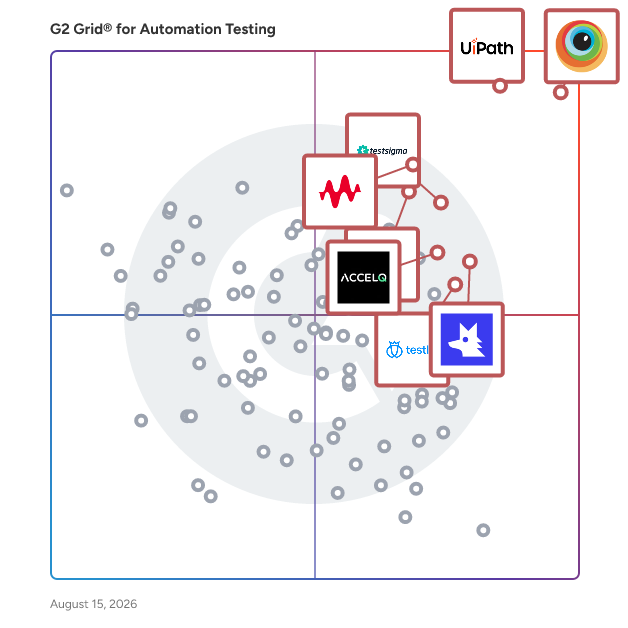
G2 takes pride in showing unbiased reviews on user satisfaction in our ratings and reports. We do not allow paid placements in any of our ratings, rankings, or reports. Learn about our scoring methodologies.
BrowserStack is the world’s leading cloud-based testing platform, trusted by 50,000+ Dev and QA teams to deliver fast, reliable, and high-quality software. From manual to automated, visual to acce
UiPath (NYSE: PATH) is a global leader in agentic automation, empowering enterprises to harness the full potential of AI agents to autonomously execute and optimize complex business processes. The UiP
UiPath Agentic Automation is a platform that combines AI-driven decision-making with traditional RPA to automate repetitive tasks and handle data and documents more efficiently. Reviewers frequently mention the platform's ability to save time, reduce errors, and handle high volume processes, as well as its ease of use and the convenience of building, testing, and scaling automations within a single platform. Reviewers noted that the platform can be expensive, requires significant effort to set up, consumes a lot of resources, and has a steep learning curve, especially for beginners.
Keysight Eggplant is a leading intelligent test automation platform that uses ML/AI to test the entire user journey — identifying and predicting any potential defects along the way. Unlike other te
Katalon is a comprehensive, all-in-one, AI-augmented quality management platform designed to assist quality assurance, DevOps, and software teams of any size in delivering exceptional customer experie
Testsigma is an agentic test automation platform powered by AI-coworkers that work alongside QA teams to simplify testing, accelerate releases and improve quality across web, mobile, desktop, API, and
Cyara is a customer experience (CX) assurance platform designed to help organizations optimize their customer interactions across every communication channel. As a leader in AI-powered CX assurance, C
Whether you are shipping web or mobile apps, QA Wolf has you covered. We build automated end-to-end tests for 80% of your user flows in just 4 months, maintain them 24 hours a day, and provide unlimit
ACCELQ offers AI-powered No-Code test automation and management built on a cloud-native platform. ACCELQ provides a unified platform for web, mobile, API, database, and packaged apps. Automation-first
Simplify your developer experience with the world's first AI-augmented software delivery platform. Upgrade your software delivery with Harness' innovative CI/CD, Feature Flags, Infrastructure as Co
Panaya is a SaaS-based company certified by SAP, Oracle, and Salesforce.com. It offers an all-in-one platform for Smart Testing solutions and Change Intelligence tailored for ERP, CRM, and cloud busin
Leapwork is the test automation platform providing a no-code visual experience for building, maintaining, and scaling complex data-driven test scenarios quickly and effectively. Software testing t
AI-Powered Test Automation Software for Modern SaaS Teams Rainforest QA is an intelligent test automation platform designed to transform how growing SaaS companies approach quality assurance. By co
ContextQA is a context-aware, AI-powered test automation platform that helps engineering and QA teams ship faster without compromising quality. Built on an agentic AI engine, it understands how code f
Tricentis Testim is the fastest way to create your most resilient UI tests for customer facing web and mobile applications. Testim’s AI-powered self-healing and auto-improving Smart Locators keep your
Copado Robotic Testing revolutionizes Salesforce QA by streamlining and optimizing manual testing. It accelerates test automation by leveraging AI-powered generative scripting, enabling teams to creat
Automation testing tools, also known as test automation software, allow development teams to run prescripted tests on their applications before they are pushed into production. These tools give developers the means to set standard test parameters and automate their execution. While the setup for these standard testing frameworks requires initial effort, they are then run quickly, repeatedly, and automatically to the benefit of developer workloads over time, reducing the need for manual testing.
While the core concept that defines automation testing software is relatively straightforward, there exists a wide variety of tools based on the types of tests they handle. This includes, but is not limited to, user interface (UI) testing, desktop testing, and different types of performance testing. These tools can be run across programming languages and operating systems, including Python, Java, JavaScript, Windows, and more.
There is a wide variety of automation testing tools on the market. These tools help test for a range of issues across several different use cases. These tests include:
Desktop testing
Desktop testing tests the functionality, security, usability, and stability of an application after it is deployed. This includes desktop application testing tools such as Katalon Studios.
User interface (UI) testing
UI testing tests the aspects that a user will come into contact with. This type of testing often focuses on visuals, as that is what the user most often sees and comes into contact with. UI testing alusuallyten tests for potential bugs.
No-code testing
No-code testing is an automated form of testing that does not require the intervention of developers. Codeless testing frees up time for developers, as they do not need to get involved with potentially long, time-intensive testing.
Mobile testing
Mobile device testing, or mobile applications testing, is the process by which mobile devices and applications are tested for areas such as functionality, usability, and consistency. As mobile apps and devices continue to become more common, this type of app testing will become increasingly important. An example of this is Appium. Appium is an open-source test automation framework for native, hybrid, and mobile web apps and web applications.
Cross-browser testing
Cross-browser testing compares and analyzes the behavior of a website in various browser environments. This web testing ensures that the website has an optimal user experience across different web apps and services. An example of this is Selenium, an integrated development environment (IDE). Selenium WebDriver conducts automated regression testing across web browsers.
API testing
API testing allows users to test APIs directly. This includes functional testing, as well as testing for reliability, performance, and security.
Load testing
Load testing tools simulate real-world load environments for apps or websites in a safe, controlled environment. These testing tools will monitor and report on the performance of applications or websites to catch slowdowns or other issues.
The following are some core features of test automation software:
Test feedback: Testers rely on test automation tools to automatically produce reports upon testing. These reports provide actionable insights when issues arise, giving development teams a jumping-off point to react accordingly. This feedback helps testers save time and effort hunting down bugs and solutions.
Test history: Test automation platforms maintain a thorough history of logs for future reference and analysis. Users rely on these test logs when tracking an issue across multiple cycles to determine possible causes. Test history serves as a roadmap that aids development teams working to resolve issues.
Custom parameters: Most test automation tools allow users to define custom tests and test parameters to best suit their needs. This allows development teams to test the exact qualities of their software that warrant analysis without wasting time with irrelevant data.
Organization: Test automation platfroms automatically notifies relevant team members with updates upon testing. Development teams also rely on test automation to accurately assign follow-up tasks when action is needed after testing. This takes effort within the software testing process off developers’ hands, freeing their time to focus on other aspects of development.
While there are many facets to consider, some key benefits apply to the successful adoption of any automation testing platform.
Automate repetitive tasks: As the name implies, test automation systems automate repetitive software testing tasks. These tasks are crucial to the software development process and time consuming when handled exclusively by developers. Implementing test automation software shifts the workload off of developers’ shoulders, allowing them to spend more time on their in-production applications.
Gain immediate insights on test outcomes: Since automation testing solutions run outcome reports after each test and automatically compare test outcomes against previous tests and benchmarks, developers can easily diagnose software flaws. Without these tools, developers must compare test results manually or use less comprehensive software to handle analysis. Test automation software reports give teams a starting point by which they more effectively solve issues with their software.
As automation testing software is costly, enterprise companies are more likely to implement them. However, depending on the situation, these solutions may also represent worthwhile value for mid-market companies.
Enterprise development teams: Enterprise development teams tend to have many software applications and updates in production simultaneously. Companies employing these teams often have the resources to justify the investment required to get test automation software set up, which then generates long-term value by saving time and effort indefinitely.
Mid-market development teams: Depending on the situation and the tool selected, mid-market development teams find enough value in implementing test automation software to make the upfront investment worth it, despite their relatively smaller resource pool.
Alternatives that can replace test automation software, either partially or completely:
Continuous integration (CI) tools: CI, or continuous testing, is the practice of frequently building and testing each change made to a codebase. Continuous testing involves developers uploading new code, or code changes, to a common code repository, which is then tested automatically at the time of upload to ensure changes do not cause issues or breaks. By automating tests, users ensure immediately their code is sound and that important software features are operating as expected.
Software testing tools: Software testing tools give development teams the methods and tools to determine the quality of their software creation and improvement projects. Development teams use software testing tools to assess whether the software is usable, performs properly, meets development team goals, and satisfies overall requirements. Test automation software automates many of the more tedious tasks associated with software testing tools, meaning the two often go together.
Related solutions that can be used together with test automation tools include:
Bug tracking software: Bug tracking software, or issue tracking software, refers to software used by quality assurance (QA) and software development teams to report software bugs and problems. Thorough bug tracking is essential for good software development. Bug tracking software provides a repository that explains how to reproduce a bug and how widespread an issue is and allows a business to separate, prioritize, sequence, and provide communications about different bugs across many projects or applications. These tools can pair with test automation tools to automatically find new bugs and begin debugging. QA testing tools, including QA automation tools, help QA testers measure the quality of the software.
Test management software: Test management tools help development teams manage, track, and maintain their software tests. Unlike software testing tools or test automation software, test management software is not designed to run software tests themselves. Instead, developers use test management solutions to maintain test cases and test results in a repository-like structure, which are then turned into actionable reports.
Software solutions can come with their own set of challenges.
Cost: Test automation tools may be an expensive investment. Picking the right tool for the right job is crucial to ensure the investment is worthwhile.
Thoroughness: For test automation software to be effective, it needs to take testing tasks thoroughly and reliably off development teams’ workload. If a test automation tool requires too much human intervention to function reliably, the time and effort saved come into question.
Test variety: Some development teams have niche testing needs. When selecting the right test automation tool, one must ensure that their chosen software covers the right variety of testing types according to development need. A test automation software tool that is unable to automate development teams’ desired test types delivers a less valuable result.
Automation testing tools and software can be used by almost any organization across industries and company sizes. In particular, any company that only has a limited number of developers can benefit from automation testing tools. These tools will help manage the workflow of the small team of developers and coders.
The requirements for automation testing software will be dependent on which type the company is purchasing. A load testing tool, for example, may have different requirements than an API testing tool. As mentioned earlier, one of the challenges of test automation software is just how niche it can get. It can be highly dependent on the individual organization’s needs and desires. A company also must consider what related technology it plans to purchase alongside the automation testing software.
Create a long list
Buyers should start by identifying which specific type of test automation software tool it is looking to purchase. Once the type of tool is identified, buyers can then use G2.com and other online resources to research the top products on the market.
Create a short list
After identifying the exact type of automation testing tools needed, buyers can then dig deeper into which product fits their specific needs. Companies should consider the bandwidth of developers on their team, which could help determine whether they need a codeless tool. Companies should also consider what pre-existing software they already have on site, as well as what additional software they may need to purchase.
Conduct demos
Companies should walk through a demo of each product they are considering purchasing. This allows them to get an up close and personal view of the testing platform, its functionality, and how it fits into the current test automation framework at the company. This allows organizations to initiate test creation to see how the test execution is performed in a test environment.
Choose a selection team
The selection team should include a mix of roles and titles that would interact with test automation software. First and foremost, at least one member of the development team should be involved, as the development team would be most likely to interact with the tool regularly. Other roles may be dependent on the automation testing use cases. If the tool purchased is for UI testing, roles such as site administrators and product managers may also need to be involved.
Negotiation
While some test automation vendors will have a set cost for their product, others may be open to negotiation. Organizations should do their research prior to the negotiation phase to ensure that what they are asking for is a reasonable price.
Final decision
Ultimately, organizations will need to decide which product they want to go forward with. Companies should consider what specific features, use cases, and capabilities they are looking for depending on their organizational needs.
Automation testing software tends to be relatively expensive, meaning that a company must carefully weigh the benefits of using such software against the costs. These products span a wide variety of use cases and functionality. Development teams searching for a test automation solution should consider each product’s feature set to weigh the potential benefits against current operational costs.
With the right tool applied in the right way, test automation software ultimately saves companies time, money, and effort indefinitely after the initial investment. Companies should compare the upfront costs of implementation to potential gains that can be had later down the line after implementation.
How is Automation Testing Software Implemented?
As stated above, there is a wide variety of use cases and functionalities of test automation software. This means that implementation can often depend on the tool or the specific kind of testing being conducted.
Test automation software is often implemented through the cloud. There are tools for both desktop and mobile devices, including IoS and Android devices. Automation testing tools can also be open source, which will be important as open-source software continues to rise in popularity.
Who is Responsible for Automation Testing Tool Implementation?
Developers are often key members of the implementation process, as they are the ones who will be using them regularly. QA team may be involved along with agile project managers in a DevOps environment. In reality, anyone involved in test coverage across the test suite could ultimately become involved.
What Does the Implementation Process Look Like for Automation Testing Tools?
Companies should plan to run tests multiple times prior to going live in order to collect test data. This test data helps ensure that testing solutions work properly, and it identifies different potential problems before they occur.
When Should You Implement Automation Testing Tools?
Organizations should implement test automation systems once they have conducted initial testing on the tool. Once up and running, developers will be eager to utilize test automation software, as it saves them time and allows them to focus on other, more engaging activities.
Smart automation software tools
As AI continues to develop as a technology, it is increasingly becoming integrated into different software testing tools. These “smart” tools are on the rise, particularly with staff that are missing developers and other resources due to labor shortages amid the Covid-19 pandemic. Automated tools are also beneficial because they are cost efficient and free up time for developers to work on other major projects and initiatives.
IoT and API testing
IoT is another technology on the rise that will impact test automation software. The majority of data shared over IoT is connected through APIs. This means it will be increasingly critical to conduct API testing to ensure IoT-enabled devices are running smoothly.