Best Mobile Development Platforms

How Many Mobile Development Platforms Products Does G2 Track?

Total Products under this Category: 176

Category Stats (Sep 2026)

  • Average Rating: 4.33/5 (↑0.01 vs Aug 2026) The average rating of products in this category, based on all submitted ratings
  • Top Trending Product: GoodBarber (+4.53%) - Among all products in this category, GoodBarber recorded the largest rating increase compared to last month

Last updated: September 01, 2026

How Does G2 Rank Mobile Development Platforms Products?

Why You Can Trust G2's Software Rankings:

  • 30 Analysts and Data Experts
  • 12,200+ Authentic Reviews
  • 176+ Products
  • Unbiased Rankings

G2's software rankings are built on verified user reviews, rigorous moderation, and a consistent research methodology maintained by a team of analysts and data experts. Each product is measured using the same transparent criteria, with no paid placement or vendor influence. While reviews reflect real user experiences, which can be subjective, they offer valuable insight into how software performs in the hands of professionals. Together, these inputs power the G2 Score, a standardized way to compare tools within every category.

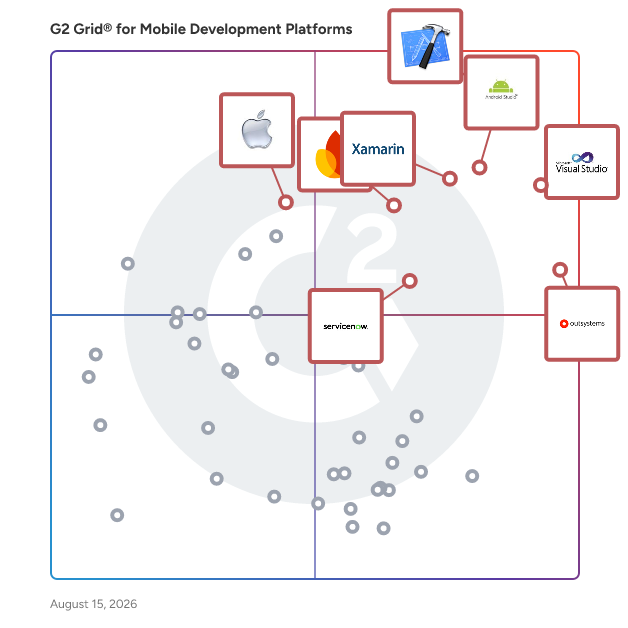
G2 Grid® for Mobile Development Platforms

G2 Grid® for Mobile Development Platforms plotting products by satisfaction and market presence

Highlighted products: Xcode, Visual Studio, Android Studio, OutSystems, .NET, Firebase, ServiceNow App Engine, and iOS SDK.

Underlying data: [Grid® JSON](https://www.g2.com/categories/mobile-development-platforms/grids.json?focus%5B%5D=xcode&focus%5B%5D=visual-studio&focus%5B%5D=android-studio&focus%5B%5D=outsystems&focus%5B%5D=net-2023-06-12&focus%5B%5D=firebase&focus%5B%5D=servicenow-app-engine&focus%5B%5D=ios-sdk)

Xcode

Xcode is Apple's integrated development environment (IDE) that provides a comprehensive suite of tools for developing, testing, and distributing applications across all Apple platforms, including iOS, macOS, watchOS, and tvOS. Designed to streamline the app development process, Xcode offers features like predictive code completion, advanced debugging tools, and simulators for various Apple devices, enabling developers to create high-quality applications efficiently. Key Features and Functionality: - Coding Intelligence: Xcode leverages machine learning models to offer predictive code completion tailored to Swift and Apple SDKs, enhancing coding efficiency. - Previews: Developers can visualize and interact with their app's user interface in real-time using Xcode's preview feature, facilitating rapid iteration and design refinement. - Simulator: Xcode includes a simulator that allows testing of applications across different Apple devices and OS versions directly from a Mac, supporting scenarios like location changes and network conditions. - Debugging Tools: The IDE provides robust debugging capabilities, including breakpoints, memory usage inspection, and variable monitoring, aiding in the identification and resolution of issues. - Performance Analysis: With Instruments, developers can analyze app performance metrics such as CPU, memory, and GPU usage in real-time, helping to optimize app responsiveness and efficiency. - Testing Frameworks: Xcode supports unit and UI testing through frameworks like Swift Testing and XCTest, enabling comprehensive test coverage and quality assurance. - Xcode Cloud: Integrated continuous integration and delivery service that automates building, testing, and distributing apps, enhancing collaboration and development speed. Primary Value and User Solutions: Xcode serves as a unified platform that simplifies the app development lifecycle for Apple devices. By integrating coding, testing, debugging, and deployment tools within a single environment, it reduces development time and complexity. Features like real-time previews and simulators allow developers to iterate quickly and ensure their applications perform optimally across all Apple platforms. The inclusion of Xcode Cloud further streamlines workflows by automating routine tasks, enabling teams to focus on innovation and delivering high-quality apps to users efficiently.

Average Rating: 4.2/5.0

Total Reviews: 1,002

How Do G2 Users Rate Xcode?

  • Has the product been a good partner in doing business?: 8.1/10 (Category avg: 8.9/10)
  • Ease of Admin: 8.0/10 (Category avg: 8.5/10)
  • Ease of Use: 7.8/10 (Category avg: 8.7/10)
  • Quality of Support: 7.7/10 (Category avg: 8.5/10)

Who Is the Company Behind Xcode?

  • Seller: Apple
  • Year Founded: 1976
  • HQ Location: Cupertino, CA
  • Twitter: @Apple
    9,935,357 Twitter followers
  • LinkedIn® Page: www.linkedin.com
    187,339 employees on LinkedIn®
  • Ownership: NASDAQ:AAPL

Who Uses This Product?

  • Who Uses This: Software Engineer, Senior Software Engineer
  • Top Industries: Computer Software, Information Technology and Services
  • Company Size: 55% Small, 23% Medium

What Do G2 Reviewers Say About Xcode?

AI-generated summary from verified user reviews

Pros
  • Users appreciate the ease of use in Xcode, highlighted by seamless integration and a user-friendly interface.
  • Users appreciate the seamless local app testing with Xcode, enabling easy simulation and straightforward setup for development.
  • Users value the efficient debugging capabilities of Xcode, which significantly expedite their app development process.
  • Users value the user-friendly interface of Xcode, which enhances their development experience with ease and efficiency.
  • Users value the integrated tools in Xcode, making development workflows simpler and more efficient for iOS apps.
Cons
  • Users experience slow performance with Xcode, especially during builds and when using the simulator, hindering productivity.
  • Users experience performance issues with Xcode, including slow speeds, crashes, and confusing error messages interrupting their workflow.
  • Users find Xcode's high specifications burdensome, especially regarding disk space and performance on older Macs.
  • Users face update issues, leading to stability concerns and complex configurations, especially on entry-level devices.
  • Users experience high memory usage with Xcode, causing slow performance and challenges, particularly on lower-end machines.

What Are Recent G2 Reviews of Xcode?

What Are G2 Users Discussing About Xcode?

Visual Studio

Visual Studio is a comprehensive integrated development environment (IDE) designed to empower developers in building applications across various platforms, including Android, iOS, Windows, web, and cloud. It supports multiple programming languages, such as .NET, C++, Python, and JavaScript, providing a versatile environment for software development. Key Features and Functionality: - IntelliSense: Offers context-aware code suggestions to enhance coding efficiency. - GitHub Copilot Integration: Provides AI-assisted coding to streamline complex tasks. - Advanced Debugging Tools: Includes a robust debugger to identify and resolve issues early in the development process. - Integrated Testing: Facilitates seamless testing with built-in tools for both manual and automated testing. - CI/CD Support: Enables continuous integration and deployment through Git and Azure DevOps integration. - Cross-Platform Development: Supports development for multiple platforms, including mobile, desktop, and cloud applications. Primary Value and Solutions Provided: Visual Studio enhances developer productivity by offering a unified environment that integrates coding, debugging, testing, and deployment tools. Its support for multiple languages and platforms allows developers to create diverse applications efficiently. The integration of AI tools like GitHub Copilot and comprehensive debugging features ensures high-quality code production. Additionally, Visual Studio's support for modern development practices, including CI/CD pipelines and cloud integration, streamlines the software development lifecycle, enabling faster and more reliable application delivery.

Average Rating: 4.5/5.0

Total Reviews: 3,836

How Do G2 Users Rate Visual Studio?

  • Has the product been a good partner in doing business?: 8.8/10 (Category avg: 8.9/10)
  • Ease of Admin: 8.5/10 (Category avg: 8.5/10)
  • Ease of Use: 8.7/10 (Category avg: 8.7/10)
  • Quality of Support: 8.4/10 (Category avg: 8.5/10)

Who Is the Company Behind Visual Studio?

  • Seller: Microsoft
  • Year Founded: 1975
  • HQ Location: Redmond, Washington
  • Twitter: @microsoft
    13,091,739 Twitter followers
  • LinkedIn® Page: www.linkedin.com
    232,750 employees on LinkedIn®
  • Ownership: MSFT

Who Uses This Product?

  • Who Uses This: Software Engineer, Software Developer
  • Top Industries: Computer Software, Information Technology and Services
  • Company Size: 36% Small, 32% Large

What Do G2 Reviewers Say About Visual Studio?

AI-generated summary from verified user reviews

Pros
  • Users admire the ease of use of Visual Studio, seamlessly integrating all tools for efficient development and productivity.
  • Users appreciate the comprehensive feature set of Visual Studio, enhancing productivity and streamlining the development process.
  • Users value the comprehensive IDE quality of Visual Studio, making development seamless with its all-in-one environment.
  • Users value the strong debugging tools in Visual Studio, which enhance the coding experience and streamline error detection.
  • Users appreciate Visual Studio's comprehensive features, including IntelliSense and seamless Git integration, enhancing overall development efficiency.
Cons
  • Users experience slow performance with Visual Studio during heavy programming, leading to crashes and increased workload.
  • Users experience high resource consumption with Visual Studio, leading to slow performance and challenges on lower-end machines.
  • Users often find high memory usage with Visual Studio, impacting performance on lower-end machines and during large projects.
  • Users experience a slow startup that can be frustrating, impacting productivity during the initial setup and solution reloads.
  • Users find that Visual Studio often experiences performance issues like slow startup and sluggishness with larger projects.

What Are Recent G2 Reviews of Visual Studio?

What Are G2 Users Discussing About Visual Studio?

Android Studio

Android Studio is Google's official integrated development environment (IDE) for Android application development, built upon JetBrains' IntelliJ IDEA. It offers a comprehensive suite of tools tailored for building, testing, and debugging Android apps across various devices. Since its initial release in 2013, Android Studio has become the primary platform for developers aiming to create high-quality Android applications. Key Features and Functionality: - Gradle-Based Build System: Facilitates flexible and efficient project builds, allowing for customized configurations and dependency management. - Rich Layout Editor: Enables intuitive drag-and-drop design of user interfaces, with real-time previews across multiple screen configurations. - Lint Tools: Provides static code analysis to identify performance, usability, and version compatibility issues, ensuring code quality. - ProGuard Integration: Offers code shrinking and obfuscation to optimize app performance and enhance security. - Built-in Support for Google Cloud Platform: Simplifies integration with services like Firebase Cloud Messaging and Google App Engine, enhancing app functionality. - Android Virtual Device (Emulator): Allows testing and debugging of applications on various Android device configurations without physical hardware. Primary Value and User Solutions: Android Studio streamlines the Android app development process by providing a unified environment equipped with essential tools and features. It addresses common development challenges such as code quality assurance, efficient debugging, and seamless integration with cloud services. By offering a robust and user-friendly platform, Android Studio empowers developers to create high-performance, reliable, and user-centric Android applications.

Average Rating: 4.5/5.0

Total Reviews: 628

How Do G2 Users Rate Android Studio?

  • Has the product been a good partner in doing business?: 8.5/10 (Category avg: 8.9/10)
  • Ease of Admin: 8.2/10 (Category avg: 8.5/10)
  • Ease of Use: 8.6/10 (Category avg: 8.7/10)
  • Quality of Support: 8.5/10 (Category avg: 8.5/10)

Who Is the Company Behind Android Studio?

  • Seller: Google
  • Year Founded: 1998
  • HQ Location: Mountain View, CA
  • Twitter: @google
    31,899,995 Twitter followers
  • LinkedIn® Page: www.linkedin.com
    301,144 employees on LinkedIn®
  • Ownership: NASDAQ:GOOG

Who Uses This Product?

  • Who Uses This: Software Engineer, Android Developer
  • Top Industries: Computer Software, Information Technology and Services
  • Company Size: 53% Small, 29% Medium

What Do G2 Reviewers Say About Android Studio?

AI-generated summary from verified user reviews

Pros
  • Users find Android Studio incredibly easy to use, highlighting its straightforward setup and intuitive features for development.
  • Users appreciate the robust functionality of Android Studio, facilitating efficient and straightforward Android app development.
  • Users praise the easy navigation and integrated tools of Android Studio, enhancing productivity and simplifying development tasks.
  • Users love the easy navigation and built-in Git in Android Studio, streamlining their development experience and project management.
  • Users appreciate the easy debugging process in Android Studio, enhancing their efficiency and simplicity in app development.
Cons
  • Users experience slow performance including long build times, crashes, and high memory usage on Android Studio.
  • Users often face high specifications requirements for Android Studio, leading to slow performance and crashes on older systems.
  • Users face performance issues with Android Studio, including slow speeds, crashes, and high resource demands on older systems.
  • Users report high memory usage with Android Studio, leading to slow performance and occasional crashes, particularly on larger projects.
  • Users experience high resource consumption with Android Studio, leading to slow performance and frustrating lag on older systems.

What Are Recent G2 Reviews of Android Studio?

What Are G2 Users Discussing About Android Studio?

OutSystems

What if you could build custom, AI-powered solutions that fit your business perfectly, without the risk or costly lock-in? The OutSystems AI-powered low-code development platform eliminates the compromises of building and buying, enabling your teams to turn ideas into mission-critical applications and agents that drive revenue, efficiency, and customer impact. By combining a trusted low-code foundation with powerful AI capabilities, you can build custom solutions up to 10x faster, with the speed of innovation and control you need to compete in the AI-centric future.

Average Rating: 4.5/5.0

Total Reviews: 1,625

How Do G2 Users Rate OutSystems?

  • Has the product been a good partner in doing business?: 8.8/10 (Category avg: 8.9/10)
  • Ease of Admin: 8.5/10 (Category avg: 8.5/10)
  • Ease of Use: 9.1/10 (Category avg: 8.7/10)
  • Quality of Support: 8.5/10 (Category avg: 8.5/10)

Who Is the Company Behind OutSystems?

  • Seller: OutSystems
  • Company Website:
  • Year Founded: 2001
  • HQ Location: Boston, MA
  • Twitter: @OutSystems
    25,276 Twitter followers
  • LinkedIn® Page: www.linkedin.com
    2,239 employees on LinkedIn®

Who Uses This Product?

  • Who Uses This: Software Engineer, Developer
  • Top Industries: Information Technology and Services, Computer Software
  • Company Size: 40% Medium, 35% Large

What Do G2 Reviewers Say About OutSystems?

AI-generated summary from verified user reviews

Pros
  • Users value the ease of use in OutSystems, making development and implementation quick and straightforward.
  • Users value the speed of development with OutSystems, enabling rapid app creation and seamless integration.
  • Users value the speed and ease of app development with OutSystems, enabling rapid creation without extensive coding knowledge.
  • Users praise the fast development capabilities of OutSystems, enabling quick app deployment and easy learning.
  • Users value the fast application development with OutSystems, enabling quick project turnaround and efficient workflows.
Cons
  • Users note the high licensing costs of OutSystems, suggesting a need for more affordable options and better integrations.
  • Users express concern over the high licensing costs and limited customization options of OutSystems.
  • Users note the limited customization options in OutSystems, hindering their ability to build highly specific applications.
  • Users express concern over high licensing costs and restrictions on customization, leading to vendor lock-in issues.
  • Users often find missing features in OutSystems, wishing for more options in UX/UI and frontend development.

What Are Recent G2 Reviews of OutSystems?

What Are G2 Users Discussing About OutSystems?

.NET

.NET is a free, open-source, cross-platform framework developed by Microsoft for building modern applications and powerful cloud services. It supports multiple operating systems, including Windows, Linux, and macOS, enabling developers to create a wide range of applications, from web and mobile to desktop and cloud-based solutions. With a unified platform, .NET allows for the use of a single codebase across various application types, enhancing productivity and reducing development time. Key Features and Functionality: - Cross-Platform Development: Develop applications that run seamlessly on Windows, Linux, and macOS. - Unified Codebase: Utilize a single codebase to build native applications for multiple platforms, including Windows, macOS, iOS, and Android. - Cloud Integration: Create scalable and resilient cloud-native applications compatible with major cloud providers. - Artificial Intelligence and Machine Learning: Incorporate AI and ML capabilities into applications using C#, OpenAI, and Azure. - Open Source and Community-Driven: Benefit from a vibrant community with over 100,000 open-source contributions and support from more than 3,700 companies. Primary Value and Solutions Provided: .NET offers a comprehensive and versatile platform that simplifies the development process by allowing developers to use a consistent set of tools and languages across various application types. Its cross-platform nature ensures that applications can reach a broader audience without the need for multiple codebases. The integration with cloud services and support for AI and ML empowers developers to build intelligent, scalable, and high-performance applications. Additionally, being open-source fosters collaboration and continuous improvement, providing developers with a robust and evolving framework for their projects.

Average Rating: 4.4/5.0

Total Reviews: 158

How Do G2 Users Rate .NET?

  • Has the product been a good partner in doing business?: 8.7/10 (Category avg: 8.9/10)
  • Ease of Admin: 8.5/10 (Category avg: 8.5/10)
  • Ease of Use: 8.2/10 (Category avg: 8.7/10)
  • Quality of Support: 8.3/10 (Category avg: 8.5/10)

Who Is the Company Behind .NET?

  • Seller: Microsoft
  • Year Founded: 1975
  • HQ Location: Redmond, Washington
  • Twitter: @microsoft
    13,091,739 Twitter followers
  • LinkedIn® Page: www.linkedin.com
    232,750 employees on LinkedIn®
  • Ownership: MSFT

Who Uses This Product?

  • Who Uses This: Senior Software Engineer, Software Engineer
  • Top Industries: Computer Software, Information Technology and Services
  • Company Size: 43% Small, 32% Large

What Do G2 Reviewers Say About .NET?

AI-generated summary from verified user reviews

Pros
  • Users praise the strong performance and cross-platform deployment of .NET, enhancing their development experience and efficiency.
  • Users value the robust functionality of .NET, enhancing their productivity with excellent tooling and cross-platform support.
  • Users value the scalability of .NET, enabling seamless growth of applications without altering core architecture.
  • Users commend the efficiency improvement provided by .NET, allowing faster and more reliable application development.
  • Users appreciate the ease of use of .NET, benefiting from seamless integration and a supportive developer community.
Cons
  • Users find the learning difficulty of .NET challenging, particularly for beginners navigating setup and error resolution.
  • Users find the high complexity of .NET challenging, particularly for newcomers and legacy project maintenance.
  • Users often find the complex setup of .NET time-consuming and challenging, particularly for beginners.
  • Users find the learning curve steep for .NET, particularly for those new to strongly typed languages or the Microsoft environment.
  • Users find the insufficient guidance for .NET challenging, leading to a steep learning curve for newcomers.

What Are Recent G2 Reviews of .NET?

What Are G2 Users Discussing About .NET?

Firebase

Firebase is a comprehensive platform developed by Google that provides a suite of tools and services designed to help developers build, improve, and grow applications across various platforms, including iOS, Android, and the web. By offering a serverless infrastructure, Firebase enables developers to focus on creating engaging user experiences without the complexities of backend management. Key Features and Functionality: - Real-time Databases: Firebase offers both the Realtime Database and Cloud Firestore, allowing developers to store and sync data across clients in real-time. These NoSQL databases are optimized for offline use and automatically scale with your application. - Authentication: Provides easy-to-integrate authentication services, supporting various sign-in methods, including email/password, phone numbers, and federated identity providers like Google and Facebook. - Cloud Functions: Enables the execution of server-side code in response to events triggered by Firebase features and HTTPS requests, allowing for the creation of complex backend logic without managing servers. - Hosting: Offers fast and secure hosting for web applications, delivering content through a global content delivery network (CDN) with automatic SSL certificates. - Cloud Messaging: Facilitates the sending of targeted notifications and messages to users across platforms, enhancing user engagement and retention. - Analytics and Performance Monitoring: Integrates with Google Analytics to provide insights into user behavior and app performance, helping developers make data-driven decisions. Primary Value and Solutions Provided: Firebase simplifies the app development process by offering a unified platform that handles backend services, real-time data synchronization, user authentication, and more. This allows developers to focus on building feature-rich applications without the overhead of managing infrastructure. By leveraging Firebase's scalable and secure environment, developers can accelerate time-to-market, ensure app stability, and deliver personalized user experiences, ultimately leading to higher user satisfaction and engagement.

Average Rating: 4.5/5.0

Total Reviews: 293

How Do G2 Users Rate Firebase?

  • Has the product been a good partner in doing business?: 8.8/10 (Category avg: 8.9/10)
  • Ease of Admin: 9.0/10 (Category avg: 8.5/10)
  • Ease of Use: 9.0/10 (Category avg: 8.7/10)
  • Quality of Support: 8.5/10 (Category avg: 8.5/10)

Who Is the Company Behind Firebase?

  • Seller: Google
  • Year Founded: 1998
  • HQ Location: Mountain View, CA
  • Twitter: @google
    31,899,995 Twitter followers
  • LinkedIn® Page: www.linkedin.com
    301,144 employees on LinkedIn®
  • Ownership: NASDAQ:GOOG

Who Uses This Product?

  • Who Uses This: Software Engineer, Senior Software Engineer
  • Top Industries: Computer Software, Information Technology and Services
  • Company Size: 71% Small, 25% Medium

What Do G2 Reviewers Say About Firebase?

AI-generated summary from verified user reviews

Pros
  • Users find Firebase to have exceptional ease of use, enabling quick setup and seamless integration with applications.
  • Users love Firebase for its comprehensive cloud services, making backend development effortless and scalable for all projects.
  • Users appreciate the real-time updates from Firebase, enhancing user experience and streamlining app development processes.
  • Users appreciate the fast and straightforward setup of Firebase, enabling efficient app deployment and management.
  • Users appreciate the speedy database management of Firebase, enabling rapid development and real-time data synchronization.
Cons
  • Users are concerned about cost issues, as Firebase pricing can become unpredictable and may escalate with increased usage.
  • Users find the pricing issues with Firebase concerning, especially as app usage scales unexpectedly.
  • Users find the pricing to be high and less competitive compared to other service providers.
  • Users find the navigation challenging, especially for first-time users, impacting their overall experience with Firebase.
  • Users find Cloud Firestore's restrictive querying and unexpected pricing increases challenging as their applications scale.

What Are Recent G2 Reviews of Firebase?

What Are G2 Users Discussing About Firebase?

ServiceNow App Engine

ServiceNow App Engine is a low-code application development platform designed to facilitate the creation, management, and evolution of custom enterprise workflow applications. This innovative solution integrates both no-code and pro-code environments, enabling users to harness the power of artificial intelligence to streamline the software development process. By employing a coding-by-intent approach, App Engine allows teams to convert natural language inputs into functional applications, making it accessible for a wide range of users, from professional developers to business technologists. The platform serves two primary functions: build-time development and runtime operations. During the build phase, the Build Agent utilizes natural language processing to generate essential application components, such as tables, forms, logic, and user interfaces, all tailored to align with existing enterprise data models and templates. Professional developers can leverage ServiceNow Studio for advanced customization and extension, while business technologists can create applications in the Creator Studio, a fully no-code environment equipped with built-in guardrails to ensure compliance with enterprise standards. This dual approach enables organizations to rapidly develop applications that meet their specific workflow needs. At runtime, App Engine operates on the ServiceNow AI Platform, providing automatic governance, security policies, and performance management. This unified platform connects workflows, data, integrations, and user experiences, eliminating the challenges often associated with tool sprawl. The App Engine Management Center plays a crucial role in maintaining governance through established data models, security rules, and templates, ensuring that all applications adhere to organizational standards. Key capabilities of ServiceNow App Engine include the AI-assisted Build Agent for application creation, the Test Agent for generating automated tests and validating changes, and the App Engine Management Center for governance. These features collectively enhance the development process, allowing organizations to modernize and consolidate manual workflows that may currently rely on outdated tools like spreadsheets and email. By accelerating release cycles and improving application quality, App Engine supports organizations in achieving measurable outcomes in development speed, cost reduction, and productivity gains. ServiceNow's App Engine has established itself as a leader in the low-code application platform space, recognized in the Gartner Magic Quadrant for six consecutive years. Trusted by 85% of the Fortune 500, organizations such as Yokogawa Electric Korea, Hitachi Vantara, and Canada Life utilize App Engine to enhance their custom application delivery processes, demonstrating the platform's effectiveness in addressing complex enterprise needs.

Average Rating: 4.5/5.0

Total Reviews: 1,038

How Do G2 Users Rate ServiceNow App Engine?

  • Has the product been a good partner in doing business?: 8.7/10 (Category avg: 8.9/10)
  • Ease of Admin: 8.7/10 (Category avg: 8.5/10)
  • Ease of Use: 8.7/10 (Category avg: 8.7/10)
  • Quality of Support: 8.4/10 (Category avg: 8.5/10)

Who Is the Company Behind ServiceNow App Engine?

  • Seller: ServiceNow
  • Company Website:
  • Year Founded: 2004
  • HQ Location: Santa Clara, CA
  • Twitter: @servicenow
    55,548 Twitter followers
  • LinkedIn® Page: www.linkedin.com
    35,078 employees on LinkedIn®

Who Uses This Product?

  • Who Uses This: ServiceNow Developer, Consultant
  • Top Industries: Information Technology and Services, Computer Software
  • Company Size: 44% Large, 26% Medium

What Do G2 Reviewers Say About ServiceNow App Engine?

AI-generated summary from verified user reviews

Pros
  • Users appreciate the ease of use of ServiceNow App Engine, enabling quick app creation through drag-and-drop features.
  • Users appreciate the low-code development capabilities of ServiceNow App Engine, enabling fast and efficient app creation.
  • Users love the easy creation features of ServiceNow App Engine, enabling fast, low-code development of applications.
  • Users appreciate the low-code flexibility of ServiceNow App Engine, enabling faster app development for all skill levels.
  • Users appreciate the fast app development capability of ServiceNow App Engine, making application creation intuitive and efficient.
Cons
  • Users face a steep learning curve with ServiceNow App Engine, requiring substantial setup and optimization efforts.
  • Users find the learning difficulty significant for newcomers, often making onboarding a challenging experience.
  • Users feel the high costs of ServiceNow App Engine could deter smaller organizations from adopting the platform.
  • Users face notable performance lags in complex workflows, hindering their overall experience with ServiceNow App Engine.
  • Users experience limited flexibility in customizations, making advanced features difficult to navigate and utilize effectively.

What Are Recent G2 Reviews of ServiceNow App Engine?

What Are G2 Users Discussing About ServiceNow App Engine?

iOS SDK

The iOS Software Development Kit (SDK) is a comprehensive suite of tools and resources provided by Apple to facilitate the creation of applications for iPhone and iPad devices. It includes a robust set of APIs, libraries, and development tools that enable developers to build, test, and deploy apps that leverage the full capabilities of Apple's hardware and software ecosystem. Key Features and Functionality: - Xcode Integration: The iOS SDK is seamlessly integrated with Xcode, Apple's official integrated development environment (IDE), providing a unified platform for coding, debugging, and testing applications. - Comprehensive APIs: Access to a wide range of APIs allows developers to incorporate advanced features such as augmented reality, machine learning, and health data into their apps. - Swift Programming Language: The SDK supports Swift, Apple's powerful and intuitive programming language, enabling developers to write clean and efficient code. - Interface Builder: A visual tool within Xcode that simplifies the design and layout of user interfaces, allowing for drag-and-drop assembly of UI components. - Simulator: The iOS Simulator enables developers to test and debug applications on various virtual devices, ensuring compatibility across different screen sizes and iOS versions. Primary Value and User Solutions: The iOS SDK empowers developers to create high-quality, feature-rich applications that integrate seamlessly with Apple's ecosystem. By providing a comprehensive set of tools and resources, it streamlines the development process, reduces time to market, and ensures that apps meet Apple's stringent performance and design standards. This results in a superior user experience and broadens the reach of applications to millions of iOS users worldwide.

Average Rating: 4.4/5.0

Total Reviews: 34

How Do G2 Users Rate iOS SDK?

  • Has the product been a good partner in doing business?: 8.1/10 (Category avg: 8.9/10)
  • Ease of Admin: 8.8/10 (Category avg: 8.5/10)
  • Ease of Use: 8.3/10 (Category avg: 8.7/10)
  • Quality of Support: 7.9/10 (Category avg: 8.5/10)

Who Is the Company Behind iOS SDK?

  • Seller: Apple
  • Year Founded: 1976
  • HQ Location: Cupertino, CA
  • Twitter: @Apple
    9,935,357 Twitter followers
  • LinkedIn® Page: www.linkedin.com
    187,339 employees on LinkedIn®
  • Ownership: NASDAQ:AAPL

Who Uses This Product?

  • Top Industries: Computer Software, Information Technology and Services
  • Company Size: 44% Small, 28% Medium

What Do G2 Reviewers Say About iOS SDK?

AI-generated summary from verified user reviews

Pros
  • Users love the effortless app creation process, allowing them to design beautiful iPhone applications with minimal coding.
  • Users enjoy the ease of use of iOS SDK, allowing for beautiful app creation with minimal coding effort.
  • Users love the easy creation of beautiful, consistent UIs across devices with the iOS SDK.
  • Users value the consistent and beautiful UI that the iOS SDK helps to create across devices.
  • Users appreciate the ease of creation for building beautiful iPhone apps, enhancing their development experience.
Cons
  • Users find the platform limitations by Apple restrictive, hindering creativity and functionality in app development.
  • Users feel the restrictions imposed by Apple limit functionality and creativity in app development significantly.
  • Users find that the complex implementation of certain APIs leads to confusion and makes development challenging.
  • Users face complex setup challenges due to poorly documented APIs, leading to unconventional problem-solving approaches.
  • Users find the high complexity of certain APIs in iOS SDK frustrating, leading to challenges in implementation and documentation.

What Are Recent G2 Reviews of iOS SDK?

What Are G2 Users Discussing About iOS SDK?

Samsung GALAXY SDK

The Samsung GALAXY SDK is a comprehensive suite of development tools designed to empower developers in creating innovative applications for Samsung's Galaxy devices. By providing access to advanced hardware features and software capabilities, the SDK enables the development of applications that deliver enhanced user experiences across a wide range of Samsung products. Key Features and Functionality: - Sensor SDK: Offers access to Samsung's BioActive Sensor algorithms on devices like the Galaxy Watch, allowing measurement of health metrics such as heart rate, skin temperature, electrocardiogram (ECG), and bioelectrical impedance analysis (BIA). - Data SDK: Enables integration of health data from various devices, including Galaxy Watch, Galaxy Ring, smartphones, and third-party devices, facilitating the creation of comprehensive digital health solutions. - Accessory SDK: Allows integration of compatible third-party health devices, such as fitness sensors and glucose monitors, through the Samsung Health app, providing a unified platform for health data management. - Galaxy GameDev: Provides tools and resources for optimizing gaming experiences on Galaxy devices, including performance analysis and graphics optimization. - Galaxy Themes: Enables designers to create and distribute custom themes, wallpapers, and icons, allowing users to personalize their Galaxy devices. - Samsung Knox SDK: Offers advanced security features and device management capabilities, allowing developers to build secure applications for enterprise environments. Primary Value and User Solutions: The Samsung GALAXY SDK empowers developers to harness the full potential of Samsung's hardware and software ecosystem, facilitating the creation of applications that are deeply integrated with device capabilities. By providing access to advanced sensors, data integration tools, and customization options, the SDK enables the development of applications that enhance user engagement, promote health and wellness, and ensure robust security. This comprehensive toolkit addresses the needs of developers aiming to deliver high-quality, feature-rich applications tailored to the diverse functionalities of Samsung Galaxy devices.

Average Rating: 4.3/5.0

Total Reviews: 34

How Do G2 Users Rate Samsung GALAXY SDK?

  • Has the product been a good partner in doing business?: 7.7/10 (Category avg: 8.9/10)
  • Ease of Admin: 8.1/10 (Category avg: 8.5/10)
  • Ease of Use: 8.3/10 (Category avg: 8.7/10)
  • Quality of Support: 8.3/10 (Category avg: 8.5/10)

Who Is the Company Behind Samsung GALAXY SDK?

  • Seller: Samsung Electronics
  • Year Founded: 1969
  • HQ Location: Suwon, Korea
  • Twitter: @Samsung
    754,964 Twitter followers
  • LinkedIn® Page: www.linkedin.com
    9,975 employees on LinkedIn®
  • Ownership: KRX: 018260

Who Uses This Product?

  • Top Industries: Computer Software
  • Company Size: 56% Small, 29% Large

What Do G2 Reviewers Say About Samsung GALAXY SDK?

AI-generated summary from verified user reviews

Pros
  • Users value the efficient app development tools in Samsung GALAXY SDK, making creation faster and easier for all.
  • Users value the seamless API integration of Samsung GALAXY SDK, enabling innovative app development with unique hardware features.
  • Users find the ease of use of Samsung GALAXY SDK makes app development faster and simpler, even for beginners.
  • Users appreciate the fast development capabilities of the Samsung GALAXY SDK, simplifying app creation even for beginners.
  • Users find the speed of development with Samsung GALAXY SDK beneficial, making app creation faster and simpler.
Cons
  • Users experience cross-platform issues with the Samsung GALAXY SDK, limiting app performance on non-Samsung devices.
  • Users find the high complexity of the Samsung GALAXY SDK overwhelming, especially for newcomers with limited experience.
  • Users find the learning curve steep, as the SDK’s complexity and inconsistent documentation can overwhelm beginners.
  • Users face compatibility issues with the Samsung GALAXY SDK, as apps may not function well on non-Samsung devices.
  • Users find the dependency on Samsung-specific hardware restricts app portability to non-Samsung Android devices.

What Are Recent G2 Reviews of Samsung GALAXY SDK?

GoodBarber

GoodBarber is an all-in-one platform for building professional native mobile apps — for iOS, Android, and Progressive Web Apps, without writing a line of code. Since 2011, GoodBarber has helped businesses ship apps that look and perform like custom development, at roughly one-tenth of the total cost of ownership. Today an app built with GoodBarber is downloaded somewhere in the world every 4 seconds, across active users in 152 countries — making it one of the leading app builders in Europe and a recognized global player. Unlike app builders that stop at creation, GoodBarber takes you from build to daily operation to long-term growth: a built-in CMS, push notifications, mobile e-commerce, hosting, analytics, and App Store / Google Play publishing — all under one subscription, one back-office, one bill. No separate hosting, database, or payment subscriptions to assemble. What sets GoodBarber apart: - Truly native output. Three independent engines generate compiled Swift (iOS), Kotlin (Android), and PWA code from a single configuration — not hybrid or WebView-wrapped apps. - A real design system. GoodBarber was the first app builder to formalize a three-layer design system (Foundations → Atoms → UI Components), enforcing WCAG contrast and typographic rules automatically. Every app looks professional; no two look alike. - Compliance built in. All data is hosted in Europe. A unified Privacy Center handles GDPR, consent (IAB TCF v2), permissions, and Apps-for-Kids rules — so apps pass store review on the first try. - 0% commission on e-commerce. GoodBarber takes no cut on any in-app transaction, online or offline. 22 payment gateways, installed in one click. - Agent-ready. An open-source MCP server lets AI assistants (Claude, Cursor, ChatGPT) operate a GoodBarber app by natural language. GoodBarber powers apps across a wide range of use cases — news & media, radio & podcasts, tourism guides, events, online courses, content creators, schools, faith & non-profit communities, employee communication, bookings & services, restaurants, grocery, local delivery, and retail storefronts. From solo creators and local businesses to marketing teams shipping without IT, and agencies and resellers managing portfolios of client apps.

Average Rating: 4.2/5.0

Total Reviews: 55

How Do G2 Users Rate GoodBarber?

  • Has the product been a good partner in doing business?: 8.5/10 (Category avg: 8.9/10)
  • Ease of Admin: 8.6/10 (Category avg: 8.5/10)
  • Ease of Use: 8.7/10 (Category avg: 8.7/10)
  • Quality of Support: 8.5/10 (Category avg: 8.5/10)

Who Is the Company Behind GoodBarber?

  • Seller: GoodBarber
  • Company Website:
  • Year Founded: 2011
  • HQ Location: Ajaccio, France
  • Twitter: @goodbarber
    3,960 Twitter followers
  • LinkedIn® Page: www.linkedin.com
    42 employees on LinkedIn®

Who Uses This Product?

  • Company Size: 86% Small, 13% Medium

What Are Recent G2 Reviews of GoodBarber?

What Are G2 Users Discussing About GoodBarber?

Supabase

Supabase is an open-source backend-as-a-service (BaaS) platform that enables developers to build and scale applications efficiently without managing server infrastructure. Launched in 2020 as an alternative to Firebase, Supabase offers a suite of tools including a PostgreSQL database, authentication, real-time subscriptions, and storage capabilities. By leveraging the robustness of PostgreSQL, Supabase provides a scalable and secure foundation for modern web and mobile applications. Key Features and Functionality: - PostgreSQL Database: Each Supabase project includes a dedicated PostgreSQL database, offering full SQL support and advanced features such as JSON handling, full-text search, and vector support. - Instant APIs: Supabase automatically generates RESTful and GraphQL APIs based on your database schema, eliminating the need for manual coding and accelerating development. - Authentication and Authorization: The platform provides built-in user authentication with support for various sign-in methods, including email/password, magic links, and social logins. It also integrates seamlessly with PostgreSQL's Row Level Security for fine-grained access control. - Real-time Capabilities: Supabase enables real-time data synchronization via WebSockets, allowing applications to respond instantly to database changes. - Edge Functions: Developers can deploy serverless functions close to users for low-latency execution, facilitating scalable and efficient backend logic. - File Storage: Supabase offers scalable storage solutions for managing and serving files, complete with configurable access policies to ensure data security. Primary Value and User Solutions: Supabase addresses the challenges developers face in building and scaling applications by providing a comprehensive, open-source backend platform. It eliminates the complexities of managing server infrastructure, allowing developers to focus on creating feature-rich applications. With its real-time capabilities, robust authentication, and seamless integration with PostgreSQL, Supabase empowers developers to build secure, scalable, and responsive applications efficiently.

Average Rating: 4.6/5.0

Total Reviews: 235

How Do G2 Users Rate Supabase?

  • Has the product been a good partner in doing business?: 9.3/10 (Category avg: 8.9/10)
  • Ease of Admin: 9.1/10 (Category avg: 8.5/10)
  • Ease of Use: 9.1/10 (Category avg: 8.7/10)
  • Quality of Support: 8.4/10 (Category avg: 8.5/10)

Who Is the Company Behind Supabase?

  • Seller: Supabase
  • Year Founded: 2020
  • HQ Location: Global, US
  • LinkedIn® Page: www.linkedin.com
    436 employees on LinkedIn®

Who Uses This Product?

  • Who Uses This: Founder, Software Engineer
  • Top Industries: Computer Software, Information Technology and Services
  • Company Size: 76% Small, 20% Medium

What Do G2 Reviewers Say About Supabase?

AI-generated summary from verified user reviews

Pros
  • Users find Supabase easy to use, enjoying its user-friendly interface and smooth integration with tools for app development.
  • Users appreciate the powerful design and easy integration of Supabase, enhancing their development experience significantly.
  • Users appreciate the user-friendly interface of Supabase, making it easy to set up and integrate smoothly.
  • Users love the easy integrations of Supabase, enhancing their workflow and speeding up project development seamlessly.
  • Users appreciate the seamless integrations of Supabase, enhancing the developer experience across various tools and projects.
Cons
  • Users feel that Supabase has beginner unfriendliness, citing complexity and limited resources for novice coders.
  • Users find the pricing expensive, especially for premium features that should be accessible to all users.
  • Users find Supabase has a high complexity that challenges novice coders and could benefit from better documentation.
  • Users face insufficient guidance in Supabase, making it challenging for novice coders to navigate the platform.
  • Users find that learning difficulties with Supabase arise due to its complexity and limited documentation for novices.

What Are Recent G2 Reviews of Supabase?

Choicely

Choicely is an AI app builder that creates real native iOS and Android apps — actual Swift and Java output, not a website in a webview wrapper. Describe your app in plain language and Choicely's AI generates the screens, navigation, and structure. Refine everything in a drag-and-drop visual editor, preview the real app on your own phone via QR code, and publish to both the App Store and Google Play with the built-in Publish Assistant, which pre-checks your app against Apple's and Google's review rules and generates your store listings. Engagement and monetization are built in: voting, polls, ratings, live video, push notifications, ticket and merchandise shops, subscriptions, and ads — the toolkit behind apps for Eurovision, Miss Universe, Got Talent, ITV's Love Island, AFTV (Arsenal Fan TV), the International Judo Federation, and the Italian Winter Sports Federation ahead of the Milano-Cortina 2026 Olympics. Start free with 300 AI credits every month — no credit card, no trial expiry. Paid plans from $25/month when you're ready to publish. An in-house Pro Services team is available when you want the app designed and built for you.

Average Rating: 5.0/5.0

Total Reviews: 21

How Do G2 Users Rate Choicely?

  • Has the product been a good partner in doing business?: 9.6/10 (Category avg: 8.9/10)
  • Ease of Admin: 9.3/10 (Category avg: 8.5/10)
  • Ease of Use: 9.7/10 (Category avg: 8.7/10)
  • Quality of Support: 9.7/10 (Category avg: 8.5/10)

Who Is the Company Behind Choicely?

  • Seller: Choicely
  • Year Founded: 2015
  • HQ Location: Helsinki, FI
  • Twitter: @choicelyapp
    818 Twitter followers
  • LinkedIn® Page: www.linkedin.com
    22 employees on LinkedIn®

Who Uses This Product?

  • Top Industries: Entertainment
  • Company Size: 81% Small, 19% Medium

What Do G2 Reviewers Say About Choicely?

AI-generated summary from verified user reviews

Pros
  • Users appreciate the exceptional customer support provided by Choicely, ensuring satisfaction and quick resolutions to issues.
  • Users find Choicely intuitive, effectively meeting their needs for a responsive app on native platforms.
Cons
  • Users find limited features in Choicely, making it challenging to accommodate niche or bespoke requirements effectively.

What Are Recent G2 Reviews of Choicely?

Android NDK

The Android Native Development Kit (NDK) is a comprehensive set of tools that enables developers to incorporate native code, written in C and C++, into their Android applications. By leveraging the NDK, developers can create high-performance applications that interact directly with device hardware, offering enhanced capabilities beyond the standard Android SDK. Key Features and Functionality: - Native Code Integration: Allows embedding of C and C++ code within Android apps, facilitating direct hardware access and optimized performance. - Comprehensive Toolset: Includes cross-compilation toolchains, debuggers, and build systems like CMake and ndk-build, streamlining the development process. - Rich API Support: Provides access to a variety of APIs, including OpenGL ES for graphics, OpenSL ES for audio, and Vulkan for advanced graphics rendering. - Platform Compatibility: Supports multiple CPU architectures, such as ARM and x86, ensuring broad device compatibility. - Integration with Android Studio: Seamlessly integrates with Android Studio, allowing for efficient project management and debugging. Primary Value and Problem Solving: The Android NDK addresses the need for performance-intensive applications by enabling developers to write parts of their apps in native code. This is particularly beneficial for applications requiring low latency and high computational power, such as games and real-time simulations. Additionally, the NDK allows for the reuse of existing C/C++ libraries, reducing development time and effort. By providing direct access to device hardware and system resources, the NDK empowers developers to create more efficient and responsive applications, enhancing the overall user experience.

Average Rating: 4.4/5.0

Total Reviews: 25

How Do G2 Users Rate Android NDK?

  • Has the product been a good partner in doing business?: 9.6/10 (Category avg: 8.9/10)
  • Ease of Admin: 7.7/10 (Category avg: 8.5/10)
  • Ease of Use: 7.1/10 (Category avg: 8.7/10)
  • Quality of Support: 7.9/10 (Category avg: 8.5/10)

Who Is the Company Behind Android NDK?

  • Seller: Google
  • Year Founded: 1998
  • HQ Location: Mountain View, CA
  • Twitter: @google
    31,899,995 Twitter followers
  • LinkedIn® Page: www.linkedin.com
    301,144 employees on LinkedIn®
  • Ownership: NASDAQ:GOOG

Who Uses This Product?

  • Top Industries: Information Technology and Services, Computer Software
  • Company Size: 48% Small, 40% Medium

What Do G2 Reviewers Say About Android NDK?

AI-generated summary from verified user reviews

Pros
  • Users value the performance benefits of Android NDK, enabling efficient media processing and real-time computations in apps.
  • Users appreciate the easy integration of Android NDK with Android Studio, enhancing performance and allowing code reuse.
  • Users value the performance optimization abilities of Android NDK for handling intensive tasks and leveraging C/C++ libraries.
  • Users appreciate the integration capabilities of Android NDK, enhancing performance with seamless C/C++ code integration.
  • Users appreciate the clear and reliable documentation of Android NDK, facilitating an efficient coding experience.
Cons
  • Users find the steep learning curve of Android NDK challenging, especially when transitioning from Java or Kotlin.
  • Users report a complex setup with Android NDK, making it challenging, especially for those new to native code.
  • Users often face debugging issues with Android NDK, finding it complex and time-consuming compared to Java or Kotlin.
  • Users note the steep learning curve of Android NDK, making setup and debugging significantly challenging for beginners.
  • Users find the complex implementation of Android NDK challenging, especially with steep learning curves and debugging difficulties.

What Are Recent G2 Reviews of Android NDK?

What Are G2 Users Discussing About Android NDK?

Azure Advisor

Azure Advisor is a free, personalized cloud consultant designed to help organizations optimize their Azure deployments. By analyzing resource configurations and usage telemetry, it provides actionable recommendations to enhance reliability, security, operational excellence, performance, and cost efficiency. This proactive guidance enables users to maximize the value of their Azure investments while adhering to best practices. Key Features and Functionality: - Comprehensive Recommendations: Advisor offers tailored suggestions across five critical areas: reliability, security, performance, operational excellence, and cost. - Customizable Targeting: Users can configure Advisor to focus on specific subscriptions and resource groups, ensuring that recommendations are relevant to their most critical assets. - Multiple Access Points: Advisor is accessible through the Azure portal, Azure Command Line Interface (CLI), and the Advisor API, providing flexibility in how users interact with the service. - Alert Notifications: The service can be set up to send alerts about new recommendations, keeping users informed about potential optimizations. - Advisor Score: This feature assesses how well workloads align with Azure best practices, offering a centralized dashboard to monitor and track optimization progress. Primary Value and Problem Solved: Azure Advisor addresses the challenge of efficiently managing and optimizing cloud resources by providing personalized, actionable insights. It helps organizations reduce costs, enhance security, improve performance, and ensure the reliability of their applications. By consolidating best practices and recommendations into a single platform, Advisor simplifies the optimization process, enabling users to make informed decisions and maintain well-architected cloud environments.

Average Rating: 4.6/5.0

Total Reviews: 13

How Do G2 Users Rate Azure Advisor?

  • Has the product been a good partner in doing business?: 9.3/10 (Category avg: 8.9/10)
  • Ease of Admin: 9.0/10 (Category avg: 8.5/10)
  • Ease of Use: 8.8/10 (Category avg: 8.7/10)
  • Quality of Support: 9.0/10 (Category avg: 8.5/10)

Who Is the Company Behind Azure Advisor?

  • Seller: Microsoft
  • Year Founded: 1975
  • HQ Location: Redmond, Washington
  • Twitter: @microsoft
    13,091,739 Twitter followers
  • LinkedIn® Page: www.linkedin.com
    232,750 employees on LinkedIn®
  • Ownership: MSFT

Who Uses This Product?

  • Company Size: 47% Large, 33% Small

What Do G2 Reviewers Say About Azure Advisor?

AI-generated summary from verified user reviews

Pros
  • Users value the constant guidance from Azure Advisor, enhancing security, performance, and cost-saving opportunities daily.
  • Users appreciate the efficiency of Azure Advisor, as it constantly reviews setups to enhance performance and reduce costs.
  • Users find the free advisory services of Azure Advisor invaluable for optimizing performance and security effortlessly.
  • Users value Azure Advisor for its constant performance monitoring, providing actionable insights for optimization and cost savings.
  • Users value the cost-saving insights from Azure Advisor, making it an essential daily tool for optimization.
Cons
  • Users find insufficient guidance on managing idle resources, leading to fragmented data and challenging manual implementations of recommendations.
  • Users find the limited automation of Azure Advisor frustrating, as it hinders effective resource management across subscriptions.
  • Users struggle with limited customization in Azure Advisor, making it hard to manage idle resources efficiently across subscriptions.
  • Users struggle with limited visibility into idle resources across subscriptions, finding data fragmented and lacking automation for cleanup.
  • Users struggle with update issues due to fragmented data and the need for manual actions for resource cleanup.

What Are Recent G2 Reviews of Azure Advisor?

What Are G2 Users Discussing About Azure Advisor?

Back4app

Your Application's Backend, Simplified. Launch your backend in minutes with no infrastructure hassles. Our low-code platform, ready-to-use components, and AI-powered tools will help you build faster and scale without limits.

Average Rating: 4.8/5.0

Total Reviews: 71

How Do G2 Users Rate Back4app?

  • Has the product been a good partner in doing business?: 9.2/10 (Category avg: 8.9/10)
  • Ease of Admin: 9.2/10 (Category avg: 8.5/10)
  • Ease of Use: 9.3/10 (Category avg: 8.7/10)
  • Quality of Support: 9.2/10 (Category avg: 8.5/10)

Who Is the Company Behind Back4app?

  • Seller: Back4app
  • Year Founded: 2015
  • HQ Location: Sunnyvale, CA
  • Twitter: @back4app
    3,469 Twitter followers
  • LinkedIn® Page: www.linkedin.com
    11 employees on LinkedIn®

Who Uses This Product?

  • Who Uses This: CEO
  • Top Industries: Computer Software
  • Company Size: 86% Small, 3% Large

What Do G2 Reviewers Say About Back4app?

AI-generated summary from verified user reviews

Pros
  • Users praise Back4app for its ease of use, making app development accessible even for beginners.
  • Users praise the excellent customer support from Back4App, highlighting prompt responses and helpful assistance throughout their projects.
  • Users find the documentation extensive and helpful, enhancing their app development experience with Back4app.
  • Users praise the easy setup of Back4app, enabling quick app deployment and seamless integration for beginners.
  • Users praise the ease of setup and exceptional cloud functions of Back4app, greatly enhancing project efficiency.
Cons
  • Users express a need for missing features in Back4App, particularly regarding storage, logs, and UI consistency.
  • Users face insufficient guidance, especially regarding limits and database edits, making the experience frustrating at times.
  • Users face resource limitations with Back4app, especially regarding storage and clarity on usage limits, complicating app development.
  • Users find storage issues with Back4app, as limits are reached quickly and the free plan is inadequate.
  • Users find code editing cumbersome as they desire a simpler method to edit database column fields.

What Are Recent G2 Reviews of Back4app?

Adam Crivello
AC
Researched and written by Adam Crivello
Updated October 3, 2024

Learn More About Mobile Development Platforms

What are Mobile Development Platforms?

Mobile app usage is on the rise, and not just for personal use. Because of the huge volume of mobile devices currently in use—phones, tablets, etc.—businesses are designing mobile applications not only for sale or external profit but also for internal business use. For midsize and enterprise companies, as well as individuals with strong development knowledge, mobile development platforms are a key tool to make app desires a reality.

Mobile development platforms aim to bring together all the tools a developer would need to build an app from start to finish under one unified software offering. By using a mobile development platform, developers don’t have to worry about bouncing between different software for certain aspects of the mobile development lifecycle, which can lead to information loss or improper characterization of data.

Key Benefits of Mobile Development Platforms

  • Tool and resource consolidation
  • Beginning-to-end lifecycle control
  • Broad functionality array
  • Testing and debugging capabilities
  • Simplified deployment process


Why Use Mobile Development Platforms?

Mobile development platforms help simplify the mobile development process by consolidating every key function and feature into one offering. Everything from planning to UI/UX design to testing can be done with a single piece of software.

Time savings — By using several pieces of software to cover the mobile development lifecycle, developers will likely spend a lot of time having to switch from software to software to work. They also may need to verify their code integrity with each switch to make sure each piece of software is using the latest version of the app or the most recent code changes. Alongside the learning curve of each new piece of software, hopping from solution to solution can be time-consuming and reduce time spent on other valuable components of the app.

Cost savings — Because developers using these platforms have to spend less time learning and switching between software to develop a mobile app, businesses can save on labor costs by using a mobile development platform. Additionally, the ability to use a single platform as opposed to several individual software offerings can save businesses money on both upfront and subscription software costs.


Who Uses Mobile Development Platforms?

As the name of the product may suggest, mobile developers and development teams are the intended audience for these products. Mobile development platforms typically require at least some, if not intermediate, programming knowledge specifically around mobile development languages (e.g., C++, Swift, Java), which can make using this software fairly exclusive to developers. Those looking to develop an app but not having much or any development experience may want to use a low-code or no-code development platform instead.


Kinds of Mobile Development Platforms

Mobile development platforms differ by the mobile operating system (OS) they cater to.

Android — As of December 2018, the Android mobile OS held 54.4% of the market share in the United States. Android mobile development platforms cater specifically to this highly popular mobile OS, allowing developers to build mobile applications for a huge variety of Android-based devices.

iOS — Of the December 2018 remaining market share, 44.8% was held by Apple’s iOS. Unlike Android, which can be run on numerous hardware brands, iOS is proprietary software and only runs on Apple’s devices (iPhone, iPad, etc.). iOS mobile development platforms help companies cater to iOS users and verify that their apps will run well for users.

Other — The remaining 1% of U.S. market share is a mixed bag of other mobile OS with systems such as Blackberry and Microsoft. These mobile OS are typically designed for proprietary mobile hardware. The mobile development platforms built to handle these other OS keep in mind the strict requirements to run on these proprietary operating systems and hardware.

Hybrid — A class of mobile development platforms that might see growth in the future, hybrid platforms allow developers to build applications for multiple OS types on a single platform. Hybrid mobile development platforms help companies reach several audiences without having to build two or more separate but similar applications. Instead, they can build for multiple operating systems under the same platform, usually with HTML5, without loss of quality or scope.


Mobile Development Platforms Features

While the following list is not exhaustive, these are the features you would typically find in a mobile development platform solution.

Front-end design tools — These tools typically comprise the user interface (UI) and user experience (UX) components of the app. Front-end design tools help companies and developers create an easy-to-use, engaging experience for the end user, aiming to minimize frustration and confusion while maximizing utility and feature quality.

Back-end design tools — While the front-end handles user interaction, the back-end handles the raw functionality of the app. Back-end design tools can include code editors, code libraries, snippet libraries, frameworks, and a vast array of other development resources that can be used towards constructing a mobile application.

Debugging — The process of finding errors in code, debugging allows developers to verify their app code is completely and correctly built out. It can be incredibly frustrating to compile code and have it fail without understanding why—debugging helps prevent that frustration.

App testing — While debugging can help identify syntactic errors in code, testing tools help find practical errors in an app’s function. Testing tools can help identify issues such as workflows that work syntactically but not practically, links that don’t properly launch, graphics that don’t load, and more. This function helps to create and maintain a quality user experience.

Additional Mobile Development Platforms Features

Integration capabilities — Some mobile development platforms offer an integration option—via plugins or APIs—with a variety of software, from product and project management offerings to service desk software and beyond. Software integration can help the overall development process be more fluid and unified through multiple departments or teams.


Potential Issues with Mobile Development Platforms

Learning curve — All development platforms are different, which can introduce issues when switching to a new platform. Developers will not only need to worry about building the app itself but also about how to use the platform. If switching to a new development platform, consider taking some time to train the devs on the platform and its features.

Feature saturation — As with any platform, it can be easy to get overwhelmed by the volume of features available. You might end up getting a platform that does far more than you need it to, which can end up being more distracting (and expensive) than helpful for some developers. Before purchasing a mobile development platform, work with your development team to see what features they might need in particular or what features might go to waste. This will help with making a better, more informed decision for your business needs.