Introducing G2.ai, the future of software buying.Try now

Lucid Visual Collaboration Suite Reseñas y Detalles del Producto

Precios

Precios proporcionados por Lucid Visual Collaboration Suite.

Free Bundle

$0.00

Contenido Multimedia de Lucid Visual Collaboration Suite

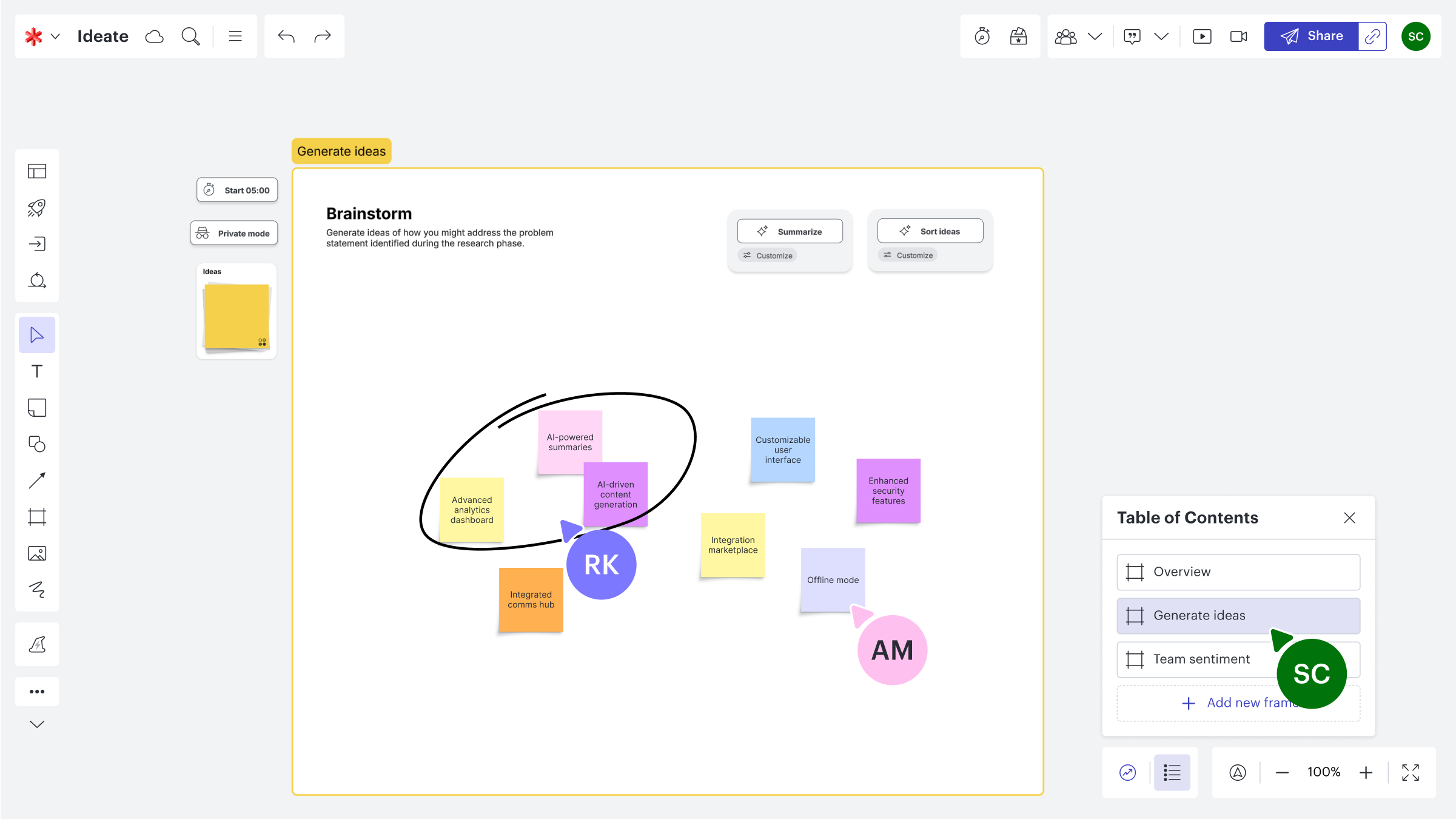
Demo Lucid Visual Collaboration Suite - Lucidspark Brainstorming Board
An interactive brainstorming board in Lucidspark where team members co-create and organize ideas using sticky notes, frames, and annotations. The screenshot highlights features like “Summarize” and “Sort ideas,” empowering teams to refine creative thinking into actionable strategies with clarity ...
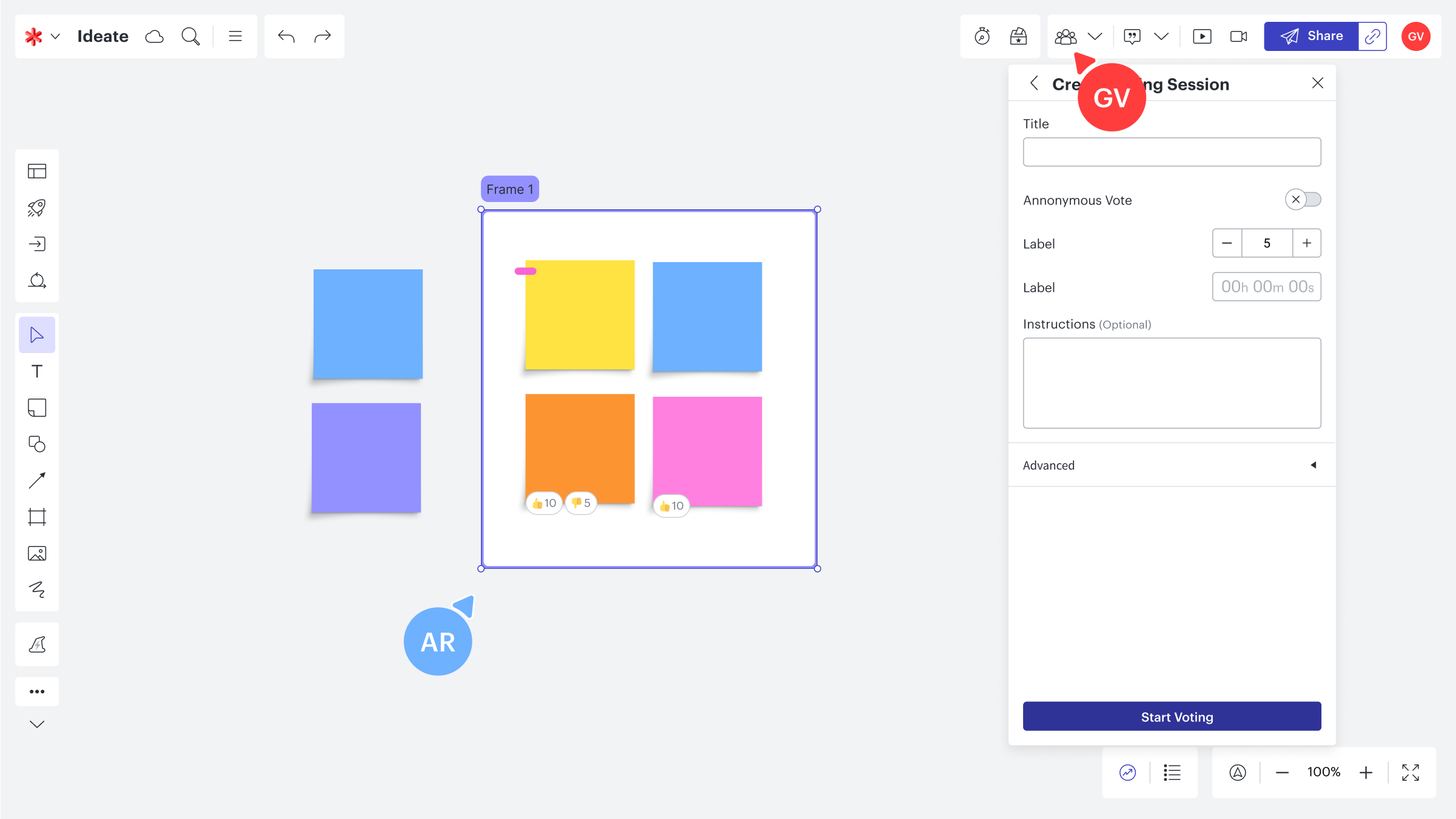
Demo Lucid Visual Collaboration Suite - Lucidspark Collaborative Voting Session
A Lucidspark board in action during a team ideation session, featuring colorful sticky notes and real-time collaboration tools. The image showcases Lucid’s built-in voting feature—allowing teams to prioritize ideas, give feedback, and make data-driven decisions in an engaging, visual workspace.
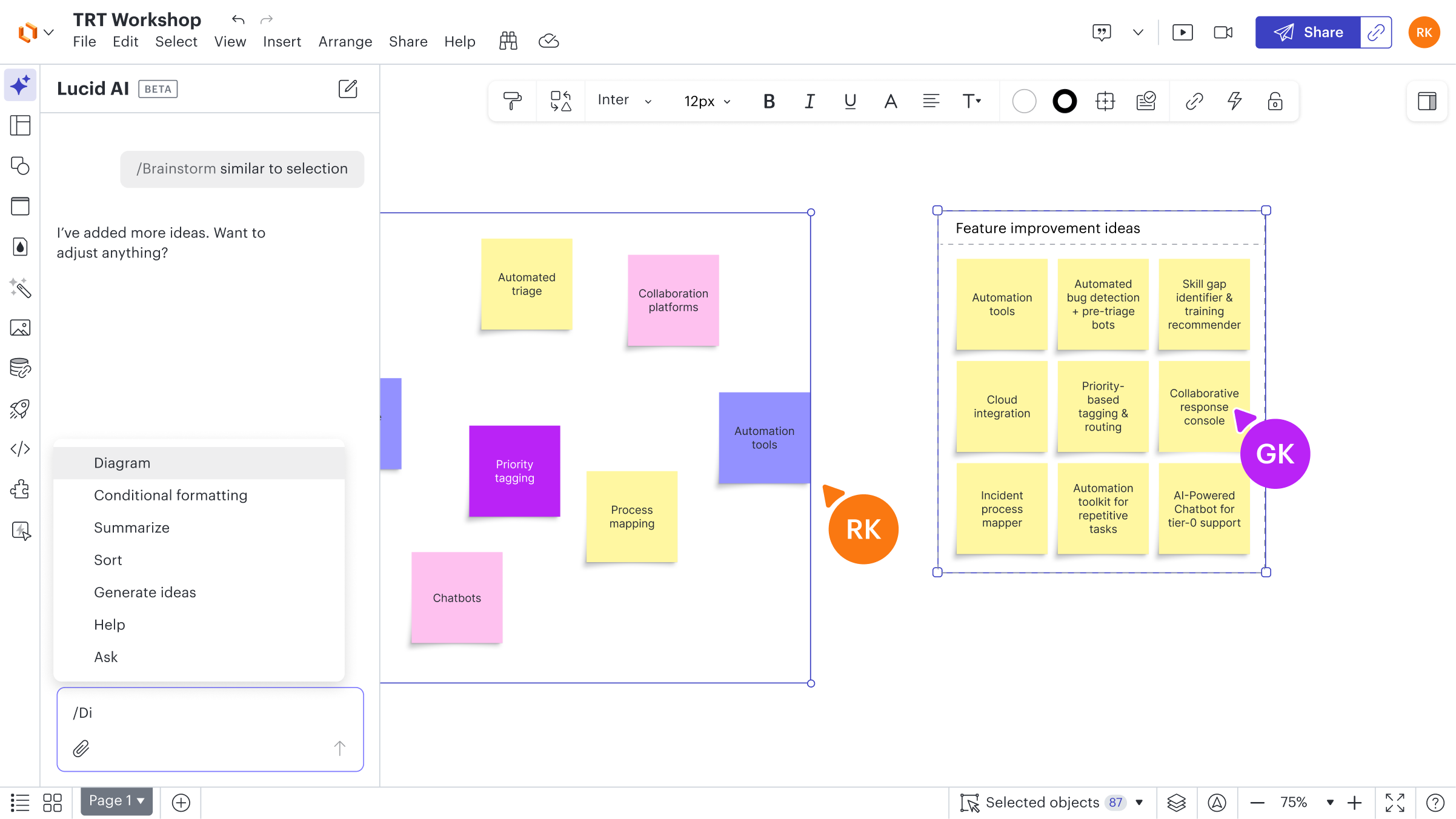
Demo Lucid Visual Collaboration Suite - Lucidchart AI for Idea Generation
A Lucid AI-enhanced workshop board showing AI-assisted brainstorming and idea clustering. The screenshot captures how AI helps teams generate new ideas, categorize insights, and accelerate innovation through intelligent suggestions—all seamlessly integrated into Lucid’s collaborative canvas.
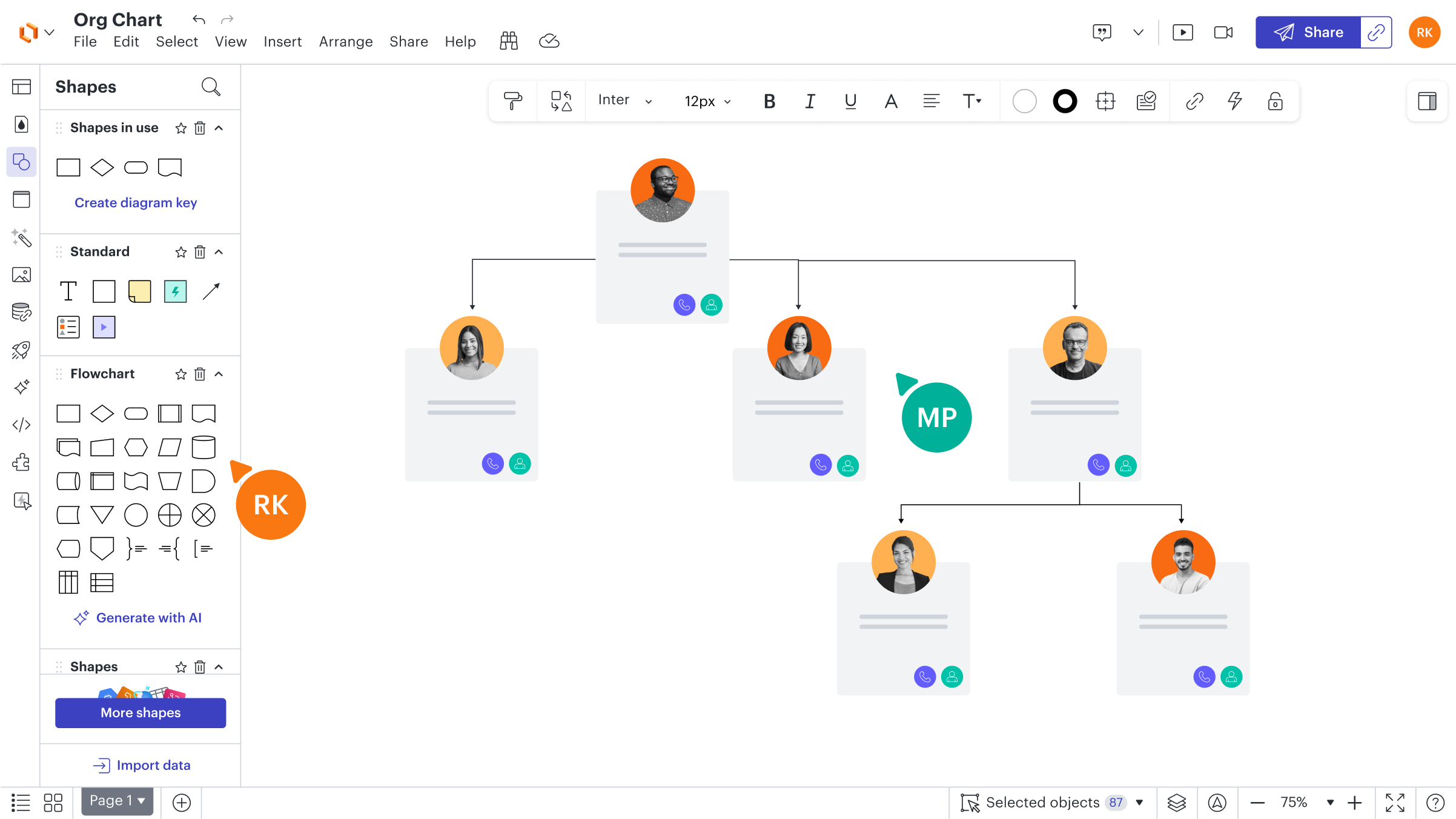
Demo Lucid Visual Collaboration Suite - Lucidchart Org Chart Example
A sample organization chart built in Lucidchart, showing a clean, collaborative workspace with connected employee cards, profile photos, and role hierarchies. The interface highlights Lucid’s intuitive diagramming tools—drag-and-drop shapes, smart connectors, and integrated team collaboration fea...
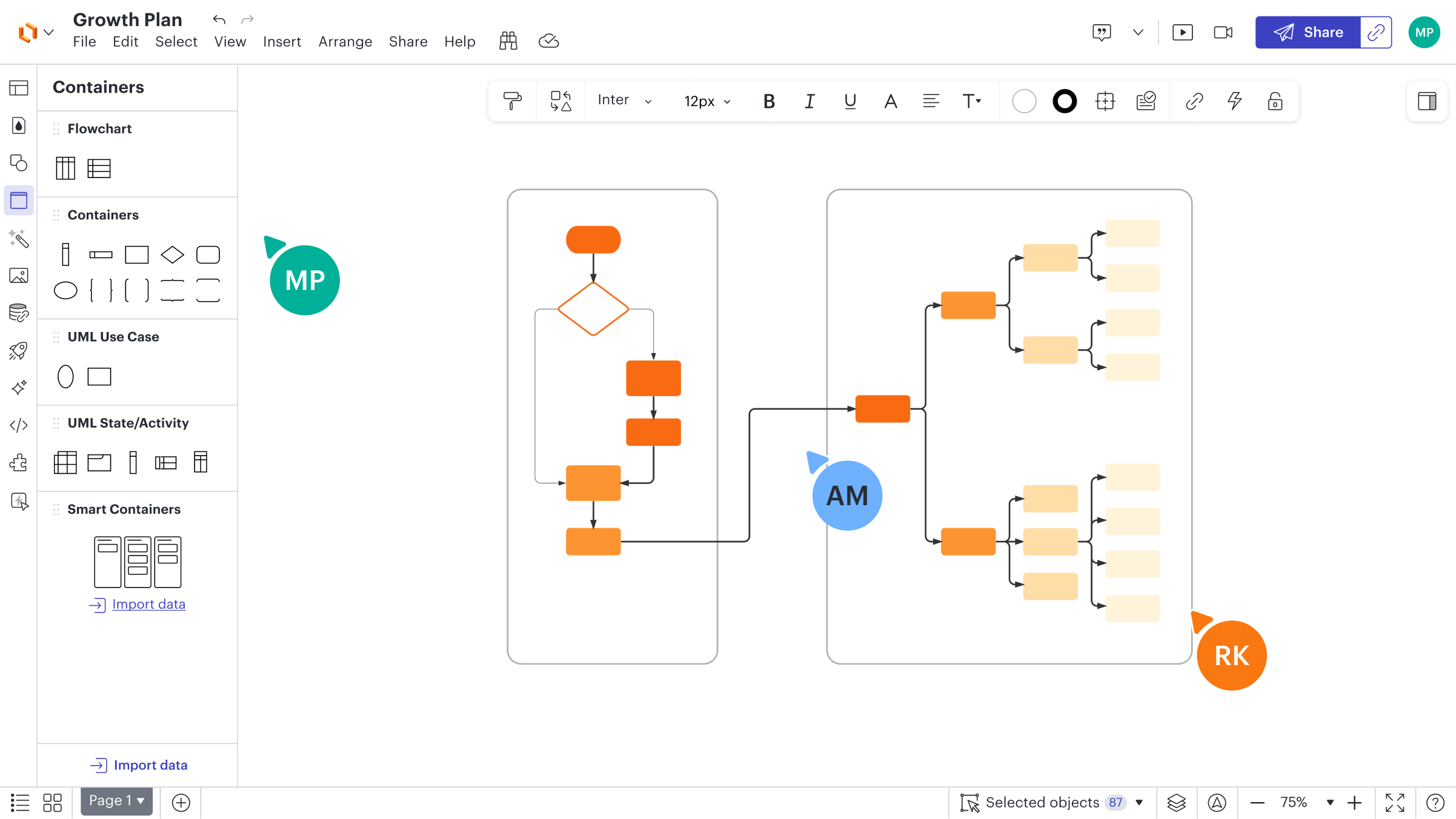
Demo Lucid Visual Collaboration Suite - Lucidchart Growth Plan Diagram
A visual growth strategy map created in Lucidchart, showcasing interconnected flowcharts and smart containers for process planning and team alignment. The image highlights Lucid’s collaborative diagramming interface—intuitive shapes, connectors, and data-driven visuals that make it easy for teams...
Discover how Lucidspark and Lucidchart work together inside the Lucid Visual Collaboration Suite to take your team from concept to clarity.
Reproducir vídeo de Lucid Visual Collaboration Suite
Discover how Lucidspark and Lucidchart work together inside the Lucid Visual Collaboration Suite to take your team from concept to clarity.
Imagen del Avatar del Producto

¿Has utilizado Lucid Visual Collaboration Suite antes?

Responde algunas preguntas para ayudar a la comunidad de Lucid Visual Collaboration Suite

Reseñas de Lucid Visual Collaboration Suite (7,527)

Ver reseñas en video de 8
Reseñas

Reseñas de Lucid Visual Collaboration Suite (7,527)

Ver reseñas en video de 8
4.5
Reseñas de 7,527

Pros y Contras

Generado a partir de reseñas de usuarios reales
Ver Todos los Pros y Contras
Buscar reseñas
Filtrar Reseñas
Borrar resultados
Las reseñas de G2 son auténticas y verificadas.
"Transforms Complex Projects into Visual Simplicity"
¿Qué es lo que más te gusta de Lucid Visual Collaboration Suite?

I mostly use Lucid Visual Collaboration Suite for school projects where I need a good visualization tool. It helps by making difficult and often complex ideas much easier to see and share with people I'm working with. Lucid Chart allows me to quickly make professional-looking diagrams like flowcharts and mind maps. Additionally, it significantly improves our teamwork since we can all see what each of us is working on in real-time. I like the most that it makes complex group projects simple and visual. The ability to work with my teammates together in real time really speeds up our working process. Also, the setup is super easy and not difficult at all. We switched from draw.io to Lucid Chart because it works better for us and makes our final presentations look much more professional. Reseña recopilada por y alojada en G2.com.

¿Qué es lo que no te gusta de Lucid Visual Collaboration Suite?

One of the key improvement areas would definitely be pricing and access features for students. The free version is incredibly helpful, although it hits its limits quite quickly, and the full subscription is a bit expensive for a student budget. Reseña recopilada por y alojada en G2.com.

Usuario verificado en Contabilidad
UC
Pequeña Empresa (50 o menos empleados)
"All-in-One Visual Collaboration Powerhouse for Teams"
¿Qué es lo que más te gusta de Lucid Visual Collaboration Suite?

The Lucid Visual Collaboration Suite stands out because it seamlessly combines free-form brainstorming with precise, professional diagramming, letting teams move from early ideas to polished workflows in one platform. Lucidspark enables collaborative whiteboarding, while Lucidchart adds structured diagrams, data-linked visuals, and automatically generated org charts, process maps, and architecture diagrams. Real-time multi-user editing, comments, and integrations with tools like Google Workspace, Atlassian, and Microsoft make it especially strong for remote or hybrid teams. Its versatility—supporting everything from simple flowcharts to complex system architecture—means it can replace multiple separate apps, reduce friction, and keep teams aligned visually throughout a project’s lifecycle. Reseña recopilada por y alojada en G2.com.

¿Qué es lo que no te gusta de Lucid Visual Collaboration Suite?

Lucid Visual Collaboration Suite is a bit sluggish when working on very large or complex diagrams, and some advanced features are only available on paid plans. The interface can feel overwhelming for beginners, and adjusting shapes or connectors precisely can be tricky. Additionally, because it’s fully cloud-based, it doesn’t work well offline or with a poor internet connection. Reseña recopilada por y alojada en G2.com.

"Empowered Our Learning with Intuitive Diagram Tools"
¿Qué es lo que más te gusta de Lucid Visual Collaboration Suite?

I was introduced to Lucid Visual Collaboration Suite by my lecturer, and for my classwork on entity relationship diagrams, it's been the best thing I've used. I appreciate the ease of use, making it very easy to create diagrams. I like how the diagrams look and find the Suite very efficient, with everything I need right at my fingertips without having to go looking for materials. As a student, I find it very understandable and user-friendly. It's very fast, and everything is in order. I managed to learn a lot through creating and linking diagrams, which helped me make a good database. Slowly, I got used to it, and now I can use it by myself. I can even recommend it to anyone and teach others how to use it. Reseña recopilada por y alojada en G2.com.

¿Qué es lo que no te gusta de Lucid Visual Collaboration Suite?

For now I don’t have comments about something negative about lucid Reseña recopilada por y alojada en G2.com.

Rishabh S.
RS
Supply Chain Analyst
"Transforms Complex Workflows into Clear Visuals"
¿Qué es lo que más te gusta de Lucid Visual Collaboration Suite?

I use the Lucid Visual Collaboration Suite to make sense of complicated workflows, especially at the intersection of engineering, operations, and procurement. I like that Lucid helps me get clarity quickly and lays everything out in a way that shows what is missing or needs change, turning abstract conversations into concrete visuals. It saves time and moves discussions forward. I appreciate how easy it is to move from a rough sketch to a refined workflow that is actionable for engineering or operations, which fits perfectly with how I work. The initial setup was also easy, and I found the basics intuitive, allowing me to create useful diagrams right away without any formal training. Reseña recopilada por y alojada en G2.com.

¿Qué es lo que no te gusta de Lucid Visual Collaboration Suite?

A few things in Lucid do not work as well as I would like. When a diagram gets big, the canvas can feel heavy to navigate. I spend time zooming in and out instead of focusing on the logic. It would help if large workflows were easier to manage or segment without breaking the flow. I also wish the formatting tools were a little faster. Lining up shapes, adjusting spacing, or keeping things visually consistent takes more effort than it should. When I am working live with a team, I want the tool to stay out of the way. Reseña recopilada por y alojada en G2.com.

"Streamlined Design Collaboration with Lucid"
¿Qué es lo que más te gusta de Lucid Visual Collaboration Suite?

I appreciate how Lucid Visual Collaboration Suite made it very easy to share and invite people to collaborate, so it didn't end up being a one-man team. It allowed me to work together with my team, get feedback, and collaborate as a group rather than working alone. I really like that I can share with a link without having to export anything, which is really nice. When we're done with our product, we can export it to send to the end users. Reseña recopilada por y alojada en G2.com.

¿Qué es lo que no te gusta de Lucid Visual Collaboration Suite?

I think it would be nice if they implemented it a little bit more to allow using pictures or things like that in chats. I didn't see that functionality. It took extra time to design components when maybe using a SVG file from somewhere else would have worked straight out of the box. Reseña recopilada por y alojada en G2.com.

BK
Civil Supervisor
Ingeniería mecánica o industrial
Empresa (> 1000 empleados)
"Excellent diagramming tool that saves a lot of time."
¿Qué es lo que más te gusta de Lucid Visual Collaboration Suite?

Lucid Visual Collaboration Suite has enabled me to create complex network diagrams in a quarter the time it took me with similar platforms. The chart helps us to maintain workflows and is the basis for further discussions and iterations. I like how it helps to set up and structure new workflows and this is especially helpful when you are managing a team and you implement new roles and services within the organization. Reseña recopilada por y alojada en G2.com.

¿Qué es lo que no te gusta de Lucid Visual Collaboration Suite?

For now, Lucid Visual Collaboration Suite satisfies all our diagramming needs so i don't have anything that i like least about it. Reseña recopilada por y alojada en G2.com.

RM
Digital Manager
Logística y cadena de suministro
Mediana Empresa (51-1000 empleados)
"Overall, Lucid Visual Collaboration Suite Is A Good Investment And Easy To Use."
¿Qué es lo que más te gusta de Lucid Visual Collaboration Suite?

We have been using Lucid Visual Collaboration Suite for a large initiative to review our current ecosystem within our organization. It is very flexible, super easy to use and intuitive. I like the ability to plot and define our company operating model using Lucid Visual Collaboration Suite and documentation of team thoughts and ideas in working sessions. Lucid Visual Collaboration Suite is the easiest tool i have ever used and their customer support team responds faster whenever you contact them. Reseña recopilada por y alojada en G2.com.

¿Qué es lo que no te gusta de Lucid Visual Collaboration Suite?

I can't think of anything right now. Lucid Visual Collaboration Suite has been a robust tool and nothing to dislike about it. Reseña recopilada por y alojada en G2.com.

PRATYUSH A.
PA
Student and researcher
Pequeña Empresa (50 o menos empleados)
"Una experiencia placentera pero algo desconcertante"
¿Qué es lo que más te gusta de Lucid Visual Collaboration Suite?

Lo mejor de Lucid, en mi opinión, es lo sencillo que es transformar un concepto ambiguo en un diagrama comprensible. La extensa biblioteca de plantillas ahorra mucho tiempo, y la interfaz se siente muy natural. Lucid me proporcionó las capacidades necesarias para mostrar puntos de contacto, acciones de escenario frontal y trasero, e interacciones con el cliente en un solo diseño cuando estaba creando un plan de servicio al cliente. El hecho de que compartir fuera fácil y mi equipo pudiera seguir mi diseño de inmediato sin más explicaciones fue realmente beneficioso para mí. Reseña recopilada por y alojada en G2.com.

¿Qué es lo que no te gusta de Lucid Visual Collaboration Suite?

Hay algunas cosas que pueden ser molestas, a pesar de la fortaleza de la plataforma. Tuve que ser cauteloso sobre lo que podía acceder como estudiante porque algunos de los diseños y características más sofisticados solo están disponibles con la suscripción paga. Debido a que la biblioteca es tan grande, ocasionalmente me tomó varios minutos encontrar la forma o símbolo preciso que estaba buscando en el menú. Finalmente, una pantalla de portátil más pequeña puede parecer un poco desordenada al trabajar en esquemas grandes. Creo que puedo crear mapas comparables usando Canva también. Además, no pude utilizarlo tan fácilmente como Canva. Reseña recopilada por y alojada en G2.com.

Prassan T.
PT
Assistance manager
Empresa (> 1000 empleados)
"Plataforma Todo-en-Uno con Funciones Amigables para el Usuario"
¿Qué es lo que más te gusta de Lucid Visual Collaboration Suite?

es fácil de usar, la guía de marcadores de posición es la guinda del pastel, tiene casi todas las funciones que solían entregar el proyecto de manera efectiva y eficiente y preparar la hoja de ruta y el flujo del proyecto, todo está disponible en una sola plataforma. Reseña recopilada por y alojada en G2.com.

¿Qué es lo que no te gusta de Lucid Visual Collaboration Suite?

también debería lanzar funciones como la asistencia por voz o una función donde un usuario pueda dar un aviso en un lenguaje genérico y pueda dar un resultado. Reseña recopilada por y alojada en G2.com.

"Collaboration Powerhouse, Needs Integrated Video Calls"
¿Qué es lo que más te gusta de Lucid Visual Collaboration Suite?

I use Lucid Visual Collaboration Suite to design my architecture for my software projects. I really like how it solves the problem of live architecture edits where multiple friends can work on it simultaneously and point out things they are sure about. It's pretty awesome that I've been able to use this freely and it's given me all I needed since my needs are not that complex as a CS student. I use Lucid's charts to explain my projects, and I find the setup was easy. Reseña recopilada por y alojada en G2.com.

¿Qué es lo que no te gusta de Lucid Visual Collaboration Suite?

I would like to have a complete video call experience on the platform itself and edit it live with friends. We use different modes of communication for live editing design sessions. Also, learning different components of design was hard. Reseña recopilada por y alojada en G2.com.

Opciones de precios

Precios proporcionados por Lucid Visual Collaboration Suite.

Free Bundle

$0.00

Individual Bundle

A partir de $11.93

Team Bundle

A partir de $13.50
Lucid Visual Collaboration Suite Comparaciones
Imagen del Avatar del Producto
Miro
Comparar ahora
Imagen del Avatar del Producto
Visio
Comparar ahora
Imagen del Avatar del Producto
Draw.io
Comparar ahora
Características de Lucid Visual Collaboration Suite
Dibujo
Colores del marcador
Mapeo mental
Votación
Comentar
Integraciones CMS
Compartir
En el navegador
Imagen del Avatar del Producto