  # Best Remote Desktop Software - Page 4

  *By [Tian Lin](https://research.g2.com/insights/author/tian-lin)*

   Remote desktop software enables users to seamlessly connect to and control a computer in another location via an internal network or the internet, displaying the remote screen in real time and giving the user full keyboard and mouse control, supporting remote work, IT troubleshooting, and product demonstrations.

### Core Capabilities of Remote Desktop Software

To qualify for inclusion in the Remote Desktop category, a product must:

- Display the remote computer screen on your own screen in real time
- Use your own keyboard and mouse to control the remote screen
- Allow complete access to and control over the remote desktop
- Allow connection either via an internal network or IP address
- Support differing operating systems

### Common Use Cases for Remote Desktop Software

IT professionals, support technicians, and remote employees use [remote desktop software](https://learn.g2.com/best-remote-desktop-software) to access and manage computers from any location. Common use cases include:

- Enabling remote employees to securely access corporate networks and servers from BYOD devices
- Allowing IT teams to troubleshoot and configure employee devices without requiring physical presence
- Supporting sales teams and user specialists in guiding clients through complex processes or product demonstrations remotely

### How Remote Desktop Software Differs from Other Tools

Remote desktop software offers full remote control of another computer, distinguishing it from [screen sharing software](https://www.g2.com/categories/screen-sharing), which allows users to share their screens for presentations or web conferencing without granting control. It also differs from [screen and video capture software](https://www.g2.com/categories/screen-and-video-capture), which records desktop activity for asynchronous sharing rather than providing live remote access. Remote desktop solutions deploy encryption, two-factor authentication, and other security measures to ensure secure data transmission during remote sessions.

### Insights from G2 on Remote Desktop Software

Based on category trends on G2, connection reliability and cross-platform OS support as standout features. Reduced need for in-person technical support and faster issue resolution as primary outcomes of adoption.


  ## How Many Remote Desktop Software Products Does G2 Track?
**Total Products under this Category:** 136

  
## How Does G2 Rank Remote Desktop Software Products?

**Why You Can Trust G2's Software Rankings:**

- 30 Analysts and Data Experts
- 15,600+ Authentic Reviews
- 136+ Products
- Unbiased Rankings

G2's software rankings are built on verified user reviews, rigorous moderation, and a consistent research methodology maintained by a team of analysts and data experts. Each product is measured using the same transparent criteria, with no paid placement or vendor influence. While reviews reflect real user experiences, which can be subjective, they offer valuable insight into how software performs in the hands of professionals. Together, these inputs power the G2 Score, a standardized way to compare tools within every category.

  
## Which Remote Desktop Software Is Best for Your Use Case?

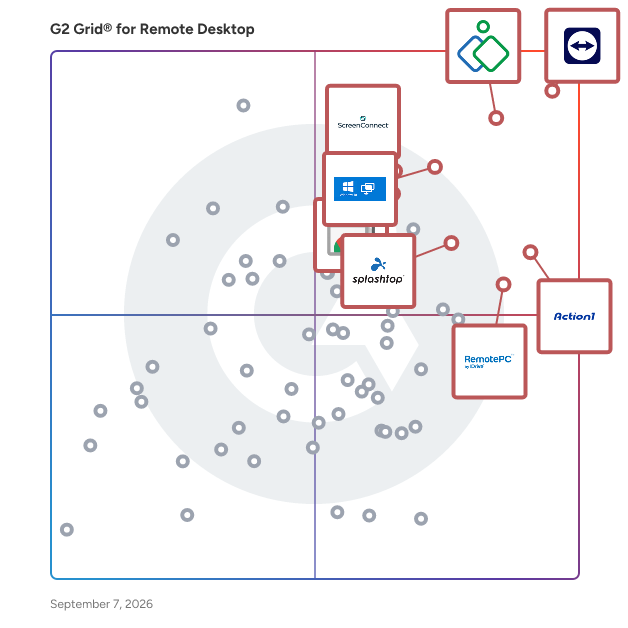
- **Leader:** [TeamViewer](https://www.g2.com/products/teamviewer/reviews)
- **Highest Performer:** [V2 Cloud](https://www.g2.com/products/v2-cloud/reviews)
- **Easiest to Use:** [Action1](https://www.g2.com/products/action1/reviews)
- **Top Trending:** [Action1](https://www.g2.com/products/action1/reviews)
- **Best Free Software:** [TeamViewer](https://www.g2.com/products/teamviewer/reviews)

  
---

**Sponsored**

### CrankWheel

Share your screen without any friction. Screen share in seconds during a voice call. You send a link via text or email and your viewer opens the session in any browser on any device. No download or registration is required for your viewer(s), even on their mobile phone. Add visuals to voice calls. No need to book a follow-up meeting, instead go seamlessly from phone call to full visual presentation. Establish trust faster and close the deal in the first cold call with CrankWheel. In addition to screen sharing, you can also run full web conferences with CrankWheel, with all participants optionally sharing their webcam and using their computer audio to speak to each other. The product can thus replace any other sales meeting tool you may be using. Remote Control and built-in custom e-signature solutions allow clients to sign legally binding agreements, audited by CrankWheel, during your meetings. The product also includes a full video sales platform, replacing Vidyard, BoomBoom or Loom, that lets you record webcam intros, screencasts, or your meetings, then share them as trackable links with optional animated previews that you can paste into your emails. You can even do &quot;video mail merge&quot; to track video interactions down to individual viewers in an audience of dozens or hundreds. Features: Easy screen share Stream HQ videos with sound within a screen share Electronic Signature on forms Record your screen and webcam and embed the video in emails, with Grant your viewer remote control A preview window shows you what the viewer sees and if he is engaged Customizable post-session redirect URL Traditional web conferencing (web-based audio, all participants can share webcam)


[Visit website](https://www.g2.com/external_clickthroughs/record?secure%5Bad_program%5D=ppc&amp;secure%5Bad_slot%5D=category_product_list&amp;secure%5Bcategory_id%5D=890&amp;secure%5Bdisplayable_resource_id%5D=1854&amp;secure%5Bdisplayable_resource_type%5D=Category&amp;secure%5Bmedium%5D=sponsored&amp;secure%5Bplacement_reason%5D=neighbor_category&amp;secure%5Bplacement_resource_ids%5D%5B%5D=1854&amp;secure%5Bprioritized%5D=false&amp;secure%5Bproduct_id%5D=22451&amp;secure%5Bresource_id%5D=890&amp;secure%5Bresource_type%5D=Category&amp;secure%5Bsource_type%5D=category_page&amp;secure%5Bsource_url%5D=https%3A%2F%2Fwww.g2.com%2Fcategories%2Fremote-desktop&amp;secure%5Btoken%5D=d5fa0c1bf7f1fdeba214f46aee1c2163f73504b5d87c12a6ec3f598a9e51e64e&amp;secure%5Burl%5D=https%3A%2F%2Fwww.crankwheel.com%2F%3Futm_campaign%3Dg2ppc%26utm_medium%3Dppc%26utm_source%3Dg2&amp;secure%5Burl_type%5D=free_trial)

---

  ## What Are the Top-Rated Remote Desktop Software Products in 2026?
### 1. [AnyViewer](https://www.g2.com/products/anyviewer/reviews)
  AnyViewer - a comprehensive remote access, remote desktop and remote support solution that can access remote computers from Windows, iPhone, Android devices anytime and anywhere safely and quickly. PC-to-PC and Phone-to-PC remote control at anytime from anywhere. Access critical files on working PC even work from home or on business trips. Deliver instant remote support to family, customers, and employees. Transfer files between local computer and remote computer. Play games on the remote desktop regardless of space and time. 100% guaranteed safety &amp; privacy.


  **Average Rating:** 2.7/5.0
  **Total Reviews:** 5
**How Do G2 Users Rate AnyViewer?**

- **Usage Information:** 3.3/10 (Category avg: 8.7/10)
- **Remote Device Control:** 5.8/10 (Category avg: 9.1/10)
- **Device Management:** 5.0/10 (Category avg: 8.7/10)

**Who Is the Company Behind AnyViewer?**

- **Seller:** [AnyViewer](https://www.g2.com/sellers/anyviewer)
- **HQ Location:** N/A
- **LinkedIn® Page:** https://www.linkedin.com/company/No-Linkedin-Presence-Added-Intentionally-By-DataOps (1 employees on LinkedIn®)

**Who Uses This Product?**
  - **Company Size:** 60% Mid-Market, 40% Small-Business


#### What Are AnyViewer's Pros and Cons?

**Pros:**

- Affordable (1 reviews)
- Ease of Use (1 reviews)
- Easy Connection (1 reviews)
- Remote Access (1 reviews)
- User-Friendly (1 reviews)

**Cons:**

- Connection Issues (1 reviews)
- Delay Issues (1 reviews)
- Slow Connectivity (1 reviews)
- Slow Performance (1 reviews)
- Unstable Connectivity (1 reviews)

### 2. [DeskRoll Remote Desktop](https://www.g2.com/products/deskroll-remote-desktop/reviews)
  DeskRoll Remote Desktop allows users to sontrol remote desktops, send files and use applications from anywhere over a secure tunnel. No VPN or proxy needed.


  **Average Rating:** 4.5/5.0
  **Total Reviews:** 4
**How Do G2 Users Rate DeskRoll Remote Desktop?**

- **Has the product been a good partner in doing business?:** 10.0/10 (Category avg: 9.0/10)
- **Usage Information:** 9.2/10 (Category avg: 8.7/10)
- **Remote Device Control:** 9.6/10 (Category avg: 9.1/10)
- **Device Management:** 9.6/10 (Category avg: 8.7/10)

**Who Is the Company Behind DeskRoll Remote Desktop?**

- **Seller:** [DeskRoll](https://www.g2.com/sellers/deskroll)
- **HQ Location:** Cupertino, US
- **Twitter:** @DeskRoll (224 Twitter followers)
- **LinkedIn® Page:** https://www.linkedin.com/company/deskroll (2 employees on LinkedIn®)

**Who Uses This Product?**
  - **Company Size:** 50% Mid-Market, 50% Small-Business


### 3. [Synergy](https://www.g2.com/products/synergy-2025-04-03/reviews)
  Synergy is a software download that shares one mouse and one keyboard between multiple computers. Simply move your mouse between your computers effortlessly. You can even copy and paste between computers. Synergy works on Windows, macOS, Linux, and Raspberry Pi. You only need a regular Ethernet or WiFi network connection, and no special hardware. It works like magic.


  **Average Rating:** 4.4/5.0
  **Total Reviews:** 4
**How Do G2 Users Rate Synergy?**

- **Has the product been a good partner in doing business?:** 6.7/10 (Category avg: 9.0/10)
- **Usage Information:** 7.5/10 (Category avg: 8.7/10)
- **Remote Device Control:** 6.7/10 (Category avg: 9.1/10)
- **Device Management:** 10.0/10 (Category avg: 8.7/10)

**Who Is the Company Behind Synergy?**

- **Seller:** [Symless](https://www.g2.com/sellers/symless)
- **Year Founded:** 2001
- **HQ Location:** London, GB
- **Twitter:** @Symless (3,530 Twitter followers)
- **LinkedIn® Page:** https://www.linkedin.com/company/synergyapp/ (2 employees on LinkedIn®)

**Who Uses This Product?**
  - **Company Size:** 75% Mid-Market, 25% Small-Business


### 4. [HP Remote Graphics Software](https://www.g2.com/products/hp-remote-graphics-software/reviews)
  HP Remote Graphics Software is an application virtualization tool for accessing 3D professional graphics applications remotely.


  **Average Rating:** 5.0/5.0
  **Total Reviews:** 3
**How Do G2 Users Rate HP Remote Graphics Software?**

- **Has the product been a good partner in doing business?:** 10.0/10 (Category avg: 9.0/10)
- **Usage Information:** 10.0/10 (Category avg: 8.7/10)
- **Remote Device Control:** 10.0/10 (Category avg: 9.1/10)
- **Device Management:** 10.0/10 (Category avg: 8.7/10)

**Who Is the Company Behind HP Remote Graphics Software?**

- **Seller:** [HP](https://www.g2.com/sellers/hp)
- **HQ Location:** Palo Alto, CA
- **Twitter:** @HP (1,094,638 Twitter followers)
- **LinkedIn® Page:** https://www.linkedin.com/company/5390798/ (138,959 employees on LinkedIn®)
- **Ownership:** HPQ
- **Total Revenue (USD mm):** $56,639

**Who Uses This Product?**
  - **Company Size:** 75% Enterprise, 25% Mid-Market


### 5. [NoMachine Enterprise Server](https://www.g2.com/products/nomachine-enterprise-server/reviews)
  NoMachine Enterprise Terminal Server provides secure and reliable access to mission-critical, specialized Linux desktops from any operating system and device, letting you federate all your desktop nodes under a single server. Organizations can conveniently centralize access, management and monitoring whilst empowering their users to run high-end, graphic-intensive OpenGL-based X applications without performance degradation. Create pools of Linux desktop nodes (Terminal Server Nodes) and scale up access to users&#39; virtual desktops by balancing the computing load among them. By adding Enterprise Terminal Servers to a Cloud Server hierarchy, sysadmin can centralize access to multiple NoMachine clusters.


  **Average Rating:** 3.5/5.0
  **Total Reviews:** 3
**How Do G2 Users Rate NoMachine Enterprise Server?**

- **Usage Information:** 10.0/10 (Category avg: 8.7/10)
- **Remote Device Control:** 8.9/10 (Category avg: 9.1/10)
- **Device Management:** 7.5/10 (Category avg: 8.7/10)

**Who Is the Company Behind NoMachine Enterprise Server?**

- **Seller:** [NoMachine](https://www.g2.com/sellers/nomachine)
- **Year Founded:** 2003
- **HQ Location:** Grand Duchy of Luxembourg, LU
- **Twitter:** @NoMachine (1,154 Twitter followers)
- **LinkedIn® Page:** https://www.linkedin.com/company/131182/ (63 employees on LinkedIn®)

**Who Uses This Product?**
  - **Company Size:** 100% Enterprise


### 6. [AweSun Remote Desktop](https://www.g2.com/products/awesun-remote-desktop/reviews)
  AweSun Remote is a fast, secure, and easy-to-use remote desktop software for remote access, remote support, and collaboration across devices. Developed by AWERAY PTE. LTD. and headquartered in Singapore, AweSun supports millions of users in over 150 countries. AweSun enables cross-platform connections across Windows, macOS, Android, and iOS, allowing individuals and teams to access and control remote devices from anywhere. With features like multi-monitor support, file transfer, unattended access, remote reboot, and AI-powered alerts, AweSun helps users stay productive and responsive—whether working from home, managing IT systems, or delivering remote assistance. For IT professionals, helpdesk teams, and MSPs, AweSun provides scalable solutions for real-time troubleshooting, centralized device management, and secure session control. With end-to-end encryption, permission management, and high-speed performance, it’s built for modern remote work environments. AweSun offers both free and professional plans, making it suitable for personal users, remote workers, SMBs, and enterprise IT teams alike.


  **Average Rating:** 4.5/5.0
  **Total Reviews:** 2
**How Do G2 Users Rate AweSun Remote Desktop?**

- **Usage Information:** 8.3/10 (Category avg: 8.7/10)
- **Remote Device Control:** 10.0/10 (Category avg: 9.1/10)
- **Device Management:** 8.3/10 (Category avg: 8.7/10)

**Who Is the Company Behind AweSun Remote Desktop?**

- **Seller:** [AWERAY PTE. LTD.](https://www.g2.com/sellers/aweray-pte-ltd)
- **Year Founded:** 2006
- **HQ Location:** singapore, SG
- **LinkedIn® Page:** https://www.linkedin.com/company/aweray-global/ (2 employees on LinkedIn®)

**Who Uses This Product?**
  - **Company Size:** 100% Mid-Market


### 7. [CACHATTO](https://www.g2.com/products/cachatto/reviews)
  With the proliferation of devices and types of access, securing business application and data has become a major challenge for today’s businesses. At the same time increasing productivity, ensuring business continuity and mitigating cyber threats are also a growing concern. To address these challenges a numerable point product, exist however managing them in cohesive manner has become a nightmare. CACHATTO with its flexible architecture is ideally suited to meet all these challenges in a single cohesive platform which is extremely easy to deploy, manage and scale. CACHATTO with its Zero Trust Model protects business applications, servers, network and data at all times.


  **Average Rating:** 5.0/5.0
  **Total Reviews:** 2
**How Do G2 Users Rate CACHATTO?**

- **Has the product been a good partner in doing business?:** 10.0/10 (Category avg: 9.0/10)
- **Usage Information:** 8.3/10 (Category avg: 8.7/10)
- **Remote Device Control:** 8.3/10 (Category avg: 9.1/10)
- **Device Management:** 9.2/10 (Category avg: 8.7/10)

**Who Is the Company Behind CACHATTO?**

- **Seller:** [CACHATTO](https://www.g2.com/sellers/cachatto)
- **Year Founded:** 2017
- **HQ Location:** Bengaluru, IN
- **Twitter:** @Cachatto_India (3 Twitter followers)
- **LinkedIn® Page:** https://www.linkedin.com/company/cachatto-india/ (29 employees on LinkedIn®)

**Who Uses This Product?**
  - **Company Size:** 100% Small-Business


### 8. [Firefox Send Tabs](https://www.g2.com/products/firefox-send-tabs/reviews)
  Send an open tab on one device to all your others with a single tap. Much easier than texting or emailing yourself those links


  **Average Rating:** 5.0/5.0
  **Total Reviews:** 2
**How Do G2 Users Rate Firefox Send Tabs?**

- **Usage Information:** 8.3/10 (Category avg: 8.7/10)
- **Remote Device Control:** 8.3/10 (Category avg: 9.1/10)

**Who Is the Company Behind Firefox Send Tabs?**

- **Seller:** [Mozilla](https://www.g2.com/sellers/mozilla)
- **Year Founded:** 2005
- **HQ Location:** San Francisco, CA
- **Twitter:** @mozilla (262,238 Twitter followers)
- **LinkedIn® Page:** https://www.linkedin.com/company/13948/ (1,755 employees on LinkedIn®)

**Who Uses This Product?**
  - **Company Size:** 100% Small-Business


### 9. [Impero Connect](https://www.g2.com/products/impero-connect/reviews)
  Impero Connect is a remote access solution that’s purpose-built for security. Support any device or server, from desktops and smartphones to highly sensitive ATMs, POS machines, smart factory devices, and medical equipment. Impero Connect offers flexible deployment options for cloud, on-premises or hybrid environments. Make sure your organisation can run effectively and safely, no matter where people and devices connect. About Impero Solutions With top talent and best-in-class technology, Impero offers educational and corporate customers the most secure way of remotely accessing devices and supporting students no matter their working or learning environments. Over 9 million users make more than 100 million connections every day using Impero. Learn more about how Impero creates safe, productive online experiences at imperosoftware.com.


  **Average Rating:** 3.3/5.0
  **Total Reviews:** 3
**How Do G2 Users Rate Impero Connect?**

- **Has the product been a good partner in doing business?:** 10.0/10 (Category avg: 9.0/10)
- **Remote Device Control:** 8.3/10 (Category avg: 9.1/10)

**Who Is the Company Behind Impero Connect?**

- **Seller:** [Netop](https://www.g2.com/sellers/netop)
- **Year Founded:** 1981
- **HQ Location:** Birkerod, DK
- **Twitter:** @NetopTech (176 Twitter followers)
- **LinkedIn® Page:** https://www.linkedin.com/company/netop-business-solutions-a-s (46 employees on LinkedIn®)

**Who Uses This Product?**
  - **Company Size:** 50% Small-Business, 25% Mid-Market


### 10. [PC-Duo by Vector Networks](https://www.g2.com/products/pc-duo-by-vector-networks/reviews)
  Award winning PC-Duo provides fast and reliable PC-PC remote control and remote access over LAN/WAN and internet connections. The famous PC-Duo reliability and performance makes it ideal for all environments including conventional PCs, thin client devices and fully virtualized desktops.


  **Average Rating:** 4.3/5.0
  **Total Reviews:** 2
**How Do G2 Users Rate PC-Duo by Vector Networks?**

- **Usage Information:** 6.7/10 (Category avg: 8.7/10)
- **Remote Device Control:** 10.0/10 (Category avg: 9.1/10)
- **Device Management:** 10.0/10 (Category avg: 8.7/10)

**Who Is the Company Behind PC-Duo by Vector Networks?**

- **Seller:** [Vector Networks](https://www.g2.com/sellers/vector-networks)
- **HQ Location:** N/A
- **Twitter:** @vectornetworks (302 Twitter followers)
- **LinkedIn® Page:** https://www.linkedin.com/company/vector-networks-inc./ (14 employees on LinkedIn®)

**Who Uses This Product?**
  - **Company Size:** 50% Mid-Market, 50% Small-Business


### 11. [Thinfinity Remote Desktop](https://www.g2.com/products/cybele-software-inc-thinfinity-remote-desktop/reviews)
  Thinfinity Remote Desktop allows you to securely deliver your Windows applications and desktops to any device with an HTML5 browser, no matter if they are hosted on the cloud, installed on-premises, or on hybrid architectures. Thinfinity Remote Desktop runs seamlessly on any public, private, or hybrid cloud. Build a flexible infrastructure mixing browser access to VDI, VMs, RemoteApps, and Unix machines. Allow users and clients to run your Windows applications anywhere and on any device.


  **Average Rating:** 3.8/5.0
  **Total Reviews:** 2

**Who Is the Company Behind Thinfinity Remote Desktop?**

- **Seller:** [Thinfinity Workspace](https://www.g2.com/sellers/thinfinity-workspace)
- **Year Founded:** 2002
- **HQ Location:** Draper, US
- **LinkedIn® Page:** https://www.linkedin.com/company/1486632 (71 employees on LinkedIn®)

**Who Uses This Product?**
  - **Company Size:** 50% Mid-Market, 50% Enterprise


### 12. [DeskIn](https://www.g2.com/products/deskin/reviews)
  DeskIn is a powerful remote desktop solution designed for both personal and enterprises. It offers seamless access across Windows, macOS, Android, and iOS platforms, making it ideal for remote work, remote gaming, IT support, and collaborative projects. [Remote Design] Remotely access office servers or workstations to run large-scale, resource-intensive design software. Ideal for scenarios such as design, game development, animation production, and film or television special effects. [Remote Work] Work from anywhere with full access to your office computers—enjoy the freedom, comfort, and productivity of working from home. Transfer files quickly and securely without compromising data safety or efficiency. [Remote Gaming] Play PC games remotely with high resolution and ultra-low latency. Stream graphics-intensive games seamlessly from office or home computers, delivering an immersive gaming experience anytime, anywhere. [Technical Assistance] Provide timely technical support to customers and colleagues with remote diagnosis and troubleshooting. Reduce customer wait times and improve team efficiency by seeing exactly what customers see, bridging communication gaps and making support more accurate and effective. [Equipment Operation and Maintenance] Remotely monitor, upgrade, debug, and troubleshoot numerous unattended devices. Resolve software issues without visiting the site, saving on travel costs. Batch management of hardware and software ensures efficient and streamlined equipment operation and maintenance. [Equipment Management] Manage company computers and servers while providing technical support to internal employees. Reduce costs and increase efficiency in IT support and device management. IT departments can also assign support accounts to external suppliers while maintaining full control over data streams.


  **Average Rating:** 5.0/5.0
  **Total Reviews:** 1

**Who Is the Company Behind DeskIn?**

- **Seller:** [Zuler Technology](https://www.g2.com/sellers/zuler-technology)
- **Year Founded:** 2021
- **HQ Location:** Singapore, SG
- **Twitter:** @DeskinRemote (20 Twitter followers)
- **LinkedIn® Page:** https://www.linkedin.com/company/86081287 (13 employees on LinkedIn®)

**Who Uses This Product?**
  - **Company Size:** 50% Mid-Market, 50% Small-Business


### 13. [Dualmon Remote Access](https://www.g2.com/products/dualmon-remote-access/reviews)
  dualmon provides an advanced Software-as-a-Service solution that will keep you connected to your computers from anywhere in the world.


  **Average Rating:** 4.5/5.0
  **Total Reviews:** 1

**Who Is the Company Behind Dualmon Remote Access?**

- **Seller:** [Dualmon](https://www.g2.com/sellers/dualmon)
- **Year Founded:** 2011
- **HQ Location:** N/A
- **Twitter:** @dualmon (69 Twitter followers)
- **LinkedIn® Page:** https://www.linkedin.com/company/7941249 (2 employees on LinkedIn®)

**Who Uses This Product?**
  - **Company Size:** 100% Mid-Market


### 14. [Ericom Connect Enterprise](https://www.g2.com/products/ericom-connect-enterprise/reviews)
  Ericom Connect is a powerful remote application and desktop access solution. Built on innovative technology and two decades of Ericom&#39;s proven expertise in the access market, Ericom Connect offers enterprise-level organizations unparalleled scalability, superior user experience and exceptional ease of use.


  **Average Rating:** 4.0/5.0
  **Total Reviews:** 1

**Who Is the Company Behind Ericom Connect Enterprise?**

- **Seller:** [Ericom Software](https://www.g2.com/sellers/ericom-software)
- **Year Founded:** 1993
- **HQ Location:** Boise, US
- **LinkedIn® Page:** https://www.linkedin.com/company/ericom-software/ (70 employees on LinkedIn®)

**Who Uses This Product?**
  - **Company Size:** 100% Enterprise


### 15. [Leostream](https://www.g2.com/products/leostream/reviews)
  The Leostream Remote Desktop Access Platform embodies over 20 years of Leostream research and development in supporting customers with hosted desktop environments, including VDI, hybrid cloud, and high-performance display protocols. It provides the world’s most robust desktop connection management and remote access feature set, allowing today’s enterprises to choose the best-of-breed components to satisfy their complex security, cost, and flexibility needs while working with them as they evolve into tomorrow.


  **Average Rating:** 5.0/5.0
  **Total Reviews:** 1
**How Do G2 Users Rate Leostream?**

- **Usage Information:** 10.0/10 (Category avg: 8.7/10)
- **Remote Device Control:** 10.0/10 (Category avg: 9.1/10)
- **Device Management:** 10.0/10 (Category avg: 8.7/10)

**Who Is the Company Behind Leostream?**

- **Seller:** [Leostream](https://www.g2.com/sellers/leostream)
- **Year Founded:** 2002
- **HQ Location:** Boston, US
- **LinkedIn® Page:** https://www.linkedin.com/company/leostream-corporation/ (20 employees on LinkedIn®)

**Who Uses This Product?**
  - **Company Size:** 100% Enterprise


### 16. [Mountain View](https://www.g2.com/products/mountain-view/reviews)
  Mountain View supports all of the TR-069 specification, including the most recent Amendment 5 and TR-181 data model. As part of the initial device pairing process, Mountain View “walks” the device’s data model and dynamically learns every parameter that is supported on that device type. Once paired, every parameter can then be viewed and configured through Mountain View’s Engineering User Interface.


  **Average Rating:** 5.0/5.0
  **Total Reviews:** 1
**How Do G2 Users Rate Mountain View?**

- **Usage Information:** 10.0/10 (Category avg: 8.7/10)
- **Remote Device Control:** 10.0/10 (Category avg: 9.1/10)
- **Device Management:** 10.0/10 (Category avg: 8.7/10)

**Who Is the Company Behind Mountain View?**

- **Seller:** [Fine Point Technologies](https://www.g2.com/sellers/fine-point-technologies)
- **HQ Location:** N/A
- **LinkedIn® Page:** https://www.linkedin.com/company/38757 (1 employees on LinkedIn®)

**Who Uses This Product?**
  - **Company Size:** 100% Mid-Market


### 17. [MyCloudIT](https://www.g2.com/products/mycloudit/reviews)
  MyCloudIT unifies cloud management for IT Operations, Accounting, and Business Operations by simplifying and automating fragmented IT deployment and management tasks. Built by cloud experts, MyCloudIT is a turn-key platform that simplifies the delivery, automation, management, and optimization of cloud workspaces, apps, and data in Microsoft Azure.


  **Average Rating:** 4.8/5.0
  **Total Reviews:** 2

**Who Is the Company Behind MyCloudIT?**

- **Seller:** [Conexlink](https://www.g2.com/sellers/conexlink)
- **Year Founded:** 2014
- **HQ Location:** Houston, US
- **LinkedIn® Page:** https://www.linkedin.com/company/conexlink-mycloudit (5 employees on LinkedIn®)

**Who Uses This Product?**
  - **Company Size:** 50% Mid-Market, 50% Small-Business


### 18. [MyQuickCloud](https://www.g2.com/products/myquickcloud/reviews)
  MyQuickCloud is the easiest way to create a cloud desktop workspace for seamless collaboration, that works with existing infrastructure or through our fully managed cloud services, because we make it effortless for teams to stay connected, productive, and in sync — from anywhere in the world Unlike traditional remote desktop tools or complex IT setups, MyQuickCloud is built on simplicity, close support and security.


  **Average Rating:** 5.0/5.0
  **Total Reviews:** 1
**How Do G2 Users Rate MyQuickCloud?**

- **Has the product been a good partner in doing business?:** 8.3/10 (Category avg: 9.0/10)
- **Usage Information:** 6.7/10 (Category avg: 8.7/10)
- **Remote Device Control:** 6.7/10 (Category avg: 9.1/10)
- **Device Management:** 5.0/10 (Category avg: 8.7/10)

**Who Is the Company Behind MyQuickCloud?**

- **Seller:** [MyQuickCloud](https://www.g2.com/sellers/myquickcloud)
- **Year Founded:** 2013
- **HQ Location:** London, GB
- **Twitter:** @MyQuickCloud (501 Twitter followers)
- **LinkedIn® Page:** https://www.linkedin.com/company/vedivi/ (9 employees on LinkedIn®)

**Who Uses This Product?**
  - **Company Size:** 100% Small-Business


### 19. [RPort](https://www.g2.com/products/cloudradar-gmbh-rport/reviews)
  RPort - remote management of any IT infrastructure. Manage Windows, Linux, desktops and servers, and any IoT device from one central console. Securely log into remote systems behind firewalls and without fixed IP addresses. Access any device via an intuitive user interface from your browser. Claim full control over your remote management - without sharing your credentials with external companies. On-demand reverse tunnels are the heart of rport. You can connect to any remote system over an encrypted tunnel using Remote Desktop, SSH, VNC, HTTP, or any TCP-based protocol. No port forwarding or VPN is needed. Feels like TeamViewer without the black-box software. RPort can execute commands on remote machines. On a single server or on a host group. Sequentially or in parallel. The client is lightweight and available for almost any operating system. Windows, Linux, and many embedded systems are supported. Any client can act as edge-device building bridges to other devices. The server doesn’t require a lot of resources. Any small cloud VM is suitable to handle hundreds of connected clients.


  **Average Rating:** 5.0/5.0
  **Total Reviews:** 1

**Who Is the Company Behind RPort?**

- **Seller:** [cloudradar](https://www.g2.com/sellers/cloudradar-6b9cb080-737b-40ee-a02f-1ca3e78ab8cd)
- **Year Founded:** 2002
- **HQ Location:** Cambridge, England, United Kingdom
- **LinkedIn® Page:** https://www.linkedin.com/company/realvnc/ (114 employees on LinkedIn®)

**Who Uses This Product?**
  - **Company Size:** 100% Small-Business


### 20. [Softdrive Remote Desktop](https://www.g2.com/products/softdrive-remote-desktop/reviews)
  Softdrive is the fastest GPU Cloud-Desktop on the market. Softdrive provides the infrastructure and remote desktop software for high-performance GPU virtual desktops. Softdrive has custom streaming software that leverages GPU video encoding with a custom UDP networking protocol to produce an experience that feels like a local computer. Softdrive Remote Desktop includes: Multi-Monitor, 4K, YUV444, Multi-factor authentication, Single-Sign-On with Azure or Google, TLS &amp; SRTP encryption, File Transfer, Remote access/control, Raw input.


  **Average Rating:** 4.5/5.0
  **Total Reviews:** 1

**Who Is the Company Behind Softdrive Remote Desktop?**

- **Seller:** [Softdrive Technologies](https://www.g2.com/sellers/softdrive-technologies)
- **Year Founded:** 2019
- **HQ Location:** Toronto, CA
- **LinkedIn® Page:** http://www.linkedin.com/company/softdrivecloud (20 employees on LinkedIn®)

**Who Uses This Product?**
  - **Company Size:** 100% Small-Business


### 21. [TeamViewer ONE](https://www.g2.com/products/teamviewer-one/reviews)
  TeamViewer ONE enables lean IT teams to shift from reactive support to proactive device management with a single platform that combines remote access, intelligent automation, experience monitoring, and endpoint management. With built-in security and automation, IT teams can resolve problems faster, support hybrid work confidently, and deliver exceptional digital experiences. AI is transforming IT management, empowering even small teams to deliver enterprise-level impact. By automating repetitive tasks, accelerating diagnostics, and enabling predictive insights, AI reduces time to resolution from hours to minutes and frees IT to focus on strategic priorities. With TeamViewer ONE, we combine remote connectivity, endpoint management, and Digital Employee Experience — all powered by AI for maximized value


  **Average Rating:** 4.7/5.0
  **Total Reviews:** 3

**Who Is the Company Behind TeamViewer ONE?**

- **Seller:** [TeamViewer](https://www.g2.com/sellers/teamviewer)
- **Company Website:** https://www.teamviewer.com
- **Year Founded:** 2005
- **HQ Location:** Goppingen
- **Twitter:** @TeamViewer (48,113 Twitter followers)
- **LinkedIn® Page:** https://www.linkedin.com/company/3479536/ (2,719 employees on LinkedIn®)

**Who Uses This Product?**
  - **Company Size:** 67% Mid-Market, 33% Enterprise


### 22. [Avica Remote Desktop](https://www.g2.com/products/avica-remote-desktop/reviews)
  Avica is an advanced remote desktop software that allows you to access, control, and manage your devices from anywhere in the world. With seamless connectivity and real-time collaboration features, Avica streamlines your business-critical processes and boosts your productivity. Avica desktop remote software is easy to use, flexible, and highly secure, providing you with peace of mind while working remotely. At Avica, our mission is to empower businesses and individuals to work remotely, securely, and collaboratively from anywhere in the world. Our dedicated technology team provides innovative and comprehensive remote desktop solutions that enable our customers to achieve their goals and realize their full potential. We strive to be the trusted partner of choice for businesses of all sizes and industries. Choose Avica for a reliable and efficient remote desktop experience that meets your unique needs.


**Who Is the Company Behind Avica Remote Desktop?**

- **Seller:** [RAYWING](https://www.g2.com/sellers/raywing)
- **Year Founded:** 2023
- **HQ Location:** Singapore, SG
- **Twitter:** @AvicaSoftware (39 Twitter followers)
- **LinkedIn® Page:** https://www.linkedin.com/company/avica-software/?viewAsMember=true (2 employees on LinkedIn®)


### 23. [ClonaDesk](https://www.g2.com/products/clonadesk/reviews)
  Clonadesk is a remote access software that allows users to interact with computer systems in other locations as though they were local. It empowers businesses to provide remote customer service and technical support with its advanced remote desktop capabilities. A seamless experience is provided by Clonadesk, which allows the support persons to troubleshoot technical issues easily and provide high-quality technical support to their customers, even from miles away.


**Who Is the Company Behind ClonaDesk?**

- **Seller:** [Clona AI Technologies](https://www.g2.com/sellers/clona-ai-technologies)
- **HQ Location:** N/A
- **LinkedIn® Page:** https://www.linkedin.com/company/clonadesk/ (2 employees on LinkedIn®)


### 24. [Conduit](https://www.g2.com/products/conduit-2026-03-30/reviews)
  AI-powered remote connection manager for SSH, RDP, VNC, and web sessions. Features an encrypted credential vault, built-in AI assistant with 9 models, and MCP server integration for AI coding agents. Cross-platform for macOS, Windows, Linux, iOS, and iPadOS. Free forever with unlimited connections. Pro from $12/month.


**Who Is the Company Behind Conduit?**

- **Seller:** [Conduit](https://www.g2.com/sellers/conduit-d2ef908f-ed68-4a57-8c76-d48944103277)
- **HQ Location:** N/A
- **LinkedIn® Page:** https://www.linkedin.com/company/No-Linkedin-Presence-Added-Intentionally-By-DataOps (1 employees on LinkedIn®)


### 25. [Dayon!](https://www.g2.com/products/dayon/reviews)
  Dayon! allows watching and controlling remote computers. It can be used as free alternative to various commercial remote desktop and remote assistance products. Its key features are - no router or network configuration required on the assisted side - friendly, multilingual (de/en/es/fr/it/ru/tr) user interface - assistant and assisted functionality in one packet - secure, encrypted communication (TLS) - very low bandwidth usage - cross platform (Windows, Linux, macOS) - open source - free


**Who Is the Company Behind Dayon!?**

- **Seller:** [Reto Galante](https://www.g2.com/sellers/reto-galante)
- **HQ Location:** N/A
- **LinkedIn® Page:** https://www.linkedin.com/company/No-Linkedin-Presence-Added-Intentionally-By-DataOps (1 employees on LinkedIn®)


    ## What Is Remote Desktop Software?
  [IT Infrastructure Software](https://www.g2.com/categories/it-infrastructure)
  ## What Software Categories Are Similar to Remote Desktop Software?
    - [Remote Support Software](https://www.g2.com/categories/remote-support)
    - [Remote Monitoring &amp; Management (RMM) Software](https://www.g2.com/categories/remote-monitoring-management-rmm)
    - [Screen Sharing Software](https://www.g2.com/categories/screen-sharing)

  
---

## How Do You Choose the Right Remote Desktop Software?

### What You Should Know About Remote Desktop Software

### What is remote desktop software?

Remote desktop software, also known as remote access software, allows users to access another computer or system remotely in real time and work on it like their local device. It ensures easy, efficient, and secure access to one or many remote desktops.&amp;nbsp;

While the software can also be used for remote support, a remote desktop tool is typically used by employees to access a machine remotely rather than to resolve a technical problem. Though the maintenance functions may not be as extensive as those of remote support solutions, remote desktop tools aid support teams in performing basic maintenance tasks on numerous devices from a single station.

Typical use cases of a remote desktop tool include granting employees access to and managing distant computers anytime, from any device, which gives them the privilege to work from anywhere. Sometimes IT support professionals use remote desktop software to troubleshoot and perform maintenance tasks remotely.

### What are the common features of remote desktop software?

The following are some core features of a remote desktop tool that can help users achieve greater flexibility and cost savings through remote work:

- Remote access and control: Remote desktop software provides end users access to and control over other devices not in their physical vicinity. The software facilitates the visibility of a specific window or the entire desktop.
- Multi-monitor support: Many workplaces now opt for multiple monitors at their workstations to help improve productivity. As a result, the remote desktop tool supports the capability to view multiple monitors at a time.
- Multiple operating system (OS) support: Businesses today use Windows, macOS, Linux, or other OS, and sometimes multiple OS within the same company. Remote desktop software has features to handle viewing and functioning on any OS, independent of the OS the end user is connecting from.
- Mobile device access: Remote desktop tools allow administrators to access connected mobile devices and support mobile OS like Android, iOS, and more.
- Data encryption: When a user’s device is being used and managed remotely, it may leave the user feeling vulnerable. The remote desktop tool offers a data encryption feature to secure the connection and protect data.
- File management: Remote desktop software facilitates file sharing and transfers to enable quick and effortless work discussion, collaboration among colleagues, and viewing of relevant documents when working remotely. The shared or transferred files are highly secure as permission to access them is granted only to authenticated user accounts.
- Remote configuration: The software helps configure a remote PC for access so that the end user can take complete control of the device over the internet anytime.
- Chat: The chat functionality of the remote desktop software allows users to send and receive messages between computers.
- Application management: Remote desktop tool centrally manages, configures, and monitors applications on employee devices.&amp;nbsp;
- Session transfer: Access to remote sessions for IT support can be transferred between users using a remote desktop application.
- Session recording: A remote desktop tool provides the ability to record remote sessions at a desired location on the local computer.&amp;nbsp;
- Security: All the data shared across a remote connection is encrypted. It also uses multi-factor authentication (MFA) to ensure only authorized users can log in and notify suspicious activities.
- Deployment flexibility: Remote desktop tools can be deployed on the cloud and on-premises, depending on the organization’s requirements.
- Remote printing: Some remote desktop solutions provide remote printing capabilities to help users print documents using a locally plugged or network printer.
- Session usage reporting: Activity log tracking and session analytics is essential for IT managers and chief information officers (CIOs) looking to track, manage, and optimize helpdesk activities.
- Branding: Remote desktop systems may let businesses customize client applications to match their websites.

### What are the benefits of remote desktop software?

There are several benefits that a business can reap from a remote desktop tool. Below is a list of advantages that the tool offers:

- Efficiency: Remote desktop tools offer the potential to maintain numerous devices from a single workstation. Users can access the systems they need from wherever they are located.
- Cost savings: Remote desktop tools may require the installation of remote client software on user devices. However, some web-based remote desktop software provides remote access with zero endpoint installation or configuration. Clientless, centrally-managed solutions do not require installation, management, and software maintenance on individual devices, thereby cutting down IT support costs. Additionally, these solutions enable users to work from home with the most reliable and secure connection resulting in reduced overhead expenditure for office space, computing equipment, software, utilities, etc.
- Flexibility: Employers are increasingly promoting flexible and remote work. The ability to work from anywhere, at any time, and on multiple devices increases employee productivity and turnover. These tools enable employees to work remotely with a seamless remote desktop connection to one or many desktops at the workplace.
- Business continuity: Remote desktop platform ensures business continuity in times of crisis, such as pandemic outbreaks, harsh weather, and transportation strikes. It provides access to business applications and data from home, enabling organizations to meet their business objectives.

### Who uses remote desktop software?

- Customer support teams: Employees on support teams are most likely to use the remote desktop tool. The software greatly improves the efficiency of most support teams’ day-to-day routines and tasks.&amp;nbsp;
- IT departments: Software and licensing administrators in the IT department can use remote desktop tools for scheduling and running maintenance on devices, regardless of the device&#39;s physical location or the administrator.
- Data archive teams: Teams that do heavy [data archive](https://learn.g2.com/data-archiving) work may also benefit from using a remote desktop tool. Data archives tend to be optimized toward UNIX systems like Linux’s numerous variants, so having a remote Linux build that can be tapped into from a Windows desktop can be incredibly valuable.
- Software engineers: Remote desktop solutions enable developers and engineers to share a single workstation, use [integrated development environments (IDEs)](https://www.g2.com/articles/ide), access remote servers, and investigate bugs remotely.
- Educational institutions: Teachers, professors, educators, and administrators use remote access solutions for conducting classes and accessing tools and files from remote locations.
- Remote users: Remote employees rely on these solutions to access company files and servers and complete tasks without being in the office.

### What are the Alternatives to Remote Desktop Software?

- [Remote support software:](https://www.g2.com/categories/remote-support) Remote support and remote desktop tools are so similar that many use the two names interchangeably. There is a slight but notable difference between the two. Remote desktop software focuses more exclusively on access to and control over a remote device. While remote support software does this as well, these solutions offer more expansive features to assist with maintenance and troubleshooting.
- [Virtual desktop infrastructure (VDI) software](https://www.g2.com/categories/virtual-desktop-infrastructure-vdi): Remote desktop and VDI software have similar characteristics but slightly different target functions. A remote desktop tool tends to focus on creating connections to physical devices. In contrast, a VDI tool hones in on entirely virtual desktops associated with servers or even an OS being run within another OS. VDI software allows for centralized hosting and viewership of numerous desktops, whereas remote desktop focuses on the ability to access numerous physical desktops from a single location.
- [Screen sharing software](https://www.g2.com/categories/screen-sharing): These systems partially match the functionality of remote desktop solutions by allowing users to share screens and demonstrate processes to viewers. Sales, marketing, and support teams use screen sharing tools to provide demos, brainstorm, and resolve technical issues.

### Challenges with remote desktop software

Remote desktop tools can come with their own set of challenges.&amp;nbsp;

- Connectivity: Remote desktop usage occurs entirely via the internet, so connectivity issues can end up disrupting the experience. When implementing a remote desktop tool, users must ensure high internet connectivity.
- Hardware dilemmas: Remote desktop software relies partly on the end device’s hardware functioning optimally. If there is an issue with the end device’s hardware, the software may not be able to access the remote device.
- Privacy: The means to take control of other users’ computers remotely does come with a certain degree of privacy risk. In the wrong hands, losing control of one’s computer means compromised data on the computer or an entire network. Companies need to use strong endpoint protection software when implementing remote support software to protect internal devices.
- Operating system compatibility: Some remote desktop systems may not efficiently support different operating systems such as Linux, macOS. or their outdated versions. This Os non-compatibility makes it challenging for remote users to receive timely solutions.
- High-performance tasks: Network speed and bandwidth variation may impact remote desktop tools&#39; ability to to complete tasks demanding high computational resources, including video rendering, data analysis, and graphic design.
- User experience: Complex remote desktop applications make it difficult for users to log in, establish connections with remote devices, and share files.

### How to choose remote desktop software

Organizations buying remote desktop software must consider business-specific needs and the following factors to maximize the return on their investment.

- Device whitelisting and authentication: Choosing a remote desktop platform with device or endpoint authentication is crucial for preventing unauthorized systems from connecting with remote devices and gaining unattended access.
- Two-factor authentication (2FA): Remote desktop solutions with 2FA capabilities verify user identity to protect devices and data from brute-force attacks, social engineering, and phishing.&amp;nbsp;
- Security compliance: Buyers must ensure that the remote access tool of their choice meets different security standards, including [General Data Protection Regulation (GDPR)](https://www.g2.com/glossary/gdpr-definition), System and Organization Controls (SOC 2), Family Educational Rights and Privacy Act (FERPA), Peripheral Component Interconnect (PCI), and Health Insurance Portability and Accountability Act (HIPAA). Also, consider choosing solutions that update security protocols regularly.&amp;nbsp;
- Ease of use: Selecting a user-friendly remote desktop tool is essential for ensuring that even non-technical users have a seamless experience while using the system. Moreover, users should be able to install the application without any difficulty.&amp;nbsp;
- File transfer: Remote desktop tools with [file sharing](https://www.g2.com/glossary/file-sharing-definition) features allow users to share presentations, documents, and data, enabling them to send or receive files immediately. Also, consider looking for systems with remote printing, chat, multi-monitor support, and remote wake-on-LAN functionalities.
- Available on mobile devices: Choosing a system that users can access from a phone or tablet helps technical support specialists resolve issues on the go.&amp;nbsp;
- Price and customer support: Consider thoroughly evaluating customer support availability and features against price to find the best solution.

Depending on their organizations’ sizes, needs, and preferences, buyers must try different tools to find the one that best fits their compatibility, security, usability requirements, and budget.

### Remote desktop software pricing

Remote desktop software is available in two deployment models: on-premises and cloud. Based on the models, the software can also be purchased as a perpetual license or as annual or monthly subscriptions. Remote desktop tools are priced as a perpetual license for on-premises software, whereas cloud-based solutions are available on a subscription basis. Some remote desktop tools can be downloaded for free private usage and are available as a three-tier license, often business, premium, or corporate.

Remote desktop software pricing varies depending on the number of seats, devices, and features organizations require. Below is a general overview of pricing based on tiers buyers choose.

- Entry-level plans range from $10 to $15 monthly and include basic features. These plans suit individual users and small businesses.
- Mid-range plans can cost businesses up to $35 per month. They provide more features suitable for larger business teams.
- Advanced plans cost around $75 monthly and offer advanced support and user management features. These are ideal for larger enterprises with extensive business requirements.

### Implementation of remote desktop software

How is remote desktop software implemented?

There are generally two ways in which a remote desktop software is implemented:

- OS-based implementation: OS-based remote desktop solutions are built directly into the OS. No extra software is required to use OS-based remote desktop solutions as the tools are already installed. For example, some versions of Windows come with built-in remote desktop software.&amp;nbsp;
- Third-party-based implementation: Third-party-based implementation is needed when remote desktop software has to be licensed by the user. Once the buyer has decided on the software that fits their particular needs and installed it, it should be ready for use.

### Remote desktop software trends

- Companies will adopt a hybrid workplace model: Companies are now looking at providing the choice of working from the office only for a few days a week. The remote working element in a hybrid workplace is a trend that is expected to grow. Employees within an organization have increasingly started preferring to work from home or anywhere else with flexible working schedules. Employers are also providing the flexibility to do so. Remote desktop and remote support software will be widely used when working remotely, as they provide seamless IT support without letting external factors hinder business processes from running smoothly.
- Organizations will opt for consolidation of remote work tools: Organizations use multiple software solutions such as video conferencing, remote support, and remote desktop to enable effective collaboration across employees, clients, and partners. It is essential to consolidate these tools and provide the organization with better visibility to enhance operational productivity, thereby reducing the need to monitor each device individually. The adoption of centralized solutions is expected to rise, considering it would help companies ensure compliance and tackle software management issues.
- BYOD trends continue gaining popularity: Many organizations encourage employees to use BYOD devices to control capital expenditure costs rising from hardware purchase and maintenance. Employees using their devices often rely on remote desktop solutions to connect with peers or access server files. Remote workers using their devices for office work are more likely to experience cybersecurity threats. Businesses must continue investing in cybersecurity, cloud security, and vulnerability management tools to prevent data leaks and unauthorized access and mitigate remote work tech vulnerability.

_Researched and Written by_ [_Anindita Sengupta_](https://research.g2.com/insights/author/anindita-sengupta)

_Reviewed and Edited by_ [_Sinchana Mistry_](https://in.linkedin.com/in/sinchana-mistry95)