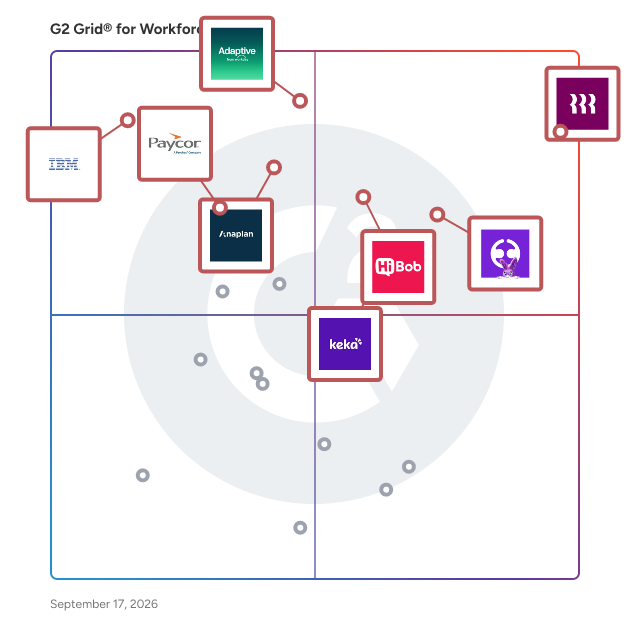
What I often see in Workforce Planning Software
Feedback Pros: What Users Consistently Appreciate
• Centralized headcount tracking replacing spreadsheet-based workforce planning processes
“What I like best about Rippling is the platform’s ability to bring multiple HR functions together in one system. It provides a centralized place to manage employee data, payroll, and other HR operations, which helps streamline processes and improve efficiency. The interface is user-friendly, and the system allows for good visibility into employee information and workflows. Additionally, the flexibility in configuration and reporting makes it easier to manage HR operations and adapt the system to organizational needs.”
- Rippling review, Aarthee S.
• Scenario modeling for hiring plans, compensation impact, and budget forecasting
“Anaplan is robust in bringing diverse operations together for easier planning, including supply, sales, and finance, among others. The app has remarkable scenario-modeling capabilities, and it keeps updating based on the analytics conducted. It also offers multi-dimensional models that handle large enterprises and ensure efficiency. In addition, the app is cloud-based, with secure and governable systems that support smooth coordination and collaboration.”
- Anaplan review, Samantha L.
• Shared visibility into workforce data across HR, finance, and leadership teams
“HiBob is strong because it consolidates core HR processes (employee data, time off, onboarding, performance) into one intuitive platform, with flexible workflows and automations that reduce manual effort. The modern UI drives high adoption, while reporting and analytics give leadership clear visibility into key people metrics for faster, data-driven decisions.”
- HiBob HRIS review, Angelos C.
Cons: Where Many Platforms Fall Short
• Advanced configuration required for complex approval flows and planning rules
“The first weakness I have identified with Rippling is that some processes, such as multi-step approvals or intricate rules on payroll, are not easily customized. In the process of attempting to configure certain workflows, this could necessitate additional testing so that we can verify that everything is fine. The frequency of use is also high, and even minor errors during configuration can paralyze HR operations in the meantime.”
- Rippling review, Richard F.
• Custom reporting and dashboards sometimes require additional setup effort
“Anaplan's main challenges are its learning curve and the complexity of large models, which can take time and expertise to manage. Integrations with some third-party tools can also require extra setup. The initial setup of Anaplan can be challenging, especially for teams new to connected planning. Building models, configuring drivers, and integrating with other systems takes time and sometimes requires guidance from Anaplan specialists.”
- Anaplan review, Faga K.
• Customer support responsiveness or resolution speed varies across implementations
“I don't like the payroll processing and customer support because they're very slow. We don't have enough flexibility in terms of the payroll process, and customer support is really bad; it takes 6-7 days to respond.”
- Keka review, Tushar A.
My Expert Takeaway on Workforce Planning Software in 2026
While reviewing the feedback across this dataset, I noticed that many organizations adopt workforce planning software after their hiring processes become too complex to manage in spreadsheets. Reviewers say these platforms help track open roles, plan staffing, and understand workforce costs clearly.
Another pattern I saw in the reviews is how often these tools sit at the intersection of HR and financial planning. Teams regularly mention connecting these platforms with HRIS tools, payroll systems, and financial planning software so leadership can evaluate hiring decisions alongside budget impact. When workforce planning tools are integrated into these systems, they tend to become a central reference point for staffing discussions rather than just a reporting layer.
Industry distribution in the dataset suggests that adoption is especially strong in technology and IT services companies, where rapid hiring cycles make structured planning more important. At the same time, reviewers from healthcare, insurance, and other regulated industries emphasize the value of workforce planning solutions for managing staffing levels, maintaining compliance requirements, and ensuring operational continuity.
One recurring challenge in the reviews is the complexity of implementation when organizations move from informal planning methods to a structured system. Several reviewers note that setting up approval paths, reporting views, and workforce planning models requires careful planning. From what I observed in the feedback, teams that establish these processes early tend to adopt the software more smoothly.
Once those foundations are in place, the best workforce planning software supports more informed hiring decisions and better alignment between staffing plans and business growth.
Workforce Planning Software FAQs
What AI tools are useful for workforce planning?
AI in workforce planning tools supports headcount forecasting, workforce cost modeling, and hiring scenario simulations. These features assist HR and finance leaders in evaluating staffing plans before hiring. Examples of AI-enabled workforce planning tools:
-
Anaplan: Used by enterprise teams to run predictive workforce models and evaluate hiring scenarios alongside financial planning.
-
Workday Adaptive Planning: Provides workforce forecasting and scenario modeling that helps HR and finance teams anticipate hiring needs and workforce costs.
-
IBM Planning Analytics: Supports AI-driven analytics for workforce planning, allowing organizations to analyze staffing demand and optimize workforce allocation.
What are the best workforce planning tools?
Leading workforce planning tools help organizations project staffing requirements, manage headcount strategies, and align workforce decisions with financial objectives. Commonly used workforce planning platforms include:
-
Anaplan: Enterprise planning platform that connects workforce planning with financial and operational planning.
-
Rippling: Combines workforce planning with HR, payroll, and employee lifecycle management.
-
HiBob HRIS: Offers workforce analytics and organizational planning tools for growing companies.
What is the most affordable workforce planning software for SMBs?
SMBs typically choose workforce planning tools that are easy to implement and combine workforce planning with HR management. Affordable workforce planning platforms often used by SMBs include:
According to G2 market segment data, several workforce planning platforms have strong adoption among small businesses:
-
Rippling (31% small business users): Combines workforce planning, HR, payroll, and IT management, appealing to SMBs seeking a unified platform.
-
HiBob HRIS (12% small business users): Designed for growing organizations needing workforce analytics, headcount visibility, and planning tools.
-
Workday Adaptive Planning (10% small business users): Offers workforce forecasting and budgeting tools to align staffing with financial plans.
What is the top-rated workforce planning platform for enterprises?
Enterprise organizations typically choose workforce planning platforms that support large-scale workforce modeling, financial alignment, and multi-department planning.
Based on G2 enterprise usage data, commonly adopted platforms include:
-
Anaplan (61% enterprise users): Enterprise connected planning platform used for complex workforce modeling across departments and global teams.
-
IBM Planning Analytics (45% enterprise users): Advanced analytics platform that supports workforce forecasting and enterprise planning scenarios.
-
Rippling (5% enterprise users): Workforce management platform that integrates HR, payroll, and workforce data into a centralized planning system.
Which solution supports multi-location workforce planning?
Multi-location workforce planning tools help organizations model staffing across regions, departments, and business units. Tools commonly used for multi-location workforce planning include:
-
Anaplan: Allows companies to plan workforce needs across multiple regions and organizational structures.
-
Workday Adaptive Planning: Supports workforce forecasting across global offices and distributed teams.
-
Rippling: Provides workforce visibility across distributed teams while integrating employee and payroll data.
Sources
Researched By: Jeffrey Lin
Last updated on March 12, 2026