  # Best WebOps Platforms - Page 6

  *By [Adam Crivello](https://research.g2.com/insights/author/adam-crivello)*

   WebOps platforms bring DevOps capabilities to website development and management, providing refined tools for web building, maintenance, and content management that enable web development teams and marketers to collaborate on a purpose-driven web presence with automated workflows and both traditional and headless CMS support.

### Core Capabilities of WebOps Platforms

To qualify for inclusion in the WebOps category, a product must:

- Provide developer-focused tools for website creation and maintenance
- Automate repetitive web development processes
- Provide web-dedicated content management capabilities
- Support both traditional and headless CMS

### Common Use Cases for WebOps Platforms

Web development teams and digital marketers use WebOps platforms to maintain fast, reliable, and content-rich web presences. Common use cases include:

- Building and deploying websites with automated testing, staging, and production workflows
- Managing web content updates and publishing workflows without requiring developer intervention for every change
- Supporting both headless and traditional CMS architectures to accommodate diverse web stack requirements

### How WebOps Platforms Differ from Other Tools

Unlike broader [digital experience platforms (DXPs)](https://www.g2.com/categories/digital-experience-platforms-dxp), WebOps platforms provide more refined and purpose-driven functionality specifically for web building and maintenance rather than end-to-end digital experience management. WebOps tools are typically used alongside [load testing software](https://www.g2.com/categories/load-testing-tools), [load balancing software](https://www.g2.com/categories/load-balancing), and [content delivery networks (CDNs)](https://www.g2.com/categories/content-delivery-network-cdn) to ensure web performance and reliability.

### Insights from G2 on WebOps Platforms

Based on category trends on G2, automated deployment workflows and flexible CMS support as standout features. Faster release cycles and improved collaboration between developers and content teams stand out as primary benefits of adoption.


## How Many WebOps Platforms Products Does G2 Track?
**Total Products under this Category:** 86

### Category Stats (May 2026)
- **Average Rating**: 4.44/5
- **New Reviews This Quarter**: 31
- **Buyer Segments**: Small-Business 67% │ Mid-Market 26% │ Enterprise 7%
- **Top Trending Product**: Progress Sitefinity (+0.013)
*Last updated: May 18, 2026*

  
## How Does G2 Rank WebOps Platforms Products?

**Why You Can Trust G2's Software Rankings:**

- 30 Analysts and Data Experts
- 12,000+ Authentic Reviews
- 86+ Products
- Unbiased Rankings

G2's software rankings are built on verified user reviews, rigorous moderation, and a consistent research methodology maintained by a team of analysts and data experts. Each product is measured using the same transparent criteria, with no paid placement or vendor influence. While reviews reflect real user experiences, which can be subjective, they offer valuable insight into how software performs in the hands of professionals. Together, these inputs power the G2 Score, a standardized way to compare tools within every category.

  
## Which WebOps Platforms Is Best for Your Use Case?

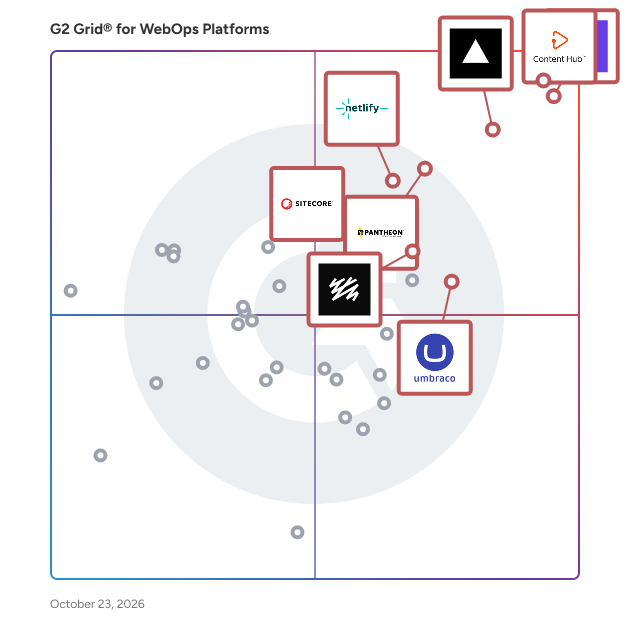
- **Leader:** [Hostinger](https://www.g2.com/products/hostinger/reviews)
- **Highest Performer:** [OneEntry](https://www.g2.com/products/oneentry/reviews)
- **Easiest to Use:** [Hostinger](https://www.g2.com/products/hostinger/reviews)
- **Top Trending:** [Vercel](https://www.g2.com/products/vercel/reviews)
- **Best Free Software:** [HubSpot Content Hub](https://www.g2.com/products/hubspot-content-hub/reviews)

  
---

**Sponsored**

### Adobe Experience Manager

Built on an AI-powered foundation, Adobe Experience Manager is a comprehensive suite of composable content services that empowers your team to create and deliver the right across websites, mobile apps, and other touchpoints -- all at scale. Adobe Experience Manager includes content and asset management, digital forms and guides, and a learning management system. Essential products within Adobe Experience Manager include: • Experience Manager Sites: Empowers brands to design and deliver personalized digital experiences at scale — fast, seamless, and built to adapt to whatever comes next. • Experience Manager Assets: A customizable Digital Assets Management system that lets you easily discover, govern, and activate millions of assets so you can deliver and scale personalized experiences. Adobe’s native AI in AEM Assets is uniquely trained on your brand’s data, voice, and creative DNA—learning from your metadata, content patterns, and regional nuances across brands and geographies. • Experience Manager Forms: End-to-end digital enrollment solution to create, manage, publish and update digital forms and customer communications integrated with back-end processes and systems of record • Learning Manager: A learning management system (LMS) that makes it easy to integrate trainings into your brands’ websites and apps. • Experience Manager Guides: A component content management system for managing and scaling documentation, knowledge, and support content.


[Visit website](https://www.g2.com/external_clickthroughs/record?secure%5Bad_program%5D=ppc&amp;secure%5Bad_slot%5D=category_product_list&amp;secure%5Bcategory_id%5D=1996&amp;secure%5Bdisplayable_resource_id%5D=1414&amp;secure%5Bdisplayable_resource_type%5D=Category&amp;secure%5Bmedium%5D=sponsored&amp;secure%5Bplacement_reason%5D=neighbor_category&amp;secure%5Bplacement_resource_ids%5D%5B%5D=51&amp;secure%5Bplacement_resource_ids%5D%5B%5D=1414&amp;secure%5Bprioritized%5D=false&amp;secure%5Bproduct_id%5D=1288&amp;secure%5Bresource_id%5D=1996&amp;secure%5Bresource_type%5D=Category&amp;secure%5Bsource_type%5D=category_page&amp;secure%5Bsource_url%5D=https%3A%2F%2Fwww.g2.com%2Fcategories%2Fwebops-platforms%3Fpage%3D6&amp;secure%5Btoken%5D=ce226223a43a7ed61f3c7656faa1a7753493a2f76790d602a37129de00f03376&amp;secure%5Burl%5D=https%3A%2F%2Fbusiness.adobe.com%2Fproducts%2Fexperience-manager%2Fsites.html%3Fsdid%3DFR7NYTLW%26mv%3Daffiliate&amp;secure%5Burl_type%5D=custom_url)

---

  
    ## What Is WebOps Platforms?
  [Development Software](https://www.g2.com/categories/development)
  ## What Software Categories Are Similar to WebOps Platforms?
    - [Web Content Management Software](https://www.g2.com/categories/web-content-management)
    - [Headless CMS Software](https://www.g2.com/categories/headless-cms)
    - [Digital Experience Platforms (DXP)](https://www.g2.com/categories/digital-experience-platforms-dxp)

  
---

## How Do You Choose the Right WebOps Platforms?

### What You Should Know About WebOps Platforms

### What are WebOps Platforms?

WebOps platforms, also known as agile content management system (CMS) software, facilitate DevOps functionalities and best practices in the context of website development and content management. These platforms focus on web building, maintenance, and management, bringing a more unique and purpose-driven approach to web presence than digital experience platforms (DXPs). These products bring web developers and marketers together to leverage the platforms’ creation and management tools in an agile way.

The collaborative capabilities offered by WebOps platforms enable teams to manage their potentially hundreds of websites more effectively. Without these tools, teams run the risk of slow, inconsistent campaigns across their various channels. On the developer side, WebOps platforms enable staging and other preproduction environments along with developer tools for creating and maintaining websites. On the non-developer side, these platforms support traditional and headless CMS for use by marketers and content creators. By merging these two personas via role-based permissions within the same environment, WebOps platforms enable teams to collaborate efficiently. The one-stop-shop nature of this software helps to ensure expeditious change applied to a company’s entire web presence. By ensuring that developers and marketers work together in lockstep within a single pane of glass, WebOps platforms eliminate many of the pitfalls and snags that come with syncing web development with content management. In some cases, WebOps platforms deemphasize the developer persona in favor of giving marketers better control over their content. To achieve this independence, these products provide no-code or low-code interfaces so that marketers and creators can manage both websites and web content effectively. This allows development teams to take a support role as needed, meaning they can focus on more complex tasks. In these cases, WebOps platforms function similarly to web content management software, though WebOps platforms go further to allow complete control over both website development and content management.

Beyond facilitating agile collaboration between developer and non-developer personas, WebOps platforms also automate many of the repetitive tasks associated with web development and content management. Automation is a key aspect of any DevOps environment, a concept that WebOps platforms adopt to promote a DevOps-style philosophy among development and marketing teams. By handling tedious functions automatically, WebOps platforms further empower teams to achieve agile content management and development.

Key Benefits of WebOps Platforms

- Facilitate agile website and content management workflows
- Enable efficient collaboration between developers and non developers
- Consolidate all aspects of website creation and management under a single pane of glass
- Save time and effort by automating repetitive web development processes

### Why Use WebOps Platforms?

WebOps platforms empower companies and teams to handle website development and content management efficiently at any scale. Companies coordinating web updates, marketing campaigns, content pushes, and branding across multiple sites use WebOps platforms to consolidate their efforts and ensure speed and consistency. By using WebOps platforms to bring teams together, consolidate all aspects of website development and maintenance, and automate repetitive tasks, teams can achieve agile CMS workflows to maximize productivity while saving headaches.

**Consolidate tasks —** WebOps platforms bring together all aspects of website development and management, such as staging, hosting, and content creation. These products help companies accelerate web-based efforts and achieve continuous maintenance by keeping everything under one roof.

**Empower collaboration —** WebOps platforms bring developers, marketers, and creators into a shared environment to empower collaboration via coordinated pipelines and role-based permissions. While some of these products primarily require developers to help navigate website creation and maintenance, some products deemphasize the developer role with a no-code interface. This allows creators and marketers to gain better control over their content and campaign efforts, while developers can support processes as needed and focus on more complex tasks within the company. By adopting the agile nature of DevOps best practices, WebOps platforms help companies break down silos and achieve efficient workflows.

**Ease workload —** WebOps platforms automate many of the tedious, repetitive tasks associated with website development and maintenance. For example, a WebOps platform might feature a no-code interface that handles the backend automatically. This allows developers, creators, and marketers to spend more time on the tasks that matter most and eases overall workloads, saving time and effort.

### Who Uses WebOps Platforms?

WebOps platforms are unique in that they bring together multiple different personas. Developers use WebOps platforms for backend website creation, hosting, and maintenance, while marketers and creators use WebOps platforms for content creation and management. Most WebOps platforms are developer first, though some of these products deemphasize the developer role. Below are some different use cases for WebOps platforms based on role:

**Developers —** Developers and development teams use WebOps platforms to create, stage, host, and maintain their businesses’ websites. Usually, this means that developers are working on the backend, developing the infrastructure and frameworks atop which businesses can display their web content. Some WebOps platforms offer no-code interfaces to build and manage the backend, meaning developers can take a back seat and support marketers and creators as needed.

**Marketers and creators —** Marketers and creators use WebOps platforms to manage branding and content initiatives across multiple sites. While developers handle the backend, marketers and creators can use WebOps platforms as agile CMS tools to coordinate the frontend. WebOps platforms allow for total collaboration between the developer, marketer, and creator roles, giving marketers and creators more control over their campaigns to help ensure brand consistency across sites. In some cases, WebOps platforms offer non-developer friendly tools to manage the backend, thus granting marketers and creators even more control over website and content management.

### WebOps Platforms Features

**Automation —** WebOps platforms automate repetitive web development and content management tasks to facilitate more efficient workflows. By handling the tedium of smaller tasks, these products empower developers, marketers, and creators to focus on more complex matters.

**Website staging —** WebOps platforms offer staging and other preproduction environments for web development. This allows developers to build out and test updates to sites before committing to deploying those updates. Staging and testing features without navigating away from the WebOps platform saves developers time and enables them to work more efficiently.

**Website hosting —** Many WebOps platforms offer full website hosting, meaning they provide the servers necessary to keep websites live. This further consolidates the various aspects of website creation and maintenance, allowing users to carry out tasks from within a single pane of glass.

**Role-based permissions —** WebOps platforms facilitate full collaboration between developers, marketers, and creators. This collaboration is achieved via role-based permissions which allow administrators to set task types by persona and build an efficient WebOps environment. This makes task allocation and handoff points clear and promotes efficient workflows to achieve agile CMS.

**Content management —** WebOps platforms enable marketers and creators to achieve agile CMS. These products allow users to coordinate content pushes, ensure consistent branding across sites, and more without compromising on deadlines. Using WebOps platforms grants marketers full control over their initiatives to ensure the desired outcome is accomplished at the same time across multiple sites.

### Software and Services Related to WebOps Platforms

[**DevOps platforms**](https://www.g2.com/categories/devops-platforms) **—** DevOps platforms give teams the tools and automation capabilities necessary to perform and manage continuous delivery. Continuous delivery refers to a development approach aimed at creating, testing, and releasing software in a quick and agile way. DevOps platforms handle continuous integration (CI) and continuous deployment (CD) to automate various development tasks and define a successful delivery pipeline.

[**Digital experience platforms (DXP)**](https://www.g2.com/categories/digital-experience-platforms-dxp) **—** DXPs are software solutions designed to engage users by rapidly building websites, applications, and portals. These tools also contain systems for managing content, media, and other collateral. A DXP helps to build and manage customer-facing touchpoints across a number of channels, providing development tools and prebuilt templates that allow companies to create functional applications with little development experience.

[**Web content management software**](https://www.g2.com/categories/web-content-management) **—** Web content management (WCM) systems allow users to create, edit, and publish digital content such as text, embedded audio and video files, and interactive graphics for websites. For users who do not have coding skills, these systems make the process of uploading and writing content simple by offering theme-oriented templates for unique design.

[**Headless CMS software**](https://www.g2.com/categories/headless-cms) **—** A headless CMS is a backend only CMS. This tool allows businesses to manage, store, and track content projects from creation to publication, just as a traditional CMS does. Unlike web content management software, the frontend delivery layer of a website is removed from a headless CMS.

[**Marketing automation software**](https://www.g2.com/categories/marketing-automation) **—** Marketing automation software automates marketing actions or tasks, streamlines marketing workflows, and measures the outcomes of marketing campaigns. These tools provide a central marketing database for all marketing information and interactions, helping marketers create segmented, personalized, and timely marketing experiences for customers or prospects. These platforms provide automation features across multiple aspects of marketing including email, social media, lead generation, direct mail, digital advertising, and more.


